Salesforce Automation
Elhem Sassi
sassi.elhem@gmail.com
1
Plan
1.Introduction
2.Formula
3.Wokflow
4.Process Builder
5.Flow
6.Challenge
7.Links
8.Conclusion
2
1. Introduction
3
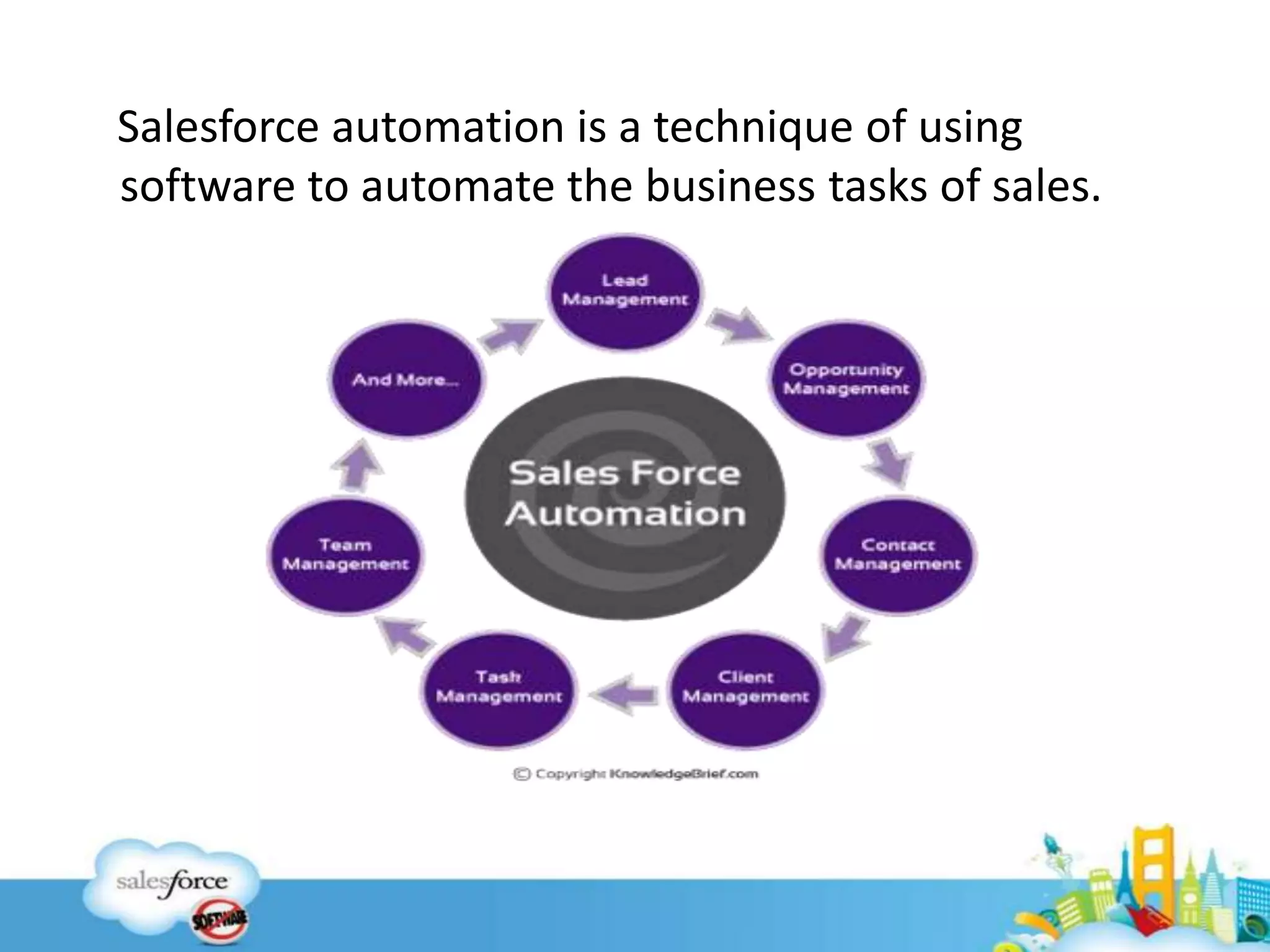
Salesforce automation is a technique of using
software to automate the business tasks of sales.
2. Formula
2.1. « Formula » Defintion
2.2. « Formulas » Actions
2.3. « Formula » Limits
2.4. « Formula » Best practices
5
2.1. Formula definition
 A formula is an algorithm that derives its value
from other fields, expressions, or values.
 Formula size is made up of two parts: formula syntax
written in formula editor and the database query
that compiled from the formula syntax.
6
2.2. Formulas actions
• Define the criteria a record must meet to enter(
Approval Processes, Approval Steps, Assignment
Rules for Leads and Cases or Auto-Response Rules
for Leads and Cases).
• Apply a value to a custom field when a user creates a
record.(Default Field Values)
7
• Prevent users from entering an invalid value in a
standard or custom field.
• Define the criteria a record must meet to trigger a
workflow rule.
8
2.3. Limits of Formula
• Formula size problems come into two flavors, the
formula is too long or its compiled size is too big.
• The value of a field can’t depend on another formula
that references it.
9
• Default value formulas for a record type can only
reference fields for that record type.
• Not available for external objects.
10
2.4. Formula best practices
11
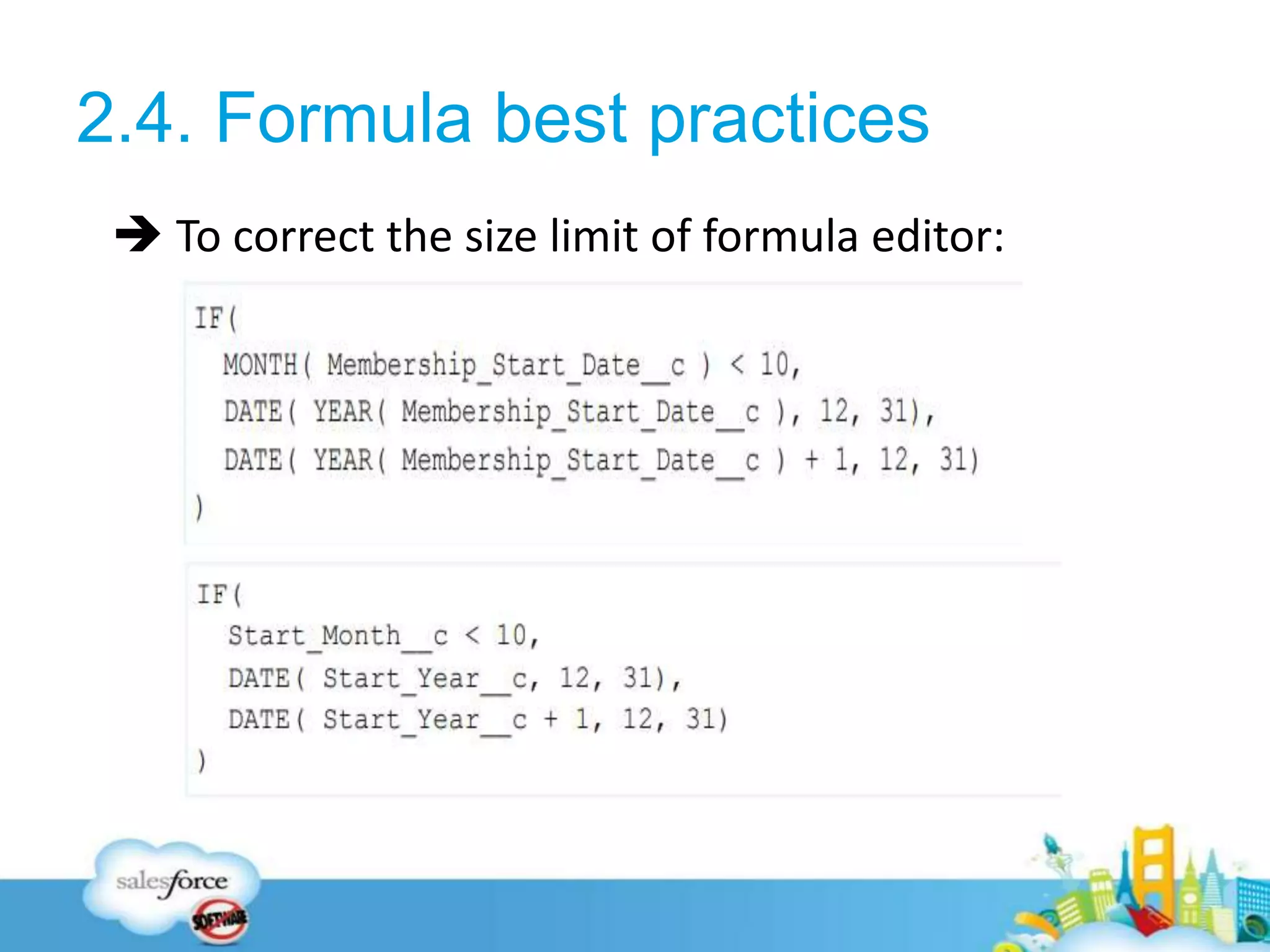
 To correct the size limit of formula editor:
12
 To correct the size limit of formula compiler:
• Minimize the number of references to other fields
• Minimize the number of times formula functions
are called
• Rethink your picklist
3. Workflow
3.1. « Workflow » Defintion
3.2. « Workflow » Action
3.3. « Workflow » Limits
13
3.1. Workflow Definition
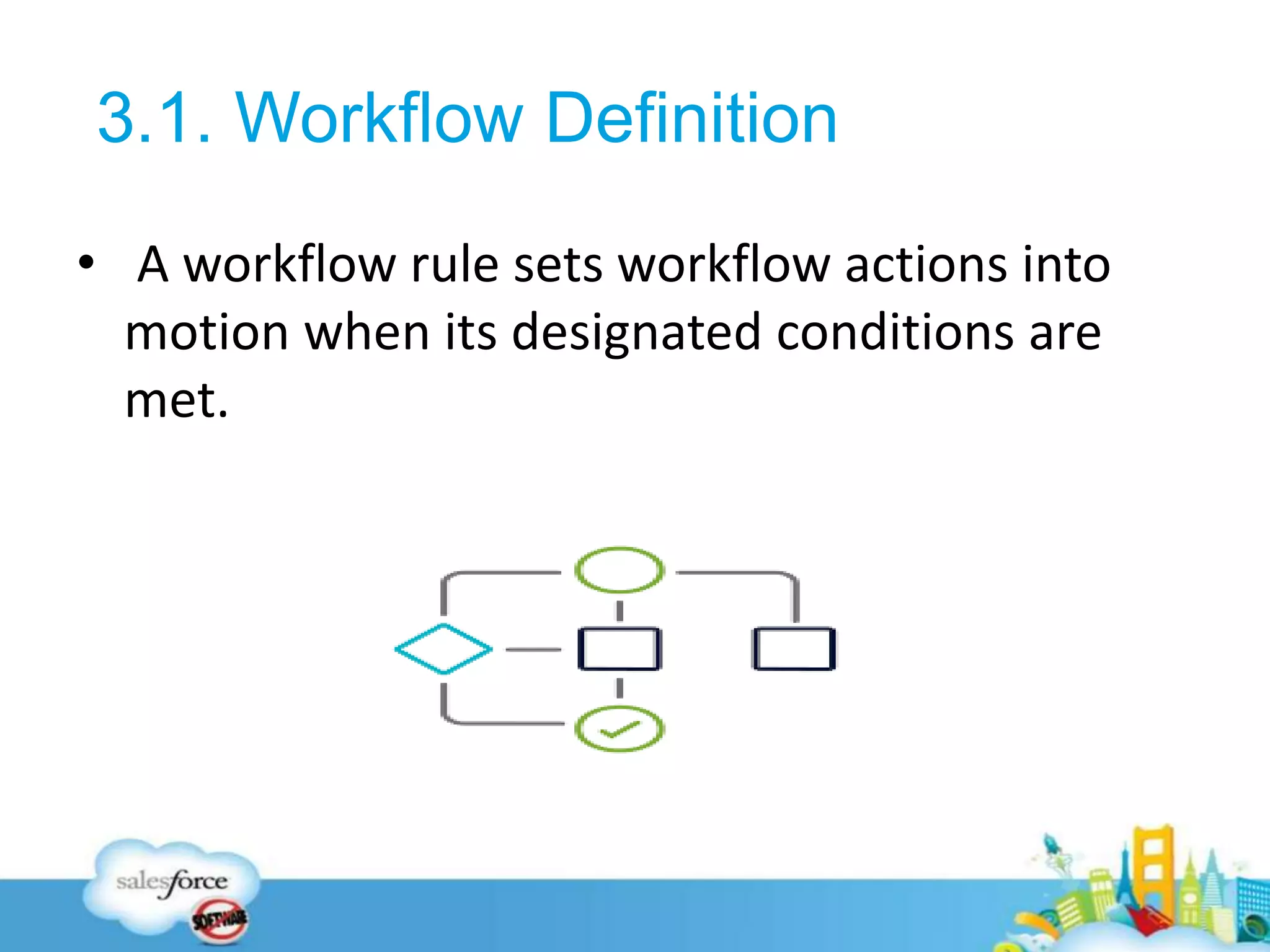
• A workflow rule sets workflow actions into
motion when its designated conditions are
met.
14
3.2. Workflow Action
• Create a task.
• Email Alerts
• Field Updates
• Outbound Messages
15
3.3. Workflow Limits
• Salesforce limits the number of total and active
rules in your org, the number of time triggers
and actions per rule.
• It also processes a limited number of daily emails
and hourly time triggers.
16
4. Process Builder
4.1. « Process Builder » Defintion
4.2. « Process Builder » Actions
4.3. « Process Builder » Limits
17
4.1. Process Builder definiton
• Process Builder helps you automate your
business processes and gives you a graphical
representation as you build it.
18
4.2. Process Builder Actions
Create a record (not just Tasks!)
Update related records
Launch a Quick Action
Post to Chatter
19
Launch a Flow
Call Apex code
Submit for approval
Invoke another process
20
4.3. Process Builder Limits
• A process’s API name must be unique across
all processes and flows in your org.
• The daily workflow email limit is 15 per
standard Salesforce license.
21
• A process’s API name must be unique across all
processes and flows in your org.
• The daily workflow email limit is 15 per standard
Salesforce license.
22
4.3. Process Builder Best practices
• Be careful while creating the processes are not
going into the infinite loop.
• If you create a Process instead of Existing Wor
kflow or Apex Triggers, Make sure that you del
eted the existing workflow or Apex Trigger oth
erwise the unexpected results might occur.
23
5. Flow
5.1. « Flow » Defintion
5.2. « Flow » Actions
5.3. « Flow » Limits
24
5.1. Flow Definiton
Flow is a wizard or a set of screens in sequential order
which can be used to complete a business process
25
5.1. Flow Actions
In addition to process builder action, with flow we can:
• Post to a community feed.
• Submit a related record for approval.
• Delete records.
• Create a bunch of records and associate them with
each other.
• Perform complex logic.
26
5.1. Flow Limits
• Flow Builder displays Apex actions from managed
packages only if the associated method is marked
global.
• Flow Builder displays email alerts from managed
packages only if the email alert isn’t protected.
• In a development organization, you can’t delete a
flow or flow version after you upload it to a released
or beta managed package.
27
5.1. Flow Best practices
• Build your flows in a test environment—like a
sandbox or Developer Edition org.
• Wait until the end of the flow to make
changes to the database.
• Control when running users can navigate
backward.
28
6. Challenge
29
Question 1:
A Customer Support Manager at Universal Containers
would like to implement call scripting for their caller
agents. What automation tool can be used to
accomplish this?
A. Workflow
B. Lightning process Builder
C. Flow
30
Question 1:
A Customer Support Manager at Universal Containers
would like to implement call scripting for their caller
agents. What automation tool can be used to
accomplish this?
A. Workflow
B. Lightning process Builder
C. Flow
31
Question 2:
The App Builder at Universal Containers has been asked
to ensure that the Amount field is populated when
the stage is set to Closed Won. What can be used to
meet this requirement?
A. Lightning Process Builder
B. Workflow
C. Flow
32
Question 2:
The App Builder at Universal Containers has been asked
to ensure that the Amount field is populated when
the stage is set to Closed Won. What can be used to
meet this requirement?
A. Lightning Process Builder
B. Workflow
C. Flow
33
7. Links
34
• https://www.salesforceben.com/introduction-
salesforce-flow/
• https://www.salesforceben.com/process-builder-vs-
flows-become-the-ultimate-admin/
35
8. Conclusion
36
37
38

Salesforce Automation

  • 1.
  • 2.
  • 3.
  • 4.
    Salesforce automation isa technique of using software to automate the business tasks of sales.
  • 5.
    2. Formula 2.1. «Formula » Defintion 2.2. « Formulas » Actions 2.3. « Formula » Limits 2.4. « Formula » Best practices 5
  • 6.
    2.1. Formula definition A formula is an algorithm that derives its value from other fields, expressions, or values.  Formula size is made up of two parts: formula syntax written in formula editor and the database query that compiled from the formula syntax. 6
  • 7.
    2.2. Formulas actions •Define the criteria a record must meet to enter( Approval Processes, Approval Steps, Assignment Rules for Leads and Cases or Auto-Response Rules for Leads and Cases). • Apply a value to a custom field when a user creates a record.(Default Field Values) 7
  • 8.
    • Prevent usersfrom entering an invalid value in a standard or custom field. • Define the criteria a record must meet to trigger a workflow rule. 8
  • 9.
    2.3. Limits ofFormula • Formula size problems come into two flavors, the formula is too long or its compiled size is too big. • The value of a field can’t depend on another formula that references it. 9
  • 10.
    • Default valueformulas for a record type can only reference fields for that record type. • Not available for external objects. 10
  • 11.
    2.4. Formula bestpractices 11  To correct the size limit of formula editor:
  • 12.
    12  To correctthe size limit of formula compiler: • Minimize the number of references to other fields • Minimize the number of times formula functions are called • Rethink your picklist
  • 13.
    3. Workflow 3.1. «Workflow » Defintion 3.2. « Workflow » Action 3.3. « Workflow » Limits 13
  • 14.
    3.1. Workflow Definition •A workflow rule sets workflow actions into motion when its designated conditions are met. 14
  • 15.
    3.2. Workflow Action •Create a task. • Email Alerts • Field Updates • Outbound Messages 15
  • 16.
    3.3. Workflow Limits •Salesforce limits the number of total and active rules in your org, the number of time triggers and actions per rule. • It also processes a limited number of daily emails and hourly time triggers. 16
  • 17.
    4. Process Builder 4.1.« Process Builder » Defintion 4.2. « Process Builder » Actions 4.3. « Process Builder » Limits 17
  • 18.
    4.1. Process Builderdefiniton • Process Builder helps you automate your business processes and gives you a graphical representation as you build it. 18
  • 19.
    4.2. Process BuilderActions Create a record (not just Tasks!) Update related records Launch a Quick Action Post to Chatter 19
  • 20.
    Launch a Flow CallApex code Submit for approval Invoke another process 20
  • 21.
    4.3. Process BuilderLimits • A process’s API name must be unique across all processes and flows in your org. • The daily workflow email limit is 15 per standard Salesforce license. 21
  • 22.
    • A process’sAPI name must be unique across all processes and flows in your org. • The daily workflow email limit is 15 per standard Salesforce license. 22
  • 23.
    4.3. Process BuilderBest practices • Be careful while creating the processes are not going into the infinite loop. • If you create a Process instead of Existing Wor kflow or Apex Triggers, Make sure that you del eted the existing workflow or Apex Trigger oth erwise the unexpected results might occur. 23
  • 24.
    5. Flow 5.1. «Flow » Defintion 5.2. « Flow » Actions 5.3. « Flow » Limits 24
  • 25.
    5.1. Flow Definiton Flowis a wizard or a set of screens in sequential order which can be used to complete a business process 25
  • 26.
    5.1. Flow Actions Inaddition to process builder action, with flow we can: • Post to a community feed. • Submit a related record for approval. • Delete records. • Create a bunch of records and associate them with each other. • Perform complex logic. 26
  • 27.
    5.1. Flow Limits •Flow Builder displays Apex actions from managed packages only if the associated method is marked global. • Flow Builder displays email alerts from managed packages only if the email alert isn’t protected. • In a development organization, you can’t delete a flow or flow version after you upload it to a released or beta managed package. 27
  • 28.
    5.1. Flow Bestpractices • Build your flows in a test environment—like a sandbox or Developer Edition org. • Wait until the end of the flow to make changes to the database. • Control when running users can navigate backward. 28
  • 29.
  • 30.
    Question 1: A CustomerSupport Manager at Universal Containers would like to implement call scripting for their caller agents. What automation tool can be used to accomplish this? A. Workflow B. Lightning process Builder C. Flow 30
  • 31.
    Question 1: A CustomerSupport Manager at Universal Containers would like to implement call scripting for their caller agents. What automation tool can be used to accomplish this? A. Workflow B. Lightning process Builder C. Flow 31
  • 32.
    Question 2: The AppBuilder at Universal Containers has been asked to ensure that the Amount field is populated when the stage is set to Closed Won. What can be used to meet this requirement? A. Lightning Process Builder B. Workflow C. Flow 32
  • 33.
    Question 2: The AppBuilder at Universal Containers has been asked to ensure that the Amount field is populated when the stage is set to Closed Won. What can be used to meet this requirement? A. Lightning Process Builder B. Workflow C. Flow 33
  • 34.
  • 35.
  • 36.
  • 37.
  • 38.

Editor's Notes

  • #5  Instead of relying on your users to perform each part of a business process, automate it! The benefits are two-fold: your users can spend their time on other tasks, and you can trust that the process is always done just so. Salesforce offers tools to automate several kinds of business processes: guided visual experiences, behind-the-scenes automation, and approval automation. You'll be happy to know that these tools don't require you to write code—they're all point-and-click. IN this presentation we well see the different types of autompation process : starting by the formula, then th workflow, process builder and the flow . And in the end we will do a small chalenge
  • #7 Let’s look at a specific example. What if you wanted to calculate how many days are left until an opportunity’s close date. You can create a simple formula field that automatically calculates that value. By adding the value to the Opportunity page layout, your users can quickly access this key information. 
  • #8 Define the criteria a record must meet to enter( Approval Processes, Approval Steps, Assignment Rules for Leads and Cases or Auto-Response Rules for Leads and Cases). Specify criteria a case must meet for it to be escalated.(Case Escalation Rules) Define the content for custom links and buttons. (Custom Buttons and Links) Custom Summary Formulas in Reports Verify that the data a user enters in a record meets the standards you specify before the user can save the record(Data Validations) Apply a value to a custom field when a user creates a record.(Default Field Values) Define the criteria that a case must meet to be escalated.(Escalation Rules) Prevent users from entering an invalid value in a standard or custom field. Validation rules can be based on formulas and display an error message to users when the value they enter is not valid.(Validation Rules) Define the criteria a record must meet to trigger a workflow rule.(Workflow Rules)
  • #9 Literal Value: A text string or number you enter that is not calculated or changed. Exemple: 0.02 in this case ROUND((Amount*0.02), 2) Field Reference: Reference the value of another custom or standard field using a merge field Function: A system-defined formula that can require input from you and returns a value or values. Operator: +, -, … Comment: in this form:
  • #10 Formula size problems come into two flavors, the formula is too long or its compiled size is too big.
  • #11 Formula fields have these limits.
  • #12 Lets look at some tips for preventing these issues : To correct the size limit of formula, you can move parts of the formula into one or more secondary formula feilds which don’t need to appear on the page layout. In this exemple, we are now down to 89 characters from 146
  • #13 Reducing the number of character in your formula dosen’t help because the compiler size of each field is included in the main formula’s compiler size. Minimize the number of references to other fields :Leverage the “default” value in CASE() + Use CASE() instead of nested OR() statements. Minimize the number of times formula functions are called : the fewer time you need to reference functions, the smaller your compile size is likely to be. Like DATE(), MONTH() for exemple moving the function HYPERLINK() outside the case (). Rethink your picklist : IN you have many options in your picklist you can use a lookup instead of it. https://resources.docs.salesforce.com/204/latest/en-us/sfdc/pdf/salesforce_formula_size_tipsheet.pdf : Formula best practices
  • #15 You can configure workflow actions to execute immediately when a record meets the conditions in your workflow rule, or set time triggers that execute the workflow actions on a specific day. You can choose whenever a record is created or edited to subsequently meet criteria (in other words, if it already satisfied the criteria before it was edited,the rule won't run). Which option you choose depends on your specific scenario
  • #16 Create a task : Assign a new task to a user, role, or record owner. Email Alerts: Send an email to one or more recipients you specify. Field Updates: Update the value of a field on a record. Outbound Messages: Send a secure, configurable API message (in XML format) to a designated listener.
  • #17 Daily Allocations for Email Alerts The daily allocation for emails sent through email alerts is 1,000 per standard Salesforce license per org—except for free Developer Edition and trial orgs, where the daily workflow email allocation is 15. The overall org allocation is 2,000,000. This allocation applies to emails sent through email alerts in workflow rules, approval processes, flows, processes, or the REST API.
  • #23 “Create a Record” action uses one DML Statement. Each “Quick Action” action uses one DML Statement. Each “Update Records” action uses one SOQL Query and one DML Statement. Each “Flows” action can use multiple SOQL Queries and DML Statements depending on the elements that the flow executes.
  • #29 Have you heard about flow limits? Because flows operate under Apex governor limits, the sky is not the limit. To avoid hitting those limits, we recommend bunching all your database changes together at the end of the flow, whether those changes create, update, or delete records. If the flow commits changes to the database between two screens, don't let users navigate from the later screen to the previous screen. Otherwise, the flow can make duplicate changes to the database
  • #39  The main difference between flows and workflows is flows are user-triggered application and workflows are event-triggered. Workflows execute their actions behind the scenes while flows can display information on the screen.  Process Builder can update any field on any related record, where Workflow can only update some fields on a parent record of a Master-Detail relationship. Process Builder finally gives admins the ability to set the exact order of operations, whereas with Workflow we had no control Process Builder also has the ability to configure multiple if-then conditions in one Process rather than separate Workflow rules,