Kovair ALM Studio –– WWiitthh IInntteeggrraattiioonnss 
KKoovvaaiirr mmaarrkkeettiinngg 
ssaalleess@@kkoovvaaiirr..ccoomm 
wwwwww..kkoovvaaiirr..ccoomm 
Kovair Software Copyright © 2000-2014
Kovair Integrated ALM – One Unified Integrated Solution 
• All-in-one solution with intuitive design reduces support burden and TCO 
 ALM Studio – Waterfall, Agile or Hybrid 
• Managing Requirements, Tests, Issues, Risks, Document, Release, Projects 
• Product Backlogs, Sprints, Tests, Issues, Documents, Releases, Projects 
 ITSM Studio (ITIL V3) – Helpdesk, Incident, Problem, Change, Knowledgebase 
• Has Industry Leading Omniprocess Task Based Process Engine 
 Allows configuring your working process instead of imposing any in-built configuration 
 Eliminates manual handoff with combination of task and notification 
 Support for Cross tool processes 
• Powered by Omnibus Integration Technology 
 Built on SOA based ESB Architecture 
 Integrates best-of-breed, open source, legacy and homegrown tools 
• Allows users to do mouse click configuration 
 No coding required – just drag and drop configurations 
• Ensures end to end coverage enabling standard compliance 
• Allows to view real-time status increasing transparency and release predictability 
• Allows to break the barriers and work in a collaborative manner 
• Highly Scalable for number of users and number of projects 
Kovair Software Copyright © 2000-2014 2
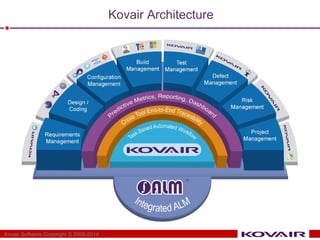
Kovair Architecture 
Kovair Software Copyright © 2000-2014
Kovair Integrated ALM - What does it offer? 
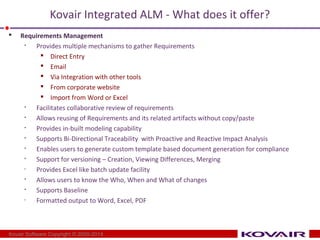
 Requirements Management 
 Provides multiple mechanisms to gather Requirements 
 Direct Entry 
 Email 
 Via Integration with other tools 
 From corporate website 
 Import from Word or Excel 
 Facilitates collaborative review of requirements 
 Allows reusing of Requirements and its related artifacts without copy/paste 
 Provides in-built modeling capability 
 Supports Bi-Directional Traceability with Proactive and Reactive Impact Analysis 
 Enables users to generate custom template based document generation for compliance 
 Support for versioning – Creation, Viewing Differences, Merging 
• Provides Excel like batch update facility 
 Allows users to know the Who, When and What of changes 
 Supports Baseline 
• Formatted output to Word, Excel, PDF 
Kovair Software Copyright © 2000-2014
Kovair Integrated ALM - What does it offer? 
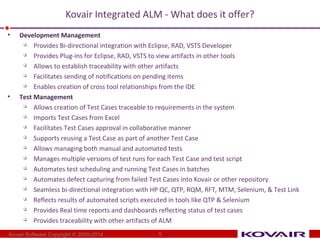
• Development Management 
 Provides Bi-directional integration with Eclipse, RAD, VSTS Developer 
 Provides Plug-ins for Eclipse, RAD, VSTS to view artifacts in other tools 
 Allows to establish traceability with other artifacts 
 Facilitates sending of notifications on pending items 
 Enables creation of cross tool relationships from the IDE 
• Test Management 
 Allows creation of Test Cases traceable to requirements in the system 
 Imports Test Cases from Excel 
 Facilitates Test Cases approval in collaborative manner 
 Supports reusing a Test Case as part of another Test Case 
 Allows managing both manual and automated tests 
 Manages multiple versions of test runs for each Test Case and test script 
 Automates test scheduling and running Test Cases in batches 
 Automates defect capturing from failed Test Cases into Kovair or other repository 
 Seamless bi-directional integration with HP QC, QTP, RQM, RFT, MTM, Selenium, & Test Link 
 Reflects results of automated scripts executed in tools like QTP & Selenium 
 Provides Real time reports and dashboards reflecting status of test cases 
 Provides traceability with other artifacts of ALM 
Kovair Software Copyright © 2000-2014 
5
Kovair Integrated ALM - What does it offer? 
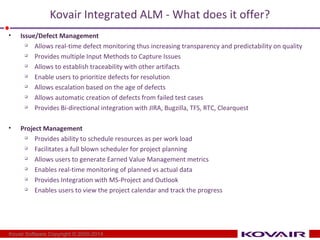
• Issue/Defect Management 
 Allows real-time defect monitoring thus increasing transparency and predictability on quality 
 Provides multiple Input Methods to Capture Issues 
 Allows to establish traceability with other artifacts 
 Enable users to prioritize defects for resolution 
 Allows escalation based on the age of defects 
 Allows automatic creation of defects from failed test cases 
 Provides Bi-directional integration with JIRA, Bugzilla, TFS, RTC, Clearquest 
• Project Management 
 Provides ability to schedule resources as per work load 
 Facilitates a full blown scheduler for project planning 
 Allows users to generate Earned Value Management metrics 
 Enables real-time monitoring of planned vs actual data 
 Provides Integration with MS-Project and Outlook 
 Enables users to view the project calendar and track the progress 
Kovair Software Copyright © 2000-2014
Kovair Integrated ALM - What does it offer? 
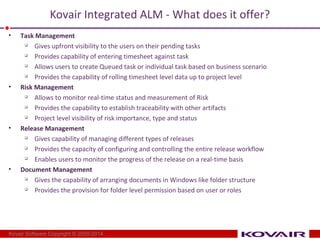
• Task Management 
 Gives upfront visibility to the users on their pending tasks 
 Provides capability of entering timesheet against task 
 Allows users to create Queued task or individual task based on business scenario 
 Provides the capability of rolling timesheet level data up to project level 
• Risk Management 
 Allows to monitor real-time status and measurement of Risk 
 Provides the capability to establish traceability with other artifacts 
 Project level visibility of risk importance, type and status 
• Release Management 
 Gives capability of managing different types of releases 
 Provides the capacity of configuring and controlling the entire release workflow 
 Enables users to monitor the progress of the release on a real-time basis 
• Document Management 
 Gives the capability of arranging documents in Windows like folder structure 
 Provides the provision for folder level permission based on user or roles 
Kovair Software Copyright © 2000-2014
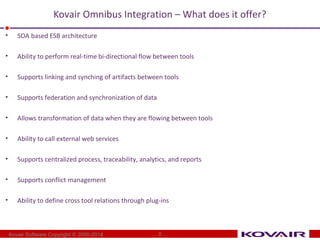
Kovair Omnibus Integration – What does it offer? 
• SOA based ESB architecture 
• Ability to perform real-time bi-directional flow between tools 
• Supports linking and synching of artifacts between tools 
• Supports federation and synchronization of data 
• Allows transformation of data when they are flowing between tools 
• Ability to call external web services 
• Supports centralized process, traceability, analytics, and reports 
• Supports conflict management 
• Ability to define cross tool relations through plug-ins 
Kovair Software Copyright © 2000-2014 8
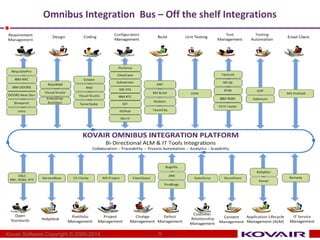
Omnibus Integration Bus – Off the shelf Integrations 
9 
Kovair Software Copyright © 2000-2014
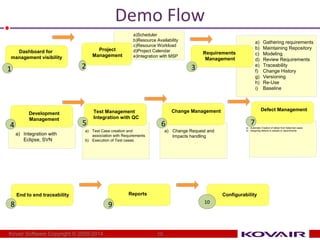
Demo Flow 
Kovair Software Copyright © 2000-2014 10 
a) Gathering requirements 
b) Maintaining Repository 
c) Modeling 
d) Review Requirements 
e) Traceability 
f) Change History 
g) Versioning 
h) Re-Use 
i) Baseline 
Requirements 
Management 
3 
Development 
Management 
a) Integration with 
Eclipse, SVN 
4 
Test Management 
Integration with QC 
a) Test Case creation and 
association with 
Requirements 
b) Execution of Test cases 
5 
Change Management 
a) Change Request and 
Impacts handling 
6 
End to end traceability 
8 
Reports 
9 
Configurability 
10 
Dashboard for 
management visibility 
1 
a)Scheduler 
b)Resource Availability 
c)Resource Workload 
d)Project Calendar 
e)Integration with MSP 
Project 
Management 
2 
Defect Management 
a) Automatic Creation of 
defect from failed test 
cases 
b) Assigning defects to 
release or requirements 
7
Product Demo 
Kovair Software Copyright © 2000-2014 11

Kovair ALM Studio Overview

  • 1.
    Kovair ALM Studio–– WWiitthh IInntteeggrraattiioonnss KKoovvaaiirr mmaarrkkeettiinngg ssaalleess@@kkoovvaaiirr..ccoomm wwwwww..kkoovvaaiirr..ccoomm Kovair Software Copyright © 2000-2014
  • 2.
    Kovair Integrated ALM– One Unified Integrated Solution • All-in-one solution with intuitive design reduces support burden and TCO  ALM Studio – Waterfall, Agile or Hybrid • Managing Requirements, Tests, Issues, Risks, Document, Release, Projects • Product Backlogs, Sprints, Tests, Issues, Documents, Releases, Projects  ITSM Studio (ITIL V3) – Helpdesk, Incident, Problem, Change, Knowledgebase • Has Industry Leading Omniprocess Task Based Process Engine  Allows configuring your working process instead of imposing any in-built configuration  Eliminates manual handoff with combination of task and notification  Support for Cross tool processes • Powered by Omnibus Integration Technology  Built on SOA based ESB Architecture  Integrates best-of-breed, open source, legacy and homegrown tools • Allows users to do mouse click configuration  No coding required – just drag and drop configurations • Ensures end to end coverage enabling standard compliance • Allows to view real-time status increasing transparency and release predictability • Allows to break the barriers and work in a collaborative manner • Highly Scalable for number of users and number of projects Kovair Software Copyright © 2000-2014 2
  • 3.
    Kovair Architecture KovairSoftware Copyright © 2000-2014
  • 4.
    Kovair Integrated ALM- What does it offer?  Requirements Management  Provides multiple mechanisms to gather Requirements  Direct Entry  Email  Via Integration with other tools  From corporate website  Import from Word or Excel  Facilitates collaborative review of requirements  Allows reusing of Requirements and its related artifacts without copy/paste  Provides in-built modeling capability  Supports Bi-Directional Traceability with Proactive and Reactive Impact Analysis  Enables users to generate custom template based document generation for compliance  Support for versioning – Creation, Viewing Differences, Merging • Provides Excel like batch update facility  Allows users to know the Who, When and What of changes  Supports Baseline • Formatted output to Word, Excel, PDF Kovair Software Copyright © 2000-2014
  • 5.
    Kovair Integrated ALM- What does it offer? • Development Management  Provides Bi-directional integration with Eclipse, RAD, VSTS Developer  Provides Plug-ins for Eclipse, RAD, VSTS to view artifacts in other tools  Allows to establish traceability with other artifacts  Facilitates sending of notifications on pending items  Enables creation of cross tool relationships from the IDE • Test Management  Allows creation of Test Cases traceable to requirements in the system  Imports Test Cases from Excel  Facilitates Test Cases approval in collaborative manner  Supports reusing a Test Case as part of another Test Case  Allows managing both manual and automated tests  Manages multiple versions of test runs for each Test Case and test script  Automates test scheduling and running Test Cases in batches  Automates defect capturing from failed Test Cases into Kovair or other repository  Seamless bi-directional integration with HP QC, QTP, RQM, RFT, MTM, Selenium, & Test Link  Reflects results of automated scripts executed in tools like QTP & Selenium  Provides Real time reports and dashboards reflecting status of test cases  Provides traceability with other artifacts of ALM Kovair Software Copyright © 2000-2014 5
  • 6.
    Kovair Integrated ALM- What does it offer? • Issue/Defect Management  Allows real-time defect monitoring thus increasing transparency and predictability on quality  Provides multiple Input Methods to Capture Issues  Allows to establish traceability with other artifacts  Enable users to prioritize defects for resolution  Allows escalation based on the age of defects  Allows automatic creation of defects from failed test cases  Provides Bi-directional integration with JIRA, Bugzilla, TFS, RTC, Clearquest • Project Management  Provides ability to schedule resources as per work load  Facilitates a full blown scheduler for project planning  Allows users to generate Earned Value Management metrics  Enables real-time monitoring of planned vs actual data  Provides Integration with MS-Project and Outlook  Enables users to view the project calendar and track the progress Kovair Software Copyright © 2000-2014
  • 7.
    Kovair Integrated ALM- What does it offer? • Task Management  Gives upfront visibility to the users on their pending tasks  Provides capability of entering timesheet against task  Allows users to create Queued task or individual task based on business scenario  Provides the capability of rolling timesheet level data up to project level • Risk Management  Allows to monitor real-time status and measurement of Risk  Provides the capability to establish traceability with other artifacts  Project level visibility of risk importance, type and status • Release Management  Gives capability of managing different types of releases  Provides the capacity of configuring and controlling the entire release workflow  Enables users to monitor the progress of the release on a real-time basis • Document Management  Gives the capability of arranging documents in Windows like folder structure  Provides the provision for folder level permission based on user or roles Kovair Software Copyright © 2000-2014
  • 8.
    Kovair Omnibus Integration– What does it offer? • SOA based ESB architecture • Ability to perform real-time bi-directional flow between tools • Supports linking and synching of artifacts between tools • Supports federation and synchronization of data • Allows transformation of data when they are flowing between tools • Ability to call external web services • Supports centralized process, traceability, analytics, and reports • Supports conflict management • Ability to define cross tool relations through plug-ins Kovair Software Copyright © 2000-2014 8
  • 9.
    Omnibus Integration Bus– Off the shelf Integrations 9 Kovair Software Copyright © 2000-2014
  • 10.
    Demo Flow KovairSoftware Copyright © 2000-2014 10 a) Gathering requirements b) Maintaining Repository c) Modeling d) Review Requirements e) Traceability f) Change History g) Versioning h) Re-Use i) Baseline Requirements Management 3 Development Management a) Integration with Eclipse, SVN 4 Test Management Integration with QC a) Test Case creation and association with Requirements b) Execution of Test cases 5 Change Management a) Change Request and Impacts handling 6 End to end traceability 8 Reports 9 Configurability 10 Dashboard for management visibility 1 a)Scheduler b)Resource Availability c)Resource Workload d)Project Calendar e)Integration with MSP Project Management 2 Defect Management a) Automatic Creation of defect from failed test cases b) Assigning defects to release or requirements 7
  • 11.
    Product Demo KovairSoftware Copyright © 2000-2014 11