Tahir Rashid Hakeem
KSU - Riyadh 1
VBScript
Outline
32.1 Introduction
32.2 Operators
32.3 Data Types and Control Structures
32.4 VBScript Functions
32.5 VBScript Example Programs
32.6 Arrays
32.7 String Manipulation
32.8 Classes and Objects
32.9 Operator Precedence Chart
32.10 Web Resources
Tahir Rashid Hakeem
KSU - Riyadh
Objectives
2
• In this tutorial, you will learn:
– To become familiar with the VBScript language.
– To use VBScript keywords, operators and functions to write
client-side scripts.
– To be able to write Sub and Function procedures.
– To use VBScript arrays and regular expressions.
– To be able to write VBScript abstract data types called
Classes.
– To be able to create objects from Classes.
– To be able to write Property Let, Property Get and
Property Set procedures.
Tahir Rashid Hakeem
KSU - Riyadh
What is VBScript?
A Safe subset of visual basic
The VBScript Code is case Insensitive.
Microsoft Visual Basic Scripting Edition brings active
scripting to a wide variety of environments, including Web
client scripting in Microsoft Internet Explorer and Web server
scripting in Microsoft Internet Information Service (IIS).
3
Tahir Rashid Hakeem
KSU - Riyadh
Tahir Rashid Hakeem
KSU - Riyadh
VBScript Data Types
VBScript has only one data type called a Variant.
A Variant is a special kind of data type that can contain different kinds of
information, depending on how it is used.
Because Variant is the only data type in VBScript, it is also the data type
returned by all functions in VBScript.
At its simplest, a Variant can contain either numeric or string information.
A Variant behaves as a number when you use it in a numeric context and as
a string when you use it in a string context.
5
Tahir Rashid Hakeem
KSU - Riyadh
VBScript Data Types - Variant
Subtypes
 Beyond the simple numeric or string classifications, a Variant can
make further distinctions about the specific nature of numeric
information.
 For example, you can have numeric information that represents a date
or a time.
 When used with other date or time data, the result is always
expressed as a date or a time.
 You can also have a rich variety of numeric information ranging in size
from Boolean values to huge floating-point numbers.
6
Tahir Rashid Hakeem
KSU - Riyadh
VBScript Data Types - Variant
Subtypes
7
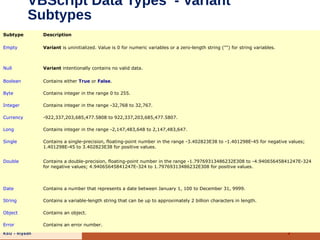
Subtype Description
Empty Variant is uninitialized. Value is 0 for numeric variables or a zero-length string ("") for string variables.
Null Variant intentionally contains no valid data.
Boolean Contains either True or False.
Byte Contains integer in the range 0 to 255.
Integer Contains integer in the range -32,768 to 32,767.
Currency -922,337,203,685,477.5808 to 922,337,203,685,477.5807.
Long Contains integer in the range -2,147,483,648 to 2,147,483,647.
Single Contains a single-precision, floating-point number in the range -3.402823E38 to -1.401298E-45 for negative values;
1.401298E-45 to 3.402823E38 for positive values.
Double Contains a double-precision, floating-point number in the range -1.79769313486232E308 to -4.94065645841247E-324
for negative values; 4.94065645841247E-324 to 1.79769313486232E308 for positive values.
Date Contains a number that represents a date between January 1, 100 to December 31, 9999.
String Contains a variable-length string that can be up to approximately 2 billion characters in length.
Object Contains an object.
Error Contains an error number.
Tahir Rashid Hakeem
KSU - Riyadh
Variables
A variable is a convenient placeholder that refers to a computer
memory location where you can store program information that may
change during the time your script is running.
For example, you might create a variable called ClickCount to store
the number of times a user clicks an object on a particular Web page.
you only have to refer to a variable by his name to see or change its
value.
8
Tahir Rashid Hakeem
KSU - Riyadh
Declaring
Variables
You declare variables explicitly in your script using the Dim statement, the
Public statement, and the Private statement. For example:
Dim DegreesFahrenheit
You declare multiple variables by separating each variable name with a
comma. For example:
Dim Top, Bottom, Left, Right
9
Tahir Rashid Hakeem
KSU - Riyadh
Declaring
Variables
 You can also declare a variable implicitly by simply using its name in your
script.
 That is not generally a good practice because you could misspell the
variable name in one or more places, causing unexpected results when
your script is run.
 For that reason, the Option Explicit statement is available to require
explicit declaration of all variables.
10
Tahir Rashid Hakeem
KSU - Riyadh
Option Explicit Statement
 Forces explicit declaration of all variables in a script.
 If used, the Option Explicit statement must appear in a script
before any other statements.
 When you use the Option Explicit statement, you must
explicitly declare all variables using the Dim, Private, Public, or
ReDim statements. If you attempt to use an undeclared
variable name, an error occurs.
 Tip Use Option Explicit to avoid incorrectly typing the name
of an existing variable or to avoid confusion in code where the
scope of the variable is not clear.
11
Tahir Rashid Hakeem
KSU - Riyadh
Naming Restrictions
 Must begin with an alphabetic character.
 Cannot contain an embedded period.
 Must not exceed 255 characters.
 Must be unique in the scope in which it is declared.
12
Tahir Rashid Hakeem
KSU - Riyadh
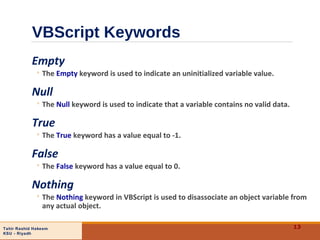
VBScript Keywords
Empty
◦ The Empty keyword is used to indicate an uninitialized variable value.
Null
◦ The Null keyword is used to indicate that a variable contains no valid data.
True
◦ The True keyword has a value equal to -1.
False
◦ The False keyword has a value equal to 0.
Nothing
◦ The Nothing keyword in VBScript is used to disassociate an object variable from
any actual object.
13
Tahir Rashid Hakeem
KSU - Riyadh
Scopes and Lifetimes
 A variable's scope is determined by where you declare it.
 When you declare a variable within a procedure, only code within that
procedure can access or change the value of that variable.
 If you declare a variable outside a procedure, you make it recognizable
to all the procedures in your script.
 The lifetime of a variable depends on how long it exists.
 The lifetime of a script-level variable extends from the time it is
declared until the time the script is finished running.
 At procedure level, a variable exists only as long as you are in the
procedure.
 we can have local variables of the same name in several different
procedures because each is recognized only by the procedure in which
it is declared.
14
Tahir Rashid Hakeem
KSU - Riyadh
Dim Statement
Dim varname[([subscripts])][, varname[([subscripts])]] . . .
Declares variables and allocates storage space.
Variables declared with Dim at the script level are available to all
procedures within the script.
At the procedure level, variables are available only within the procedure.
You can also use the Dim statement with empty parentheses to declare a
dynamic array.
Note   When you use the Dim statement in a procedure, you generally put
the Dim statement at the beginning of the procedure.
15
Tahir Rashid Hakeem
KSU - Riyadh
Private Statement
Private varname[([subscripts])][, varname[([subscripts])]] . . .
Declares private variables and allocates storage space.
Private statement variables are available only to the script in which they are
declared.
The following example illustrates use of the Private statement:
16
Private MyNumber ‘--- Private Variant variable.
Private MyArray(9) ‘--- Private array variable.
‘--- Multiple Private declarations of Variant variables.
Private MyNumber, MyVar, YourNumber
Tahir Rashid Hakeem
KSU - Riyadh
Public Statement
Public varname[([subscripts])][, varname[([subscripts])]] . . .
Declares public variables and allocates storage space.
Public statement variables are available to all procedures in all scripts.
You can also use the Public statement with empty parentheses to declare a
dynamic array.
17
Public MyNumber ‘--- Public Variant variable.
Public MyArray(9) ‘--- Public array variable.
‘--- Multiple Public declarations of Variant variables.
Public MyNumber, MyVar, YourNumber
Tahir Rashid Hakeem
KSU - Riyadh
Rem Statement
 Includes explanatory remarks in a program.
Rem Comment
‘ Comment
 As shown in the syntax section, you can use an apostrophe (') instead of the Rem
keyword.
 If the Rem keyword follows other statements on a line, it must be separated from
the statements by a colon.
 However, when you use an apostrophe, the colon is not required after other
statements.
18
MyStr1 = "Hello" : Rem Comment after a statement separated by a colon.MyStr1 = "Hello" : Rem Comment after a statement separated by a colon.
MyStr2 = "Goodbye" ' This is also a comment; no colon is needed.MyStr2 = "Goodbye" ' This is also a comment; no colon is needed.
Rem Comment on a line with no code; no colon is needed.Rem Comment on a line with no code; no colon is needed.
Tahir Rashid Hakeem
KSU - Riyadh
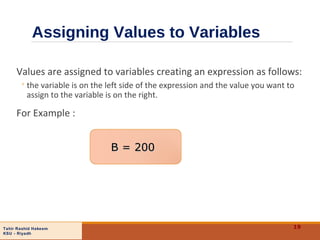
Assigning Values to Variables
Values are assigned to variables creating an expression as follows:
◦the variable is on the left side of the expression and the value you want to
assign to the variable is on the right.
For Example :
19
B = 200B = 200
Tahir Rashid Hakeem
KSU - Riyadh
Operators
20
• Types of operators
– Arithmetic
• Most are similar to JavaScript’s
– Logical
– Comparison
• VBScript is case-insensitive
Tahir Rashid Hakeem
KSU - Riyadh
Mathematic Operators
21
VBScript operation Arithmetic operator Algebraic expression VBScript expression
Addition + x + y x + y
Subtraction - z – 8 z – 8
Multiplication * yb y * b
Division (floating-point) / v u or <Anchor0> v / u
Division (integer)  none v  u
Exponentiation ^ q p q ^ p
Negation - –e —e
Modulus Mod q mod r q Mod r
Tahir Rashid Hakeem
KSU - Riyadh
Comparison
Operators
22
Standard algebraic
equality operator or
relational operator
VBScript
comparison
operator
Example of
VBScript
condition
Meaning of VBScript
condition
= = d = g d is equal tog
< > s < > r s is not equal tor
> > y > x y is greater thanx
< < p < m p is less thanm
≥ >= c >= z C is greater than or equal toz
<= m <= s m is less than or equal tos≤
≠
Tahir Rashid Hakeem
KSU - Riyadh
Logical Operators
23
Truth tables for VBScript Logical Operators 
Logical And:
True And True= True
True And False =False
False And True =False
False And False =False
Logical Or:
True Or True = True
True Or False = True
False Or True = True
False Or False =False
Logical Imp:
True Imp True= True
True Imp False =False
False Imp True =True
False Imp False =True
Logical Eqv:
True Eqv True= True
True Eqv False =False
False Eqv True =False
False Eqv False =True
Logical Xor:
True Xor True = False
True Xor False =True
False Xor True =True
False Xor False =False
Logical Not:
Not True = False
Not False = True
Tahir Rashid Hakeem
KSU - Riyadh
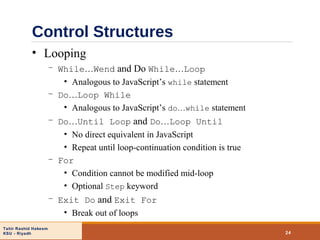
Control Structures
24
• Looping
– While…Wend and Do While…Loop
• Analogous to JavaScript’s while statement
– Do…Loop While
• Analogous to JavaScript’s do…while statement
– Do…Until Loop and Do…Loop Until
• No direct equivalent in JavaScript
• Repeat until loop-continuation condition is true
– For
• Condition cannot be modified mid-loop
• Optional Step keyword
– Exit Do and Exit For
• Break out of loops
Tahir Rashid Hakeem
KSU - Riyadh
Examples Looping Control
Structures
25
JavaScript  VBScript 
1 while ( !( x == 10 ) )
2 ++x;
1 Do Until x = 10
2 x = x + 1
3 Loop
Comparing JavaScript’s while to VBScript’s Do Until.
JavaScript   VBScript 
1 do {
2 ++x;
3 } while ( !( x == 10 ) );
1 Do
2 x = x + 1
3 Loop Until x = 10
Comparing JavaScript’s do...while to VBScript’s Do Loop...Until.
JavaScript   VBScript 
1 x = 8;
2 for ( y = 1; y < x; y++ )
3 x /= 2;
1 x = 8
2 For y = 1 To x
3 x = x  2
4 Next
Comparing JavaScript’s for to VBScript’s For.
Tahir Rashid Hakeem
KSU - Riyadh
Decision Control
Statements
26
Making Decisions Using If...Then...Else
The If...Then...Else statement is used to evaluate whether a condition is True
or False and then to specify one or more statements to run, depending on the
result.
Usually, the condition is an expression that uses a comparison operator to
compare one value or variable with another.
If...Then...Else statements can be nested to as many levels as you need.
Tahir Rashid Hakeem
KSU - Riyadh
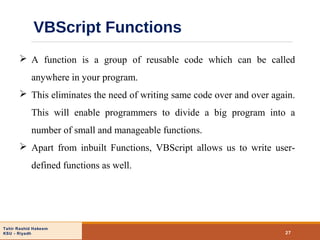
VBScript Functions
27
 A function is a group of reusable code which can be called
anywhere in your program.
 This eliminates the need of writing same code over and over again.
This will enable programmers to divide a big program into a
number of small and manageable functions.
 Apart from inbuilt Functions, VBScript allows us to write user-
defined functions as well.
Tahir Rashid Hakeem
KSU - Riyadh 28
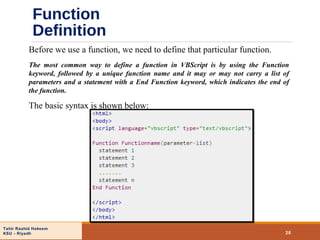
Before we use a function, we need to define that particular function.
The most common way to define a function in VBScript is by using the Function
keyword, followed by a unique function name and it may or may not carry a list of
parameters and a statement with a End Function keyword, which indicates the end of
the function.
The basic syntax is shown below:
Function
Definition
Tahir Rashid Hakeem
KSU - Riyadh 29
Function
Example
Tahir Rashid Hakeem
KSU - Riyadh
Calling a Function
30
To invoke a function somewhere later in the script, you would simple need to
write the name of that function with the Call keyword.
Tahir Rashid Hakeem
KSU - Riyadh
VBScript Functions
31
Function
Variant
subtype
returned
Description
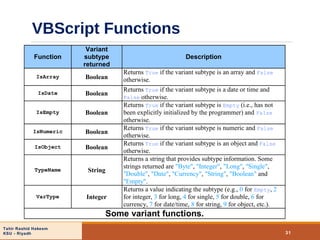
IsArray Boolean
Returns True if the variant subtype is an array and False
otherwise.
IsDate Boolean
Returns True if the variant subtype is a date or time and
False otherwise.
IsEmpty Boolean
Returns True if the variant subtype is Empty (i.e., has not
been explicitly initialized by the programmer) and False
otherwise.
IsNumeric Boolean
Returns True if the variant subtype is numeric and False
otherwise.
IsObject Boolean
Returns True if the variant subtype is an object and False
otherwise.
TypeName String
Returns a string that provides subtype information. Some
strings returned are "Byte", "Integer", "Long", "Single",
"Double", "Date", "Currency", "String", "Boolean" and
"Empty".
VarType Integer
Returns a value indicating the subtype (e.g., 0 for Empty, 2
for integer, 3 for long, 4 for single, 5 for double, 6 for
currency, 7 for date/time, 8 for string, 9 for object, etc.).
Some variant functions.
Tahir Rashid Hakeem
KSU - Riyadh
VBScript Functions
32
• Math functions
– VBScript provides many functions for common operations
• Exponential
• Logarithmic
• Square root
• Rounding
• Absolute value
• Trigonometry
• Random number generation
Tahir Rashid Hakeem
KSU - Riyadh
VBScript Math
Functions
33
Function Description Example
Abs(x)
Absolute value of x Abs(-7) is 7
Abs(0) is 0
Abs(76) is 76
Atn(x)
Trigonometric arctangent of x
(in radians)
Atn(1)*4 is
3.14159265358979
Cos(x) Trigonometric cosine of x (in radians) Cos(0) is 1
Exp(x) Exponential function ex
Exp(1.0) is 2.71828
Exp(2.0) is 7.38906
Int(x)
Returns the whole-number part of x. Int
rounds to the next smallest number.
Int(-5.3) is –6
Int(0.893) is 0
Int(76.45) is 76
Fix(x)
Returns the whole-number part of x
[Note: Fix and Int are different. When x is
negative, Int rounds to the next
smallest number, while Fix rounds to the
next-largest number.]
Fix(-5.3) is –5
Fix(0.893) is 0
Fix(76.45) is 76
Log(x) Natural logarithm of x (base e) Log(2.718282) is 1.0
Log(7.389056) is 2.0
Rnd()
Returns a pseudo-random floating-point
number in the range 0 Rnd < 1. Call
function Randomize once before calling Rnd
to get a different sequence of random
numbers each time the program is run.
Call Randomize
...
z = Rnd()
VBScript math functions.
≤
Tahir Rashid Hakeem
KSU - Riyadh
VBScript Math
Functions
34
Function Description Example
Round(x, y)
Rounds x to y decimal places. If y is
omitted, x is returned as an integer.
Round(4.844) is 5
Round(5.7839, 2) is 5.78
Sgn(x) Sign of x
Sgn(-1988) is –1
Sgn(0) is 0
Sgn(3.3) is 1
Sin(x) Trigonometric sine of x (in radians) Sin(0) is 0
Sqr(x) Square root of x
Sqr(900.0) is 30.0
Sqr(9.0) is 3.0
Tan(x) Trigonometric tangent of x (in radians) Tan(0) is 0
VBScript math functions.
Tahir Rashid Hakeem
KSU - Riyadh
VBScript Functions
35
• Formatting functions
– Currency
– Dates and times
– Numbers
– Percentages
Tahir Rashid Hakeem
KSU - Riyadh
Functions
36
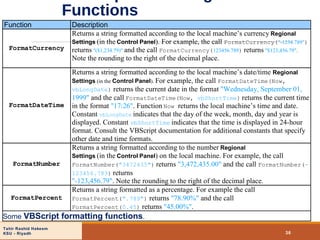
Function Description
FormatCurrency
Returns a string formatted according to the local machine’s currency Regional
Settings (in the Control Panel). For example, the call FormatCurrency("-1234.789")
returns "($1,234.79)" and the call FormatCurrency(123456.789) returns "$123,456.79".
Note the rounding to the right of the decimal place.
FormatDateTime
Returns a string formatted according to the local machine’s date/time Regional
Settings (in the Control Panel). For example, the call FormatDateTime(Now,
vbLongDate) returns the current date in the format "Wednesday, September 01,
1999" and the call FormatDateTime(Now, vbShortTime) returns the current time
in the format "17:26". Function Now returns the local machine’s time and date.
Constant vbLongDate indicates that the day of the week, month, day and year is
displayed. Constant vbShortTime indicates that the time is displayed in 24-hour
format. Consult the VBScript documentation for additional constants that specify
other date and time formats.
FormatNumber
Returns a string formatted according to the number Regional
Settings (in the Control Panel) on the local machine. For example, the call
FormatNumber("3472435") returns "3,472,435.00" and the call FormatNumber(-
123456.789) returns
"-123,456.79". Note the rounding to the right of the decimal place.
FormatPercent
Returns a string formatted as a percentage. For example the call
FormatPercent(".789") returns "78.90%" and the call
FormatPercent(0.45) returns "45.00%".
Some VBScript formatting functions.
Tahir Rashid Hakeem
KSU - Riyadh
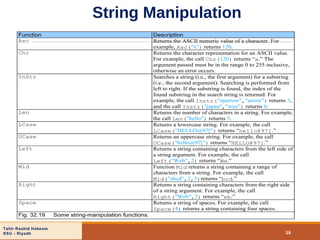
String Manipulation
37
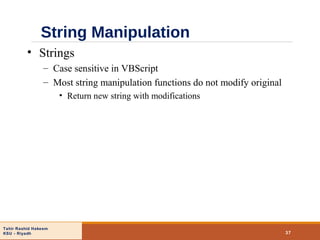
• Strings
– Case sensitive in VBScript
– Most string manipulation functions do not modify original
• Return new string with modifications
Tahir Rashid Hakeem
KSU - Riyadh
String Manipulation
38
Function Description
Asc Returns the ASCII numeric value of a character. For
example, Asc("x") returns 120.
Chr Returns the character representation for an ASCII value.
For example, the call Chr(120) returns “x.” The
argument passed must be in the range 0 to 255 inclusive,
otherwise an error occurs.
InStr Searches a string (i.e., the first argument) for a substring
(i.e., the second argument). Searching is performed from
left to right. If the substring is found, the index of the
found substring in the search string is returned. For
example, the call Instr("sparrow","arrow") returns 3,
and the call Instr("japan","wax") returns 0.
Len Returns the number of characters in a string. For example,
the call Len("hello") returns 5.
LCase Returns a lowercase string. For example, the call
LCase("HELLO@97[") returns “hello@97[.”
UCase Returns an uppercase string. For example, the call
UCase("hello@97[") returns “HELLO@97[.”
Left Returns a string containing characters from the left side of
a string argument. For example, the call
Left("Web",2) returns “We.”
Mid Function Mid returns a string containing a range of
characters from a string. For example, the call
Mid("abcd",2,3)returns “bcd.”
Right Returns a string containing characters from the right side
of a string argument. For example, the call
Right("Web",2) returns “eb.”
Space Returns a string of spaces. For example, the call
Space(4) returns a string containing four spaces.
Fig. 32.19 Some string-manipulation functions.
Tahir Rashid Hakeem
KSU - Riyadh
String Manipulation
39
Function Description
StrComp
Compares two strings for equality. Returns 1 if the first string is greater
than the second string, returns -1 if the first string is less than the second
string and returns 0 if the strings are equivalent. The default is a binary
comparison (i.e., case sensitive). An optional third argument of
vbTextCompare indicates a case-insensitive comparison. For example,
the call StrComp("bcd", "BCD") returns 1, the call
StrComp("BCD", "bcd") returns -1, the call StrComp("bcd",
"bcd") returns 0 and the call StrComp("bcd", "BCD",
vbTextCompare) returns 0.
String
Returns a string containing a repeated character. For example, the call
String(4,"u")returns “uuuu.”
Trim
Returns a string that does not contain leading or trailing space
characters. For example, the call Trim(" hi ") returns
“hi.”
LTrim Returns a string that does not contain any leading space characters. For
example, the call LTrim(" yes") returns “yes.”
RTrim Returns a string that does not contain any trailing space characters. For
example, the call RTrim("no ") returns “no”.
Filter
Returns an array of strings containing the result of the Filter
operation. For example, the call
Filter(Array("A","S","D","F","G","D"),"D") returns a
two-element array containing "D" and "D", and the call
Filter(Array("A","S","D","F","G","D"),"D",False)
returns an array containing "A" , "S", "F" and "G".
String manipulation functions.
Tahir Rashid Hakeem
KSU - Riyadh
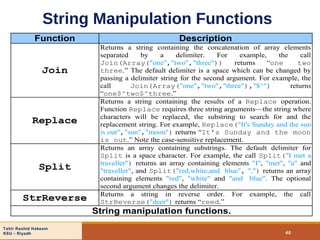
String Manipulation Functions
40
Function Description
Join
Returns a string containing the concatenation of array elements
separated by a delimiter. For example, the call
Join(Array("one","two","three")) returns “one two
three.” The default delimiter is a space which can be changed by
passing a delimiter string for the second argument. For example, the
call Join(Array("one","two","three"),"$^") returns
“one$^two$^three.”
Replace
Returns a string containing the results of a Replace operation.
Function Replace requires three string arguments—the string where
characters will be replaced, the substring to search for and the
replacement string. For example, Replace("It's Sunday and the sun
is out","sun","moon") returns “It's Sunday and the moon
is out.” Note the case-sensitive replacement.
Split
Returns an array containing substrings. The default delimiter for
Split is a space character. For example, the call Split("I met a
traveller") returns an array containing elements "I", "met", "a" and
"traveller", and Split("red,white,and blue", ",") returns an array
containing elements "red", "white" and "and blue". The optional
second argument changes the delimiter.
StrReverse Returns a string in reverse order. For example, the call
StrReverse("deer") returns “reed.”
String manipulation functions.
Tahir Rashid Hakeem
KSU - Riyadh
String Manipulation
41
• Translating to Pig Latin
– Uses string methods
• Split
• InStr
• LCase
• Left
Tahir Rashid Hakeem
KSU - Riyadh
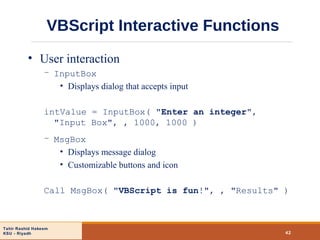
VBScript Interactive Functions
42
• User interaction
– InputBox
• Displays dialog that accepts input
intValue = InputBox( "Enter an integer",
"Input Box", , 1000, 1000 )
– MsgBox
• Displays message dialog
• Customizable buttons and icon
Call MsgBox( "VBScript is fun!", , "Results" )
Tahir Rashid Hakeem
KSU - Riyadh
Arrays
43
• Arrays
– Related data items of same type
– Fixed size or dynamic
• Also “redimmable”
– Made up of individual elements
• Accessed via array name, parentheses and index number
• Start at position zero
• Declaring arrays
– Keyword Dim
– Name
– Highest valid index
• Upper bound
Tahir Rashid Hakeem
KSU - Riyadh
Arrays
44
• Examples
– Declaring array with three elements
Dim numbers( 2 )
– Assigning values to each element
numbers(0) = 77
numbers(1) = 68
numbers(2) = 55
Tahir Rashid Hakeem
KSU - Riyadh
Arrays
45
• Examples, cont.
– Declaring array and using For loop to fill with values
• Fills with multiples of 3 from 0 through 30
Dim h( 11 ), x, i
i = 0
For x = 0 To 30 Step 3
h(i) = CInt( x )
i = CInt( i ) + 1
Next
Tahir Rashid Hakeem
KSU - Riyadh
Arrays
46
• Array dimensions
– UBound and LBound functions
• LBound is always zero
• Access modifiers
– Public vs. Private
• Public default
• Dynamic arrays
– Keyword ReDim
• Keyword Preserve
• Allocating arrays larger than original vs. smaller than original
– Keyword Erase
Tahir Rashid Hakeem
KSU - Riyadh
Arrays
47
• Multidimensional arrays
– Like normal arrays
• Rows and columns rather than just columns
– UBound and LBound still work
• Dimension is second argument
– Can be fixed size or created dynamically
Tahir Rashid Hakeem
KSU - Riyadh
Arrays
48
• Examples of multidimensional arrays
– Declaring two- and three-dimensional arrays
Dim b(2, 2), tripleArray(100, 8, 15)
– Determining upper bound of third dimension
For x = 0 To UBound(tripleArray, 3)
– Dynamically allocating three-dimensional array
ReDim threeD(11, 8, 1)
Tahir Rashid Hakeem
KSU - Riyadh
Classes and Objects
49
• Object-based programming
– Objects have data and behavior
– Information hiding
• Not necessary to know internal details to use class
• Allows class internals to be replaced/upgraded
without breaking code that uses class
– Objects model real-world entities
• Makes programs easier to understand
– Promotes reusability
– Objects are instances of classes
• Class can have many objects existing at same time
Tahir Rashid Hakeem
KSU - Riyadh
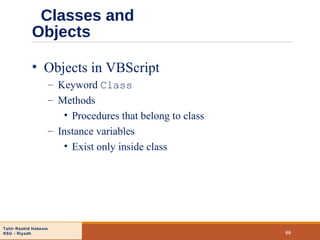
Classes and
Objects
50
• Objects in VBScript
– Keyword Class
– Methods
• Procedures that belong to class
– Instance variables
• Exist only inside class
Tahir Rashid Hakeem
KSU - Riyadh
Classes and Objects
51
• Abstract data-types
– Powerful feature for simplifying programs
– Represented as classes
– Describe data in terms of behavior
– Instance variables should be Private
• Allow access through methods
• Ensure integrity and consistency
• Property Let, Property Get, Property Set
• Exit Property
Tahir Rashid Hakeem
KSU - Riyadh
Classes and
Objects
52
• Property Set
– Use for basic Variant sub-type variables
Public Property Set BirthDay(bDay)
Set mBirthDate = bDay
End Property
Public Property Get BirthDay()
Set BirthDay = mBirthDate
End Property
Tahir Rashid Hakeem
KSU - Riyadh
Operator Precedence Chart
53
Operator Type
() parentheses
- unary minus
^ exponentiation
*
/

multiplication
division
integer division
Mod modulus
+
-
addition
subtraction
& string concatenation
=
<>
<
<=
>
>=
Is
equality
inequality
less than
less than or equal
greater than
greater than or equal
object equivalence
Not logical NOT
And logical AND
Or logical OR
Xor logical exclusive OR
Eqv logical equivalence
Imp logical implication

Vb script

  • 1.
    Tahir Rashid Hakeem KSU- Riyadh 1 VBScript Outline 32.1 Introduction 32.2 Operators 32.3 Data Types and Control Structures 32.4 VBScript Functions 32.5 VBScript Example Programs 32.6 Arrays 32.7 String Manipulation 32.8 Classes and Objects 32.9 Operator Precedence Chart 32.10 Web Resources
  • 2.
    Tahir Rashid Hakeem KSU- Riyadh Objectives 2 • In this tutorial, you will learn: – To become familiar with the VBScript language. – To use VBScript keywords, operators and functions to write client-side scripts. – To be able to write Sub and Function procedures. – To use VBScript arrays and regular expressions. – To be able to write VBScript abstract data types called Classes. – To be able to create objects from Classes. – To be able to write Property Let, Property Get and Property Set procedures.
  • 3.
    Tahir Rashid Hakeem KSU- Riyadh What is VBScript? A Safe subset of visual basic The VBScript Code is case Insensitive. Microsoft Visual Basic Scripting Edition brings active scripting to a wide variety of environments, including Web client scripting in Microsoft Internet Explorer and Web server scripting in Microsoft Internet Information Service (IIS). 3
  • 4.
  • 5.
    Tahir Rashid Hakeem KSU- Riyadh VBScript Data Types VBScript has only one data type called a Variant. A Variant is a special kind of data type that can contain different kinds of information, depending on how it is used. Because Variant is the only data type in VBScript, it is also the data type returned by all functions in VBScript. At its simplest, a Variant can contain either numeric or string information. A Variant behaves as a number when you use it in a numeric context and as a string when you use it in a string context. 5
  • 6.
    Tahir Rashid Hakeem KSU- Riyadh VBScript Data Types - Variant Subtypes  Beyond the simple numeric or string classifications, a Variant can make further distinctions about the specific nature of numeric information.  For example, you can have numeric information that represents a date or a time.  When used with other date or time data, the result is always expressed as a date or a time.  You can also have a rich variety of numeric information ranging in size from Boolean values to huge floating-point numbers. 6
  • 7.
    Tahir Rashid Hakeem KSU- Riyadh VBScript Data Types - Variant Subtypes 7 Subtype Description Empty Variant is uninitialized. Value is 0 for numeric variables or a zero-length string ("") for string variables. Null Variant intentionally contains no valid data. Boolean Contains either True or False. Byte Contains integer in the range 0 to 255. Integer Contains integer in the range -32,768 to 32,767. Currency -922,337,203,685,477.5808 to 922,337,203,685,477.5807. Long Contains integer in the range -2,147,483,648 to 2,147,483,647. Single Contains a single-precision, floating-point number in the range -3.402823E38 to -1.401298E-45 for negative values; 1.401298E-45 to 3.402823E38 for positive values. Double Contains a double-precision, floating-point number in the range -1.79769313486232E308 to -4.94065645841247E-324 for negative values; 4.94065645841247E-324 to 1.79769313486232E308 for positive values. Date Contains a number that represents a date between January 1, 100 to December 31, 9999. String Contains a variable-length string that can be up to approximately 2 billion characters in length. Object Contains an object. Error Contains an error number.
  • 8.
    Tahir Rashid Hakeem KSU- Riyadh Variables A variable is a convenient placeholder that refers to a computer memory location where you can store program information that may change during the time your script is running. For example, you might create a variable called ClickCount to store the number of times a user clicks an object on a particular Web page. you only have to refer to a variable by his name to see or change its value. 8
  • 9.
    Tahir Rashid Hakeem KSU- Riyadh Declaring Variables You declare variables explicitly in your script using the Dim statement, the Public statement, and the Private statement. For example: Dim DegreesFahrenheit You declare multiple variables by separating each variable name with a comma. For example: Dim Top, Bottom, Left, Right 9
  • 10.
    Tahir Rashid Hakeem KSU- Riyadh Declaring Variables  You can also declare a variable implicitly by simply using its name in your script.  That is not generally a good practice because you could misspell the variable name in one or more places, causing unexpected results when your script is run.  For that reason, the Option Explicit statement is available to require explicit declaration of all variables. 10
  • 11.
    Tahir Rashid Hakeem KSU- Riyadh Option Explicit Statement  Forces explicit declaration of all variables in a script.  If used, the Option Explicit statement must appear in a script before any other statements.  When you use the Option Explicit statement, you must explicitly declare all variables using the Dim, Private, Public, or ReDim statements. If you attempt to use an undeclared variable name, an error occurs.  Tip Use Option Explicit to avoid incorrectly typing the name of an existing variable or to avoid confusion in code where the scope of the variable is not clear. 11
  • 12.
    Tahir Rashid Hakeem KSU- Riyadh Naming Restrictions  Must begin with an alphabetic character.  Cannot contain an embedded period.  Must not exceed 255 characters.  Must be unique in the scope in which it is declared. 12
  • 13.
    Tahir Rashid Hakeem KSU- Riyadh VBScript Keywords Empty ◦ The Empty keyword is used to indicate an uninitialized variable value. Null ◦ The Null keyword is used to indicate that a variable contains no valid data. True ◦ The True keyword has a value equal to -1. False ◦ The False keyword has a value equal to 0. Nothing ◦ The Nothing keyword in VBScript is used to disassociate an object variable from any actual object. 13
  • 14.
    Tahir Rashid Hakeem KSU- Riyadh Scopes and Lifetimes  A variable's scope is determined by where you declare it.  When you declare a variable within a procedure, only code within that procedure can access or change the value of that variable.  If you declare a variable outside a procedure, you make it recognizable to all the procedures in your script.  The lifetime of a variable depends on how long it exists.  The lifetime of a script-level variable extends from the time it is declared until the time the script is finished running.  At procedure level, a variable exists only as long as you are in the procedure.  we can have local variables of the same name in several different procedures because each is recognized only by the procedure in which it is declared. 14
  • 15.
    Tahir Rashid Hakeem KSU- Riyadh Dim Statement Dim varname[([subscripts])][, varname[([subscripts])]] . . . Declares variables and allocates storage space. Variables declared with Dim at the script level are available to all procedures within the script. At the procedure level, variables are available only within the procedure. You can also use the Dim statement with empty parentheses to declare a dynamic array. Note   When you use the Dim statement in a procedure, you generally put the Dim statement at the beginning of the procedure. 15
  • 16.
    Tahir Rashid Hakeem KSU- Riyadh Private Statement Private varname[([subscripts])][, varname[([subscripts])]] . . . Declares private variables and allocates storage space. Private statement variables are available only to the script in which they are declared. The following example illustrates use of the Private statement: 16 Private MyNumber ‘--- Private Variant variable. Private MyArray(9) ‘--- Private array variable. ‘--- Multiple Private declarations of Variant variables. Private MyNumber, MyVar, YourNumber
  • 17.
    Tahir Rashid Hakeem KSU- Riyadh Public Statement Public varname[([subscripts])][, varname[([subscripts])]] . . . Declares public variables and allocates storage space. Public statement variables are available to all procedures in all scripts. You can also use the Public statement with empty parentheses to declare a dynamic array. 17 Public MyNumber ‘--- Public Variant variable. Public MyArray(9) ‘--- Public array variable. ‘--- Multiple Public declarations of Variant variables. Public MyNumber, MyVar, YourNumber
  • 18.
    Tahir Rashid Hakeem KSU- Riyadh Rem Statement  Includes explanatory remarks in a program. Rem Comment ‘ Comment  As shown in the syntax section, you can use an apostrophe (') instead of the Rem keyword.  If the Rem keyword follows other statements on a line, it must be separated from the statements by a colon.  However, when you use an apostrophe, the colon is not required after other statements. 18 MyStr1 = "Hello" : Rem Comment after a statement separated by a colon.MyStr1 = "Hello" : Rem Comment after a statement separated by a colon. MyStr2 = "Goodbye" ' This is also a comment; no colon is needed.MyStr2 = "Goodbye" ' This is also a comment; no colon is needed. Rem Comment on a line with no code; no colon is needed.Rem Comment on a line with no code; no colon is needed.
  • 19.
    Tahir Rashid Hakeem KSU- Riyadh Assigning Values to Variables Values are assigned to variables creating an expression as follows: ◦the variable is on the left side of the expression and the value you want to assign to the variable is on the right. For Example : 19 B = 200B = 200
  • 20.
    Tahir Rashid Hakeem KSU- Riyadh Operators 20 • Types of operators – Arithmetic • Most are similar to JavaScript’s – Logical – Comparison • VBScript is case-insensitive
  • 21.
    Tahir Rashid Hakeem KSU- Riyadh Mathematic Operators 21 VBScript operation Arithmetic operator Algebraic expression VBScript expression Addition + x + y x + y Subtraction - z – 8 z – 8 Multiplication * yb y * b Division (floating-point) / v u or <Anchor0> v / u Division (integer) none v u Exponentiation ^ q p q ^ p Negation - –e —e Modulus Mod q mod r q Mod r
  • 22.
    Tahir Rashid Hakeem KSU- Riyadh Comparison Operators 22 Standard algebraic equality operator or relational operator VBScript comparison operator Example of VBScript condition Meaning of VBScript condition = = d = g d is equal tog < > s < > r s is not equal tor > > y > x y is greater thanx < < p < m p is less thanm ≥ >= c >= z C is greater than or equal toz <= m <= s m is less than or equal tos≤ ≠
  • 23.
    Tahir Rashid Hakeem KSU- Riyadh Logical Operators 23 Truth tables for VBScript Logical Operators  Logical And: True And True= True True And False =False False And True =False False And False =False Logical Or: True Or True = True True Or False = True False Or True = True False Or False =False Logical Imp: True Imp True= True True Imp False =False False Imp True =True False Imp False =True Logical Eqv: True Eqv True= True True Eqv False =False False Eqv True =False False Eqv False =True Logical Xor: True Xor True = False True Xor False =True False Xor True =True False Xor False =False Logical Not: Not True = False Not False = True
  • 24.
    Tahir Rashid Hakeem KSU- Riyadh Control Structures 24 • Looping – While…Wend and Do While…Loop • Analogous to JavaScript’s while statement – Do…Loop While • Analogous to JavaScript’s do…while statement – Do…Until Loop and Do…Loop Until • No direct equivalent in JavaScript • Repeat until loop-continuation condition is true – For • Condition cannot be modified mid-loop • Optional Step keyword – Exit Do and Exit For • Break out of loops
  • 25.
    Tahir Rashid Hakeem KSU- Riyadh Examples Looping Control Structures 25 JavaScript  VBScript  1 while ( !( x == 10 ) ) 2 ++x; 1 Do Until x = 10 2 x = x + 1 3 Loop Comparing JavaScript’s while to VBScript’s Do Until. JavaScript   VBScript  1 do { 2 ++x; 3 } while ( !( x == 10 ) ); 1 Do 2 x = x + 1 3 Loop Until x = 10 Comparing JavaScript’s do...while to VBScript’s Do Loop...Until. JavaScript   VBScript  1 x = 8; 2 for ( y = 1; y < x; y++ ) 3 x /= 2; 1 x = 8 2 For y = 1 To x 3 x = x 2 4 Next Comparing JavaScript’s for to VBScript’s For.
  • 26.
    Tahir Rashid Hakeem KSU- Riyadh Decision Control Statements 26 Making Decisions Using If...Then...Else The If...Then...Else statement is used to evaluate whether a condition is True or False and then to specify one or more statements to run, depending on the result. Usually, the condition is an expression that uses a comparison operator to compare one value or variable with another. If...Then...Else statements can be nested to as many levels as you need.
  • 27.
    Tahir Rashid Hakeem KSU- Riyadh VBScript Functions 27  A function is a group of reusable code which can be called anywhere in your program.  This eliminates the need of writing same code over and over again. This will enable programmers to divide a big program into a number of small and manageable functions.  Apart from inbuilt Functions, VBScript allows us to write user- defined functions as well.
  • 28.
    Tahir Rashid Hakeem KSU- Riyadh 28 Before we use a function, we need to define that particular function. The most common way to define a function in VBScript is by using the Function keyword, followed by a unique function name and it may or may not carry a list of parameters and a statement with a End Function keyword, which indicates the end of the function. The basic syntax is shown below: Function Definition
  • 29.
    Tahir Rashid Hakeem KSU- Riyadh 29 Function Example
  • 30.
    Tahir Rashid Hakeem KSU- Riyadh Calling a Function 30 To invoke a function somewhere later in the script, you would simple need to write the name of that function with the Call keyword.
  • 31.
    Tahir Rashid Hakeem KSU- Riyadh VBScript Functions 31 Function Variant subtype returned Description IsArray Boolean Returns True if the variant subtype is an array and False otherwise. IsDate Boolean Returns True if the variant subtype is a date or time and False otherwise. IsEmpty Boolean Returns True if the variant subtype is Empty (i.e., has not been explicitly initialized by the programmer) and False otherwise. IsNumeric Boolean Returns True if the variant subtype is numeric and False otherwise. IsObject Boolean Returns True if the variant subtype is an object and False otherwise. TypeName String Returns a string that provides subtype information. Some strings returned are "Byte", "Integer", "Long", "Single", "Double", "Date", "Currency", "String", "Boolean" and "Empty". VarType Integer Returns a value indicating the subtype (e.g., 0 for Empty, 2 for integer, 3 for long, 4 for single, 5 for double, 6 for currency, 7 for date/time, 8 for string, 9 for object, etc.). Some variant functions.
  • 32.
    Tahir Rashid Hakeem KSU- Riyadh VBScript Functions 32 • Math functions – VBScript provides many functions for common operations • Exponential • Logarithmic • Square root • Rounding • Absolute value • Trigonometry • Random number generation
  • 33.
    Tahir Rashid Hakeem KSU- Riyadh VBScript Math Functions 33 Function Description Example Abs(x) Absolute value of x Abs(-7) is 7 Abs(0) is 0 Abs(76) is 76 Atn(x) Trigonometric arctangent of x (in radians) Atn(1)*4 is 3.14159265358979 Cos(x) Trigonometric cosine of x (in radians) Cos(0) is 1 Exp(x) Exponential function ex Exp(1.0) is 2.71828 Exp(2.0) is 7.38906 Int(x) Returns the whole-number part of x. Int rounds to the next smallest number. Int(-5.3) is –6 Int(0.893) is 0 Int(76.45) is 76 Fix(x) Returns the whole-number part of x [Note: Fix and Int are different. When x is negative, Int rounds to the next smallest number, while Fix rounds to the next-largest number.] Fix(-5.3) is –5 Fix(0.893) is 0 Fix(76.45) is 76 Log(x) Natural logarithm of x (base e) Log(2.718282) is 1.0 Log(7.389056) is 2.0 Rnd() Returns a pseudo-random floating-point number in the range 0 Rnd < 1. Call function Randomize once before calling Rnd to get a different sequence of random numbers each time the program is run. Call Randomize ... z = Rnd() VBScript math functions. ≤
  • 34.
    Tahir Rashid Hakeem KSU- Riyadh VBScript Math Functions 34 Function Description Example Round(x, y) Rounds x to y decimal places. If y is omitted, x is returned as an integer. Round(4.844) is 5 Round(5.7839, 2) is 5.78 Sgn(x) Sign of x Sgn(-1988) is –1 Sgn(0) is 0 Sgn(3.3) is 1 Sin(x) Trigonometric sine of x (in radians) Sin(0) is 0 Sqr(x) Square root of x Sqr(900.0) is 30.0 Sqr(9.0) is 3.0 Tan(x) Trigonometric tangent of x (in radians) Tan(0) is 0 VBScript math functions.
  • 35.
    Tahir Rashid Hakeem KSU- Riyadh VBScript Functions 35 • Formatting functions – Currency – Dates and times – Numbers – Percentages
  • 36.
    Tahir Rashid Hakeem KSU- Riyadh Functions 36 Function Description FormatCurrency Returns a string formatted according to the local machine’s currency Regional Settings (in the Control Panel). For example, the call FormatCurrency("-1234.789") returns "($1,234.79)" and the call FormatCurrency(123456.789) returns "$123,456.79". Note the rounding to the right of the decimal place. FormatDateTime Returns a string formatted according to the local machine’s date/time Regional Settings (in the Control Panel). For example, the call FormatDateTime(Now, vbLongDate) returns the current date in the format "Wednesday, September 01, 1999" and the call FormatDateTime(Now, vbShortTime) returns the current time in the format "17:26". Function Now returns the local machine’s time and date. Constant vbLongDate indicates that the day of the week, month, day and year is displayed. Constant vbShortTime indicates that the time is displayed in 24-hour format. Consult the VBScript documentation for additional constants that specify other date and time formats. FormatNumber Returns a string formatted according to the number Regional Settings (in the Control Panel) on the local machine. For example, the call FormatNumber("3472435") returns "3,472,435.00" and the call FormatNumber(- 123456.789) returns "-123,456.79". Note the rounding to the right of the decimal place. FormatPercent Returns a string formatted as a percentage. For example the call FormatPercent(".789") returns "78.90%" and the call FormatPercent(0.45) returns "45.00%". Some VBScript formatting functions.
  • 37.
    Tahir Rashid Hakeem KSU- Riyadh String Manipulation 37 • Strings – Case sensitive in VBScript – Most string manipulation functions do not modify original • Return new string with modifications
  • 38.
    Tahir Rashid Hakeem KSU- Riyadh String Manipulation 38 Function Description Asc Returns the ASCII numeric value of a character. For example, Asc("x") returns 120. Chr Returns the character representation for an ASCII value. For example, the call Chr(120) returns “x.” The argument passed must be in the range 0 to 255 inclusive, otherwise an error occurs. InStr Searches a string (i.e., the first argument) for a substring (i.e., the second argument). Searching is performed from left to right. If the substring is found, the index of the found substring in the search string is returned. For example, the call Instr("sparrow","arrow") returns 3, and the call Instr("japan","wax") returns 0. Len Returns the number of characters in a string. For example, the call Len("hello") returns 5. LCase Returns a lowercase string. For example, the call LCase("HELLO@97[") returns “hello@97[.” UCase Returns an uppercase string. For example, the call UCase("hello@97[") returns “HELLO@97[.” Left Returns a string containing characters from the left side of a string argument. For example, the call Left("Web",2) returns “We.” Mid Function Mid returns a string containing a range of characters from a string. For example, the call Mid("abcd",2,3)returns “bcd.” Right Returns a string containing characters from the right side of a string argument. For example, the call Right("Web",2) returns “eb.” Space Returns a string of spaces. For example, the call Space(4) returns a string containing four spaces. Fig. 32.19 Some string-manipulation functions.
  • 39.
    Tahir Rashid Hakeem KSU- Riyadh String Manipulation 39 Function Description StrComp Compares two strings for equality. Returns 1 if the first string is greater than the second string, returns -1 if the first string is less than the second string and returns 0 if the strings are equivalent. The default is a binary comparison (i.e., case sensitive). An optional third argument of vbTextCompare indicates a case-insensitive comparison. For example, the call StrComp("bcd", "BCD") returns 1, the call StrComp("BCD", "bcd") returns -1, the call StrComp("bcd", "bcd") returns 0 and the call StrComp("bcd", "BCD", vbTextCompare) returns 0. String Returns a string containing a repeated character. For example, the call String(4,"u")returns “uuuu.” Trim Returns a string that does not contain leading or trailing space characters. For example, the call Trim(" hi ") returns “hi.” LTrim Returns a string that does not contain any leading space characters. For example, the call LTrim(" yes") returns “yes.” RTrim Returns a string that does not contain any trailing space characters. For example, the call RTrim("no ") returns “no”. Filter Returns an array of strings containing the result of the Filter operation. For example, the call Filter(Array("A","S","D","F","G","D"),"D") returns a two-element array containing "D" and "D", and the call Filter(Array("A","S","D","F","G","D"),"D",False) returns an array containing "A" , "S", "F" and "G". String manipulation functions.
  • 40.
    Tahir Rashid Hakeem KSU- Riyadh String Manipulation Functions 40 Function Description Join Returns a string containing the concatenation of array elements separated by a delimiter. For example, the call Join(Array("one","two","three")) returns “one two three.” The default delimiter is a space which can be changed by passing a delimiter string for the second argument. For example, the call Join(Array("one","two","three"),"$^") returns “one$^two$^three.” Replace Returns a string containing the results of a Replace operation. Function Replace requires three string arguments—the string where characters will be replaced, the substring to search for and the replacement string. For example, Replace("It's Sunday and the sun is out","sun","moon") returns “It's Sunday and the moon is out.” Note the case-sensitive replacement. Split Returns an array containing substrings. The default delimiter for Split is a space character. For example, the call Split("I met a traveller") returns an array containing elements "I", "met", "a" and "traveller", and Split("red,white,and blue", ",") returns an array containing elements "red", "white" and "and blue". The optional second argument changes the delimiter. StrReverse Returns a string in reverse order. For example, the call StrReverse("deer") returns “reed.” String manipulation functions.
  • 41.
    Tahir Rashid Hakeem KSU- Riyadh String Manipulation 41 • Translating to Pig Latin – Uses string methods • Split • InStr • LCase • Left
  • 42.
    Tahir Rashid Hakeem KSU- Riyadh VBScript Interactive Functions 42 • User interaction – InputBox • Displays dialog that accepts input intValue = InputBox( "Enter an integer", "Input Box", , 1000, 1000 ) – MsgBox • Displays message dialog • Customizable buttons and icon Call MsgBox( "VBScript is fun!", , "Results" )
  • 43.
    Tahir Rashid Hakeem KSU- Riyadh Arrays 43 • Arrays – Related data items of same type – Fixed size or dynamic • Also “redimmable” – Made up of individual elements • Accessed via array name, parentheses and index number • Start at position zero • Declaring arrays – Keyword Dim – Name – Highest valid index • Upper bound
  • 44.
    Tahir Rashid Hakeem KSU- Riyadh Arrays 44 • Examples – Declaring array with three elements Dim numbers( 2 ) – Assigning values to each element numbers(0) = 77 numbers(1) = 68 numbers(2) = 55
  • 45.
    Tahir Rashid Hakeem KSU- Riyadh Arrays 45 • Examples, cont. – Declaring array and using For loop to fill with values • Fills with multiples of 3 from 0 through 30 Dim h( 11 ), x, i i = 0 For x = 0 To 30 Step 3 h(i) = CInt( x ) i = CInt( i ) + 1 Next
  • 46.
    Tahir Rashid Hakeem KSU- Riyadh Arrays 46 • Array dimensions – UBound and LBound functions • LBound is always zero • Access modifiers – Public vs. Private • Public default • Dynamic arrays – Keyword ReDim • Keyword Preserve • Allocating arrays larger than original vs. smaller than original – Keyword Erase
  • 47.
    Tahir Rashid Hakeem KSU- Riyadh Arrays 47 • Multidimensional arrays – Like normal arrays • Rows and columns rather than just columns – UBound and LBound still work • Dimension is second argument – Can be fixed size or created dynamically
  • 48.
    Tahir Rashid Hakeem KSU- Riyadh Arrays 48 • Examples of multidimensional arrays – Declaring two- and three-dimensional arrays Dim b(2, 2), tripleArray(100, 8, 15) – Determining upper bound of third dimension For x = 0 To UBound(tripleArray, 3) – Dynamically allocating three-dimensional array ReDim threeD(11, 8, 1)
  • 49.
    Tahir Rashid Hakeem KSU- Riyadh Classes and Objects 49 • Object-based programming – Objects have data and behavior – Information hiding • Not necessary to know internal details to use class • Allows class internals to be replaced/upgraded without breaking code that uses class – Objects model real-world entities • Makes programs easier to understand – Promotes reusability – Objects are instances of classes • Class can have many objects existing at same time
  • 50.
    Tahir Rashid Hakeem KSU- Riyadh Classes and Objects 50 • Objects in VBScript – Keyword Class – Methods • Procedures that belong to class – Instance variables • Exist only inside class
  • 51.
    Tahir Rashid Hakeem KSU- Riyadh Classes and Objects 51 • Abstract data-types – Powerful feature for simplifying programs – Represented as classes – Describe data in terms of behavior – Instance variables should be Private • Allow access through methods • Ensure integrity and consistency • Property Let, Property Get, Property Set • Exit Property
  • 52.
    Tahir Rashid Hakeem KSU- Riyadh Classes and Objects 52 • Property Set – Use for basic Variant sub-type variables Public Property Set BirthDay(bDay) Set mBirthDate = bDay End Property Public Property Get BirthDay() Set BirthDay = mBirthDate End Property
  • 53.
    Tahir Rashid Hakeem KSU- Riyadh Operator Precedence Chart 53 Operator Type () parentheses - unary minus ^ exponentiation * / multiplication division integer division Mod modulus + - addition subtraction & string concatenation = <> < <= > >= Is equality inequality less than less than or equal greater than greater than or equal object equivalence Not logical NOT And logical AND Or logical OR Xor logical exclusive OR Eqv logical equivalence Imp logical implication