Vagrant Up &
Running
+ Basic Provisioning
To follow along, clone: https://github.com/svpernova09/Vagrant-
Up-and-Running-Talk
Give feedback on this talk: https://joind.in/user/view/22057
Joe Ferguson - joe@joeferguson.me
Professionally
● Web Developer at RocketFuel
● PHP / LAMP Focused
Semi Professional
● Co-Organizer for MemphisPHP.org
● MidsouthMakers - Hackerspace Leader
● HACKmemphis.com Organizer
Who is this guy?
● Tool for building complete dev
environments
● Easy to use workflow
● Focus on automation
● Lowers Dev Environment setup time
● Increase Dev / Live Environment Parity
What is Vagrant?
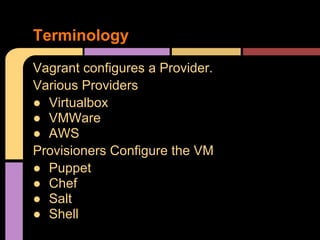
Vagrant configures a Provider.
Various Providers
● Virtualbox
● VMWare
● AWS
Provisioners Configure the VM
● Puppet
● Chef
● Salt
● Shell
Terminology
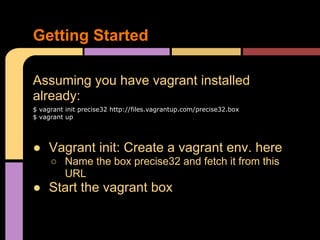
Assuming you have vagrant installed
already:
$ vagrant init precise32 http://files.vagrantup.com/precise32.box
$ vagrant up
● Vagrant init: Create a vagrant env. here
○ Name the box precise32 and fetch it from this
URL
● Start the vagrant box
Getting Started
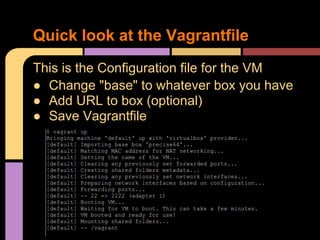
This is the Configuration file for the VM
● Change "base" to whatever box you have
● Add URL to box (optional)
● Save Vagrantfile
Quick look at the Vagrantfile
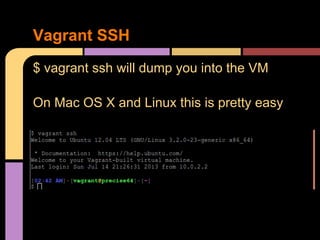
$ vagrant ssh will dump you into the VM
On Mac OS X and Linux this is pretty easy
Vagrant SSH
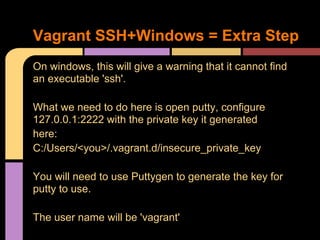
On windows, this will give a warning that it cannot find
an executable 'ssh'.
What we need to do here is open putty, configure
127.0.0.1:2222 with the private key it generated
here:
C:/Users/<you>/.vagrant.d/insecure_private_key
You will need to use Puttygen to generate the key for
putty to use.
The user name will be 'vagrant'
Vagrant SSH+Windows = Extra Step
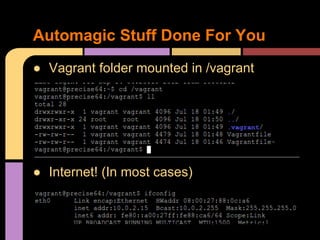
● Vagrant folder mounted in /vagrant
● Internet! (In most cases)
Automagic Stuff Done For You
● You get an empty VM with not much stuff
Where does this get you?
Four Common Provisioning Methods
● Puppet*
● Chef
● Salt
● Shell*
*We will cover
Provisioning
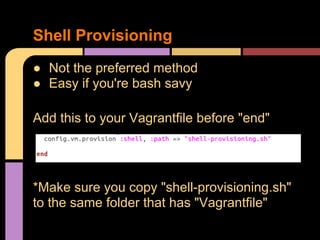
● Not the preferred method
● Easy if you're bash savy
Add this to your Vagrantfile before "end"
*Make sure you copy "shell-provisioning.sh"
to the same folder that has "Vagrantfile"
Shell Provisioning
If your vagrant box is still running:
● vagrant reload
Otherwise:
● vagrant up
Vagrant will start the VM and run the
provisioning shell script.
Shell Provisioning
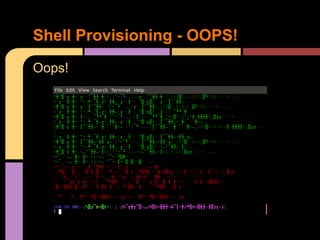
Oops!
Shell Provisioning - OOPS!
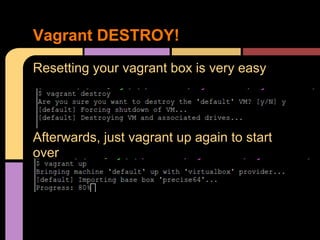
Resetting your vagrant box is very easy
Afterwards, just vagrant up again to start
over
Vagrant DESTROY!
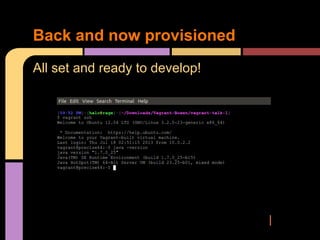
All set and ready to develop!
Back and now provisioned
Enter: Puppet - https://puppetlabs.com/
Why puppet?
● Open Source Version
● Community Support
● Easier to grasp than Bash / Chef*
*for non-bash and non-ruby devs
There is a BETTER way
The simplistic syntax makes puppet
manifests very easy to read and learn from.
PuPHPet - https://puphpet.com/
● Geared towards PHP, but flexible
● Creates manifests for you
● Great to learn from
Puppet: Learn from others
Once you have a box configured, you can
use vagrant box to package it up to share
with your other developers.
This provides an easy way to ensure a team
of developers are always on the same
version and operating system that matches
the live environment as closely as possible.
It's always nice to share...
Links:
● Vagrant: http://www.vagrantup.com
● Vagrant Boxes: http://www.vagrantbox.es
● Make Vagrant Up Yours: https://jtreminio.
com/2013/06/make_vagrant_up_yours
● PuPHPet: https://puphpet.com/
● Vagrant: Up and Running: http://shop.oreilly.
com/product/0636920026358.do
Provisioning:
● Puppet: https://puppetlabs.com/puppet/puppet-open-
source/
● Chef: http://docs.opscode.com/
● Salt: https://github.com/saltstack
Links / Q & A

Vagrant up-and-running

  • 1.
    Vagrant Up & Running +Basic Provisioning To follow along, clone: https://github.com/svpernova09/Vagrant- Up-and-Running-Talk Give feedback on this talk: https://joind.in/user/view/22057
  • 2.
    Joe Ferguson -joe@joeferguson.me Professionally ● Web Developer at RocketFuel ● PHP / LAMP Focused Semi Professional ● Co-Organizer for MemphisPHP.org ● MidsouthMakers - Hackerspace Leader ● HACKmemphis.com Organizer Who is this guy?
  • 3.
    ● Tool forbuilding complete dev environments ● Easy to use workflow ● Focus on automation ● Lowers Dev Environment setup time ● Increase Dev / Live Environment Parity What is Vagrant?
  • 4.
    Vagrant configures aProvider. Various Providers ● Virtualbox ● VMWare ● AWS Provisioners Configure the VM ● Puppet ● Chef ● Salt ● Shell Terminology
  • 5.
    Assuming you havevagrant installed already: $ vagrant init precise32 http://files.vagrantup.com/precise32.box $ vagrant up ● Vagrant init: Create a vagrant env. here ○ Name the box precise32 and fetch it from this URL ● Start the vagrant box Getting Started
  • 6.
    This is theConfiguration file for the VM ● Change "base" to whatever box you have ● Add URL to box (optional) ● Save Vagrantfile Quick look at the Vagrantfile
  • 7.
    $ vagrant sshwill dump you into the VM On Mac OS X and Linux this is pretty easy Vagrant SSH
  • 8.
    On windows, thiswill give a warning that it cannot find an executable 'ssh'. What we need to do here is open putty, configure 127.0.0.1:2222 with the private key it generated here: C:/Users/<you>/.vagrant.d/insecure_private_key You will need to use Puttygen to generate the key for putty to use. The user name will be 'vagrant' Vagrant SSH+Windows = Extra Step
  • 9.
    ● Vagrant foldermounted in /vagrant ● Internet! (In most cases) Automagic Stuff Done For You
  • 10.
    ● You getan empty VM with not much stuff Where does this get you?
  • 11.
    Four Common ProvisioningMethods ● Puppet* ● Chef ● Salt ● Shell* *We will cover Provisioning
  • 12.
    ● Not thepreferred method ● Easy if you're bash savy Add this to your Vagrantfile before "end" *Make sure you copy "shell-provisioning.sh" to the same folder that has "Vagrantfile" Shell Provisioning
  • 13.
    If your vagrantbox is still running: ● vagrant reload Otherwise: ● vagrant up Vagrant will start the VM and run the provisioning shell script. Shell Provisioning
  • 14.
  • 15.
    Resetting your vagrantbox is very easy Afterwards, just vagrant up again to start over Vagrant DESTROY!
  • 16.
    All set andready to develop! Back and now provisioned
  • 17.
    Enter: Puppet -https://puppetlabs.com/ Why puppet? ● Open Source Version ● Community Support ● Easier to grasp than Bash / Chef* *for non-bash and non-ruby devs There is a BETTER way
  • 18.
    The simplistic syntaxmakes puppet manifests very easy to read and learn from. PuPHPet - https://puphpet.com/ ● Geared towards PHP, but flexible ● Creates manifests for you ● Great to learn from Puppet: Learn from others
  • 19.
    Once you havea box configured, you can use vagrant box to package it up to share with your other developers. This provides an easy way to ensure a team of developers are always on the same version and operating system that matches the live environment as closely as possible. It's always nice to share...
  • 20.
    Links: ● Vagrant: http://www.vagrantup.com ●Vagrant Boxes: http://www.vagrantbox.es ● Make Vagrant Up Yours: https://jtreminio. com/2013/06/make_vagrant_up_yours ● PuPHPet: https://puphpet.com/ ● Vagrant: Up and Running: http://shop.oreilly. com/product/0636920026358.do Provisioning: ● Puppet: https://puppetlabs.com/puppet/puppet-open- source/ ● Chef: http://docs.opscode.com/ ● Salt: https://github.com/saltstack Links / Q & A