Vagrant & Devops
What is Vagrant?
● Syntactic sugar around VMs
○
○
○
○
○
○

Virtualbox
VMWare
LXC
AWS
Rackspace
etc
What is Vagrant?
● Syntactic sugar around provisioning
○
○
○
○
○
○

Chef
Puppet
Ansible
Salt
Scripts (bash, etc)
etc
What is Vagrant?
● Five commands
○
○
○
○
○

vagrant up
vagrant provision
vagrant ssh
vagrant halt
vagrant destroy

● Really more like 16 commands (v1.4.3)
○ You really only use the first 5.
It’s just Ruby
● Runs on Windows, Linux, OSX
● Use all the programming constructs
○ loops
○ variables
○ etc

● Check the environment
○ Great for working with Jenkins

● Bring in modules
It’s just a configuration file
● You’re building a configuration file
○ Actions don’t happen immediately

● The Vagrant engine is intuitive
○ (usually)
require 'vagrant-vbguest'
max_memory = 4 * 1024 # This is in megabytes
Vagrant.configure("2") do |config|
config.vm.provider :virtualbox do |vb, override|
override.vm.box = "precise64"
override.vm.box_url = "http://some.place.com/some/path.box"
vb.customize ["modifyvm", :id, "--memory", max_memory]
end
end
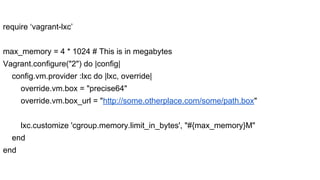
require ‘vagrant-lxc’
max_memory = 4 * 1024 # This is in megabytes
Vagrant.configure("2") do |config|
config.vm.provider :lxc do |lxc, override|
override.vm.box = "precise64"
override.vm.box_url = "http://some.otherplace.com/some/path.box"
lxc.customize 'cgroup.memory.limit_in_bytes', "#{max_memory}M"
end
end
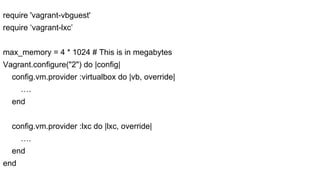
require 'vagrant-vbguest'
require ‘vagrant-lxc’
max_memory = 4 * 1024 # This is in megabytes
Vagrant.configure("2") do |config|
config.vm.provider :virtualbox do |vb, override|
….
end
config.vm.provider :lxc do |lxc, override|
….
end
end
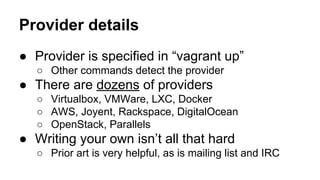
Provider details
● Provider is specified in “vagrant up”
○ Other commands detect the provider

● There are dozens of providers
○ Virtualbox, VMWare, LXC, Docker
○ AWS, Joyent, Rackspace, DigitalOcean
○ OpenStack, Parallels

● Writing your own isn’t all that hard
○ Prior art is very helpful, as is mailing list and IRC
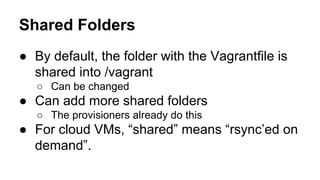
Shared Folders
● By default, the folder with the Vagrantfile is
shared into /vagrant
○ Can be changed

● Can add more shared folders
○ The provisioners already do this

● For cloud VMs, “shared” means “rsync’ed on
demand”.
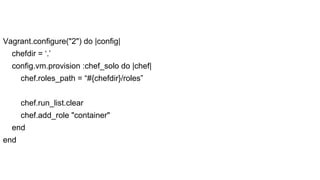
Vagrant.configure("2") do |config|
chefdir = ‘.’
config.vm.provision :chef_solo do |chef|
chef.roles_path = “#{chefdir}/roles”
chef.run_list.clear
chef.add_role "container"
end
end
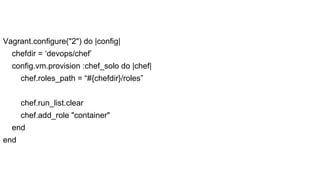
Vagrant.configure("2") do |config|
chefdir = ‘devops/chef’
config.vm.provision :chef_solo do |chef|
chef.roles_path = “#{chefdir}/roles”
chef.run_list.clear
chef.add_role "container"
end
end
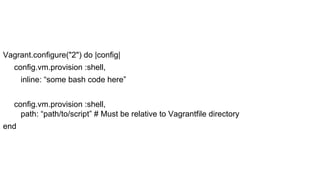
Vagrant.configure("2") do |config|
config.vm.provision :shell,
inline: “some bash code here”
config.vm.provision :shell,
path: “path/to/script” # Must be relative to Vagrantfile directory
end
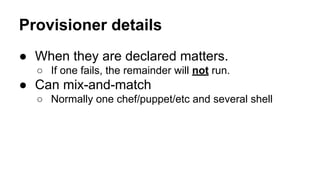
Provisioner details
● When they are declared matters.
○ If one fails, the remainder will not run.

● Can mix-and-match
○ Normally one chef/puppet/etc and several shell
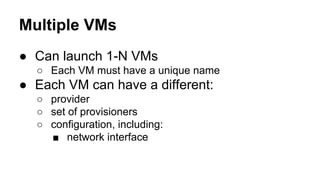
Multiple VMs
● Can launch 1-N VMs
○ Each VM must have a unique name

● Each VM can have a different:
○ provider
○ set of provisioners
○ configuration, including:
■ network interface
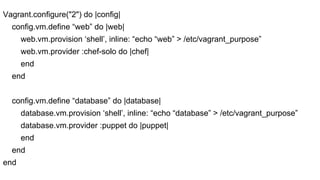
Vagrant.configure("2") do |config|
config.vm.define “web” do |web|
web.vm.provision ‘shell’, inline: “echo “web” > /etc/vagrant_purpose”
web.vm.provider :chef-solo do |chef|
end
end
config.vm.define “database” do |database|
database.vm.provision ‘shell’, inline: “echo “database” > /etc/vagrant_purpose”
database.vm.provider :puppet do |puppet|
end
end
end
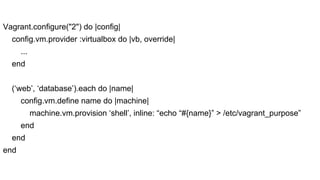
Vagrant.configure("2") do |config|
config.vm.provider :virtualbox do |vb, override|
...
end
(‘web’, ‘database’).each do |name|
config.vm.define name do |machine|
machine.vm.provision ‘shell’, inline: “echo “#{name}” > /etc/vagrant_purpose”
end
end
end
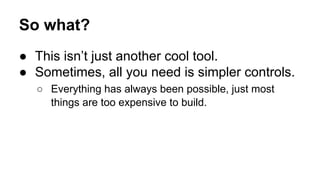
So what?
● This isn’t just another cool tool.
● Sometimes, all you need is simpler controls.
○ Everything has always been possible, just most
things are too expensive to build.
Clone production
● Dev and QA should be clones of Prod
○ Prod doesn’t run on a single server
○ So, why does QA and Dev?
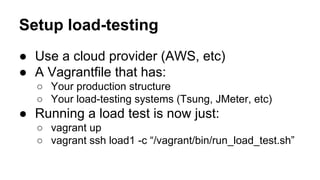
Setup load-testing
● Use a cloud provider (AWS, etc)
● A Vagrantfile that has:
○ Your production structure
○ Your load-testing systems (Tsung, JMeter, etc)

● Running a load test is now just:
○ vagrant up
○ vagrant ssh load1 -c “/vagrant/bin/run_load_test.sh”
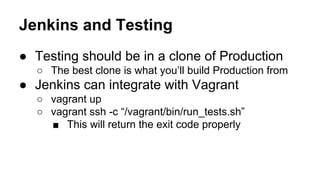
Jenkins and Testing
● Testing should be in a clone of Production
○ The best clone is what you’ll build Production from

● Jenkins can integrate with Vagrant
○ vagrant up
○ vagrant ssh -c “/vagrant/bin/run_tests.sh”
■ This will return the exit code properly
Vagrant.configure("2") do |config|
# Configure the AWS provider here
NUM = # Figure out how many instances to run
(1 .. NUM).each do |index|
config.vm.define “test#{index}” do |test|
test.vm.provision ‘shell’, inline: “echo “test#{index}” > /etc/vagrant_purpose”
test.vm.provider :aws do |aws|
aws.tags = { ‘Name’ => “#{aws.tags[‘Name’]}-test#{index}” }
end
end
end
end
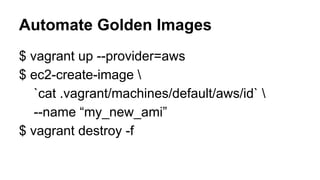
Automate Golden Images
$ vagrant up --provider=aws
$ ec2-create-image 
`cat .vagrant/machines/default/aws/id` 
--name “my_new_ami”
$ vagrant destroy -f
Putting it all together (A Crazy Idea)
● Let developers manage server changes
○ Chef cookbooks for a project are checked into that
project’s repository
○ Developers can make changes
○ Vagrant lets them test out changes in a clone of
production
○ Devops participates in code reviews (as needed)
■ Devops has veto over changes to devops/
directory and code.
Putting it all together (A Crazy Idea)
● Devops is no longer responsible for:
○ Server changes

● Devops IS responsible for:
○ Validating proposed server changes
○ Ensuring the pipeline for server changes
○ Training the developers to own their server changes

● Job changes
○ Build the engine instead of pulling the rickshaw
Questions?
Rob Kinyon
rob.kinyon@gmail.com
rkinyon on Twitter
robkinyon on IRC

Vagrant

  • 1.
  • 2.
    What is Vagrant? ●Syntactic sugar around VMs ○ ○ ○ ○ ○ ○ Virtualbox VMWare LXC AWS Rackspace etc
  • 3.
    What is Vagrant? ●Syntactic sugar around provisioning ○ ○ ○ ○ ○ ○ Chef Puppet Ansible Salt Scripts (bash, etc) etc
  • 4.
    What is Vagrant? ●Five commands ○ ○ ○ ○ ○ vagrant up vagrant provision vagrant ssh vagrant halt vagrant destroy ● Really more like 16 commands (v1.4.3) ○ You really only use the first 5.
  • 5.
    It’s just Ruby ●Runs on Windows, Linux, OSX ● Use all the programming constructs ○ loops ○ variables ○ etc ● Check the environment ○ Great for working with Jenkins ● Bring in modules
  • 6.
    It’s just aconfiguration file ● You’re building a configuration file ○ Actions don’t happen immediately ● The Vagrant engine is intuitive ○ (usually)
  • 7.
    require 'vagrant-vbguest' max_memory =4 * 1024 # This is in megabytes Vagrant.configure("2") do |config| config.vm.provider :virtualbox do |vb, override| override.vm.box = "precise64" override.vm.box_url = "http://some.place.com/some/path.box" vb.customize ["modifyvm", :id, "--memory", max_memory] end end
  • 8.
    require ‘vagrant-lxc’ max_memory =4 * 1024 # This is in megabytes Vagrant.configure("2") do |config| config.vm.provider :lxc do |lxc, override| override.vm.box = "precise64" override.vm.box_url = "http://some.otherplace.com/some/path.box" lxc.customize 'cgroup.memory.limit_in_bytes', "#{max_memory}M" end end
  • 9.
    require 'vagrant-vbguest' require ‘vagrant-lxc’ max_memory= 4 * 1024 # This is in megabytes Vagrant.configure("2") do |config| config.vm.provider :virtualbox do |vb, override| …. end config.vm.provider :lxc do |lxc, override| …. end end
  • 10.
    Provider details ● Provideris specified in “vagrant up” ○ Other commands detect the provider ● There are dozens of providers ○ Virtualbox, VMWare, LXC, Docker ○ AWS, Joyent, Rackspace, DigitalOcean ○ OpenStack, Parallels ● Writing your own isn’t all that hard ○ Prior art is very helpful, as is mailing list and IRC
  • 11.
    Shared Folders ● Bydefault, the folder with the Vagrantfile is shared into /vagrant ○ Can be changed ● Can add more shared folders ○ The provisioners already do this ● For cloud VMs, “shared” means “rsync’ed on demand”.
  • 12.
    Vagrant.configure("2") do |config| chefdir= ‘.’ config.vm.provision :chef_solo do |chef| chef.roles_path = “#{chefdir}/roles” chef.run_list.clear chef.add_role "container" end end
  • 13.
    Vagrant.configure("2") do |config| chefdir= ‘devops/chef’ config.vm.provision :chef_solo do |chef| chef.roles_path = “#{chefdir}/roles” chef.run_list.clear chef.add_role "container" end end
  • 14.
    Vagrant.configure("2") do |config| config.vm.provision:shell, inline: “some bash code here” config.vm.provision :shell, path: “path/to/script” # Must be relative to Vagrantfile directory end
  • 15.
    Provisioner details ● Whenthey are declared matters. ○ If one fails, the remainder will not run. ● Can mix-and-match ○ Normally one chef/puppet/etc and several shell
  • 16.
    Multiple VMs ● Canlaunch 1-N VMs ○ Each VM must have a unique name ● Each VM can have a different: ○ provider ○ set of provisioners ○ configuration, including: ■ network interface
  • 17.
    Vagrant.configure("2") do |config| config.vm.define“web” do |web| web.vm.provision ‘shell’, inline: “echo “web” > /etc/vagrant_purpose” web.vm.provider :chef-solo do |chef| end end config.vm.define “database” do |database| database.vm.provision ‘shell’, inline: “echo “database” > /etc/vagrant_purpose” database.vm.provider :puppet do |puppet| end end end
  • 18.
    Vagrant.configure("2") do |config| config.vm.provider:virtualbox do |vb, override| ... end (‘web’, ‘database’).each do |name| config.vm.define name do |machine| machine.vm.provision ‘shell’, inline: “echo “#{name}” > /etc/vagrant_purpose” end end end
  • 19.
    So what? ● Thisisn’t just another cool tool. ● Sometimes, all you need is simpler controls. ○ Everything has always been possible, just most things are too expensive to build.
  • 20.
    Clone production ● Devand QA should be clones of Prod ○ Prod doesn’t run on a single server ○ So, why does QA and Dev?
  • 21.
    Setup load-testing ● Usea cloud provider (AWS, etc) ● A Vagrantfile that has: ○ Your production structure ○ Your load-testing systems (Tsung, JMeter, etc) ● Running a load test is now just: ○ vagrant up ○ vagrant ssh load1 -c “/vagrant/bin/run_load_test.sh”
  • 22.
    Jenkins and Testing ●Testing should be in a clone of Production ○ The best clone is what you’ll build Production from ● Jenkins can integrate with Vagrant ○ vagrant up ○ vagrant ssh -c “/vagrant/bin/run_tests.sh” ■ This will return the exit code properly
  • 23.
    Vagrant.configure("2") do |config| #Configure the AWS provider here NUM = # Figure out how many instances to run (1 .. NUM).each do |index| config.vm.define “test#{index}” do |test| test.vm.provision ‘shell’, inline: “echo “test#{index}” > /etc/vagrant_purpose” test.vm.provider :aws do |aws| aws.tags = { ‘Name’ => “#{aws.tags[‘Name’]}-test#{index}” } end end end end
  • 24.
    Automate Golden Images $vagrant up --provider=aws $ ec2-create-image `cat .vagrant/machines/default/aws/id` --name “my_new_ami” $ vagrant destroy -f
  • 25.
    Putting it alltogether (A Crazy Idea) ● Let developers manage server changes ○ Chef cookbooks for a project are checked into that project’s repository ○ Developers can make changes ○ Vagrant lets them test out changes in a clone of production ○ Devops participates in code reviews (as needed) ■ Devops has veto over changes to devops/ directory and code.
  • 26.
    Putting it alltogether (A Crazy Idea) ● Devops is no longer responsible for: ○ Server changes ● Devops IS responsible for: ○ Validating proposed server changes ○ Ensuring the pipeline for server changes ○ Training the developers to own their server changes ● Job changes ○ Build the engine instead of pulling the rickshaw
  • 27.