Corporate Travel and
Expense Management App
UX/UI Design Assignment
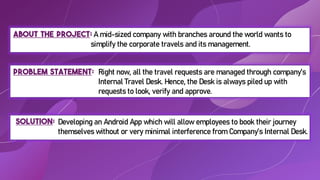
About the project: A mid-sized company with branches around the world wants to
simplify the corporate travels and its management.
Solution:
Problem Statement:
Developing an Android App which will allow employees to book their journey
themselves without or very minimal interference from Company’s Internal Desk.
Right now, all the travel requests are managed through company’s
Internal Travel Desk. Hence, the Desk is always piled up with
requests to look, verify and approve.
Stanford d.school
Why this model?
For solving this problem, we would be using Stanford d.school Design Thinking Model. We preferred this model over others because
it is easy to use, apply and understandable by masses.
This model has 5 stages with each stage having different processes to choose from and apply for the design thinking. These stages
are as follows-
D E S I G N
T H I N K I N G
S T E P S
Try to understand the problems faced by users from their POV
Finally test your prototype with the concerned users and get their feedbacks
Make a prototype of your solution in order to share with stakeholders
and the users in the real market
This step is all about generating multiple ideas/solutions that fits
best to the problem
Narrow down the problems and well define the problem that needs to
be focused upon
1.
EMPATHIZE
Pain-Gain
Analysis:
This method
includes-
• Jobs to be done
• Pains customers
face
• Gains customer
gets
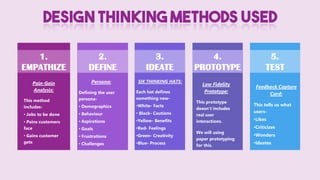
DESIGN THINKING METHODS USED
2.
DEFINE
3.
IDEATE
4.
PROTOTYPE
5.
TEST
Persona:
Defining the user
persona-
• Demographics
• Behaviour
• Aspirations
• Goals
• Frustrations
• Challenges
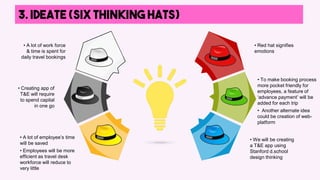
SIX THINKING HATS:
Each hat defines
something new-
•White- Facts
• Black- Cautions
•Yellow- Benefits
•Red- Feelings
•Green- Creativity
•Blue- Process
Low Fidelity
Prototype:
This prototype
doesn’t includes
real user
interactions.
We will using
paper prototyping
for this.
Feedback Capture
Card:
This tells us what
users-
•Likes
•Criticizes
•Wonders
•Ideates
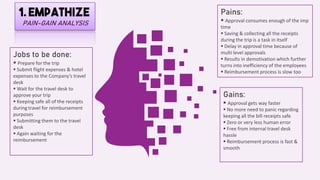
1. EMPATHIZE
PAIN-GAIN ANALYSIS
Jobs to be done:
 Prepare for the trip
 Submit flight expenses & hotel
expenses to the Company’s travel
desk
 Wait for the travel desk to
approve your trip
 Keeping safe all of the receipts
during travel for reimbursement
purposes
 Submitting them to the travel
desk
 Again waiting for the
reimbursement
Pains:
 Approval consumes enough of the imp
time
 Saving & collecting all the receipts
during the trip is a task in itself
 Delay in approval time because of
multi level approvals
 Results in demotivation which further
turns into inefficiency of the employees
 Reimbursement process is slow too
Gains:
 Approval gets way faster
 No more need to panic regarding
keeping all the bill receipts safe
 Zero or very less human error
 Free from internal travel desk
hassle
 Reimbursement process is fast &
smooth
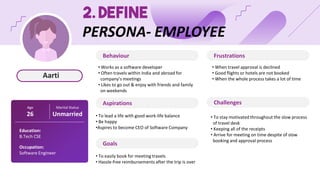
Aarti
2. DEFINE
PERSONA- EMPLOYEE
Age
26
Marital Status
Unmarried
Education:
B.Tech CSE
Occupation:
Software Engineer
Behaviour
Aspirations
Goals
• To easily book for meeting travels
• Hassle-free reimbursements after the trip is over
• To lead a life with good work-life balance
• Be happy
•Aspires to become CEO of Software Company
Frustrations
Challenges
• Works as a software developer
• Often travels within India and abroad for
company’s meetings
• Likes to go out & enjoy with friends and family
on weekends
• When travel approval is declined
• Good flights or hotels are not booked
• When the whole process takes a lot of time
• To stay motivated throughout the slow process
of travel desk
• Keeping all of the receipts
• Arrive for meeting on time despite of slow
booking and approval process
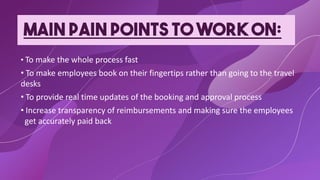
MAIN PAIN POINTS TO WORK ON:
• To make the whole process fast
• To make employees book on their fingertips rather than going to the travel
desks
• To provide real time updates of the booking and approval process
• Increase transparency of reimbursements and making sure the employees
get accurately paid back
3. IDEATE (six thinking hats)
• We will be creating
a T&E app using
Stanford d.school
design thinking
• A lot of employee’s time
will be saved
• Employees will be more
efficient as travel desk
workforce will reduce to
very little
• To make booking process
more pocket friendly for
employees, a feature of
‘advance payment’ will be
added for each trip
• Another alternate idea
could be creation of web-
platform
• Creating app of
T&E will require
to spend capital
in one go
• Red hat signifies
emotions
• A lot of work force
& time is spent for
daily travel bookings
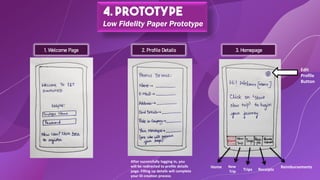
4. Prototype
Low Fidelity Paper Prototype
2. Profile Details 3. Homepage
After successfully logging in, you
will be redirected to profile details
page. Filling up details will complete
your ID creation process
1. Welcome Page
Edit
Profile
Button
Home New
Trip Trips Receipts
Reimbursements
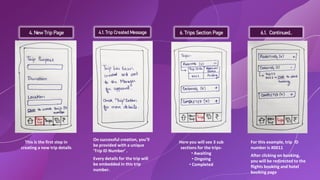
4. New Trip Page
This is the first step in
creating a new trip details
4.1. Trip Created Message 6. Trips Section Page 6.1. Continued..
On successful creation, you’ll
be provided with a unique
‘Trip ID Number’ .
Every details for the trip will
be embedded in this trip
number.
Here you will see 3 sub
sections for the trips-
• Awaiting
• Ongoing
• Completed
For this example, trip ID
number is #0011
After clicking on booking,
you will be redirected to the
flights booking and hotel
booking page
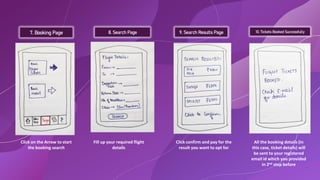
7. Booking Page 8. Search Page 9. Search Results Page 10. Tickets Booked Successfully
Click on the Arrow to start
the booking search
Fill up your required flight
details
Click confirm and pay for the
result you want to opt for
All the booking details (in
this case, ticket details) will
be sent to your registered
email id which you provided
in 2nd step before
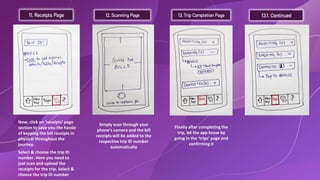
11. Receipts Page 12. Scanning Page 13. Trip Completion Page 13.1. Continued
Now, click on ‘receipts’ page
section to save you the hassle
of keeping the bill receipts in
physical throughout the
journey.
Select & choose the trip ID
number. Here you need to
just scan and upload the
receipts for the trip. Select &
choose the trip ID number
Simply scan through your
phone’s camera and the bill
receipts will be added to the
respective trip ID number
automatically
Finally after completing the
trip, let the app know by
going in the ‘trips’ page and
confirming it
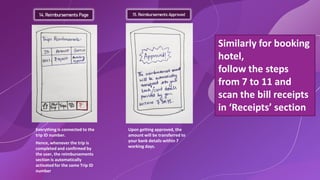
14. Reimbursements Page 15. Reimbursements Approved
Everything is connected to the
trip ID number.
Hence, whenever the trip is
completed and confirmed by
the user, the reimbursements
section is automatically
activated for the same Trip ID
number
Upon getting approved, the
amount will be transferred to
your bank details within 7
working days.
Similarly for booking
hotel,
follow the steps
from 7 to 11 and
scan the bill receipts
in ‘Receipts’ section
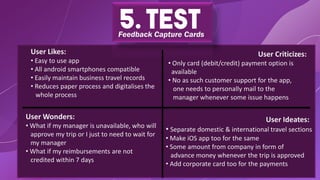
5. Test
Feedback Capture Cards
User Likes:
• Easy to use app
• All android smartphones compatible
• Easily maintain business travel records
• Reduces paper process and digitalises the
whole process
User Wonders:
• What if my manager is unavailable, who will
approve my trip or I just to need to wait for
my manager
• What if my reimbursements are not
credited within 7 days
User Ideates:
• Separate domestic & international travel sections
• Make iOS app too for the same
• Some amount from company in form of
advance money whenever the trip is approved
• Add corporate card too for the payments
User Criticizes:
• Only card (debit/credit) payment option is
available
• No as such customer support for the app,
one needs to personally mail to the
manager whenever some issue happens
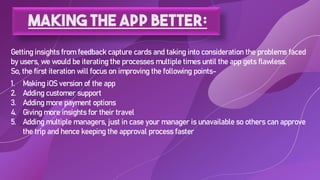
Making the app better:
Getting insights from feedback capture cards and taking into consideration the problems faced
by users, we would be iterating the processes multiple times until the app gets flawless.
So, the first iteration will focus on improving the following points-
1. Making iOS version of the app
2. Adding customer support
3. Adding more payment options
4. Giving more insights for their travel
5. Adding multiple managers, just in case your manager is unavailable so others can approve
the trip and hence keeping the approval process faster

UX_UI_Assignment.pdf

  • 1.
    Corporate Travel and ExpenseManagement App UX/UI Design Assignment
  • 2.
    About the project:A mid-sized company with branches around the world wants to simplify the corporate travels and its management. Solution: Problem Statement: Developing an Android App which will allow employees to book their journey themselves without or very minimal interference from Company’s Internal Desk. Right now, all the travel requests are managed through company’s Internal Travel Desk. Hence, the Desk is always piled up with requests to look, verify and approve.
  • 3.
  • 4.
    Why this model? Forsolving this problem, we would be using Stanford d.school Design Thinking Model. We preferred this model over others because it is easy to use, apply and understandable by masses. This model has 5 stages with each stage having different processes to choose from and apply for the design thinking. These stages are as follows- D E S I G N T H I N K I N G S T E P S Try to understand the problems faced by users from their POV Finally test your prototype with the concerned users and get their feedbacks Make a prototype of your solution in order to share with stakeholders and the users in the real market This step is all about generating multiple ideas/solutions that fits best to the problem Narrow down the problems and well define the problem that needs to be focused upon
  • 5.
    1. EMPATHIZE Pain-Gain Analysis: This method includes- • Jobsto be done • Pains customers face • Gains customer gets DESIGN THINKING METHODS USED 2. DEFINE 3. IDEATE 4. PROTOTYPE 5. TEST Persona: Defining the user persona- • Demographics • Behaviour • Aspirations • Goals • Frustrations • Challenges SIX THINKING HATS: Each hat defines something new- •White- Facts • Black- Cautions •Yellow- Benefits •Red- Feelings •Green- Creativity •Blue- Process Low Fidelity Prototype: This prototype doesn’t includes real user interactions. We will using paper prototyping for this. Feedback Capture Card: This tells us what users- •Likes •Criticizes •Wonders •Ideates
  • 6.
    1. EMPATHIZE PAIN-GAIN ANALYSIS Jobsto be done:  Prepare for the trip  Submit flight expenses & hotel expenses to the Company’s travel desk  Wait for the travel desk to approve your trip  Keeping safe all of the receipts during travel for reimbursement purposes  Submitting them to the travel desk  Again waiting for the reimbursement Pains:  Approval consumes enough of the imp time  Saving & collecting all the receipts during the trip is a task in itself  Delay in approval time because of multi level approvals  Results in demotivation which further turns into inefficiency of the employees  Reimbursement process is slow too Gains:  Approval gets way faster  No more need to panic regarding keeping all the bill receipts safe  Zero or very less human error  Free from internal travel desk hassle  Reimbursement process is fast & smooth
  • 7.
    Aarti 2. DEFINE PERSONA- EMPLOYEE Age 26 MaritalStatus Unmarried Education: B.Tech CSE Occupation: Software Engineer Behaviour Aspirations Goals • To easily book for meeting travels • Hassle-free reimbursements after the trip is over • To lead a life with good work-life balance • Be happy •Aspires to become CEO of Software Company Frustrations Challenges • Works as a software developer • Often travels within India and abroad for company’s meetings • Likes to go out & enjoy with friends and family on weekends • When travel approval is declined • Good flights or hotels are not booked • When the whole process takes a lot of time • To stay motivated throughout the slow process of travel desk • Keeping all of the receipts • Arrive for meeting on time despite of slow booking and approval process
  • 8.
    MAIN PAIN POINTSTO WORK ON: • To make the whole process fast • To make employees book on their fingertips rather than going to the travel desks • To provide real time updates of the booking and approval process • Increase transparency of reimbursements and making sure the employees get accurately paid back
  • 9.
    3. IDEATE (sixthinking hats) • We will be creating a T&E app using Stanford d.school design thinking • A lot of employee’s time will be saved • Employees will be more efficient as travel desk workforce will reduce to very little • To make booking process more pocket friendly for employees, a feature of ‘advance payment’ will be added for each trip • Another alternate idea could be creation of web- platform • Creating app of T&E will require to spend capital in one go • Red hat signifies emotions • A lot of work force & time is spent for daily travel bookings
  • 10.
    4. Prototype Low FidelityPaper Prototype 2. Profile Details 3. Homepage After successfully logging in, you will be redirected to profile details page. Filling up details will complete your ID creation process 1. Welcome Page Edit Profile Button Home New Trip Trips Receipts Reimbursements
  • 11.
    4. New TripPage This is the first step in creating a new trip details 4.1. Trip Created Message 6. Trips Section Page 6.1. Continued.. On successful creation, you’ll be provided with a unique ‘Trip ID Number’ . Every details for the trip will be embedded in this trip number. Here you will see 3 sub sections for the trips- • Awaiting • Ongoing • Completed For this example, trip ID number is #0011 After clicking on booking, you will be redirected to the flights booking and hotel booking page
  • 12.
    7. Booking Page8. Search Page 9. Search Results Page 10. Tickets Booked Successfully Click on the Arrow to start the booking search Fill up your required flight details Click confirm and pay for the result you want to opt for All the booking details (in this case, ticket details) will be sent to your registered email id which you provided in 2nd step before
  • 13.
    11. Receipts Page12. Scanning Page 13. Trip Completion Page 13.1. Continued Now, click on ‘receipts’ page section to save you the hassle of keeping the bill receipts in physical throughout the journey. Select & choose the trip ID number. Here you need to just scan and upload the receipts for the trip. Select & choose the trip ID number Simply scan through your phone’s camera and the bill receipts will be added to the respective trip ID number automatically Finally after completing the trip, let the app know by going in the ‘trips’ page and confirming it
  • 14.
    14. Reimbursements Page15. Reimbursements Approved Everything is connected to the trip ID number. Hence, whenever the trip is completed and confirmed by the user, the reimbursements section is automatically activated for the same Trip ID number Upon getting approved, the amount will be transferred to your bank details within 7 working days. Similarly for booking hotel, follow the steps from 7 to 11 and scan the bill receipts in ‘Receipts’ section
  • 15.
    5. Test Feedback CaptureCards User Likes: • Easy to use app • All android smartphones compatible • Easily maintain business travel records • Reduces paper process and digitalises the whole process User Wonders: • What if my manager is unavailable, who will approve my trip or I just to need to wait for my manager • What if my reimbursements are not credited within 7 days User Ideates: • Separate domestic & international travel sections • Make iOS app too for the same • Some amount from company in form of advance money whenever the trip is approved • Add corporate card too for the payments User Criticizes: • Only card (debit/credit) payment option is available • No as such customer support for the app, one needs to personally mail to the manager whenever some issue happens
  • 16.
    Making the appbetter: Getting insights from feedback capture cards and taking into consideration the problems faced by users, we would be iterating the processes multiple times until the app gets flawless. So, the first iteration will focus on improving the following points- 1. Making iOS version of the app 2. Adding customer support 3. Adding more payment options 4. Giving more insights for their travel 5. Adding multiple managers, just in case your manager is unavailable so others can approve the trip and hence keeping the approval process faster