Announcements
• Program Assignment#1 due Tuesday
Feb. 15 at 11:55 pm
– TA will explain parts b-d in recitation
• Read chapters 7 and 8
• Today:
– Finish RR and multi-level scheduling,
– cover Signals (helpful for PA #1), and
– begin Ch. 8 Synchronization
3.
Round Robin Scheduling(cont.)
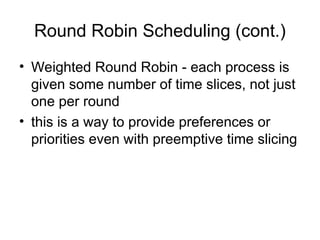
• Weighted Round Robin - each process is
given some number of time slices, not just
one per round
• this is a way to provide preferences or
priorities even with preemptive time slicing
4.
Multi-level Queue Scheduling
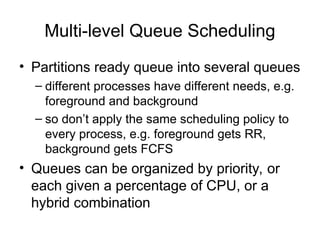
•Partitions ready queue into several queues
– different processes have different needs, e.g.
foreground and background
– so don’t apply the same scheduling policy to
every process, e.g. foreground gets RR,
background gets FCFS
• Queues can be organized by priority, or
each given a percentage of CPU, or a
hybrid combination
5.
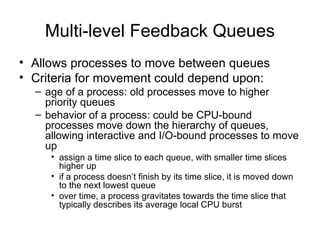
Multi-level Feedback Queues
•Allows processes to move between queues
• Criteria for movement could depend upon:
– age of a process: old processes move to higher
priority queues
– behavior of a process: could be CPU-bound
processes move down the hierarchy of queues,
allowing interactive and I/O-bound processes to move
up
• assign a time slice to each queue, with smaller time slices
higher up
• if a process doesn’t finish by its time slice, it is moved down
to the next lowest queue
• over time, a process gravitates towards the time slice that
typically describes its average local CPU burst
6.
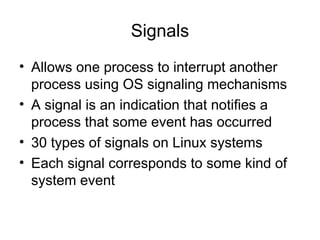
Signals
• Allows oneprocess to interrupt another
process using OS signaling mechanisms
• A signal is an indication that notifies a
process that some event has occurred
• 30 types of signals on Linux systems
• Each signal corresponds to some kind of
system event
7.
Signals
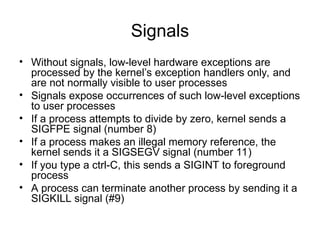
• Without signals,low-level hardware exceptions are
processed by the kernel’s exception handlers only, and
are not normally visible to user processes
• Signals expose occurrences of such low-level exceptions
to user processes
• If a process attempts to divide by zero, kernel sends a
SIGFPE signal (number 8)
• If a process makes an illegal memory reference, the
kernel sends it a SIGSEGV signal (number 11)
• If you type a ctrl-C, this sends a SIGINT to foreground
process
• A process can terminate another process by sending it a
SIGKILL signal (#9)
8.
Signals
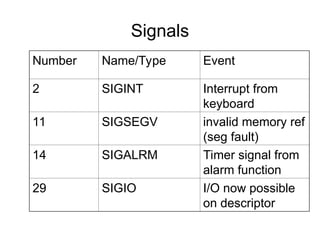
Number Name/Type Event
2SIGINT Interrupt from
keyboard
11 SIGSEGV invalid memory ref
(seg fault)
14 SIGALRM Timer signal from
alarm function
29 SIGIO I/O now possible
on descriptor
9.
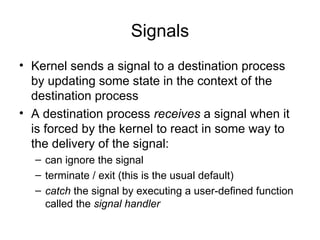
Signals
• Kernel sendsa signal to a destination process
by updating some state in the context of the
destination process
• A destination process receives a signal when it
is forced by the kernel to react in some way to
the delivery of the signal:
– can ignore the signal
– terminate / exit (this is the usual default)
– catch the signal by executing a user-defined function
called the signal handler
10.
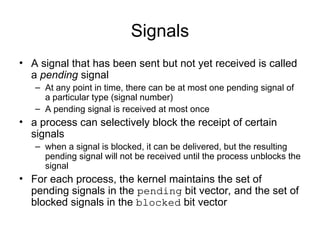
Signals
• A signalthat has been sent but not yet received is called
a pending signal
– At any point in time, there can be at most one pending signal of
a particular type (signal number)
– A pending signal is received at most once
• a process can selectively block the receipt of certain
signals
– when a signal is blocked, it can be delivered, but the resulting
pending signal will not be received until the process unblocks the
signal
• For each process, the kernel maintains the set of
pending signals in the pending bit vector, and the set of
blocked signals in the blocked bit vector
11.
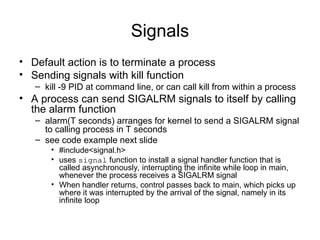
Signals
• Default actionis to terminate a process
• Sending signals with kill function
– kill -9 PID at command line, or can call kill from within a process
• A process can send SIGALRM signals to itself by calling
the alarm function
– alarm(T seconds) arranges for kernel to send a SIGALRM signal
to calling process in T seconds
– see code example next slide
• #include<signal.h>
• uses signal function to install a signal handler function that is
called asynchronously, interrupting the infinite while loop in main,
whenever the process receives a SIGALRM signal
• When handler returns, control passes back to main, which picks up
where it was interrupted by the arrival of the signal, namely in its
infinite loop
12.
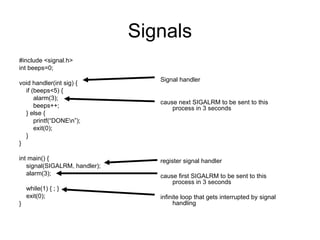
Signals
#include <signal.h>
int beeps=0;
voidhandler(int sig) {
if (beeps<5) {
alarm(3);
beeps++;
} else {
printf(“DONEn”);
exit(0);
}
}
int main() {
signal(SIGALRM, handler);
alarm(3);
while(1) { ; }
exit(0);
}
Signal handler
cause next SIGALRM to be sent to this
process in 3 seconds
register signal handler
cause first SIGALRM to be sent to this
process in 3 seconds
infinite loop that gets interrupted by signal
handling
13.
Signals
• Receiving signals:
–when a kernel is returning from some exception handler, it
checks to see if there are any pending signals for a process
before passing control to the process
– default action is typically termination
– signal(signum, handler) function is used to change the
action associated with a signal
• if handler is SIG_IGN, then signals of type signum are ignored
• if handler is SIG_DFL, then revert to default action
• otherwise handler is user-defined function call the signal handler.
This installs or registers the signal handler.
– Invocation of the signal handler is called catching the signal
– Execution of signal handler is called handling the signal
14.
Signals
• When aprocess catches a signal of type
signum=k, the handler installed for signal k is
invoked with a single integer argument set to k
• This argument allows the same handler function
to catch different types of signals
• When handler executes its return statement
(finishes), control usually passes back to the
instruction where the process was interrupted
15.
Signals
• Handling multiplesignals
– choose to handle the lower number signals first
– pending signals are blocked,
• e.g. if a 2nd
SIGINT is received while handling 1st
SIGINT, the
2nd
SIGINT becomes pending and won’t be received until after
the handler returns
– pending signals are not queued
• there can be at most one pending signal of type k, e.g. if a 3rd
SIGINT arrives while the 1st
SIGINT is being handled and the
2nd
SIGINT is already pending, then the 3rd
SIGINT is dropped
– system calls can be interrupted
• slow system calls that are interrupted by signal handling may
not resume in some systems, and may return immediately
with an error
16.
Signals
• Portable signalhandling: sigaction() is a standard
POSIX API for signal handling
– allows users on Posix-compliant systems such as Linux and
Solaris to specify the signal-handling semantics they want, e.g.
whether sys call is aborted or restarted
• sigaction(signum, struct sigaction*act, struct
sigaction *oldact)
• each struct sigaction can define a handler, e.g.
action.sa_handler = handler;
• In part iv of PA #1,
– use sigaction() to define the handler, e.g. reschedule()
– Also need to set up the timer - use setitimer instead of alarm. A
SIGALRM is delivered when timer expires.
17.
Chapter 8: Synchronization
•Protect access to shared common resources,
e.g. buffers, variables, files, devices, etc., by
using some type of synchronization
• Examples:
– processes P1 and P2 use IPC to establish a shared
memory buffer between them, and have to arbitrate
access to avoid writing to the same memory location
at the same time
– Threads T1 and T2 shared some global variables,
and have to synchronize to avoid writing to the same
memory location at the same time
• Producer-Consumer example, next slide
18.
Synchronization
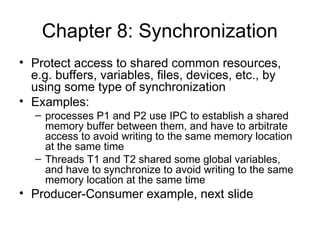
• a Producerprocess P1 and a Consumer process P2
share some memory, say a bounded buffer
• Producer writes data into shared memory, while
Consumer reads data
• In order to indicate that there is new data (produced), or
that existing data has been read (consumed), then
define a variable counter
– keeps track of how much new data is in the buffer that has not
yet been read
– if counter==0, then consumer shouldn’t read from the buffer
– if counter==MAX_BUFF_SIZE, then producer can’t write to the
buffer
19.
Synchronization
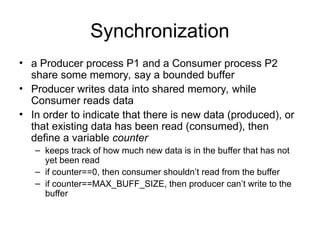
while(1) {
while(counter==MAX);
buffer[in] =nextdata;
in = (in+1) % MAX;
counter++;
}
Data
Bounded Buffer
counter
Producer
Process
Consumer
Process
while(1) {
while(counter==0);
getdata = buffer[out];
out = (out+1) % MAX;
counter--;
}
Producer writes new data into
buffer and increments counter
Consumer reads new data from
buffer and decrements counter
counter
updates
can conflict!
buffer[0]
buffer[MAX]
20.
Synchronization
counter++; can translate
intoseveral machine
language instructions,
e.g.
reg1 = counter;
reg1 = reg1 + 1;
counter = reg1;
counter--; can translate
into several machine
language instructions,
e.g.
reg2 = counter;
reg2 = reg2 - 1;
counter = reg2;
If these low-level instructions are interleaved, e.g. the Producer process
is context-switched out, and the Consumer process is context-switched in,
and vice versa, then the results of counter’s value can be unpredictable
21.
Synchronization
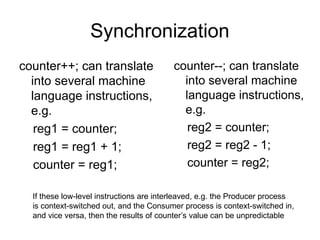
// counter++
reg1 =counter;
reg1 = reg1 + 1;
counter = reg1;
// counter--;
reg2 = counter;
reg2 = reg2 - 1;
counter = reg2;
(1)
[5]
(3)
[6]
(2)
[5]
(4)
[4]
(5)
[6]
(6)
[4]
• Suppose we have the following sequence of interleaving, where
the brackets [value] denote the local value of counter in either the
producer or consumer’s process. Let counter=5 initially.
• At the end, counter = 4. But if steps (5) and (6) were reversed, then counter=6 !!!
• Value of shared variable counter changes depending upon (an arbitrary) order of
writes - very undesirable!
![Synchronization
while(1) {
while(counter==MAX);
buffer[in] = nextdata;
in = (in+1) % MAX;
counter++;
}
Data
Bounded Buffer
counter
Producer
Process
Consumer
Process
while(1) {
while(counter==0);
getdata = buffer[out];
out = (out+1) % MAX;
counter--;
}
Producer writes new data into
buffer and increments counter
Consumer reads new data from
buffer and decrements counter
counter
updates
can conflict!
buffer[0]
buffer[MAX]](https://image.slidesharecdn.com/021005signalssynch-250331104756-c070e5be/85/Traffic-Signal-Synchronization-Operating-Systems-19-320.jpg)
![Synchronization
// counter++
reg1 = counter;
reg1 = reg1 + 1;
counter = reg1;
// counter--;
reg2 = counter;
reg2 = reg2 - 1;
counter = reg2;
(1)
[5]
(3)
[6]
(2)
[5]
(4)
[4]
(5)
[6]
(6)
[4]
• Suppose we have the following sequence of interleaving, where
the brackets [value] denote the local value of counter in either the
producer or consumer’s process. Let counter=5 initially.
• At the end, counter = 4. But if steps (5) and (6) were reversed, then counter=6 !!!
• Value of shared variable counter changes depending upon (an arbitrary) order of
writes - very undesirable!](https://image.slidesharecdn.com/021005signalssynch-250331104756-c070e5be/85/Traffic-Signal-Synchronization-Operating-Systems-21-320.jpg)


