USING WIKISPACES IN THE CLASSROOM A Presentation by Craig Wheatley
What is Wikispaces? Wikispaces is a free hosting service that allows the placement of information on a page for a purpose, and allows anyone to access and contribute to the page Example:  A student may set up a wikispace for a class project Wikispaces.com
Why would I need to use this in my classroom? Wikispaces can be used to enhance instruction and bring it into the twenty-first century. Wikispaces is also a FREE alternative to students to upload information and to be creative. Even though these are great, Wikispaces can do a whole lot more.
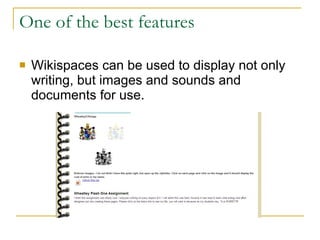
One of the best features Wikispaces can be used to display not only writing, but images and sounds and documents for use.
Make a class Wikispaces page On a Wikispace, teachers have the option to organize projects and with that, all information is located in one spot.  This feature prevents students from wondering where a part is.
Online learning center option With a wikispace, a student can be invited to contribute, and they themselves can do their work on the wikispace site.
Communication and Access Wikispaces is a great tool for discussion and communication as a tab can be added where questions may be posed. Wikispaces can be accessed anywhere that there is a device that hooks up to the internet.  Students can work at school and then work at home.
How is Wikispaces good for all learners? Wikispaces allows for differentiated instruction It is easily accessible Allows students to be creative and collaborative Easy to manage and navigate
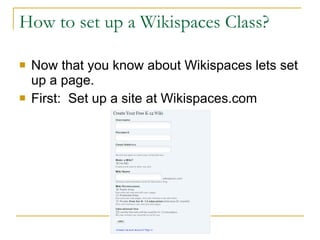
How to set up a Wikispaces Class? Now that you know about Wikispaces lets set up a page. First:  Set up a site at Wikispaces.com
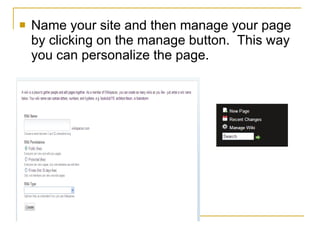
Name your site and then manage your page by clicking on the manage button.  This way you can personalize the page.
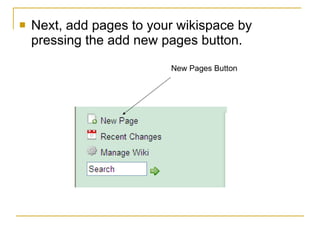
Next, add pages to your wikispace by pressing the add new pages button. New Pages Button
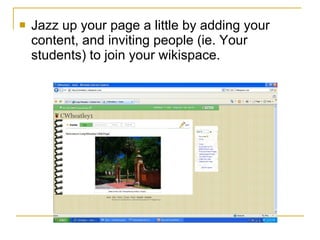
Jazz up your page a little by adding your content, and inviting people (ie. Your students) to join your wikispace.
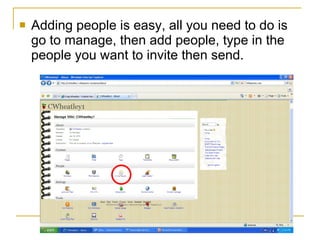
Adding people is easy, all you need to do is go to manage, then add people, type in the people you want to invite then send.
ENJOY  YOUR  WIKISPACE

Using Wikispaces In The Classroom

  • 1.
    USING WIKISPACES INTHE CLASSROOM A Presentation by Craig Wheatley
  • 2.
    What is Wikispaces?Wikispaces is a free hosting service that allows the placement of information on a page for a purpose, and allows anyone to access and contribute to the page Example: A student may set up a wikispace for a class project Wikispaces.com
  • 3.
    Why would Ineed to use this in my classroom? Wikispaces can be used to enhance instruction and bring it into the twenty-first century. Wikispaces is also a FREE alternative to students to upload information and to be creative. Even though these are great, Wikispaces can do a whole lot more.
  • 4.
    One of thebest features Wikispaces can be used to display not only writing, but images and sounds and documents for use.
  • 5.
    Make a classWikispaces page On a Wikispace, teachers have the option to organize projects and with that, all information is located in one spot. This feature prevents students from wondering where a part is.
  • 6.
    Online learning centeroption With a wikispace, a student can be invited to contribute, and they themselves can do their work on the wikispace site.
  • 7.
    Communication and AccessWikispaces is a great tool for discussion and communication as a tab can be added where questions may be posed. Wikispaces can be accessed anywhere that there is a device that hooks up to the internet. Students can work at school and then work at home.
  • 8.
    How is Wikispacesgood for all learners? Wikispaces allows for differentiated instruction It is easily accessible Allows students to be creative and collaborative Easy to manage and navigate
  • 9.
    How to setup a Wikispaces Class? Now that you know about Wikispaces lets set up a page. First: Set up a site at Wikispaces.com
  • 10.
    Name your siteand then manage your page by clicking on the manage button. This way you can personalize the page.
  • 11.
    Next, add pagesto your wikispace by pressing the add new pages button. New Pages Button
  • 12.
    Jazz up yourpage a little by adding your content, and inviting people (ie. Your students) to join your wikispace.
  • 13.
    Adding people iseasy, all you need to do is go to manage, then add people, type in the people you want to invite then send.
  • 14.
    ENJOY YOUR WIKISPACE