
Wide World of Wikis www.mhsdivas.wikispaces.com January 17, 2009 Melissa Lynch and Wendy Sutton
Wikispaces for Teachers A Guide to Using Them in Your Classroom
Getting to Know You!
Our Objectives To introduce teachers to wikis and their many uses in education. To encourage and assist in the design and use of their own classroom wikis.
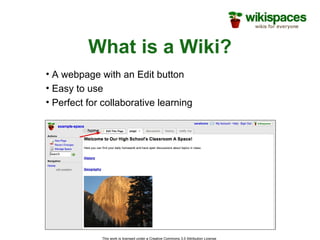
What is a Wiki? A webpage with an Edit button Easy to use Perfect for collaborative learning
Why Bring It To The Classroom? Promotes communication between students, teachers, and parents Great motivator for students Easy to monitor Allows for creativity and innovation Encourages participation of all students A new, interesting way to learn
How Can I Use it in a Classroom? Simple websites Peer-reviewed projects Group projects Manage school and classroom documents  Classroom discussion and debate Teacher collaboration Post classroom assignments Collaborate with an international classroom
Examples of Wikis www.wikipedia.com www. thebeehive . wikispaces .com www.gadgetcamp.wikispaces.com www.terrythetennisball.wikispaces.com ADD MORE
Getting Started…
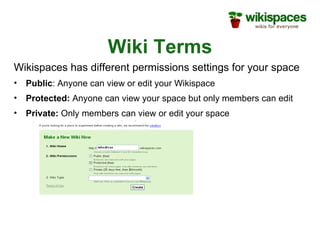
Wiki Terms Wikispaces has different permissions settings for your space Public : Anyone can view or edit your Wikispace Protected:  Anyone can view your space but only members can edit Private:  Only members can view or edit your space
Wikispace Tour Introduction http://www.wikispaces.com/site/tour#introduction
Activity Use your handout to sign-up for your wikispaces account. Edit your page and experiment using the font and formatting tools.
Wikispace Tour Look and Feel http://www.wikispaces.com/site/tour#myspace
Activity Click on the Manage Wiki Button on the left side of your wikispace page.  Click on Look and Feel and play with your space theme and color scheme.
Wikispace Tour Files and Photos http://www.wikispaces.com/site/tour#files
Questions? Visit us: http://www.wikispaces.com http://www.wikispaces.com Email us: [email_address] [email_address] [email_address]

Wide World of Wikis

  • 1.
    Wide World ofWikis www.mhsdivas.wikispaces.com January 17, 2009 Melissa Lynch and Wendy Sutton
  • 2.
    Wikispaces for TeachersA Guide to Using Them in Your Classroom
  • 3.
  • 4.
    Our Objectives Tointroduce teachers to wikis and their many uses in education. To encourage and assist in the design and use of their own classroom wikis.
  • 5.
    What is aWiki? A webpage with an Edit button Easy to use Perfect for collaborative learning
  • 6.
    Why Bring ItTo The Classroom? Promotes communication between students, teachers, and parents Great motivator for students Easy to monitor Allows for creativity and innovation Encourages participation of all students A new, interesting way to learn
  • 7.
    How Can IUse it in a Classroom? Simple websites Peer-reviewed projects Group projects Manage school and classroom documents Classroom discussion and debate Teacher collaboration Post classroom assignments Collaborate with an international classroom
  • 8.
    Examples of Wikiswww.wikipedia.com www. thebeehive . wikispaces .com www.gadgetcamp.wikispaces.com www.terrythetennisball.wikispaces.com ADD MORE
  • 9.
  • 10.
    Wiki Terms Wikispaceshas different permissions settings for your space Public : Anyone can view or edit your Wikispace Protected: Anyone can view your space but only members can edit Private: Only members can view or edit your space
  • 11.
    Wikispace Tour Introductionhttp://www.wikispaces.com/site/tour#introduction
  • 12.
    Activity Use yourhandout to sign-up for your wikispaces account. Edit your page and experiment using the font and formatting tools.
  • 13.
    Wikispace Tour Lookand Feel http://www.wikispaces.com/site/tour#myspace
  • 14.
    Activity Click onthe Manage Wiki Button on the left side of your wikispace page. Click on Look and Feel and play with your space theme and color scheme.
  • 15.
    Wikispace Tour Filesand Photos http://www.wikispaces.com/site/tour#files
  • 16.
    Questions? Visit us:http://www.wikispaces.com http://www.wikispaces.com Email us: [email_address] [email_address] [email_address]