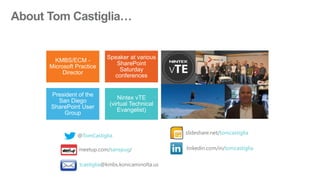
KMBS/ECM -
Microsoft Practice
Director
Speaker at various
SharePoint
Saturday
conferences
President of the
San Diego
SharePoint User
Group
Nintex vTE
(virtual Technical
Evangelist)
@TomCastiglia
linkedin.com/in/tomcastiglia
slideshare.net/tomcastiglia
tcastiglia@kmbs.konicaminolta.us
meetup.com/sanspug/
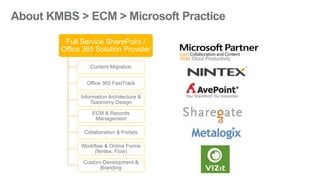
Full Service SharePoint /
Office 365 Solution Provider
Content Migration
Office 365 FastTrack
Information Architecture &
Taxonomy Design
ECM & Records
Management
Collaboration & Portals
Workflow & Online Forms
(Nintex, Flow)
Custom Development &
Branding
Gold Cloud Productivity
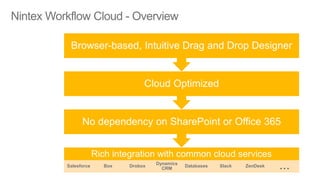
Rich integration with common cloud services
Salesforce Box Drobox
Dynamics
CRM
Databases Slack ZenDesk …
No dependency on SharePoint or Office 365
Cloud Optimized
Browser-based, Intuitive Drag and Drop Designer
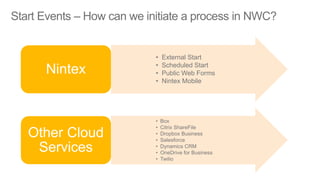
• External Start
• Scheduled Start
• Public Web Forms
• Nintex Mobile
Nintex
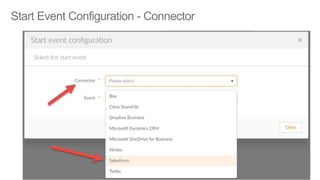
• Box
• Citrix ShareFile
• Dropbox Business
• Salesforce
• Dynamics CRM
• OneDrive for Business
• Twilio
Other Cloud
Services
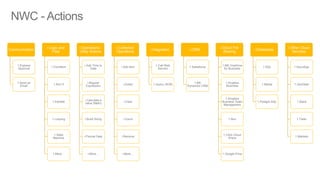
Communication
1.Express
Approval
1.Send an
Email
i.Logic and
Flow
1.Condition
1.Run If
1.Parallel
1.Looping
1.State
Machine
1.More…
i.Operations /
Utility Actions
i.Add Time to
Date
i.Regular
Expression
i.Calculate a
value (Math)
i.Build String
i.Format Date
i.More…
i.Collection
Operations
i.Add item
i.Exists
i.Clear
i.Count
i.Remove
i.More…
i.Integration
1.Call Web
Service
1.Query JSON
i.CRM
1.Salesforce
1.MS
Dynamics CRM
i.Cloud File
Sharing
1.MS OneDrive
for Business
1.Dropbox
Business
1.Dropbox
Business Team
Management
1.Box
1.Citrix Cloud
Share
1.Google Drive
i.Databases
1.SQL
1.MySql
1.Postgre SQL
i.Other Cloud
Services
1.DocuSign
1.ZenDesk
1.Slack
1.Twilio
1.Marketo
•
•
•
•
•
•
•
•
•
•
•
•
•
•
•
•
•
•
•
Using Nintex Workflow Cloud with Salesforce for customer surveys

Using Nintex Workflow Cloud with Salesforce for customer surveys

  • 3.
    KMBS/ECM - Microsoft Practice Director Speakerat various SharePoint Saturday conferences President of the San Diego SharePoint User Group Nintex vTE (virtual Technical Evangelist) @TomCastiglia linkedin.com/in/tomcastiglia slideshare.net/tomcastiglia tcastiglia@kmbs.konicaminolta.us meetup.com/sanspug/
  • 4.
    Full Service SharePoint/ Office 365 Solution Provider Content Migration Office 365 FastTrack Information Architecture & Taxonomy Design ECM & Records Management Collaboration & Portals Workflow & Online Forms (Nintex, Flow) Custom Development & Branding Gold Cloud Productivity
  • 5.
    Rich integration withcommon cloud services Salesforce Box Drobox Dynamics CRM Databases Slack ZenDesk … No dependency on SharePoint or Office 365 Cloud Optimized Browser-based, Intuitive Drag and Drop Designer
  • 6.
    • External Start •Scheduled Start • Public Web Forms • Nintex Mobile Nintex • Box • Citrix ShareFile • Dropbox Business • Salesforce • Dynamics CRM • OneDrive for Business • Twilio Other Cloud Services
  • 7.
    Communication 1.Express Approval 1.Send an Email i.Logic and Flow 1.Condition 1.RunIf 1.Parallel 1.Looping 1.State Machine 1.More… i.Operations / Utility Actions i.Add Time to Date i.Regular Expression i.Calculate a value (Math) i.Build String i.Format Date i.More… i.Collection Operations i.Add item i.Exists i.Clear i.Count i.Remove i.More… i.Integration 1.Call Web Service 1.Query JSON i.CRM 1.Salesforce 1.MS Dynamics CRM i.Cloud File Sharing 1.MS OneDrive for Business 1.Dropbox Business 1.Dropbox Business Team Management 1.Box 1.Citrix Cloud Share 1.Google Drive i.Databases 1.SQL 1.MySql 1.Postgre SQL i.Other Cloud Services 1.DocuSign 1.ZenDesk 1.Slack 1.Twilio 1.Marketo
  • 8.
  • 9.

Editor's Notes

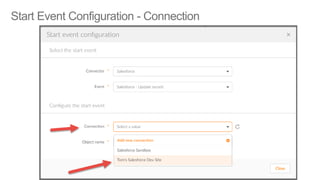
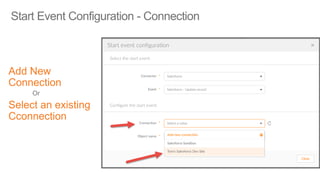
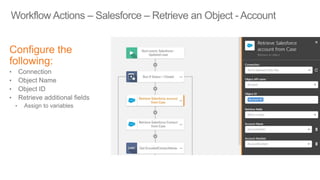
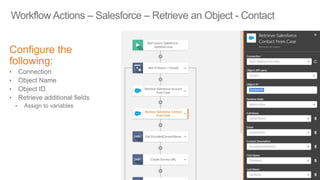
  • #19 Select the desired connection (same one used in Start Event) The select the Object from the drop down list In this case, the Account ID was provided as a Start Variable from the Salesforce Case Closed start event. SO we pass that value into Object ID field. We can now select which Account fields we want to return. In this case, I selected Account Name and Account Number.
  • #20 This is the same as with Account, but we are retrieving details for the customer Contact that is assigned to the Case. We’re retrieving Full Name, Email, Contact Description, First Name, Last Name. Essentially we’ll need to use the Account and Contact info in the survey notification that we send to the contact.
  • #21 This is the same as with Account, but we are retrieving details for the customer Contact that is assigned to the Case. We’re retrieving Full Name, Email, Contact Description, First Name, Last Name. Essentially we’ll need to use the Account and Contact info in the survey notification that we send to the contact.
  • #22 This is the same as with Account, but we are retrieving details for the customer Contact that is assigned to the Case. We’re retrieving Full Name, Email, Contact Description, First Name, Last Name. Essentially we’ll need to use the Account and Contact info in the survey notification that we send to the contact.