Using Mobile Learning for Induction,
Compliance and Performance Support
Alex Mackman, Technical Director
Agenda
• Why mobile?
• Scenarios
• Performance Support
• Compliance
• Induction
• Mobile learning checklist
• Q&A
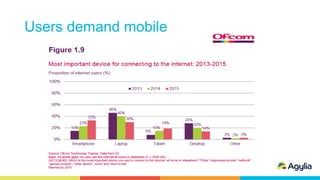
Users demand mobile
Scenarios
• Augmenting formal learning
• Performance Support
• Compliance
• Induction
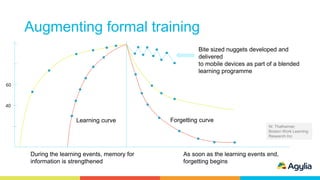
Augmenting formal training
During the learning events, memory for
information is strengthened
As soon as the learning events end,
forgetting begins
Forgetting curve
W. Thalheimer,
Boston Work Learning
Research Inc
40
60
Learning curve
Bite sized nuggets developed and
delivered
to mobile devices as part of a blended
learning programme
Performance Support
Performance Support
• Improving skills and learning while doing real tasks on the job
• How to videos
• Reference manuals and materials
• Procedures and checklists
• Infographics
• Mini Apps (small performance support tools distributed to targeted user groups)
• Contextual relevance and discoverability - more important than pixel
perfect content
• Help users find what they want, when they need it
• At home people are used to almost instant access to information and problem solving
through social networks
• The expectations for the same experience in the workplace is growing
• Must be kept up to date (push notifications)
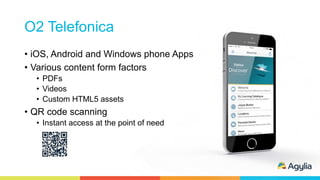
O2 Telefonica
• iOS, Android and Windows phone Apps
• Various content form factors
• PDFs
• Videos
• Custom HTML5 assets
• QR code scanning
• Instant access at the point of need
Compliance
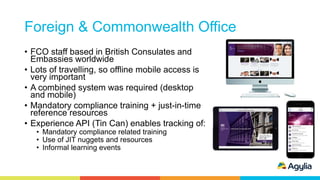
Foreign & Commonwealth Office
• FCO staff based in British Consulates and
Embassies worldwide
• Lots of travelling, so offline mobile access is
very important
• A combined system was required (desktop
and mobile)
• Mandatory compliance training + just-in-time
reference resources
• Experience API (Tin Can) enables tracking of:
• Mandatory compliance related training
• Use of JIT nuggets and resources
• Informal learning events
Induction
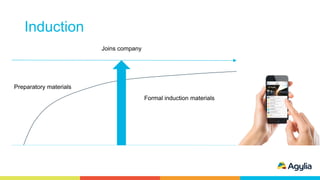
Induction
Joins company
Preparatory materials
Formal induction materials
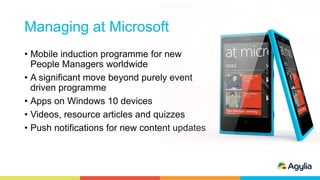
Managing at Microsoft
• Mobile induction programme for new
People Managers worldwide
• A significant move beyond purely event
driven programme
• Apps on Windows 10 devices
• Videos, resource articles and quizzes
• Push notifications for new content updates
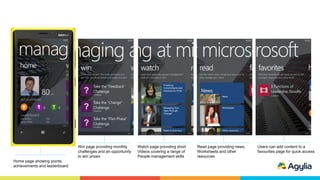
Win page providing monthly
challenges and an opportunity
to win prizes
Watch page providing short
Videos covering a range of
People management skills
Read page providing news,
Worksheets and other
resources
Home page showing points,
achievements and leaderboard
Users can add content to a
favourites page for quick access
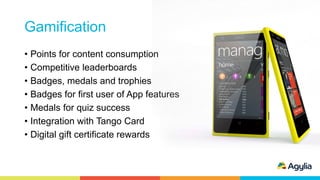
Gamification
• Points for content consumption
• Competitive leaderboards
• Badges, medals and trophies
• Badges for first user of App features
• Medals for quiz success
• Integration with Tango Card
• Digital gift certificate rewards
Gamification
• Gartner predicts that this year:
• 70% of the top 2,000 global organisations will use gamification as a
primary mechanism for organisational change
• This is a >100% increase from the 20% predicted in 2012
What you need to consider
Mobile learning checklist
 BYOD support with native Apps for iOS, Android and Windows
 User experience
 Offline content consumption
 Multiple asset types (e.g. Videos, eLearning, PDFs and custom HTML5 assets)
 Multiple content sources
 Dynamic content with push notifications
 Experience API (tracking with backwards compatibility with SCORM)
 A range of security options
 Scalability and speed of implementation
 Provides traditional online support
Q&A
www.agylia.com
info@agylia.com
+44 (0)1454 269222
+001 425 274 1970

Using Mobile Learning for Induction, Compliance and Performance Support

  • 1.
    Using Mobile Learningfor Induction, Compliance and Performance Support Alex Mackman, Technical Director
  • 2.
    Agenda • Why mobile? •Scenarios • Performance Support • Compliance • Induction • Mobile learning checklist • Q&A
  • 3.
  • 4.
    Scenarios • Augmenting formallearning • Performance Support • Compliance • Induction
  • 5.
    Augmenting formal training Duringthe learning events, memory for information is strengthened As soon as the learning events end, forgetting begins Forgetting curve W. Thalheimer, Boston Work Learning Research Inc 40 60 Learning curve Bite sized nuggets developed and delivered to mobile devices as part of a blended learning programme
  • 6.
  • 7.
    Performance Support • Improvingskills and learning while doing real tasks on the job • How to videos • Reference manuals and materials • Procedures and checklists • Infographics • Mini Apps (small performance support tools distributed to targeted user groups) • Contextual relevance and discoverability - more important than pixel perfect content • Help users find what they want, when they need it • At home people are used to almost instant access to information and problem solving through social networks • The expectations for the same experience in the workplace is growing • Must be kept up to date (push notifications)
  • 8.
    O2 Telefonica • iOS,Android and Windows phone Apps • Various content form factors • PDFs • Videos • Custom HTML5 assets • QR code scanning • Instant access at the point of need
  • 9.
  • 10.
    Foreign & CommonwealthOffice • FCO staff based in British Consulates and Embassies worldwide • Lots of travelling, so offline mobile access is very important • A combined system was required (desktop and mobile) • Mandatory compliance training + just-in-time reference resources • Experience API (Tin Can) enables tracking of: • Mandatory compliance related training • Use of JIT nuggets and resources • Informal learning events
  • 11.
  • 12.
  • 13.
    Managing at Microsoft •Mobile induction programme for new People Managers worldwide • A significant move beyond purely event driven programme • Apps on Windows 10 devices • Videos, resource articles and quizzes • Push notifications for new content updates
  • 14.
    Win page providingmonthly challenges and an opportunity to win prizes Watch page providing short Videos covering a range of People management skills Read page providing news, Worksheets and other resources Home page showing points, achievements and leaderboard Users can add content to a favourites page for quick access
  • 15.
    Gamification • Points forcontent consumption • Competitive leaderboards • Badges, medals and trophies • Badges for first user of App features • Medals for quiz success • Integration with Tango Card • Digital gift certificate rewards
  • 16.
    Gamification • Gartner predictsthat this year: • 70% of the top 2,000 global organisations will use gamification as a primary mechanism for organisational change • This is a >100% increase from the 20% predicted in 2012
  • 17.
    What you needto consider
  • 18.
    Mobile learning checklist BYOD support with native Apps for iOS, Android and Windows  User experience  Offline content consumption  Multiple asset types (e.g. Videos, eLearning, PDFs and custom HTML5 assets)  Multiple content sources  Dynamic content with push notifications  Experience API (tracking with backwards compatibility with SCORM)  A range of security options  Scalability and speed of implementation  Provides traditional online support
  • 19.
  • 20.

Editor's Notes

  • #2 Mobile learning is playing a vital role in increasing the engagement, productivity and efficiency of today’s modern workforce. In this seminar we will focus on induction, compliance and performance support – three areas where mobile learning is having a major impact on learning and development.   From our work with Telefónica, Deloitte, Microsoft and the Foreign & Commonwealth Office, we will discuss why mobile is the ideal channel for delivering these programmes and how to deliver it successfully.   This seminar is aimed at Learning & Development and HR professionals, and will provide practical tips and ideas.
  • #4 This slide shows the dramatic increase in the use of smartphones & tablets (from 23% by 29% to 52%) which have now overtaken the declining PCs (down from 74% by 30% to 44%).
  • #6 The graph shows the typical learning and forgetting curves. The green learning curve shows learning with the “spacing effect”. Green = spaced learning curve Red = Normal learning curve When we talk about the spacing effect, we are talking about spacing repetitions of learning points over time. The spacing effect occurs when we present learners with a concept to learn, wait some amount of time, and then present the same concept again. Spacing can involve a few repetitions or many repetitions. http://www.leerbeleving.nl/wp-content/uploads/2011/11/Spacing_Learning_Over_Time__March2009v1_.pdf
  • #9 Other potential uses of QR codes for instant access to materials: Engineers retrieving “how to videos” at the point of need Mechanic reference manuals O2 also really interested Retail staff for 200, 300 stores –QR Code, product scanning Phone setup steps (varies per phone, per carrier etc), product sales guides
  • #11 FCO staff are based in British Consulates and Embassies all over the world. The nature of their work means that they travel a great deal and are often out of their office on official business. The FCO wanted a modern and flexible way of supporting their staff with a range of training, support and reference materials on a wide range of topics.   The FCO project started with their consular staff, next step is 15,000 users globally across the whole of the foreign office. They wanted a way to support staff worldwide in order that their staff could provide excellent consular services. They also wanted a system to reflect the way people learn today so just-in-time at the point of need was very important. Access to materials while in the office, travelling or in the field very important. They wanted a combined system; desktop and PC delivery plus mobile with offline support. The solution capitalised on the benefits of Experience API (Tin Can) to enable informal learning events to be captured in addition to formal learning in the classroom. e.g. job shadowing, mentoring, attending conferences The system also enables them to track statutory, mandatory training to help them meet their public service commitments. The system delivers a full range of digital learning and support resources.
  • #14 Key features: Windows 10 tablet and phone Apps Single sign-on via corporate Active Directory for authentication Gamification (points, prizes, electronic gift certificates) Multiple content types (video, quizzes, Word docs, Power Point presentations) Offline content consumption and sync Experience API (Tin Can) tracking