What did we do today?
 Ideas for using Memiary in the classroom


              Mark Warner
            Teachmeet Sussex / Kent
             18th September 2009
www.memiary.com


      iPhone app also available
Register and enter five things you did each day...
• Five learning objectives and / or targets achieved,
• Five activities that the pupils enjoyed,
• Five interesting things that you want to remember,
• Or a mixture of the above!
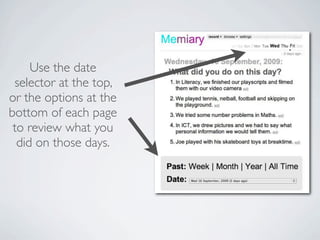
Use the date
 selector at the top,
or the options at the
bottom of each page
 to review what you
  did on those days.
At the end of each week / month / term / year, review
what you have learnt, achieved and remembered about
that period in time.
* Use this to assess knowledge and understanding.
* Or use it to refresh pupils’ memories about the concepts.
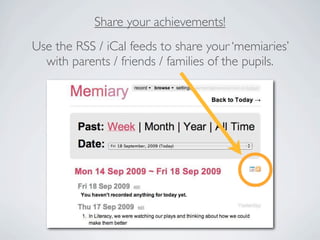
Share your achievements!
Use the RSS / iCal feeds to share your ‘memiaries’
  with parents / friends / families of the pupils.
Copy and paste your memiaries into Wordle.
Pick out a word from the Wordle...
•What does it mean?
•Which activities does it refer to?
•What did we learn during that time?
September       October      November


   Make a class timeline with your
memiaries for each week / month / term.
Use Wordle’s
  word count tool
   to create data
handling content for
Maths and ICT work.
What will you do tomorrow?
Enter an outline of tomorrow’s plans at the end of the
day so students are aware of their next learning steps.


 Review these at the end of the next day - did they
      match with what you actually achieved?
Any more ideas?
I would love to hear them...

mark@teachingideas.co.uk

          Thank you

Using Memiary in the Classroom

  • 1.
    What did wedo today? Ideas for using Memiary in the classroom Mark Warner Teachmeet Sussex / Kent 18th September 2009
  • 2.
    www.memiary.com iPhone app also available
  • 3.
    Register and enterfive things you did each day... • Five learning objectives and / or targets achieved, • Five activities that the pupils enjoyed, • Five interesting things that you want to remember, • Or a mixture of the above!
  • 4.
    Use the date selector at the top, or the options at the bottom of each page to review what you did on those days.
  • 5.
    At the endof each week / month / term / year, review what you have learnt, achieved and remembered about that period in time. * Use this to assess knowledge and understanding. * Or use it to refresh pupils’ memories about the concepts.
  • 6.
    Share your achievements! Usethe RSS / iCal feeds to share your ‘memiaries’ with parents / friends / families of the pupils.
  • 7.
    Copy and pasteyour memiaries into Wordle.
  • 8.
    Pick out aword from the Wordle... •What does it mean? •Which activities does it refer to? •What did we learn during that time?
  • 9.
    September October November Make a class timeline with your memiaries for each week / month / term.
  • 10.
    Use Wordle’s word count tool to create data handling content for Maths and ICT work.
  • 11.
    What will youdo tomorrow? Enter an outline of tomorrow’s plans at the end of the day so students are aware of their next learning steps. Review these at the end of the next day - did they match with what you actually achieved?
  • 12.
    Any more ideas? Iwould love to hear them... mark@teachingideas.co.uk Thank you