Using Indicators
Security Attacks
To Deal With
Introduction
Attack patterns and their indicators
Explaining the indicators with an attack scenario
Attack scenario
Investigating the attack
Detecting and enriching IoCs and IoAs with Log360
IoA or IoC: Which one should be used?
1.
2.
3.
3
4
5
5
6
8
10
4.
5.
Table of contents
www.manageengine.com/log360log360-support@manageengine.com
Introduction
Security breaches and sophisticated attacks are on the
rise, spurring continued improvements in the security
information and event management (SIEM) space. To
further combat these advanced attacks, security
intelligence platforms and solutions have been
strengthened by their vendors.
Improvements in attack mitigation techniques have given
rise to several new parameters that detect potential
threats and attack patterns early on. Later sections of this
white paper elaborate on two such parameters—indicators
of compromise (IoCs) and indicators of attack (IoAs)—that
help detect attacks instantly, blueprint an attack
sequence, identify an attack before damage is caused, and
more.
This white paper helps security professionals understand
the unique capabilities of these indicators, the differences
between them, and the steps to configure a SIEM solution
to detect IoCs and IoAs.
3
www.manageengine.com/log360log360-support@manageengine.com
Attack patterns and their indicators.
Security attacks can thus be broadly classified into two types:
Enterprises are not immune to security attacks, no matter how good their security systems are.
Hackers always try to exploit a network's vulnerabilities and security loopholes, usually either to
gain access to critical network resources or to bring down business services.
Depending on the attack type, the pattern of approach will be different. For instance, attacks that
attempt to bring down business operations will concentrate on bypassing endpoint security
systems and flooding the resources with irrelevant traffic. On the other hand, attacks
attempting to steal data will focus on acquiring confidential information through unauthorized
access to critical resources.
Attacks that disrupt business operations, such as DDoS attacks targeted at
bringing down an e-commerce or banking company's web service.
Attacks that steal confidential information.
Regardless of its type, every attack will leave a trace, which is known as an indicator.
These indicators provide details that help security professionals:
Conclude whether a suspicious event is a threat or an on-going attack. .
Detect threats at their initial stage, which helps contain an attack before it even occurs.
Identify whether an attack is ongoing or if it has happened before.
Speed up the attack discovery process.
Ascertain an attack's total impact once it has been resolved.
4
www.manageengine.com/log360log360-support@manageengine.com
Most enterprises rely on IoCs to
contain an ongoing attack or to
conduct forensic analysis to resolve an
attack or assess its impact. Essentially,
IoCs tell administrators the network
has been compromised. They answer
the vital w's: what happened, who was
involved, and when it occurred.
Two major indicators come in handy for security professionals: IoCs and IoAs
IoCs
IoAs are suspicious security events
that could turn out to be a potential
threat or attack. Once they're detected,
IoAs are then enriched with contextual
information such as user behavior
patterns, vulnerabilities, and input data
from other security tools. All these
details help in ascertaining whether an
IoA is a potential threat. Since IoAs
identify attacks at an early stage, they
play a major role in preventing attacks.
IoAs
Explaining the indicators with an attack scenario.
Fighting security attacks is a multi-step process. Gathering clues, aka indicators, from the
network Is the first step in that process. Let's use an attack scenario to elaborate on the process
of identifying indicators.
Attack scenario
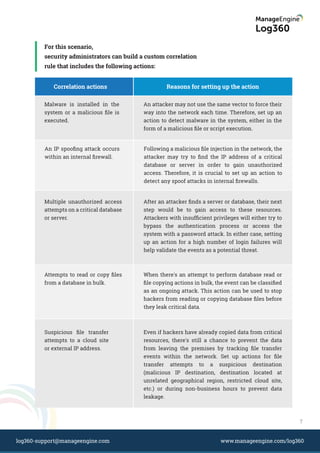
Assume in this scenario that a malicious Microsoft Excel file is spread over email to
employees in an organization. The email is drafted with authentic message threads, so many
employees download the malicious file because they are made to believe it is a message from
someone they know. When a user opens that file, a macro is automatically executed. That
macro then tries to access critical databases, copies confidential customer information from
those databases, appends that data to the Excel file, and then uploads the modified Excel file
to a cloud site.
5
www.manageengine.com/log360log360-support@manageengine.com
Investigating the attack
The compromise stage is when the attack surfaces, allowing it to be detected. These kinds of
attacks can be detected promptly by configuring the right alert profiles for the following IoCs:
Attacks can be prevented during the intrusion stage if the source of the attack is found to be
suspicious or malicious. In this scenario, the email has come from a non-suspicious IP address
and the message looks authentic, thus deceiving the spam filter. Therefore, detecting and
containing this attack at the initial stage would be difficult.
Again, the success of this attack discovery process depends on validating each of the IoCs (with
respect to user context) and enriching the events by correlating them with other related events.
Security administrators need to delve deep into this specific attack pattern and identify the
indicators of this attack. Once they do so, they can proactively deal with any attack that follows
a similar pattern. However, attacks don't occur like this all the time.
Considering this scenario, every time the attacker attempts an attack, they may not use the
same technique of infiltrating the network with an Excel file. With that in mind, security
administrators should set up traps by defining correlation rules that cover all possible actions in
an attack pattern.
Unauthorized access attempts on critical databases.
Unauthorized copy actions performed in a database.
Attempts to upload or transfer a file to an unauthorized cloud site.
Hackers circulate a
seemingly innocuous
email that includes a
malicious Excel file
attachment.
Each time the user
opens the Excel file, it
executes a macro that
steals confidential
data from the network.
Intrusion Navigation
Macro finds the
critical database and
accesses it.
Appends the Excel
sheet with copied
confidential data.
Data Compromise
The macro uploads
the modified file to a
cloud file storage site.
Transmission
6
www.manageengine.com/log360log360-support@manageengine.com
For this scenario,
security administrators can build a custom correlation
rule that includes the following actions:
Correlation actions Reasons for setting up the action
Malware is installed in the
system or a malicious file is
executed.
An attacker may not use the same vector to force their
way into the network each time. Therefore, set up an
action to detect malware in the system, either in the
form of a malicious file or script execution.
An IP spoofing attack occurs
within an internal firewall.
Following a malicious file injection in the network, the
attacker may try to find the IP address of a critical
database or server in order to gain unauthorized
access. Therefore, it is crucial to set up an action to
detect any spoof attacks in internal firewalls.
Attempts to read or copy files
from a database in bulk.
When there's an attempt to perform database read or
file copying actions in bulk, the event can be classified
as an ongoing attack. This action can be used to stop
hackers from reading or copying database files before
they leak critical data.
Suspicious file transfer
attempts to a cloud site
or external IP address.
Even if hackers have already copied data from critical
resources, there's still a chance to prevent the data
from leaving the premises by tracking file transfer
events within the network. Set up actions for file
transfer attempts to a suspicious destination
(malicious IP destination, destination located at
unrelated geographical region, restricted cloud site,
etc.) or during non-business hours to prevent data
leakage.
Multiple unauthorized access
attempts on a critical database
or server.
After an attacker finds a server or database, their next
step would be to gain access to these resources.
Attackers with insufficient privileges will either try to
bypass the authentication process or access the
system with a password attack. In either case, setting
up an action for a high number of login failures will
help validate the events as a potential threat.
7
www.manageengine.com/log360log360-support@manageengine.com
These kinds of correlation rules cover all possible scenarios in which similar attack patterns
can occur. More importantly, these rules alert security administrators in real time, helping them
prevent security threats from compromising their organization's security and reputation. To
further aid in threat mitigation, each correlation rule can be enriched with contextual business
information specific to that event.
Detecting and enriching IoCs and IoAs with Log360
Log360 comes with a built-in, real-time event response system that detects IoCs, and a
correlation engine that helps enrich IoAs.
This solution also has a prepackaged global IP threat database that has over 600 million
malicious IP addresses. Whenever traffic from any of these IP addresses hit resources in
the network, the security administrators will be notified in real-time and with the solution,
they can even configure a custom script to block this IP address right away.
Unauthorized access attempts to critical databases.
Unusual login failures-Identify who attempted to log on, from which IP
address, when, and whether it was from a remote host.
Login failure details—Lists all logon failures, including why the logon failed
(for example, whether it was due to a bad password or incorrect username).
Unauthorized copy of critical information.
Detailed DML auditing—Track who executed a select query in the database,
from where, and when.
Copy attempts—Determine who tried to copy data, to where, and from which
machine the attempt was made.
Real-time event response system: Log360 has over 700 prebuilt alert profiles that are
based on meticulous study of various IoCs. Security administrators can choose to enable
alert profiles that are relevant to their business context to detect attacks instantly.
Whenever an IoC occurs, administrators will get real-time notifications via email or SMS,
as well as a detailed report on the event, speeding up the attack mitigation process.
Furthermore, to reduce the number of false positives, Log360 includes the ability to create
alert profiles for specific devices based on event frequency or time frame. Log360 also
provides detailed reports on each of the following:
8
www.manageengine.com/log360log360-support@manageengine.com
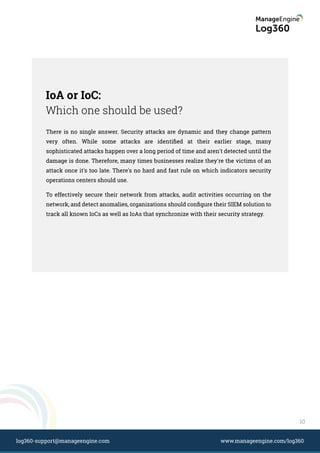
Log360 rule builder
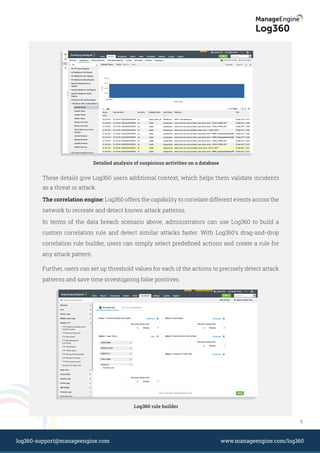
Detailed analysis of suspicious activities on a database
These details give Log360 users additional context, which helps them validate incidents
as a threat or attack.
The correlation engine: Log360 offers the capability to correlate different events across the
network to recreate and detect known attack patterns.
In terms of the data breach scenario above, administrators can use Log360 to build a
custom correlation rule and detect similar attacks faster. With Log360's drag-and-drop
correlation rule builder, users can simply select predefined actions and create a rule for
any attack pattern.
Further, users can set up threshold values for each of the actions to precisely detect attack
patterns and save time investigating false positives.
9
www.manageengine.com/log360log360-support@manageengine.com
IoA or IoC:
Which one should be used?
There is no single answer. Security attacks are dynamic and they change pattern
very often. While some attacks are identified at their earlier stage, many
sophisticated attacks happen over a long period of time and aren't detected until the
damage is done. Therefore, many times businesses realize they're the victims of an
attack once it's too late. There's no hard and fast rule on which indicators security
operations centers should use.
To effectively secure their network from attacks, audit activities occurring on the
network, and detect anomalies, organizations should configure their SIEM solution to
track all known IoCs as well as IoAs that synchronize with their security strategy.
10
www.manageengine.com/log360log360-support@manageengine.com
About ManageEngine
ManageEngine delivers the real-time IT management tools that empower an IT team to
meet an organization’s need for real-timeservices and support. Worldwide, more than
60,000 established and emerging enterprise-including more than 60 percent of the
Fortune 500-rely on ManageEngine products to ensure the optimal performance of their
critical IT infrastructure, including networks, servers, applications, desktops and more.
ManageEngine is a division of Zoho Corp. with offices worldwide, including the United
States, United Kingdom, India, Japan and China.
Log360 offers the capability to correlate different events across the network to recreate
and detect known attack patterns.
About the author
Subhalakshmi Ganapathy currently works as a Senior Product Marketing Analyst for IT
Security Solutions at ManageEngine. She has in-depth knowledge in information
security and compliance management. She provides strategic guidance for enterprises
on Security Information and Event Management (SIEM), network security, and data
privacy.
Reach out to Subha at subhalakshmi.g@manageengine.com.
Visit www.manageengine.com/log360 for in-depth information about the
solution and all its features.
Email:
log360-support@manageengine.com.
Dial Toll Free:
+1 925 924 9500 (Toll Free)
+1 408 916 9393 (Direct)
Or
Or

Using indicators to deal with security attacks

  • 1.
  • 2.
    Introduction Attack patterns andtheir indicators Explaining the indicators with an attack scenario Attack scenario Investigating the attack Detecting and enriching IoCs and IoAs with Log360 IoA or IoC: Which one should be used? 1. 2. 3. 3 4 5 5 6 8 10 4. 5. Table of contents www.manageengine.com/log360log360-support@manageengine.com
  • 3.
    Introduction Security breaches andsophisticated attacks are on the rise, spurring continued improvements in the security information and event management (SIEM) space. To further combat these advanced attacks, security intelligence platforms and solutions have been strengthened by their vendors. Improvements in attack mitigation techniques have given rise to several new parameters that detect potential threats and attack patterns early on. Later sections of this white paper elaborate on two such parameters—indicators of compromise (IoCs) and indicators of attack (IoAs)—that help detect attacks instantly, blueprint an attack sequence, identify an attack before damage is caused, and more. This white paper helps security professionals understand the unique capabilities of these indicators, the differences between them, and the steps to configure a SIEM solution to detect IoCs and IoAs. 3 www.manageengine.com/log360log360-support@manageengine.com
  • 4.
    Attack patterns andtheir indicators. Security attacks can thus be broadly classified into two types: Enterprises are not immune to security attacks, no matter how good their security systems are. Hackers always try to exploit a network's vulnerabilities and security loopholes, usually either to gain access to critical network resources or to bring down business services. Depending on the attack type, the pattern of approach will be different. For instance, attacks that attempt to bring down business operations will concentrate on bypassing endpoint security systems and flooding the resources with irrelevant traffic. On the other hand, attacks attempting to steal data will focus on acquiring confidential information through unauthorized access to critical resources. Attacks that disrupt business operations, such as DDoS attacks targeted at bringing down an e-commerce or banking company's web service. Attacks that steal confidential information. Regardless of its type, every attack will leave a trace, which is known as an indicator. These indicators provide details that help security professionals: Conclude whether a suspicious event is a threat or an on-going attack. . Detect threats at their initial stage, which helps contain an attack before it even occurs. Identify whether an attack is ongoing or if it has happened before. Speed up the attack discovery process. Ascertain an attack's total impact once it has been resolved. 4 www.manageengine.com/log360log360-support@manageengine.com
  • 5.
    Most enterprises relyon IoCs to contain an ongoing attack or to conduct forensic analysis to resolve an attack or assess its impact. Essentially, IoCs tell administrators the network has been compromised. They answer the vital w's: what happened, who was involved, and when it occurred. Two major indicators come in handy for security professionals: IoCs and IoAs IoCs IoAs are suspicious security events that could turn out to be a potential threat or attack. Once they're detected, IoAs are then enriched with contextual information such as user behavior patterns, vulnerabilities, and input data from other security tools. All these details help in ascertaining whether an IoA is a potential threat. Since IoAs identify attacks at an early stage, they play a major role in preventing attacks. IoAs Explaining the indicators with an attack scenario. Fighting security attacks is a multi-step process. Gathering clues, aka indicators, from the network Is the first step in that process. Let's use an attack scenario to elaborate on the process of identifying indicators. Attack scenario Assume in this scenario that a malicious Microsoft Excel file is spread over email to employees in an organization. The email is drafted with authentic message threads, so many employees download the malicious file because they are made to believe it is a message from someone they know. When a user opens that file, a macro is automatically executed. That macro then tries to access critical databases, copies confidential customer information from those databases, appends that data to the Excel file, and then uploads the modified Excel file to a cloud site. 5 www.manageengine.com/log360log360-support@manageengine.com
  • 6.
    Investigating the attack Thecompromise stage is when the attack surfaces, allowing it to be detected. These kinds of attacks can be detected promptly by configuring the right alert profiles for the following IoCs: Attacks can be prevented during the intrusion stage if the source of the attack is found to be suspicious or malicious. In this scenario, the email has come from a non-suspicious IP address and the message looks authentic, thus deceiving the spam filter. Therefore, detecting and containing this attack at the initial stage would be difficult. Again, the success of this attack discovery process depends on validating each of the IoCs (with respect to user context) and enriching the events by correlating them with other related events. Security administrators need to delve deep into this specific attack pattern and identify the indicators of this attack. Once they do so, they can proactively deal with any attack that follows a similar pattern. However, attacks don't occur like this all the time. Considering this scenario, every time the attacker attempts an attack, they may not use the same technique of infiltrating the network with an Excel file. With that in mind, security administrators should set up traps by defining correlation rules that cover all possible actions in an attack pattern. Unauthorized access attempts on critical databases. Unauthorized copy actions performed in a database. Attempts to upload or transfer a file to an unauthorized cloud site. Hackers circulate a seemingly innocuous email that includes a malicious Excel file attachment. Each time the user opens the Excel file, it executes a macro that steals confidential data from the network. Intrusion Navigation Macro finds the critical database and accesses it. Appends the Excel sheet with copied confidential data. Data Compromise The macro uploads the modified file to a cloud file storage site. Transmission 6 www.manageengine.com/log360log360-support@manageengine.com
  • 7.
    For this scenario, securityadministrators can build a custom correlation rule that includes the following actions: Correlation actions Reasons for setting up the action Malware is installed in the system or a malicious file is executed. An attacker may not use the same vector to force their way into the network each time. Therefore, set up an action to detect malware in the system, either in the form of a malicious file or script execution. An IP spoofing attack occurs within an internal firewall. Following a malicious file injection in the network, the attacker may try to find the IP address of a critical database or server in order to gain unauthorized access. Therefore, it is crucial to set up an action to detect any spoof attacks in internal firewalls. Attempts to read or copy files from a database in bulk. When there's an attempt to perform database read or file copying actions in bulk, the event can be classified as an ongoing attack. This action can be used to stop hackers from reading or copying database files before they leak critical data. Suspicious file transfer attempts to a cloud site or external IP address. Even if hackers have already copied data from critical resources, there's still a chance to prevent the data from leaving the premises by tracking file transfer events within the network. Set up actions for file transfer attempts to a suspicious destination (malicious IP destination, destination located at unrelated geographical region, restricted cloud site, etc.) or during non-business hours to prevent data leakage. Multiple unauthorized access attempts on a critical database or server. After an attacker finds a server or database, their next step would be to gain access to these resources. Attackers with insufficient privileges will either try to bypass the authentication process or access the system with a password attack. In either case, setting up an action for a high number of login failures will help validate the events as a potential threat. 7 www.manageengine.com/log360log360-support@manageengine.com
  • 8.
    These kinds ofcorrelation rules cover all possible scenarios in which similar attack patterns can occur. More importantly, these rules alert security administrators in real time, helping them prevent security threats from compromising their organization's security and reputation. To further aid in threat mitigation, each correlation rule can be enriched with contextual business information specific to that event. Detecting and enriching IoCs and IoAs with Log360 Log360 comes with a built-in, real-time event response system that detects IoCs, and a correlation engine that helps enrich IoAs. This solution also has a prepackaged global IP threat database that has over 600 million malicious IP addresses. Whenever traffic from any of these IP addresses hit resources in the network, the security administrators will be notified in real-time and with the solution, they can even configure a custom script to block this IP address right away. Unauthorized access attempts to critical databases. Unusual login failures-Identify who attempted to log on, from which IP address, when, and whether it was from a remote host. Login failure details—Lists all logon failures, including why the logon failed (for example, whether it was due to a bad password or incorrect username). Unauthorized copy of critical information. Detailed DML auditing—Track who executed a select query in the database, from where, and when. Copy attempts—Determine who tried to copy data, to where, and from which machine the attempt was made. Real-time event response system: Log360 has over 700 prebuilt alert profiles that are based on meticulous study of various IoCs. Security administrators can choose to enable alert profiles that are relevant to their business context to detect attacks instantly. Whenever an IoC occurs, administrators will get real-time notifications via email or SMS, as well as a detailed report on the event, speeding up the attack mitigation process. Furthermore, to reduce the number of false positives, Log360 includes the ability to create alert profiles for specific devices based on event frequency or time frame. Log360 also provides detailed reports on each of the following: 8 www.manageengine.com/log360log360-support@manageengine.com
  • 9.
    Log360 rule builder Detailedanalysis of suspicious activities on a database These details give Log360 users additional context, which helps them validate incidents as a threat or attack. The correlation engine: Log360 offers the capability to correlate different events across the network to recreate and detect known attack patterns. In terms of the data breach scenario above, administrators can use Log360 to build a custom correlation rule and detect similar attacks faster. With Log360's drag-and-drop correlation rule builder, users can simply select predefined actions and create a rule for any attack pattern. Further, users can set up threshold values for each of the actions to precisely detect attack patterns and save time investigating false positives. 9 www.manageengine.com/log360log360-support@manageengine.com
  • 10.
    IoA or IoC: Whichone should be used? There is no single answer. Security attacks are dynamic and they change pattern very often. While some attacks are identified at their earlier stage, many sophisticated attacks happen over a long period of time and aren't detected until the damage is done. Therefore, many times businesses realize they're the victims of an attack once it's too late. There's no hard and fast rule on which indicators security operations centers should use. To effectively secure their network from attacks, audit activities occurring on the network, and detect anomalies, organizations should configure their SIEM solution to track all known IoCs as well as IoAs that synchronize with their security strategy. 10 www.manageengine.com/log360log360-support@manageengine.com
  • 11.
    About ManageEngine ManageEngine deliversthe real-time IT management tools that empower an IT team to meet an organization’s need for real-timeservices and support. Worldwide, more than 60,000 established and emerging enterprise-including more than 60 percent of the Fortune 500-rely on ManageEngine products to ensure the optimal performance of their critical IT infrastructure, including networks, servers, applications, desktops and more. ManageEngine is a division of Zoho Corp. with offices worldwide, including the United States, United Kingdom, India, Japan and China. Log360 offers the capability to correlate different events across the network to recreate and detect known attack patterns. About the author Subhalakshmi Ganapathy currently works as a Senior Product Marketing Analyst for IT Security Solutions at ManageEngine. She has in-depth knowledge in information security and compliance management. She provides strategic guidance for enterprises on Security Information and Event Management (SIEM), network security, and data privacy. Reach out to Subha at subhalakshmi.g@manageengine.com. Visit www.manageengine.com/log360 for in-depth information about the solution and all its features. Email: log360-support@manageengine.com. Dial Toll Free: +1 925 924 9500 (Toll Free) +1 408 916 9393 (Direct) Or Or