Bedfordshire County Council
Using IDEA with SAP
SAP IDEA User Group
21st October 2004
David Horn & Adrian Howe
Objective
To establish that Material Codes
are appropriately mapped to GL
Accounts
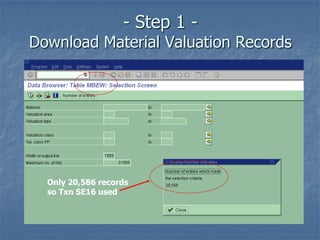
- Step 1 -
Download Material Valuation Records
Only 20,586 records
so Txn SE16 used
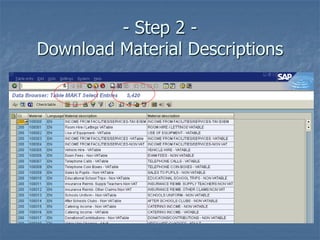
- Step 2 -
Download Material Descriptions
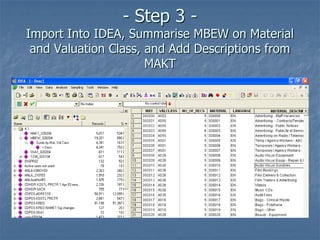
- Step 3 -
Import Into IDEA, Summarise MBEW on Material
and Valuation Class, and Add Descriptions from
MAKT
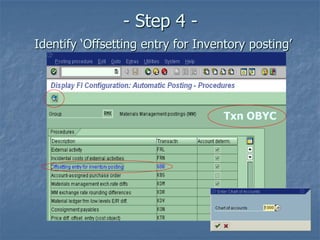
- Step 4 -
Identify ‘Offsetting entry for Inventory posting’
Txn OBYC
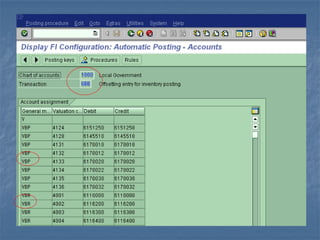
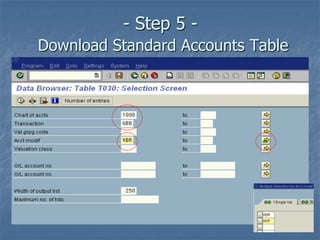
- Step 5 -
Download Standard Accounts Table
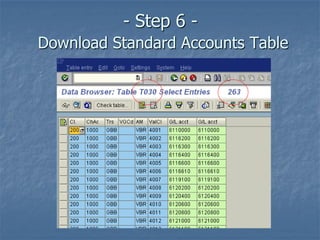
- Step 6 -
Download Standard Accounts Table
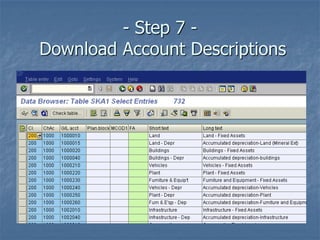
- Step 7 -
Download Account Descriptions
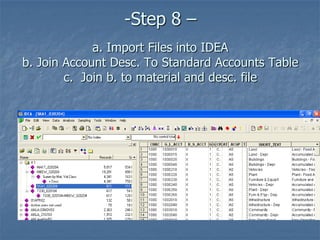
-Step 8 –
a. Import Files into IDEA
b. Join Account Desc. To Standard Accounts Table
c. Join b. to material and desc. file
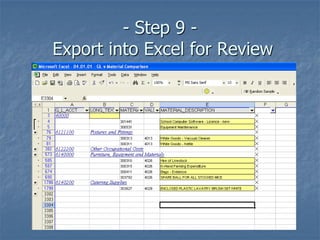
- Step 9 -
Export into Excel for Review
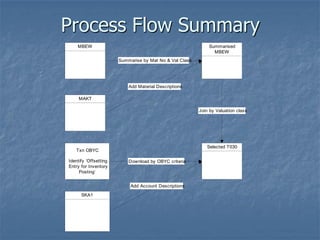
Process Flow Summary
MBEW Summarised
MBEW
Summarise by Mat No & Val Class
MAKT
Add Material Descriptions
Selected T030
Txn OBYC
Identify ‘Offsetting
Entry for Inventory
Posting’
Download by OBYC criteria
SKA1
Join by Valuation class
Add Account Descriptions
Any Questions?

Using IDEA with SAP

  • 1.
    Bedfordshire County Council UsingIDEA with SAP SAP IDEA User Group 21st October 2004 David Horn & Adrian Howe
  • 2.
    Objective To establish thatMaterial Codes are appropriately mapped to GL Accounts
  • 3.
    - Step 1- Download Material Valuation Records Only 20,586 records so Txn SE16 used
  • 5.
    - Step 2- Download Material Descriptions
  • 6.
    - Step 3- Import Into IDEA, Summarise MBEW on Material and Valuation Class, and Add Descriptions from MAKT
  • 7.
    - Step 4- Identify ‘Offsetting entry for Inventory posting’ Txn OBYC
  • 9.
    - Step 5- Download Standard Accounts Table
  • 10.
    - Step 6- Download Standard Accounts Table
  • 11.
    - Step 7- Download Account Descriptions
  • 12.
    -Step 8 – a.Import Files into IDEA b. Join Account Desc. To Standard Accounts Table c. Join b. to material and desc. file
  • 13.
    - Step 9- Export into Excel for Review
  • 14.
    Process Flow Summary MBEWSummarised MBEW Summarise by Mat No & Val Class MAKT Add Material Descriptions Selected T030 Txn OBYC Identify ‘Offsetting Entry for Inventory Posting’ Download by OBYC criteria SKA1 Join by Valuation class Add Account Descriptions
  • 15.