
Using FIWARE Lab Cloud
Fernando López
Telefónica I+D
Cloud Architects, FIWARE
fernando.lopezaguilar@telefonica.com, @flopezaguilar
(Slides: http://bit.ly/fiware-cloud-mx)
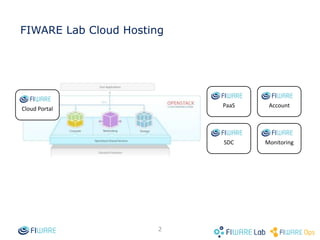
FIWARE Lab Cloud Hosting
Cloud Portal
PaaS
SDC Monitoring
Account
2
Create your account
• Create your Basic account in FIWARE Lab.
• Request a Trial account with the email of the created
user to
– Request a Trial account in fiware-developers-
week@lists.fiware.org
• We generate your Trial account for 14 days in order to
work with the FIWARE Lab Cloud.
If you have any question or problem contact to
fiware-lab-help@lists.fi-ware.org
Indicating:
• User (email).
• Region name.
• Tenant ID.
• ID of the component with problems.
4
Reference information
• Complete user guide of FIWARE Lab Cloud
http://bit.ly/fiware-lab-cloud
• These slides
• FIWARE eLearning Platform
http://edu.fi-ware.org/
5
Thanks!Thanks!
(Slides: http://tinyurl.com/fiwarelab-cloud)

Using fiware lab cloud

  • 1.
    Using FIWARE LabCloud Fernando López Telefónica I+D Cloud Architects, FIWARE fernando.lopezaguilar@telefonica.com, @flopezaguilar (Slides: http://bit.ly/fiware-cloud-mx)
  • 2.
    FIWARE Lab CloudHosting Cloud Portal PaaS SDC Monitoring Account 2
  • 3.
    Create your account •Create your Basic account in FIWARE Lab. • Request a Trial account with the email of the created user to – Request a Trial account in fiware-developers- week@lists.fiware.org • We generate your Trial account for 14 days in order to work with the FIWARE Lab Cloud.
  • 4.
    If you haveany question or problem contact to fiware-lab-help@lists.fi-ware.org Indicating: • User (email). • Region name. • Tenant ID. • ID of the component with problems. 4
  • 5.
    Reference information • Completeuser guide of FIWARE Lab Cloud http://bit.ly/fiware-lab-cloud • These slides • FIWARE eLearning Platform http://edu.fi-ware.org/ 5
  • 7.