
Introduction to the
DevNet Sandbox
Dan Klingler
Sandbox Automation Lead
daklinge@cisco.com
What is the
DevNet Sandbox?
What's DevNet all about?
We’re all about providing
developers with the tools, the
resources, and the code you need
to build innovative,
network-enabled solutions.
WHAT IS SANDBOX?
The DevNet Sandbox is a collection of
Cloud-based Labs, specifically
designed to enable developers to:
Explore, Learn, Develop, Test
• What is Sandbox
• Developer Lab Models
• Quick Demo
• Self-Driven IVT Testing
• How You Can Develop in the Sandbox!
Agenda
The Goal of Sandbox
To enable developers to quickly and easily
explore or create solutions based on Cisco
technologies -
by providing ready, useful, robust Lab
Environments.
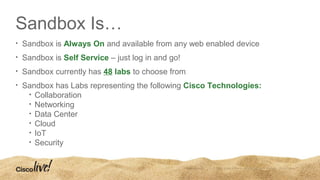
Sandbox Is…
• Sandbox is Always On and available from any web enabled device
• Sandbox is Self Service – just log in and go!
• Sandbox currently has 48 labs to choose from
• Sandbox has Labs representing the following Cisco Technologies:
• Collaboration
• Networking
• Data Center
• Cloud
• IoT
• Security
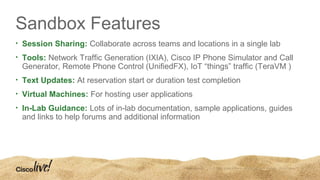
Sandbox Features
• Session Sharing: Collaborate across teams and locations in a single lab
• Tools: Network Traffic Generation (IXIA), Cisco IP Phone Simulator and Call
Generator, Remote Phone Control (UnifiedFX), IoT “things” traffic (TeraVM )
• Text Updates: At reservation start or duration test completion
• Virtual Machines: For hosting user applications
• In-Lab Guidance: Lots of in-lab documentation, sample applications, guides
and links to help forums and additional information
LAB MODELS
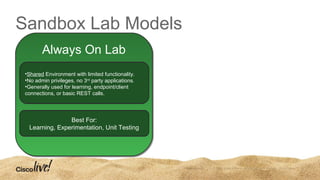
Sandbox Lab Models
•Shared Environment with limited functionality.
•No admin privileges, no 3rd
party applications.
•Generally used for learning, endpoint/client
connections, or basic REST calls.
Best For:
Learning, Experimentation, Unit Testing
Always On Lab
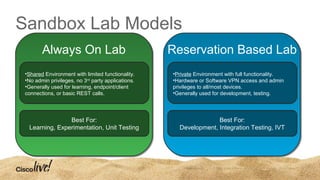
Sandbox Lab Models
•Shared Environment with limited functionality.
•No admin privileges, no 3rd
party applications.
•Generally used for learning, endpoint/client
connections, or basic REST calls.
Best For:
Learning, Experimentation, Unit Testing
Always On Lab
•Private Environment with full functionality.
•Hardware or Software VPN access and admin
privileges to all/most devices.
•Generally used for development, testing.
Best For:
Development, Integration Testing, IVT
Reservation Based Lab
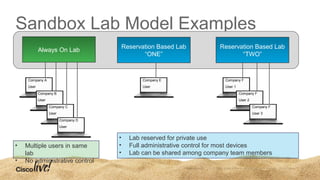
Sandbox Lab Model Examples
Company A
User
Company B
User
Company E
User
Company F
User 1
Company F
User 2
Company F
User 3
Company C
User
Company D
User
• Multiple users in same
lab
• No administrative control
• Lab reserved for private use
• Full administrative control for most devices
• Lab can be shared among company team members
Always On Lab
Reservation Based Lab
“ONE”
Reservation Based Lab
“TWO”
Reservation Based Lab Access Flow
User Makes
Lab Reservation
Reservation Begins Lab is Provisioned
Email Sent with
VPN Credentials
User VPN Connects
User Has Full
Access to Lab
Typical Lab Progression
APIC-EM
Always-On Lab
APIC-EM
Reservation Lab
Database Only
APIC-EM
Reservation Lab
Mini-Lab
APIC-EM
Reservation Lab
Full HW Lab
Complexity
Functionality
QUICK DEMO
SANDBOX IVT:
PUTTING YOU IN THE
DRIVER'S SEAT
IVT (Interoperability Verification
Test)
IVT is the testing process required for a
product to obtain a Cisco Compatible
Certification.
IVT Options and Process
Submit 3rd
Party Lab IVT
Pay 3rd
Party Lab
[$4,680 / $9,880]*
Test is Scheduled by
3rd
Party Lab
3rd
Party Lab Executes
Test - Results Submitted
Submit IVT Request in Partner Dashboard
*Collab Example
IVT Options and Process
Submit 3rd
Party Lab IVT
Pay 3rd
Party Lab
[$4,680 / $9,880]*
Test is Scheduled by
3rd
Party Lab
3rd
Party Lab Executes
Test - Results Submitted
Submit for
SANDBOX IVT
Purchase SB IVT Lab
[$2,500 / $5,000]*
Make a Lab Reservation
at YOUR Convenience
YOU Execute Test
-Results Auto Submitted
Submit IVT Request in Partner Dashboard
*Collab Example
IVT Options and Process
Submit 3rd
Party Lab IVT
Pay 3rd
Party Lab
[$4,680 / $9,880]*
Test is Scheduled by
3rd
Party Lab
3rd
Party Lab Executes
Test - Results Submitted
Submit for
SANDBOX IVT
Purchase SB IVT Lab
[$2,500 / $5,000]*
Make a Lab Reservation
at YOUR Convenience
YOU Execute Test
-Results Auto Submitted
Submit IVT Request in Partner Dashboard
*Collab Example
Sandbox IVT
• Reduce out of pocket costs to partners
• Test Automation supports repeatability and efficiency
• Increased testing efficiency due to partner product knowledge
• Faster time to market with Cisco Compatibility Certification by
eliminating 3rd
party lab business transaction process and queue of other
work
• Provided as a choice. Program members will still have access to
authorized 3rd
party labs if services are preferred.
Sandbox IVT: Labs Available Today
• Collaboration: Call Accounting and Billing
• Collaboration: Endpoints, Headsets and Cameras
• Collaboration: Operator/Attendant Consoles
• Collaboration: Phone Application Server
• Collaboration: Voice Recording
Example Sandbox IVT Lab
*Collab Example
Instructions
Contains test plan,
and lab information
Commands
Leads user through
workflow, drives
automation, data
collection and
submission
IVT TESTIMONIALS
“One of the big advantages of
conducting the self-test was the
flexibility to set our own schedule.
Lab staff members were readily
available, and had the knowledge
needed to quickly respond to our
questions and concerns.”
- Kathy Learnan, Director of Product Development ISI Telemanagement Solutions, Inc.
“..the Sandbox’s ease of use and
powerful features allowed me to test my
product against many different call
scenarios. In addition, the automated
test cases enabled me to complete the
testing in a minimal amount of time and
effort.”
- Steve Ginter, Resource Software International Ltd.
“Our goal was to streamline the
certification process by not having to
ship any hardware to a test lab in a
different country, by eliminating travel,
and by working on our own schedule
without being dependent on a 3rd
party
testing resource.”
- Michal Grebac, Strategic Sales & Marketing Director, 2Ring
“…as compared to the last IVT testing I
did in-person, this is already laid out
easier than ever before...”
- Forrest Ryan, CCNA iQ NetSolutions
“…an excellent experience where I was
able to certify without having to leave my
very own testing bench...”
- Phillip Walenta, Polycom
HOW YOU CAN
• Explore
• Learn
• Develop
• Test
IN THE SANDBOX
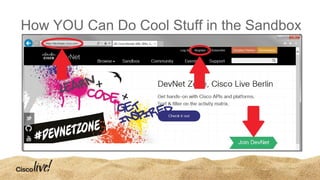
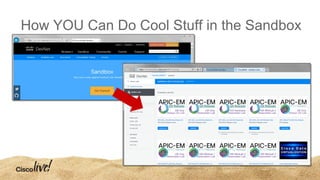
How YOU Can Do Cool Stuff in the Sandbox
WRAP-UP
The Goal of Sandbox
To enable developers to quickly and easily
explore or create solutions based on Cisco
technologies -
by providing ready, useful, robust Lab
Environments.
Sandbox Is…
• Always-On Labs
• Reservation Labs
• You can: Explore, Learn, Experiment,
Conduct a POC, Develop, Integrate, Test,
and get an IVT Certification.
• Most Labs are FREE! (IVT Testing Labs are not.)
More Sandbox Information…
• developer.cisco.com/Sandbox
• One Hour Hands-On Workshop
• Thursday, 4:00PM, Workbench #1
• Sandbox Station at Cisco Live Berlin
Introduction to the DevNet Sandbox

Introduction to the DevNet Sandbox

  • 2.
    Introduction to the DevNetSandbox Dan Klingler Sandbox Automation Lead daklinge@cisco.com
  • 3.
  • 4.
    What's DevNet allabout? We’re all about providing developers with the tools, the resources, and the code you need to build innovative, network-enabled solutions.
  • 5.
    WHAT IS SANDBOX? TheDevNet Sandbox is a collection of Cloud-based Labs, specifically designed to enable developers to: Explore, Learn, Develop, Test
  • 6.
    • What isSandbox • Developer Lab Models • Quick Demo • Self-Driven IVT Testing • How You Can Develop in the Sandbox! Agenda
  • 7.
    The Goal ofSandbox To enable developers to quickly and easily explore or create solutions based on Cisco technologies - by providing ready, useful, robust Lab Environments.
  • 9.
    Sandbox Is… • Sandboxis Always On and available from any web enabled device • Sandbox is Self Service – just log in and go! • Sandbox currently has 48 labs to choose from • Sandbox has Labs representing the following Cisco Technologies: • Collaboration • Networking • Data Center • Cloud • IoT • Security
  • 10.
    Sandbox Features • SessionSharing: Collaborate across teams and locations in a single lab • Tools: Network Traffic Generation (IXIA), Cisco IP Phone Simulator and Call Generator, Remote Phone Control (UnifiedFX), IoT “things” traffic (TeraVM ) • Text Updates: At reservation start or duration test completion • Virtual Machines: For hosting user applications • In-Lab Guidance: Lots of in-lab documentation, sample applications, guides and links to help forums and additional information
  • 11.
  • 12.
    Sandbox Lab Models •SharedEnvironment with limited functionality. •No admin privileges, no 3rd party applications. •Generally used for learning, endpoint/client connections, or basic REST calls. Best For: Learning, Experimentation, Unit Testing Always On Lab
  • 13.
    Sandbox Lab Models •SharedEnvironment with limited functionality. •No admin privileges, no 3rd party applications. •Generally used for learning, endpoint/client connections, or basic REST calls. Best For: Learning, Experimentation, Unit Testing Always On Lab •Private Environment with full functionality. •Hardware or Software VPN access and admin privileges to all/most devices. •Generally used for development, testing. Best For: Development, Integration Testing, IVT Reservation Based Lab
  • 14.
    Sandbox Lab ModelExamples Company A User Company B User Company E User Company F User 1 Company F User 2 Company F User 3 Company C User Company D User • Multiple users in same lab • No administrative control • Lab reserved for private use • Full administrative control for most devices • Lab can be shared among company team members Always On Lab Reservation Based Lab “ONE” Reservation Based Lab “TWO”
  • 15.
    Reservation Based LabAccess Flow User Makes Lab Reservation Reservation Begins Lab is Provisioned Email Sent with VPN Credentials User VPN Connects User Has Full Access to Lab
  • 16.
    Typical Lab Progression APIC-EM Always-OnLab APIC-EM Reservation Lab Database Only APIC-EM Reservation Lab Mini-Lab APIC-EM Reservation Lab Full HW Lab Complexity Functionality
  • 17.
  • 18.
    SANDBOX IVT: PUTTING YOUIN THE DRIVER'S SEAT
  • 19.
    IVT (Interoperability Verification Test) IVTis the testing process required for a product to obtain a Cisco Compatible Certification.
  • 20.
    IVT Options andProcess Submit 3rd Party Lab IVT Pay 3rd Party Lab [$4,680 / $9,880]* Test is Scheduled by 3rd Party Lab 3rd Party Lab Executes Test - Results Submitted Submit IVT Request in Partner Dashboard *Collab Example
  • 21.
    IVT Options andProcess Submit 3rd Party Lab IVT Pay 3rd Party Lab [$4,680 / $9,880]* Test is Scheduled by 3rd Party Lab 3rd Party Lab Executes Test - Results Submitted Submit for SANDBOX IVT Purchase SB IVT Lab [$2,500 / $5,000]* Make a Lab Reservation at YOUR Convenience YOU Execute Test -Results Auto Submitted Submit IVT Request in Partner Dashboard *Collab Example
  • 22.
    IVT Options andProcess Submit 3rd Party Lab IVT Pay 3rd Party Lab [$4,680 / $9,880]* Test is Scheduled by 3rd Party Lab 3rd Party Lab Executes Test - Results Submitted Submit for SANDBOX IVT Purchase SB IVT Lab [$2,500 / $5,000]* Make a Lab Reservation at YOUR Convenience YOU Execute Test -Results Auto Submitted Submit IVT Request in Partner Dashboard *Collab Example
  • 23.
    Sandbox IVT • Reduceout of pocket costs to partners • Test Automation supports repeatability and efficiency • Increased testing efficiency due to partner product knowledge • Faster time to market with Cisco Compatibility Certification by eliminating 3rd party lab business transaction process and queue of other work • Provided as a choice. Program members will still have access to authorized 3rd party labs if services are preferred.
  • 24.
    Sandbox IVT: LabsAvailable Today • Collaboration: Call Accounting and Billing • Collaboration: Endpoints, Headsets and Cameras • Collaboration: Operator/Attendant Consoles • Collaboration: Phone Application Server • Collaboration: Voice Recording
  • 25.
    Example Sandbox IVTLab *Collab Example Instructions Contains test plan, and lab information Commands Leads user through workflow, drives automation, data collection and submission
  • 26.
  • 27.
    “One of thebig advantages of conducting the self-test was the flexibility to set our own schedule. Lab staff members were readily available, and had the knowledge needed to quickly respond to our questions and concerns.” - Kathy Learnan, Director of Product Development ISI Telemanagement Solutions, Inc.
  • 28.
    “..the Sandbox’s easeof use and powerful features allowed me to test my product against many different call scenarios. In addition, the automated test cases enabled me to complete the testing in a minimal amount of time and effort.” - Steve Ginter, Resource Software International Ltd.
  • 29.
    “Our goal wasto streamline the certification process by not having to ship any hardware to a test lab in a different country, by eliminating travel, and by working on our own schedule without being dependent on a 3rd party testing resource.” - Michal Grebac, Strategic Sales & Marketing Director, 2Ring
  • 30.
    “…as compared tothe last IVT testing I did in-person, this is already laid out easier than ever before...” - Forrest Ryan, CCNA iQ NetSolutions “…an excellent experience where I was able to certify without having to leave my very own testing bench...” - Phillip Walenta, Polycom
  • 31.
    HOW YOU CAN •Explore • Learn • Develop • Test IN THE SANDBOX
  • 32.
    How YOU CanDo Cool Stuff in the Sandbox
  • 33.
    How YOU CanDo Cool Stuff in the Sandbox
  • 34.
    How YOU CanDo Cool Stuff in the Sandbox
  • 35.
    How YOU CanDo Cool Stuff in the Sandbox
  • 36.
  • 37.
    The Goal ofSandbox To enable developers to quickly and easily explore or create solutions based on Cisco technologies - by providing ready, useful, robust Lab Environments.
  • 38.
    Sandbox Is… • Always-OnLabs • Reservation Labs • You can: Explore, Learn, Experiment, Conduct a POC, Develop, Integrate, Test, and get an IVT Certification. • Most Labs are FREE! (IVT Testing Labs are not.)
  • 39.
    More Sandbox Information… •developer.cisco.com/Sandbox • One Hour Hands-On Workshop • Thursday, 4:00PM, Workbench #1 • Sandbox Station at Cisco Live Berlin