Session 3 - Core Context Management
Fernando López, Cloud & Platform Senior Expert
fernando.lopez@fiware.org
@flopezaguilar
FIWARE Foundation, e.V.
1
Did you
understand
anything?
I haven't understand
anything yet. And
You?
Me neither…
Ok, lets follow with
our poker faces…
2
Captain, may I ask
now some
questions?
Sure…
I mean, a question
after this one…
Spock!!!
Learning Goals
▪ General overview of Orion Context Broker architecture
▪ Introduction to NGSI, NGSIv2
▪ Creating and pulling data
▪ Pushing data and notifications
▪ Batch operations
3
4
Orion Context Broker
General concepts
▪ Context data represents the state of a physical or conceptual object which exists in the
real world.
▪ The Orion Context Broker maintains a representation of the state of the entities:
• Entered programmatically
• Retrieved from sensors
• Augmented by other sources such as webservices, other context brokers etc.
▪ The Context Broker only holds the current state - it has no memory
5
General concepts
▪ NGSI v2 is a vendor-neutral standardized interface for interactions within FIWARE
• Simple REST API for CRUD
• Subscriptions can be used raise events to send data to other microservices
• Registrations can be used to retrieve context from other sources
• Also supports Query Filtering + Pagination + Geoqueries
• Use the Open API Specification to generate a library
6
Orion Context Broker
7
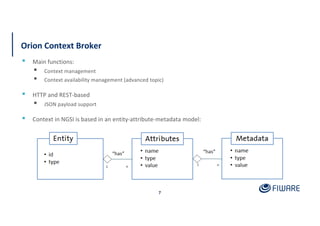
▪ Main functions:
▪ Context management
▪ Context availability management (advanced topic)
▪ HTTP and REST-based
▪ JSON payload support
▪ Context in NGSI is based in an entity-attribute-metadata model:
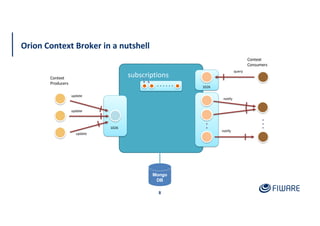
Orion Context Broker in a nutshell
8
Context
Producers
Context
Consumers
subscriptions
update
query
notify
notify
update
update
Mongo
DB
1026
1026
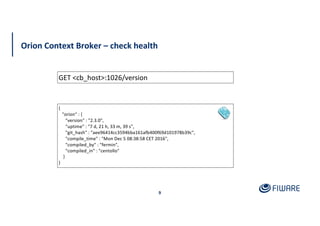
Orion Context Broker – check health
9
GET <cb_host>:1026/version
{
"orion" : {
"version" : "2.3.0",
"uptime" : "7 d, 21 h, 33 m, 39 s",
"git_hash" : "aee96414cc3594bba161afb400f69d101978b39c",
"compile_time" : "Mon Dec 5 08:38:58 CET 2016",
"compiled_by" : "fermin",
"compiled_in" : "centollo"
}
}
10
Introduction to NGSI, NGSIv2
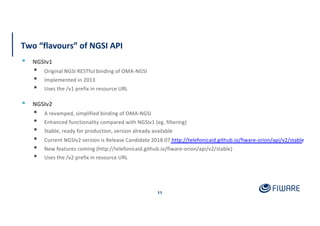
Two “flavours” of NGSI API
11
▪ NGSIv1
▪ Original NGSI RESTful binding of OMA-NGSI
▪ Implemented in 2013
▪ Uses the /v1 prefix in resource URL
▪ NGSIv2
▪ A revamped, simplified binding of OMA-NGSI
▪ Enhanced functionality compared with NGSIv1 (eg. filtering)
▪ Stable, ready for production, version already available
▪ Current NGSIv2 version is Release Candidate 2018.07 http://telefonicaid.github.io/fiware-orion/api/v2/stable
▪ New features coming (http://telefonicaid.github.io/fiware-orion/api/v2/stable)
▪ Uses the /v2 prefix in resource URL
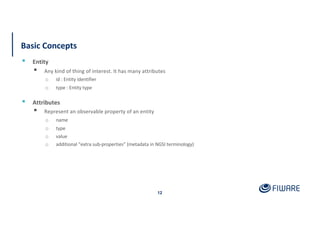
Basic Concepts
12
▪ Entity
▪ Any kind of thing of interest. It has many attributes
o id : Entity identifier
o type : Entity type
▪ Attributes
▪ Represent an observable property of an entity
o name
o type
o value
o additional “extra sub-properties” (metadata in NGSI terminology)
Entity Examples in NGSIv2
13
{
“id”: “Traffic-Incidence-9876”,
“type”: “gsmadata:TrafficIncidence”,
“category”: “Vehicle Fault”,
“severity”: “Yellow”,
“vehicleType”: “Truck”,
“startDate”: "2015-07-17T09:31:11.112Z”
“roadName”: “N-122”,
“description”: “A truck is stopped on road”
}
{
“id”: “r786543”,
“type”: “Room”,
“name”: “Chrisantemum”,
“temperature”: 22,
“seatNumber”: 10,
“location”: {
“type”: “Point”,
“coordinates”: [31.2222200, 121.4580600]
}
}
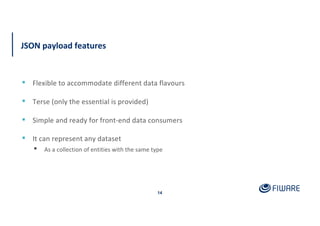
JSON payload features
14
▪ Flexible to accommodate different data flavours
▪ Terse (only the essential is provided)
▪ Simple and ready for front-end data consumers
▪ It can represent any dataset
▪ As a collection of entities with the same type
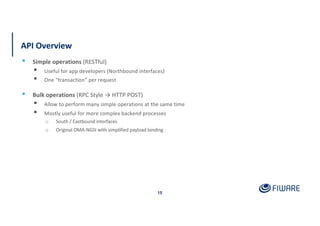
API Overview
15
▪ Simple operations (RESTful)
▪ Useful for app developers (Northbound interfaces)
▪ One “transaction” per request
▪ Bulk operations (RPC Style → HTTP POST)
▪ Allow to perform many simple operations at the same time
▪ Mostly useful for more complex backend processes
o South / Eastbound interfaces
o Original OMA-NGSI with simplified payload binding
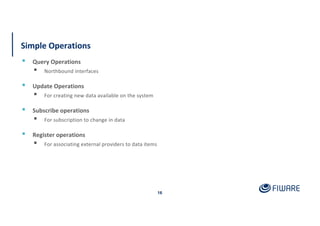
Simple Operations
16
▪ Query Operations
▪ Northbound interfaces
▪ Update Operations
▪ For creating new data available on the system
▪ Subscribe operations
▪ For subscription to change in data
▪ Register operations
▪ For associating external providers to data items
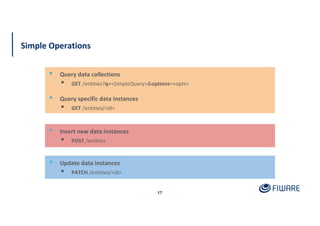
Simple Operations
17
▪ Query data collections
▪ GET /entities?q=<SimpleQuery>&options=<opts>
▪ Query specific data instances
▪ GET /entities/<id>
▪ Insert new data instances
▪ POST /entities
▪ Update data instances
▪ PATCH /entities/<id>
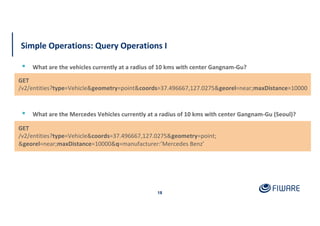
Simple Operations: Query Operations I
18
▪ What are the Mercedes Vehicles currently at a radius of 10 kms with center Gangnam-Gu (Seoul)?
GET
/v2/entities?type=Vehicle&geometry=point&coords=37.496667,127.0275&georel=near;maxDistance=10000
▪ What are the vehicles currently at a radius of 10 kms with center Gangnam-Gu?
GET
/v2/entities?type=Vehicle&coords=37.496667,127.0275&geometry=point;
&georel=near;maxDistance=10000&q=manufacturer:’Mercedes Benz’
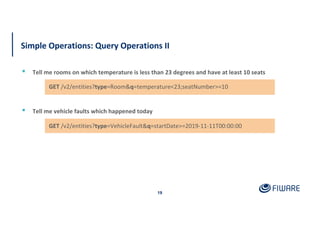
Simple Operations: Query Operations II
19
▪ Tell me rooms on which temperature is less than 23 degrees and have at least 10 seats
GET /v2/entities?type=VehicleFault&q=startDate>=2019-11-11T00:00:00
▪ Tell me vehicle faults which happened today
GET /v2/entities?type=Room&q=temperature<23;seatNumber>=10
Simple Operations: Query payload examples
20
[
{
“id”: “123-456-789”,
“type”: “Vehicle”,
“model”: “C200”,
“brand”: “Mercedes Benz”,
“buildYear”: “2010”
},
{
“id”: “000-987-654”,
“type”: “Vehicle”,
“model”: “Astra”,
“brand”: “Opel”,
“buildYear”: “2003”
}
]
[
{
“id”: “123890-22222”,
“type”: “VehicleFault”,
“location”: {
“type”: “point”,
“coordinates”: [40.41, -3.70]
}
“startDate”: 2015-07-17T11:12:42.540Z”
}
]
Simple Operations: Query Operations III
21
GET /v2/entities/r786543/attrs/temperature/value
▪ Tell me the temperature at the Chrisantemum room
▪ Only Value is returned → The most abbreviated response
GET /v2/entities?type=CarBrand&attrs=name&options=values
▪ Tell me the known car brands
23.5
[“Ford”, “Mercedes Benz”, “Hyundai”]
22
Creating and Pulling data
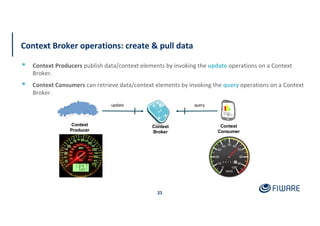
Context Broker operations: create & pull data
23
▪ Context Producers publish data/context elements by invoking the update operations on a Context
Broker.
▪ Context Consumers can retrieve data/context elements by invoking the query operations on a Context
Broker.
Context
Consumer
query
Context
Producer
update
Context
Broker
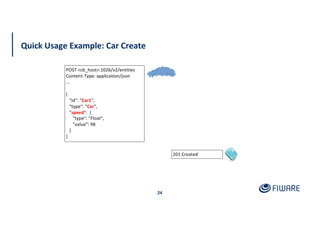
Quick Usage Example: Car Create
24
201 Created
POST <cb_host>:1026/v2/entities
Content-Type: application/json
...
{
"id": "Car1",
"type": "Car",
"speed": {
"type": "Float",
"value": 98
}
}
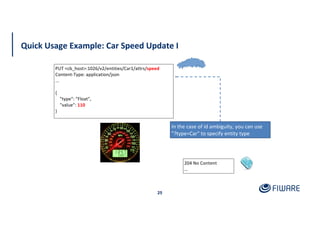
Quick Usage Example: Car Speed Update I
25
PUT <cb_host>:1026/v2/entities/Car1/attrs/speed
Content-Type: application/json
...
{
"type": "Float",
"value": 110
}
204 No Content
…
In the case of id ambiguity, you can use
"?type=Car" to specify entity type
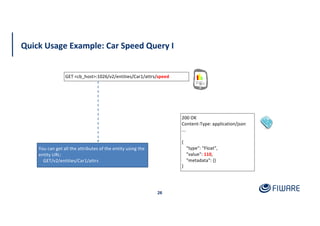
Quick Usage Example: Car Speed Query I
26
200 OK
Content-Type: application/json
...
{
"type": "Float",
"value": 110,
"metadata": {}
}
You can get all the attributes of the entity using the
entity URL:
GET/v2/entities/Car1/attrs
GET <cb_host>:1026/v2/entities/Car1/attrs/speed
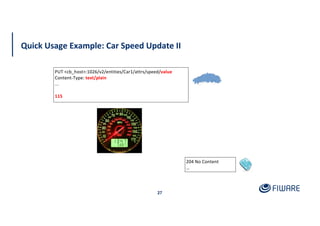
Quick Usage Example: Car Speed Update II
27
PUT <cb_host>:1026/v2/entities/Car1/attrs/speed/value
Content-Type: text/plain
...
115
204 No Content
…
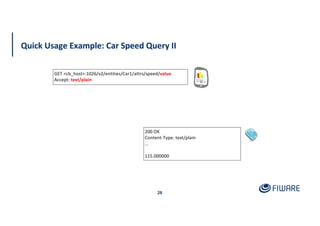
Quick Usage Example: Car Speed Query II
28
200 OK
Content-Type: text/plain
...
115.000000
GET <cb_host>:1026/v2/entities/Car1/attrs/speed/value
Accept: text/plain
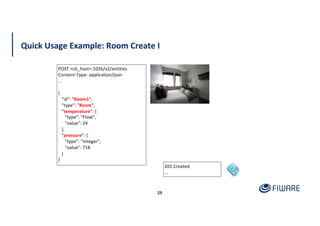
Quick Usage Example: Room Create I
29
201 Created
...
POST <cb_host>:1026/v2/entities
Content-Type: application/json
...
{
"id": "Room1",
"type": "Room",
"temperature": {
"type": "Float",
"value": 24
},
"pressure": {
"type": "Integer",
"value": 718
}
}
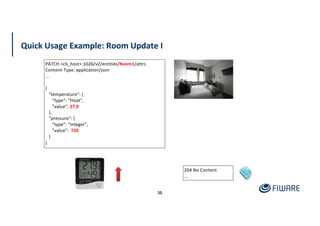
Quick Usage Example: Room Update I
30
204 No Content
…
PATCH <cb_host>:1026/v2/entities/Room1/attrs
Content-Type: application/json
...
{
"temperature“: {
"type": "Float",
"value": 27,9
},
"pressure": {
"type": "Integer",
"value": 720
}
}
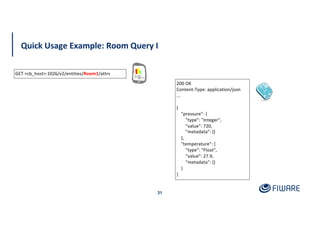
Quick Usage Example: Room Query I
31
200 OK
Content-Type: application/json
...
{
"pressure": {
"type": "Integer",
"value": 720,
"metadata": {}
},
"temperature": {
"type": "Float",
"value": 27.9,
"metadata": {}
}
}
GET <cb_host>:1026/v2/entities/Room1/attrs
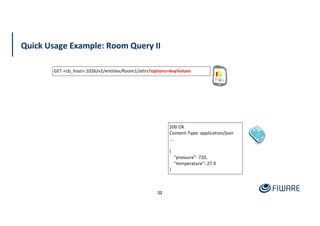
Quick Usage Example: Room Query II
32
200 OK
Content-Type: application/json
...
{
"pressure": 720,
"temperature": 27.9
}
GET <cb_host>:1026/v2/entities/Room1/attrs?options=keyValues
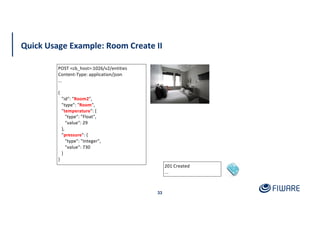
Quick Usage Example: Room Create II
33
201 Created
...
POST <cb_host>:1026/v2/entities
Content-Type: application/json
...
{
"id": "Room2",
"type": "Room",
"temperature": {
"type": "Float",
"value": 29
},
"pressure": {
"type": "Integer",
"value": 730
}
}
Quick Usage Example: Filters I
34
200 OK
Content-Type: application/json
...
[
{
"id": "Room2",
"pressure": 730,
"temperature": 29,
"type": "Room"
}
]
GET <cb_host>:1026/v2/entities?options=keyValues&q=temperature>28
Quick Usage Example: Filters II
35
200 OK
Content-Type: application/json
...
[
{
"id": "Room1",
"pressure": 720,
"temperature": 25,
"type": "Room"
}
]
GET <cb_host>:1026/v2/entities?options=keyValues&q=pressure==715..725
The full description of the Simple
Query Language for filtering can be
found in the NGSIv2 Specification
document
36
Push data
Context
Consumer
update
Context
Broker
subId = subscribeContext (consumer, expr, expiration)
notify (subId, data/context)
Context Broker operations: push data
37
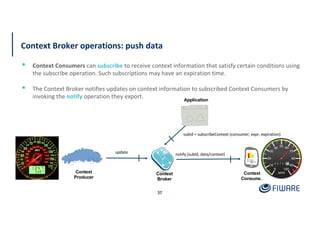
▪ Context Consumers can subscribe to receive context information that satisfy certain conditions using
the subscribe operation. Such subscriptions may have an expiration time.
▪ The Context Broker notifies updates on context information to subscribed Context Consumers by
invoking the notify operation they export.
Context
Producer
Application
Quick Usage Example: Subscription
38
POST <cb_host>:1026/v2/subscriptions
Content-Type: application/json
…
{
"subject": {
"entities": [
{
"id": "Room1",
"type": "Room"
}
],
"condition": {
"attrs": [ "temperature" ]
}
},
"notification": {
"http": {
"url": "http://<host>:<port>/publish"
},
"attrs": [ "temperature" ]
},
"expires": "2026-04-05T14:00:00.00Z"
}
201 Created
Location: /v2/subscriptions/51c0ac9ed714fb3b37d7d5a8
...
Quick Usage Example: Notification
39
POST /publish HTTP/1.1
Content-type: application/json; charset=utf-8
Ngsiv2-AttrsFormat: normalized
…
{
"subscriptionId": "574d720dbef222abb860534a",
"data": [
{
"id": "Room1",
"type": "Room",
"temperature": {
"type": "Float",
"value": 17.8,
"metadata": {}
}
}
]
}
27.9
17.8
List existing subscriptions
40
200 OK
Content-Type: application/json
…
[{
"id": " 51c0ac9ed714fb3b37d7d5a8 ",
"expires": "2026-04-05T14:00:00.00Z",
"status": "active",
"subject": {
"entities": [{
"id": "Room1",
"type": "Room"
}],
"condition": {
"attrs": ["temperature"]
}
},
"notification": {
"timesSent": 3,
"lastNotification": "2016-05-31T11:19:32.00Z",
"lastSuccess": "2016-05-31T11:19:32.00Z",
"attrs": ["temperature"],
"attrsFormat": "normalized",
"http": {
"url": "http://localhost:1028/publish"
}
}
}]
The full description of the
subscription object (including all its
fields) can be found in the NGSIv2
Specification
GET <cb_host>:1026/v2/subscriptions
41
Batch operations
Orion Context Broker: batch operations
42
▪ Batch query and batch update
▪ They are equivalent in functionality to previously described RESTful operations
▪ All them use POST as verb and the /v2/op URL prefix, including operation parameters in the JSON
payload
▪ They implement extra functionality that cannot be achieved with RESTful operations, e.g. to create
several entities with the same operation
▪ They are not a substitute but a complement to RESTful operations
Special update action types
43
▪ Used by /v2/op/update (batch operation)
▪ Conventional actionTypes
▪ APPEND: append (or update if the attribute already exists)
▪ UPDATE: update
▪ DELETE: delete
▪ Special actionTypes
▪ APPEND_STRICT: strict append (returns error if some of the attributes to add already exists)
▪ REPLACE: delete all the entity attributes, next append the ones in the update request
Batch Operation Example: Create Several Rooms
44
201 Created
...
POST <cb_host>:1026/v2/op/update
Conten-Type: application/json
...
{
"actionType": "APPEND",
"entities": [
{
"type": "Room",
"id": "Room3",
"temperature": {
"value": 21.2,
"type": "Float"
},
"pressure": {
"value": 722,
"type": "Integer"
}
},
…
…
{
"type": "Room",
"id": "Room4",
"temperature": {
"value": 31.8,
"type": "Float"
},
"pressure": {
"value": 712,
"type": "Integer"
}
}
]
}
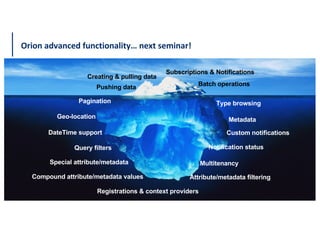
Orion advanced functionality… next seminar!
45
Pagination
Metadata
Compound attribute/metadata values
Type browsing
Geo-location
Query filters
DateTime support Custom notifications
Notification status
Attribute/metadata filtering
Special attribute/metadata
Registrations & context providers
Multitenancy
Creating & pulling data
Pushing data
Subscriptions & Notifications
Batch operations
Summary: Terms
46
● JSON, JavaScript Object Notation is an open-standard file format that uses human-readable text to
transmit data objects consisting of attribute–value pairs and array data types.
● NGSIv2, version 2 of the Open Mobile Alliance (OMA) Next Generation Service Interfaces (NGSI).
● Publish,
● Subscribe,
● Notify,
● Pulling mechanism,
● Pushing mechanism,
References
47
● FIWARE Catalogue
o https://www.fiware.org/developers/catalogue
● NGSIv2 Specification
o http://fiware.github.io/specifications/ngsiv2/stable
o http://fiware.github.io/specifications/ngsiv2/latest
● Orion support though StackOverflow
o Ask your questions using the “fiware-orion” tag
o Look for existing questions at http://stackoverflow.com/questions/tagged/fiware-orion
Question & Answer
48
fiware-tech-help@lists.fiware.org
5
0

Core Context Management

  • 1.
    Session 3 -Core Context Management Fernando López, Cloud & Platform Senior Expert fernando.lopez@fiware.org @flopezaguilar FIWARE Foundation, e.V.
  • 2.
    1 Did you understand anything? I haven'tunderstand anything yet. And You? Me neither… Ok, lets follow with our poker faces…
  • 3.
    2 Captain, may Iask now some questions? Sure… I mean, a question after this one… Spock!!!
  • 4.
    Learning Goals ▪ Generaloverview of Orion Context Broker architecture ▪ Introduction to NGSI, NGSIv2 ▪ Creating and pulling data ▪ Pushing data and notifications ▪ Batch operations 3
  • 5.
  • 6.
    General concepts ▪ Contextdata represents the state of a physical or conceptual object which exists in the real world. ▪ The Orion Context Broker maintains a representation of the state of the entities: • Entered programmatically • Retrieved from sensors • Augmented by other sources such as webservices, other context brokers etc. ▪ The Context Broker only holds the current state - it has no memory 5
  • 7.
    General concepts ▪ NGSIv2 is a vendor-neutral standardized interface for interactions within FIWARE • Simple REST API for CRUD • Subscriptions can be used raise events to send data to other microservices • Registrations can be used to retrieve context from other sources • Also supports Query Filtering + Pagination + Geoqueries • Use the Open API Specification to generate a library 6
  • 8.
    Orion Context Broker 7 ▪Main functions: ▪ Context management ▪ Context availability management (advanced topic) ▪ HTTP and REST-based ▪ JSON payload support ▪ Context in NGSI is based in an entity-attribute-metadata model:
  • 9.
    Orion Context Brokerin a nutshell 8 Context Producers Context Consumers subscriptions update query notify notify update update Mongo DB 1026 1026
  • 10.
    Orion Context Broker– check health 9 GET <cb_host>:1026/version { "orion" : { "version" : "2.3.0", "uptime" : "7 d, 21 h, 33 m, 39 s", "git_hash" : "aee96414cc3594bba161afb400f69d101978b39c", "compile_time" : "Mon Dec 5 08:38:58 CET 2016", "compiled_by" : "fermin", "compiled_in" : "centollo" } }
  • 11.
  • 12.
    Two “flavours” ofNGSI API 11 ▪ NGSIv1 ▪ Original NGSI RESTful binding of OMA-NGSI ▪ Implemented in 2013 ▪ Uses the /v1 prefix in resource URL ▪ NGSIv2 ▪ A revamped, simplified binding of OMA-NGSI ▪ Enhanced functionality compared with NGSIv1 (eg. filtering) ▪ Stable, ready for production, version already available ▪ Current NGSIv2 version is Release Candidate 2018.07 http://telefonicaid.github.io/fiware-orion/api/v2/stable ▪ New features coming (http://telefonicaid.github.io/fiware-orion/api/v2/stable) ▪ Uses the /v2 prefix in resource URL
  • 13.
    Basic Concepts 12 ▪ Entity ▪Any kind of thing of interest. It has many attributes o id : Entity identifier o type : Entity type ▪ Attributes ▪ Represent an observable property of an entity o name o type o value o additional “extra sub-properties” (metadata in NGSI terminology)
  • 14.
    Entity Examples inNGSIv2 13 { “id”: “Traffic-Incidence-9876”, “type”: “gsmadata:TrafficIncidence”, “category”: “Vehicle Fault”, “severity”: “Yellow”, “vehicleType”: “Truck”, “startDate”: "2015-07-17T09:31:11.112Z” “roadName”: “N-122”, “description”: “A truck is stopped on road” } { “id”: “r786543”, “type”: “Room”, “name”: “Chrisantemum”, “temperature”: 22, “seatNumber”: 10, “location”: { “type”: “Point”, “coordinates”: [31.2222200, 121.4580600] } }
  • 15.
    JSON payload features 14 ▪Flexible to accommodate different data flavours ▪ Terse (only the essential is provided) ▪ Simple and ready for front-end data consumers ▪ It can represent any dataset ▪ As a collection of entities with the same type
  • 16.
    API Overview 15 ▪ Simpleoperations (RESTful) ▪ Useful for app developers (Northbound interfaces) ▪ One “transaction” per request ▪ Bulk operations (RPC Style → HTTP POST) ▪ Allow to perform many simple operations at the same time ▪ Mostly useful for more complex backend processes o South / Eastbound interfaces o Original OMA-NGSI with simplified payload binding
  • 17.
    Simple Operations 16 ▪ QueryOperations ▪ Northbound interfaces ▪ Update Operations ▪ For creating new data available on the system ▪ Subscribe operations ▪ For subscription to change in data ▪ Register operations ▪ For associating external providers to data items
  • 18.
    Simple Operations 17 ▪ Querydata collections ▪ GET /entities?q=<SimpleQuery>&options=<opts> ▪ Query specific data instances ▪ GET /entities/<id> ▪ Insert new data instances ▪ POST /entities ▪ Update data instances ▪ PATCH /entities/<id>
  • 19.
    Simple Operations: QueryOperations I 18 ▪ What are the Mercedes Vehicles currently at a radius of 10 kms with center Gangnam-Gu (Seoul)? GET /v2/entities?type=Vehicle&geometry=point&coords=37.496667,127.0275&georel=near;maxDistance=10000 ▪ What are the vehicles currently at a radius of 10 kms with center Gangnam-Gu? GET /v2/entities?type=Vehicle&coords=37.496667,127.0275&geometry=point; &georel=near;maxDistance=10000&q=manufacturer:’Mercedes Benz’
  • 20.
    Simple Operations: QueryOperations II 19 ▪ Tell me rooms on which temperature is less than 23 degrees and have at least 10 seats GET /v2/entities?type=VehicleFault&q=startDate>=2019-11-11T00:00:00 ▪ Tell me vehicle faults which happened today GET /v2/entities?type=Room&q=temperature<23;seatNumber>=10
  • 21.
    Simple Operations: Querypayload examples 20 [ { “id”: “123-456-789”, “type”: “Vehicle”, “model”: “C200”, “brand”: “Mercedes Benz”, “buildYear”: “2010” }, { “id”: “000-987-654”, “type”: “Vehicle”, “model”: “Astra”, “brand”: “Opel”, “buildYear”: “2003” } ] [ { “id”: “123890-22222”, “type”: “VehicleFault”, “location”: { “type”: “point”, “coordinates”: [40.41, -3.70] } “startDate”: 2015-07-17T11:12:42.540Z” } ]
  • 22.
    Simple Operations: QueryOperations III 21 GET /v2/entities/r786543/attrs/temperature/value ▪ Tell me the temperature at the Chrisantemum room ▪ Only Value is returned → The most abbreviated response GET /v2/entities?type=CarBrand&attrs=name&options=values ▪ Tell me the known car brands 23.5 [“Ford”, “Mercedes Benz”, “Hyundai”]
  • 23.
  • 24.
    Context Broker operations:create & pull data 23 ▪ Context Producers publish data/context elements by invoking the update operations on a Context Broker. ▪ Context Consumers can retrieve data/context elements by invoking the query operations on a Context Broker. Context Consumer query Context Producer update Context Broker
  • 25.
    Quick Usage Example:Car Create 24 201 Created POST <cb_host>:1026/v2/entities Content-Type: application/json ... { "id": "Car1", "type": "Car", "speed": { "type": "Float", "value": 98 } }
  • 26.
    Quick Usage Example:Car Speed Update I 25 PUT <cb_host>:1026/v2/entities/Car1/attrs/speed Content-Type: application/json ... { "type": "Float", "value": 110 } 204 No Content … In the case of id ambiguity, you can use "?type=Car" to specify entity type
  • 27.
    Quick Usage Example:Car Speed Query I 26 200 OK Content-Type: application/json ... { "type": "Float", "value": 110, "metadata": {} } You can get all the attributes of the entity using the entity URL: GET/v2/entities/Car1/attrs GET <cb_host>:1026/v2/entities/Car1/attrs/speed
  • 28.
    Quick Usage Example:Car Speed Update II 27 PUT <cb_host>:1026/v2/entities/Car1/attrs/speed/value Content-Type: text/plain ... 115 204 No Content …
  • 29.
    Quick Usage Example:Car Speed Query II 28 200 OK Content-Type: text/plain ... 115.000000 GET <cb_host>:1026/v2/entities/Car1/attrs/speed/value Accept: text/plain
  • 30.
    Quick Usage Example:Room Create I 29 201 Created ... POST <cb_host>:1026/v2/entities Content-Type: application/json ... { "id": "Room1", "type": "Room", "temperature": { "type": "Float", "value": 24 }, "pressure": { "type": "Integer", "value": 718 } }
  • 31.
    Quick Usage Example:Room Update I 30 204 No Content … PATCH <cb_host>:1026/v2/entities/Room1/attrs Content-Type: application/json ... { "temperature“: { "type": "Float", "value": 27,9 }, "pressure": { "type": "Integer", "value": 720 } }
  • 32.
    Quick Usage Example:Room Query I 31 200 OK Content-Type: application/json ... { "pressure": { "type": "Integer", "value": 720, "metadata": {} }, "temperature": { "type": "Float", "value": 27.9, "metadata": {} } } GET <cb_host>:1026/v2/entities/Room1/attrs
  • 33.
    Quick Usage Example:Room Query II 32 200 OK Content-Type: application/json ... { "pressure": 720, "temperature": 27.9 } GET <cb_host>:1026/v2/entities/Room1/attrs?options=keyValues
  • 34.
    Quick Usage Example:Room Create II 33 201 Created ... POST <cb_host>:1026/v2/entities Content-Type: application/json ... { "id": "Room2", "type": "Room", "temperature": { "type": "Float", "value": 29 }, "pressure": { "type": "Integer", "value": 730 } }
  • 35.
    Quick Usage Example:Filters I 34 200 OK Content-Type: application/json ... [ { "id": "Room2", "pressure": 730, "temperature": 29, "type": "Room" } ] GET <cb_host>:1026/v2/entities?options=keyValues&q=temperature>28
  • 36.
    Quick Usage Example:Filters II 35 200 OK Content-Type: application/json ... [ { "id": "Room1", "pressure": 720, "temperature": 25, "type": "Room" } ] GET <cb_host>:1026/v2/entities?options=keyValues&q=pressure==715..725 The full description of the Simple Query Language for filtering can be found in the NGSIv2 Specification document
  • 37.
  • 38.
    Context Consumer update Context Broker subId = subscribeContext(consumer, expr, expiration) notify (subId, data/context) Context Broker operations: push data 37 ▪ Context Consumers can subscribe to receive context information that satisfy certain conditions using the subscribe operation. Such subscriptions may have an expiration time. ▪ The Context Broker notifies updates on context information to subscribed Context Consumers by invoking the notify operation they export. Context Producer Application
  • 39.
    Quick Usage Example:Subscription 38 POST <cb_host>:1026/v2/subscriptions Content-Type: application/json … { "subject": { "entities": [ { "id": "Room1", "type": "Room" } ], "condition": { "attrs": [ "temperature" ] } }, "notification": { "http": { "url": "http://<host>:<port>/publish" }, "attrs": [ "temperature" ] }, "expires": "2026-04-05T14:00:00.00Z" } 201 Created Location: /v2/subscriptions/51c0ac9ed714fb3b37d7d5a8 ...
  • 40.
    Quick Usage Example:Notification 39 POST /publish HTTP/1.1 Content-type: application/json; charset=utf-8 Ngsiv2-AttrsFormat: normalized … { "subscriptionId": "574d720dbef222abb860534a", "data": [ { "id": "Room1", "type": "Room", "temperature": { "type": "Float", "value": 17.8, "metadata": {} } } ] } 27.9 17.8
  • 41.
    List existing subscriptions 40 200OK Content-Type: application/json … [{ "id": " 51c0ac9ed714fb3b37d7d5a8 ", "expires": "2026-04-05T14:00:00.00Z", "status": "active", "subject": { "entities": [{ "id": "Room1", "type": "Room" }], "condition": { "attrs": ["temperature"] } }, "notification": { "timesSent": 3, "lastNotification": "2016-05-31T11:19:32.00Z", "lastSuccess": "2016-05-31T11:19:32.00Z", "attrs": ["temperature"], "attrsFormat": "normalized", "http": { "url": "http://localhost:1028/publish" } } }] The full description of the subscription object (including all its fields) can be found in the NGSIv2 Specification GET <cb_host>:1026/v2/subscriptions
  • 42.
  • 43.
    Orion Context Broker:batch operations 42 ▪ Batch query and batch update ▪ They are equivalent in functionality to previously described RESTful operations ▪ All them use POST as verb and the /v2/op URL prefix, including operation parameters in the JSON payload ▪ They implement extra functionality that cannot be achieved with RESTful operations, e.g. to create several entities with the same operation ▪ They are not a substitute but a complement to RESTful operations
  • 44.
    Special update actiontypes 43 ▪ Used by /v2/op/update (batch operation) ▪ Conventional actionTypes ▪ APPEND: append (or update if the attribute already exists) ▪ UPDATE: update ▪ DELETE: delete ▪ Special actionTypes ▪ APPEND_STRICT: strict append (returns error if some of the attributes to add already exists) ▪ REPLACE: delete all the entity attributes, next append the ones in the update request
  • 45.
    Batch Operation Example:Create Several Rooms 44 201 Created ... POST <cb_host>:1026/v2/op/update Conten-Type: application/json ... { "actionType": "APPEND", "entities": [ { "type": "Room", "id": "Room3", "temperature": { "value": 21.2, "type": "Float" }, "pressure": { "value": 722, "type": "Integer" } }, … … { "type": "Room", "id": "Room4", "temperature": { "value": 31.8, "type": "Float" }, "pressure": { "value": 712, "type": "Integer" } } ] }
  • 46.
    Orion advanced functionality…next seminar! 45 Pagination Metadata Compound attribute/metadata values Type browsing Geo-location Query filters DateTime support Custom notifications Notification status Attribute/metadata filtering Special attribute/metadata Registrations & context providers Multitenancy Creating & pulling data Pushing data Subscriptions & Notifications Batch operations
  • 47.
    Summary: Terms 46 ● JSON,JavaScript Object Notation is an open-standard file format that uses human-readable text to transmit data objects consisting of attribute–value pairs and array data types. ● NGSIv2, version 2 of the Open Mobile Alliance (OMA) Next Generation Service Interfaces (NGSI). ● Publish, ● Subscribe, ● Notify, ● Pulling mechanism, ● Pushing mechanism,
  • 48.
    References 47 ● FIWARE Catalogue ohttps://www.fiware.org/developers/catalogue ● NGSIv2 Specification o http://fiware.github.io/specifications/ngsiv2/stable o http://fiware.github.io/specifications/ngsiv2/latest ● Orion support though StackOverflow o Ask your questions using the “fiware-orion” tag o Look for existing questions at http://stackoverflow.com/questions/tagged/fiware-orion
  • 49.
  • 51.