Session ID:
Prepared by:
Patching and Upgrading with
Virtualization
The Epiphany
149
Kellyn Pot’Vin-Gorman, Technical Intelligence Manager
@DBAKevlar
Epiphany
e·piph·a·ny
əˈpifənē/
noun
a (1) : a usually sudden manifestation or perception of the essential nature or
meaning of something (2) : an intuitive grasp of reality through something (as an
event) usually simple and striking (3) : an illuminating discovery, realization, or
disclosure
b : a revealing scene or moment
A Single Use Case
The goal here is with one use case
to help drive the epiphany of
virtualization.
Patching and Upgrading….
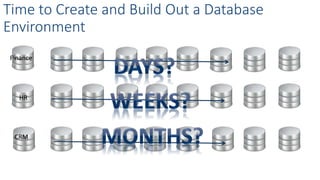
Time to Create and Build Out a Database
Environment
Finance
HR
CRM
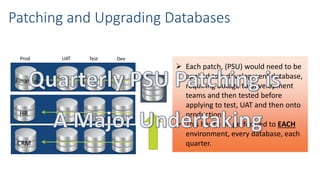
Patching and Upgrading Databases
 Each patch, (PSU) would need to be
applied to a development database,
requiring outage to development
teams and then tested before
applying to test, UAT and then onto
production.
 This has to be performed to EACH
environment, every database, each
quarter.
Finance
HR
CRM
UAT Test DevProd
Risks/Challenges Of This Approach
• Downtime for valuable resources.
• DBAs working afterhours
• Each database must have it done and…
• The tedious task must be performed over and over again.
• Little opportunity for advanced learning.
• Each database may experience different bugs.
April 2-6, 2017 in Las Vegas, NV USA #C17LV
What Happens When You Go to the Cloud?
• All this has to happen, but now up to the cloud
• It’s not just about getting the environment patches, but
keep them all in sync and more environments to keep
track of and patch
• Demands, resources and new cost structure
• Monitoring it all isn’t easy, either…
April 2-6, 2017 in Las Vegas, NV USA #C17LV
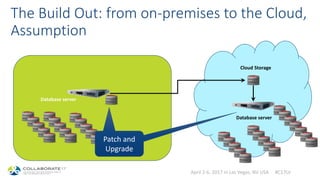
The Build Out: from on-premises to the Cloud,
Assumption
Database server
Cloud Storage
Database server
Patch and
Upgrade
Go Into Virtualization Deeper?
Virtualization 101 and Q&A
9:45 AM–10:45 AM Apr 5, 2017
Jasmine C
▶▶▶
Virtualize and Deployed▶ ▶ ▶
0.6 TB
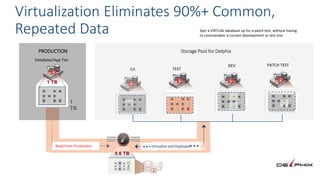
Virtualization Eliminates 90%+ Common,
Repeated Data
Storage Pool for Delphix
QA
DEV PATCH TEST
PRODUCTION
Database/App Tier
1
TB
1 TB
Read From Production
Spin a VIRTUAL database up for a patch test, without having
to commandeer a current development or test one.
TEST
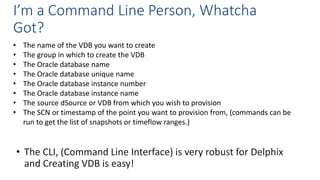
I’m a Command Line Person, Whatcha
Got?
• The CLI, (Command Line Interface) is very robust for Delphix
and Creating VDB is easy!
• The name of the VDB you want to create
• The group in which to create the VDB
• The Oracle database name
• The Oracle database unique name
• The Oracle database instance number
• The Oracle database instance name
• The source dSource or VDB from which you wish to provision
• The SCN or timestamp of the point you want to provision from, (commands can be
run to get the list of snapshots or timeflow ranges.)
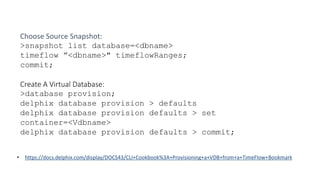
• https://docs.delphix.com/display/DOCS43/CLI+Cookbook%3A+Provisioning+a+VDB+from+a+TimeFlow+Bookmark
Choose Source Snapshot:
>snapshot list database=<dbname>
timeflow ”<dbname>" timeflowRanges;
commit;
Create A Virtual Database:
>database provision;
delphix database provision > defaults
delphix database provision defaults > set
container=<Vdbname>
delphix database provision defaults > commit;
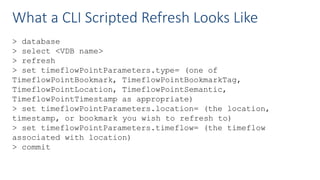
What a CLI Scripted Refresh Looks Like
> database
> select <VDB name>
> refresh
> set timeflowPointParameters.type= (one of
TimeflowPointBookmark, TimeflowPointBookmarkTag,
TimeflowPointLocation, TimeflowPointSemantic,
TimeflowPointTimestamp as appropriate)
> set timeflowPointParameters.location= (the location,
timestamp, or bookmark you wish to refresh to)
> set timeflowPointParameters.timeflow= (the timeflow
associated with location)
> commit
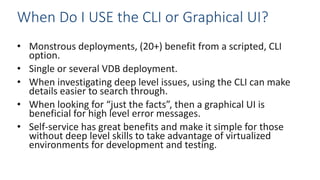
• Monstrous deployments, (20+) benefit from a scripted, CLI
option.
• Single or several VDB deployment.
• When investigating deep level issues, using the CLI can make
details easier to search through.
• When looking for “just the facts”, then a graphical UI is
beneficial for high level error messages.
• Self-service has great benefits and make it simple for those
without deep level skills to take advantage of virtualized
environments for development and testing.
When Do I USE the CLI or Graphical UI?
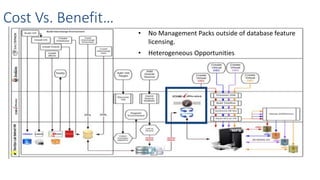
Cost Vs. Benefit…
• No Management Packs outside of database feature
licensing.
• Heterogeneous Opportunities
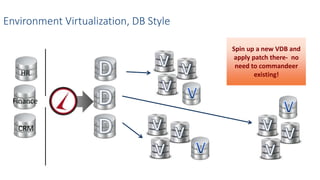
Spin up a new VDB and
apply patch there- no
need to commandeer
existing!
Environment Virtualization, DB Style
HR
Finance
CRM
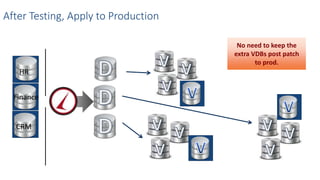
No need to keep the
extra VDBs post patch
to prod.
After Testing, Apply to Production
HR
Finance
CRM
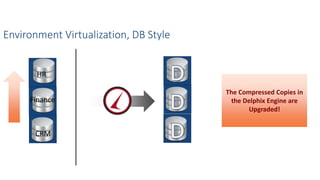
The Compressed Copies in
the Delphix Engine are
Upgraded!
Environment Virtualization, DB Style
HR
Finance
CRM
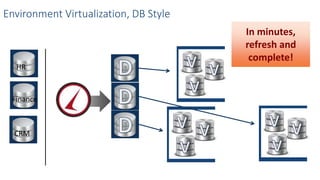
In minutes,
refresh and
complete!
Environment Virtualization, DB Style
HR
Finance
CRM
• Not only did I save on 80% or more on storage usage overall.
• I didn’t have to take away a valuable resource’s database environment to test the
patch/upgrade.
• I didn’t have to apply the patch/upgrade to each environment, as they are
virtualized copies of the source.
• I save significant time that commonly has to be allocated to quarterly and annual
maintenance for patching and upgrading.
• I apply the patch twice- once to test, once to production. I only need to refresh my
environments after I’m done.
• This works for the database AND application tier.
Patching and Upgrading with Virtualization
The quickest way to complete a task is not
having to do it.
April 2-6, 2017 in Las Vegas, NV USA #C17LV
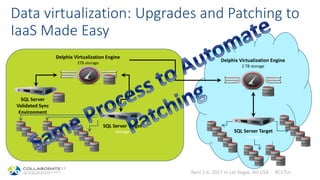
Data virtualization: Upgrades and Patching to
IaaS Made Easy
Delphix Virtualization Engine
2TB storage
Delphix Virtualization Engine
2 TB storage
SQL Server Target
Storage
SQL Server
Validated Sync
Environment
SQL Server Target
Storage
https://www.delphix.com/products/free-trial-request
• Delphix Oracle Upgrade Workflow: https://support.delphix.com/hc/en-
us/articles/221248628-Oracle-Upgrades-Workflow-and-Troubleshooting
• Upgrading the Dsource after an Oracle Upgrade:
https://docs.delphix.com/display/DOCS/Upgrading+dSources+after+an+Or
acle+Upgrade
• How to Upgrade an Oracle VDB: https://support.delphix.com/hc/en-
us/articles/204929258-KB089-How-to-Upgrade-an-Oracle-VDB
• Tip: Don’t Suspend:LogSync When Upgrading the Source!
https://community.delphix.com/delphix/topics/tip-of-the-day-upgrading-
an-oracle-vdb
References and Tips
Q&A

Upgrading and Patching with Virtualization

  • 1.
    Session ID: Prepared by: Patchingand Upgrading with Virtualization The Epiphany 149 Kellyn Pot’Vin-Gorman, Technical Intelligence Manager @DBAKevlar
  • 2.
    Epiphany e·piph·a·ny əˈpifənē/ noun a (1) :a usually sudden manifestation or perception of the essential nature or meaning of something (2) : an intuitive grasp of reality through something (as an event) usually simple and striking (3) : an illuminating discovery, realization, or disclosure b : a revealing scene or moment
  • 3.
    A Single UseCase The goal here is with one use case to help drive the epiphany of virtualization.
  • 4.
  • 5.
    Time to Createand Build Out a Database Environment Finance HR CRM
  • 7.
    Patching and UpgradingDatabases  Each patch, (PSU) would need to be applied to a development database, requiring outage to development teams and then tested before applying to test, UAT and then onto production.  This has to be performed to EACH environment, every database, each quarter. Finance HR CRM UAT Test DevProd
  • 8.
    Risks/Challenges Of ThisApproach • Downtime for valuable resources. • DBAs working afterhours • Each database must have it done and… • The tedious task must be performed over and over again. • Little opportunity for advanced learning. • Each database may experience different bugs.
  • 9.
    April 2-6, 2017in Las Vegas, NV USA #C17LV What Happens When You Go to the Cloud? • All this has to happen, but now up to the cloud • It’s not just about getting the environment patches, but keep them all in sync and more environments to keep track of and patch • Demands, resources and new cost structure • Monitoring it all isn’t easy, either…
  • 10.
    April 2-6, 2017in Las Vegas, NV USA #C17LV The Build Out: from on-premises to the Cloud, Assumption Database server Cloud Storage Database server Patch and Upgrade
  • 11.
    Go Into VirtualizationDeeper? Virtualization 101 and Q&A 9:45 AM–10:45 AM Apr 5, 2017 Jasmine C
  • 12.
    ▶▶▶ Virtualize and Deployed▶▶ ▶ 0.6 TB Virtualization Eliminates 90%+ Common, Repeated Data Storage Pool for Delphix QA DEV PATCH TEST PRODUCTION Database/App Tier 1 TB 1 TB Read From Production Spin a VIRTUAL database up for a patch test, without having to commandeer a current development or test one. TEST
  • 13.
    I’m a CommandLine Person, Whatcha Got? • The CLI, (Command Line Interface) is very robust for Delphix and Creating VDB is easy! • The name of the VDB you want to create • The group in which to create the VDB • The Oracle database name • The Oracle database unique name • The Oracle database instance number • The Oracle database instance name • The source dSource or VDB from which you wish to provision • The SCN or timestamp of the point you want to provision from, (commands can be run to get the list of snapshots or timeflow ranges.)
  • 14.
    • https://docs.delphix.com/display/DOCS43/CLI+Cookbook%3A+Provisioning+a+VDB+from+a+TimeFlow+Bookmark Choose SourceSnapshot: >snapshot list database=<dbname> timeflow ”<dbname>" timeflowRanges; commit; Create A Virtual Database: >database provision; delphix database provision > defaults delphix database provision defaults > set container=<Vdbname> delphix database provision defaults > commit;
  • 15.
    What a CLIScripted Refresh Looks Like > database > select <VDB name> > refresh > set timeflowPointParameters.type= (one of TimeflowPointBookmark, TimeflowPointBookmarkTag, TimeflowPointLocation, TimeflowPointSemantic, TimeflowPointTimestamp as appropriate) > set timeflowPointParameters.location= (the location, timestamp, or bookmark you wish to refresh to) > set timeflowPointParameters.timeflow= (the timeflow associated with location) > commit
  • 16.
    • Monstrous deployments,(20+) benefit from a scripted, CLI option. • Single or several VDB deployment. • When investigating deep level issues, using the CLI can make details easier to search through. • When looking for “just the facts”, then a graphical UI is beneficial for high level error messages. • Self-service has great benefits and make it simple for those without deep level skills to take advantage of virtualized environments for development and testing. When Do I USE the CLI or Graphical UI?
  • 17.
    Cost Vs. Benefit… •No Management Packs outside of database feature licensing. • Heterogeneous Opportunities
  • 18.
    Spin up anew VDB and apply patch there- no need to commandeer existing! Environment Virtualization, DB Style HR Finance CRM
  • 19.
    No need tokeep the extra VDBs post patch to prod. After Testing, Apply to Production HR Finance CRM
  • 20.
    The Compressed Copiesin the Delphix Engine are Upgraded! Environment Virtualization, DB Style HR Finance CRM
  • 21.
    In minutes, refresh and complete! EnvironmentVirtualization, DB Style HR Finance CRM
  • 23.
    • Not onlydid I save on 80% or more on storage usage overall. • I didn’t have to take away a valuable resource’s database environment to test the patch/upgrade. • I didn’t have to apply the patch/upgrade to each environment, as they are virtualized copies of the source. • I save significant time that commonly has to be allocated to quarterly and annual maintenance for patching and upgrading. • I apply the patch twice- once to test, once to production. I only need to refresh my environments after I’m done. • This works for the database AND application tier. Patching and Upgrading with Virtualization
  • 24.
    The quickest wayto complete a task is not having to do it.
  • 25.
    April 2-6, 2017in Las Vegas, NV USA #C17LV Data virtualization: Upgrades and Patching to IaaS Made Easy Delphix Virtualization Engine 2TB storage Delphix Virtualization Engine 2 TB storage SQL Server Target Storage SQL Server Validated Sync Environment SQL Server Target Storage
  • 26.
  • 27.
    • Delphix OracleUpgrade Workflow: https://support.delphix.com/hc/en- us/articles/221248628-Oracle-Upgrades-Workflow-and-Troubleshooting • Upgrading the Dsource after an Oracle Upgrade: https://docs.delphix.com/display/DOCS/Upgrading+dSources+after+an+Or acle+Upgrade • How to Upgrade an Oracle VDB: https://support.delphix.com/hc/en- us/articles/204929258-KB089-How-to-Upgrade-an-Oracle-VDB • Tip: Don’t Suspend:LogSync When Upgrading the Source! https://community.delphix.com/delphix/topics/tip-of-the-day-upgrading- an-oracle-vdb References and Tips
  • 28.

Editor's Notes

  • #5 I’d simplified patching using Enterprise Manager 12c and patch plans. They were simple to create, but still required work each month to test and build. Also expensive management tasks. Sometimes I still had to intervene. It was a never-ending task.
  • #6 DBA has to commandeer a database for patch testing. This has to be performed for EACH environment, 100’s or 1000’s of databases! Most are not synchronized with production, different outcomes when released to production. Bugs occurring in one, not another!
  • #12 This session is on Wednesday morning at 9:45am in Jasmine C
  • #13 Note that the application tier is being virtualized along with the database. A block is a block, so this tier can be virtualized just like the database and a consistent image of all of them, (aka containers, even in self-service app, Jet Stream) So after you design these, then dev, pms and testers and manage them with a few clicks of a mouse. Total space used will be 1TB at the most.
  • #14 You may ask, why do you need a CLI- very clear, for large deployments, CLI is powerful. Grants the ability to build out templates and deploy on massive scale vs. clicking repeatedly. UI provides easy access for those less technical to deploy and user interface to manage environment.
  • #15 If you read my last post on April 1st, no, you can’t remove developers with the cli…it was an April fools joke… 
  • #16 Still, very simple vs. what we write every day to support a simple create table or create database…
  • #18 Update)/Oracle upgrade: A) Apply to existing ORACLE_HOME. (best if on Delphix v4.1.x or higher.) B) Create new ORACLE_HOME (could clone existing one) and then apply the PSU to the new ORACLE_HOME. For a dSource using option A: 1) Follow Oracle documentation, patch the ORALCE_HOME and the database. 2) Refresh the Environment in the GUI. For a dSource using option B: 1) Refresh the Environment from the Delphix GUI and verify that the new ORACLE_HOME is picked up and in the databases tab as an ORACLE Installation. 2) Follow all Oracle documentation, patch the production database etc. 3) Go to the Delphix GUI flip the dSource card over and use the Upgrade Icon on the bottom to switch the ORACLE_INSTALLATION to the new (verified in step 1).
  • #19 Deploy extra vdb just to test the patch for each environment.
  • #21 Testing upgrades and patches can be greatly simplified using the portability and ease-of-use of Delphix Virtual Databases (VDBs). Here are two approaches that can be used, depending on the upgrade or patch. Link the production database with the Delphix Server. Provision a VDB at the existing patch level. Patch the existing $Oracle_Home against the live VDB. or  Create the new $Oracle_Home and swing the VDB. Rollback VDB or Refresh from production. Repeat 3 or 4 until confident. Once the process has been tested and confirmed, it can be rolled out with confidence into production.