A Practitioner's Guide to Digital
            Marketing
                BMC 319-001


    Downtown Campus 906, 8th Ave SW, Calgary,
                  Room: 222


                                                1
Digital Marketing
Digital Marketing
                    2 Questions:
                    2 Questions:
          How do we frame our Plan?
           How do we frame our Plan?
        How do execute on that Plan? 2
        How do execute on that Plan?
Digital Marketing Models
his is what we use to execute the plan…
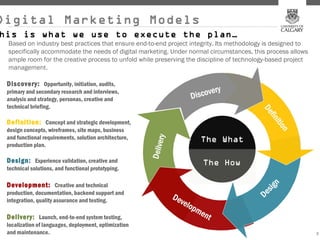
 Based on industry best practices that ensure end-to-end project integrity. Its methodology is designed to
 specifically accommodate the needs of digital marketing. Under normal circumstances, this process allows
 ample room for the creative process to unfold while preserving the discipline of technology-based project
 management.

 Discovery: Opportunity, initiation, audits,
 primary and secondary research and interviews,
 analysis and strategy, personas, creative and
 technical briefing.

 Definition: Concept and strategic development,
 design concepts, wireframes, site maps, business
 and functional requirements, solution architecture,
 production plan.

 Design: Experience validation, creative and
 technical solutions, and functional prototyping.

 Development: Creative and technical
 production, documentation, backend support and
 integration, quality assurance and testing.

 Delivery: Launch, end-to-end system testing,
 localization of languages, deployment, optimization
 and maintenance.                                                                                            3
                                                                                                             3
Digital Marketing Models
his is what we use to execute the plan…


                                          4
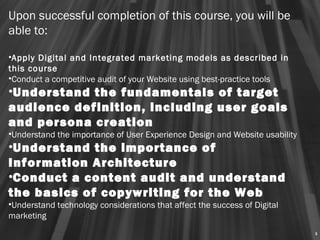
Upon successful completion of this course, you will be
able to:
 
•Apply Digital and Integrated marketing models as described in
this course
•Conduct a competitive audit of your Website using best-practice tools
•Understand the fundamentals of target
audience definition, including user goals
and persona creation
•Understand the importance of User Experience Design and Website usability
•Understand the importance of
Information Architecture
•Conduct a content audit and understand
the basics of copywriting for the Web
•Understand technology considerations that affect the success of Digital
marketing
                                                                             5
Analytics
 Analytics
How are people using our website?
     What insights can we gather?
     What insights can we gather?
                                6
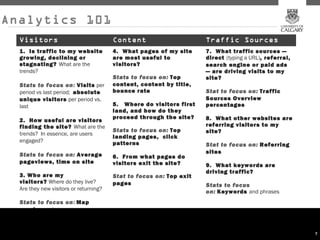
Analytics 101
  Visitors                              Content                        Traffic Sources
  1.  Is traffic to my website          4.  What pages of my site      7.  What traffic sources —
  growing, declining or                 are most useful to             direct (typing a URL), referral,
  stagnating? What are the              visitors?                      search engine or paid ads
  trends?                                                              — are driving visits to my
                                        Stats to focus on: Top         site?
  Stats to focus on: Visits per         content, content by title,
  period vs last period;  absolute      bounce rate                    Stat to focus on:  Traffic
  unique visitors per period vs.                                       Sources Overview
  last                                  5.   Where do visitors first   percentages
                                        land, and how do they
                                        proceed through the site?      8.  What other websites are
  2.  How useful are visitors
  finding the site? What are the                                       referring visitors to my
                                        Stats to focus on: Top         site?
  trends?  In essence, are users
                                        landing pages,  click
  engaged?                              patterns                       Stat to focus on:  Referring
                                                                       sites
  Stats to focus on:  Average           6.  From what pages do
  pageviews, time on site               visitors exit the site?        9.  What keywords are
                                                                       driving traffic?
  3. Who are my                         Stat to focus on: Top exit
  visitors? Where do they live?         pages                          Stats to focus
  Are they new visitors or returning?
                                                                       on: Keywords and phrases
  Stats to focus on: Map
  overlay and  new vs
  returning

                                                                                                          7
Target Audience
Target Audience
                How do we know who we are talking to?
                 How do we know who we are talking to?
 How do we use this information to inform our thinking?
 How do we use this information to inform our thinking?
                                                      8
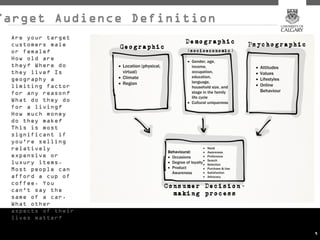
Target Audience Definition
 Are your target
 customers male
 or female?
 How old are
 they? Where do
 they live? Is
 geography a
 limiting factor
 for any reason?
 What do they do
 for a living?
 How much money
 do they make?
 This is most
 significant if
 you're selling
 relatively
 expensive or
 luxury items.
 Most people can
 afford a cup of
 coffee. You
 can't say the
 same of a car.
 What other
 aspects of their
 lives matter?

                             9
“Design for
       “Design for
somebody, alienate
somebody, alienate
          nobody”.
          nobody”.


                     10
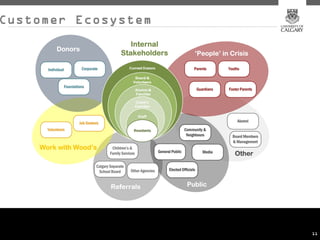
Customer Ecosystem


                     11
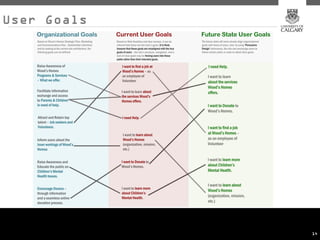
User goals
                                                        User goals
                        One of the keys to success for an online property is that ititaligns itself with user goals.
                         One of the keys to success for an online property is that aligns itself with user goals.
The ideal state is to know and understand the user’s goal when visiting the site in order to facilitate their experience and
 The ideal state is to know and understand the user’s goal when visiting the site in order to facilitate their experience and
                                                                                assist them in accomplishing their tasks.
                                                                                  assist them in accomplishing their tasks.
                                                                                                                         12
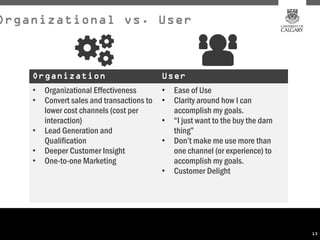
Organizational vs. User


    Organization                            User
    •   Organizational Effectiveness        •   Ease of Use
    •   Convert sales and transactions to   •   Clarity around how I can
        lower cost channels (cost per           accomplish my goals.
        interaction)                        •   “I just want to the buy the darn
    •   Lead Generation and                     thing”
        Qualification                       •   Don’t make me use more than
    •   Deeper Customer Insight                 one channel (or experience) to
    •   One-to-one Marketing                    accomplish my goals.
                                            •   Customer Delight


                                                                                   13
User Goals


             14
              14
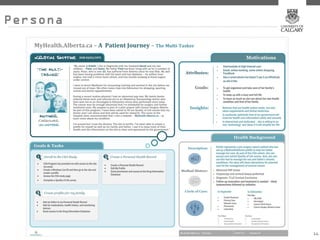
Personas
                                                       Personas
AAuser persona is aarepresentation of the goals and behavior of aareal group of users, based on their
   user persona is representation of the goals and behavior of real group of users, based on their
  demographics. We use them to determine how to align organizational goals with those of end users.
   demographics. We use them to determine how to align organizational goals with those of end users.


                                                                                                  15
Persona


          16
          16
Customer Journey


                   17
                   17
Content Strategy
     Content Strategy
How do we organize and write our content for the digital context?


                                                               18
Why is Content
                 Why is Content
                     Important?
                     Important?
Content is aaStrategic Brand Asset, and should be treated as such
 Content is Strategic Brand Asset, and should be treated as such
          Content is aalarge part of the user/customer experience
           Content is large part of the user/customer experience
                                                              19
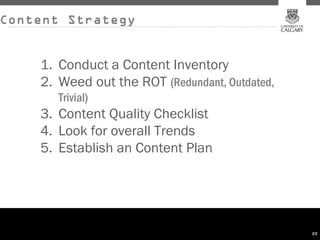
Content Strategy


    1. Conduct a Content Inventory
    2. Weed out the ROT (Redundant, Outdated,
       Trivial)
    3. Content Quality Checklist
    4. Look for overall Trends
    5. Establish an Content Plan


                                                20
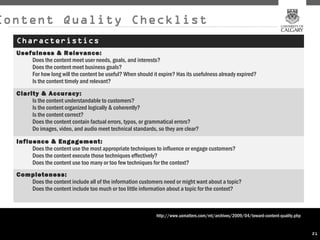
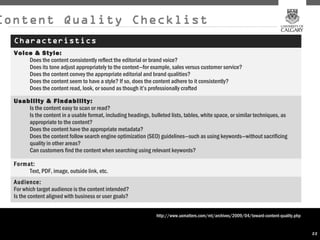
Content Quality Checklist
  Characteristics
  Usefulness & Relevance:
      Does the content meet user needs, goals, and interests?
      Does the content meet business goals?
      For how long will the content be useful? When should it expire? Has its usefulness already expired?
      Is the content timely and relevant?
  Clarity & Accuracy:
       Is the content understandable to customers?
       Is the content organized logically & coherently?
       Is the content correct?
       Does the content contain factual errors, typos, or grammatical errors?
       Do images, video, and audio meet technical standards, so they are clear?

  Influence & Engagement:
       Does the content use the most appropriate techniques to influence or engage customers?
       Does the content execute those techniques effectively?
       Does the content use too many or too few techniques for the context?
  Completeness:
     Does the content include all of the information customers need or might want about a topic?
     Does the content include too much or too little information about a topic for the context?


                                                              http://www.uxmatters.com/mt/archives/2009/04/toward-content-quality.php


                                                                                                                                        21
Content Quality Checklist
  Characteristics
  Voice & Style:
      Does the content consistently reflect the editorial or brand voice?
      Does its tone adjust appropriately to the context—for example, sales versus customer service?
      Does the content convey the appropriate editorial and brand qualities?
      Does the content seem to have a style? If so, does the content adhere to it consistently?
      Does the content read, look, or sound as though it’s professionally crafted

  Usability & Findability:
      Is the content easy to scan or read?
      Is the content in a usable format, including headings, bulleted lists, tables, white space, or similar techniques, as
      appropriate to the content?
      Does the content have the appropriate metadata?
      Does the content follow search engine optimization (SEO) guidelines—such as using keywords—without sacrificing
      quality in other areas?
      Can customers find the content when searching using relevant keywords?

  Format:
       Text, PDF, image, outside link, etc.
  Audience:
  For which target audience is the content intended?
  Is the content aligned with business or user goals?


                                                                 http://www.uxmatters.com/mt/archives/2009/04/toward-content-quality.php


                                                                                                                                           22
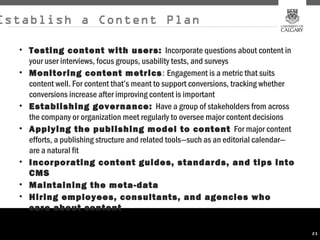
Establish a Content Plan

  • Testing content with users: Incorporate questions about content in
    your user interviews, focus groups, usability tests, and surveys
  • Monitoring content metrics : Engagement is a metric that suits
    content well. For content that’s meant to support conversions, tracking whether
    conversions increase after improving content is important
  • Establishing governance: Have a group of stakeholders from across
    the company or organization meet regularly to oversee major content decisions
  • Applying the publishing model to content For major content
    efforts, a publishing structure and related tools—such as an editorial calendar—
    are a natural fit
  • Incorporating content guides, standards, and tips into
    CMS
  • Maintaining the meta-data
  • Hiring employees, consultants, and agencies who
    care about content

                                                                                       23
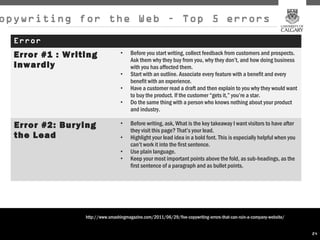
opywriting for the Web – Top 5 errors
  Error
  Error #1 : Writing              •    Before you start writing, collect feedback from customers and prospects.
                                       Ask them why they buy from you, why they don’t, and how doing business
  Inwardly                             with you has affected them.
                                  •    Start with an outline. Associate every feature with a benefit and every
                                       benefit with an experience.
                                  •    Have a customer read a draft and then explain to you why they would want
                                       to buy the product. If the customer “gets it,” you’re a star.
                                  •    Do the same thing with a person who knows nothing about your product
                                       and industry.

  Error #2: Burying               •    Before writing, ask, What is the key takeaway I want visitors to have after
                                       they visit this page? That’s your lead.
  the Lead                        •    Highlight your lead idea in a bold font. This is especially helpful when you
                                       can’t work it into the first sentence.
                                  •    Use plain language.
                                  •    Keep your most important points above the fold, as sub-headings, as the
                                       first sentence of a paragraph and as bullet points.


                 http://www.smashingmagazine.com/2011/06/29/five-copywriting-errors-that-can-ruin-a-company-website/


                                                                                                                       24
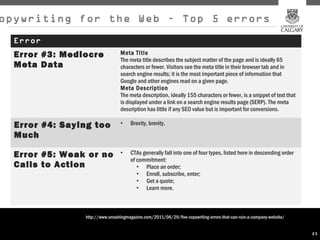
opywriting for the Web – Top 5 errors
  Error
  Error #3: Mediocre             Meta Title
                                 The meta title describes the subject matter of the page and is ideally 65
  Meta Data                      characters or fewer. Visitors see the meta title in their browser tab and in
                                 search engine results; it is the most important piece of information that
                                 Google and other engines read on a given page.
                                 Meta Description
                                 The meta description, ideally 155 characters or fewer, is a snippet of text that
                                 is displayed under a link on a search engine results page (SERP). The meta
                                 description has little if any SEO value but is important for conversions.

  Error #4: Saying too           •    Brevity, brevity.

  Much

  Error #5: Weak or no           •    CTAs generally fall into one of four types, listed here in descending order
                                      of commitment:
  Calls to Action                        • Place an order;
                                         • Enroll, subscribe, enter;
                                         • Get a quote;
                                         • Learn more.


                http://www.smashingmagazine.com/2011/06/29/five-copywriting-errors-that-can-ruin-a-company-website/


                                                                                                                      25
Information
 Information
Architecture
Architecture
 How do we structure our website?
  How do we structure our website?
What are the organizing principles?6
What are the organizing principles?
                                  2
                                  26
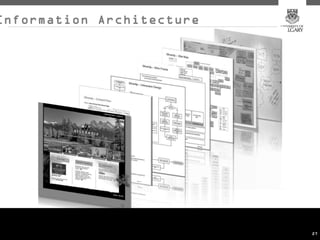
Information Architecture


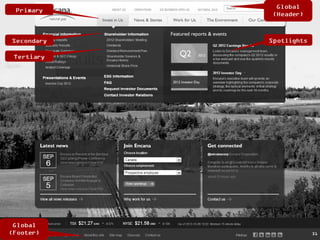
                           27
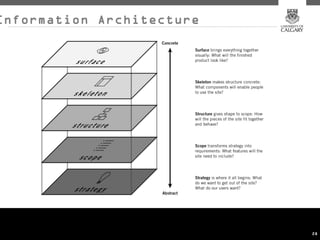
Information Architecture


                           28
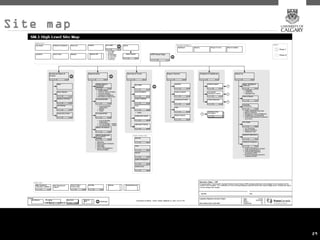
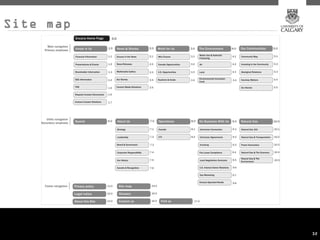
Site map


           29
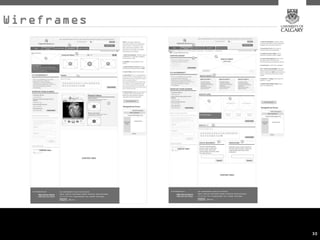
Wireframes


             30
31
Site map


           32
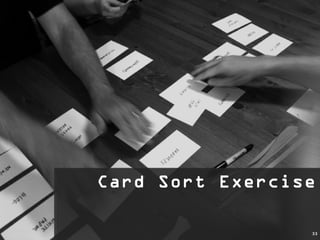
Card Sort Exercise
Card Sort Exercise

                 33
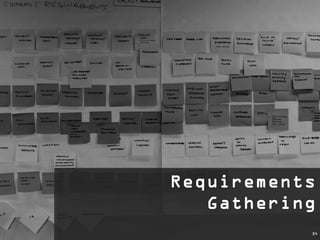
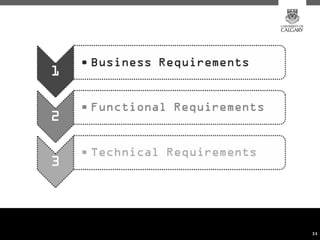
Requirements
Requirements
   Gathering
   Gathering
           34
35
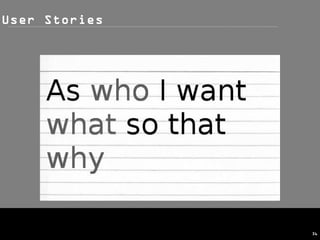
User Stories


               36
Mobile
             Mobile
What makes mobile different?

                          37
Mobile Market
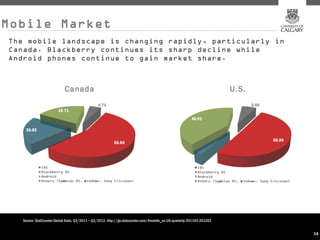
The mobile landscape is changing rapidly, particularly in
Canada. Blackberry continues its sharp decline while
Android phones continue to gain market share.


                            Canada                                                                                        U.S.


   Source: StatCounter Global Stats. Q3/2011 – Q3/2012. http://gs.statcounter.com/#mobile_os-US-quarterly-201103-201203


                                                                                                                                 38
                                                                                                                                 38
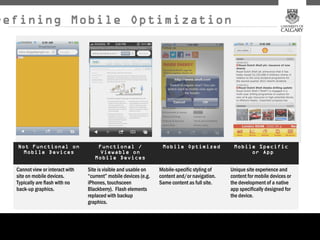
Defining Mobile Optimization


  Not Functional on                  Functional /                  Mobile Optimized             Mobile Specific
    Mobile Devices                    Viewable on                                                    or App
                                    Mobile Devices

  Cannot view or interact with   Site is visible and usable on    Mobile-specific styling of   Unique site experience and
  site on mobile devices.        “current” mobile devices (e.g.   content and/or navigation.   content for mobile devices or
  Typically are flash with no    iPhones, touchsceen              Same content as full site.   the development of a native
  back-up graphics.              Blackberry). Flash elements                                   app specifically designed for
                                 replaced with backup                                          the device.
                                 graphics.


                                                                                                                               39
‘Featured’ Mobile
                           Content
Ideally, a website should be fully optimized for
mobile. The optimization and promotion of
‘featured’ mobile content should only be
considered if:

•The Target Audiences being considered warrants
specific and immediate attention –
•A review of Analytics supports the fact that these
audiences are accessing via mobile
•Due to the site’s size and complexity, a pilot or phased
approach is desired
•A more detailed content audit and site inventory is
necessary before optimizing the entire site
•The target audiences in question do not warrant the
development of a native mobile app (ROI)


                                                       40
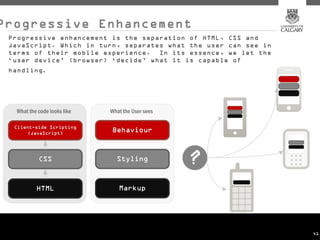
Progressive Enhancement
 Progressive enhancement is the separation of HTML, CSS and
 JavaScript. Which in turn, separates what the user can see in
 terms of their mobile experience. In its essence, we let the
 ‘user device’ (browser) ‘decide’ what it is capable of
 handling .


                                                                 41
                                                                 41
A Practitioner's Guide to Digital
            Marketing
                BMC 319-001


    Downtown Campus 906, 8th Ave SW, Calgary,
                  Room: 222


                                                42

UoC Digital Marketing Lecture 2

  • 1.
    A Practitioner's Guideto Digital Marketing BMC 319-001 Downtown Campus 906, 8th Ave SW, Calgary, Room: 222 1
  • 2.
    Digital Marketing Digital Marketing 2 Questions: 2 Questions: How do we frame our Plan? How do we frame our Plan? How do execute on that Plan? 2 How do execute on that Plan?
  • 3.
    Digital Marketing Models hisis what we use to execute the plan… Based on industry best practices that ensure end-to-end project integrity. Its methodology is designed to specifically accommodate the needs of digital marketing. Under normal circumstances, this process allows ample room for the creative process to unfold while preserving the discipline of technology-based project management. Discovery: Opportunity, initiation, audits, primary and secondary research and interviews, analysis and strategy, personas, creative and technical briefing. Definition: Concept and strategic development, design concepts, wireframes, site maps, business and functional requirements, solution architecture, production plan. Design: Experience validation, creative and technical solutions, and functional prototyping. Development: Creative and technical production, documentation, backend support and integration, quality assurance and testing. Delivery: Launch, end-to-end system testing, localization of languages, deployment, optimization and maintenance. 3 3
  • 4.
    Digital Marketing Models hisis what we use to execute the plan… 4
  • 5.
    Upon successful completionof this course, you will be able to:   •Apply Digital and Integrated marketing models as described in this course •Conduct a competitive audit of your Website using best-practice tools •Understand the fundamentals of target audience definition, including user goals and persona creation •Understand the importance of User Experience Design and Website usability •Understand the importance of Information Architecture •Conduct a content audit and understand the basics of copywriting for the Web •Understand technology considerations that affect the success of Digital marketing   5
  • 6.
    Analytics Analytics How arepeople using our website? How are people using our website? What insights can we gather? What insights can we gather? 6
  • 7.
    Analytics 101 Visitors Content Traffic Sources 1.  Is traffic to my website 4.  What pages of my site 7.  What traffic sources — growing, declining or are most useful to direct (typing a URL), referral, stagnating? What are the visitors? search engine or paid ads trends? — are driving visits to my Stats to focus on: Top site? Stats to focus on: Visits per content, content by title, period vs last period;  absolute bounce rate Stat to focus on:  Traffic unique visitors per period vs. Sources Overview last 5.   Where do visitors first percentages land, and how do they proceed through the site? 8.  What other websites are 2.  How useful are visitors finding the site? What are the referring visitors to my Stats to focus on: Top site? trends?  In essence, are users landing pages,  click engaged? patterns Stat to focus on:  Referring sites Stats to focus on:  Average 6.  From what pages do pageviews, time on site visitors exit the site? 9.  What keywords are driving traffic? 3. Who are my Stat to focus on: Top exit visitors? Where do they live?  pages Stats to focus Are they new visitors or returning? on: Keywords and phrases Stats to focus on: Map overlay and  new vs returning 7
  • 8.
    Target Audience Target Audience How do we know who we are talking to? How do we know who we are talking to? How do we use this information to inform our thinking? How do we use this information to inform our thinking? 8
  • 9.
    Target Audience Definition Are your target customers male or female? How old are they? Where do they live? Is geography a limiting factor for any reason? What do they do for a living? How much money do they make? This is most significant if you're selling relatively expensive or luxury items. Most people can afford a cup of coffee. You can't say the same of a car. What other aspects of their lives matter? 9
  • 10.
    “Design for “Design for somebody, alienate somebody, alienate nobody”. nobody”. 10
  • 11.
  • 12.
    User goals User goals One of the keys to success for an online property is that ititaligns itself with user goals. One of the keys to success for an online property is that aligns itself with user goals. The ideal state is to know and understand the user’s goal when visiting the site in order to facilitate their experience and The ideal state is to know and understand the user’s goal when visiting the site in order to facilitate their experience and assist them in accomplishing their tasks. assist them in accomplishing their tasks. 12
  • 13.
    Organizational vs. User Organization User • Organizational Effectiveness • Ease of Use • Convert sales and transactions to • Clarity around how I can lower cost channels (cost per accomplish my goals. interaction) • “I just want to the buy the darn • Lead Generation and thing” Qualification • Don’t make me use more than • Deeper Customer Insight one channel (or experience) to • One-to-one Marketing accomplish my goals. • Customer Delight 13
  • 14.
  • 15.
    Personas Personas AAuser persona is aarepresentation of the goals and behavior of aareal group of users, based on their user persona is representation of the goals and behavior of real group of users, based on their demographics. We use them to determine how to align organizational goals with those of end users. demographics. We use them to determine how to align organizational goals with those of end users. 15
  • 16.
    Persona 16 16
  • 17.
  • 18.
    Content Strategy Content Strategy How do we organize and write our content for the digital context? How do we organize and write our content for the digital context? 18
  • 19.
    Why is Content Why is Content Important? Important? Content is aaStrategic Brand Asset, and should be treated as such Content is Strategic Brand Asset, and should be treated as such Content is aalarge part of the user/customer experience Content is large part of the user/customer experience 19
  • 20.
    Content Strategy 1. Conduct a Content Inventory 2. Weed out the ROT (Redundant, Outdated, Trivial) 3. Content Quality Checklist 4. Look for overall Trends 5. Establish an Content Plan 20
  • 21.
    Content Quality Checklist Characteristics Usefulness & Relevance: Does the content meet user needs, goals, and interests? Does the content meet business goals? For how long will the content be useful? When should it expire? Has its usefulness already expired? Is the content timely and relevant? Clarity & Accuracy: Is the content understandable to customers? Is the content organized logically & coherently? Is the content correct? Does the content contain factual errors, typos, or grammatical errors? Do images, video, and audio meet technical standards, so they are clear? Influence & Engagement: Does the content use the most appropriate techniques to influence or engage customers? Does the content execute those techniques effectively? Does the content use too many or too few techniques for the context? Completeness: Does the content include all of the information customers need or might want about a topic? Does the content include too much or too little information about a topic for the context? http://www.uxmatters.com/mt/archives/2009/04/toward-content-quality.php 21
  • 22.
    Content Quality Checklist Characteristics Voice & Style: Does the content consistently reflect the editorial or brand voice? Does its tone adjust appropriately to the context—for example, sales versus customer service? Does the content convey the appropriate editorial and brand qualities? Does the content seem to have a style? If so, does the content adhere to it consistently? Does the content read, look, or sound as though it’s professionally crafted Usability & Findability: Is the content easy to scan or read? Is the content in a usable format, including headings, bulleted lists, tables, white space, or similar techniques, as appropriate to the content? Does the content have the appropriate metadata? Does the content follow search engine optimization (SEO) guidelines—such as using keywords—without sacrificing quality in other areas? Can customers find the content when searching using relevant keywords? Format: Text, PDF, image, outside link, etc. Audience: For which target audience is the content intended? Is the content aligned with business or user goals? http://www.uxmatters.com/mt/archives/2009/04/toward-content-quality.php 22
  • 23.
    Establish a ContentPlan • Testing content with users: Incorporate questions about content in your user interviews, focus groups, usability tests, and surveys • Monitoring content metrics : Engagement is a metric that suits content well. For content that’s meant to support conversions, tracking whether conversions increase after improving content is important • Establishing governance: Have a group of stakeholders from across the company or organization meet regularly to oversee major content decisions • Applying the publishing model to content For major content efforts, a publishing structure and related tools—such as an editorial calendar— are a natural fit • Incorporating content guides, standards, and tips into CMS • Maintaining the meta-data • Hiring employees, consultants, and agencies who care about content 23
  • 24.
    opywriting for theWeb – Top 5 errors Error Error #1 : Writing • Before you start writing, collect feedback from customers and prospects. Ask them why they buy from you, why they don’t, and how doing business Inwardly with you has affected them. • Start with an outline. Associate every feature with a benefit and every benefit with an experience. • Have a customer read a draft and then explain to you why they would want to buy the product. If the customer “gets it,” you’re a star. • Do the same thing with a person who knows nothing about your product and industry. Error #2: Burying • Before writing, ask, What is the key takeaway I want visitors to have after they visit this page? That’s your lead. the Lead • Highlight your lead idea in a bold font. This is especially helpful when you can’t work it into the first sentence. • Use plain language. • Keep your most important points above the fold, as sub-headings, as the first sentence of a paragraph and as bullet points. http://www.smashingmagazine.com/2011/06/29/five-copywriting-errors-that-can-ruin-a-company-website/ 24
  • 25.
    opywriting for theWeb – Top 5 errors Error Error #3: Mediocre Meta Title The meta title describes the subject matter of the page and is ideally 65 Meta Data characters or fewer. Visitors see the meta title in their browser tab and in search engine results; it is the most important piece of information that Google and other engines read on a given page. Meta Description The meta description, ideally 155 characters or fewer, is a snippet of text that is displayed under a link on a search engine results page (SERP). The meta description has little if any SEO value but is important for conversions. Error #4: Saying too • Brevity, brevity. Much Error #5: Weak or no • CTAs generally fall into one of four types, listed here in descending order of commitment: Calls to Action • Place an order; • Enroll, subscribe, enter; • Get a quote; • Learn more. http://www.smashingmagazine.com/2011/06/29/five-copywriting-errors-that-can-ruin-a-company-website/ 25
  • 26.
    Information Information Architecture Architecture Howdo we structure our website? How do we structure our website? What are the organizing principles?6 What are the organizing principles? 2 26
  • 27.
  • 28.
  • 29.
  • 30.
  • 31.
  • 32.
  • 33.
    Card Sort Exercise CardSort Exercise 33
  • 34.
    Requirements Requirements Gathering Gathering 34
  • 35.
  • 36.
  • 37.
    Mobile Mobile What makes mobile different? What makes mobile different? 37
  • 38.
    Mobile Market The mobilelandscape is changing rapidly, particularly in Canada. Blackberry continues its sharp decline while Android phones continue to gain market share. Canada U.S. Source: StatCounter Global Stats. Q3/2011 – Q3/2012. http://gs.statcounter.com/#mobile_os-US-quarterly-201103-201203 38 38
  • 39.
    Defining Mobile Optimization Not Functional on Functional / Mobile Optimized Mobile Specific Mobile Devices Viewable on or App Mobile Devices Cannot view or interact with Site is visible and usable on Mobile-specific styling of Unique site experience and site on mobile devices. “current” mobile devices (e.g. content and/or navigation. content for mobile devices or Typically are flash with no iPhones, touchsceen Same content as full site. the development of a native back-up graphics. Blackberry). Flash elements app specifically designed for replaced with backup the device. graphics. 39
  • 40.
    ‘Featured’ Mobile Content Ideally, a website should be fully optimized for mobile. The optimization and promotion of ‘featured’ mobile content should only be considered if: •The Target Audiences being considered warrants specific and immediate attention – •A review of Analytics supports the fact that these audiences are accessing via mobile •Due to the site’s size and complexity, a pilot or phased approach is desired •A more detailed content audit and site inventory is necessary before optimizing the entire site •The target audiences in question do not warrant the development of a native mobile app (ROI) 40
  • 41.
    Progressive Enhancement Progressiveenhancement is the separation of HTML, CSS and JavaScript. Which in turn, separates what the user can see in terms of their mobile experience. In its essence, we let the ‘user device’ (browser) ‘decide’ what it is capable of handling . 41 41
  • 42.
    A Practitioner's Guideto Digital Marketing BMC 319-001 Downtown Campus 906, 8th Ave SW, Calgary, Room: 222 42

Editor's Notes

  • #14 Redo
  • #19 Acts as a hub for all other marketing efforts.
  • #20 Acts as a hub for all other marketing efforts.
  • #27 Acts as a hub for all other marketing efforts.