Untangling the web
Class 6: user research, build tools, more javascript, and putting a website up
Agenda
 Homework discussion
 UX and collaboration
 Build tools
 More JavaScript
 Integrating JS into a web page
 functions
 Scope and context
 JS exercises and project 1 group discussions
 Homework 5
Homework 4
 Folks had a harder time with this than previous homeworks
 As we get into the programming assignments, more time will be required and
more work on your own
 Resources:
 The computer science assistance centre, ECS 251,
https://connex.csc.uvic.ca/portal/site/cscassist
 For this initial exercise: http://www.teaching-materials.org/javascript/
 Ask for help on the slack channel
 Start early in case you get stuck!
 If you copy code from online, reference where you got it!
Homework 4
 Concepts:
 Arrays
 Functions
 Looping
 Printing (one form, console.log)
Homework 4 – Arrays and functions
 var wordLetters = ['G', 'O', 'A', 'T'];
 var guessedLetters = ['_', '_', '_', '_'];
 Function guessLetter(letter) { do stuff…}
 guessLetter('G');
 guessLetter('I');
 guessLetter('O');
 guessLetter('A');
 guessLetter('T');
Homework 4 – looping and printing
function guessLetter(letter) {
var goodGuess = false;
var moreToGuess = false;
for (var i = 0; i <
wordLetters.length; i++) {
if (wordLetters[i] == letter) {
guessedLetters[i] = letter;
goodGuess = true;
}
if (guessedLetters[i] == '_') {
moreToGuess = true;
}
}
if (goodGuess) {
console.log('Yay, you found a
letter!');
console.log(guessedLetters.join(''));
if (!moreToGuess) {
console.log('YOU WON!');
}
} else {
console.log('Oh noes, thats not
right!');
}
}
Additional topics on the homework
 Limit number of wrong guesses
 Displaying on web pages rather than the REPL
UX and collaboration
 I’m giving this section incredibly short shrift
 There is a third year HCI course entirely devoted to this topic, when I taught it we
spent 4 classes just on the material shoved into the next 20 minutes
 I wanted to give a flavour of it, though, because in a well executed project 1 there
will be some user research, even if only from secondary sources
UX research
 Primary sources
 Interviewing users
 Doing prototype usability studies
 Naturalistic observation of user behaviour
 User comments on your software (if it’s released)
 Secondary sources
 Web research
 User comments on forums about similar software
 Primary sources are best, but secondary sources are fine for early stage
User stories and Personas
 Often before you have real users, you need imaginary users
 The more concrete these users are the better, build a back-story!
 These are personas
 These personas interact with your software in multiple ways
 These are user stories
 User stories are an important explanatory technique for your project
 User personas are an important tool to make those stories real and to prioritize
features
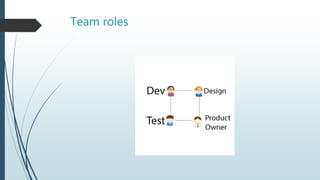
Team roles
Collaboration strategies
 Hackathons
 Agile development
 Sprints
 Scrums
 Waterfall development
Back to Git
 Each person develops in a branch
 Those branches are merged onto the master branch
 The master branch is tested to make sure the merged code behaves as expected
Testing strategies
 Individual code is tested before merging as well
 This is likely to be ad-hoc testing in this class
 In more rigorous environments Test Driven Development (TDD) is practiced
 In this model, the developer writes test cases before writing the code
 Then the tests are automated to see if the code is meeting all the cases
 It is a really good practice to get into!
Build tools
 This is getting back to class 4
 I’m not going to spend too much more time on a local build environment, but it is
essential to doing time-effective development
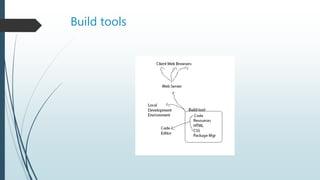
 We’ll go through one of my environments to illustrate
 I won’t enforce that you set up an efficient dev environment, but I certainly suggest
it. Meaning:
 Understand the command line
 Understand a local editor (I suggest VS Code, but sublime or atom are fine too)
 Use a local build tool to run a local web server with hot reloading and linting
Build tools
Build tools reading assigment
 Basic version
 http://blog.modulus.io/introduction-to-grunt
 Advanced version
 https://github.com/verekia/js-stack-from-
scratch?utm_campaign=React%2BNewsletter&utm_medium=email&utm_source=
React_Newsletter_47
More JS – integrating JS into a web page
 Basic version
 https://jsfiddle.net/
 Just save the fiddle and submit the homework as a link
 Advanced version (you’ll need to get to this one eventually, but not necessarily this
week)
 Set up and run a local build environment
 Copy the project up to a server (ie. nitrous.io or the generated version to github pages)
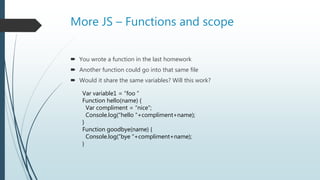
More JS – Functions and scope
 You wrote a function in the last homework
 Another function could go into that same file
 Would it share the same variables? Will this work?
Var variable1 = “foo ”
Function hello(name) {
Var compliment = “nice”;
Console.log(“hello “+compliment+name);
}
Function goodbye(name) {
Console.log(“bye “+compliment+name);
}
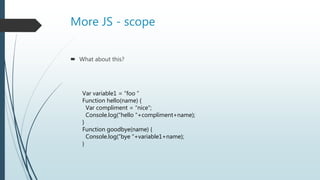
More JS - scope
 What about this?
Var variable1 = “foo ”
Function hello(name) {
Var compliment = “nice”;
Console.log(“hello “+compliment+name);
}
Function goodbye(name) {
Console.log(“bye “+variable1+name);
}
More JS – execution context
 The “this” pointer
 Scope is about variables, execution context is about objects
 New keyword
 Another reading assignment
 http://ryanmorr.com/understanding-scope-and-context-in-javascript/
JS exercises
 http://www.w3resource.com/javascript-exercises/
 (we’ll spend a couple minutes looking at these as a group and then there will be
time to work on your own or work in your project groups)
Homework 5
 Create a web page that asks for pizza toppings and creates your order
 Display a list of toppings and their associated prices, include at least 5 items in the
list
 Pizza toppings should be typed in by the user in a comma delimited list in a single
text box. When all the toppings are entered, the user presses a “prepare order”
button
 The program should take the toppings and present the toppings with a total price.
When the user presses the “place order” button present a pop-up dialog that says
“thanks!”. Use CSS to make the thanks message large and red.
 (if you have a problem with the pop-up, you can just display the thanks message
underneath the button, but try to figure out the pop up!)

Untangling6

  • 1.
    Untangling the web Class6: user research, build tools, more javascript, and putting a website up
  • 2.
    Agenda  Homework discussion UX and collaboration  Build tools  More JavaScript  Integrating JS into a web page  functions  Scope and context  JS exercises and project 1 group discussions  Homework 5
  • 3.
    Homework 4  Folkshad a harder time with this than previous homeworks  As we get into the programming assignments, more time will be required and more work on your own  Resources:  The computer science assistance centre, ECS 251, https://connex.csc.uvic.ca/portal/site/cscassist  For this initial exercise: http://www.teaching-materials.org/javascript/  Ask for help on the slack channel  Start early in case you get stuck!  If you copy code from online, reference where you got it!
  • 4.
    Homework 4  Concepts: Arrays  Functions  Looping  Printing (one form, console.log)
  • 5.
    Homework 4 –Arrays and functions  var wordLetters = ['G', 'O', 'A', 'T'];  var guessedLetters = ['_', '_', '_', '_'];  Function guessLetter(letter) { do stuff…}  guessLetter('G');  guessLetter('I');  guessLetter('O');  guessLetter('A');  guessLetter('T');
  • 6.
    Homework 4 –looping and printing function guessLetter(letter) { var goodGuess = false; var moreToGuess = false; for (var i = 0; i < wordLetters.length; i++) { if (wordLetters[i] == letter) { guessedLetters[i] = letter; goodGuess = true; } if (guessedLetters[i] == '_') { moreToGuess = true; } } if (goodGuess) { console.log('Yay, you found a letter!'); console.log(guessedLetters.join('')); if (!moreToGuess) { console.log('YOU WON!'); } } else { console.log('Oh noes, thats not right!'); } }
  • 7.
    Additional topics onthe homework  Limit number of wrong guesses  Displaying on web pages rather than the REPL
  • 8.
    UX and collaboration I’m giving this section incredibly short shrift  There is a third year HCI course entirely devoted to this topic, when I taught it we spent 4 classes just on the material shoved into the next 20 minutes  I wanted to give a flavour of it, though, because in a well executed project 1 there will be some user research, even if only from secondary sources
  • 9.
    UX research  Primarysources  Interviewing users  Doing prototype usability studies  Naturalistic observation of user behaviour  User comments on your software (if it’s released)  Secondary sources  Web research  User comments on forums about similar software  Primary sources are best, but secondary sources are fine for early stage
  • 10.
    User stories andPersonas  Often before you have real users, you need imaginary users  The more concrete these users are the better, build a back-story!  These are personas  These personas interact with your software in multiple ways  These are user stories  User stories are an important explanatory technique for your project  User personas are an important tool to make those stories real and to prioritize features
  • 11.
  • 12.
    Collaboration strategies  Hackathons Agile development  Sprints  Scrums  Waterfall development
  • 13.
    Back to Git Each person develops in a branch  Those branches are merged onto the master branch  The master branch is tested to make sure the merged code behaves as expected
  • 14.
    Testing strategies  Individualcode is tested before merging as well  This is likely to be ad-hoc testing in this class  In more rigorous environments Test Driven Development (TDD) is practiced  In this model, the developer writes test cases before writing the code  Then the tests are automated to see if the code is meeting all the cases  It is a really good practice to get into!
  • 15.
    Build tools  Thisis getting back to class 4  I’m not going to spend too much more time on a local build environment, but it is essential to doing time-effective development  We’ll go through one of my environments to illustrate  I won’t enforce that you set up an efficient dev environment, but I certainly suggest it. Meaning:  Understand the command line  Understand a local editor (I suggest VS Code, but sublime or atom are fine too)  Use a local build tool to run a local web server with hot reloading and linting
  • 16.
  • 17.
    Build tools readingassigment  Basic version  http://blog.modulus.io/introduction-to-grunt  Advanced version  https://github.com/verekia/js-stack-from- scratch?utm_campaign=React%2BNewsletter&utm_medium=email&utm_source= React_Newsletter_47
  • 18.
    More JS –integrating JS into a web page  Basic version  https://jsfiddle.net/  Just save the fiddle and submit the homework as a link  Advanced version (you’ll need to get to this one eventually, but not necessarily this week)  Set up and run a local build environment  Copy the project up to a server (ie. nitrous.io or the generated version to github pages)
  • 19.
    More JS –Functions and scope  You wrote a function in the last homework  Another function could go into that same file  Would it share the same variables? Will this work? Var variable1 = “foo ” Function hello(name) { Var compliment = “nice”; Console.log(“hello “+compliment+name); } Function goodbye(name) { Console.log(“bye “+compliment+name); }
  • 20.
    More JS -scope  What about this? Var variable1 = “foo ” Function hello(name) { Var compliment = “nice”; Console.log(“hello “+compliment+name); } Function goodbye(name) { Console.log(“bye “+variable1+name); }
  • 21.
    More JS –execution context  The “this” pointer  Scope is about variables, execution context is about objects  New keyword  Another reading assignment  http://ryanmorr.com/understanding-scope-and-context-in-javascript/
  • 22.
    JS exercises  http://www.w3resource.com/javascript-exercises/ (we’ll spend a couple minutes looking at these as a group and then there will be time to work on your own or work in your project groups)
  • 23.
    Homework 5  Createa web page that asks for pizza toppings and creates your order  Display a list of toppings and their associated prices, include at least 5 items in the list  Pizza toppings should be typed in by the user in a comma delimited list in a single text box. When all the toppings are entered, the user presses a “prepare order” button  The program should take the toppings and present the toppings with a total price. When the user presses the “place order” button present a pop-up dialog that says “thanks!”. Use CSS to make the thanks message large and red.  (if you have a problem with the pop-up, you can just display the thanks message underneath the button, but try to figure out the pop up!)