UNTANGLING THE WEB
CLASS 4 – CSS, FLEXBOX, AND A BIT MORE HTML AND JS
AGENDA
• Please note that I’m swapping bluemix and CSS from the
original agenda. While we have momentum on html and CSS I
wanted to carry on rather than switching gears.
• Review of github, discuss branches
• CSS and making things look pretty
• Introduction to bootstrap
REMINDER OF HOW TO GET HTML ELEMENTS
FROM JS
• innerHTML is where the page contents are changed, but you
have to first find the object. So give each HTML object you’ll
want to change an ID
• Then in the javascript use document.getElementById to find
that object
• https://jsfiddle.net/3p9fm0w7/
PROJECT 1 DEBRIEF
• Some as simple as one line, some up to 33 lines of code
• Key elements were accepting user input, splitting that input,
sorting the array, and outputting it back to the user
HOMEWORK 3
• Won’t go into any great detail now because one student has an
extension
• Remember, any extension requests must be made at least 48 hours
before due date!
• document.getElementById
• document.createElement
• appendChild
GITHUB REVIEW
• Git clone
• Update for each significant set of changes (do this often!!)
• Git add
• Git commit –m
• Git push
GITHUB BRANCHES
• Detailed guide: https://git-scm.com/book/en/v1/Git-Branching-
What-a-Branch-Is
• Simpler view: https://guides.github.com/activities/hello-
world/#branch
• The gh-pages branch is special in that it tells github to expose that
on github pages
COMMANDS TO CREATE A BRANCH
• git checkout -b gh-pages
• This checks out the current code and puts it into a new branch on your
local machine
• git push origin gh-pages
• This pushes that new branch up to the server, creating the new branch
on github
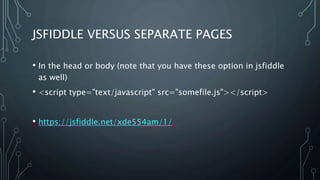
JSFIDDLE VERSUS SEPARATE PAGES
• In the head or body (note that you have these option in jsfiddle
as well)
• <script type="text/javascript" src="somefile.js"></script>
• https://jsfiddle.net/xde554am/1/
CSS INTRO – CASCADING STYLE SHEETS
• CSS is just styling on top of HTML
• Everything should generally run the same without it, it will just
look ugly
• We’re going to work with some CSS directly, but will then
introduce some ways of making it easier
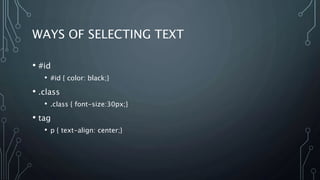
WAYS OF SELECTING TEXT
• #id
• #id { color: black;}
• .class
• .class { font-size:30px;}
• tag
• p { text-align: center;}
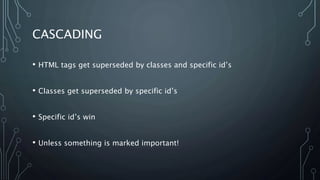
CASCADING
• HTML tags get superseded by classes and specific id’s
• Classes get superseded by specific id’s
• Specific id’s win
• Unless something is marked important!
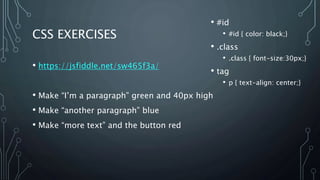
CSS EXERCISES
• https://jsfiddle.net/sw465f3a/
• Make “I’m a paragraph” green and 40px high
• Make “another paragraph” blue
• Make “more text” and the button red
• #id
• #id { color: black;}
• .class
• .class { font-size:30px;}
• tag
• p { text-align: center;}
EXERCISE ANSWERS
• https://jsfiddle.net/sw465f3a/1/
• Can you make all the paragraph tags blue without changing the
class or id specifiers?
• https://jsfiddle.net/sw465f3a/2/
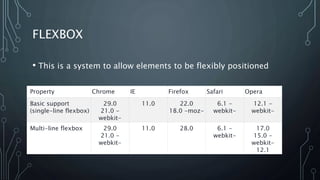
FLEXBOX
• This is a system to allow elements to be flexibly positioned
Property Chrome IE Firefox Safari Opera
Basic support
(single-line flexbox)
29.0
21.0 -
webkit-
11.0 22.0
18.0 -moz-
6.1 -
webkit-
12.1 -
webkit-
Multi-line flexbox 29.0
21.0 -
webkit-
11.0 28.0 6.1 -
webkit-
17.0
15.0 -
webkit-
12.1
FLEXBOX FROGGY
• Let’s take a few minutes to do some examples
• http://flexboxfroggy.com/
UI FRAMEWORKS
• There are a number of different frameworks
• Some are just styling
• Bootstrap (from twitter)
• UI-Kit
• Some are more full-featured frameworks
• React
• Angular
• Vue
BOOTSTRAP
• Built by Twitter originally, but open sourced and now has a large following
• Some features are built on top of jquery
• http://jquery.com/: “jQuery is a fast, small, and feature-rich JavaScript
library. It makes things like HTML document traversal and manipulation,
event handling, animation, and Ajax much simpler with an easy-to-use API
that works across a multitude of browsers. With a combination of versatility
and extensibility, jQuery has changed the way that millions of people write
JavaScript.”
• We will not use jquery directly very much in this course, but know it exists
BOOTSTRAP
• Most functions are just CSS, though, and you invoke them by attaching
classnames to your HTML objects
• Remember when we wrote CSS to target by class? Using a period in the CSS
targets the styling by class name
• So in your HTML you can use classnames that have definitions in the
bootstrap CSS files
• For instance, in a button this makes it a “danger” button:
<a href="#" class="btn btn-danger">Danger</a>
BOOTSTRAP EXERCISE 1
• Using the button definitions below, create one of each of the five button types in
bootstrap:
• btn-default
• btn-primary
• btn-success
• btn-info
• btn-warning
• btn-danger
• Start from this as an example: http://jsfiddle.net/fv2ohh8y/3/
• Note the external resources!
EXERCISE 1 ANSWER
• http://jsfiddle.net/fv2ohh8y/4/
BOOTSTRAP EXERCISE 2
• Reference: http://www.w3schools.com/bootstrap/
• Example: https://jsfiddle.net/oazgbqay/7
• Play with the page, understand what a responsive UI means
• Using the refence above, edit the page so that a tooltip pops up over
the gray area at the top (the “jumbotron”) that reads “Hooray!”
EXERCISE 2 ANSWER
• https://jsfiddle.net/oazgbqay/8/
BOOTSTRAP THEMES
• Because the CSS is open source, by editing the bootstrap CSS
and re-releasing, many different visual styles are possible.
• https://bootswatch.com/ is a good source of some of these,
but there are many different sites
• https://jsfiddle.net/oazgbqay/9/
BOOTSTRAP TEMPLATES
• https://startbootstrap.com/template-categories/all/
• There are also many templates available to get you started with
bootstrap that provide a website starting point for you. Some
are paid, many are free.
USING BOOTSTRAP ON YOUR PAGES
RATHER THAN JSFIDDLE
• Easiest to use a CDN, but could also place the .js and .css files
on your site directly
• http://getbootstrap.com/getting-started/
• Make sure you also include jsquery!
TO REMEMBER!
• In jsfiddle, you’ll generally want to set your javascript to run in
the body (click the settings in the upper right of the javascript
pane)
• And when you get into trouble and don’t see things working
remember to use the developer console (f-12 on PC,
Cmd+Opt+I on Mac)
HOMEWORK 4
• Create your resume and host it on github pages (feel free to leave
any personal information off or even create a resume for a
fictitious person if you prefer)
• This resume should use bootstrap for styling and flexbox for
positioning
• Include a title, a list of skills formatted nicely and a job history
section
• Make sure your commit history reflects your work progress

Untangling the web - fall2017 - class 4

  • 1.
    UNTANGLING THE WEB CLASS4 – CSS, FLEXBOX, AND A BIT MORE HTML AND JS
  • 2.
    AGENDA • Please notethat I’m swapping bluemix and CSS from the original agenda. While we have momentum on html and CSS I wanted to carry on rather than switching gears. • Review of github, discuss branches • CSS and making things look pretty • Introduction to bootstrap
  • 3.
    REMINDER OF HOWTO GET HTML ELEMENTS FROM JS • innerHTML is where the page contents are changed, but you have to first find the object. So give each HTML object you’ll want to change an ID • Then in the javascript use document.getElementById to find that object • https://jsfiddle.net/3p9fm0w7/
  • 4.
    PROJECT 1 DEBRIEF •Some as simple as one line, some up to 33 lines of code • Key elements were accepting user input, splitting that input, sorting the array, and outputting it back to the user
  • 5.
    HOMEWORK 3 • Won’tgo into any great detail now because one student has an extension • Remember, any extension requests must be made at least 48 hours before due date! • document.getElementById • document.createElement • appendChild
  • 6.
    GITHUB REVIEW • Gitclone • Update for each significant set of changes (do this often!!) • Git add • Git commit –m • Git push
  • 7.
    GITHUB BRANCHES • Detailedguide: https://git-scm.com/book/en/v1/Git-Branching- What-a-Branch-Is • Simpler view: https://guides.github.com/activities/hello- world/#branch • The gh-pages branch is special in that it tells github to expose that on github pages
  • 8.
    COMMANDS TO CREATEA BRANCH • git checkout -b gh-pages • This checks out the current code and puts it into a new branch on your local machine • git push origin gh-pages • This pushes that new branch up to the server, creating the new branch on github
  • 9.
    JSFIDDLE VERSUS SEPARATEPAGES • In the head or body (note that you have these option in jsfiddle as well) • <script type="text/javascript" src="somefile.js"></script> • https://jsfiddle.net/xde554am/1/
  • 10.
    CSS INTRO –CASCADING STYLE SHEETS • CSS is just styling on top of HTML • Everything should generally run the same without it, it will just look ugly • We’re going to work with some CSS directly, but will then introduce some ways of making it easier
  • 11.
    WAYS OF SELECTINGTEXT • #id • #id { color: black;} • .class • .class { font-size:30px;} • tag • p { text-align: center;}
  • 12.
    CASCADING • HTML tagsget superseded by classes and specific id’s • Classes get superseded by specific id’s • Specific id’s win • Unless something is marked important!
  • 13.
    CSS EXERCISES • https://jsfiddle.net/sw465f3a/ •Make “I’m a paragraph” green and 40px high • Make “another paragraph” blue • Make “more text” and the button red • #id • #id { color: black;} • .class • .class { font-size:30px;} • tag • p { text-align: center;}
  • 14.
    EXERCISE ANSWERS • https://jsfiddle.net/sw465f3a/1/ •Can you make all the paragraph tags blue without changing the class or id specifiers? • https://jsfiddle.net/sw465f3a/2/
  • 15.
    FLEXBOX • This isa system to allow elements to be flexibly positioned Property Chrome IE Firefox Safari Opera Basic support (single-line flexbox) 29.0 21.0 - webkit- 11.0 22.0 18.0 -moz- 6.1 - webkit- 12.1 - webkit- Multi-line flexbox 29.0 21.0 - webkit- 11.0 28.0 6.1 - webkit- 17.0 15.0 - webkit- 12.1
  • 16.
    FLEXBOX FROGGY • Let’stake a few minutes to do some examples • http://flexboxfroggy.com/
  • 17.
    UI FRAMEWORKS • Thereare a number of different frameworks • Some are just styling • Bootstrap (from twitter) • UI-Kit • Some are more full-featured frameworks • React • Angular • Vue
  • 18.
    BOOTSTRAP • Built byTwitter originally, but open sourced and now has a large following • Some features are built on top of jquery • http://jquery.com/: “jQuery is a fast, small, and feature-rich JavaScript library. It makes things like HTML document traversal and manipulation, event handling, animation, and Ajax much simpler with an easy-to-use API that works across a multitude of browsers. With a combination of versatility and extensibility, jQuery has changed the way that millions of people write JavaScript.” • We will not use jquery directly very much in this course, but know it exists
  • 19.
    BOOTSTRAP • Most functionsare just CSS, though, and you invoke them by attaching classnames to your HTML objects • Remember when we wrote CSS to target by class? Using a period in the CSS targets the styling by class name • So in your HTML you can use classnames that have definitions in the bootstrap CSS files • For instance, in a button this makes it a “danger” button: <a href="#" class="btn btn-danger">Danger</a>
  • 20.
    BOOTSTRAP EXERCISE 1 •Using the button definitions below, create one of each of the five button types in bootstrap: • btn-default • btn-primary • btn-success • btn-info • btn-warning • btn-danger • Start from this as an example: http://jsfiddle.net/fv2ohh8y/3/ • Note the external resources!
  • 21.
    EXERCISE 1 ANSWER •http://jsfiddle.net/fv2ohh8y/4/
  • 22.
    BOOTSTRAP EXERCISE 2 •Reference: http://www.w3schools.com/bootstrap/ • Example: https://jsfiddle.net/oazgbqay/7 • Play with the page, understand what a responsive UI means • Using the refence above, edit the page so that a tooltip pops up over the gray area at the top (the “jumbotron”) that reads “Hooray!”
  • 23.
    EXERCISE 2 ANSWER •https://jsfiddle.net/oazgbqay/8/
  • 24.
    BOOTSTRAP THEMES • Becausethe CSS is open source, by editing the bootstrap CSS and re-releasing, many different visual styles are possible. • https://bootswatch.com/ is a good source of some of these, but there are many different sites • https://jsfiddle.net/oazgbqay/9/
  • 25.
    BOOTSTRAP TEMPLATES • https://startbootstrap.com/template-categories/all/ •There are also many templates available to get you started with bootstrap that provide a website starting point for you. Some are paid, many are free.
  • 26.
    USING BOOTSTRAP ONYOUR PAGES RATHER THAN JSFIDDLE • Easiest to use a CDN, but could also place the .js and .css files on your site directly • http://getbootstrap.com/getting-started/ • Make sure you also include jsquery!
  • 27.
    TO REMEMBER! • Injsfiddle, you’ll generally want to set your javascript to run in the body (click the settings in the upper right of the javascript pane) • And when you get into trouble and don’t see things working remember to use the developer console (f-12 on PC, Cmd+Opt+I on Mac)
  • 28.
    HOMEWORK 4 • Createyour resume and host it on github pages (feel free to leave any personal information off or even create a resume for a fictitious person if you prefer) • This resume should use bootstrap for styling and flexbox for positioning • Include a title, a list of skills formatted nicely and a job history section • Make sure your commit history reflects your work progress