Unix Command
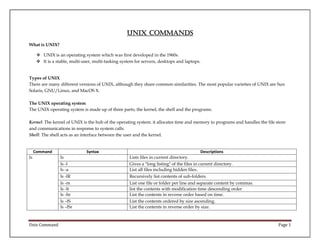
What is UNIX?
 UNIX is an operating system which was first developed in the 1960s.
 It is a stable, multi-user, multi-tasking system for servers, desktops and laptops.

Types of UNIX
There are many different versions of UNIX, although they share common similarities. The most popular varieties of UNIX are Sun
Solaris, GNU/Linux, and MacOS X.
The UNIX operating system
The UNIX operating system is made up of three parts; the kernel, the shell and the programs.
Kernel: The kernel of UNIX is the hub of the operating system: it allocates time and memory to programs and handles the file store
and communications in response to system calls.
Shell: The shell acts as an interface between the user and the kernel.

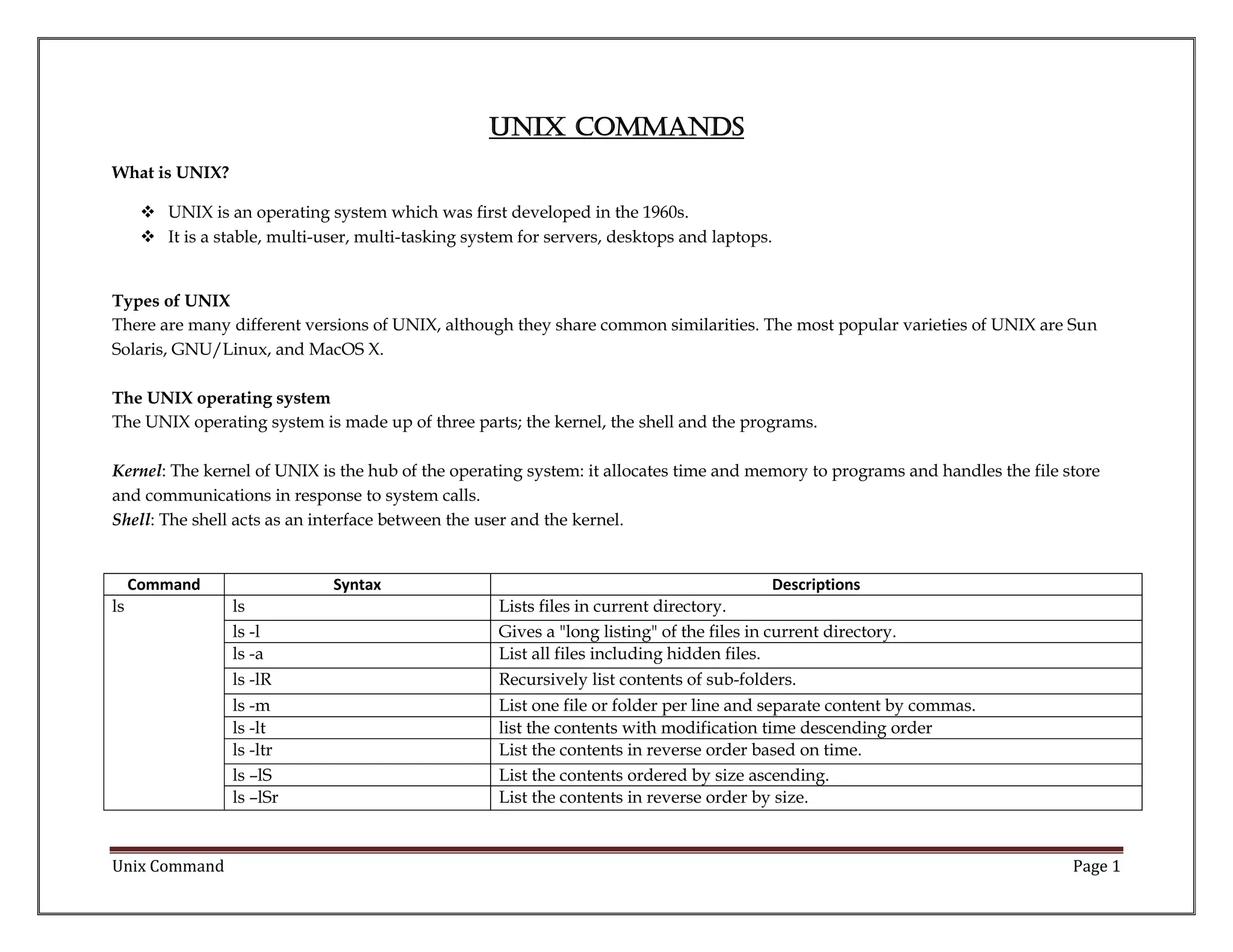
Command
ls

Syntax

Descriptions
Lists files in current directory.
Gives a "long listing" of the files in current directory.
List all files including hidden files.
Recursively list contents of sub-folders.

ls -m
ls -lt
ls -ltr
ls –lS
ls –lSr

Atul Pant

ls
ls -l
ls -a
ls -lR

List one file or folder per line and separate content by commas.
list the contents with modification time descending order
List the contents in reverse order based on time.
List the contents ordered by size ascending.
List the contents in reverse order by size.

Page 1
Unix Command
cat

cat filename [-n] [-b] [-u] [-s] [-v]
cat [file.txt] [file2.txt] > [file3.txt]

Allows look, modifying or combining a file.
Reads file1.txt and file2.txt and combines those files to make file3.txt.

cut

cut [-b] [-c] [-f] list [-n] [-d delim]
[-s] [file]
cut –b [file.txt]

To extract parts of each line of a file.

cut –c [file.txt]

The list following -b specifies byte positions (for instance, -b1-72 would pass the
first 72 bytes of each line).
The list following -c specifies character positions (for instance, -c1-72 would pass
the first 72 characters of each line).

sort

sort [options] [file]
sort –r [file.txt]
sort –n [file.txt]
sort –u [file.txt]

Sorts the lines in a text file.
Sort the file, file.txt in reverse order.
Sort numerically
Pick unique lines in a file and then sort them.

uniq

uniq [-c | -d | -u ] [ -f fields ] [ -s
char ] [-n] [+m] [input_file] [
output_file]
uniq –i [file.txt]
uniq –c [file.txt]
uniq –u [file.txt]
uniq –d [file.txt]

Report or filter out repeated lines in a file.

grep [options] PATTERN [file]
grep "one" file.txt
grep -i "one" file.txt
grep "one * two" file.txt

Finds text within a file.
Search file.txt in the current directory for any reference of one.
grep case-insensitively.
use wildcard * (asterisk).

grep

Atul Pant

Identify case-insensitive unique lines.
Get count of unique lines.
Get only unique lines from a file.
Get all duplicate lines from a file.

Page 2
Unix Command
df

df [OPTION] [FILE]
df -h
df -hT
df -BG

du

List all the file systems on the system, their mount points and their total size, free
size and used size.
Displays the sizes in an easy to read format.
Display type of file-system
Display size of file systems in specified units

du [-a] [-k] [-s] [-d] [-L] [-o] [-r] [x] directories
du –h test

Tells you how much space a file occupies.

ps [-a] [-A] [-c] [-d] [-e] [-f] [-j] [l] [-L] [-P] [-y] [ -g grplist ] [ -n
namelist ] [-o format ] [ -p
proclist ] [ -s sidlist ] [ -t term] [ u uidlist ] [ -U uidlist ] [ -G
gidlist ]
ps –e | head –n3
ps –p1
ps –p1,2

Displays the list of all processes that the system's processor is currently handling.

kill

kill [-s] [-l] [pid]
kill -9 [pid]
killall java

It will kill or stop running processes.
To forcefully kill a process.
To kill processes by name

split

split [-linecount | -l linecount ] [
-a suffixlength ] [filename]
split –l1000 file.txt
split –b5m file.txt

Split a file into pieces.

ps

Atul Pant

Display human-readable size for files/folders listed by 'du'

Display all running processes
Display processes based on process id
Display multiple processes by process ids

To split a file based on number of lines.
to split a file based on size of data

Page 3
Unix Command
chmod

chmod 111 a.txt
chmod 222 a.txt

Changes the permission of a file. There are 3 types of permissions for a file i.e. read,
write and execute abbreviated as r, w and x respectively. This command also
assigns numbers 4, 2 and 1 to read, write and execute permissions respectively.
These 3 permissions can be separately set for three types owner, group, everyone
else.
---x--x—x
--w--w--w-

crontab

crontab [-u user] file
crontab -l
crontab -e
crontab -r

It’s used to schedule scripts to run periodically at configured times.
To display jobs scheduled in crontab.
To add, update or delete jobs from crontab.
To delete all scheduled jobs from crontab.

find

find
find .

Finds one or more files assuming that you know their approximate filenames.
List contents of current folder using 'find' comamnd

cp

cp
cp a.txt b.txt
cp a.txt newdir(/home/)

It’s used to create copies of files and folders.
To copy a file in same directory.
To copy a file in different directory.

mv

mv [-f] [-i] oldname newname
mv a.txt b.txt
mv a.txt subdir (/home/)
mv subdir copydir

It’s used to move files/folders from one folder to another.
To move a file to another file.
To move a file to another folder.
to move a folder.

Atul Pant

chmod [OPTION] [MODE]
[filename]

Page 4
Unix Command
rm

rm [-f] [-i] [-R] [-r] [filenames |
directory]
rm file.txt
rm –f file.txt
rm –rf subdir

It’s used to delete files and folders.

mkdir

mkdir [option] directory
mkdir subdir
mkdir –p subdirA/sundirB

To create a new directory.
To make a folder.
To make a folder and sub-folders hierarchy.

zip

zip first.zip
unzip –l first.zip

To compress files/folders to a smaller size. Zipping a file helps save disk space
while storing or helps conserve network bandwidth while transporting the file.
It’s used to extract the files/folders from a zipped file.

tar

tar
tar -cvwf file.tar myfile.txt
tar -xvwf myfile.tar

Create Tape ARchives (TAR) and add or extract files.
Creating a tar file.
Extracting the files from a tar file.

tail

tail
tail -n2 basic.txt
tail -f error.log

It will display the last n lines or last n bytes from a byte. It can also monitor a file.
To display last n lines of a file.
To use option -f to track changes to a file.

paste

paste [-s] [-d list] file

It’s used to merge multiple files together.

Atul Pant

To delete a file.
To delete a file without prompting.
To delete a folder.

Page 5
Unix Command
References:
http://www.computerhope.com/unix.htm
http://2min2code.com/categories/unix_commands
http://www.masswerk.at/jsuix/

Atul Pant

Page 6

Unix command

  • 1.
    Unix Command What isUNIX?  UNIX is an operating system which was first developed in the 1960s.  It is a stable, multi-user, multi-tasking system for servers, desktops and laptops. Types of UNIX There are many different versions of UNIX, although they share common similarities. The most popular varieties of UNIX are Sun Solaris, GNU/Linux, and MacOS X. The UNIX operating system The UNIX operating system is made up of three parts; the kernel, the shell and the programs. Kernel: The kernel of UNIX is the hub of the operating system: it allocates time and memory to programs and handles the file store and communications in response to system calls. Shell: The shell acts as an interface between the user and the kernel. Command ls Syntax Descriptions Lists files in current directory. Gives a "long listing" of the files in current directory. List all files including hidden files. Recursively list contents of sub-folders. ls -m ls -lt ls -ltr ls –lS ls –lSr Atul Pant ls ls -l ls -a ls -lR List one file or folder per line and separate content by commas. list the contents with modification time descending order List the contents in reverse order based on time. List the contents ordered by size ascending. List the contents in reverse order by size. Page 1
  • 2.
    Unix Command cat cat filename[-n] [-b] [-u] [-s] [-v] cat [file.txt] [file2.txt] > [file3.txt] Allows look, modifying or combining a file. Reads file1.txt and file2.txt and combines those files to make file3.txt. cut cut [-b] [-c] [-f] list [-n] [-d delim] [-s] [file] cut –b [file.txt] To extract parts of each line of a file. cut –c [file.txt] The list following -b specifies byte positions (for instance, -b1-72 would pass the first 72 bytes of each line). The list following -c specifies character positions (for instance, -c1-72 would pass the first 72 characters of each line). sort sort [options] [file] sort –r [file.txt] sort –n [file.txt] sort –u [file.txt] Sorts the lines in a text file. Sort the file, file.txt in reverse order. Sort numerically Pick unique lines in a file and then sort them. uniq uniq [-c | -d | -u ] [ -f fields ] [ -s char ] [-n] [+m] [input_file] [ output_file] uniq –i [file.txt] uniq –c [file.txt] uniq –u [file.txt] uniq –d [file.txt] Report or filter out repeated lines in a file. grep [options] PATTERN [file] grep "one" file.txt grep -i "one" file.txt grep "one * two" file.txt Finds text within a file. Search file.txt in the current directory for any reference of one. grep case-insensitively. use wildcard * (asterisk). grep Atul Pant Identify case-insensitive unique lines. Get count of unique lines. Get only unique lines from a file. Get all duplicate lines from a file. Page 2
  • 3.
    Unix Command df df [OPTION][FILE] df -h df -hT df -BG du List all the file systems on the system, their mount points and their total size, free size and used size. Displays the sizes in an easy to read format. Display type of file-system Display size of file systems in specified units du [-a] [-k] [-s] [-d] [-L] [-o] [-r] [x] directories du –h test Tells you how much space a file occupies. ps [-a] [-A] [-c] [-d] [-e] [-f] [-j] [l] [-L] [-P] [-y] [ -g grplist ] [ -n namelist ] [-o format ] [ -p proclist ] [ -s sidlist ] [ -t term] [ u uidlist ] [ -U uidlist ] [ -G gidlist ] ps –e | head –n3 ps –p1 ps –p1,2 Displays the list of all processes that the system's processor is currently handling. kill kill [-s] [-l] [pid] kill -9 [pid] killall java It will kill or stop running processes. To forcefully kill a process. To kill processes by name split split [-linecount | -l linecount ] [ -a suffixlength ] [filename] split –l1000 file.txt split –b5m file.txt Split a file into pieces. ps Atul Pant Display human-readable size for files/folders listed by 'du' Display all running processes Display processes based on process id Display multiple processes by process ids To split a file based on number of lines. to split a file based on size of data Page 3
  • 4.
    Unix Command chmod chmod 111a.txt chmod 222 a.txt Changes the permission of a file. There are 3 types of permissions for a file i.e. read, write and execute abbreviated as r, w and x respectively. This command also assigns numbers 4, 2 and 1 to read, write and execute permissions respectively. These 3 permissions can be separately set for three types owner, group, everyone else. ---x--x—x --w--w--w- crontab crontab [-u user] file crontab -l crontab -e crontab -r It’s used to schedule scripts to run periodically at configured times. To display jobs scheduled in crontab. To add, update or delete jobs from crontab. To delete all scheduled jobs from crontab. find find find . Finds one or more files assuming that you know their approximate filenames. List contents of current folder using 'find' comamnd cp cp cp a.txt b.txt cp a.txt newdir(/home/) It’s used to create copies of files and folders. To copy a file in same directory. To copy a file in different directory. mv mv [-f] [-i] oldname newname mv a.txt b.txt mv a.txt subdir (/home/) mv subdir copydir It’s used to move files/folders from one folder to another. To move a file to another file. To move a file to another folder. to move a folder. Atul Pant chmod [OPTION] [MODE] [filename] Page 4
  • 5.
    Unix Command rm rm [-f][-i] [-R] [-r] [filenames | directory] rm file.txt rm –f file.txt rm –rf subdir It’s used to delete files and folders. mkdir mkdir [option] directory mkdir subdir mkdir –p subdirA/sundirB To create a new directory. To make a folder. To make a folder and sub-folders hierarchy. zip zip first.zip unzip –l first.zip To compress files/folders to a smaller size. Zipping a file helps save disk space while storing or helps conserve network bandwidth while transporting the file. It’s used to extract the files/folders from a zipped file. tar tar tar -cvwf file.tar myfile.txt tar -xvwf myfile.tar Create Tape ARchives (TAR) and add or extract files. Creating a tar file. Extracting the files from a tar file. tail tail tail -n2 basic.txt tail -f error.log It will display the last n lines or last n bytes from a byte. It can also monitor a file. To display last n lines of a file. To use option -f to track changes to a file. paste paste [-s] [-d list] file It’s used to merge multiple files together. Atul Pant To delete a file. To delete a file without prompting. To delete a folder. Page 5
  • 6.