Admin  |  How To _______________________________________________________________________________________________________


                                           pet
                                        Pup w
                                         Sho

Automating UNIX Administration
                             A Puppet show can turn out to be real entertainment for UNIX administrators.


                             I
                                           n the UNIX operating system            problems in the UNIX environment occur due
                                           everything is a file, which makes      to ad-hoc changes, which can be mitigated
                                           it an easy-to-manage and               by following proper change management
                                           administrator-friendly system.         procedures. Handling and monitoring ad-hoc
                             The traditional way of managing UNIX was             changes, and restoring the previous state,
                             to use the telnet interface, but being a plain-      remains a challenge for organisations.
                             text protocol, telnet exposes you to the risk of          Meeting such challenges is quite workable
                             network snooping and compromise of login             for a small set-up of 1-20 servers and a dedicated
                             credentials. SSH works on an encrypted channel       UNIX administration. But during hardware
                             to overcome the snooping issues. A UNIX              failure or other problems, where the servers
                             administrator can SSH into the box from a            need to be reconfigured from scratch, it takes a
                             remote machine and change the configuration          lot of effort and time in restoring the servers to
                             or execute commands remotely.                        the previous state. To handle such scenarios, a
                                 Generally, it is considered a good practice to   quick solution would be to hire another UNIX
                             take a configuration backup before making any        administrator who could act as a secondary
                             changes to the production configuration so that      resource and offloads other activities from the
                             the old configuration is available for roll-back.    primary resource during disaster conditions.
                             Also, as a part of the organisation’s policy, the         Think about a scenario of managing a
                             same base configuration should be configured         globally-distributed data centre with 500 *NIX
                             on all the servers to reflect consistency and as     servers or more, comprising Solaris, Debian,
                             a server-hardening practice. A majority of the       Ubuntu, Fedora, CentOS, etc. Here, servers

40  |  June 2009 | LInuX For You | www.LinuxForu.com
____________________________________________________________________________________________________________                       How To    |  Admin

are running with the same base configuration and packages,
where configuration files need to be checked-out to a version-                           Client                         Client                 Client
controlled repository. Only planned changes are allowed and
the previous configuration state is restored for unplanned                         puppetd                           puppetd                 puppetd
changes. Additionally, centralised user and policy management,
along with automated configuration recovery during disaster
conditions are required. In such a case, building a team of
10-20 administrators would not be a recommended approach.                                                            Network
Rather, using a centralised configuration tool to automate the
administration tasks would be a better option to follow.
     Along with commercial tools like BladeLogic and OpsWare,
there are a couple of open source systems automation and
configuration management tools available like Bcfg2, Cfengine                                                      puppet Master
and Puppet. Cfengine has been an administrator’s favourite
configuration management framework since the past few years
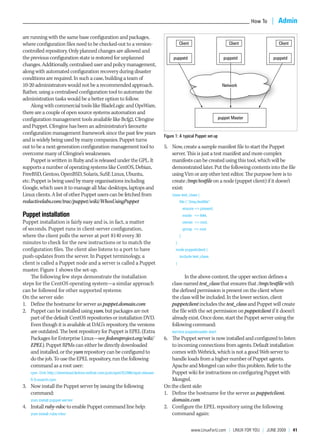
                                                                              Figure 1: A typical Puppet set-up
and is widely being used by many companies. Puppet turns
out to be a next-generation configuration management tool to                  5. Now, create a sample manifest file to start the Puppet
overcome many of Cfengine’s weaknesses.                                          server. This is just a test manifest and more complex
     Puppet is written in Ruby and is released under the GPL. It                 manifests can be created using this tool, which will be
supports a number of operating systems like CentOS, Debian,                      demonstrated later. Put the following contents into the file
FreeBSD, Gentoo, OpenBSD, Solaris, SuSE Linux, Ubuntu,                           using Vim or any other text editor. The purpose here is to
etc. Puppet is being used by many organisations including                        create /tmp/testfile on a node (puppet client) if it doesn’t
Google, which uses it to manage all Mac desktops, laptops and                    exist:
Linux clients. A list of other Puppet users can be fetched from                    class test_class {
reductivelabs.com/trac/puppet/wiki/WhosUsingPuppet                                       file { “/tmp/testfile”:
                                                                                             ensure => present,
Puppet installation                                                                          mode => 644,
Puppet installation is fairly easy and is, in fact, a matter                                 owner => root,
of seconds. Puppet runs in client-server configuration,                                      group => root
where the client polls the server at port 8140 every 30                                  }
minutes to check for the new instructions or to match the                            }
configuration files. The client also listens to a port to have                       node puppetclient {
push-updates from the server. In Puppet terminology, a                                   include test_class
client is called a Puppet node and a server is called a Puppet                       }
master. Figure 1 shows the set-up.
    The following few steps demonstrate the installation                                  In the above content, the upper section defines a
steps for the CentOS operating system—a similar approach                           class named test_class that ensures that /tmp/testfile with
can be followed for other supported systems:                                       the defined permission is present on the client where
On the server side:                                                                the class will be included. In the lower section, client
1. Define the hostname for server as puppet.domain.com                             puppetclient includes the test_class and Puppet will create
2. Puppet can be installed using yum, but packages are not                         the file with the set permission on puppetclient if it doesn’t
    part of the default CentOS repositories or installation DVD.                   already exist. Once done, start the Puppet server using the
    Even though it is available at DAG’s repository, the versions                  following command:
    are outdated. The best repository for Puppet is EPEL (Extra                    service puppetmaster start
    Packages for Enterprise Linux—see fedoraproject.org/wiki/                 6. The Puppet server is now installed and configured to listen
    EPEL). Puppet RPMs can either be directly downloaded                         to incoming connections from agents. Default installation
    and installed, or the yum repository can be configured to                    comes with Webrick, which is not a good Web server to
    do the job. To use the EPEL repository, run the following                    handle loads from a higher number of Puppet agents.
    command as a root user:                                                      Apache and Mongrel can solve this problem. Refer to the
   rpm -Uvh http://download.fedora.redhat.com/pub/epel/5/i386/epel-release-      Puppet wiki for instructions on configuring Puppet with
   5-3.noarch.rpm                                                                Mongrel.
3. Now install the Puppet server by issuing the following                     On the client side:
   command:                                                                   1. Define the hostname for the server as puppetclient.
   yum install puppet-server                                                     domain.com
4. Install ruby-rdoc to enable Puppet command line help:                      2. Configure the EPEL repository using the following
   yum install ruby-rdoc                                                         command again:

                                                                                                  www.LinuxForu.com | LInuX For You | June 2009 | 41
Admin  |  How To ____________________________________________________________________________________________________________

     rpm -Uvh http://download.fedora.redhat.com/pub/epel/5/i386/epel-release-   exec { “/usr/sbin/start_vhost”: }
     5-3.noarch.rpm                                                             }
3. Install puppet and ruby-rdoc:                                                Sample 4: To start a service as per the remote operating
     yum install puppet ruby-rdoc                                               system:
           This completes installation of the Puppet server                     class httpd_service_start {
     and client.                                                                case $operatingsystem {
           Before proceeding further, make sure that the                        redhat: { service { “httpd”: ensure => running }}
     systems timing for the Puppet server and client are in                     debian: { service { “apache”: ensure => running }}
     sync. Now, from the client, issue the following command                    default: { service { “apache2”: ensure => running }}
     to get approval from the server as its subscriber:                         }
     puppetd --verbose --server puppet.domain.com                               }
             This will display the following output:                            Sample 5: To create a user:
     info: Creating a new certificate request for pclient.torridnetworks.com    class virt_users {
     info: Creating a new SSL key at /var/lib/puppet/ssl/private_keys/          @user { “jsmith”:
     puppetclient.domain.com.pem                                                ensure => “present”,
           In the above command, the client has raised a                        uid => “507”,
     request to the server to be registered as a subscriber. Now,               gid => “507”,
     the server needs to approve the subscriptions. To view the                 comment => “John Smith”,
     pending subscriptions, issue the following command on                      home => “/nfs/HR/home/jsmith”,
     the server:                                                                shell => “/bin/bash”,
     puppetca --list                                                            }
           The above command will give the name of the node                     Sample 6: To manage Cron job:
     that needs to be approved or signed by the server. In the                  class set_cron_syscheck {
     next command, sign that node:                                              cron { “syscheck”:
     puppetca -s puppetclient.domain.com                                        command => “/usr/bin/syscheck”,
            Once the client is approved by the server, the class                user => “root”,
     assigned to the client will be executed. In this case, a file              hour => “18”,
     /tmp/testfile will be created on puppetclient.domain.com.                  minute => “0”
     If the created file is deleted, it will be recreated on the next           }
     polling, i.e., within the next 30 minutes.                                 }
            Once the basic Puppet infrastructure is ready,                      Sample 7: Transferring a file from the Puppet server:
     different classes can be created to accomplish different                   class httpd_conf{
     tasks.                                                                     file { “httpd.conf”:
                                                                                source => “puppet://puppetmaster/httpd/conf/httpd.conf”
Some sample Puppet classes                                                      }
Below are a few sample classes for quick reference.                             }
Sample 1: To install Apache and run the httpd service:                              Of course, much more detailed manifests can be created
class apache {                                                                  to manage multiple servers with heterogeneous UNIX
package { httpd: ensure => installed }                                          operating systems. Subversion can be configured with
service { “httpd”:                                                              Puppet to store configuration files and track changes, so
ensure => running,                                                              that the changes can be reverted to a previous state.
require => Package[“httpd”],                                                        Reporting is one of the important aspects of a
}                                                                               configuration management system. Reporting from a
}                                                                               configuration management system can provide information
Sample 2: To stop the mdmdp service:                                            on performance and compliance to policies and standards.
class redhat {                                                                  Puppet’s reporting engine is limited at this stage, but still
service {                                                                       allows some useful basic reporting that can be graphed and
“mdmdp”:                                                                        displayed.
enable => true,                                                                     So, all in all, Puppet can be a real boost for UNIX
ensure => stopped,                                                              administrators.
}
}
                                                                                    By: Dhruv Soi
Sample 3: To execute commands:
                                                                                    The author is the founder and principal consultant, Torrid
class start_vhost {
                                                                                    Networks, and chair, OWASP India. He can be reached at
$noop = true                                                                        dhruv.soi@torridnet.com
exec { “/usr/sbin/start_ws”: }


42  |  June 2009 | LInuX For You | www.LinuxForu.com

Unix Automation using centralized configuration management tool

  • 1.
    Admin  |  HowTo _______________________________________________________________________________________________________ pet Pup w Sho Automating UNIX Administration A Puppet show can turn out to be real entertainment for UNIX administrators. I n the UNIX operating system problems in the UNIX environment occur due everything is a file, which makes to ad-hoc changes, which can be mitigated it an easy-to-manage and by following proper change management administrator-friendly system. procedures. Handling and monitoring ad-hoc The traditional way of managing UNIX was changes, and restoring the previous state, to use the telnet interface, but being a plain- remains a challenge for organisations. text protocol, telnet exposes you to the risk of Meeting such challenges is quite workable network snooping and compromise of login for a small set-up of 1-20 servers and a dedicated credentials. SSH works on an encrypted channel UNIX administration. But during hardware to overcome the snooping issues. A UNIX failure or other problems, where the servers administrator can SSH into the box from a need to be reconfigured from scratch, it takes a remote machine and change the configuration lot of effort and time in restoring the servers to or execute commands remotely. the previous state. To handle such scenarios, a Generally, it is considered a good practice to quick solution would be to hire another UNIX take a configuration backup before making any administrator who could act as a secondary changes to the production configuration so that resource and offloads other activities from the the old configuration is available for roll-back. primary resource during disaster conditions. Also, as a part of the organisation’s policy, the Think about a scenario of managing a same base configuration should be configured globally-distributed data centre with 500 *NIX on all the servers to reflect consistency and as servers or more, comprising Solaris, Debian, a server-hardening practice. A majority of the Ubuntu, Fedora, CentOS, etc. Here, servers 40  |  June 2009 | LInuX For You | www.LinuxForu.com
  • 2.
    ____________________________________________________________________________________________________________ How To  |  Admin are running with the same base configuration and packages, where configuration files need to be checked-out to a version- Client Client Client controlled repository. Only planned changes are allowed and the previous configuration state is restored for unplanned puppetd puppetd puppetd changes. Additionally, centralised user and policy management, along with automated configuration recovery during disaster conditions are required. In such a case, building a team of 10-20 administrators would not be a recommended approach. Network Rather, using a centralised configuration tool to automate the administration tasks would be a better option to follow. Along with commercial tools like BladeLogic and OpsWare, there are a couple of open source systems automation and configuration management tools available like Bcfg2, Cfengine puppet Master and Puppet. Cfengine has been an administrator’s favourite configuration management framework since the past few years Figure 1: A typical Puppet set-up and is widely being used by many companies. Puppet turns out to be a next-generation configuration management tool to 5. Now, create a sample manifest file to start the Puppet overcome many of Cfengine’s weaknesses. server. This is just a test manifest and more complex Puppet is written in Ruby and is released under the GPL. It manifests can be created using this tool, which will be supports a number of operating systems like CentOS, Debian, demonstrated later. Put the following contents into the file FreeBSD, Gentoo, OpenBSD, Solaris, SuSE Linux, Ubuntu, using Vim or any other text editor. The purpose here is to etc. Puppet is being used by many organisations including create /tmp/testfile on a node (puppet client) if it doesn’t Google, which uses it to manage all Mac desktops, laptops and exist: Linux clients. A list of other Puppet users can be fetched from class test_class { reductivelabs.com/trac/puppet/wiki/WhosUsingPuppet file { “/tmp/testfile”: ensure => present, Puppet installation mode => 644, Puppet installation is fairly easy and is, in fact, a matter owner => root, of seconds. Puppet runs in client-server configuration, group => root where the client polls the server at port 8140 every 30 } minutes to check for the new instructions or to match the } configuration files. The client also listens to a port to have node puppetclient { push-updates from the server. In Puppet terminology, a include test_class client is called a Puppet node and a server is called a Puppet } master. Figure 1 shows the set-up. The following few steps demonstrate the installation In the above content, the upper section defines a steps for the CentOS operating system—a similar approach class named test_class that ensures that /tmp/testfile with can be followed for other supported systems: the defined permission is present on the client where On the server side: the class will be included. In the lower section, client 1. Define the hostname for server as puppet.domain.com puppetclient includes the test_class and Puppet will create 2. Puppet can be installed using yum, but packages are not the file with the set permission on puppetclient if it doesn’t part of the default CentOS repositories or installation DVD. already exist. Once done, start the Puppet server using the Even though it is available at DAG’s repository, the versions following command: are outdated. The best repository for Puppet is EPEL (Extra service puppetmaster start Packages for Enterprise Linux—see fedoraproject.org/wiki/ 6. The Puppet server is now installed and configured to listen EPEL). Puppet RPMs can either be directly downloaded to incoming connections from agents. Default installation and installed, or the yum repository can be configured to comes with Webrick, which is not a good Web server to do the job. To use the EPEL repository, run the following handle loads from a higher number of Puppet agents. command as a root user: Apache and Mongrel can solve this problem. Refer to the rpm -Uvh http://download.fedora.redhat.com/pub/epel/5/i386/epel-release- Puppet wiki for instructions on configuring Puppet with 5-3.noarch.rpm Mongrel. 3. Now install the Puppet server by issuing the following On the client side: command: 1. Define the hostname for the server as puppetclient. yum install puppet-server domain.com 4. Install ruby-rdoc to enable Puppet command line help: 2. Configure the EPEL repository using the following yum install ruby-rdoc command again: www.LinuxForu.com | LInuX For You | June 2009 | 41
  • 3.
    Admin  |  HowTo ____________________________________________________________________________________________________________ rpm -Uvh http://download.fedora.redhat.com/pub/epel/5/i386/epel-release- exec { “/usr/sbin/start_vhost”: } 5-3.noarch.rpm } 3. Install puppet and ruby-rdoc: Sample 4: To start a service as per the remote operating yum install puppet ruby-rdoc system: This completes installation of the Puppet server class httpd_service_start { and client. case $operatingsystem { Before proceeding further, make sure that the redhat: { service { “httpd”: ensure => running }} systems timing for the Puppet server and client are in debian: { service { “apache”: ensure => running }} sync. Now, from the client, issue the following command default: { service { “apache2”: ensure => running }} to get approval from the server as its subscriber: } puppetd --verbose --server puppet.domain.com } This will display the following output: Sample 5: To create a user: info: Creating a new certificate request for pclient.torridnetworks.com class virt_users { info: Creating a new SSL key at /var/lib/puppet/ssl/private_keys/ @user { “jsmith”: puppetclient.domain.com.pem ensure => “present”, In the above command, the client has raised a uid => “507”, request to the server to be registered as a subscriber. Now, gid => “507”, the server needs to approve the subscriptions. To view the comment => “John Smith”, pending subscriptions, issue the following command on home => “/nfs/HR/home/jsmith”, the server: shell => “/bin/bash”, puppetca --list } The above command will give the name of the node Sample 6: To manage Cron job: that needs to be approved or signed by the server. In the class set_cron_syscheck { next command, sign that node: cron { “syscheck”: puppetca -s puppetclient.domain.com command => “/usr/bin/syscheck”, Once the client is approved by the server, the class user => “root”, assigned to the client will be executed. In this case, a file hour => “18”, /tmp/testfile will be created on puppetclient.domain.com. minute => “0” If the created file is deleted, it will be recreated on the next } polling, i.e., within the next 30 minutes. } Once the basic Puppet infrastructure is ready, Sample 7: Transferring a file from the Puppet server: different classes can be created to accomplish different class httpd_conf{ tasks. file { “httpd.conf”: source => “puppet://puppetmaster/httpd/conf/httpd.conf” Some sample Puppet classes } Below are a few sample classes for quick reference. } Sample 1: To install Apache and run the httpd service: Of course, much more detailed manifests can be created class apache { to manage multiple servers with heterogeneous UNIX package { httpd: ensure => installed } operating systems. Subversion can be configured with service { “httpd”: Puppet to store configuration files and track changes, so ensure => running, that the changes can be reverted to a previous state. require => Package[“httpd”], Reporting is one of the important aspects of a } configuration management system. Reporting from a } configuration management system can provide information Sample 2: To stop the mdmdp service: on performance and compliance to policies and standards. class redhat { Puppet’s reporting engine is limited at this stage, but still service { allows some useful basic reporting that can be graphed and “mdmdp”: displayed. enable => true, So, all in all, Puppet can be a real boost for UNIX ensure => stopped, administrators. } } By: Dhruv Soi Sample 3: To execute commands: The author is the founder and principal consultant, Torrid class start_vhost { Networks, and chair, OWASP India. He can be reached at $noop = true dhruv.soi@torridnet.com exec { “/usr/sbin/start_ws”: } 42  |  June 2009 | LInuX For You | www.LinuxForu.com