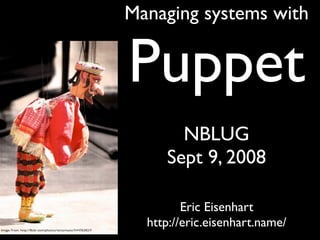

Managing systems with


Puppet
       NBLUG
     Sept 9, 2008

         Eric Eisenhart
  http://eric.eisenhart.name/
System Administration
                “We will encourage
                you to develop the
              three great virtues of a
               programmer: laziness,
              impatience, and hubris.”
                   --Larry Wall,
                 Programming Perl
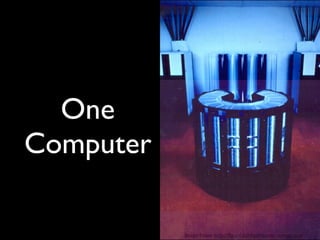
One
Computer

           Image From: http://ftp.arl.mil/ftp/historic-computers/
Two
Computers

            Image From http://flickr.com/photos/arthur_pewty/2703897757/
Hand-
Crafted
Individually
Maintained
Many
Computers
Many
Computers
Many
Computers
Many
Computers
Many
Computers
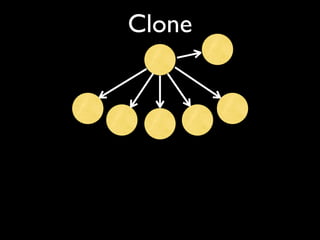
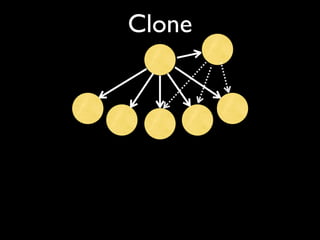
Gold Master
Clone
Clone
Clone
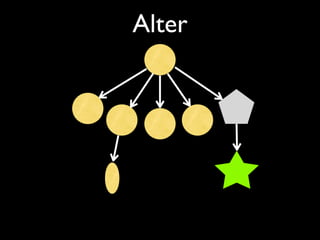
Alter
Alter
Alter
Alter


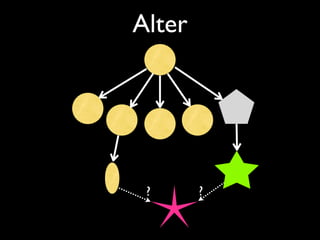
 ?      ?
Multiple
Masters?
Change by Hand?
What do you
do next time?
Reproducible Process
Same But Different
What is
Puppet?
Lazy Puppeteers

  People are finally figuring out puppet and
  how it gets you to the pub by 4pm. Note
    that I've been at this pub since 2pm.
                -- Jorge Castro
An Analogy
An Analogy
An Analogy
                       Programming       SysAdmin

 Low Level,                            commands and
                        Assembly
Non-Portable,                              files

Some Abstraction,
Portability Possible
                            C            Cfengine


    Abstract,          Perl, Python,
                                          Puppet
    Portable              Ruby
An Analogy
                       Programming       SysAdmin

 Low Level,                            commands and
                        Assembly
Non-Portable,                              files

Some Abstraction,
Portability Possible
                            C            Cfengine


    Abstract,          Perl, Python,
                                          Puppet
    Portable              Ruby
An Analogy
                       Programming       SysAdmin

 Low Level,                            commands and
                        Assembly
Non-Portable,                              files

Some Abstraction,
Portability Possible
                            C            Cfengine


    Abstract,          Perl, Python,
                                          Puppet
    Portable              Ruby
An Analogy
                       Programming       SysAdmin

 Low Level,                            commands and
                        Assembly
Non-Portable,                              files

Some Abstraction,
Portability Possible
                            C            Cfengine


    Abstract,          Perl, Python,
                                          Puppet
    Portable              Ruby
“the most damaging phrase in the language is:
      `We've always done it this way.’”
             -- Grace Hopper
      (developer of the first compiler)
Puppet
Puppet
Language
Puppet
Language

Client & Server
Puppet
Language

Client & Server

Resource Abstraction
Puppet
Language

Client & Server

Resource Abstraction

New Way To Think
Puppet Language
Puppet Language
  Declarative
Puppet Language
  Declarative
  Semantic
Puppet Language
  Declarative
  Semantic
  Reproducible
Puppet Language
  Declarative
  Semantic
  Reproducible
  Shareable
Puppet Language
  Declarative
  Semantic
  Reproducible
  Shareable
  Maintainable
Puppet Language
  Declarative
  Semantic
  Reproducible
  Shareable
  Maintainable
  Extensible
Old Way: Kickstart tricks
%post
if grep -q "release 5" /etc/redhat-release
then
   INSTALL="yum -y install"
else
   INSTALL="up2date-nox"
fi

$INSTALL exim
curl https://master/exim/exim.conf >
  /etc/exim/exim.conf
chkconfig exim on
Old Way: Package tricks
Requires: exim

%post
  curl https://master/exim/exim.conf >
    /etc/exim/exim.conf
  chkconfig exim on
  service exim restart

%triggerin -- exim
  curl https://master/exim/exim.conf >
    /etc/exim/exim.conf
  service exim restart
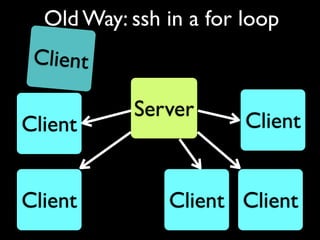
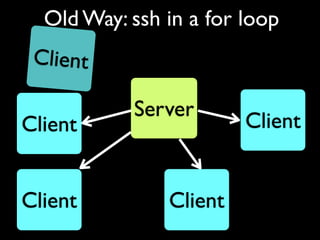
Old Way: ssh in a for loop
for h in eximbox1 eximbox2 eximbox3; do
  ssh $h ‘
     grep “release 4” /etc/redhat-release &&
       up2date exim
     grep “release 5” /etc/redhat-release &&
       yum install exim’
  scp exim/exim.conf $h:/etc/exim/exim.conf
  ssh $h /etc/init.d/exim start
done
for h in eximbox1 eximbox2 eximbox3; do
         ssh $h ‘
            grep “release 4” /etc/redhat-release &&
              up2date exim
            grep “release 5” /etc/redhat-release &&
              yum install exim’
         scp exim/exim.conf $h:/etc/exim/exim.conf
         ssh $h /etc/init.d/exim start
       done

node eximbox1, eximbox2, eximbox3 {
  package { exim:
    ensure => installed
  }
  file { “/etc/exim/exim.conf”:
    source => “puppet:///exim/exim.conf”
  }
  service { exim: ensure => running }
}
Old Way: ssh in a for loop


           Server
Client                  Client


Client Client Client Client
Old Way: ssh in a for loop
 Client

           Server
Client                  Client


Client         Client Client
Old Way: ssh in a for loop
 Client

           Server
Client                  Client


Client         Client
Client & Server
     Server


      Client
Client & Server
       Code


     Server


      Client
Client & Server
       Code


     Server


      Client
Client & Server
         Code


        Server
Facts


        Client
Client & Server    Code


                  Server
        Compile
Facts


                  Client
Client & Server       Code


                  Server
        Compile
                  Config
Facts


                  Client
Client & Server       Code


                  Server
        Compile
                  Config
Facts


                             Run


                  Client
Client & Server       Code


                  Server
        Compile


                             Files
                  Config
Facts


                             Run


                  Client
Client & Server       Code


                  Server
        Compile


                             Files
                  Config


                                     Report
Facts


                             Run


                  Client
Client & Server       Code


                  Server
        Compile


                             Files
                  Config


                                     Report
Facts


                             Run              Sleep


                  Client
Client & Server       Code


                  Server
        Compile


                             Files
                  Config


                                     Report
Facts


                             Run              Sleep


                  Client
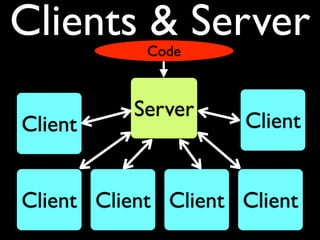
Clients & Server
            Code


          Server
Client               Client


Client Client Client Client
Expanded Old Way
for h in eximbox1 eximbox2 eximbox3; do
  ssh $h ‘
     grep “release 4” /etc/redhat-release &&
       up2date exim
     grep “release 5” /etc/redhat-release &&
       yum install exim’
  scp exim/exim.conf $h:/etc/exim/exim.conf
  ssh $h /etc/init.d/exim start
done
for h in eximbox1 eximbox2 eximbox3; do
         ssh $h ‘
            grep “release 4” /etc/redhat-release &&
              up2date exim
            grep “release 5” /etc/redhat-release &&
              yum install exim’
         scp exim/exim.conf $h:/etc/exim/exim.conf
         ssh $h /etc/init.d/exim start
       done

node eximbox1, eximbox2, eximbox3 {
  package { exim:
    ensure => installed
  }
  file { “/etc/exim/exim.conf”:
    source => “puppet:///exim/exim.conf”
  }
  service { exim: ensure => running }
}
for h in eximbox1 eximbox2 eximbox3; do
  ssh root@$h chkconfig exim on
done


service { exim:
  ensure => running,
  enable => true
}
package { exim:
  ensure => installed
}
file { “exim.conf”:
  source => “puppet:///exim/exim.conf”,
  name    => “/etc/exim/exim.conf”,
  require => Package[exim]
}
service { exim:
  ensure    => running,
  enable    => true,
  subscribe => [
    File[“exim.conf”], Package[exim]
  ]
}
class exim {
  include spamassassin::client
  package { exim: ... }
  file { “exim.conf”: ... }
  service { “exim”: ...}
}
class spamassassin {
  class server { ... }
  class client { ... }
}
node eximbox1, eximbox2 {
  include exim
}
node eximbox3 {
  include exim
  include spamassassin::server
}
node spambox {
  include spamassassin::server
}
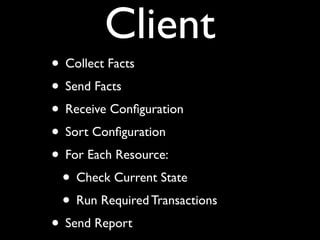
Client
Client
• Collect Facts
Client
• Collect Facts
• Send Facts
Client
• Collect Facts
• Send Facts
• Receive Configuration
Client
• Collect Facts
• Send Facts
• Receive Configuration
• Sort Configuration
Client
• Collect Facts
• Send Facts
• Receive Configuration
• Sort Configuration
• For Each Resource:
Client
• Collect Facts
• Send Facts
• Receive Configuration
• Sort Configuration
• For Each Resource:
 • Check Current State
Client
• Collect Facts
• Send Facts
• Receive Configuration
• Sort Configuration
• For Each Resource:
 • Check Current State
 • Run Required Transactions
Client
• Collect Facts
• Send Facts
• Receive Configuration
• Sort Configuration
• For Each Resource:
 • Check Current State
 • Run Required Transactions
• Send Report
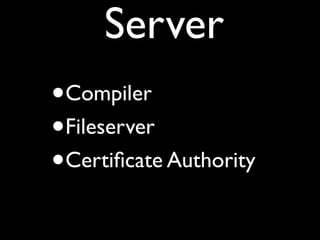
Server
Server
•   Compiler
Server
•   Compiler
•   Fileserver
Server
•   Compiler
•   Fileserver
•   Certificate Authority
Server
•   Compiler
•   Fileserver
•   Certificate Authority
•   Report Handler
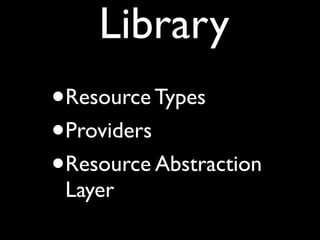
Library
Library
•   Resource Types
Library
•   Resource Types
•   Providers
Library
•   Resource Types
•   Providers
•   Resource Abstraction
    Layer
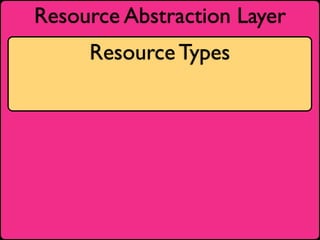
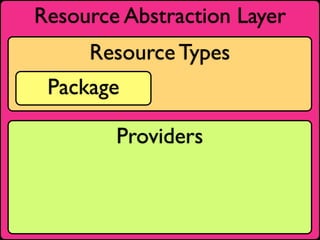
Resource Abstraction Layer
     Resource Types
Resource Abstraction Layer
     Resource Types


        Providers
Resource Abstraction Layer
     Resource Types
 Package

        Providers
Resource Abstraction Layer
          Resource Types
      Package

              Providers
dpkg    rpm   ports

apt     yum     sun
Resource Abstraction Layer
          Resource Types
      Package             Service

              Providers
dpkg    rpm   ports

apt     yum     sun
Resource Abstraction Layer
          Resource Types
      Package              Service

              Providers
dpkg    rpm   ports        init   SMF

apt     yum     sun       redhat debian
service { iptables:
    ensure    => running,
    hasstatus => true,
}
host { example:
  ip    => “192.168.7.4”,
  alias => [“monkey”, “tamarin”]
}
file {
  “/nfs”:
    ensure => directory;
  “/nfs/example”:
    ensure => directory;
  “/nfs/example/foo”:
    ensure => directory;
}
file {
  “/nfs”:
    ensure => directory;
  “/nfs/example”:
    ensure => directory;
  “/nfs/example/foo”:
    ensure => directory;
}

file {
  [ “/nfs”,
    “/nfs/example”,
    “/nfs/example/foo” ]:
       ensure => directory;
}
$nfsopts = “vers=3,tcp,intr,hard”

mount { "/nfs/example/foo":
  atboot => true,
  device => "example:/foo",
  ensure => "mounted",
  fstype => "nfs",
  options => $nfsopts,
  dump    => "0",
  pass    => "0",
  require => [
    Host[example],
    File["/nfs/example/foo"]
  ]
}
group { monkeys: ensure => present }

group { eric: ensure => present }

user { eric:
  ensure       =>   present,
  comment      =>   “Eric Eisenhart”,
  managehome   =>   true,
  groups       =>   [monkeys, admin],
  before       =>   Group[eric],
  require      =>   Group[monkeys]
}
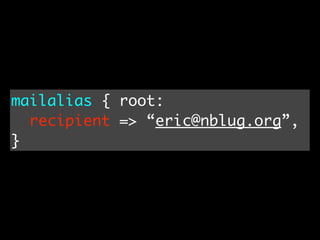
mailalias { root:
  recipient => “eric@nblug.org”,
}
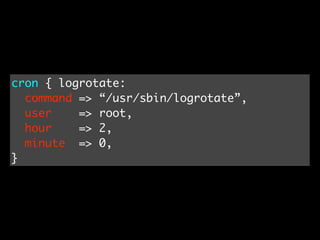
cron { logrotate:
  command => “/usr/sbin/logrotate”,
  user    => root,
  hour    => 2,
  minute => 0,
}
exec { “make   stuff”:
  cwd     =>   “/nfs/example/foo”,
  creates =>   “/nfs/example/foo/stuff”,
  require =>   Mount[“/nfs/example/foo”]
}
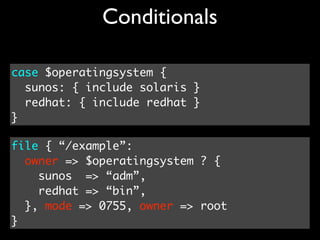
Conditionals

case $operatingsystem {
  sunos: { include solaris }
  redhat: { include redhat }
}
Conditionals

case $operatingsystem {
  sunos: { include solaris }
  redhat: { include redhat }
}

file { “/example”:
  owner => $operatingsystem ? {
    sunos => “adm”,
    redhat => “bin”,
  }, mode => 0755, owner => root
}
Conditionals
include yoursite::${operatingsystem}

case $operatingsystem {
  sunos: { include solaris }
  redhat: { include redhat }
}

file { “/example”:
  owner => $operatingsystem ? {
    sunos => “adm”,
    redhat => “bin”,
  }, mode => 0755, owner => root
}
Mutually Assured Resurrection
$cron = $operatingsystem ? {
    redhat => “crond”,
    debian => “cron”
}
service { cron:
  name => $cron,
  ensure => running,
}
cron { “restart-puppet”:
  command => “pgrep puppetd ||
              service puppetd restart”,
  minute => 0,
}
Scary
package { “kernel”:
  ensure => latest,
  notify => Exec[reboot]
}
exec { “reboot”:
  refreshonly => true,
}

    Think carefully before using this example
Virtual Resources
Virtual Resources
class users {
  @user { eric: ... }
}
class sysadmins {
  include users
  realize( User[eric] )
}
class workstation {
  include users
  realize( User[eric] )
}
Exported Resources
Exported Resources
class ssh::knownhosts {
  @@sshkey { $hostname:
    type => rsa,
    key => $sshrsakey
  }
  Sshkey <<| name != $hostname |>>
}
define virtualhost (
  $ensure = present,
  $aliases = [],
  $path = “/var/www/html/hosts/$hostname”
) {
  file { “/etc/httpd/conf.d/vh-$name.conf”:
    content => template(“vhost.erb”),
    notify => Service[“httpd”],
    ensure => $ensure
  }
  file { $path: ensure => directory }
}
virtualhost { “nblug.org”:
  aliases => [“www.nblug.org”]
}
Templates
<VirtualHost>
  ServerName <%= hostname %>
  <% aliases.each do |name| -%>
    ServerAlias <%= name %>
  <% end -%>
  DocumentRoot <%= path %>
  CustomLog /var/log/httpd/<%= name %>.log
  ErrorLog /var/log/httpd/<%= name %>.err
</VirtualHost>
Modules
# cd /etc/puppet/modules/bind/
# find . | grep -v CVS
./README
./manifests
./manifests/init.pp
./manifests/special.pp
./templates
./templates/named.conf.erb
./files
./files/named.root
./files/named.local
¿ Live Demo ?
Future
• More native types and providers
• Puppet Common Modules
• augeas integration:
  augeas { "grub timeout":
    context => "/files/etc/grub.conf",
    changes => "set timeout 30"
  }
• Test Frameworks?
Questions
End
•   Puppet: http://puppet.reductivelabs.com/
•   More: http://delicious.com/freiheit/puppet
•   Pulling Strings With Puppet: http://xrl.us/oqpb4 (amazon)
•   Alternatives:
     •   cfengine (automating the old ways)
     •   Bcfg2 (XML)
     •   LCFG (less OS support)
     •   $$$$
•   Me: http://eric.eisenhart.name/
•   slide:ology: http://slideology.com/

Puppet NBLUG 2008-09

  • 1.
    Managing systems with Puppet NBLUG Sept 9, 2008 Eric Eisenhart http://eric.eisenhart.name/
  • 2.
  • 3.
  • 4.
    System Administration “We will encourage you to develop the three great virtues of a programmer: laziness, impatience, and hubris.” --Larry Wall, Programming Perl
  • 5.
    One Computer Image From: http://ftp.arl.mil/ftp/historic-computers/
  • 6.
    Two Computers Image From http://flickr.com/photos/arthur_pewty/2703897757/
  • 7.
  • 8.
  • 9.
  • 10.
  • 11.
  • 12.
  • 13.
  • 14.
  • 15.
  • 16.
  • 17.
  • 18.
  • 19.
  • 20.
  • 21.
  • 22.
  • 23.
  • 24.
    What do you donext time?
  • 25.
  • 26.
  • 27.
  • 28.
    Lazy Puppeteers People are finally figuring out puppet and how it gets you to the pub by 4pm. Note that I've been at this pub since 2pm. -- Jorge Castro
  • 29.
  • 30.
  • 31.
    An Analogy Programming SysAdmin Low Level, commands and Assembly Non-Portable, files Some Abstraction, Portability Possible C Cfengine Abstract, Perl, Python, Puppet Portable Ruby
  • 32.
    An Analogy Programming SysAdmin Low Level, commands and Assembly Non-Portable, files Some Abstraction, Portability Possible C Cfengine Abstract, Perl, Python, Puppet Portable Ruby
  • 33.
    An Analogy Programming SysAdmin Low Level, commands and Assembly Non-Portable, files Some Abstraction, Portability Possible C Cfengine Abstract, Perl, Python, Puppet Portable Ruby
  • 34.
    An Analogy Programming SysAdmin Low Level, commands and Assembly Non-Portable, files Some Abstraction, Portability Possible C Cfengine Abstract, Perl, Python, Puppet Portable Ruby
  • 35.
    “the most damagingphrase in the language is: `We've always done it this way.’” -- Grace Hopper (developer of the first compiler)
  • 36.
  • 37.
  • 38.
  • 39.
  • 40.
    Puppet Language Client & Server ResourceAbstraction New Way To Think
  • 41.
  • 42.
    Puppet Language Declarative
  • 43.
    Puppet Language Declarative Semantic
  • 44.
    Puppet Language Declarative Semantic Reproducible
  • 45.
    Puppet Language Declarative Semantic Reproducible Shareable
  • 46.
    Puppet Language Declarative Semantic Reproducible Shareable Maintainable
  • 47.
    Puppet Language Declarative Semantic Reproducible Shareable Maintainable Extensible
  • 48.
    Old Way: Kickstarttricks %post if grep -q "release 5" /etc/redhat-release then INSTALL="yum -y install" else INSTALL="up2date-nox" fi $INSTALL exim curl https://master/exim/exim.conf > /etc/exim/exim.conf chkconfig exim on
  • 49.
    Old Way: Packagetricks Requires: exim %post curl https://master/exim/exim.conf > /etc/exim/exim.conf chkconfig exim on service exim restart %triggerin -- exim curl https://master/exim/exim.conf > /etc/exim/exim.conf service exim restart
  • 50.
    Old Way: sshin a for loop for h in eximbox1 eximbox2 eximbox3; do ssh $h ‘ grep “release 4” /etc/redhat-release && up2date exim grep “release 5” /etc/redhat-release && yum install exim’ scp exim/exim.conf $h:/etc/exim/exim.conf ssh $h /etc/init.d/exim start done
  • 51.
    for h ineximbox1 eximbox2 eximbox3; do ssh $h ‘ grep “release 4” /etc/redhat-release && up2date exim grep “release 5” /etc/redhat-release && yum install exim’ scp exim/exim.conf $h:/etc/exim/exim.conf ssh $h /etc/init.d/exim start done node eximbox1, eximbox2, eximbox3 { package { exim: ensure => installed } file { “/etc/exim/exim.conf”: source => “puppet:///exim/exim.conf” } service { exim: ensure => running } }
  • 52.
    Old Way: sshin a for loop Server Client Client Client Client Client Client
  • 53.
    Old Way: sshin a for loop Client Server Client Client Client Client Client
  • 54.
    Old Way: sshin a for loop Client Server Client Client Client Client
  • 55.
    Client & Server Server Client
  • 56.
    Client & Server Code Server Client
  • 57.
    Client & Server Code Server Client
  • 58.
    Client & Server Code Server Facts Client
  • 59.
    Client & Server Code Server Compile Facts Client
  • 60.
    Client & Server Code Server Compile Config Facts Client
  • 61.
    Client & Server Code Server Compile Config Facts Run Client
  • 62.
    Client & Server Code Server Compile Files Config Facts Run Client
  • 63.
    Client & Server Code Server Compile Files Config Report Facts Run Client
  • 64.
    Client & Server Code Server Compile Files Config Report Facts Run Sleep Client
  • 65.
    Client & Server Code Server Compile Files Config Report Facts Run Sleep Client
  • 66.
    Clients & Server Code Server Client Client Client Client Client Client
  • 67.
    Expanded Old Way forh in eximbox1 eximbox2 eximbox3; do ssh $h ‘ grep “release 4” /etc/redhat-release && up2date exim grep “release 5” /etc/redhat-release && yum install exim’ scp exim/exim.conf $h:/etc/exim/exim.conf ssh $h /etc/init.d/exim start done
  • 68.
    for h ineximbox1 eximbox2 eximbox3; do ssh $h ‘ grep “release 4” /etc/redhat-release && up2date exim grep “release 5” /etc/redhat-release && yum install exim’ scp exim/exim.conf $h:/etc/exim/exim.conf ssh $h /etc/init.d/exim start done node eximbox1, eximbox2, eximbox3 { package { exim: ensure => installed } file { “/etc/exim/exim.conf”: source => “puppet:///exim/exim.conf” } service { exim: ensure => running } }
  • 69.
    for h ineximbox1 eximbox2 eximbox3; do ssh root@$h chkconfig exim on done service { exim: ensure => running, enable => true }
  • 70.
    package { exim: ensure => installed } file { “exim.conf”: source => “puppet:///exim/exim.conf”, name => “/etc/exim/exim.conf”, require => Package[exim] } service { exim: ensure => running, enable => true, subscribe => [ File[“exim.conf”], Package[exim] ] }
  • 71.
    class exim { include spamassassin::client package { exim: ... } file { “exim.conf”: ... } service { “exim”: ...} } class spamassassin { class server { ... } class client { ... } }
  • 72.
    node eximbox1, eximbox2{ include exim } node eximbox3 { include exim include spamassassin::server } node spambox { include spamassassin::server }
  • 73.
  • 74.
  • 75.
  • 76.
    Client • Collect Facts •Send Facts • Receive Configuration
  • 77.
    Client • Collect Facts •Send Facts • Receive Configuration • Sort Configuration
  • 78.
    Client • Collect Facts •Send Facts • Receive Configuration • Sort Configuration • For Each Resource:
  • 79.
    Client • Collect Facts •Send Facts • Receive Configuration • Sort Configuration • For Each Resource: • Check Current State
  • 80.
    Client • Collect Facts •Send Facts • Receive Configuration • Sort Configuration • For Each Resource: • Check Current State • Run Required Transactions
  • 81.
    Client • Collect Facts •Send Facts • Receive Configuration • Sort Configuration • For Each Resource: • Check Current State • Run Required Transactions • Send Report
  • 82.
  • 83.
    Server • Compiler
  • 84.
    Server • Compiler • Fileserver
  • 85.
    Server • Compiler • Fileserver • Certificate Authority
  • 86.
    Server • Compiler • Fileserver • Certificate Authority • Report Handler
  • 87.
  • 88.
    Library • Resource Types
  • 89.
    Library • Resource Types • Providers
  • 90.
    Library • Resource Types • Providers • Resource Abstraction Layer
  • 91.
  • 92.
  • 93.
    Resource Abstraction Layer Resource Types Providers
  • 94.
    Resource Abstraction Layer Resource Types Package Providers
  • 95.
    Resource Abstraction Layer Resource Types Package Providers dpkg rpm ports apt yum sun
  • 96.
    Resource Abstraction Layer Resource Types Package Service Providers dpkg rpm ports apt yum sun
  • 97.
    Resource Abstraction Layer Resource Types Package Service Providers dpkg rpm ports init SMF apt yum sun redhat debian
  • 98.
    service { iptables: ensure => running, hasstatus => true, }
  • 99.
    host { example: ip => “192.168.7.4”, alias => [“monkey”, “tamarin”] }
  • 100.
    file { “/nfs”: ensure => directory; “/nfs/example”: ensure => directory; “/nfs/example/foo”: ensure => directory; }
  • 101.
    file { “/nfs”: ensure => directory; “/nfs/example”: ensure => directory; “/nfs/example/foo”: ensure => directory; } file { [ “/nfs”, “/nfs/example”, “/nfs/example/foo” ]: ensure => directory; }
  • 102.
    $nfsopts = “vers=3,tcp,intr,hard” mount{ "/nfs/example/foo": atboot => true, device => "example:/foo", ensure => "mounted", fstype => "nfs", options => $nfsopts, dump => "0", pass => "0", require => [ Host[example], File["/nfs/example/foo"] ] }
  • 103.
    group { monkeys:ensure => present } group { eric: ensure => present } user { eric: ensure => present, comment => “Eric Eisenhart”, managehome => true, groups => [monkeys, admin], before => Group[eric], require => Group[monkeys] }
  • 104.
    mailalias { root: recipient => “eric@nblug.org”, }
  • 105.
    cron { logrotate: command => “/usr/sbin/logrotate”, user => root, hour => 2, minute => 0, }
  • 106.
    exec { “make stuff”: cwd => “/nfs/example/foo”, creates => “/nfs/example/foo/stuff”, require => Mount[“/nfs/example/foo”] }
  • 107.
    Conditionals case $operatingsystem { sunos: { include solaris } redhat: { include redhat } }
  • 108.
    Conditionals case $operatingsystem { sunos: { include solaris } redhat: { include redhat } } file { “/example”: owner => $operatingsystem ? { sunos => “adm”, redhat => “bin”, }, mode => 0755, owner => root }
  • 109.
    Conditionals include yoursite::${operatingsystem} case $operatingsystem{ sunos: { include solaris } redhat: { include redhat } } file { “/example”: owner => $operatingsystem ? { sunos => “adm”, redhat => “bin”, }, mode => 0755, owner => root }
  • 110.
    Mutually Assured Resurrection $cron= $operatingsystem ? { redhat => “crond”, debian => “cron” } service { cron: name => $cron, ensure => running, } cron { “restart-puppet”: command => “pgrep puppetd || service puppetd restart”, minute => 0, }
  • 111.
    Scary package { “kernel”: ensure => latest, notify => Exec[reboot] } exec { “reboot”: refreshonly => true, } Think carefully before using this example
  • 112.
  • 113.
    Virtual Resources class users{ @user { eric: ... } } class sysadmins { include users realize( User[eric] ) } class workstation { include users realize( User[eric] ) }
  • 114.
  • 115.
    Exported Resources class ssh::knownhosts{ @@sshkey { $hostname: type => rsa, key => $sshrsakey } Sshkey <<| name != $hostname |>> }
  • 116.
    define virtualhost ( $ensure = present, $aliases = [], $path = “/var/www/html/hosts/$hostname” ) { file { “/etc/httpd/conf.d/vh-$name.conf”: content => template(“vhost.erb”), notify => Service[“httpd”], ensure => $ensure } file { $path: ensure => directory } } virtualhost { “nblug.org”: aliases => [“www.nblug.org”] }
  • 117.
    Templates <VirtualHost> ServerName<%= hostname %> <% aliases.each do |name| -%> ServerAlias <%= name %> <% end -%> DocumentRoot <%= path %> CustomLog /var/log/httpd/<%= name %>.log ErrorLog /var/log/httpd/<%= name %>.err </VirtualHost>
  • 118.
    Modules # cd /etc/puppet/modules/bind/ #find . | grep -v CVS ./README ./manifests ./manifests/init.pp ./manifests/special.pp ./templates ./templates/named.conf.erb ./files ./files/named.root ./files/named.local
  • 119.
  • 120.
    Future • More nativetypes and providers • Puppet Common Modules • augeas integration: augeas { "grub timeout": context => "/files/etc/grub.conf", changes => "set timeout 30" } • Test Frameworks?
  • 121.
  • 122.
    End • Puppet: http://puppet.reductivelabs.com/ • More: http://delicious.com/freiheit/puppet • Pulling Strings With Puppet: http://xrl.us/oqpb4 (amazon) • Alternatives: • cfengine (automating the old ways) • Bcfg2 (XML) • LCFG (less OS support) • $$$$ • Me: http://eric.eisenhart.name/ • slide:ology: http://slideology.com/

Editor's Notes

  • #2 My License: http://creativecommons.org/licenses/by-sa/3.0/ -- not all included images fall under that; check links Image: http://flickr.com/photos/victornuno/544763827/
  • #3 What is system administration? Supporting Customers. Services, not computers. Invisible when done right. Ideal SysAdmin: lazy http://www.sysadminday.com/whatsysadmin.html Photo from: http://flickr.com/photos/emzee/139794246/
  • #4 What is system administration? Supporting Customers. Services, not computers. Invisible when done right. Ideal SysAdmin: lazy http://www.sysadminday.com/whatsysadmin.html Photo from: http://flickr.com/photos/emzee/139794246/
  • #5 It was okay to hand-craft; you only had one computer. One computer was all you needed. Image From: http://ftp.arl.mil/ftp/historic-computers/
  • #6 Later, maybe more computers. Maybe 2 to have a highly-available cluster or to have one to test with and one to use for &amp;#x201C;production&amp;#x201D; Image from: http://hampage.hu/vax/kepek/VAXft3000.jpg -- originally from HP
  • #7 The Old Ways Hand-crafted. Do every step by hand. Image From: http://flickr.com/photos/oaspetele_de_piatra/2680418274/
  • #8 In that environment, it makes sense to hand-manage each system with care. Image: Niece, Kaylei Rose
  • #9 Later, maybe more computers. Maybe 2 to have a highly-available cluster or to have one to test with and one to use for &amp;#x201C;production&amp;#x201D;. 95 Unix servers, 27 of them are VMs. 54+ puppet managed. Total server population: ~150 (?)
  • #10 Later, maybe more computers. Maybe 2 to have a highly-available cluster or to have one to test with and one to use for &amp;#x201C;production&amp;#x201D;. 95 Unix servers, 27 of them are VMs. 54+ puppet managed. Total server population: ~150 (?)
  • #11 Later, maybe more computers. Maybe 2 to have a highly-available cluster or to have one to test with and one to use for &amp;#x201C;production&amp;#x201D;. 95 Unix servers, 27 of them are VMs. 54+ puppet managed. Total server population: ~150 (?)
  • #12 Later, maybe more computers. Maybe 2 to have a highly-available cluster or to have one to test with and one to use for &amp;#x201C;production&amp;#x201D;. 95 Unix servers, 27 of them are VMs. 54+ puppet managed. Total server population: ~150 (?)
  • #13 Later, maybe more computers. Maybe 2 to have a highly-available cluster or to have one to test with and one to use for &amp;#x201C;production&amp;#x201D;. 95 Unix servers, 27 of them are VMs. 54+ puppet managed. Total server population: ~150 (?)
  • #14 As you go from 2 to many, one obvious technique: the golden master. By hand: work that system to perfection. Then copy up to an image server. Image From: http://flickr.com/photos/chitrasudar/2558214472/
  • #15 Then clone your images from the golden master to all of your systems. Great for computer labs Ghost. Or even kickstart
  • #16 Then clone your images from the golden master to all of your systems. Great for computer labs Ghost. Or even kickstart
  • #17 But what if you need to make something different? 4 web servers 1 DB Server. Add a slimmed down image for Virtual machine Now you need to make at DB server for a VM? How? You have 4 images of the whole OS on a hard drive somewhere, but how do you merge 2 sets of changes together?
  • #18 But what if you need to make something different? 4 web servers 1 DB Server. Add a slimmed down image for Virtual machine Now you need to make at DB server for a VM? How? You have 4 images of the whole OS on a hard drive somewhere, but how do you merge 2 sets of changes together?
  • #19 But what if you need to make something different? 4 web servers 1 DB Server. Add a slimmed down image for Virtual machine Now you need to make at DB server for a VM? How? You have 4 images of the whole OS on a hard drive somewhere, but how do you merge 2 sets of changes together?
  • #20 http://flickr.com/photos/thaths/1392403911/ http://flickr.com/photos/odalaigh/2331571735/ http://flickr.com/photos/chitrasudar/2558214472/
  • #21 http://flickr.com/photos/eschipul/2403443144/
  • #22 http://flickr.com/photos/yersinia/464036939/
  • #23 http://flickr.com/photos/travel_aficionado/2266607520/
  • #24 Fundamental Issue: You want your systems as alike as possible (makes life easier), but you also need to make them different from each other in specific ways.
  • #26 Puppet is a way to automatically manage your systems.
  • #27 Puppet lets you be lazier making the computers do all of the work BEING documentation http://friendfeed.com/e/d6e342f7-d768-ce43-5529-eef2166cabc3/puppetmasterd-People-are-finally-figuring-out/?service=twitter
  • #28 An Analogy &amp;#x201C;A HighLevelLanguage is a ProgrammingLanguage that supports system development at a high LevelOfAbstraction, thereby freeing the developer from keeping in his head lots of details that are irrelevant to the problem at hand.&amp;#x201D; -- http://c2.com/cgi/wiki?HighLevelLanguage
  • #29 An Analogy &amp;#x201C;A HighLevelLanguage is a ProgrammingLanguage that supports system development at a high LevelOfAbstraction, thereby freeing the developer from keeping in his head lots of details that are irrelevant to the problem at hand.&amp;#x201D; -- http://c2.com/cgi/wiki?HighLevelLanguage
  • #30 An Analogy &amp;#x201C;A HighLevelLanguage is a ProgrammingLanguage that supports system development at a high LevelOfAbstraction, thereby freeing the developer from keeping in his head lots of details that are irrelevant to the problem at hand.&amp;#x201D; -- http://c2.com/cgi/wiki?HighLevelLanguage
  • #31 An Analogy &amp;#x201C;A HighLevelLanguage is a ProgrammingLanguage that supports system development at a high LevelOfAbstraction, thereby freeing the developer from keeping in his head lots of details that are irrelevant to the problem at hand.&amp;#x201D; -- http://c2.com/cgi/wiki?HighLevelLanguage
  • #32 An Analogy &amp;#x201C;A HighLevelLanguage is a ProgrammingLanguage that supports system development at a high LevelOfAbstraction, thereby freeing the developer from keeping in his head lots of details that are irrelevant to the problem at hand.&amp;#x201D; -- http://c2.com/cgi/wiki?HighLevelLanguage
  • #33 Probably in response to programmers who still wanted to write Assembly
  • #34 &amp;#x201C;Puppet is a declarative language for expressing system configuration, a client and server for distributing it, and a library for realizing the configuration.&amp;#x201D; New Way to Think: Instead of automating current techniques (files and commands), Puppet reframes the problem.
  • #35 &amp;#x201C;Puppet is a declarative language for expressing system configuration, a client and server for distributing it, and a library for realizing the configuration.&amp;#x201D; New Way to Think: Instead of automating current techniques (files and commands), Puppet reframes the problem.
  • #36 &amp;#x201C;Puppet is a declarative language for expressing system configuration, a client and server for distributing it, and a library for realizing the configuration.&amp;#x201D; New Way to Think: Instead of automating current techniques (files and commands), Puppet reframes the problem.
  • #37 &amp;#x201C;Puppet is a declarative language for expressing system configuration, a client and server for distributing it, and a library for realizing the configuration.&amp;#x201D; New Way to Think: Instead of automating current techniques (files and commands), Puppet reframes the problem.
  • #38 Declarative: You say what you want, not how to do it. nouns, not verbs. Semantic: Code has meaning. Reproducible: Repeat and get the same results Shareable: give to a friend. Or find modules on the internet and use them Maintainable Extensible: not all that terribly hard to write Resource Types and Providers. Also: define.
  • #39 Declarative: You say what you want, not how to do it. nouns, not verbs. Semantic: Code has meaning. Reproducible: Repeat and get the same results Shareable: give to a friend. Or find modules on the internet and use them Maintainable Extensible: not all that terribly hard to write Resource Types and Providers. Also: define.
  • #40 Declarative: You say what you want, not how to do it. nouns, not verbs. Semantic: Code has meaning. Reproducible: Repeat and get the same results Shareable: give to a friend. Or find modules on the internet and use them Maintainable Extensible: not all that terribly hard to write Resource Types and Providers. Also: define.
  • #41 Declarative: You say what you want, not how to do it. nouns, not verbs. Semantic: Code has meaning. Reproducible: Repeat and get the same results Shareable: give to a friend. Or find modules on the internet and use them Maintainable Extensible: not all that terribly hard to write Resource Types and Providers. Also: define.
  • #42 Declarative: You say what you want, not how to do it. nouns, not verbs. Semantic: Code has meaning. Reproducible: Repeat and get the same results Shareable: give to a friend. Or find modules on the internet and use them Maintainable Extensible: not all that terribly hard to write Resource Types and Providers. Also: define.
  • #43 Declarative: You say what you want, not how to do it. nouns, not verbs. Semantic: Code has meaning. Reproducible: Repeat and get the same results Shareable: give to a friend. Or find modules on the internet and use them Maintainable Extensible: not all that terribly hard to write Resource Types and Providers. Also: define.
  • #46 Old: commands and files. New: resources. Problems with old way: doesn&amp;#x2019;t happen at install time. Doesn&amp;#x2019;t happen if system is unavailable. Doesn&amp;#x2019;t fix itself (yum/apt server down, typo, broken later, etc). Ugly. Could put into install script (kickstart, etc), but then what about later when want to change systems? Manage same code twice? Put into an RPM or .DEB? (funky when modifying config files) same thing applies to &amp;#x201C;clusterssh&amp;#x201D;
  • #47 Old: commands and files. New: resources. Problems with old way: doesn&amp;#x2019;t happen at install time. Doesn&amp;#x2019;t happen if system is unavailable. Doesn&amp;#x2019;t fix itself (yum/apt server down, typo, broken later, etc). Ugly. Could put into install script (kickstart, etc), but then what about later when want to change systems? Manage same code twice? Put into an RPM or .DEB? (funky when modifying config files) same thing applies to &amp;#x201C;clusterssh&amp;#x201D;
  • #48 Old: commands and files. New: resources. Problems with old way: doesn&amp;#x2019;t happen at install time. Doesn&amp;#x2019;t happen if system is unavailable. Doesn&amp;#x2019;t fix itself (yum/apt server down, typo, broken later, etc). Ugly. Could put into install script (kickstart, etc), but then what about later when want to change systems? Manage same code twice? Put into an RPM or .DEB? (funky when modifying config files) same thing applies to &amp;#x201C;clusterssh&amp;#x201D;
  • #49 Old: commands and files. New: resources. Problems with old way: doesn&amp;#x2019;t happen at install time. Doesn&amp;#x2019;t happen if system is unavailable. Doesn&amp;#x2019;t fix itself (yum/apt server down, typo, broken later, etc). Ugly. Could put into install script (kickstart, etc), but then what about later when want to change systems? Manage same code twice? Put into an RPM or .DEB? (funky when modifying config files) same thing applies to &amp;#x201C;clusterssh&amp;#x201D;
  • #50 Old: commands and files. New: resources. Problems with old way: doesn&amp;#x2019;t happen at install time. Doesn&amp;#x2019;t happen if system is unavailable. Doesn&amp;#x2019;t fix itself (yum/apt server down, typo, broken later, etc). Ugly. Could put into install script (kickstart, etc), but then what about later when want to change systems? Manage same code twice? Put into an RPM or .DEB? (funky when modifying config files) same thing applies to &amp;#x201C;clusterssh&amp;#x201D;
  • #70 Old: commands and files. New: resources. Problems with old way: doesn&amp;#x2019;t happen at install time. Doesn&amp;#x2019;t happen if system is unavailable. Doesn&amp;#x2019;t fix itself (yum/apt server down, typo, broken later, etc). Ugly. Could put into install script (kickstart, etc), but then what about later when want to change systems? Manage same code twice? Put into an RPM or .DEB? (funky when modifying config files)
  • #71 Old: commands and files. New: resources. Problems with old way: doesn&amp;#x2019;t happen at install time. Doesn&amp;#x2019;t happen if system is unavailable. Doesn&amp;#x2019;t fix itself (yum/apt server down, typo, broken later, etc). Ugly. Could put into install script (kickstart, etc), but then what about later when want to change systems? Manage same code twice? Put into an RPM or .DEB? (funky when modifying config files)
  • #72 Old: commands and files. New: resources. Problems with old way: doesn&amp;#x2019;t happen at install time. Doesn&amp;#x2019;t happen if system is unavailable. Doesn&amp;#x2019;t fix itself (yum/apt server down, typo, broken later, etc). Ugly. Could put into install script (kickstart, etc), but then what about later when want to change systems? Manage same code twice? Put into an RPM or .DEB? (funky when modifying config files)
  • #73 Old: commands and files. New: resources. Problems with old way: doesn&amp;#x2019;t happen at install time. Doesn&amp;#x2019;t happen if system is unavailable. Doesn&amp;#x2019;t fix itself (yum/apt server down, typo, broken later, etc). Ugly. Could put into install script (kickstart, etc), but then what about later when want to change systems? Manage same code twice? Put into an RPM or .DEB? (funky when modifying config files)
  • #74 Old: commands and files. New: resources. Problems with old way: doesn&amp;#x2019;t happen at install time. Doesn&amp;#x2019;t happen if system is unavailable. Doesn&amp;#x2019;t fix itself (yum/apt server down, typo, broken later, etc). Ugly. Could put into install script (kickstart, etc), but then what about later when want to change systems? Manage same code twice? Put into an RPM or .DEB? (funky when modifying config files)
  • #75 Let&amp;#x2019;s build this up a bit Restart the box and puppet starts exim (instead of coming up on its own)
  • #76 require &lt;-&gt; after subscribe &lt;-&gt; notify
  • #100 hasstatus hasrestart start, stop, restart, status, pattern
  • #104 groupadd: groupadd, netinfo, etc.
  • #107 command (namevar) creates, onlyif, unless, refreshonly returns, user, group, timeout, environment, cwd,
  • #111 I would never do this. I think this would work. Might not get a report, since could kill puppet before it&amp;#x2019;s done with stuff...
  • #112 Like a virtual method in some object-oriented languages. Can only manage a resource in one place: this is a kind of workaround.
  • #113 Requires database backend sqlite by default MySQL or something else required to scale
  • #119 &gt;&gt;&gt;&gt;&gt;&gt;&gt;&gt;&gt;&gt;&gt;&gt;&gt;&gt;&gt;&gt;&gt; STAND &gt;&gt;&gt;&gt;&gt;&gt;&gt;&gt;&gt;&gt;&gt;&gt;&gt;&gt;&gt;&gt;&gt;&gt;&gt;&gt;&gt;&gt;&gt;&gt;&gt;&gt;&gt; http://commons.wikimedia.org/wiki/Image:Leontopithecus.rosalia-03-ZOO.Dvur.Kralove.jpg