By
Nicholas Aanto M
MCA 3rd Year
Pondicherry University
CONTENTS
• U N I V E R S A L U S A B I L I T Y
• U S A B I L I T Y
• U N I V E R S A L D E S I G N
• G O A L O F U N I V E R S A L
U S A B I L I T Y
• C H A L L E N G E S T O U N I V E R S A L
U S A B I L I T Y
• R E F E R E N C E S
Universal Usability
Universal usability refers to the design of
information and communications products
and services that are usable for every
citizen. Professor Ben Shneiderman, a
computer scientist at the University of
Maryland's Human-Computer Interaction
Lab, College Park, has advocated the
concept.
What is Universal
Usability ?
• In the words of Human computer Interaction
pioneer Ben Schneiderman defines, universal
usability as “having more than 90% of all
households as successful users of information
and communications services at least once a
week.”
• He suggested that the designers need to
achieve universal usability by “supporting wider
range of technologies, to accommodate diverse
users, and to help users bridge the gap
between what they know and what they need
to know.”
USABILITY
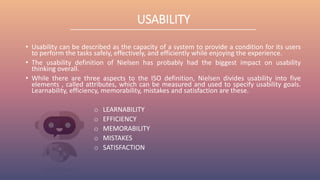
• Usability can be described as the capacity of a system to provide a condition for its users
to perform the tasks safely, effectively, and efficiently while enjoying the experience.
• The usability definition of Nielsen has probably had the biggest impact on usability
thinking overall.
• While there are three aspects to the ISO definition, Nielsen divides usability into five
elements , called attributes, which can be measured and used to specify usability goals.
Learnability, efficiency, memorability, mistakes and satisfaction are these.
o LEARNABILITY
o EFFICIENCY
o MEMORABILITY
o MISTAKES
o SATISFACTION
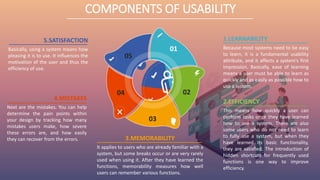
3.MEMORABILITY
It applies to users who are already familiar with a
system, but some breaks occur or are very rarely
used when using it. After they have learned the
functions, memorability measures how well
users can remember various functions.
5.SATISFACTION
Basically, using a system means how
pleasing it is to use. It influences the
motivation of the user and thus the
efficiency of use.
1.LEARNABILITY
Because most systems need to be easy
to learn, it is a fundamental usability
attribute, and it affects a system's first
impression. Basically, ease of learning
means a user must be able to learn as
quickly and as easily as possible how to
use a system.
4.MISTAKES
Next are the mistakes. You can help
determine the pain points within
your design by tracking how many
mistakes users make, how severe
these errors are, and how easily
they can recover from the errors.
2.EFFICIENCY
This means how quickly a user can
perform tasks once they have learned
how to use a system. There are also
some users who do not need to learn
to fully use a system, but when they
have learned its basic functionality,
they are satisfied. The introduction of
hidden shortcuts for frequently used
functions is one way to improve
efficiency.
01
02
03
04
05
COMPONENTS OF USABILITY
UNIVERSAL DESIGN
• Universal Design is the design and composition of an environment so that all individuals,
regardless of their age, size, ability or disability, can access, understand and use it to the
greatest extent possible. An environment should be designed to meet the needs of all
people who wish to use it (or any building, product , or service in that environment).
• A working group of architects, product designers , engineers and environmental design
researchers, led by the late Ronald Mace at North Carolina State University, developed the
7 Principles of Universal Design in 1997. They are,
o Equitable Use
o Flexibility in Use
o Simple and Intuitive Use
o Perceptible Information
o Tolerance for Error
o Low Physical Effort
o Size and Space for Approach and Use
7 PRINCIPLES OF UNIVERSAL DESIGN
01
02
03
04
05
06
07
7 PRINCIPLES OF
UNIVERSAL
DESIGN
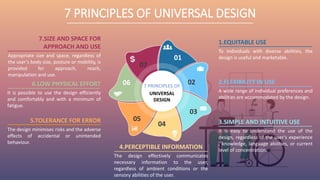
5.TOLERANCE FOR ERROR
The design minimises risks and the adverse
effects of accidental or unintended
behaviour.
1.EQUITABLE USE
To individuals with diverse abilities, the
design is useful and marketable.
2.FLEXIBILITY IN USE
A wide range of individual preferences and
abilities are accommodated by the design.
3.SIMPLE AND INTUITIVE USE
It is easy to understand the use of the
design, regardless of the user's experience
, knowledge, language abilities, or current
level of concentration.
4.PERCEPTIBLE INFORMATION
The design effectively communicates
necessary information to the user,
regardless of ambient conditions or the
sensory abilities of the user.
6.LOW PHYSICAL EFFORT
It is possible to use the design efficiently
and comfortably and with a minimum of
fatigue.
7.SIZE AND SPACE FOR
APPROACH AND USE
Appropriate size and space, regardless of
the user's body size, posture or mobility, is
provided for approach, reach,
manipulation and use.
GOAL OF UNIVERSAL
USABILITY
• The objective of universal usability is to
allow information and communications services
to benefit the widest possible range of users.
• Both the company and users need to save
time.
• It must give the product a happy experience.
• The user should be able to understand all the
content in the application.
CHALLENGES TO
UNIVERSAL USABILITY
There are three major challenges to universal usability:
• Supporting a wide range of hardware , software and access to
the network.
• Adapting to individual user differences, such as age , gender,
disabilities, literacy, culture, income, etc. It is possible to
roughly categories individual differences into three types:
physical, cognitive, and socio-cultural.
• Bridging the gap in knowledge between what users know and
what a particular system needs to know. Two issues need to be
resolved:
oBuilding a user model to access the background
information of individual users on a particular system;
oIntegrating the evolutionary learning mechanism.
Thank You
• USABILITY IS A KEY ELEMENT OF USER EXPERIENCE
• UNIVERSAL_USABILITY
References
• UNIVERSAL DESIGN
• UNIVERSAL DESIGN 7 PRINCIPLES

Universal usability

  • 1.
    By Nicholas Aanto M MCA3rd Year Pondicherry University
  • 2.
    CONTENTS • U NI V E R S A L U S A B I L I T Y • U S A B I L I T Y • U N I V E R S A L D E S I G N • G O A L O F U N I V E R S A L U S A B I L I T Y • C H A L L E N G E S T O U N I V E R S A L U S A B I L I T Y • R E F E R E N C E S
  • 3.
    Universal Usability Universal usabilityrefers to the design of information and communications products and services that are usable for every citizen. Professor Ben Shneiderman, a computer scientist at the University of Maryland's Human-Computer Interaction Lab, College Park, has advocated the concept.
  • 4.
    What is Universal Usability? • In the words of Human computer Interaction pioneer Ben Schneiderman defines, universal usability as “having more than 90% of all households as successful users of information and communications services at least once a week.” • He suggested that the designers need to achieve universal usability by “supporting wider range of technologies, to accommodate diverse users, and to help users bridge the gap between what they know and what they need to know.”
  • 5.
    USABILITY • Usability canbe described as the capacity of a system to provide a condition for its users to perform the tasks safely, effectively, and efficiently while enjoying the experience. • The usability definition of Nielsen has probably had the biggest impact on usability thinking overall. • While there are three aspects to the ISO definition, Nielsen divides usability into five elements , called attributes, which can be measured and used to specify usability goals. Learnability, efficiency, memorability, mistakes and satisfaction are these. o LEARNABILITY o EFFICIENCY o MEMORABILITY o MISTAKES o SATISFACTION
  • 6.
    3.MEMORABILITY It applies tousers who are already familiar with a system, but some breaks occur or are very rarely used when using it. After they have learned the functions, memorability measures how well users can remember various functions. 5.SATISFACTION Basically, using a system means how pleasing it is to use. It influences the motivation of the user and thus the efficiency of use. 1.LEARNABILITY Because most systems need to be easy to learn, it is a fundamental usability attribute, and it affects a system's first impression. Basically, ease of learning means a user must be able to learn as quickly and as easily as possible how to use a system. 4.MISTAKES Next are the mistakes. You can help determine the pain points within your design by tracking how many mistakes users make, how severe these errors are, and how easily they can recover from the errors. 2.EFFICIENCY This means how quickly a user can perform tasks once they have learned how to use a system. There are also some users who do not need to learn to fully use a system, but when they have learned its basic functionality, they are satisfied. The introduction of hidden shortcuts for frequently used functions is one way to improve efficiency. 01 02 03 04 05 COMPONENTS OF USABILITY
  • 7.
    UNIVERSAL DESIGN • UniversalDesign is the design and composition of an environment so that all individuals, regardless of their age, size, ability or disability, can access, understand and use it to the greatest extent possible. An environment should be designed to meet the needs of all people who wish to use it (or any building, product , or service in that environment). • A working group of architects, product designers , engineers and environmental design researchers, led by the late Ronald Mace at North Carolina State University, developed the 7 Principles of Universal Design in 1997. They are, o Equitable Use o Flexibility in Use o Simple and Intuitive Use o Perceptible Information o Tolerance for Error o Low Physical Effort o Size and Space for Approach and Use
  • 8.
    7 PRINCIPLES OFUNIVERSAL DESIGN 01 02 03 04 05 06 07 7 PRINCIPLES OF UNIVERSAL DESIGN 5.TOLERANCE FOR ERROR The design minimises risks and the adverse effects of accidental or unintended behaviour. 1.EQUITABLE USE To individuals with diverse abilities, the design is useful and marketable. 2.FLEXIBILITY IN USE A wide range of individual preferences and abilities are accommodated by the design. 3.SIMPLE AND INTUITIVE USE It is easy to understand the use of the design, regardless of the user's experience , knowledge, language abilities, or current level of concentration. 4.PERCEPTIBLE INFORMATION The design effectively communicates necessary information to the user, regardless of ambient conditions or the sensory abilities of the user. 6.LOW PHYSICAL EFFORT It is possible to use the design efficiently and comfortably and with a minimum of fatigue. 7.SIZE AND SPACE FOR APPROACH AND USE Appropriate size and space, regardless of the user's body size, posture or mobility, is provided for approach, reach, manipulation and use.
  • 9.
    GOAL OF UNIVERSAL USABILITY •The objective of universal usability is to allow information and communications services to benefit the widest possible range of users. • Both the company and users need to save time. • It must give the product a happy experience. • The user should be able to understand all the content in the application.
  • 10.
    CHALLENGES TO UNIVERSAL USABILITY Thereare three major challenges to universal usability: • Supporting a wide range of hardware , software and access to the network. • Adapting to individual user differences, such as age , gender, disabilities, literacy, culture, income, etc. It is possible to roughly categories individual differences into three types: physical, cognitive, and socio-cultural. • Bridging the gap in knowledge between what users know and what a particular system needs to know. Two issues need to be resolved: oBuilding a user model to access the background information of individual users on a particular system; oIntegrating the evolutionary learning mechanism.
  • 11.
  • 12.
    • USABILITY ISA KEY ELEMENT OF USER EXPERIENCE • UNIVERSAL_USABILITY References • UNIVERSAL DESIGN • UNIVERSAL DESIGN 7 PRINCIPLES