Universal Usability
Submitted By
Sandhiya S
18352048
MCA 3rd year
Pondicherry University
What is usability
Quality components
Introduction to universal usability
Important
Major challenge
Universal usability differ from accessibility
Guidelines
Reference
Content
What is usability
Usability can be described as the capacity of a system
to provide a condition for its users to perform the
tasks safely, effectively, and efficiently while enjoying
the experience.
Quality components
 Learnability – The ease with which the user can figure out how to use the
product for the first time.
 Efficiency – The ease with which users can accomplish tasks.
 Memorability – How well a user can recall the system after a period
without using it.
 Errors – The amount and severity of errors both from the system and the
user.
 Satisfaction – The pleasure a user gets from using the product.”
Universal usability
 Universal usability refers to the design of information and
communications products and services that are usable for every citizen.
 Enabling all citizens to succeed using communication and information
technology in their tasks.
 The design of products and environments to be usable by all people, to
the greatest extent possible, without the need for adaptation or
specialized design.
Important of universal usability
 The goal of universal usability is to enable the widest
possible range of users to benefit from information and
communications services.
 This goal is stronger than merely providing access, which
focuses on technology availability and is often tied to access
for users with disabilities.
Major challenges
Universal usability is the latest such challenge:
In order to build systems that are universally usable, designers must
account for technology variety, user diversity, and gaps in user knowledge.
These issues are particularly challenging and important in the context of
increasing the usability of the World-Wide-Web.
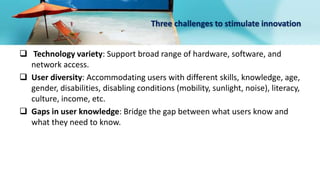
Three challenges to stimulate innovation
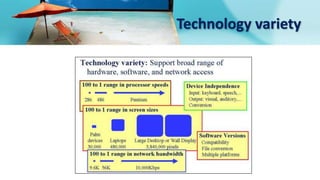
 Technology variety: Support broad range of hardware, software, and
network access.
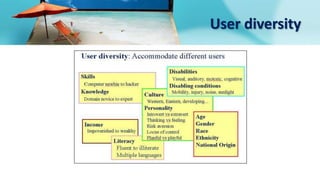
 User diversity: Accommodating users with different skills, knowledge, age,
gender, disabilities, disabling conditions (mobility, sunlight, noise), literacy,
culture, income, etc.
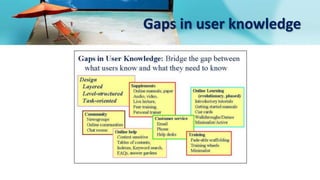
 Gaps in user knowledge: Bridge the gap between what users know and
what they need to know.
Technology variety
User diversity
Gaps in user knowledge
Principles
• Design simply: Design simple sites, emphasizing important elements and
using simple structures and clean, standards-based markup.
• Build well: Take full advantage of these inherent properties, such as
fallbacks, flexibility, and user control, to construct universally usable Web
sites.
• Favor HTML over other formats: HTML is the best format for universal
usability. Provide documents in nonstandard formats, such
as PDF and Flash, only as an alternative to accessible html.
universal usability differ from accessibility?
Accessibility is concerned primarily with making the content and
functionality of web sites accessible—within reach—to all users. Universal
usability goes one step further, striving to make the content and
functionality accessible and usable by all.
Universal Usability Guidelines
 Moving beyond the “typical” user
 Supporting adaptation
 Flexibility
 User control
 Keyboard functionality
 Text equivalents
Reference
https://edtroxell.com/5-core-components-usability/
http://universalusability.com/
https://en.wikipedia.org/wiki/Universal_usability
https://webstyleguide.com/wsg3/2-universal-
usability/4-guidelines.html
Thank you

Universal Usability

  • 1.
    Universal Usability Submitted By SandhiyaS 18352048 MCA 3rd year Pondicherry University
  • 2.
    What is usability Qualitycomponents Introduction to universal usability Important Major challenge Universal usability differ from accessibility Guidelines Reference Content
  • 3.
    What is usability Usabilitycan be described as the capacity of a system to provide a condition for its users to perform the tasks safely, effectively, and efficiently while enjoying the experience.
  • 4.
    Quality components  Learnability– The ease with which the user can figure out how to use the product for the first time.  Efficiency – The ease with which users can accomplish tasks.  Memorability – How well a user can recall the system after a period without using it.  Errors – The amount and severity of errors both from the system and the user.  Satisfaction – The pleasure a user gets from using the product.”
  • 5.
    Universal usability  Universalusability refers to the design of information and communications products and services that are usable for every citizen.  Enabling all citizens to succeed using communication and information technology in their tasks.  The design of products and environments to be usable by all people, to the greatest extent possible, without the need for adaptation or specialized design.
  • 6.
    Important of universalusability  The goal of universal usability is to enable the widest possible range of users to benefit from information and communications services.  This goal is stronger than merely providing access, which focuses on technology availability and is often tied to access for users with disabilities.
  • 7.
    Major challenges Universal usabilityis the latest such challenge: In order to build systems that are universally usable, designers must account for technology variety, user diversity, and gaps in user knowledge. These issues are particularly challenging and important in the context of increasing the usability of the World-Wide-Web.
  • 8.
    Three challenges tostimulate innovation  Technology variety: Support broad range of hardware, software, and network access.  User diversity: Accommodating users with different skills, knowledge, age, gender, disabilities, disabling conditions (mobility, sunlight, noise), literacy, culture, income, etc.  Gaps in user knowledge: Bridge the gap between what users know and what they need to know.
  • 9.
  • 10.
  • 11.
    Gaps in userknowledge
  • 12.
    Principles • Design simply:Design simple sites, emphasizing important elements and using simple structures and clean, standards-based markup. • Build well: Take full advantage of these inherent properties, such as fallbacks, flexibility, and user control, to construct universally usable Web sites. • Favor HTML over other formats: HTML is the best format for universal usability. Provide documents in nonstandard formats, such as PDF and Flash, only as an alternative to accessible html.
  • 13.
    universal usability differfrom accessibility? Accessibility is concerned primarily with making the content and functionality of web sites accessible—within reach—to all users. Universal usability goes one step further, striving to make the content and functionality accessible and usable by all.
  • 14.
    Universal Usability Guidelines Moving beyond the “typical” user  Supporting adaptation  Flexibility  User control  Keyboard functionality  Text equivalents
  • 15.
  • 16.