Introduction to Computer
Programming and Data Structures
Course Code: CS1101
Course Instructor: Dr. Ashish Kumar Sahu
Department of Computer Science and Engineering National Institute of Technology Jamshedpur 1
Outlines
 Storage Devices
 Number Systems
Introduction to Computer Programming and Data Structures Course Code:CS1101 Dr. Ashish Kumar Sahu 2
Storage Devices
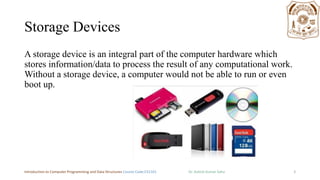
A storage device is an integral part of the computer hardware which
stores information/data to process the result of any computational work.
Without a storage device, a computer would not be able to run or even
boot up.
Introduction to Computer Programming and Data Structures Course Code:CS1101 Dr. Ashish Kumar Sahu 3
Types of storage device
Computer storage is of two types:
 Primary Storage Devices: It is also known as internal memory and main
memory. This is a section of the CPU that holds program instructions, input
data, and intermediate results. It is generally smaller in size. RAM (Random
Access Memory) and ROM (Read Only Memory) are examples of primary
storage.
 Secondary Storage Devices: Secondary storage is a memory that is stored
external to the computer. It is mainly used for the permanent and long-term
storage of programs and data. Hard Disk, CD, DVD, Pen/Flash drive, SSD,
etc, are examples of secondary storage.
Introduction to Computer Programming and Data Structures Course Code:CS1101 Dr. Ashish Kumar Sahu 4
Primary storage devices
RAM: It stands for Random Access Memory. It is used to store information that
is used immediately or we can say that it is a temporary memory. Computers
bring the software installed on a hard disk to RAM to process it and to be used
by the user. Once, the computer is turned off, the data is deleted.
ROM: It stands for Read-Only Memory. The data written or stored in these
devices are non-volatile, i.e, once the data is stored in the memory cannot be
modified or deleted. The memory from which will only read but cannot write it.
This type of memory is non-volatile. The information is stored permanently
during manufacture only once. ROM stores instructions that are used to start a
computer. This operation is referred to as bootstrap.
Introduction to Computer Programming and Data Structures Course Code:CS1101 Dr. Ashish Kumar Sahu 5
Secondary Storage Devices
 Floppy disk. ...
 Hard disk. ...
 Magnetic disk. ...
 Pen drive. ...
 SSD. ...
 Sd card.
Introduction to Computer Programming and Data Structures Course Code:CS1101 Dr. Ashish Kumar Sahu 6
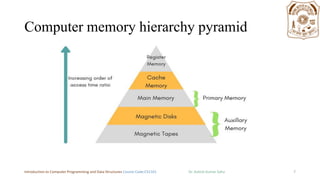
Computer memory hierarchy pyramid
Introduction to Computer Programming and Data Structures Course Code:CS1101 Dr. Ashish Kumar Sahu 7
Online and cloud storage
Cloud storage: Cloud storage is a cloud computing model that transmits and
holds data on remote storage systems where a cloud computing provider
manages, maintains, and made available data to users over a network. It offers
users the reliability, confidentiality, durability, and 'access data anytime.
Introduction to Computer Programming and Data Structures Course Code:CS1101 Dr. Ashish Kumar Sahu 8
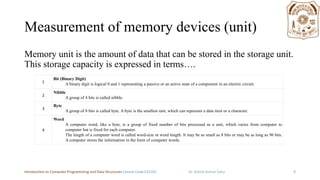
Measurement of memory devices (unit)
Memory unit is the amount of data that can be stored in the storage unit.
This storage capacity is expressed in terms….
Introduction to Computer Programming and Data Structures Course Code:CS1101 Dr. Ashish Kumar Sahu 9
1
Bit (Binary Digit)
A binary digit is logical 0 and 1 representing a passive or an active state of a component in an electric circuit.
2
Nibble
A group of 4 bits is called nibble.
3
Byte
A group of 8 bits is called byte. A byte is the smallest unit, which can represent a data item or a character.
4
Word
A computer word, like a byte, is a group of fixed number of bits processed as a unit, which varies from computer to
computer but is fixed for each computer.
The length of a computer word is called word-size or word length. It may be as small as 8 bits or may be as long as 96 bits.
A computer stores the information in the form of computer words.
Higher storage units
S.No. Unit & Description
1
Kilobyte (KB)
1 KB = 1024 Bytes
2
Megabyte (MB)
1 MB = 1024 KB
3
GigaByte (GB)
1 GB = 1024 MB
4
TeraByte (TB)
1 TB = 1024 GB
5
PetaByte (PB)
1 PB = 1024 TB
Introduction to Computer Programming and Data Structures Course Code:CS1101 Dr. Ashish Kumar Sahu 10
Advance
Introduction to Computer Programming and Data Structures Course Code:CS1101 Dr. Ashish Kumar Sahu 11
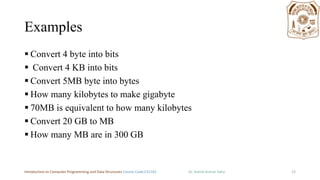
Examples
 Convert 4 byte into bits
 Convert 4 KB into bits
 Convert 5MB byte into bytes
 How many kilobytes to make gigabyte
 70MB is equivalent to how many kilobytes
 Convert 20 GB to MB
 How many MB are in 300 GB
Introduction to Computer Programming and Data Structures Course Code:CS1101 Dr. Ashish Kumar Sahu 12
Number Systems
The number system is a way to represent or express numbers. You have
heard of various types of number systems such as the whole
number and the real numbers. But in the context of computers, we
define other types of number systems.
 The decimal number system
 The binary number system
 The octal number system
 The hexadecimal number system
Introduction to Computer Programming and Data Structures Course Code:CS1101 Dr. Ashish Kumar Sahu 13
Decimal Number System
The number system that we use in our day-to-day life is the decimal number
system. Decimal number system has base 10 as it uses 10 digits from 0 to 9.
In decimal number system, the successive positions to the left of the decimal
point represent units, tens, hundreds, thousands, and so on.
Each position represents a specific power of the base (10). For example, the
decimal number 1234 consists of the digit 4 in the units position, 3 in the tens
position, 2 in the hundreds position, and 1 in the thousands position. Its value
can be written as
(1 x 1000)+ (2 x 100)+ (3 x 10)+ (4 x l)
1000 + 200 + 30 + 4
1234
Introduction to Computer Programming and Data Structures Course Code:CS1101 Dr. Ashish Kumar Sahu 14
Binary Number System
Uses two digits, 0 and 1, and also called as base 2 number system.
 1010 = 1 * 23 + 0 * 22 + 1 * 21 + 0 * 20
 = 8 + 2
 = 10
 1100 1001 = 1 * 27 + 1 * 26 + 1 * 23 + 1 * 20
 = 128 + 64 + 8 + 1
 = 201
Introduction to Computer Programming and Data Structures Course Code:CS1101 Dr. Ashish Kumar Sahu 15
The octal number system
8 digits: 0, 1, 2, 3, 4, 5, 6, 7,
Octal numbers to Decimal
1368 = 1 * 82 + 3 * 81 + 6 * 80
= 1 * 64 + 3 * 8 + 6 * 1
= 9410
Introduction to Computer Programming and Data Structures Course Code:CS1101 Dr. Ashish Kumar Sahu 16
The hexadecimal number system
16 digits:
0, 1, 2, 3, 4, 5, 6, 7, 8, 9, A, B, C, D, E, F
“0x” often precedes hexadecimal numbers
0x123 = 1 * 162 + 2 * 161 + 3 * 160
= 1 * 256 + 2 * 16 +3 * 1
= 256 + 32 +3
= 291
Introduction to Computer Programming and Data Structures Course Code:CS1101 Dr. Ashish Kumar Sahu 17
Introduction to Computer Programming and Data Structures Course Code:CS1101 Dr. Ashish Kumar Sahu 18
Fractional
Number
• Point: Decimal Point, Binary Point, Hexadecimal
point
+ 7x10‐1+5x10‐2
247.75 = 2x10²+4x101+7x100
• Binary
10.101= 1x21+0x20 + 1x2‐1+0x2‐2+1x2‐3
• Hexadecimal
6A.7D=6x161+10x160 + 7x16‐1+Dx16‐2
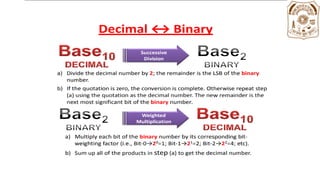
Converting To and From Decimal
Successive
Division
Decimal10
0 1 2 3 4 5 6 7 8 9 Weighted
Multiplication
Octal8
0 1 2 3 4 5 6 7
Hexadecimal16
0 1 2 3 4 5 6 7 8 9 A B C D E F
Weighted
Multiplication
Successive
Division
Successive
Division
Weighted
Multiplication
Binary2
0 1
25
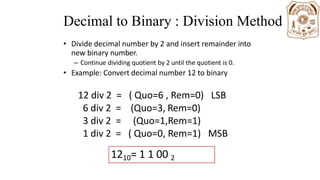
Decimal to Binary : Division Method
• Divide decimal number by 2 and insert remainder into
new binary number.
– Continue dividing quotient by 2 until the quotient is 0.
• Example: Convert decimal number 12 to binary
12 div 2 = ( Quo=6 , Rem=0) LSB
6 div 2 =
3 div 2 =
1 div 2 =
(Quo=3, Rem=0)
(Quo=1,Rem=1)
( Quo=0, Rem=1) MSB
1210= 1 1 00 2
Decimal to Octal Conversion
The Process: Successive Division
• Divide number by 8; R is the LSB of the octal number
• While Q is 0
• Using the Q as the decimal number.
• New remainder is MSB of the octal number.
11
8 94 r  6  LSB
1
r  3 9410 = 1368
8 11
0
8 1 r  1  MSB 28
Decimal to Hexadecimal Conversion
The Process: Successive Division
• Divide number by 16; R is the LSB of the hex
number
• While Q is 0
• Using the Q as the decimal number.
• New remainder is MSB of the hex number.
5
16 94 r  E  LSB
0
16 5 r  5  MSB
9410 = 5E16
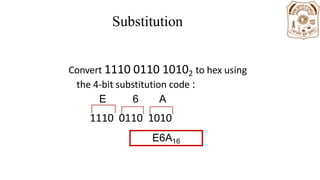
Substitution
Code
Convert 1110 0110 10102 to hex using
the 4‐bit substitution code :
E 6 A
1110 0110 1010
E6A16
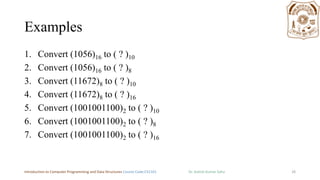
Examples
1. Convert (1056)16 to ( ? )10
2. Convert (1056)16 to ( ? )8
3. Convert (11672)8 to ( ? )10
4. Convert (11672)8 to ( ? )16
5. Convert (1001001100)2 to ( ? )10
6. Convert (1001001100)2 to ( ? )8
7. Convert (1001001100)2 to ( ? )16
Introduction to Computer Programming and Data Structures Course Code:CS1101 Dr. Ashish Kumar Sahu 26
Home Work
1. What do you understand about cache memory.
2. The need of octal and hexadecimal numbers in computer system.
Introduction to Computer Programming and Data Structures Course Code:CS1101 Dr. Ashish Kumar Sahu 27

unit1.2.pdf

  • 1.
    Introduction to Computer Programmingand Data Structures Course Code: CS1101 Course Instructor: Dr. Ashish Kumar Sahu Department of Computer Science and Engineering National Institute of Technology Jamshedpur 1
  • 2.
    Outlines  Storage Devices Number Systems Introduction to Computer Programming and Data Structures Course Code:CS1101 Dr. Ashish Kumar Sahu 2
  • 3.
    Storage Devices A storagedevice is an integral part of the computer hardware which stores information/data to process the result of any computational work. Without a storage device, a computer would not be able to run or even boot up. Introduction to Computer Programming and Data Structures Course Code:CS1101 Dr. Ashish Kumar Sahu 3
  • 4.
    Types of storagedevice Computer storage is of two types:  Primary Storage Devices: It is also known as internal memory and main memory. This is a section of the CPU that holds program instructions, input data, and intermediate results. It is generally smaller in size. RAM (Random Access Memory) and ROM (Read Only Memory) are examples of primary storage.  Secondary Storage Devices: Secondary storage is a memory that is stored external to the computer. It is mainly used for the permanent and long-term storage of programs and data. Hard Disk, CD, DVD, Pen/Flash drive, SSD, etc, are examples of secondary storage. Introduction to Computer Programming and Data Structures Course Code:CS1101 Dr. Ashish Kumar Sahu 4
  • 5.
    Primary storage devices RAM:It stands for Random Access Memory. It is used to store information that is used immediately or we can say that it is a temporary memory. Computers bring the software installed on a hard disk to RAM to process it and to be used by the user. Once, the computer is turned off, the data is deleted. ROM: It stands for Read-Only Memory. The data written or stored in these devices are non-volatile, i.e, once the data is stored in the memory cannot be modified or deleted. The memory from which will only read but cannot write it. This type of memory is non-volatile. The information is stored permanently during manufacture only once. ROM stores instructions that are used to start a computer. This operation is referred to as bootstrap. Introduction to Computer Programming and Data Structures Course Code:CS1101 Dr. Ashish Kumar Sahu 5
  • 6.
    Secondary Storage Devices Floppy disk. ...  Hard disk. ...  Magnetic disk. ...  Pen drive. ...  SSD. ...  Sd card. Introduction to Computer Programming and Data Structures Course Code:CS1101 Dr. Ashish Kumar Sahu 6
  • 7.
    Computer memory hierarchypyramid Introduction to Computer Programming and Data Structures Course Code:CS1101 Dr. Ashish Kumar Sahu 7
  • 8.
    Online and cloudstorage Cloud storage: Cloud storage is a cloud computing model that transmits and holds data on remote storage systems where a cloud computing provider manages, maintains, and made available data to users over a network. It offers users the reliability, confidentiality, durability, and 'access data anytime. Introduction to Computer Programming and Data Structures Course Code:CS1101 Dr. Ashish Kumar Sahu 8
  • 9.
    Measurement of memorydevices (unit) Memory unit is the amount of data that can be stored in the storage unit. This storage capacity is expressed in terms…. Introduction to Computer Programming and Data Structures Course Code:CS1101 Dr. Ashish Kumar Sahu 9 1 Bit (Binary Digit) A binary digit is logical 0 and 1 representing a passive or an active state of a component in an electric circuit. 2 Nibble A group of 4 bits is called nibble. 3 Byte A group of 8 bits is called byte. A byte is the smallest unit, which can represent a data item or a character. 4 Word A computer word, like a byte, is a group of fixed number of bits processed as a unit, which varies from computer to computer but is fixed for each computer. The length of a computer word is called word-size or word length. It may be as small as 8 bits or may be as long as 96 bits. A computer stores the information in the form of computer words.
  • 10.
    Higher storage units S.No.Unit & Description 1 Kilobyte (KB) 1 KB = 1024 Bytes 2 Megabyte (MB) 1 MB = 1024 KB 3 GigaByte (GB) 1 GB = 1024 MB 4 TeraByte (TB) 1 TB = 1024 GB 5 PetaByte (PB) 1 PB = 1024 TB Introduction to Computer Programming and Data Structures Course Code:CS1101 Dr. Ashish Kumar Sahu 10
  • 11.
    Advance Introduction to ComputerProgramming and Data Structures Course Code:CS1101 Dr. Ashish Kumar Sahu 11
  • 12.
    Examples  Convert 4byte into bits  Convert 4 KB into bits  Convert 5MB byte into bytes  How many kilobytes to make gigabyte  70MB is equivalent to how many kilobytes  Convert 20 GB to MB  How many MB are in 300 GB Introduction to Computer Programming and Data Structures Course Code:CS1101 Dr. Ashish Kumar Sahu 12
  • 13.
    Number Systems The numbersystem is a way to represent or express numbers. You have heard of various types of number systems such as the whole number and the real numbers. But in the context of computers, we define other types of number systems.  The decimal number system  The binary number system  The octal number system  The hexadecimal number system Introduction to Computer Programming and Data Structures Course Code:CS1101 Dr. Ashish Kumar Sahu 13
  • 14.
    Decimal Number System Thenumber system that we use in our day-to-day life is the decimal number system. Decimal number system has base 10 as it uses 10 digits from 0 to 9. In decimal number system, the successive positions to the left of the decimal point represent units, tens, hundreds, thousands, and so on. Each position represents a specific power of the base (10). For example, the decimal number 1234 consists of the digit 4 in the units position, 3 in the tens position, 2 in the hundreds position, and 1 in the thousands position. Its value can be written as (1 x 1000)+ (2 x 100)+ (3 x 10)+ (4 x l) 1000 + 200 + 30 + 4 1234 Introduction to Computer Programming and Data Structures Course Code:CS1101 Dr. Ashish Kumar Sahu 14
  • 15.
    Binary Number System Usestwo digits, 0 and 1, and also called as base 2 number system.  1010 = 1 * 23 + 0 * 22 + 1 * 21 + 0 * 20  = 8 + 2  = 10  1100 1001 = 1 * 27 + 1 * 26 + 1 * 23 + 1 * 20  = 128 + 64 + 8 + 1  = 201 Introduction to Computer Programming and Data Structures Course Code:CS1101 Dr. Ashish Kumar Sahu 15
  • 16.
    The octal numbersystem 8 digits: 0, 1, 2, 3, 4, 5, 6, 7, Octal numbers to Decimal 1368 = 1 * 82 + 3 * 81 + 6 * 80 = 1 * 64 + 3 * 8 + 6 * 1 = 9410 Introduction to Computer Programming and Data Structures Course Code:CS1101 Dr. Ashish Kumar Sahu 16
  • 17.
    The hexadecimal numbersystem 16 digits: 0, 1, 2, 3, 4, 5, 6, 7, 8, 9, A, B, C, D, E, F “0x” often precedes hexadecimal numbers 0x123 = 1 * 162 + 2 * 161 + 3 * 160 = 1 * 256 + 2 * 16 +3 * 1 = 256 + 32 +3 = 291 Introduction to Computer Programming and Data Structures Course Code:CS1101 Dr. Ashish Kumar Sahu 17
  • 18.
    Introduction to ComputerProgramming and Data Structures Course Code:CS1101 Dr. Ashish Kumar Sahu 18
  • 19.
    Fractional Number • Point: DecimalPoint, Binary Point, Hexadecimal point + 7x10‐1+5x10‐2 247.75 = 2x10²+4x101+7x100 • Binary 10.101= 1x21+0x20 + 1x2‐1+0x2‐2+1x2‐3 • Hexadecimal 6A.7D=6x161+10x160 + 7x16‐1+Dx16‐2
  • 20.
    Converting To andFrom Decimal Successive Division Decimal10 0 1 2 3 4 5 6 7 8 9 Weighted Multiplication Octal8 0 1 2 3 4 5 6 7 Hexadecimal16 0 1 2 3 4 5 6 7 8 9 A B C D E F Weighted Multiplication Successive Division Successive Division Weighted Multiplication Binary2 0 1 25
  • 22.
    Decimal to Binary: Division Method • Divide decimal number by 2 and insert remainder into new binary number. – Continue dividing quotient by 2 until the quotient is 0. • Example: Convert decimal number 12 to binary 12 div 2 = ( Quo=6 , Rem=0) LSB 6 div 2 = 3 div 2 = 1 div 2 = (Quo=3, Rem=0) (Quo=1,Rem=1) ( Quo=0, Rem=1) MSB 1210= 1 1 00 2
  • 23.
    Decimal to OctalConversion The Process: Successive Division • Divide number by 8; R is the LSB of the octal number • While Q is 0 • Using the Q as the decimal number. • New remainder is MSB of the octal number. 11 8 94 r  6  LSB 1 r  3 9410 = 1368 8 11 0 8 1 r  1  MSB 28
  • 24.
    Decimal to HexadecimalConversion The Process: Successive Division • Divide number by 16; R is the LSB of the hex number • While Q is 0 • Using the Q as the decimal number. • New remainder is MSB of the hex number. 5 16 94 r  E  LSB 0 16 5 r  5  MSB 9410 = 5E16
  • 25.
    Substitution Code Convert 1110 011010102 to hex using the 4‐bit substitution code : E 6 A 1110 0110 1010 E6A16
  • 26.
    Examples 1. Convert (1056)16to ( ? )10 2. Convert (1056)16 to ( ? )8 3. Convert (11672)8 to ( ? )10 4. Convert (11672)8 to ( ? )16 5. Convert (1001001100)2 to ( ? )10 6. Convert (1001001100)2 to ( ? )8 7. Convert (1001001100)2 to ( ? )16 Introduction to Computer Programming and Data Structures Course Code:CS1101 Dr. Ashish Kumar Sahu 26
  • 27.
    Home Work 1. Whatdo you understand about cache memory. 2. The need of octal and hexadecimal numbers in computer system. Introduction to Computer Programming and Data Structures Course Code:CS1101 Dr. Ashish Kumar Sahu 27