Database Management System(DBMS)
Unit-V
Emerging Database Technologies
Sanjivani Rural Education Society’s
Sanjivani College of Engineering, Kopargaon-423603
(An Autonomous Institute Affiliated to Savitribai Phule Pune University, Pune)
NACC ‘A’ Grade Accredited, ISO 9001:2015 Certified
Department of Information Technology
(NBAAccredited)
Ms. B B Pawar
Assistant Professor
2.
DBMS – Unit-VIDepartment of Information Technology
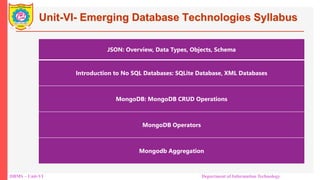
Unit-VI- Emerging Database Technologies Syllabus
JSON: Overview, Data Types, Objects, Schema
Introduction to No SQL Databases: SQLite Database, XML Databases
MongoDB: MongoDB CRUD Operations
MongoDB Operators
Mongodb Aggregation
3.
DBMS – Unit-VIDepartment of Information Technology
• NoSQL stands for ‘Not-Only SQL’.
• These types of databases are Non-Relational or non-tabular.
• A No-SQL database does not require a specific schema and hence is schema-less
• All the entries/documents are JSON documents.
• Examples − MongoDB, DynamoDB, Redis, etc.
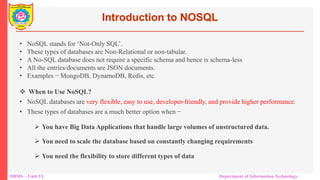
When to Use NoSQL?
• NoSQL databases are very flexible, easy to use, developer-friendly, and provide higher performance.
• These types of databases are a much better option when −
You have Big Data Applications that handle large volumes of unstructured data.
You need to scale the database based on constantly changing requirements
You need the flexibility to store different types of data
Introduction to NOSQL
4.
DBMS – Unit-VIDepartment of Information Technology
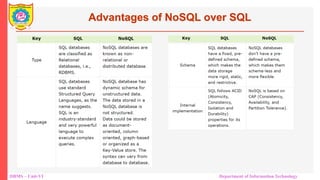
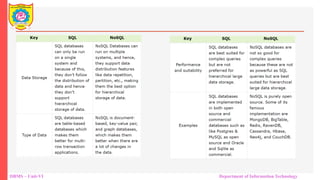
Advantages of NoSQL over SQL
DBMS – Unit-VIDepartment of Information Technology
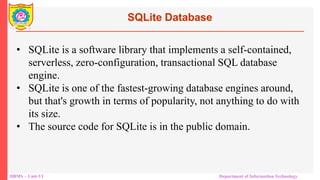
SQLite Database
• SQLite is a software library that implements a self-contained,
serverless, zero-configuration, transactional SQL database
engine.
• SQLite is one of the fastest-growing database engines around,
but that's growth in terms of popularity, not anything to do with
its size.
• The source code for SQLite is in the public domain.
7.
DBMS – Unit-VIDepartment of Information Technology
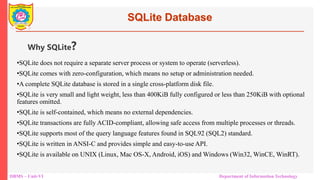
SQLite Database
•SQLite does not require a separate server process or system to operate (serverless).
•SQLite comes with zero-configuration, which means no setup or administration needed.
•A complete SQLite database is stored in a single cross-platform disk file.
•SQLite is very small and light weight, less than 400KiB fully configured or less than 250KiB with optional
features omitted.
•SQLite is self-contained, which means no external dependencies.
•SQLite transactions are fully ACID-compliant, allowing safe access from multiple processes or threads.
•SQLite supports most of the query language features found in SQL92 (SQL2) standard.
•SQLite is written in ANSI-C and provides simple and easy-to-use API.
•SQLite is available on UNIX (Linux, Mac OS-X, Android, iOS) and Windows (Win32, WinCE, WinRT).
Why SQLite?
8.
DBMS – Unit-VIDepartment of Information Technology
Applications of SQLite
• SQLite is used to develop embedded software for devices like televisions, cell phones, cameras, etc
• desktop applications such as version control systems, financial analysis tools, media cataloging and
editing suites, CAD packages, record keeping programs
• used to perform database operations on android devices such as storing, manipulating or retrieving
persistent data from the database.
9.
DBMS – Unit-VIDepartment of Information Technology
JSON Introduction
• JSON stands for JavaScript Object Notation.
• The format was specified by Douglas Crockford.
• It was designed for human-readable data interchange.
• It has been extended from the JavaScript scripting language.
• The filename extension is .json.
• JSON Internet Media type is application/json.
• The Uniform Type Identifier is public.json.
10.
DBMS – Unit-VIDepartment of Information Technology
• It is used while writing JavaScript based applications that includes
browser extensions and websites.
• JSON format is used for serializing and transmitting structured data over
network connection.
• It is primarily used to transmit data between a server and web
applications.
• Web services and APIs use JSON format to provide public data.
• It can be used with modern programming languages.
JSON Uses
11.
DBMS – Unit-VIDepartment of Information Technology
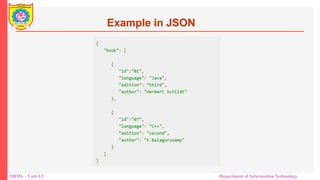
Example in JSON
12.
DBMS – Unit-VIDepartment of Information Technology
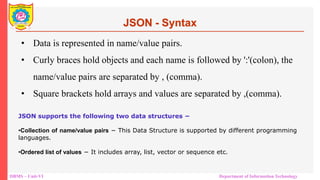
• Data is represented in name/value pairs.
• Curly braces hold objects and each name is followed by ':'(colon), the
name/value pairs are separated by , (comma).
• Square brackets hold arrays and values are separated by ,(comma).
JSON - Syntax
JSON supports the following two data structures −
•Collection of name/value pairs − This Data Structure is supported by different programming
languages.
•Ordered list of values − It includes array, list, vector or sequence etc.
13.
DBMS – Unit-VIDepartment of Information Technology
JSON - DataTypes
Sr.No. Type & Description
1
Integer
Digits 1-9, 0 and positive or negative
2
Fraction
Fractions like .3, .9
3
Exponent
Exponent like e, e+, e-, E, E+, E-
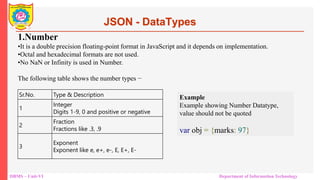
1.Number
•It is a double precision floating-point format in JavaScript and it depends on implementation.
•Octal and hexadecimal formats are not used.
•No NaN or Infinity is used in Number.
The following table shows the number types −
Example
Example showing Number Datatype,
value should not be quoted
var obj = {marks: 97}
14.
DBMS – Unit-VIDepartment of Information Technology
JSON - DataTypes
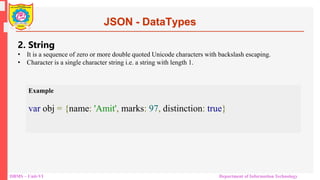
2. String
• It is a sequence of zero or more double quoted Unicode characters with backslash escaping.
• Character is a single character string i.e. a string with length 1.
Example
var obj = {name: 'Amit', marks: 97, distinction: true}
15.
DBMS – Unit-VIDepartment of Information Technology
JSON - DataTypes
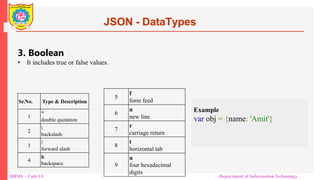
3. Boolean
• It includes true or false values.
Example
var obj = {name: 'Amit'}
Sr.No. Type & Description
1
"
double quotation
2
backslash
3
/
forward slash
4
b
backspace
5
f
form feed
6
n
new line
7
r
carriage return
8
t
horizontal tab
9
u
four hexadecimal
digits
16.
DBMS – Unit-VIDepartment of Information Technology
JSON - DataTypes
4. Array
• It is an ordered collection of values.
• These are enclosed in square brackets which means that array begins with .[. and ends with .]..
• The values are separated by , (comma).
• Array indexing can be started at 0 or 1.
• Arrays should be used when the key names are sequential integers.
Example
17.
DBMS – Unit-VIDepartment of Information Technology
JSON - DataTypes
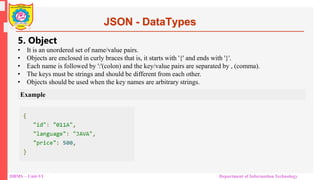
5. Object
• It is an unordered set of name/value pairs.
• Objects are enclosed in curly braces that is, it starts with '{' and ends with '}'.
• Each name is followed by ':'(colon) and the key/value pairs are separated by , (comma).
• The keys must be strings and should be different from each other.
• Objects should be used when the key names are arbitrary strings.
Example
18.
DBMS – Unit-VIDepartment of Information Technology
JSON - DataTypes
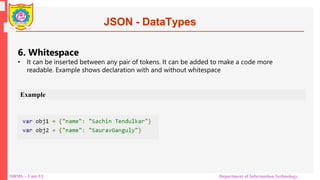
6. Whitespace
• It can be inserted between any pair of tokens. It can be added to make a code more
readable. Example shows declaration with and without whitespace
Example
19.
DBMS – Unit-VIDepartment of Information Technology
JSON - DataTypes
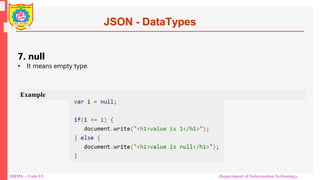
7. null
• It means empty type.
Example
20.
DBMS – Unit-VIDepartment of Information Technology
JSON - DataTypes
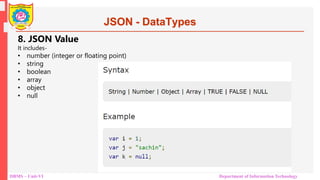
8. JSON Value
It includes-
• number (integer or floating point)
• string
• boolean
• array
• object
• null
21.
DBMS – Unit-VIDepartment of Information Technology
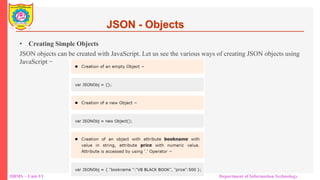
• Creating Simple Objects
JSON objects can be created with JavaScript. Let us see the various ways of creating JSON objects using
JavaScript −
JSON - Objects
22.
DBMS – Unit-VIDepartment of Information Technology
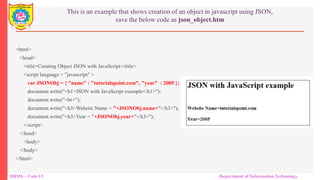
This is an example that shows creation of an object in javascript using JSON,
save the below code as json_object.htm
<html>
<head>
<title>Creating Object JSON with JavaScript</title>
<script language = "javascript" >
var JSONObj = { "name" : "tutorialspoint.com", "year" : 2005 };
document.write("<h1>JSON with JavaScript example</h1>");
document.write("<br>");
document.write("<h3>Website Name = "+JSONObj.name+"</h3>");
document.write("<h3>Year = "+JSONObj.year+"</h3>");
</script>
</head>
<body>
</body>
</html>
23.
DBMS – Unit-VIDepartment of Information Technology
Creating Array Objects
<html>
<head>
<title>Creation of array object in javascript using JSON</title>
<script language = "javascript" >
document.writeln("<h2>JSON array object</h2>");
var books = { "Pascal" : [
{ "Name" : "Pascal Made Simple", "price" : 700 },
{ "Name" : "Guide to Pascal", "price" : 400 }],
"Scala" : [
{ "Name" : "Scala for the Impatient", "price" : 1000 },
{ "Name" : "Scala in Depth", "price" : 1300 }]
}
var i = 0
document.writeln("<table border = '2'><tr>");
for(i = 0;i<books.Pascal.length;i++) {
document.writeln("<td>");
document.writeln("<table border = '1' width = 100 >");
document.writeln("<tr><td><b>Name</b></td><td width = 50>" + books.Pascal[i].Name+"</td></tr>");
document.writeln("<tr><td><b>Price</b></td><td width = 50>" + books.Pascal[i].price +"</td></tr>");
document.writeln("</table>");
document.writeln("</td>");
}
DBMS – Unit-VIDepartment of Information Technology
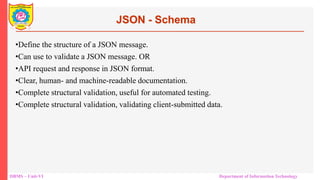
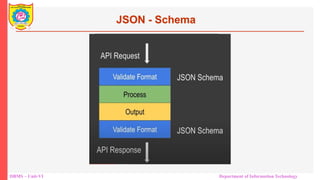
•Define the structure of a JSON message.
•Can use to validate a JSON message. OR
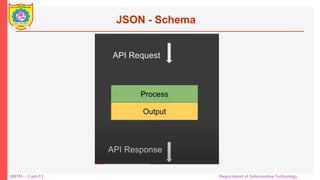
•API request and response in JSON format.
•Clear, human- and machine-readable documentation.
•Complete structural validation, useful for automated testing.
•Complete structural validation, validating client-submitted data.
JSON - Schema
26.
DBMS – Unit-VIDepartment of Information Technology
JSON - Schema
27.
DBMS – Unit-VIDepartment of Information Technology
JSON - Schema
28.
DBMS – Unit-VIDepartment of Information Technology
{
"$schema": "http://json-schema.org/draft-04/schema#",
"title": "Product",
"description": "A product from Acme's catalog",
"type": "object",
"properties": {
"id": {
"description": "The unique identifier for a product",
"type": "integer"
},
"name": {
"description": "Name of the product",
"type": "string"
},
"price": {
"type": "number",
"minimum": 0,
"exclusiveMinimum": true
}
},
"required": ["id", "name", "price"]
}
DBMS – Unit-VIDepartment of Information Technology
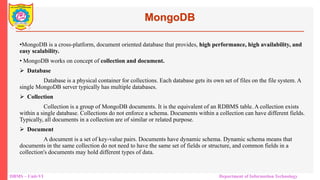
MongoDB
•MongoDB is a cross-platform, document oriented database that provides, high performance, high availability, and
easy scalability.
• MongoDB works on concept of collection and document.
Database
Database is a physical container for collections. Each database gets its own set of files on the file system. A
single MongoDB server typically has multiple databases.
Collection
Collection is a group of MongoDB documents. It is the equivalent of an RDBMS table. A collection exists
within a single database. Collections do not enforce a schema. Documents within a collection can have different fields.
Typically, all documents in a collection are of similar or related purpose.
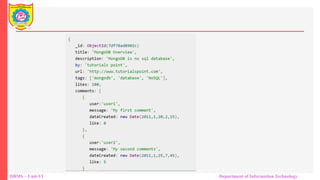
Document
A document is a set of key-value pairs. Documents have dynamic schema. Dynamic schema means that
documents in the same collection do not need to have the same set of fields or structure, and common fields in a
collection's documents may hold different types of data.
DBMS – Unit-VIDepartment of Information Technology
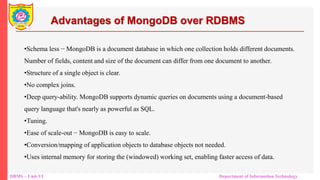
Advantages of MongoDB over RDBMS
•Schema less − MongoDB is a document database in which one collection holds different documents.
Number of fields, content and size of the document can differ from one document to another.
•Structure of a single object is clear.
•No complex joins.
•Deep query-ability. MongoDB supports dynamic queries on documents using a document-based
query language that's nearly as powerful as SQL.
•Tuning.
•Ease of scale-out − MongoDB is easy to scale.
•Conversion/mapping of application objects to database objects not needed.
•Uses internal memory for storing the (windowed) working set, enabling faster access of data.
33.
DBMS – Unit-VIDepartment of Information Technology
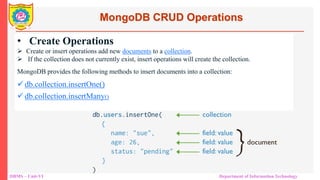
MongoDB CRUD Operations
• Create Operations
Create or insert operations add new documents to a collection.
If the collection does not currently exist, insert operations will create the collection.
MongoDB provides the following methods to insert documents into a collection:
db.collection.insertOne()
db.collection.insertMany()
34.
DBMS – Unit-VIDepartment of Information Technology
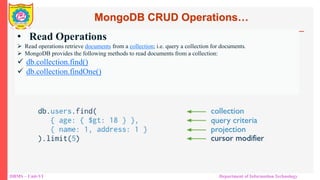
• Read Operations
Read operations retrieve documents from a collection; i.e. query a collection for documents.
MongoDB provides the following methods to read documents from a collection:
db.collection.find()
db.collection.findOne()
MongoDB CRUD Operations…
35.
DBMS – Unit-VIDepartment of Information Technology
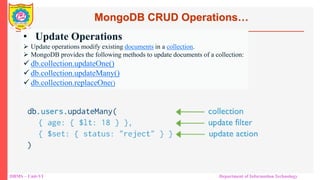
• Update Operations
Update operations modify existing documents in a collection.
MongoDB provides the following methods to update documents of a collection:
db.collection.updateOne()
db.collection.updateMany()
db.collection.replaceOne()
MongoDB CRUD Operations…
36.
DBMS – Unit-VIDepartment of Information Technology
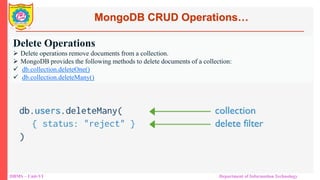
Delete Operations
Delete operations remove documents from a collection.
MongoDB provides the following methods to delete documents of a collection:
db.collection.deleteOne()
db.collection.deleteMany()
MongoDB CRUD Operations…
37.
DBMS – Unit-VIDepartment of Information Technology
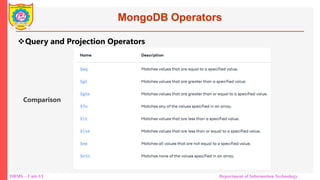
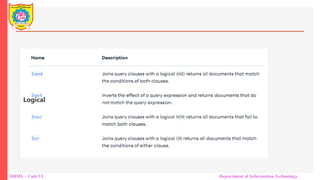
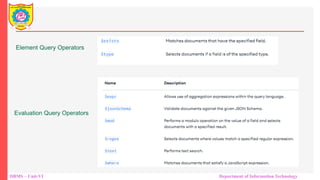
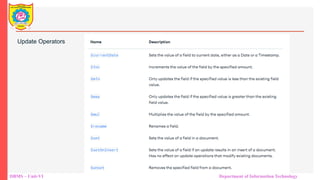
MongoDB Operators
Query and Projection Operators
Comparison
38.
DBMS – Unit-VIDepartment of Information Technology
Logical
39.
DBMS – Unit-VIDepartment of Information Technology
Element Query Operators
Evaluation Query Operators
40.
DBMS – Unit-VIDepartment of Information Technology
Update Operators
41.
DBMS – Unit-VIDepartment of Information Technology
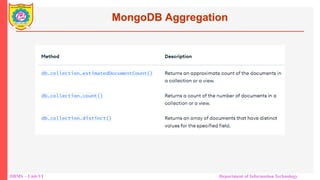
MongoDB Aggregation
42.
DBMS – Unit-VIDepartment of Information Technology
References
1. https://www.tutorialspoint.com/mongodb/index.htm
2. https://www.tutorialspoint.com/json/index.htm
3. https://www.tutorialspoint.com/NoSQL-Databases

![DBMS – Unit-VI Department of Information Technology
JSON - DataTypes
4. Array
• It is an ordered collection of values.
• These are enclosed in square brackets which means that array begins with .[. and ends with .]..
• The values are separated by , (comma).
• Array indexing can be started at 0 or 1.
• Arrays should be used when the key names are sequential integers.
Example](https://image.slidesharecdn.com/unit5nosql-250813104258-1e0041b1/85/UNIT-5-NO-Structured-Query-Language-updated-16-320.jpg)
![DBMS – Unit-VI Department of Information Technology
Creating Array Objects
<html>
<head>
<title>Creation of array object in javascript using JSON</title>
<script language = "javascript" >
document.writeln("<h2>JSON array object</h2>");
var books = { "Pascal" : [
{ "Name" : "Pascal Made Simple", "price" : 700 },
{ "Name" : "Guide to Pascal", "price" : 400 }],
"Scala" : [
{ "Name" : "Scala for the Impatient", "price" : 1000 },
{ "Name" : "Scala in Depth", "price" : 1300 }]
}
var i = 0
document.writeln("<table border = '2'><tr>");
for(i = 0;i<books.Pascal.length;i++) {
document.writeln("<td>");
document.writeln("<table border = '1' width = 100 >");
document.writeln("<tr><td><b>Name</b></td><td width = 50>" + books.Pascal[i].Name+"</td></tr>");
document.writeln("<tr><td><b>Price</b></td><td width = 50>" + books.Pascal[i].price +"</td></tr>");
document.writeln("</table>");
document.writeln("</td>");
}](https://image.slidesharecdn.com/unit5nosql-250813104258-1e0041b1/85/UNIT-5-NO-Structured-Query-Language-updated-23-320.jpg)
![DBMS – Unit-VI Department of Information Technology
for(i = 0;i<books.Scala.length;i++) {
document.writeln("<td>");
document.writeln("<table border = '1' width = 100 >");
document.writeln("<tr><td><b>Name</b></td><td width = 50>" + books.Scala[i].Name+"</td></tr>");
document.writeln("<tr><td><b>Price</b></td><td width = 50>" + books.Scala[i].price+"</td></tr>");
document.writeln("</table>");
document.writeln("</td>");
}
document.writeln("</tr></table>");
</script>
</head>](https://image.slidesharecdn.com/unit5nosql-250813104258-1e0041b1/85/UNIT-5-NO-Structured-Query-Language-updated-24-320.jpg)
![DBMS – Unit-VI Department of Information Technology
{
"$schema": "http://json-schema.org/draft-04/schema#",
"title": "Product",
"description": "A product from Acme's catalog",
"type": "object",
"properties": {
"id": {
"description": "The unique identifier for a product",
"type": "integer"
},
"name": {
"description": "Name of the product",
"type": "string"
},
"price": {
"type": "number",
"minimum": 0,
"exclusiveMinimum": true
}
},
"required": ["id", "name", "price"]
}](https://image.slidesharecdn.com/unit5nosql-250813104258-1e0041b1/85/UNIT-5-NO-Structured-Query-Language-updated-28-320.jpg)
![{
"Employees": [
{
"empId": "EMP01",
"jobTitle": "Developer",
"firstName": "Shivang",
"lastName": "Yadav",
"fullName": "Shivang Yadav",
"address": "Indore, MP, India",
"contact": "+91-9999999999",
"email": "shivang.yadavji@gmail.com"
},
{
"empId": "EMP02",
"jobTitle": "Jr. Developer",
"firstName": "Alvin",
"lastName": "Alexander",
"fullName": "Alvin Alexander",
"address": "New Delhi, India",
"contact": "+91-9999999999",
"email": "heyitsalvinalex@gmail.com"
},
]
}
{
"$schema": "http://json-schema.org/draft-04/schema#",
"type": "object",
"properties": {
"Employees": {
"type": "array",
"items": [
{
"type": "object",
"properties": {
"empId": {
"type": "string"
},
"jobTitle": {
"type": "string"
},
"firstName": {
"type": "string"
},
"lastName": {
"type": "string"
},
"fullName": {
"type": "string"
},
"address": {
"type": "string"
},
"contact": {
"type": "string"
},
"email": {
"type": "string"
}
},
"required": [
"empId", "jobTitle", "firstName","lastName",
"fullName", "address", "contact", "email"
] },
{
"type": "object",
"properties": {"empId": "type": "string"
},
"jobTitle": {
"type": "string"
},
"firstName": {
"type": "string"
},
"lastName": {
"type": "string"
},
"fullName": {
"type": "string"
},
"address": {
"type": "string"
},
"contact": { "type": "string"
},
"email": { "type": "string" }
},
"required": [
"empId", "jobTitle", "firstName", "lastName", "fullName",
"address",
"contact",
"email"
] } ] } },
"required": [
"Employees"
] }
JSON JSON SCHEMA](https://image.slidesharecdn.com/unit5nosql-250813104258-1e0041b1/85/UNIT-5-NO-Structured-Query-Language-updated-29-320.jpg)