DATABASE MANAGEMENT SYSTEM-
USING MICROSOFT ACCESS
MRS. LAXMI B PANDYA
WHAT IS DBMS
 Database Management System(DBMS) is a
computerized data keeping system software to
create and manage databases, allowing users to
create, read, update and delete data in a database.
 A database management system (DBMS) is a
software package designed to define,
manipulate, retrieve and manage data in a
centralized database
DBMS EXAMPLE
 Google- Google Bigtable, Cloud SQL
 Netflix- AWS
 Facebook- MY SQL
 Amazon- Amazon RDS-Relational Database
System
 Youtube- MY SQL, Google Modular Data Center
 Flipcart- MY SQL, Hadoop
 Instagram- Postgre SQL, Cassandra
COMPONENT OF DATABASE
 FIELDS
 RECORDS
 TABLES
FUNCTIONS OF A DATABASE
 ADDING OF A RECORD
 DELETING OF A RECORD
 MODIFICATION/UPDATION OF RECORDS
 RETRIEVAL/QUERING OF RECORDS
 ARRANGEMENT OF RECORD
Based on its Functions every database offers
various:-
 Data Definition Language Command(DDL)
 Data Manipulation Language Command(DML)
 Data Control Language Command(DCL)
 Transaction Control Language Command(TCL)
DATA DEFINITION LANGUAGE (DDL)
 Specification notation for defining the database schema
Example: create table instructor (
ID char(5),
name varchar(20),
dept_name varchar(20),
salary numeric(8,2))
 DDL compiler generates a set of table templates stored in a data
dictionary
 Data dictionary contains metadata (i.e., data about data)
 Database schema
 Integrity constraints
 Primary key (ID uniquely identifies instructors)
 Authorization
 Who can access what
DATA MANIPULATION LANGUAGE (DML)
 Language for accessing and manipulating the
data organized by the appropriate data model
 DML also known as query language
 Two classes of languages
 Pure – used for proving properties about
computational power and for optimization
 Relational Algebra
 Tuple relational calculus
 Domain relational calculus
 Commercial – used in commercial systems
 SQL is the most widely used commercial language
DATABASE CONTROL LANGUAGE
TRANSACTION CONTROL LANGUAGE
FEATURES OF DBMS
1. Data storage, retrieval, and update: The ability to store,
retrieve, and update the data that are in the database.
2. User-accessible catalog: where descriptions of database
components are stored and are accessible to the users
3. Shared update support: A mechanism to ensure accuracy
when several users are updating the database at the same
time
4. Backup and Recovery Services: Mechanisms for recovering
the database in the event that a database is damaged
somehow.
5. Security Services: Mechanisms to ensure that certain rules
are followed with regard to data in the database and any
changes that are made in the data
FEATURES OF DBMS
5. Integrity services: Mechanisms to ensure that certain
rules are followed with regard to data in the database
and any changes that are made in the data.
6. Data Independence: Facilities to support the
independence of programs from the structure of the
database.
7. Replication support: A facility to manage copies of the
same data at multiple locations.
8. Utility Services: DBMS provided services that assist
in the general maintenance of the database.
TYPES OF DATABASE
CENTRALISED DATABASE
 Centralized database stores data at a centralized database
system. It comforts the users to access the stored data from
different locations through several applications. An example of
a Centralized database can be Central Library that carries a
central database of each library in a college/university.
DISTRIBUTED DBMS
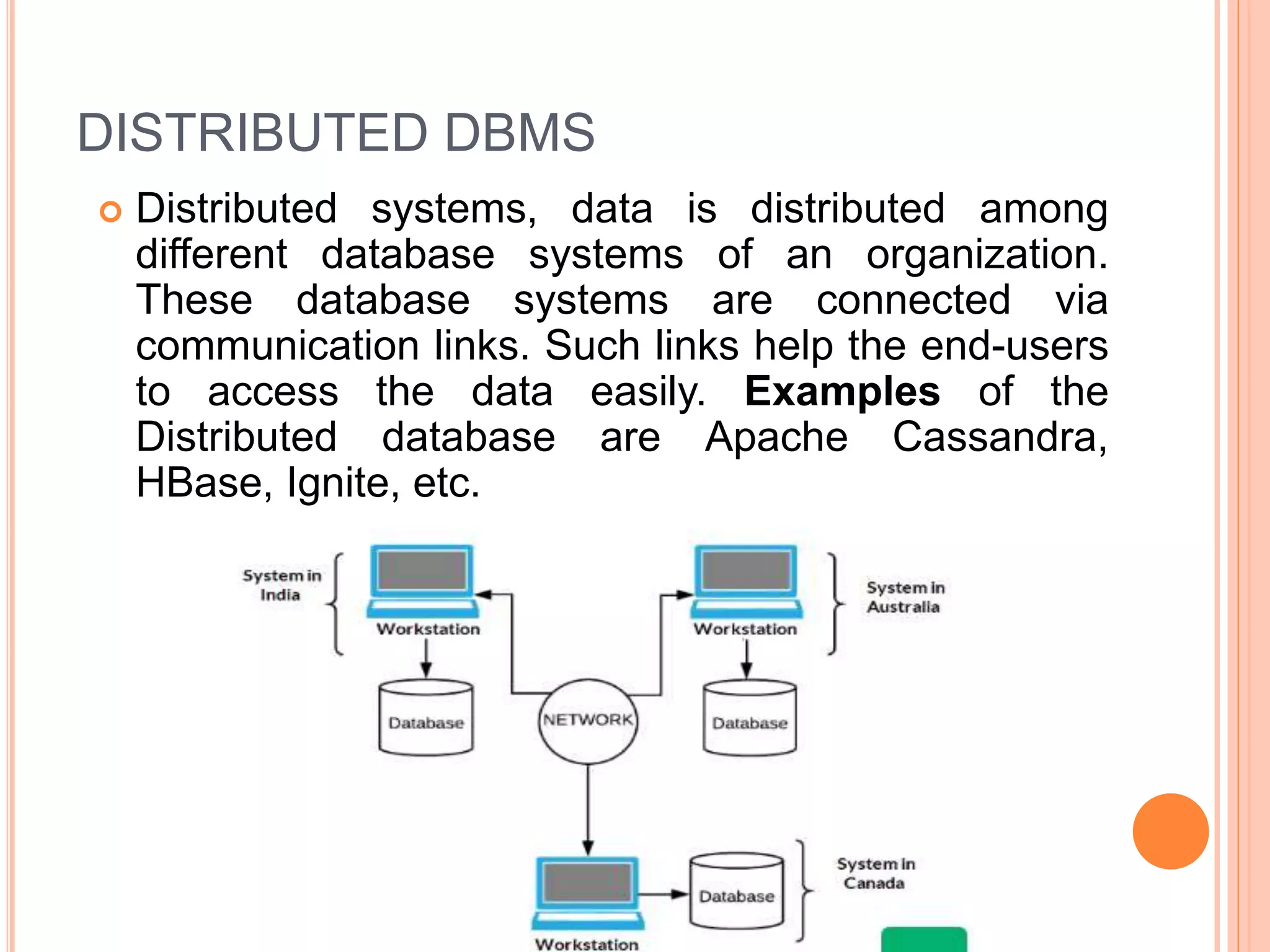
 Distributed systems, data is distributed among
different database systems of an organization.
These database systems are connected via
communication links. Such links help the end-users
to access the data easily. Examples of the
Distributed database are Apache Cassandra,
HBase, Ignite, etc.
Exactly every child has one parent. Departments and
Administration are entirely unlike each other and yet fall under
the domain of a University. They are elements that form this
hierarchy. The child records are linked to the parent record using
a field, and so the parent record is allowed multiple child records.
However, vice versa is not possible.
Here every child can have multiple parent. As a result, a
network or net of database files linked with multiple threads is
observed. Notice how the Student, Faculty, and Resources
elements each have two-parent records, which are
Departments and Clubs.
OBJECT ORIENTED DATABASE
 The type of database that uses the object-based data
model approach for storing data in the database
system. The data is represented and stored as objects
which are similar to the objects used in the object-
oriented programming language. E.g. MongoDB
OBJECT ORIENTED DATABASE MODEL
Object oriented database structure Relational database structure
CLOUD DATABASE
 A type of database where data is stored in a virtual
environment and executes over the cloud
computing platform. It provides users with various
cloud computing services (SaaS, PaaS, IaaS, etc.)
for accessing the database. There are numerous
cloud platforms, but the best options are:
 Amazon Web Services(AWS)
 Microsoft Azure
 Kamatera
 PhonixNAP
 ScienceSoft
 Google Cloud SQL, etc.
RELATIONAL DATABASE
 Relational or SQL databases
 A relational database is a type of data store organizing
data into tables that are related to one another, which
explains the name.
 Structured Query Language is the core of these
systems as it is used to communicate with and manage
these databases, having given birth to their second
name — SQL databases. RDBMSs have a predefined
schema, meaning data resides in rows (records) and
columns (attributes) with a strict structure. Here, each
record usually holds a value for each attribute, resulting
in clear dependencies between different data points.
PROPERTIES OF A RELATION:
 Each relation has a unique name by which it is
identified in the database.
 Relation does not contain duplicate tuples.
 The tuples of a relation have no specific order.
 All attributes in a relation are atomic, i.e., each cell
of a relation contains exactly one value.
RELATIONAL MODEL
 All the data is stored in various tables.
 Example of tabular data in the relational model
Columns
Rows
A SAMPLE RELATIONAL DATABASE
FEATURES OF RELATIONAL DATABASE
 Scalability. Relational databases usually scale vertically, meaning data
lives on a single server, and scaling is done by adding more computer
(CPU, GPU, and RAM) power to that one server. However, switching
from small to bigger machines often involves downtime. Scaling an SQL
database between multiple servers (horizontal scaling) can be a
challenge as it requires data structure changes and additional
engineering efforts.
 Performance. Relational databases show great performance with
intensive read/write operations on small to medium datasets. They also
offer improved speed of data retrieval by adding indexes to data fields to
query and join tables. However, when the amount of data and user
requests grows, the performance may suffer.
 Security. Due to the integrated structure and data storage system, SQL
databases don’t require much engineering effort to make them well-
protected. They are a good choice for building and supporting complex
software solutions, where any interaction has a range of consequences.
One of the SQL fundamentals is ACID compliance (Atomicity,
Consistency, Isolation, Durability). The ACID-compliance is a preferred
option if you build, for instance, E-Commerce or financial applications,
where database integrity is critical.
RDBMS-ACID COMPLIANCE
 A means Atomicity: This ensures the data operation will
complete either with success or with failure. It follows the 'all
or nothing' strategy. For example, a transaction will either be
committed or will abort.
 C means Consistency: If we perform any operation over the
data, its value before and after the operation should be
preserved. For example, the account balance before and after
the transaction should be correct, i.e., it should remain
conserved.
 I means Isolation: There can be concurrent users for
accessing data at the same time from the database. Thus,
isolation between the data should remain isolated. For
example, when multiple transactions occur at the same time,
one transaction effects should not be visible to the other
transactions in the database.
 D means Durability: It ensures that once it completes the
operation and commits the data, data changes should remain
permanent.
RDMS EXAMPLES
 MySQL
 MariaDB
 Oracle
 PostgreSQL
 MSSQL
NO SQL- NON RELATIONAL DATABASE
 Non-SQL/Not Only SQL is a type of database that
is used for storing a wide range of data sets. It is
not a relational database as it stores data not only
in tabular form but in several different ways. It came
into existence when the demand for building
modern applications increased. Thus, NoSQL
presented a wide variety of database technologies
in response to the demands
NON SQL DATABASE TYPES AND PURPOSE
 The most common data models are
 document-oriented — to store, retrieve, and manage data as
JSON documents;
 key-value — to represent data as a collection of key-value
pairs, where keys are unique strings having corresponding
data values;
 graph — to store data in the node-edge-node structure where
nodes are data points and edges are their relationships; and
 wide-column — to store data in the tabular format with
flexible columns, meaning they can vary from row to row in the
same table.
 As these databases aren’t limited to a table structure, they are
called NoSQL. They allow for storing unstructured data such
as texts, photos, videos, PDF files, and a bunch of other
formats. Data is simple to query but isn’t always classified into
rows and columns as in a relational database.
NO SQL EXAMPLES
 Dynamo DB
 MongoDB
 Redis
 Cassandra
 Elasticsearch
 Firebase
 For example, you can think of a BlogPost document
that has associations with
multiple Comment documents and Like documents.
This is stored using no sql database.
APPLICATION OF DATABASE
 Banking: transactions
 Airlines: reservations, schedules
 Universities: registration, grades
 Sales: customers, products, purchases
 Online retailers: order tracking, customized
recommendations
 Manufacturing: production, inventory, orders, supply chain
 Human resources: employee records, salaries, tax
deductions
 Accounting -It is widely used in accounting it may be used
for reviewing accounts, tracking down invoices, keeping a
check on the creditors of the company, reviewing final
accounts at year end etc. MS Access is a very effective tool
for financial management and even tax management.
INTEGRITY CONSTRAINTS IN DBMS
 Integrity constraints are a set of rules. It is used to
maintain the quality of information.
 Integrity constraints ensure that the data insertion,
updating, and other processes have to be
performed in such a way that data integrity is not
affected.
 Thus, integrity constraint is used to guard against
accidental damage to the database.
DOMAIN CONSTRAINTS
 Domain constraints can be defined as the definition of a
valid set of values for an attribute.
 The data type of domain includes string, character,
integer, time, date, currency, etc. The value of the
attribute must be available in the corresponding
domain.
ENTITY INTEGRITY CONSTRAINTS
 The entity integrity constraint states that primary
key value can't be null.
 This is because the primary key value is used to
identify individual rows in relation and if the primary
key has a null value, then we can't identify those
rows.
 A table can contain a null value other than the
primary key field.
REFERENTIAL INTEGRITY CONSTRAINTS
 A referential integrity constraint is specified between
two tables.
 In the Referential integrity constraints, if a foreign key
in Table 1 refers to the Primary Key of Table 2, then
every value of the Foreign Key in Table 1 must be null
or be available in Table 2.
 Referential integrity refers to the accuracy and
consistency of data within a relationship.
Referential Integrity requires that, whenever a foreign key value is used
it must reference a valid, existing primary key in the parent table. And
if you delete a record from the parent table it will cascade removing it
from the child table too if required.
KEY CONSTRAINTS
 Keys are the entity set that is used to identify an
entity within its entity set uniquely.
 An entity set can have multiple keys, but out of
which one key will be the primary key. A primary
key can contain a unique and null value in the
relational table.
TYPES OF KEYS IN DBMS
 A KEY IS AN ATTRIBUTE OR A SET OF ATTRIBUTE USED TO DEFINED A
RECORD/ROW IN A TABLE.
 Super Key – A super key is a group of single or multiple keys which identifies rows
in a table.
 Primary Key – is a column or group of columns in a table that uniquely identify
every row in that table.
 Candidate Key – is a set of attributes that uniquely identify tuples in a table.
Candidate Key is a super key with no repeated attributes.
 Alternate Key – is a column or group of columns in a table that uniquely identify
every row in that table.
 Foreign Key – is a column that creates a relationship between two tables. The
purpose of Foreign keys is to maintain data integrity and allow navigation between
two different instances of an entity.
 Compound Key – has two or more attributes that allow you to uniquely recognize
a specific record. It is possible that each column may not be unique by itself within
the database.
 Composite Key – is a combination of two or more columns that uniquely identify
rows in a table. The combination of columns guarantees uniqueness, though
individual uniqueness is not guaranteed.
 Surrogate Key – An artificial key which aims to uniquely identify each record is
called a surrogate key. These kind of key are unique because they are created
when you don’t have any natural primary key.
 https://www.javatpoint.com/dbms-keys
 https://www.guru99.com/dbms-keys.html
VALIDATION IN DBMS
To do this ... Validation Rule for Fields Explanation
Accept letters (a - z) only Is Null OR Not Like "*[!a-z]*" Any character outside the range A to Z is rejected. (Case insensitive.)
Accept digits (0 - 9) only Is Null OR Not Like "*[!0-9]*" Any character outside the range 0 to 9 is rejected. (Decimal point and negative sign rejected.)
Letters and spaces only Is Null Or Not Like "*[!a-z OR "" ""]*" Punctuation and digits rejected.
Digits and letters only Is Null OR Not Like "*[!((a-z) or (0-9))]*" Accepts A to Z and 0 to 9, but no punctuation or other characters.
Exactly 8 characters Is Null OR Like "????????" The question mark stands for one character.
Exactly 4 digits
Is Null OR Between 1000 And 9999 For Number fields.
Is Null OR Like "####" For Text fields.
Positive numbers only Is Null OR >= 0 Remove the "=" if zero is not allowed either.
No more than 100% Is Null OR Between -1 And 1 100% is 1. Use 0 instead of -1 if negative percentages are not allowed.
Not a future date Is Null OR <= Date()
Email address
Is Null OR ((Like "*?@?*.?*") AND
(Not Like "*[ ,;]*"))
Requires at least one character, @, at least one character, dot, at least one character. Space, comma, and semicolon are
not permitted.
You must fill in Field1 Not Null Same as setting the field's Required property, but lets you create a custom message (in the Validation Text property.)
Limit to specific choices
Is Null OR "M" Or "F" It is better to use a lookup table for the list, but this may be useful for simple choices such as Male/Female.
Is Null OR IN (1, 2, 4, 8) The IN operator may be simpler than several ORs.
Yes/No/Null field Is Null OR 0 or -1
The Yes/No field in Access does not support Null as other databases do. To simulate a real Yes/No/Null data type, use a
Number field (size Integer) with this rule. (Access uses 0 for False, and -1 for True.)
VALIDATION IN DBMS
Validation Rule Description
<100 Must be less than 100.
<=100 Must be less than or equal to 100.
Between 1 and 10 Must be between 1 and 10.
0 Must not equal 0.
<1/1/95 Must be a date before 1/1/95.
>= Date( ) Must be today’s date or later.
<= Date( ) Must be today’s date or earlier.
“Business” Or “Pleasure” Or “Other” Must be “Business” or “Pleasure” or “Other.”
Like “??” Must have two characters.
Like “####” Must have four numbers.
JOIN IN DBMS
 JOIN IS USED TO ESTABLISH A RELATIONSHIP
BETWEEN TWO OR MORE TABLES BASED ON A
COMMON KEY IN ORDER TO EXTRACT
RECORDS FROM MULTIPLE TABLE BASED ON
SOME CRITERIA.
 QUERIES CAN BE USED TO EXTRACT DATA
FROM MULTIPLE TABLES USING JOIN.
VIEWS IN DBMS
 We can visualize views in DBMS as some kind of virtual
tables that are like projections of data fields from original
tables and are not actual tables of the database. We can
extract some specific data from multiple tables based on
our needs using views. Views actually do not hold the
data from the tables, instead, it is just a definition of the
data in the data dictionary. Views can easily be created,
modified and deleted based on the user's needs.
 We can temporarily pick up the data from multiple table
and then query on them instead of having individual
query for each table.
 It is used for security reason if you don’t want to provide
a full access of tables and records to all.
 Selected views can be shared with people instead.
EXAMPLES-
TABLES EMP AND EMP ROLE
EmpID
EmpNa
me
Addres
s
Contact
1 Alex London
05-
124219
69
2 Adolf
San
Francis
co
01-
125843
65
3 Aryan Delhi
91-
967236
7287
4 Bhuvan
Hydera
bad
91-
998328
8383
5 Carol
New
York
01-
189289
92
6 Steve
Californ
ia
01-
137832
82
EmpID Role Dept
1 Intern
Engineerin
g
2 Trainee IT
3 Executive HR
4 SDE-1
Engineerin
g
5 SDE-2
Engineerin
g
6
Technical
Architect
Engineerin
g
EXAMPLES IN VIEWS
 CREATE VIEW EmpView2 AS SELECT EmpID,
Dept FROM EmpRole WHERE EmpID<4;
 Select * from EmpView2
Output :-
EmpID Dept
1 Engineering
2 IT
3 HR
VIEW COMMAND
 CREATE VIEW EmpView1 AS SELECT EmpID,
EmpName FROM Employee;
 SELECT * FROM EmpView1
Output
EmpID EmpName
1 Alex
2 Adolf
3 Aryan
4 Bhuvan
5 Carol
6 Steve
COMPONENT OF DBMS-MS ACCESS
 Tables
 In MS Access Tables store the data or the information that you feed the program. The data table can be created
with the required field names, properties etc as desired by the user. If the table is not created correctly, the
database may be slow in giving results or give wrong results entirely. So it is essential the table be created properly
and carefully.
 Relationships
 Relationships are the connections that form between one or more table. So the relationships can be one-on-one,
one-to-many and then of course many-to-many.
 Queries
 Queries are when the user or the programmer requests the database for information. The objects help create a
SQL compatible query, which can help store data and retrieve information from the database. Queries can also sort
and filter data as per the query statement.
 Forms
 This is an object class which allows the programmer/designer to create a user interface for MS Access. A form is
defined by tables and queries.
 Reports
 Once all the data has been entered into the database, the user will want to view the information. For this he can run
reports which will allow him to view the information, or summarize the information. The reports can be customized
by the user. The source of the information in these reports are the tables and the queries.
 Macros
 Macros are tools on MS Access that allow you to automate tasks on your forms or reports. They are predefined
actions that add functionality and efficiency to your database. They can perform a series of actions like open a
table, run queries, create reports etc. The command will be performed each time the macro button is clicked on.
 Modules
 These are the foundations of the software that allows the programmer to create a set of predefined instructions
called sub-routines. These modules can be used throughout the database, they can be used from anywhere in the
database.
REFERENTIAL INTEGRITY
 https://www.youtube.com/watch?v=MtFcBnuoqow
 https://www.youtube.com/watch?v=VGwO27JMQh
w
DIFFERENT VIEWS IN MS ACCESS
 Datasheet view
 Design View
 Form View
 Report View
 Pivot Table View
 Pivot Chart View
JOIN IN MS ACCESS
 Inner Join
 Left Outer Join
 Right Outer Join
DATA MANIPULATION IN MS ACCESS
 1) Modifying the Structure of the table
 2) Modifying the Records
 3) Adding a new field
 4) Deleting an existing field
 5) Deleting an existing record
 6) Adding a new record
DATABASE MANAGEMENT SYSTEM-MRS. LAXMI B PANDYA FOR 25TH AUGUST,2022.pptx

DATABASE MANAGEMENT SYSTEM-MRS. LAXMI B PANDYA FOR 25TH AUGUST,2022.pptx

  • 1.
    DATABASE MANAGEMENT SYSTEM- USINGMICROSOFT ACCESS MRS. LAXMI B PANDYA
  • 2.
    WHAT IS DBMS Database Management System(DBMS) is a computerized data keeping system software to create and manage databases, allowing users to create, read, update and delete data in a database.  A database management system (DBMS) is a software package designed to define, manipulate, retrieve and manage data in a centralized database
  • 3.
    DBMS EXAMPLE  Google-Google Bigtable, Cloud SQL  Netflix- AWS  Facebook- MY SQL  Amazon- Amazon RDS-Relational Database System  Youtube- MY SQL, Google Modular Data Center  Flipcart- MY SQL, Hadoop  Instagram- Postgre SQL, Cassandra
  • 4.
    COMPONENT OF DATABASE FIELDS  RECORDS  TABLES
  • 5.
    FUNCTIONS OF ADATABASE  ADDING OF A RECORD  DELETING OF A RECORD  MODIFICATION/UPDATION OF RECORDS  RETRIEVAL/QUERING OF RECORDS  ARRANGEMENT OF RECORD Based on its Functions every database offers various:-  Data Definition Language Command(DDL)  Data Manipulation Language Command(DML)  Data Control Language Command(DCL)  Transaction Control Language Command(TCL)
  • 6.
    DATA DEFINITION LANGUAGE(DDL)  Specification notation for defining the database schema Example: create table instructor ( ID char(5), name varchar(20), dept_name varchar(20), salary numeric(8,2))  DDL compiler generates a set of table templates stored in a data dictionary  Data dictionary contains metadata (i.e., data about data)  Database schema  Integrity constraints  Primary key (ID uniquely identifies instructors)  Authorization  Who can access what
  • 7.
    DATA MANIPULATION LANGUAGE(DML)  Language for accessing and manipulating the data organized by the appropriate data model  DML also known as query language  Two classes of languages  Pure – used for proving properties about computational power and for optimization  Relational Algebra  Tuple relational calculus  Domain relational calculus  Commercial – used in commercial systems  SQL is the most widely used commercial language
  • 8.
  • 9.
  • 10.
    FEATURES OF DBMS 1.Data storage, retrieval, and update: The ability to store, retrieve, and update the data that are in the database. 2. User-accessible catalog: where descriptions of database components are stored and are accessible to the users 3. Shared update support: A mechanism to ensure accuracy when several users are updating the database at the same time 4. Backup and Recovery Services: Mechanisms for recovering the database in the event that a database is damaged somehow. 5. Security Services: Mechanisms to ensure that certain rules are followed with regard to data in the database and any changes that are made in the data
  • 11.
    FEATURES OF DBMS 5.Integrity services: Mechanisms to ensure that certain rules are followed with regard to data in the database and any changes that are made in the data. 6. Data Independence: Facilities to support the independence of programs from the structure of the database. 7. Replication support: A facility to manage copies of the same data at multiple locations. 8. Utility Services: DBMS provided services that assist in the general maintenance of the database.
  • 12.
  • 13.
    CENTRALISED DATABASE  Centralizeddatabase stores data at a centralized database system. It comforts the users to access the stored data from different locations through several applications. An example of a Centralized database can be Central Library that carries a central database of each library in a college/university.
  • 14.
    DISTRIBUTED DBMS  Distributedsystems, data is distributed among different database systems of an organization. These database systems are connected via communication links. Such links help the end-users to access the data easily. Examples of the Distributed database are Apache Cassandra, HBase, Ignite, etc.
  • 16.
    Exactly every childhas one parent. Departments and Administration are entirely unlike each other and yet fall under the domain of a University. They are elements that form this hierarchy. The child records are linked to the parent record using a field, and so the parent record is allowed multiple child records. However, vice versa is not possible.
  • 18.
    Here every childcan have multiple parent. As a result, a network or net of database files linked with multiple threads is observed. Notice how the Student, Faculty, and Resources elements each have two-parent records, which are Departments and Clubs.
  • 19.
    OBJECT ORIENTED DATABASE The type of database that uses the object-based data model approach for storing data in the database system. The data is represented and stored as objects which are similar to the objects used in the object- oriented programming language. E.g. MongoDB
  • 20.
  • 21.
    Object oriented databasestructure Relational database structure
  • 22.
    CLOUD DATABASE  Atype of database where data is stored in a virtual environment and executes over the cloud computing platform. It provides users with various cloud computing services (SaaS, PaaS, IaaS, etc.) for accessing the database. There are numerous cloud platforms, but the best options are:  Amazon Web Services(AWS)  Microsoft Azure  Kamatera  PhonixNAP  ScienceSoft  Google Cloud SQL, etc.
  • 23.
    RELATIONAL DATABASE  Relationalor SQL databases  A relational database is a type of data store organizing data into tables that are related to one another, which explains the name.  Structured Query Language is the core of these systems as it is used to communicate with and manage these databases, having given birth to their second name — SQL databases. RDBMSs have a predefined schema, meaning data resides in rows (records) and columns (attributes) with a strict structure. Here, each record usually holds a value for each attribute, resulting in clear dependencies between different data points.
  • 24.
    PROPERTIES OF ARELATION:  Each relation has a unique name by which it is identified in the database.  Relation does not contain duplicate tuples.  The tuples of a relation have no specific order.  All attributes in a relation are atomic, i.e., each cell of a relation contains exactly one value.
  • 26.
    RELATIONAL MODEL  Allthe data is stored in various tables.  Example of tabular data in the relational model Columns Rows
  • 27.
  • 28.
    FEATURES OF RELATIONALDATABASE  Scalability. Relational databases usually scale vertically, meaning data lives on a single server, and scaling is done by adding more computer (CPU, GPU, and RAM) power to that one server. However, switching from small to bigger machines often involves downtime. Scaling an SQL database between multiple servers (horizontal scaling) can be a challenge as it requires data structure changes and additional engineering efforts.  Performance. Relational databases show great performance with intensive read/write operations on small to medium datasets. They also offer improved speed of data retrieval by adding indexes to data fields to query and join tables. However, when the amount of data and user requests grows, the performance may suffer.  Security. Due to the integrated structure and data storage system, SQL databases don’t require much engineering effort to make them well- protected. They are a good choice for building and supporting complex software solutions, where any interaction has a range of consequences. One of the SQL fundamentals is ACID compliance (Atomicity, Consistency, Isolation, Durability). The ACID-compliance is a preferred option if you build, for instance, E-Commerce or financial applications, where database integrity is critical.
  • 29.
    RDBMS-ACID COMPLIANCE  Ameans Atomicity: This ensures the data operation will complete either with success or with failure. It follows the 'all or nothing' strategy. For example, a transaction will either be committed or will abort.  C means Consistency: If we perform any operation over the data, its value before and after the operation should be preserved. For example, the account balance before and after the transaction should be correct, i.e., it should remain conserved.  I means Isolation: There can be concurrent users for accessing data at the same time from the database. Thus, isolation between the data should remain isolated. For example, when multiple transactions occur at the same time, one transaction effects should not be visible to the other transactions in the database.  D means Durability: It ensures that once it completes the operation and commits the data, data changes should remain permanent.
  • 30.
    RDMS EXAMPLES  MySQL MariaDB  Oracle  PostgreSQL  MSSQL
  • 31.
    NO SQL- NONRELATIONAL DATABASE  Non-SQL/Not Only SQL is a type of database that is used for storing a wide range of data sets. It is not a relational database as it stores data not only in tabular form but in several different ways. It came into existence when the demand for building modern applications increased. Thus, NoSQL presented a wide variety of database technologies in response to the demands
  • 32.
    NON SQL DATABASETYPES AND PURPOSE  The most common data models are  document-oriented — to store, retrieve, and manage data as JSON documents;  key-value — to represent data as a collection of key-value pairs, where keys are unique strings having corresponding data values;  graph — to store data in the node-edge-node structure where nodes are data points and edges are their relationships; and  wide-column — to store data in the tabular format with flexible columns, meaning they can vary from row to row in the same table.  As these databases aren’t limited to a table structure, they are called NoSQL. They allow for storing unstructured data such as texts, photos, videos, PDF files, and a bunch of other formats. Data is simple to query but isn’t always classified into rows and columns as in a relational database.
  • 33.
    NO SQL EXAMPLES Dynamo DB  MongoDB  Redis  Cassandra  Elasticsearch  Firebase  For example, you can think of a BlogPost document that has associations with multiple Comment documents and Like documents. This is stored using no sql database.
  • 34.
    APPLICATION OF DATABASE Banking: transactions  Airlines: reservations, schedules  Universities: registration, grades  Sales: customers, products, purchases  Online retailers: order tracking, customized recommendations  Manufacturing: production, inventory, orders, supply chain  Human resources: employee records, salaries, tax deductions  Accounting -It is widely used in accounting it may be used for reviewing accounts, tracking down invoices, keeping a check on the creditors of the company, reviewing final accounts at year end etc. MS Access is a very effective tool for financial management and even tax management.
  • 35.
    INTEGRITY CONSTRAINTS INDBMS  Integrity constraints are a set of rules. It is used to maintain the quality of information.  Integrity constraints ensure that the data insertion, updating, and other processes have to be performed in such a way that data integrity is not affected.  Thus, integrity constraint is used to guard against accidental damage to the database.
  • 37.
    DOMAIN CONSTRAINTS  Domainconstraints can be defined as the definition of a valid set of values for an attribute.  The data type of domain includes string, character, integer, time, date, currency, etc. The value of the attribute must be available in the corresponding domain.
  • 38.
    ENTITY INTEGRITY CONSTRAINTS The entity integrity constraint states that primary key value can't be null.  This is because the primary key value is used to identify individual rows in relation and if the primary key has a null value, then we can't identify those rows.  A table can contain a null value other than the primary key field.
  • 39.
    REFERENTIAL INTEGRITY CONSTRAINTS A referential integrity constraint is specified between two tables.  In the Referential integrity constraints, if a foreign key in Table 1 refers to the Primary Key of Table 2, then every value of the Foreign Key in Table 1 must be null or be available in Table 2.
  • 40.
     Referential integrityrefers to the accuracy and consistency of data within a relationship. Referential Integrity requires that, whenever a foreign key value is used it must reference a valid, existing primary key in the parent table. And if you delete a record from the parent table it will cascade removing it from the child table too if required.
  • 41.
    KEY CONSTRAINTS  Keysare the entity set that is used to identify an entity within its entity set uniquely.  An entity set can have multiple keys, but out of which one key will be the primary key. A primary key can contain a unique and null value in the relational table.
  • 42.
    TYPES OF KEYSIN DBMS  A KEY IS AN ATTRIBUTE OR A SET OF ATTRIBUTE USED TO DEFINED A RECORD/ROW IN A TABLE.  Super Key – A super key is a group of single or multiple keys which identifies rows in a table.  Primary Key – is a column or group of columns in a table that uniquely identify every row in that table.  Candidate Key – is a set of attributes that uniquely identify tuples in a table. Candidate Key is a super key with no repeated attributes.  Alternate Key – is a column or group of columns in a table that uniquely identify every row in that table.  Foreign Key – is a column that creates a relationship between two tables. The purpose of Foreign keys is to maintain data integrity and allow navigation between two different instances of an entity.  Compound Key – has two or more attributes that allow you to uniquely recognize a specific record. It is possible that each column may not be unique by itself within the database.  Composite Key – is a combination of two or more columns that uniquely identify rows in a table. The combination of columns guarantees uniqueness, though individual uniqueness is not guaranteed.  Surrogate Key – An artificial key which aims to uniquely identify each record is called a surrogate key. These kind of key are unique because they are created when you don’t have any natural primary key.  https://www.javatpoint.com/dbms-keys  https://www.guru99.com/dbms-keys.html
  • 43.
    VALIDATION IN DBMS Todo this ... Validation Rule for Fields Explanation Accept letters (a - z) only Is Null OR Not Like "*[!a-z]*" Any character outside the range A to Z is rejected. (Case insensitive.) Accept digits (0 - 9) only Is Null OR Not Like "*[!0-9]*" Any character outside the range 0 to 9 is rejected. (Decimal point and negative sign rejected.) Letters and spaces only Is Null Or Not Like "*[!a-z OR "" ""]*" Punctuation and digits rejected. Digits and letters only Is Null OR Not Like "*[!((a-z) or (0-9))]*" Accepts A to Z and 0 to 9, but no punctuation or other characters. Exactly 8 characters Is Null OR Like "????????" The question mark stands for one character. Exactly 4 digits Is Null OR Between 1000 And 9999 For Number fields. Is Null OR Like "####" For Text fields. Positive numbers only Is Null OR >= 0 Remove the "=" if zero is not allowed either. No more than 100% Is Null OR Between -1 And 1 100% is 1. Use 0 instead of -1 if negative percentages are not allowed. Not a future date Is Null OR <= Date() Email address Is Null OR ((Like "*?@?*.?*") AND (Not Like "*[ ,;]*")) Requires at least one character, @, at least one character, dot, at least one character. Space, comma, and semicolon are not permitted. You must fill in Field1 Not Null Same as setting the field's Required property, but lets you create a custom message (in the Validation Text property.) Limit to specific choices Is Null OR "M" Or "F" It is better to use a lookup table for the list, but this may be useful for simple choices such as Male/Female. Is Null OR IN (1, 2, 4, 8) The IN operator may be simpler than several ORs. Yes/No/Null field Is Null OR 0 or -1 The Yes/No field in Access does not support Null as other databases do. To simulate a real Yes/No/Null data type, use a Number field (size Integer) with this rule. (Access uses 0 for False, and -1 for True.)
  • 44.
    VALIDATION IN DBMS ValidationRule Description <100 Must be less than 100. <=100 Must be less than or equal to 100. Between 1 and 10 Must be between 1 and 10. 0 Must not equal 0. <1/1/95 Must be a date before 1/1/95. >= Date( ) Must be today’s date or later. <= Date( ) Must be today’s date or earlier. “Business” Or “Pleasure” Or “Other” Must be “Business” or “Pleasure” or “Other.” Like “??” Must have two characters. Like “####” Must have four numbers.
  • 45.
    JOIN IN DBMS JOIN IS USED TO ESTABLISH A RELATIONSHIP BETWEEN TWO OR MORE TABLES BASED ON A COMMON KEY IN ORDER TO EXTRACT RECORDS FROM MULTIPLE TABLE BASED ON SOME CRITERIA.  QUERIES CAN BE USED TO EXTRACT DATA FROM MULTIPLE TABLES USING JOIN.
  • 46.
    VIEWS IN DBMS We can visualize views in DBMS as some kind of virtual tables that are like projections of data fields from original tables and are not actual tables of the database. We can extract some specific data from multiple tables based on our needs using views. Views actually do not hold the data from the tables, instead, it is just a definition of the data in the data dictionary. Views can easily be created, modified and deleted based on the user's needs.  We can temporarily pick up the data from multiple table and then query on them instead of having individual query for each table.  It is used for security reason if you don’t want to provide a full access of tables and records to all.  Selected views can be shared with people instead.
  • 47.
    EXAMPLES- TABLES EMP ANDEMP ROLE EmpID EmpNa me Addres s Contact 1 Alex London 05- 124219 69 2 Adolf San Francis co 01- 125843 65 3 Aryan Delhi 91- 967236 7287 4 Bhuvan Hydera bad 91- 998328 8383 5 Carol New York 01- 189289 92 6 Steve Californ ia 01- 137832 82 EmpID Role Dept 1 Intern Engineerin g 2 Trainee IT 3 Executive HR 4 SDE-1 Engineerin g 5 SDE-2 Engineerin g 6 Technical Architect Engineerin g
  • 48.
    EXAMPLES IN VIEWS CREATE VIEW EmpView2 AS SELECT EmpID, Dept FROM EmpRole WHERE EmpID<4;  Select * from EmpView2 Output :- EmpID Dept 1 Engineering 2 IT 3 HR
  • 49.
    VIEW COMMAND  CREATEVIEW EmpView1 AS SELECT EmpID, EmpName FROM Employee;  SELECT * FROM EmpView1 Output EmpID EmpName 1 Alex 2 Adolf 3 Aryan 4 Bhuvan 5 Carol 6 Steve
  • 50.
    COMPONENT OF DBMS-MSACCESS  Tables  In MS Access Tables store the data or the information that you feed the program. The data table can be created with the required field names, properties etc as desired by the user. If the table is not created correctly, the database may be slow in giving results or give wrong results entirely. So it is essential the table be created properly and carefully.  Relationships  Relationships are the connections that form between one or more table. So the relationships can be one-on-one, one-to-many and then of course many-to-many.  Queries  Queries are when the user or the programmer requests the database for information. The objects help create a SQL compatible query, which can help store data and retrieve information from the database. Queries can also sort and filter data as per the query statement.  Forms  This is an object class which allows the programmer/designer to create a user interface for MS Access. A form is defined by tables and queries.  Reports  Once all the data has been entered into the database, the user will want to view the information. For this he can run reports which will allow him to view the information, or summarize the information. The reports can be customized by the user. The source of the information in these reports are the tables and the queries.  Macros  Macros are tools on MS Access that allow you to automate tasks on your forms or reports. They are predefined actions that add functionality and efficiency to your database. They can perform a series of actions like open a table, run queries, create reports etc. The command will be performed each time the macro button is clicked on.  Modules  These are the foundations of the software that allows the programmer to create a set of predefined instructions called sub-routines. These modules can be used throughout the database, they can be used from anywhere in the database.
  • 51.
  • 52.
    DIFFERENT VIEWS INMS ACCESS  Datasheet view  Design View  Form View  Report View  Pivot Table View  Pivot Chart View
  • 53.
    JOIN IN MSACCESS  Inner Join  Left Outer Join  Right Outer Join
  • 54.
    DATA MANIPULATION INMS ACCESS  1) Modifying the Structure of the table  2) Modifying the Records  3) Adding a new field  4) Deleting an existing field  5) Deleting an existing record  6) Adding a new record