Database Management System (DBMS)
Unit-V
Transaction
Sanjivani Rural Education Society’s
Sanjivani College of Engineering, Kopargaon-423603
(An Autonomous Institute Affiliated to Savitribai Phule Pune University, Pune)
NACC ‘A’ Grade Accredited, ISO 9001:2015 Certified
Department of Information Technology
(NBAAccredited)
Ms. B B Pawar
Assistant Professor
DBMS – Unit-V Department of Information Technology
Unit-V-Syllabus
Transactions: Basic concept of a Transaction,
Transaction Management, Properties of Transactions,
Concept of Schedule, Serial Schedule,
Serializability: Conflict and View, Cascaded Aborts,
Recoverable and No recoverable Schedules.
Concurrency Control: Time-stamps and locking protocols,
Recovery System: Shadow-Paging and Log-Based Recovery, Checkpoints.
DBMS – Unit-III Department of Information Technology
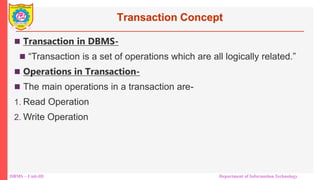
Transaction Concept
 Transaction in DBMS-
 “Transaction is a set of operations which are all logically related.”
 Operations in Transaction-
 The main operations in a transaction are-
1. Read Operation
2. Write Operation
DBMS – Unit-III Department of Information Technology
Transaction Concept
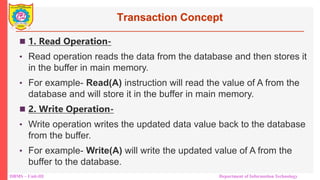
 1. Read Operation-
• Read operation reads the data from the database and then stores it
in the buffer in main memory.
• For example- Read(A) instruction will read the value of A from the
database and will store it in the buffer in main memory.
 2. Write Operation-
• Write operation writes the updated data value back to the database
from the buffer.
• For example- Write(A) will write the updated value of A from the
buffer to the database.
DBMS – Unit-III Department of Information Technology
Transaction Concept
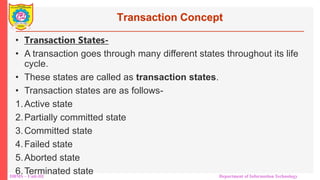
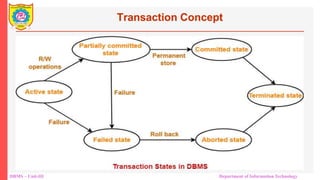
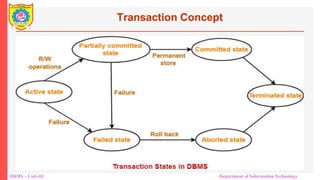
• Transaction States-
• A transaction goes through many different states throughout its life
cycle.
• These states are called as transaction states.
• Transaction states are as follows-
1.Active state
2.Partially committed state
3.Committed state
4.Failed state
5.Aborted state
6.Terminated state
DBMS – Unit-III Department of Information Technology
Transaction Concept
DBMS – Unit-III Department of Information Technology
Transaction Concept
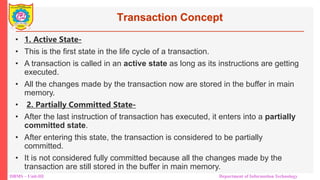
• 1. Active State-
• This is the first state in the life cycle of a transaction.
• A transaction is called in an active state as long as its instructions are getting
executed.
• All the changes made by the transaction now are stored in the buffer in main
memory.
• 2. Partially Committed State-
• After the last instruction of transaction has executed, it enters into a partially
committed state.
• After entering this state, the transaction is considered to be partially
committed.
• It is not considered fully committed because all the changes made by the
transaction are still stored in the buffer in main memory.
DBMS – Unit-III Department of Information Technology
Transaction Concept
• Committed State-
• After all the changes made by the transaction have been successfully stored
into the database, it enters into a committed state.
• Now, the transaction is considered to be fully committed.
• NOTE-
• After a transaction has entered the committed state, it is not possible to roll
back the transaction.
• In other words, it is not possible to undo the changes that has been made by
the transaction.
• This is because the system is updated into a new consistent state.
• The only way to undo the changes is by carrying out another transaction
called as compensating transaction that performs the reverse operations.
•
DBMS – Unit-III Department of Information Technology
Transaction Concept
• 4. Failed State-
• When a transaction is getting executed in the active state or partially
committed state and some failure occurs due to which it becomes impossible
to continue the execution, it enters into a failed state.
• 5. Aborted State-
• After the transaction has failed and entered into a failed state, all the changes
made by it have to be undone.
• To undo the changes made by the transaction, it becomes necessary to roll
back the transaction.
• After the transaction has rolled back completely, it enters into an aborted
state.
•
DBMS – Unit-III Department of Information Technology
Transaction Concept
• 6. Terminated State-
• This is the last state in the life cycle of a transaction.
• After entering the committed state or aborted state, the transaction finally
enters into a terminated state where its life cycle finally comes to an end.
DBMS – Unit-III Department of Information Technology
ACID Properties in Transaction
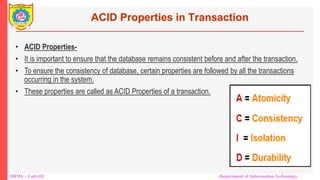
• ACID Properties-
• It is important to ensure that the database remains consistent before and after the transaction.
• To ensure the consistency of database, certain properties are followed by all the transactions
occurring in the system.
• These properties are called as ACID Properties of a transaction.
DBMS – Unit-III Department of Information Technology
ACID Properties in Transaction
Atomicity-
• This property ensures that either the transaction occurs completely or it does
not occur at all.
• In other words, it ensures that no transaction occurs partially.
• That is why, it is also referred to as “All or nothing rule“.
• It is the responsibility of Transaction Control Manager to ensure atomicity of
the transactions.
• 2. Consistency-
• This property ensures that integrity constraints are maintained.
• In other words, it ensures that the database remains consistent before and
after the transaction.
• It is the responsibility of DBMS and application programmer to ensure
consistency of the database.
•
DBMS – Unit-III Department of Information Technology
ACID Properties in Transaction
• 3. Isolation-
• This property ensures that multiple transactions can occur simultaneously
without causing any inconsistency.
• During execution, each transaction feels as if it is getting executed alone in the
system.
• A transaction does not realize that there are other transactions as well getting
executed parallely.
• Changes made by a transaction becomes visible to other transactions only
after they are written in the memory.
• The resultant state of the system after executing all the transactions is same
as the state that would be achieved if the transactions were executed serially
one after the other.
• It is the responsibility of concurrency control manager to ensure isolation for all
the transactions.
DBMS – Unit-III Department of Information Technology
ACID Properties in Transaction
• 4. Durability-
•
• This property ensures that all the changes made by a transaction
after its successful execution are written successfully to the disk.
• It also ensures that these changes exist permanently and are
never lost even if there occurs a failure of any kind.
• It is the responsibility of recovery manager to ensure durability in
the database.
DBMS – Unit-III Department of Information Technology
Transaction Concept
DBMS – Unit-III Department of Information Technology
Concurrency Problems in Transaction
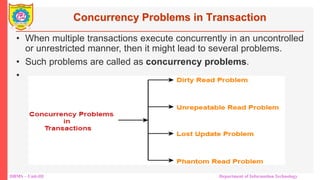
• When multiple transactions execute concurrently in an uncontrolled
or unrestricted manner, then it might lead to several problems.
• Such problems are called as concurrency problems.
•
DBMS – Unit-III Department of Information Technology
Concurrency Problems in Transaction
• 1. Dirty Read Problem-
• Reading the data written by an uncommitted transaction is
called as dirty read.
• This read is called as dirty read because-
• There is always a chance that the uncommitted transaction might roll back
later.
• Thus, uncommitted transaction might make other transactions read a value
that does not even exist.
• This leads to inconsistency of the database.
• NOTE-
• Dirty read does not lead to inconsistency always.
• It becomes problematic only when the uncommitted transaction fails and roll
backs later due to some reason.
DBMS – Unit-III Department of Information Technology
Concurrency Problems in Transaction
DBMS – Unit-III Department of Information Technology
Concurrency Problems in Transaction
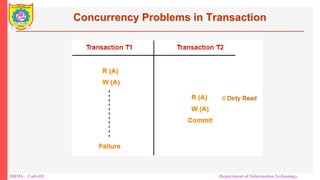
• Here,
1. T1 reads the value of A.
2. T1 updates the value of A in the buffer.
3. T2 reads the value of A from the buffer.
4. T2 writes the updated the value of A.
5. T2 commits.
6. T1 fails in later stages and rolls back.
• In this example,
• T2 reads the dirty value of A written by the uncommitted transaction T1.
• T1 fails in later stages and roll backs.
• Thus, the value that T2 read now stands to be incorrect.
• Therefore, database becomes inconsistent.
DBMS – Unit-III Department of Information Technology
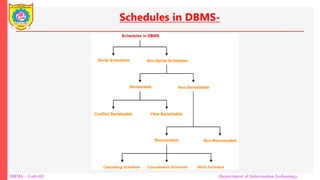
Schedules in DBMS-
DBMS – Unit-III Department of Information Technology
Serializability in DBMS-
• Some non-serial schedules may lead to inconsistency of the database.
• Serializability is a concept that helps to identify which non-serial schedules are correct and will maintain the consistency
of the database.
Serializable Schedules-
• If a given non-serial schedule of ‘n’ transactions is equivalent to some serial schedule of ‘n’ transactions, then it is called
as a serializable schedule.
Characteristics-
Serializable schedules behave exactly same as serial schedules.
Thus, serializable schedules are always-
• Consistent
• Recoverable
• Casacadeless
• Strict
DBMS – Unit-III Department of Information Technology
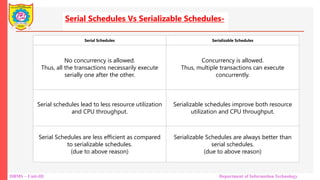
Serial Schedules Serializable Schedules
No concurrency is allowed.
Thus, all the transactions necessarily execute
serially one after the other.
Concurrency is allowed.
Thus, multiple transactions can execute
concurrently.
Serial schedules lead to less resource utilization
and CPU throughput.
Serializable schedules improve both resource
utilization and CPU throughput.
Serial Schedules are less efficient as compared
to serializable schedules.
(due to above reason)
Serializable Schedules are always better than
serial schedules.
(due to above reason)
Serial Schedules Vs Serializable Schedules-
DBMS – Unit-III Department of Information Technology
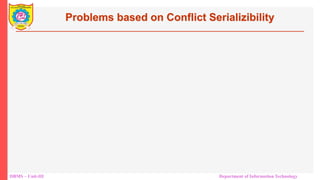
Types of Serializability-
Serializability is mainly of two types-
DBMS – Unit-III Department of Information Technology
Problems based on Conflict Serializibility
DBMS – Unit-III Department of Information Technology
Check whether the given schedule S is conflict serializable and recoverable or
not-
DBMS – Unit-III Department of Information Technology
DBMS – Unit-III Mr. R. N. Kankrale Department of Information Technology
References
1. Database System Concepts Sixth Edition,Avi Silberschatz Henry F. Korth S. Sudarshan
2. https://www.gatevidyalay.com/transaction-states-in-dbms/

Unit 5.Transaction and Concurrency Control

  • 1.
    Database Management System(DBMS) Unit-V Transaction Sanjivani Rural Education Society’s Sanjivani College of Engineering, Kopargaon-423603 (An Autonomous Institute Affiliated to Savitribai Phule Pune University, Pune) NACC ‘A’ Grade Accredited, ISO 9001:2015 Certified Department of Information Technology (NBAAccredited) Ms. B B Pawar Assistant Professor
  • 2.
    DBMS – Unit-VDepartment of Information Technology Unit-V-Syllabus Transactions: Basic concept of a Transaction, Transaction Management, Properties of Transactions, Concept of Schedule, Serial Schedule, Serializability: Conflict and View, Cascaded Aborts, Recoverable and No recoverable Schedules. Concurrency Control: Time-stamps and locking protocols, Recovery System: Shadow-Paging and Log-Based Recovery, Checkpoints.
  • 3.
    DBMS – Unit-IIIDepartment of Information Technology Transaction Concept  Transaction in DBMS-  “Transaction is a set of operations which are all logically related.”  Operations in Transaction-  The main operations in a transaction are- 1. Read Operation 2. Write Operation
  • 4.
    DBMS – Unit-IIIDepartment of Information Technology Transaction Concept  1. Read Operation- • Read operation reads the data from the database and then stores it in the buffer in main memory. • For example- Read(A) instruction will read the value of A from the database and will store it in the buffer in main memory.  2. Write Operation- • Write operation writes the updated data value back to the database from the buffer. • For example- Write(A) will write the updated value of A from the buffer to the database.
  • 5.
    DBMS – Unit-IIIDepartment of Information Technology Transaction Concept • Transaction States- • A transaction goes through many different states throughout its life cycle. • These states are called as transaction states. • Transaction states are as follows- 1.Active state 2.Partially committed state 3.Committed state 4.Failed state 5.Aborted state 6.Terminated state
  • 6.
    DBMS – Unit-IIIDepartment of Information Technology Transaction Concept
  • 7.
    DBMS – Unit-IIIDepartment of Information Technology Transaction Concept • 1. Active State- • This is the first state in the life cycle of a transaction. • A transaction is called in an active state as long as its instructions are getting executed. • All the changes made by the transaction now are stored in the buffer in main memory. • 2. Partially Committed State- • After the last instruction of transaction has executed, it enters into a partially committed state. • After entering this state, the transaction is considered to be partially committed. • It is not considered fully committed because all the changes made by the transaction are still stored in the buffer in main memory.
  • 8.
    DBMS – Unit-IIIDepartment of Information Technology Transaction Concept • Committed State- • After all the changes made by the transaction have been successfully stored into the database, it enters into a committed state. • Now, the transaction is considered to be fully committed. • NOTE- • After a transaction has entered the committed state, it is not possible to roll back the transaction. • In other words, it is not possible to undo the changes that has been made by the transaction. • This is because the system is updated into a new consistent state. • The only way to undo the changes is by carrying out another transaction called as compensating transaction that performs the reverse operations. •
  • 9.
    DBMS – Unit-IIIDepartment of Information Technology Transaction Concept • 4. Failed State- • When a transaction is getting executed in the active state or partially committed state and some failure occurs due to which it becomes impossible to continue the execution, it enters into a failed state. • 5. Aborted State- • After the transaction has failed and entered into a failed state, all the changes made by it have to be undone. • To undo the changes made by the transaction, it becomes necessary to roll back the transaction. • After the transaction has rolled back completely, it enters into an aborted state. •
  • 10.
    DBMS – Unit-IIIDepartment of Information Technology Transaction Concept • 6. Terminated State- • This is the last state in the life cycle of a transaction. • After entering the committed state or aborted state, the transaction finally enters into a terminated state where its life cycle finally comes to an end.
  • 11.
    DBMS – Unit-IIIDepartment of Information Technology ACID Properties in Transaction • ACID Properties- • It is important to ensure that the database remains consistent before and after the transaction. • To ensure the consistency of database, certain properties are followed by all the transactions occurring in the system. • These properties are called as ACID Properties of a transaction.
  • 12.
    DBMS – Unit-IIIDepartment of Information Technology ACID Properties in Transaction Atomicity- • This property ensures that either the transaction occurs completely or it does not occur at all. • In other words, it ensures that no transaction occurs partially. • That is why, it is also referred to as “All or nothing rule“. • It is the responsibility of Transaction Control Manager to ensure atomicity of the transactions. • 2. Consistency- • This property ensures that integrity constraints are maintained. • In other words, it ensures that the database remains consistent before and after the transaction. • It is the responsibility of DBMS and application programmer to ensure consistency of the database. •
  • 13.
    DBMS – Unit-IIIDepartment of Information Technology ACID Properties in Transaction • 3. Isolation- • This property ensures that multiple transactions can occur simultaneously without causing any inconsistency. • During execution, each transaction feels as if it is getting executed alone in the system. • A transaction does not realize that there are other transactions as well getting executed parallely. • Changes made by a transaction becomes visible to other transactions only after they are written in the memory. • The resultant state of the system after executing all the transactions is same as the state that would be achieved if the transactions were executed serially one after the other. • It is the responsibility of concurrency control manager to ensure isolation for all the transactions.
  • 14.
    DBMS – Unit-IIIDepartment of Information Technology ACID Properties in Transaction • 4. Durability- • • This property ensures that all the changes made by a transaction after its successful execution are written successfully to the disk. • It also ensures that these changes exist permanently and are never lost even if there occurs a failure of any kind. • It is the responsibility of recovery manager to ensure durability in the database.
  • 15.
    DBMS – Unit-IIIDepartment of Information Technology Transaction Concept
  • 16.
    DBMS – Unit-IIIDepartment of Information Technology Concurrency Problems in Transaction • When multiple transactions execute concurrently in an uncontrolled or unrestricted manner, then it might lead to several problems. • Such problems are called as concurrency problems. •
  • 17.
    DBMS – Unit-IIIDepartment of Information Technology Concurrency Problems in Transaction • 1. Dirty Read Problem- • Reading the data written by an uncommitted transaction is called as dirty read. • This read is called as dirty read because- • There is always a chance that the uncommitted transaction might roll back later. • Thus, uncommitted transaction might make other transactions read a value that does not even exist. • This leads to inconsistency of the database. • NOTE- • Dirty read does not lead to inconsistency always. • It becomes problematic only when the uncommitted transaction fails and roll backs later due to some reason.
  • 18.
    DBMS – Unit-IIIDepartment of Information Technology Concurrency Problems in Transaction
  • 19.
    DBMS – Unit-IIIDepartment of Information Technology Concurrency Problems in Transaction • Here, 1. T1 reads the value of A. 2. T1 updates the value of A in the buffer. 3. T2 reads the value of A from the buffer. 4. T2 writes the updated the value of A. 5. T2 commits. 6. T1 fails in later stages and rolls back. • In this example, • T2 reads the dirty value of A written by the uncommitted transaction T1. • T1 fails in later stages and roll backs. • Thus, the value that T2 read now stands to be incorrect. • Therefore, database becomes inconsistent.
  • 20.
    DBMS – Unit-IIIDepartment of Information Technology Schedules in DBMS-
  • 21.
    DBMS – Unit-IIIDepartment of Information Technology
  • 22.
    DBMS – Unit-IIIDepartment of Information Technology
  • 23.
    DBMS – Unit-IIIDepartment of Information Technology Serializability in DBMS- • Some non-serial schedules may lead to inconsistency of the database. • Serializability is a concept that helps to identify which non-serial schedules are correct and will maintain the consistency of the database. Serializable Schedules- • If a given non-serial schedule of ‘n’ transactions is equivalent to some serial schedule of ‘n’ transactions, then it is called as a serializable schedule. Characteristics- Serializable schedules behave exactly same as serial schedules. Thus, serializable schedules are always- • Consistent • Recoverable • Casacadeless • Strict
  • 24.
    DBMS – Unit-IIIDepartment of Information Technology Serial Schedules Serializable Schedules No concurrency is allowed. Thus, all the transactions necessarily execute serially one after the other. Concurrency is allowed. Thus, multiple transactions can execute concurrently. Serial schedules lead to less resource utilization and CPU throughput. Serializable schedules improve both resource utilization and CPU throughput. Serial Schedules are less efficient as compared to serializable schedules. (due to above reason) Serializable Schedules are always better than serial schedules. (due to above reason) Serial Schedules Vs Serializable Schedules-
  • 25.
    DBMS – Unit-IIIDepartment of Information Technology Types of Serializability- Serializability is mainly of two types-
  • 26.
    DBMS – Unit-IIIDepartment of Information Technology Problems based on Conflict Serializibility
  • 27.
    DBMS – Unit-IIIDepartment of Information Technology Check whether the given schedule S is conflict serializable and recoverable or not-
  • 28.
    DBMS – Unit-IIIDepartment of Information Technology
  • 29.
    DBMS – Unit-IIIDepartment of Information Technology
  • 30.
    DBMS – Unit-IIIDepartment of Information Technology
  • 31.
    DBMS – Unit-IIIDepartment of Information Technology
  • 32.
    DBMS – Unit-IIIDepartment of Information Technology
  • 33.
    DBMS – Unit-IIIDepartment of Information Technology
  • 34.
    DBMS – Unit-IIIDepartment of Information Technology
  • 35.
    DBMS – Unit-IIIDepartment of Information Technology
  • 36.
    DBMS – Unit-IIIDepartment of Information Technology
  • 37.
    DBMS – Unit-IIIDepartment of Information Technology
  • 38.
    DBMS – Unit-IIIDepartment of Information Technology
  • 39.
    DBMS – Unit-IIIDepartment of Information Technology
  • 40.
    DBMS – Unit-IIIDepartment of Information Technology
  • 41.
    DBMS – Unit-IIIDepartment of Information Technology
  • 42.
    DBMS – Unit-IIIDepartment of Information Technology
  • 43.
    DBMS – Unit-IIIDepartment of Information Technology
  • 44.
    DBMS – Unit-IIIDepartment of Information Technology
  • 45.
    DBMS – Unit-IIIDepartment of Information Technology
  • 46.
    DBMS – Unit-IIIDepartment of Information Technology
  • 47.
    DBMS – Unit-IIIDepartment of Information Technology
  • 48.
    DBMS – Unit-IIIDepartment of Information Technology
  • 49.
    DBMS – Unit-IIIDepartment of Information Technology
  • 50.
    DBMS – Unit-IIIDepartment of Information Technology
  • 51.
    DBMS – Unit-IIIDepartment of Information Technology
  • 52.
    DBMS – Unit-IIIDepartment of Information Technology
  • 53.
    DBMS – Unit-IIIDepartment of Information Technology
  • 54.
    DBMS – Unit-IIIDepartment of Information Technology
  • 55.
    DBMS – Unit-IIIDepartment of Information Technology
  • 56.
    DBMS – Unit-IIIDepartment of Information Technology
  • 57.
    DBMS – Unit-IIIDepartment of Information Technology
  • 58.
    DBMS – Unit-IIIDepartment of Information Technology
  • 59.
    DBMS – Unit-IIIDepartment of Information Technology
  • 60.
    DBMS – Unit-IIIDepartment of Information Technology
  • 61.
    DBMS – Unit-IIIDepartment of Information Technology
  • 62.
    DBMS – Unit-IIIDepartment of Information Technology
  • 63.
    DBMS – Unit-IIIDepartment of Information Technology
  • 64.
    DBMS – Unit-IIIDepartment of Information Technology
  • 65.
    DBMS – Unit-IIIDepartment of Information Technology
  • 66.
    DBMS – Unit-IIIDepartment of Information Technology
  • 67.
    DBMS – Unit-IIIDepartment of Information Technology
  • 68.
    DBMS – Unit-IIIDepartment of Information Technology
  • 69.
    DBMS – Unit-IIIDepartment of Information Technology
  • 70.
    DBMS – Unit-IIIDepartment of Information Technology
  • 71.
    DBMS – Unit-IIIDepartment of Information Technology
  • 72.
    DBMS – Unit-IIIMr. R. N. Kankrale Department of Information Technology References 1. Database System Concepts Sixth Edition,Avi Silberschatz Henry F. Korth S. Sudarshan 2. https://www.gatevidyalay.com/transaction-states-in-dbms/