Unit 2 - Project Life Cycle
and Processes
Phases of project management, Project initiation, planning, execution, monitoring,
and closure,Agile vs.Waterfall methodologies
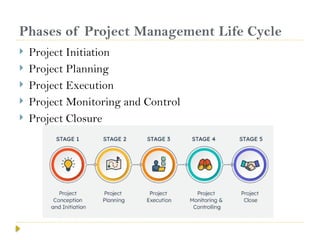
Phases of Project Management Life Cycle
 Project Initiation
 Project Planning
 Project Execution
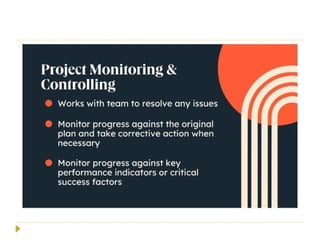
 Project Monitoring and Control
 Project Closure
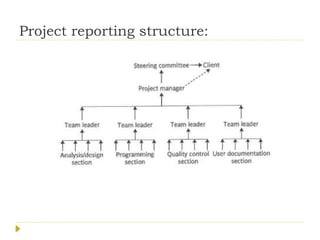
Project reporting structure:
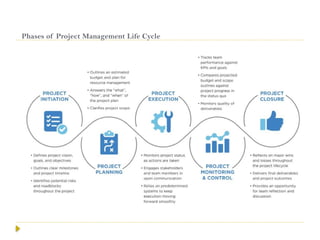
Phases of Project Management Life Cycle
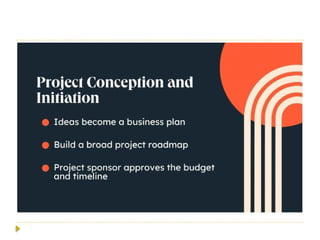
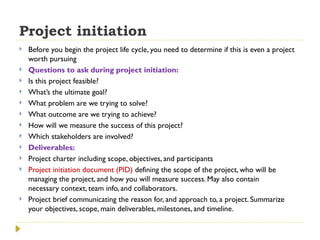
Project initiation
 Before you begin the project life cycle, you need to determine if this is even a project
worth pursuing
 Questions to ask during project initiation:
 Is this project feasible?
 What’s the ultimate goal?
 What problem are we trying to solve?
 What outcome are we trying to achieve?
 How will we measure the success of this project?
 Which stakeholders are involved?
 Deliverables:
 Project charter including scope, objectives, and participants
 Project initiation document (PID) defining the scope of the project, who will be
managing the project, and how you will measure success. May also contain
necessary context, team info, and collaborators.
 Project brief communicating the reason for, and approach to, a project. Summarize
your objectives, scope, main deliverables, milestones, and timeline.
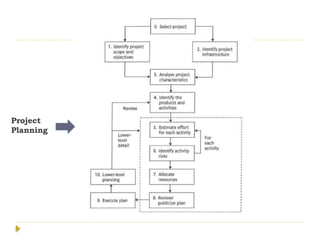
Project
Planning
 E.g. Developing an E-Commerce Website
 Define Project Objectives and Scope - primary objectives
are to increase online sales by 30% in the first year.
 Identify Stakeholders and Form the Project Team –
 PM Identify retail business owner, marketing manager, IT
manager
 team is assembled, including a project manager, 2 front-
end developers, 2 back-end developers, a UI/UX designer,
a QA tester, and a content writer.
 Determine Requirements
 Requirements Gathering
 Prioritize Requirements-prioritized based on business value and
technical feasibility.
 secure checkout process is deemed high priority, while adding an
advanced product recommendation engine is considered a lower
priority.
 Develop a Work Breakdown Structure (WBS)
 Breaking Down Work : divide the project into manageable tasks
and subtasks
 task of developing the “Shopping Cart” feature is broken down into
subtasks such as designing the cart page, implementing add/remove
item functionality, and integrating with the payment gateway.
 AssigningTasks: Each task in the WBS is assigned to
specific team members based on their expertise.
 Estimate Time and Cost:
 Create a Detailed Project Schedule:
 Gantt Chart:The project manager creates a Gantt chart
to visually represent the project timeline, showing task
dependencies and key milestones.
 Risk Management Planning
 Identify Risks
 Risk Assessment and Mitigation
 Develop a Communication Plan-
 Communication Strategy:A communication plan is
developed to ensure effective communication among
team members and stakeholders throughout the project.
 Resource Allocation
 Develop a Quality Management Plan
 Quality Standard, Quality Assurance Activities
 Finalize and Approve the Project Plan
 Review and Approval-The project plan, including the
schedule, budget, risk management plan, and quality
management plan, is reviewed by stakeholders
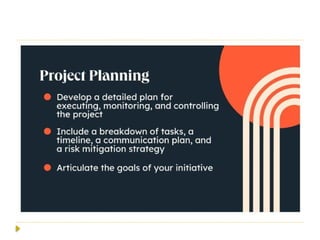
Planning
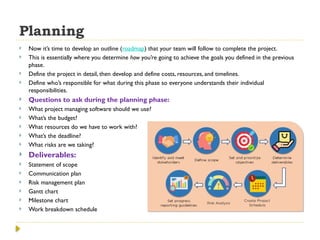
 Now it’s time to develop an outline (roadmap) that your team will follow to complete the project.
 This is essentially where you determine how you’re going to achieve the goals you defined in the previous
phase.
 Define the project in detail, then develop and define costs, resources, and timelines.
 Define who’s responsible for what during this phase so everyone understands their individual
responsibilities.
 Questions to ask during the planning phase:
 What project managing software should we use?
 What’s the budget?
 What resources do we have to work with?
 What’s the deadline?
 What risks are we taking?
 Deliverables:
 Statement of scope
 Communication plan
 Risk management plan
 Gantt chart
 Milestone chart
 Work breakdown schedule
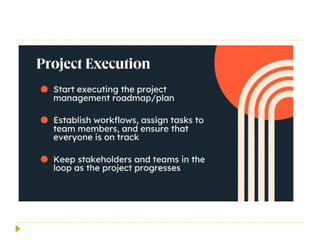
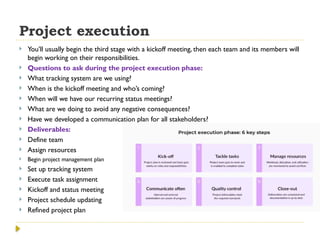
Project execution
 You’ll usually begin the third stage with a kickoff meeting, then each team and its members will
begin working on their responsibilities.
 Questions to ask during the project execution phase:
 What tracking system are we using?
 When is the kickoff meeting and who’s coming?
 When will we have our recurring status meetings?
 What are we doing to avoid any negative consequences?
 Have we developed a communication plan for all stakeholders?
 Deliverables:
 Define team
 Assign resources
 Begin project management plan
 Set up tracking system
 Execute task assignment
 Kickoff and status meeting
 Project schedule updating
 Refined project plan
 The execution phase of a software project involves
carrying out the project plan by performing tasks and
activities to develop the software.
 This phase includes coding, testing, managing resources,
and communicating with stakeholders to ensure that the
project is delivered on time, within scope, and on budget.
 E. g: Developing a Food Delivery App
Project performance and monitoring
 Questions to ask during the performance and
monitoring phase:
 How is the quality of the project?
 Where are we in terms of budget?
 Are we on schedule?
 Are there any roadblocks?
 Are we still projected to meet the deadline?
 Deliverables:
 Use your project management software and shared visuals
to mark completed project steps and make notes on
progress and status.
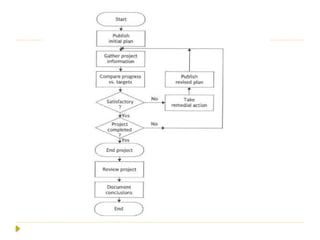
Project performance and monitoring
 Monitoring and control in software project management
involves tracking the project's progress and performance,
ensuring it stays aligned with the planned objectives,
timeline, and budget.
 This process helps identify potential issues early and
allows for timely corrective actions.

 1. Progress Tracking and Status Reporting
 Daily Stand-ups: Short, daily meetings where team
members share what they worked on the previous day, what
they plan to work on today, and any obstacles they're facing.
 Weekly Status Reports: Regular reports detailing the
project’s progress against the plan, current issues, risks, and
any changes made to the project scope, timeline, or budget.
 2. Performance Metrics and Key Performance Indicators
(KPIs)
 A technique used to measure project performance and
progress by comparing the planned work with the completed
work and its cost.
 3. Quality Assurance and Control
 Code Reviews: Regular peer reviews of the codebase to ensure
quality.
 Automated Testing: automated tests to detect bugs or issues early
in the development cycle.
 User Acceptance Testing (UAT): Ensuring that the software meets
user requirements and functions as expected before final delivery.
 4. Risk Management
 Risk Register: A document used to identify, assess, and manage risks
throughout the project lifecycle. It includes potential risks, their
impact, likelihood, and mitigation strategies.
 Regular Risk Assessments: Periodic reviews of the risk register to
identify new risks and assess the status of existing risks.
 5. Change Control Process
 Change Requests: Formal requests for changes to the project scope, timeline,
or budget.
 Each request is reviewed, assessed for impact, and either approved or rejected.
 6. Resource Management
 Resource Utilization Reports: Monitoring team member workloads and
availability to ensure optimal resource allocation.
 Skills Assessment: Regularly assessing team skills to identify gaps and plan
for training or hiring as needed.
 7. Stakeholder Communication and Feedback
 Regular Stakeholder Meetings: Engaging with stakeholders to provide
updates, gather feedback, and ensure alignment with project goals.
 Surveys and Feedback Loops: Collecting feedback from users and
stakeholders at various stages to guide development and adjustments.
 8. Project Management Tools and Software
 JIRA/Trello/Asana: Tools that help in tracking tasks, managing
backlogs, and visualizing project progress using boards and timelines.
 Microsoft Project: A tool used for creating Gantt charts, tracking
progress, managing resources, and scheduling tasks.
 9. Budget Monitoring
 Cost Tracking: Monitoring expenses against the budget to ensure
the project remains within financial constraints.
 10. Issue Management
 Issue Logs: Documenting problems encountered during the project
and tracking their resolution.
 Root Cause Analysis: Investigating the underlying causes of issues
to prevent recurrence
 E.g. A financial institution is developing a new mobile
banking app to enhance customer experience and offer
features like mobile deposits, money transfers, account
management, and bill payments.
 The project is scheduled for a 9-month timeline, with a
budget of $1.5 million and a team of 25 members,
including developers, testers, UX designers, and product
managers
 The project closure phase is the final phase of a
software project lifecycle.
 It involves completing all activities related to formally
closing out the project.
 The primary objective is to ensure that all project
deliverables have been met, all documentation is
completed, and the project is officially closed.
 This phase also includes reviewing the project’s
performance, documenting lessons learned, releasing
project resources, and ensuring stakeholder satisfaction.
Project closing phase
 Questions to ask during the closing phase:
 What went well?
 What did we learn?
 What can be improved next time?
 Are there any steps we can do away with?
 Deliverables:
 A proper celebration
 Project closure report that includes:
 Project name
 Goal
 Start date
 Deadline and actual delivery
 Projected budget and actual budget.
 Team members
 Stakeholders
 Pain points
 Wins
 Observations
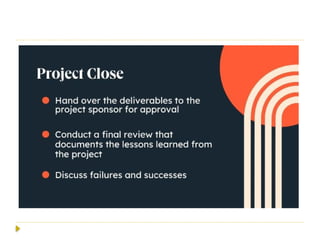
 E.g: Closure of a Food Delivery App Development Project
 1. Final Deliverables Review and Acceptance
 For the food delivery app, this includes verifying that all
features (like order tracking, payment processing, and customer
support) are functioning as specified in the project scope.
 stakeholders review the app’s performance, confirm that it
meets their expectations, and sign off on the project.
2. Completion of Administrative Tasks
includes the final project plan, requirements documents, design
documents, test plans, user manuals, and deployment guides.
project manager ensures all contracts are fulfilled and closed.
 Release of Resources
 Team Release - Project team members are formally released from the
project.
 Documenting Lessons Learned:
 Performance Evaluation-review of the project’s performance, comparing
planned objectives, timelines, and costs against actual outcomes.
 Team Performance Review: Individual and team performance is
reviewed.
 Celebrating Success
 Formal Project Closure-summarizes the entire project, including
objectives, deliverables, outcomes, budget performance, schedule etc.
 Post-Implementation Review (PIR)
 Review After Deployment
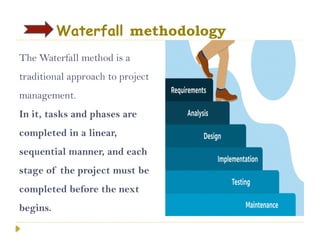
Waterfall methodology
The Waterfall method is a
traditional approach to project
management.
In it, tasks and phases are
completed in a linear,
sequential manner, and each
stage of the project must be
completed before the next
begins.
Advantages of the Waterfall Model
 Easy to Understand:The Classical Waterfall Model is
very simple and easy to understand.
 Individual Processing:Phases in the Classical Waterfall
model are processed one at a time.
 Properly Defined:In the classical waterfall model, each
stage in the model is clearly defined.
 Clear Milestones:The classical Waterfall model has
very clear and well-understood milestones.
 Properly Documented:Processes, actions, and results
are very well documented.
Disadvantages of the SDLC Waterfall Model
 No Feedback Path:
 Limited Flexibility:
 Limited Stakeholder Involvement:The Waterfall Model is
a structured and sequential approach, which means that
stakeholders are typically involved only in the early phases
of the project (requirements gathering and analysis) later
on they are not involved.
 Late Defect Detection:In the Waterfall Model, testing is
typically done toward the end of the development process.
 Lengthy Development Cycle:The Waterfall Model can
result in a lengthy development cycle, as each phase must
be completed before moving on to the next.
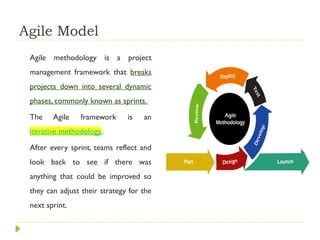
Agile Model
Agile methodology is a project
management framework that breaks
projects down into several dynamic
phases, commonly known as sprints.
The Agile framework is an
iterative methodology.
After every sprint, teams reflect and
look back to see if there was
anything that could be improved so
they can adjust their strategy for the
next sprint.
 1. Requirement Gathering
 In this stage, the project team identifies and documents the needs
and expectations of various stakeholders, including clients, users,
and subject matter experts.
 It involves defining the project’s scope, objectives, and
requirements.
 Establishing a budget and schedule.
 Creating a project plan and allocating resources.
2. Design
Developing a high-level system architecture.
Creating detailed specifications, which include data structures,
algorithms, and interfaces. Planning for the software’s user
interface.
3. Development (Coding)
Writing the actual code for the software. Conducting unit
testing to verify the functionality of individual components.
 4.Testing
 This phase involves several types of testing:
 IntegrationTesting: Ensuring that different components work together.
 SystemTesting: Testing the entire system as a whole.
 User AcceptanceTesting: Confirming that the software meets user
requirements.
 PerformanceTesting: Assessing the system’s speed, scalability, and stability.
 5. Deployment
 Deploying the software to a production environment.
 Put the software into the real world where people can use it.
 Make sure it works smoothly in the real world.
 Providing training and support for end-users.
 6. Review (Maintenance)
 Addressing and resolving any issues that may arise after deployment.
 Releasing updates and patches to enhance the software and address problems.
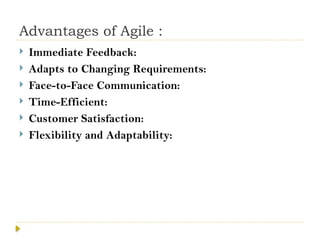
Advantages of Agile :
 Immediate Feedback:
 Adapts to Changing Requirements:
 Face-to-Face Communication:
 Time-Efficient:
 Customer Satisfaction:
 Flexibility and Adaptability:
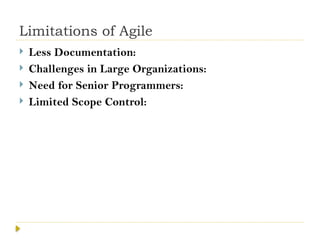
Limitations of Agile
 Less Documentation:
 Challenges in Large Organizations:
 Need for Senior Programmers:
 Limited Scope Control:
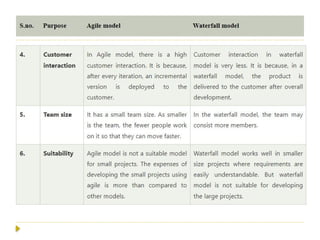
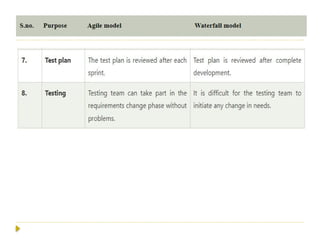
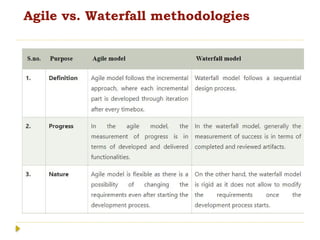
Agile vs. Waterfall methodologies
Unit 2 - Project Life Cycle and Processes.pptx

Unit 2 - Project Life Cycle and Processes.pptx

  • 1.
    Unit 2 -Project Life Cycle and Processes Phases of project management, Project initiation, planning, execution, monitoring, and closure,Agile vs.Waterfall methodologies
  • 2.
    Phases of ProjectManagement Life Cycle  Project Initiation  Project Planning  Project Execution  Project Monitoring and Control  Project Closure
  • 3.
  • 4.
    Phases of ProjectManagement Life Cycle
  • 6.
    Project initiation  Beforeyou begin the project life cycle, you need to determine if this is even a project worth pursuing  Questions to ask during project initiation:  Is this project feasible?  What’s the ultimate goal?  What problem are we trying to solve?  What outcome are we trying to achieve?  How will we measure the success of this project?  Which stakeholders are involved?  Deliverables:  Project charter including scope, objectives, and participants  Project initiation document (PID) defining the scope of the project, who will be managing the project, and how you will measure success. May also contain necessary context, team info, and collaborators.  Project brief communicating the reason for, and approach to, a project. Summarize your objectives, scope, main deliverables, milestones, and timeline.
  • 8.
  • 9.
     E.g. Developingan E-Commerce Website  Define Project Objectives and Scope - primary objectives are to increase online sales by 30% in the first year.  Identify Stakeholders and Form the Project Team –  PM Identify retail business owner, marketing manager, IT manager  team is assembled, including a project manager, 2 front- end developers, 2 back-end developers, a UI/UX designer, a QA tester, and a content writer.
  • 10.
     Determine Requirements Requirements Gathering  Prioritize Requirements-prioritized based on business value and technical feasibility.  secure checkout process is deemed high priority, while adding an advanced product recommendation engine is considered a lower priority.  Develop a Work Breakdown Structure (WBS)  Breaking Down Work : divide the project into manageable tasks and subtasks  task of developing the “Shopping Cart” feature is broken down into subtasks such as designing the cart page, implementing add/remove item functionality, and integrating with the payment gateway.
  • 11.
     AssigningTasks: Eachtask in the WBS is assigned to specific team members based on their expertise.  Estimate Time and Cost:  Create a Detailed Project Schedule:  Gantt Chart:The project manager creates a Gantt chart to visually represent the project timeline, showing task dependencies and key milestones.  Risk Management Planning  Identify Risks  Risk Assessment and Mitigation
  • 12.
     Develop aCommunication Plan-  Communication Strategy:A communication plan is developed to ensure effective communication among team members and stakeholders throughout the project.  Resource Allocation  Develop a Quality Management Plan  Quality Standard, Quality Assurance Activities  Finalize and Approve the Project Plan  Review and Approval-The project plan, including the schedule, budget, risk management plan, and quality management plan, is reviewed by stakeholders
  • 13.
    Planning  Now it’stime to develop an outline (roadmap) that your team will follow to complete the project.  This is essentially where you determine how you’re going to achieve the goals you defined in the previous phase.  Define the project in detail, then develop and define costs, resources, and timelines.  Define who’s responsible for what during this phase so everyone understands their individual responsibilities.  Questions to ask during the planning phase:  What project managing software should we use?  What’s the budget?  What resources do we have to work with?  What’s the deadline?  What risks are we taking?  Deliverables:  Statement of scope  Communication plan  Risk management plan  Gantt chart  Milestone chart  Work breakdown schedule
  • 15.
    Project execution  You’llusually begin the third stage with a kickoff meeting, then each team and its members will begin working on their responsibilities.  Questions to ask during the project execution phase:  What tracking system are we using?  When is the kickoff meeting and who’s coming?  When will we have our recurring status meetings?  What are we doing to avoid any negative consequences?  Have we developed a communication plan for all stakeholders?  Deliverables:  Define team  Assign resources  Begin project management plan  Set up tracking system  Execute task assignment  Kickoff and status meeting  Project schedule updating  Refined project plan
  • 16.
     The executionphase of a software project involves carrying out the project plan by performing tasks and activities to develop the software.  This phase includes coding, testing, managing resources, and communicating with stakeholders to ensure that the project is delivered on time, within scope, and on budget.  E. g: Developing a Food Delivery App
  • 18.
    Project performance andmonitoring  Questions to ask during the performance and monitoring phase:  How is the quality of the project?  Where are we in terms of budget?  Are we on schedule?  Are there any roadblocks?  Are we still projected to meet the deadline?  Deliverables:  Use your project management software and shared visuals to mark completed project steps and make notes on progress and status.
  • 20.
    Project performance andmonitoring  Monitoring and control in software project management involves tracking the project's progress and performance, ensuring it stays aligned with the planned objectives, timeline, and budget.  This process helps identify potential issues early and allows for timely corrective actions. 
  • 21.
     1. ProgressTracking and Status Reporting  Daily Stand-ups: Short, daily meetings where team members share what they worked on the previous day, what they plan to work on today, and any obstacles they're facing.  Weekly Status Reports: Regular reports detailing the project’s progress against the plan, current issues, risks, and any changes made to the project scope, timeline, or budget.  2. Performance Metrics and Key Performance Indicators (KPIs)  A technique used to measure project performance and progress by comparing the planned work with the completed work and its cost.
  • 22.
     3. QualityAssurance and Control  Code Reviews: Regular peer reviews of the codebase to ensure quality.  Automated Testing: automated tests to detect bugs or issues early in the development cycle.  User Acceptance Testing (UAT): Ensuring that the software meets user requirements and functions as expected before final delivery.  4. Risk Management  Risk Register: A document used to identify, assess, and manage risks throughout the project lifecycle. It includes potential risks, their impact, likelihood, and mitigation strategies.  Regular Risk Assessments: Periodic reviews of the risk register to identify new risks and assess the status of existing risks.
  • 23.
     5. ChangeControl Process  Change Requests: Formal requests for changes to the project scope, timeline, or budget.  Each request is reviewed, assessed for impact, and either approved or rejected.  6. Resource Management  Resource Utilization Reports: Monitoring team member workloads and availability to ensure optimal resource allocation.  Skills Assessment: Regularly assessing team skills to identify gaps and plan for training or hiring as needed.  7. Stakeholder Communication and Feedback  Regular Stakeholder Meetings: Engaging with stakeholders to provide updates, gather feedback, and ensure alignment with project goals.  Surveys and Feedback Loops: Collecting feedback from users and stakeholders at various stages to guide development and adjustments.
  • 24.
     8. ProjectManagement Tools and Software  JIRA/Trello/Asana: Tools that help in tracking tasks, managing backlogs, and visualizing project progress using boards and timelines.  Microsoft Project: A tool used for creating Gantt charts, tracking progress, managing resources, and scheduling tasks.  9. Budget Monitoring  Cost Tracking: Monitoring expenses against the budget to ensure the project remains within financial constraints.  10. Issue Management  Issue Logs: Documenting problems encountered during the project and tracking their resolution.  Root Cause Analysis: Investigating the underlying causes of issues to prevent recurrence
  • 25.
     E.g. Afinancial institution is developing a new mobile banking app to enhance customer experience and offer features like mobile deposits, money transfers, account management, and bill payments.  The project is scheduled for a 9-month timeline, with a budget of $1.5 million and a team of 25 members, including developers, testers, UX designers, and product managers
  • 27.
     The projectclosure phase is the final phase of a software project lifecycle.  It involves completing all activities related to formally closing out the project.  The primary objective is to ensure that all project deliverables have been met, all documentation is completed, and the project is officially closed.  This phase also includes reviewing the project’s performance, documenting lessons learned, releasing project resources, and ensuring stakeholder satisfaction.
  • 28.
    Project closing phase Questions to ask during the closing phase:  What went well?  What did we learn?  What can be improved next time?  Are there any steps we can do away with?  Deliverables:  A proper celebration  Project closure report that includes:  Project name  Goal  Start date  Deadline and actual delivery  Projected budget and actual budget.  Team members  Stakeholders  Pain points  Wins  Observations
  • 29.
     E.g: Closureof a Food Delivery App Development Project  1. Final Deliverables Review and Acceptance  For the food delivery app, this includes verifying that all features (like order tracking, payment processing, and customer support) are functioning as specified in the project scope.  stakeholders review the app’s performance, confirm that it meets their expectations, and sign off on the project. 2. Completion of Administrative Tasks includes the final project plan, requirements documents, design documents, test plans, user manuals, and deployment guides. project manager ensures all contracts are fulfilled and closed.
  • 30.
     Release ofResources  Team Release - Project team members are formally released from the project.  Documenting Lessons Learned:  Performance Evaluation-review of the project’s performance, comparing planned objectives, timelines, and costs against actual outcomes.  Team Performance Review: Individual and team performance is reviewed.  Celebrating Success  Formal Project Closure-summarizes the entire project, including objectives, deliverables, outcomes, budget performance, schedule etc.  Post-Implementation Review (PIR)  Review After Deployment
  • 31.
    Waterfall methodology The Waterfallmethod is a traditional approach to project management. In it, tasks and phases are completed in a linear, sequential manner, and each stage of the project must be completed before the next begins.
  • 32.
    Advantages of theWaterfall Model  Easy to Understand:The Classical Waterfall Model is very simple and easy to understand.  Individual Processing:Phases in the Classical Waterfall model are processed one at a time.  Properly Defined:In the classical waterfall model, each stage in the model is clearly defined.  Clear Milestones:The classical Waterfall model has very clear and well-understood milestones.  Properly Documented:Processes, actions, and results are very well documented.
  • 33.
    Disadvantages of theSDLC Waterfall Model  No Feedback Path:  Limited Flexibility:  Limited Stakeholder Involvement:The Waterfall Model is a structured and sequential approach, which means that stakeholders are typically involved only in the early phases of the project (requirements gathering and analysis) later on they are not involved.  Late Defect Detection:In the Waterfall Model, testing is typically done toward the end of the development process.  Lengthy Development Cycle:The Waterfall Model can result in a lengthy development cycle, as each phase must be completed before moving on to the next.
  • 34.
    Agile Model Agile methodologyis a project management framework that breaks projects down into several dynamic phases, commonly known as sprints. The Agile framework is an iterative methodology. After every sprint, teams reflect and look back to see if there was anything that could be improved so they can adjust their strategy for the next sprint.
  • 35.
     1. RequirementGathering  In this stage, the project team identifies and documents the needs and expectations of various stakeholders, including clients, users, and subject matter experts.  It involves defining the project’s scope, objectives, and requirements.  Establishing a budget and schedule.  Creating a project plan and allocating resources. 2. Design Developing a high-level system architecture. Creating detailed specifications, which include data structures, algorithms, and interfaces. Planning for the software’s user interface. 3. Development (Coding) Writing the actual code for the software. Conducting unit testing to verify the functionality of individual components.
  • 36.
     4.Testing  Thisphase involves several types of testing:  IntegrationTesting: Ensuring that different components work together.  SystemTesting: Testing the entire system as a whole.  User AcceptanceTesting: Confirming that the software meets user requirements.  PerformanceTesting: Assessing the system’s speed, scalability, and stability.  5. Deployment  Deploying the software to a production environment.  Put the software into the real world where people can use it.  Make sure it works smoothly in the real world.  Providing training and support for end-users.  6. Review (Maintenance)  Addressing and resolving any issues that may arise after deployment.  Releasing updates and patches to enhance the software and address problems.
  • 37.
    Advantages of Agile:  Immediate Feedback:  Adapts to Changing Requirements:  Face-to-Face Communication:  Time-Efficient:  Customer Satisfaction:  Flexibility and Adaptability:
  • 38.
    Limitations of Agile Less Documentation:  Challenges in Large Organizations:  Need for Senior Programmers:  Limited Scope Control:
  • 39.
    Agile vs. Waterfallmethodologies