Project management
Instructor : Saliha Zahoor
Software project management
• Concerned with activities involved in ensuring
that software is delivered on time and on
schedule and in accordance with the
requirements of the organisations developing
and procuring the software.
• Project management is needed because
software development is always subject to
budget and schedule constraints that are set by
the organisation developing the software.
Software management distinctions
• The product is intangible.
• There are no standard software processes.
• The software development process is not
standardised.
• Large software projects are often 'one-off'
projects.
• Engineering projects that are innovative often
have schedule problems and budget problems.
Management activities
• Proposal writing.
• Project planning and scheduling.
• Project costing.
• Project monitoring and reviews.
• Personnel selection and evaluation.
• Report writing and presentations.
Management activities
• Proposal Writing: The proposal describes the
objectives of the project and how it will be carried out.
It include cost and schedule estimates. Proposal writing
is a skill that acquire through practices and experience.
• Project Planning: concerned with identifying the
activities, milestones and deliverables produced by a
project.
• Project Monitoring: The manager must keep track of
the progress of the project and compare actual and
planned progress and costs.
Personnel Selection and Evaluation
• Project Manager have to select people to work on their projects.
• May not be possible to appoint the ideal people to work on a
project due to following reasons.
– Project budget may not allow for the use of highly-paid staff;
– Staff with the appropriate experience may not be available;
– An organisation may wish to develop employee skills on a software
project.
• Managers have to work within these constraints especially when
there are shortages of trained staff.
• Report writing and Presentation: Project managers responsible
for reporting on the project to both the client and and contractor
organization.
Project planning
• Probably the most time-consuming project
management activity.
• Continuous activity from initial concept through
to system delivery. Plans must be regularly revised
as new information becomes available.
• Various different types of plan may be developed
to support the main software project plan that is
concerned with schedule and budget.
Project planning process
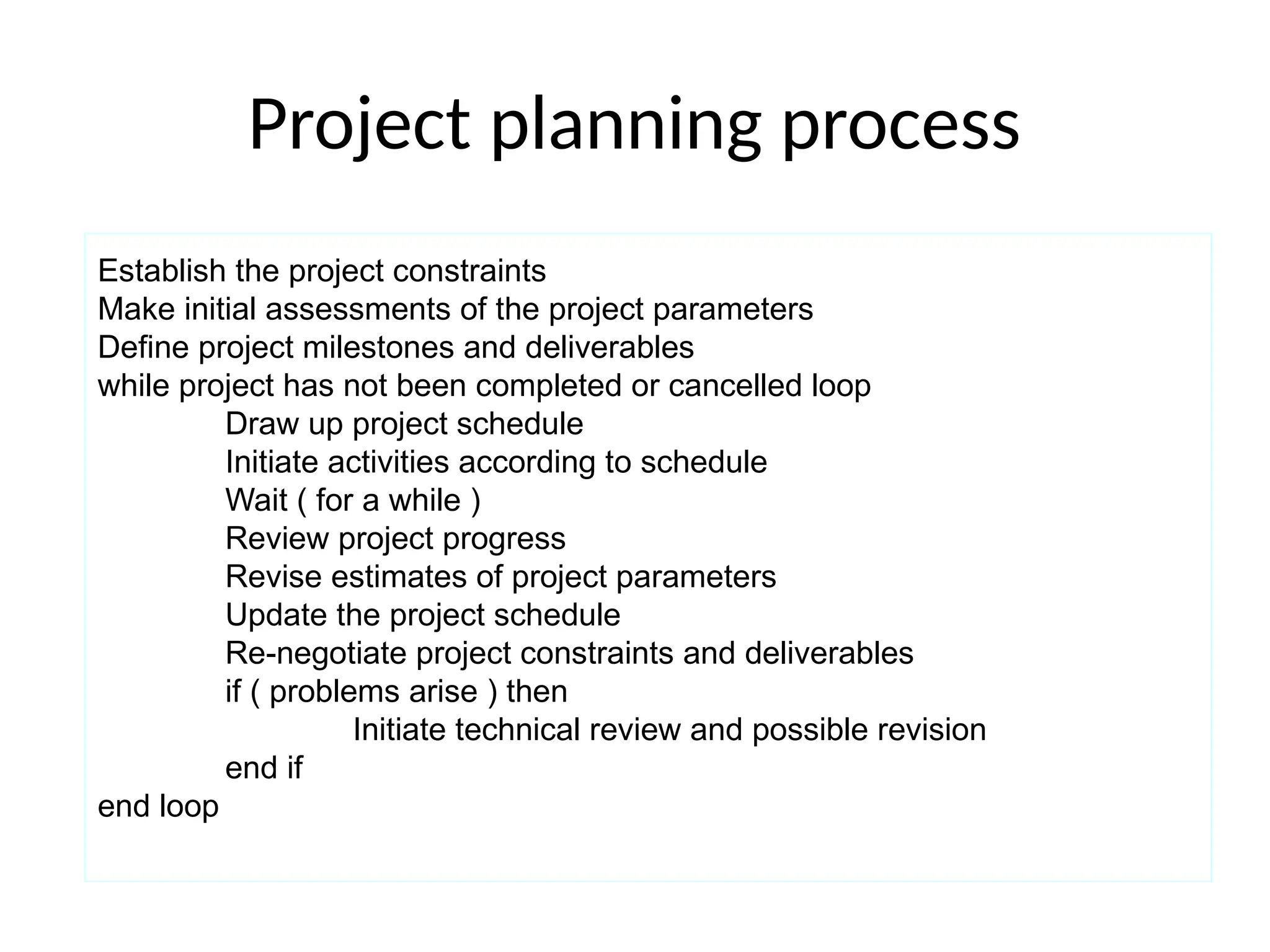
Establish the project constraints
Make initial assessments of the project parameters
Define project milestones and deliverables
while project has not been completed or cancelled loop
Draw up project schedule
Initiate activities according to schedule
Wait ( for a while )
Review project progress
Revise estimates of project parameters
Update the project schedule
Re-negotiate project constraints and deliverables
if ( problems arise ) then
Initiate technical review and possible revision
end if
end loop
Types of Software Development Plan
• Quality Plan: Describes the quality procedures
and standards that will be used in a project.
• Validation Plan: Describe the approach ,
resources and schedule used for system
validation.
• Configuration Management Plan: Describe
the configuration management procedures
and structures to be used.
Types of Software development Plan
• Maintenance Plan: Predict the maintenance
requirements of the system ,maintenance cost
and effort required.
• Staff Development Plan: Describes the skills
and experience of team members.
The project plan
• The project plan sets out:
– The resources available to the project;
– The work breakdown;
– A schedule for the work.
Project plan structure
• Introduction.
• Project organisation.
• Risk analysis.
• Hardware and software resource
requirements.
• Work breakdown.
• Project schedule.
• Monitoring and reporting mechanisms.
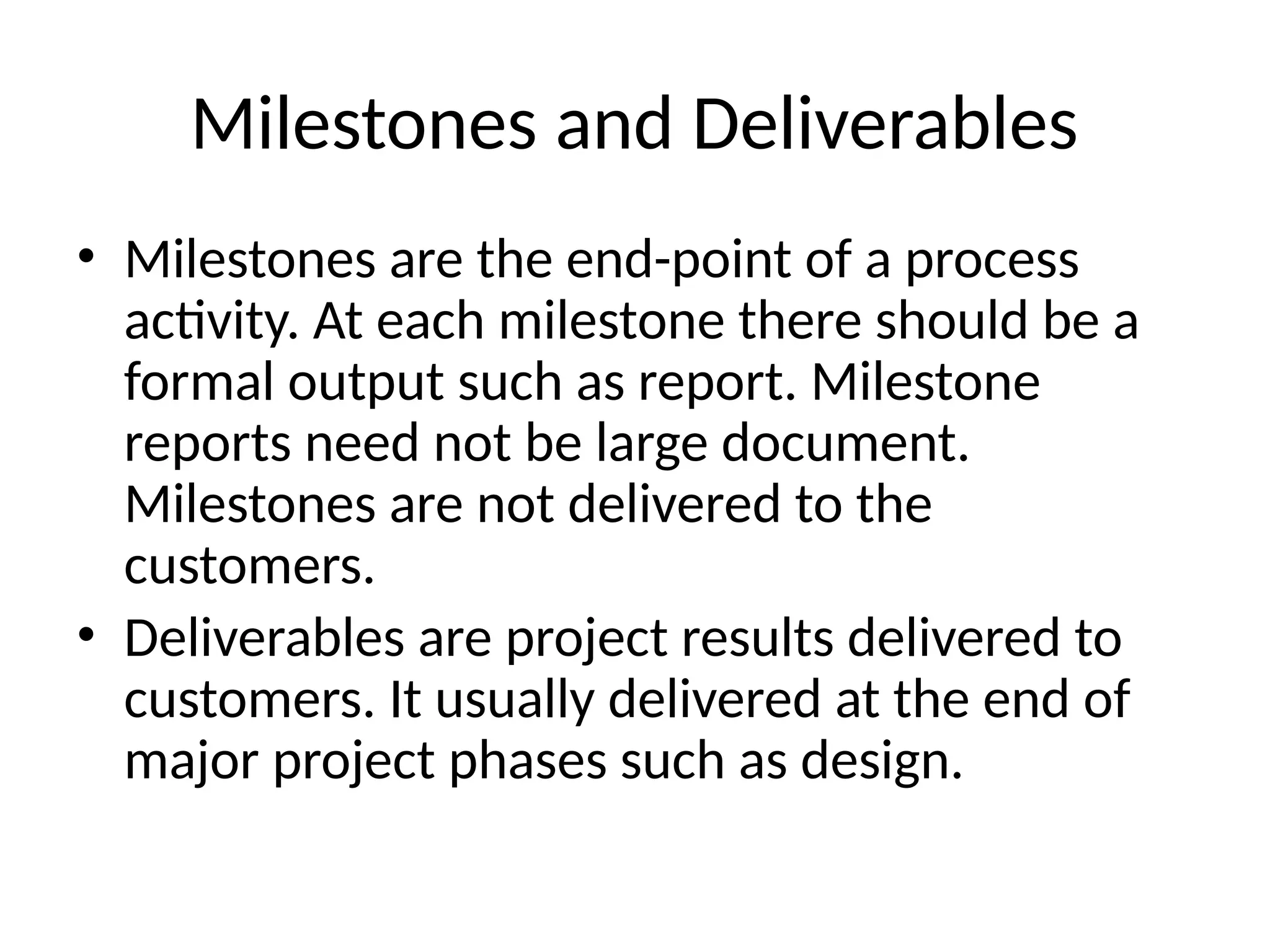
Milestones and Deliverables
• Milestones are the end-point of a process
activity. At each milestone there should be a
formal output such as report. Milestone
reports need not be large document.
Milestones are not delivered to the
customers.
• Deliverables are project results delivered to
customers. It usually delivered at the end of
major project phases such as design.
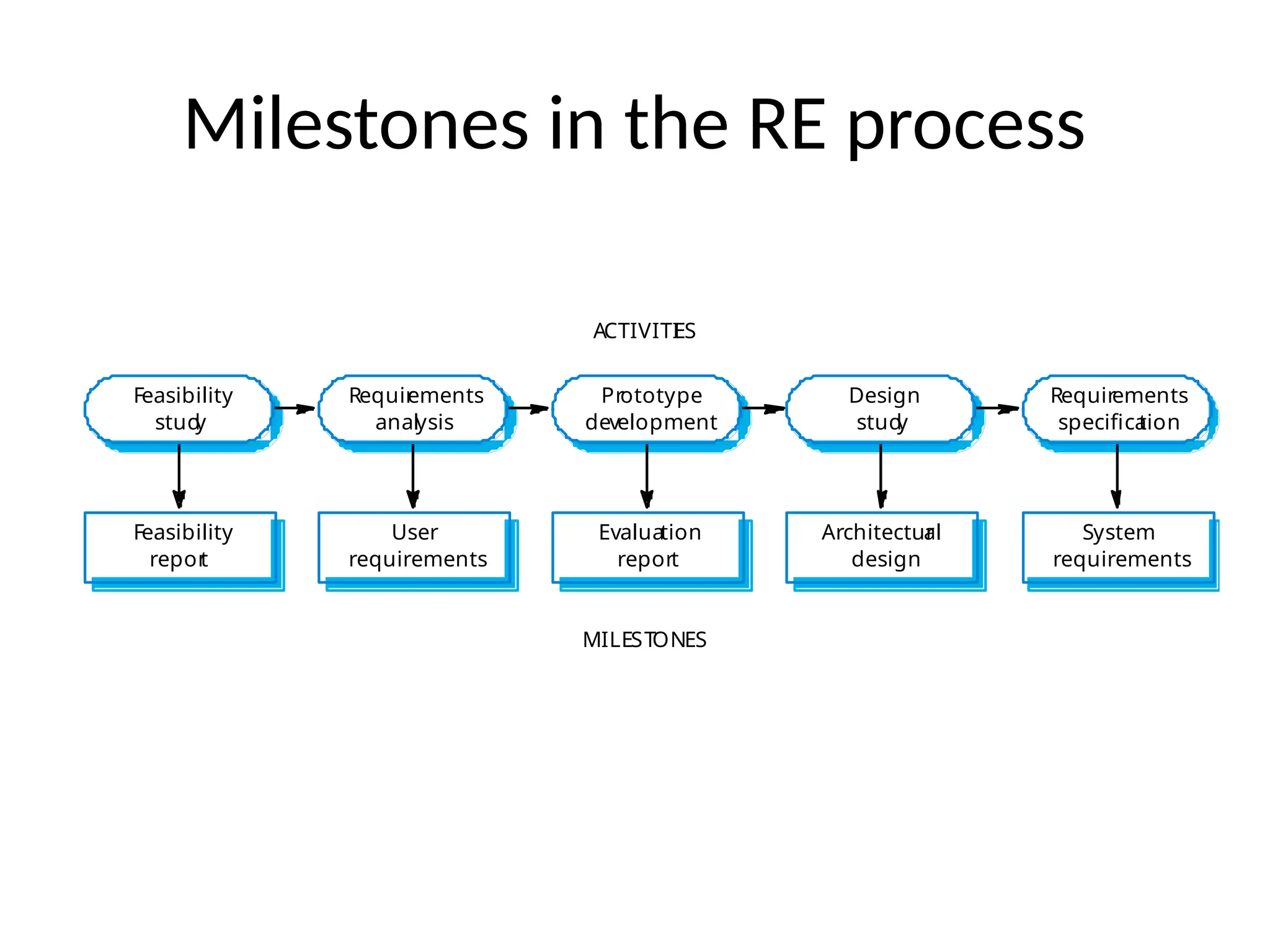
Milestones in the RE process
Evaluation
report
Prototype
development
User
requirements
Requir
ements
analysis
Feasibility
repor
t
Feasibility
stud
y
Architectur
al
design
Design
stud
y
System
requirements
Requirements
specifica
tion
ACTIVITI
ES
MILESTONES
Project scheduling
• Managers estimate the time and resources
required to complete activities and organize
them into a coherent sequence.
• Minimize task dependencies to avoid delays
caused by one task waiting for another to
complete.
• Some of the activities are carried out in parallel.
coordinate these parallel activities and organize
the work .
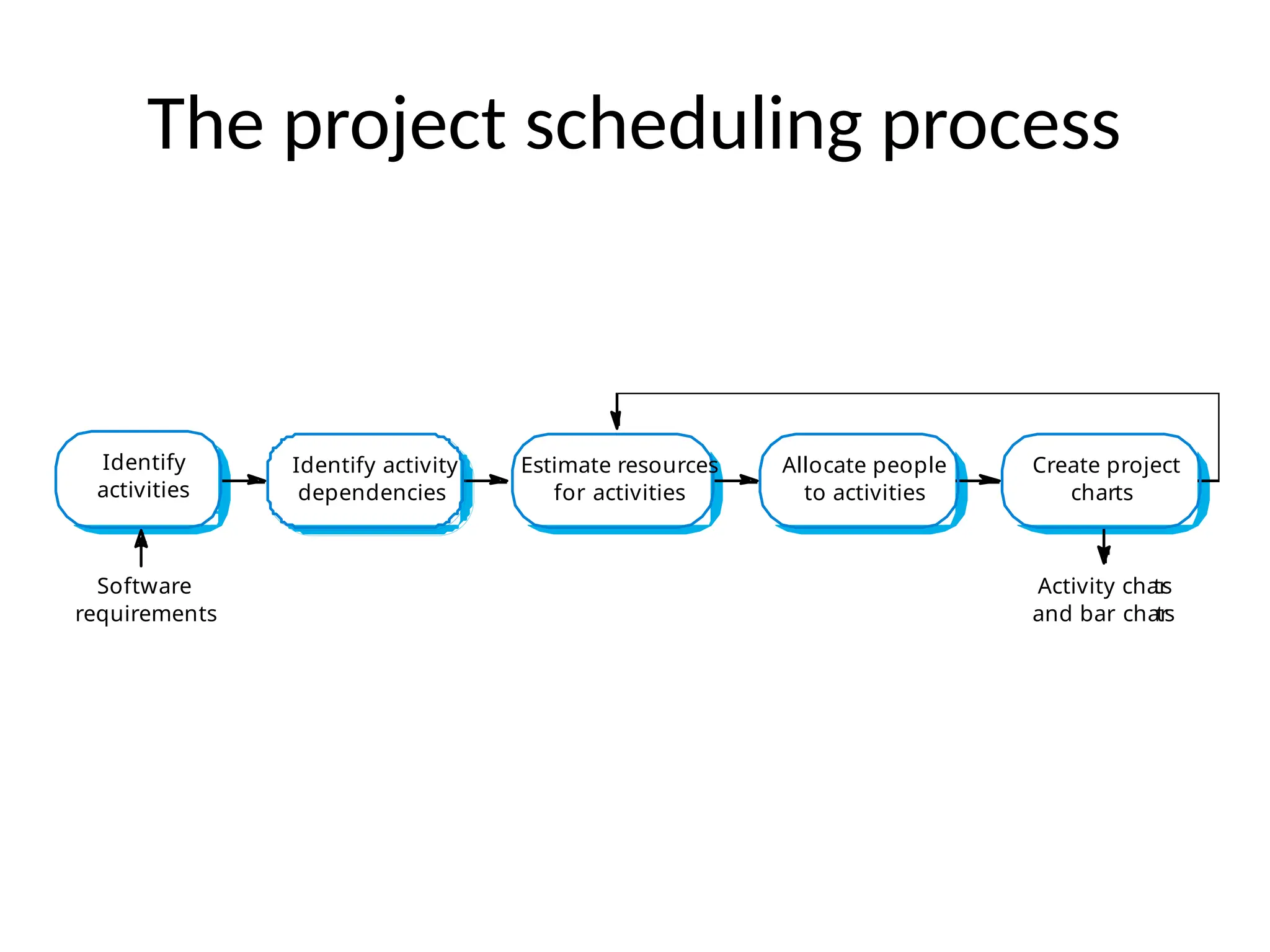
The project scheduling process
Estimate resources
for activities
Identify activity
dependencies
Identify
activities
Allocate people
to activities
Software
requirements
Activity char
ts
and bar char
ts
Create project
charts
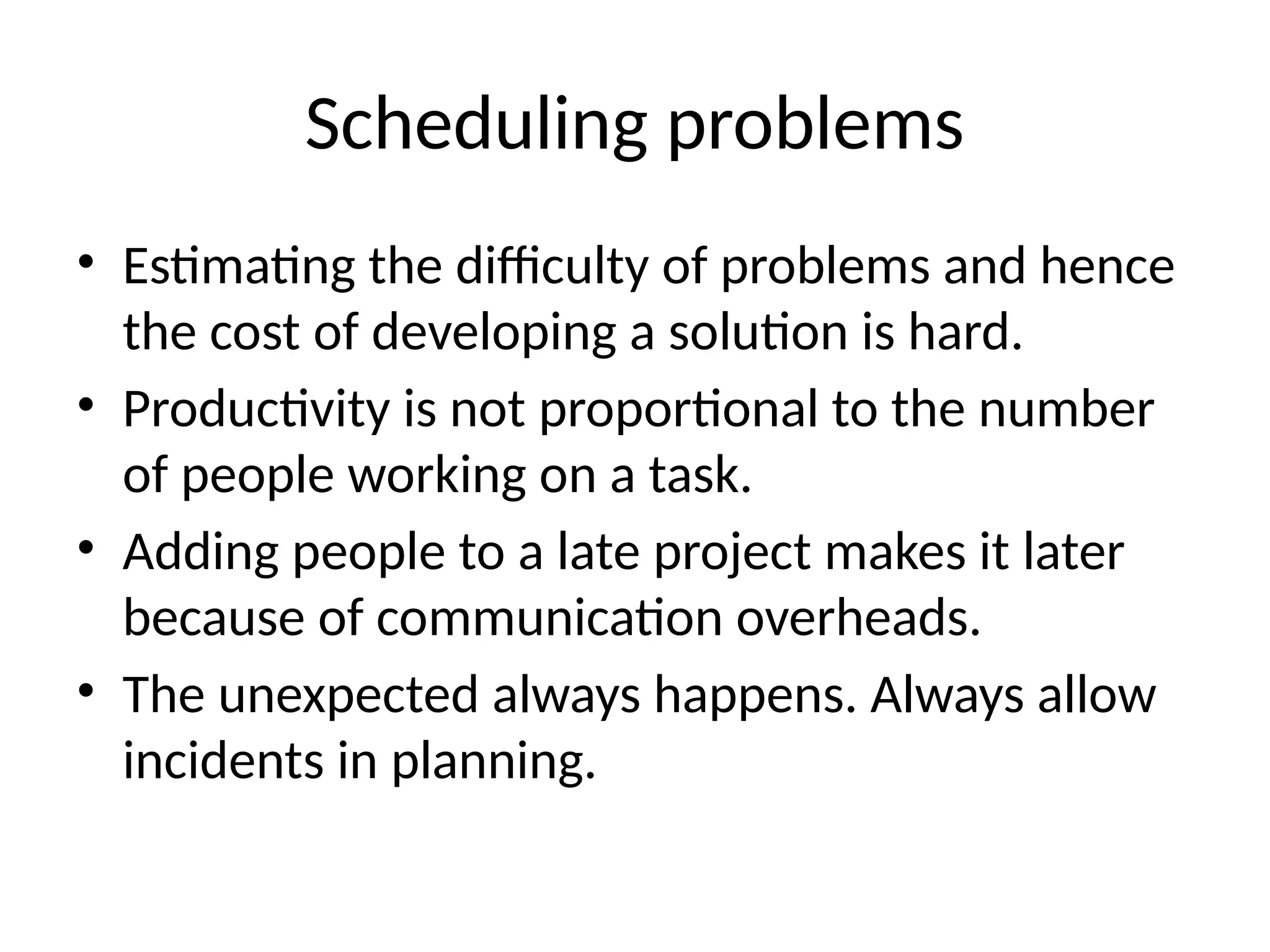
Scheduling problems
• Estimating the difficulty of problems and hence
the cost of developing a solution is hard.
• Productivity is not proportional to the number
of people working on a task.
• Adding people to a late project makes it later
because of communication overheads.
• The unexpected always happens. Always allow
incidents in planning.
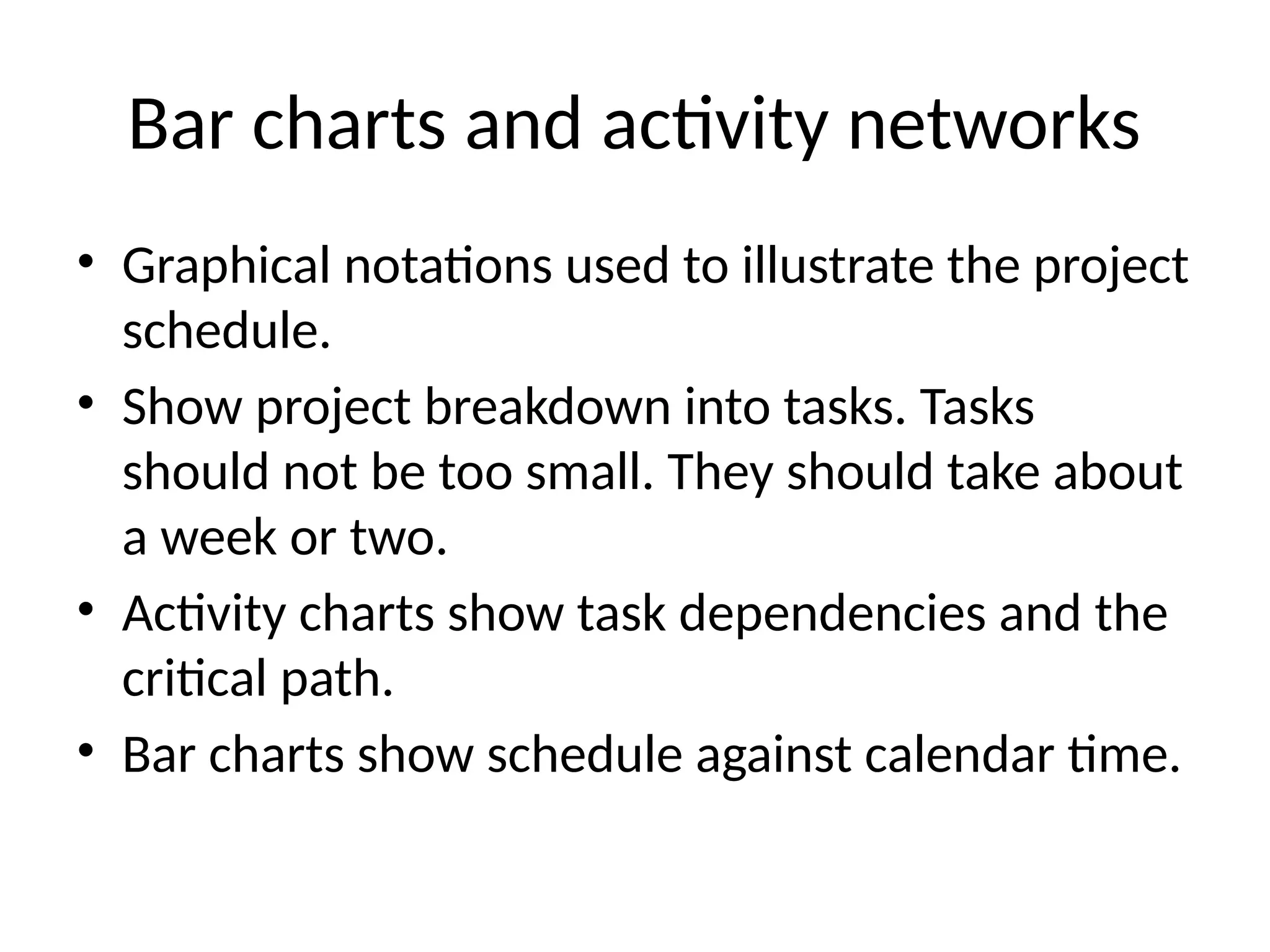
Bar charts and activity networks
• Graphical notations used to illustrate the project
schedule.
• Show project breakdown into tasks. Tasks
should not be too small. They should take about
a week or two.
• Activity charts show task dependencies and the
critical path.
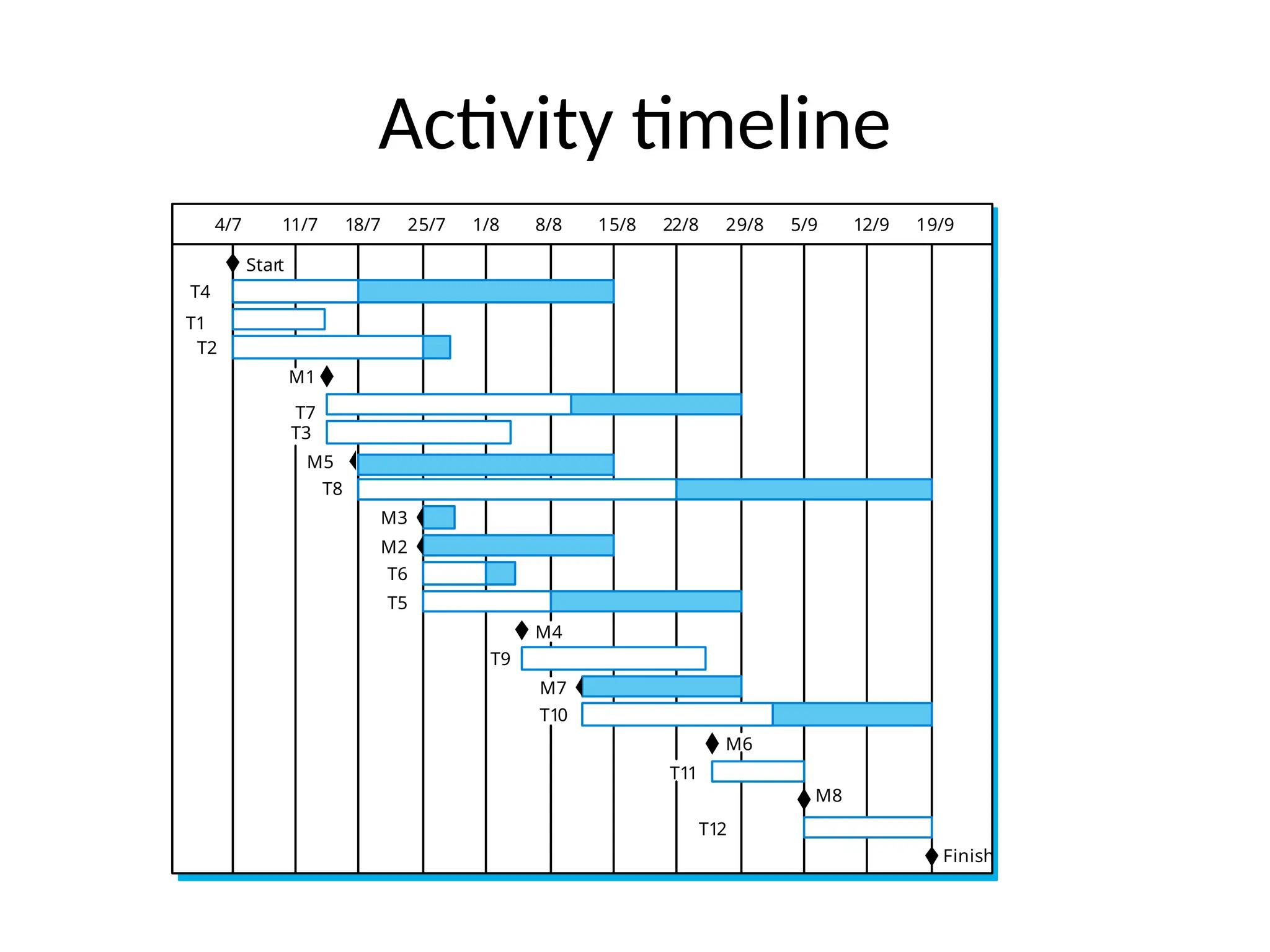
• Bar charts show schedule against calendar time.
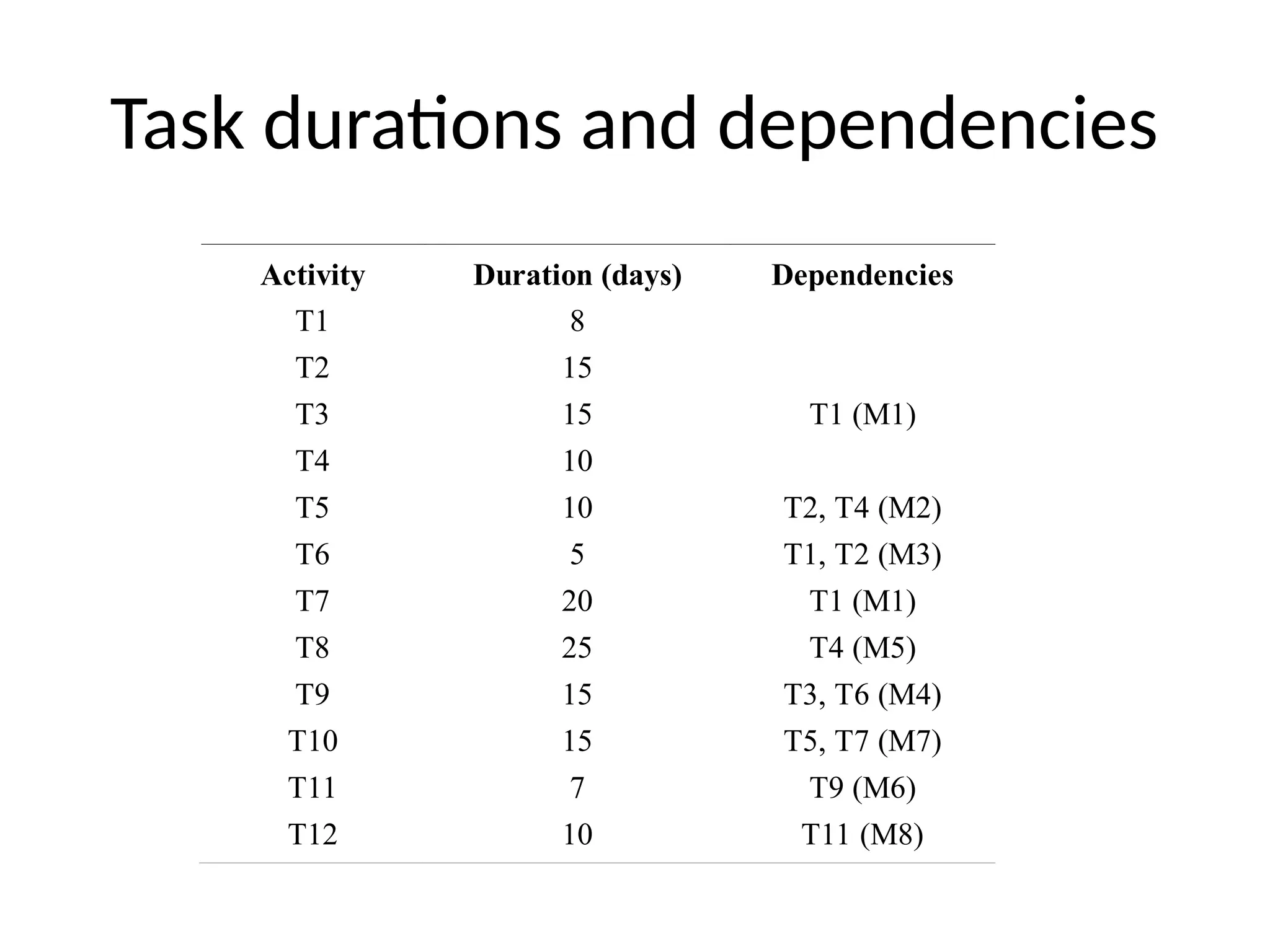
Task durations and dependencies
Activity Duration (days) Dependencies
T1 8
T2 15
T3 15 T1 (M1)
T4 10
T5 10 T2, T4 (M2)
T6 5 T1, T2 (M3)
T7 20 T1 (M1)
T8 25 T4 (M5)
T9 15 T3, T6 (M4)
T10 15 T5, T7 (M7)
T11 7 T9 (M6)
T12 10 T11 (M8)
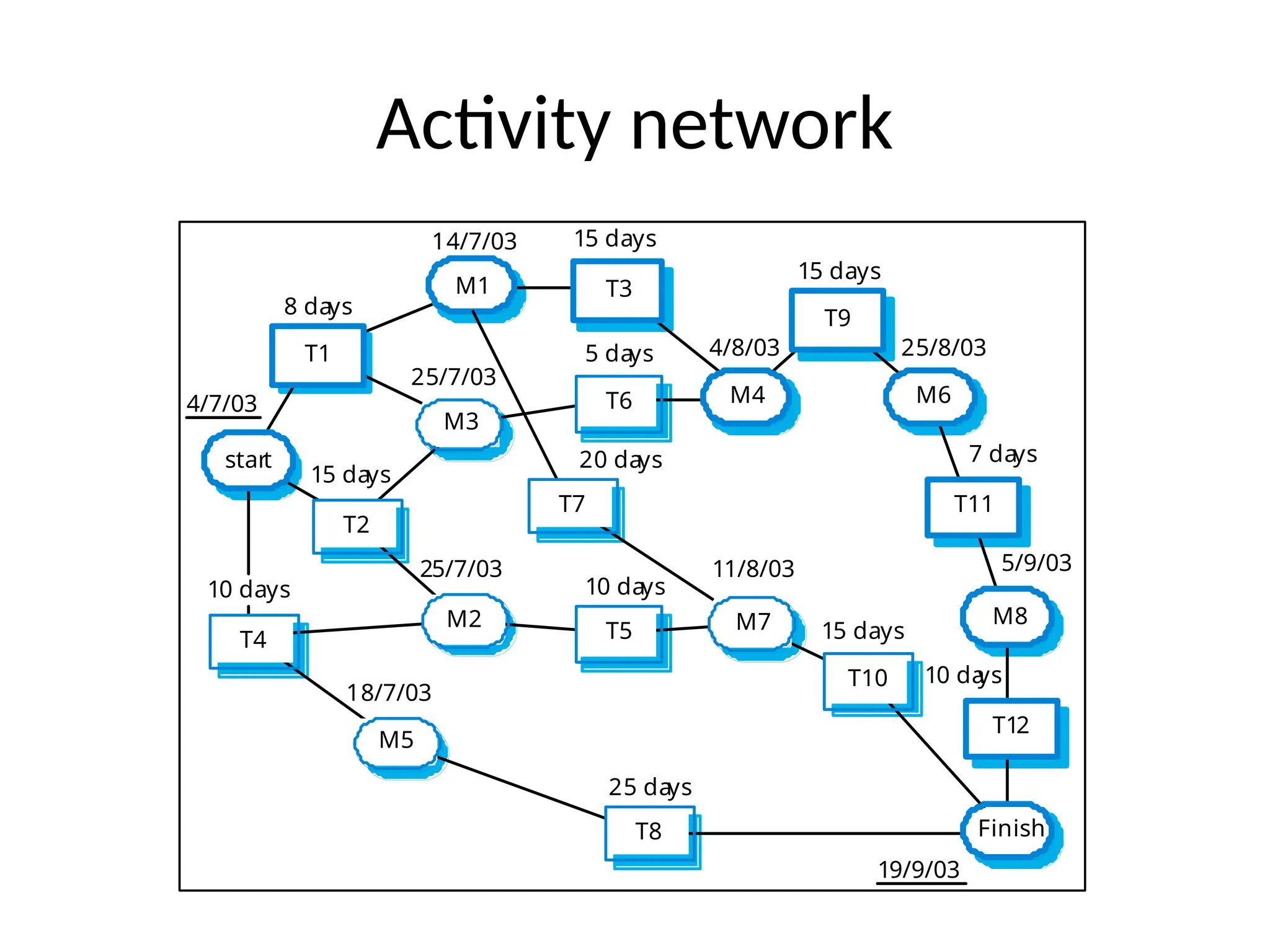
Activity network
start
T2
M3
T6
Finish
T10
M7
T5
T7
M2
T4
M5
T8
4/7/03
8 days
14/7/03 15 days
4/8/03
15 days
25/8/03
7 days
5/9/03
10 da
ys
19/9/03
15 days
11/8/03
25 days
10 days
20 days
5 days
25/7/03
15 days
25/7/03
18/7/03
10 days
T1
M1 T3
T9
M6
T11
M8
T12
M4
Activity timeline
4/7 11/7 18/7 25/7 1/8 8/8 15/8 22/8 29/8 5/9 12/9 19/9
T4
T1
T2
M1
T7
T3
M5
T8
M3
M2
T6
T5
M4
T9
M7
T10
M6
T11
M8
T12
Start
Finish
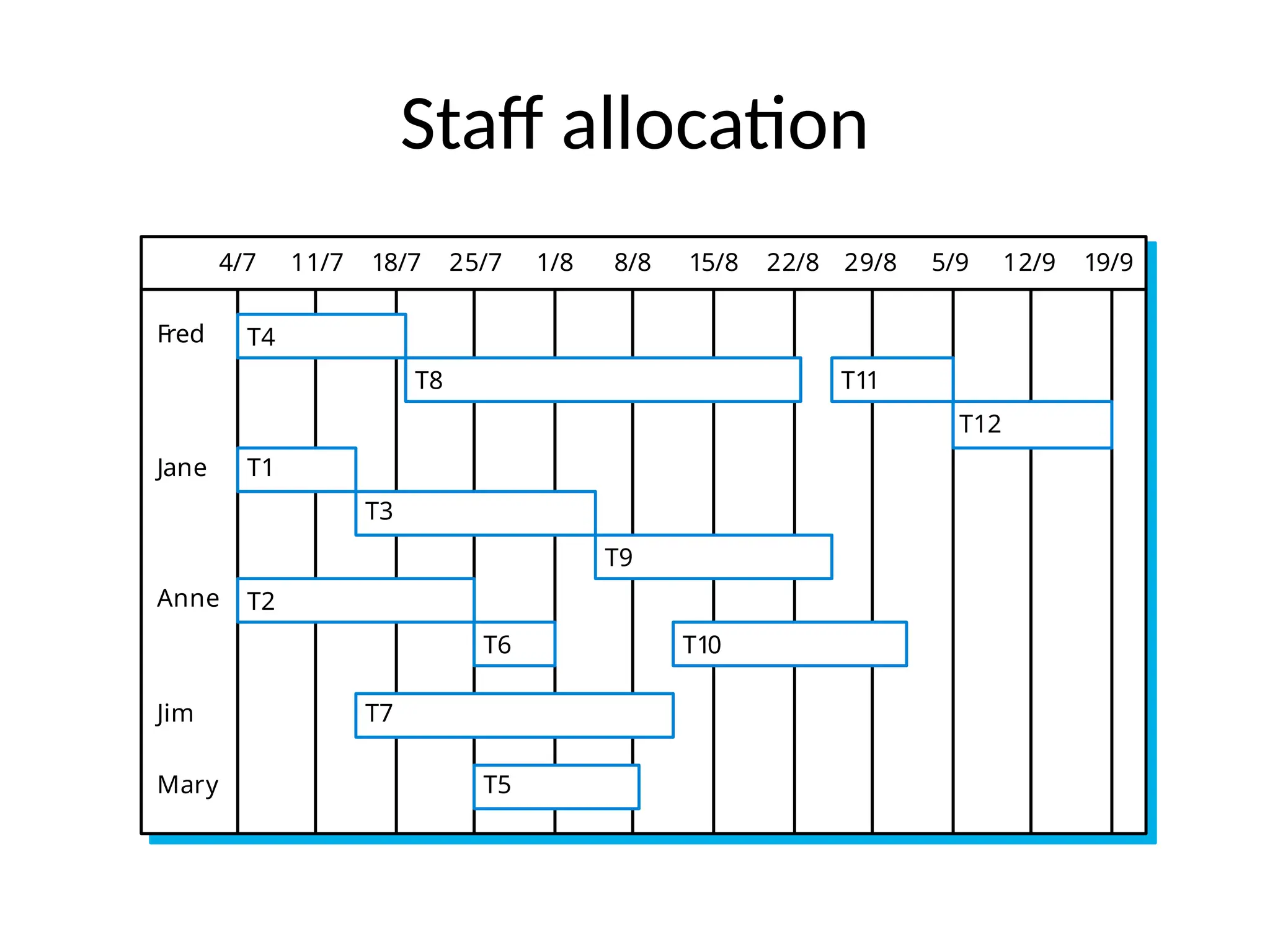
Staff allocation
4/7 11/7 18/7 25/7 1/8 8/8 15/8 22/8 29/8 5/9 12/9 19/9
T4
T8 T11
T12
T1
T3
T9
T2
T6 T10
T7
T5
Fred
Jane
Anne
Mary
Jim

Project management Scheduling software engineering.pptx

  • 1.
  • 2.
    Software project management •Concerned with activities involved in ensuring that software is delivered on time and on schedule and in accordance with the requirements of the organisations developing and procuring the software. • Project management is needed because software development is always subject to budget and schedule constraints that are set by the organisation developing the software.
  • 3.
    Software management distinctions •The product is intangible. • There are no standard software processes. • The software development process is not standardised. • Large software projects are often 'one-off' projects. • Engineering projects that are innovative often have schedule problems and budget problems.
  • 4.
    Management activities • Proposalwriting. • Project planning and scheduling. • Project costing. • Project monitoring and reviews. • Personnel selection and evaluation. • Report writing and presentations.
  • 5.
    Management activities • ProposalWriting: The proposal describes the objectives of the project and how it will be carried out. It include cost and schedule estimates. Proposal writing is a skill that acquire through practices and experience. • Project Planning: concerned with identifying the activities, milestones and deliverables produced by a project. • Project Monitoring: The manager must keep track of the progress of the project and compare actual and planned progress and costs.
  • 6.
    Personnel Selection andEvaluation • Project Manager have to select people to work on their projects. • May not be possible to appoint the ideal people to work on a project due to following reasons. – Project budget may not allow for the use of highly-paid staff; – Staff with the appropriate experience may not be available; – An organisation may wish to develop employee skills on a software project. • Managers have to work within these constraints especially when there are shortages of trained staff. • Report writing and Presentation: Project managers responsible for reporting on the project to both the client and and contractor organization.
  • 7.
    Project planning • Probablythe most time-consuming project management activity. • Continuous activity from initial concept through to system delivery. Plans must be regularly revised as new information becomes available. • Various different types of plan may be developed to support the main software project plan that is concerned with schedule and budget.
  • 8.
    Project planning process Establishthe project constraints Make initial assessments of the project parameters Define project milestones and deliverables while project has not been completed or cancelled loop Draw up project schedule Initiate activities according to schedule Wait ( for a while ) Review project progress Revise estimates of project parameters Update the project schedule Re-negotiate project constraints and deliverables if ( problems arise ) then Initiate technical review and possible revision end if end loop
  • 9.
    Types of SoftwareDevelopment Plan • Quality Plan: Describes the quality procedures and standards that will be used in a project. • Validation Plan: Describe the approach , resources and schedule used for system validation. • Configuration Management Plan: Describe the configuration management procedures and structures to be used.
  • 10.
    Types of Softwaredevelopment Plan • Maintenance Plan: Predict the maintenance requirements of the system ,maintenance cost and effort required. • Staff Development Plan: Describes the skills and experience of team members.
  • 11.
    The project plan •The project plan sets out: – The resources available to the project; – The work breakdown; – A schedule for the work.
  • 12.
    Project plan structure •Introduction. • Project organisation. • Risk analysis. • Hardware and software resource requirements. • Work breakdown. • Project schedule. • Monitoring and reporting mechanisms.
  • 13.
    Milestones and Deliverables •Milestones are the end-point of a process activity. At each milestone there should be a formal output such as report. Milestone reports need not be large document. Milestones are not delivered to the customers. • Deliverables are project results delivered to customers. It usually delivered at the end of major project phases such as design.
  • 14.
    Milestones in theRE process Evaluation report Prototype development User requirements Requir ements analysis Feasibility repor t Feasibility stud y Architectur al design Design stud y System requirements Requirements specifica tion ACTIVITI ES MILESTONES
  • 15.
    Project scheduling • Managersestimate the time and resources required to complete activities and organize them into a coherent sequence. • Minimize task dependencies to avoid delays caused by one task waiting for another to complete. • Some of the activities are carried out in parallel. coordinate these parallel activities and organize the work .
  • 16.
    The project schedulingprocess Estimate resources for activities Identify activity dependencies Identify activities Allocate people to activities Software requirements Activity char ts and bar char ts Create project charts
  • 17.
    Scheduling problems • Estimatingthe difficulty of problems and hence the cost of developing a solution is hard. • Productivity is not proportional to the number of people working on a task. • Adding people to a late project makes it later because of communication overheads. • The unexpected always happens. Always allow incidents in planning.
  • 18.
    Bar charts andactivity networks • Graphical notations used to illustrate the project schedule. • Show project breakdown into tasks. Tasks should not be too small. They should take about a week or two. • Activity charts show task dependencies and the critical path. • Bar charts show schedule against calendar time.
  • 19.
    Task durations anddependencies Activity Duration (days) Dependencies T1 8 T2 15 T3 15 T1 (M1) T4 10 T5 10 T2, T4 (M2) T6 5 T1, T2 (M3) T7 20 T1 (M1) T8 25 T4 (M5) T9 15 T3, T6 (M4) T10 15 T5, T7 (M7) T11 7 T9 (M6) T12 10 T11 (M8)
  • 20.
    Activity network start T2 M3 T6 Finish T10 M7 T5 T7 M2 T4 M5 T8 4/7/03 8 days 14/7/0315 days 4/8/03 15 days 25/8/03 7 days 5/9/03 10 da ys 19/9/03 15 days 11/8/03 25 days 10 days 20 days 5 days 25/7/03 15 days 25/7/03 18/7/03 10 days T1 M1 T3 T9 M6 T11 M8 T12 M4
  • 21.
    Activity timeline 4/7 11/718/7 25/7 1/8 8/8 15/8 22/8 29/8 5/9 12/9 19/9 T4 T1 T2 M1 T7 T3 M5 T8 M3 M2 T6 T5 M4 T9 M7 T10 M6 T11 M8 T12 Start Finish
  • 22.
    Staff allocation 4/7 11/718/7 25/7 1/8 8/8 15/8 22/8 29/8 5/9 12/9 19/9 T4 T8 T11 T12 T1 T3 T9 T2 T6 T10 T7 T5 Fred Jane Anne Mary Jim