UNIT – 2
SCSA3079
MOBILE AND WIRELESS SECURITY
Dr. G. Rajeswari 2
INTRODUCTION TO WIRELESS SECURITY
PROTOCOLS AND CRYPTOGRAPHY
1. OSI Model
2. Internet Model
3. Wireless Local Area Network (LAN) Security Protocols
4. Cryptography
5. Secure Sockets Layer/Transport Layer Security (SSL/TLS)
6. Secure Shell (SSH) - Protocol or Program
7. Terminal Access and File Transfer
8. Port Forwarding, Man-in-the-Middle (MITM) of SSL/TLS and SSH, WTLS
9. WEP, 802.1x, IP Security (IP Sec)
7/14/2024
Dr. G. Rajeswari 3
OSI Model
• OSI stands for Open System Interconnection is a reference model that
describes how information from a software application in one computer moves
through a physical medium to the software application in another computer
• OSI consists of seven layers, and each layer performs a particular network
function
• OSI model was developed by the International Organization for
Standardization (ISO) in 1984, and it is now considered as an architectural
model for the inter-computer communications
• OSI model divides the whole task into seven smaller and manageable tasks.
Each layer is assigned a particular task
• Each layer is self-contained, so that task assigned to each layer can be
performed independently
7/14/2024
Dr. G. Rajeswari 4
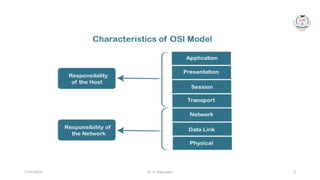
Characteristics of OSI Model
• The OSI model is divided into two layers: upper layers and lower layers
• The upper layer of the OSI model mainly deals with the application related
issues, and they are implemented only in the software. The application
layer is closest to the end user. Both the end user and the application layer
interact with the software applications. An upper layer refers to the layer
just above another layer
• The lower layer of the OSI model deals with the data transport issues. The
data link layer and the physical layer are implemented in hardware and
software. The physical layer is the lowest layer of the OSI model and is
closest to the physical medium. The physical layer is mainly responsible for
placing the information on the physical medium
7/14/2024
Dr. G. Rajeswari 5
7/14/2024
Dr. G. Rajeswari 6
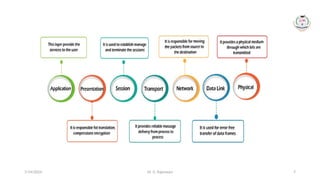
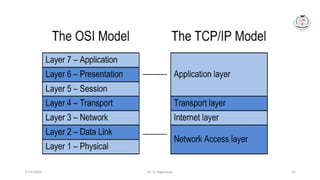
7 Layers of OSI Model
There are the seven OSI layers. Each layer has different functions. A list of
seven layers are given below:
1. Physical Layer
2. Data-Link Layer
3. Network Layer
4. Transport Layer
5. Session Layer
6. Presentation Layer
7. Application Layer
7/14/2024
Dr. G. Rajeswari 7
7/14/2024
Dr. G. Rajeswari 8
1. Physical layer
• The main functionality of the physical layer is to transmit the individual bits
from one node to another node
• It is the lowest layer of the OSI model
• It establishes, maintains and deactivates the physical connection
• It specifies the mechanical, electrical and procedural network interface
specifications
7/14/2024
Dr. G. Rajeswari 9
Functions of a Physical layer
• Line Configuration: It defines the way how two or more devices can be
connected physically
• Data Transmission: It defines the transmission mode whether it is simplex,
half-duplex or full-duplex mode between the two devices on the network
• Topology: It defines the way how network devices are arranged
• Signals: It determines the type of the signal used for transmitting the
information
7/14/2024
Dr. G. Rajeswari 10
2. Data Link Layer
• This layer is responsible for the error-free transfer of data frames
• It defines the format of the data on the network
• It provides a reliable and efficient communication between two or more
devices
• It is mainly responsible for the unique identification of each device that
resides on a local network
7/14/2024
Dr. G. Rajeswari 11
Functions of the Data-link layer (1/2)
• Framing: The data link layer translates the physical's raw bit stream into packets
known as Frames. The Data link layer adds the header and trailer to the frame.
The header which is added to the frame contains the hardware destination and
source address
• Physical Addressing: The Data link layer adds a header to the frame that contains
a destination address. The frame is transmitted to the destination address
mentioned in the header
• Flow Control: Flow control is the main functionality of the Data-link layer. It is the
technique through which the constant data rate is maintained on both the sides
so that no data get corrupted. It ensures that the transmitting station such as a
server with higher processing speed does not exceed the receiving station, with
lower processing speed
7/14/2024
Dr. G. Rajeswari 12
Functions of the Data-link layer (2/2)
• Error Control: Error control is achieved by adding a calculated value CRC
(Cyclic Redundancy Check) that is placed to the Data link layer's trailer
which is added to the message frame before it is sent to the physical layer.
If any error seems to occur, then the receiver sends the acknowledgment
for the retransmission of the corrupted frames
• Access Control: When two or more devices are connected to the same
communication channel, then the data link layer protocols are used to
determine which device has control over the link at a given time
7/14/2024
Dr. G. Rajeswari 13
3. Network Layer
• It is a layer 3 that manages device addressing, tracks the location of
devices on the network
• It determines the best path to move data from source to the
destination based on the network conditions, the priority of service,
and other factors
• The Data link layer is responsible for routing and forwarding the
packets
• Routers are the layer 3 devices, they are specified in this layer and
used to provide the routing services within an internetwork
• The protocols used to route the network traffic are known as Network
layer protocols. Examples of protocols are IP and Ipv6
7/14/2024
Dr. G. Rajeswari 14
Functions of Network Layer
• Internetworking: An internetworking is the main responsibility of the
network layer. It provides a logical connection between different devices
• Addressing: A Network layer adds the source and destination address to
the header of the frame. Addressing is used to identify the device on the
internet
• Routing: Routing is the major component of the network layer, and it
determines the best optimal path out of the multiple paths from source to
the destination
• Packetizing: A Network Layer receives the packets from the upper layer and
converts them into packets. This process is known as Packetizing. It is
achieved by internet protocol (IP)
7/14/2024
Dr. G. Rajeswari 15
4. Transport Layer
• The Transport layer is a Layer 4 ensures that messages are transmitted in
the order in which they are sent and there is no duplication of data
• The main responsibility of the transport layer is to transfer the data
completely
• It receives the data from the upper layer and converts them into smaller
units known as segments
• This layer can be termed as an end-to-end layer as it provides a point-to-
point connection between source and destination to deliver the data
reliably
7/14/2024
Dr. G. Rajeswari 16
Functions of Transport Layer (1/2)
• Service-point addressing: Computers run several programs simultaneously due to
this reason, the transmission of data from source to the destination not only from
one computer to another computer but also from one process to another
process. The transport layer adds the header that contains the address known as
a service-point address or port address. The responsibility of the network layer is
to transmit the data from one computer to another computer and the
responsibility of the transport layer is to transmit the message to the correct
process
• Segmentation and reassembly: When the transport layer receives the message
from the upper layer, it divides the message into multiple segments, and each
segment is assigned with a sequence number that uniquely identifies each
segment. When the message has arrived at the destination, then the transport
layer reassembles the message based on their sequence numbers
7/14/2024
Dr. G. Rajeswari 17
Functions of Transport Layer (2/2)
• Connection control: Transport layer provides two services Connection-oriented
service and connectionless service. A connectionless service treats each segment
as an individual packet, and they all travel in different routes to reach the
destination. A connection-oriented service makes a connection with the transport
layer at the destination machine before delivering the packets. In connection-
oriented service, all the packets travel in the single route
• Flow control: The transport layer also responsible for flow control but it is
performed end-to-end rather than across a single link
• Error control: The transport layer is also responsible for Error control. Error
control is performed end-to-end rather than across the single link. The sender
transport layer ensures that message reach at the destination without any error
7/14/2024
Dr. G. Rajeswari 18
5. Session Layer
• It is a layer 3 in the OSI model
• The Session layer is used to establish, maintain and synchronizes the
interaction between communicating devices
Functions of Session layer:
• Dialog control: Session layer acts as a dialog controller that creates a dialog
between two processes or we can say that it allows the communication
between two processes which can be either half-duplex or full-duplex
• Synchronization: Session layer adds some checkpoints when transmitting
the data in a sequence. If some error occurs in the middle of the
transmission of data, then the transmission will take place again from the
checkpoint. This process is known as Synchronization and recovery
7/14/2024
Dr. G. Rajeswari 19
6. Presentation Layer
• A Presentation layer is mainly concerned with the syntax and
semantics of the information exchanged between the two systems
• It acts as a data translator for a network
• This layer is a part of the operating system that converts the data
from one presentation format to another format
• The Presentation layer is also known as the syntax layer
7/14/2024
Dr. G. Rajeswari 20
Functions of Presentation layer
• Translation: The processes in two systems exchange the information in the form
of character strings, numbers and so on. Different computers use different
encoding methods, the presentation layer handles the interoperability between
the different encoding methods. It converts the data from sender-dependent
format into a common format and changes the common format into receiver-
dependent format at the receiving end
• Encryption: Encryption is needed to maintain privacy. Encryption is a process of
converting the sender-transmitted information into another form and sends the
resulting message over the network
• Compression: Data compression is a process of compressing the data, i.e., it
reduces the number of bits to be transmitted. Data compression is very
important in multimedia such as text, audio, video
7/14/2024
Dr. G. Rajeswari 21
7. Application Layer
• An application layer serves as a window for users and application
processes to access network service
• It handles issues such as network transparency, resource allocation,
etc.
• An application layer is not an application, but it performs the
application layer functions.
• This layer provides the network services to the end-users
7/14/2024
Dr. G. Rajeswari 22
Functions of Application layer
• File transfer, access, and management (FTAM): An application layer
allows a user to access the files in a remote computer, to retrieve the
files from a computer and to manage the files in a remote computer
• Mail services: An application layer provides the facility for email
forwarding and storage
• Directory services: An application provides the distributed database
sources and is used to provide that global information about various
objects
7/14/2024
Dr. G. Rajeswari 23
Internet Model (1/2)
• Internet uses TCP/IP protocol suite, also known as Internet suite. This
defines Internet Model which contains four layered architecture
• OSI Model is general communication model but Internet Model is what the
internet uses for all its communication
• The internet is independent of its underlying network architecture so is its
Model
• This model has the following layers:
7/14/2024
Dr. G. Rajeswari 24
Internet Model (2/2)
• Application Layer: This layer defines the protocol which enables user
to interact with the network. For example, FTP, HTTP etc.
• Transport Layer: This layer defines how data should flow between
hosts. Major protocol at this layer is Transmission Control Protocol
(TCP). This layer ensures data delivered between hosts is in-order and
is responsible for end-to-end delivery
• Internet Layer: Internet Protocol (IP) works on this layer. This layer
facilitates host addressing and recognition. This layer defines routing
• Network access Layer or Link Layer: This layer provides mechanism of
sending and receiving actual data. Unlike its OSI Model counterpart,
this layer is independent of underlying network architecture and
hardware
7/14/2024
Dr. G. Rajeswari 25
7/14/2024
Dr. G. Rajeswari 26
Wireless LAN Security Protocols
• Wireless Local Area Network (WLAN) security protocols are essential for
protecting the confidentiality, integrity, and availability of data transmitted
over wireless networks
• Several security protocols have been developed over the years to address
different aspects of wireless security
• Here are some key WLAN security protocols:
7/14/2024
Dr. G. Rajeswari 27
1. WEP (Wired Equivalent Privacy)
• Description: WEP was one of the earliest security protocols for wireless
networks, introduced as part of the original IEEE 802.11 standard
• Security Weaknesses: However, WEP has significant security vulnerabilities,
and it is now considered highly insecure
• It is susceptible to key-cracking attacks and provides weak protection for
wireless communications
7/14/2024
Dr. G. Rajeswari 28
2. WPA (Wi-Fi Protected Access)
• Description: WPA was introduced as a replacement for WEP to address its
security weaknesses
• Improvements: WPA improved the security of wireless networks by
introducing Temporal Key Integrity Protocol (TKIP) for encryption and
enforcing stronger key management practices
• Vulnerabilities: While WPA was more secure than WEP, it is still vulnerable
to certain attacks, and its use is generally discouraged in favor of more
advanced protocols
7/14/2024
Dr. G. Rajeswari 29
3. WPA2 (Wi-Fi Protected Access 2)
• Description: WPA2 represents a further improvement in wireless security
and is currently one of the most widely used protocols
• Encryption: It introduced the use of the Advanced Encryption Standard
(AES) for more robust encryption, replacing TKIP used in WPA
• Security Features: WPA2 incorporates stronger security mechanisms and
has been the standard for securing Wi-Fi networks for many years
7/14/2024
Dr. G. Rajeswari 30
4. WPA3 (Wi-Fi Protected Access 3)
• Description: WPA3 is the latest iteration in the evolution of Wi-Fi security,
designed to address vulnerabilities identified in WPA2
• Enhancements: WPA3 introduces stronger encryption, individualized data
encryption for open networks, protection against brute-force attacks on
weak passwords, and improved security for IoT devices
7/14/2024
Dr. G. Rajeswari 31
5. 802.1X (EAP/TLS or PEAP)
• Description: 802.1X is an IEEE standard that provides port-based network
access control. It is commonly used with Extensible Authentication
Protocol (EAP) methods for authentication
• Security Features: EAP/TLS (EAP with Transport Layer Security) and PEAP
(Protected Extensible Authentication Protocol) are commonly used within
the 802.1X framework to provide more secure authentication
7/14/2024
Dr. G. Rajeswari 32
6. EAP-TLS (Extensible Authentication Protocol- Transport Layer Security)
• Description: EAP-TLS is an authentication protocol that uses digital
certificates to establish a secure communication channel between the client
and the authentication server
• Security Benefits: EAP-TLS provides a high level of security by ensuring that
both the client and the server authenticate each other using digital
certificates
7/14/2024
Dr. G. Rajeswari 33
7. WPA3-Personal and WPA3-Enterprise
• Description: WPA3 introduces separate modes for personal (home) and
enterprise (business) environments
• Features: WPA3-Personal includes Simultaneous Authentication of Equals
(SAE), a stronger key exchange protocol, while WPA3-Enterprise builds on
the existing 802.1X framework for enhanced security in enterprise settings
7/14/2024
Dr. G. Rajeswari 34
8. Wireless Intrusion Detection Systems (WIDS)
and Wireless Intrusion Prevention Systems (WIPS)
• Description: While not encryption protocols, WIDS and WIPS are crucial
components of WLAN security. They are designed to detect and, in the
case of WIPS, prevent unauthorized access and potential threats on
wireless networks
• When securing a wireless network, it is recommended to use the latest and
most secure protocols available
• For optimal security, WPA3 is preferred over WPA2 or earlier protocols
• Additionally, implementing other security measures such as strong and
unique passwords, network segmentation, and regular security audits
contributes to a more robust WLAN security posture
7/14/2024
Dr. G. Rajeswari 35
Cryptography
• Cryptography is the art and science of making a cryptosystem that is
capable of providing information security
• Cryptography deals with the actual securing of digital data. It refers to the
design of mechanisms based on mathematical algorithms that provide
fundamental information security services
• Thus, cryptography is the establishment of a large toolkit containing
different techniques in security applications
7/14/2024
Dr. G. Rajeswari 36
What is Cryptanalysis?
• The art and science of breaking the cipher text is known as cryptanalysis
• Cryptanalysis is the sister branch of cryptography and they both co-
exist. The cryptographic process results in the cipher text for
transmission or storage
• It involves the study of cryptographic mechanism with the intention to
break them
• Cryptanalysis is also used during the design of the new cryptographic
techniques to test their security strengths
• Note − Cryptography concerns with the design of cryptosystems, while
cryptanalysis studies the breaking of cryptosystems
7/14/2024
Dr. G. Rajeswari 37
Security Services of Cryptography
The primary objective of using cryptography is to provide the following four
fundamental information security services
• Confidentiality
• Data Integrity
• Authentication
• Non-repudiation
7/14/2024
Dr. G. Rajeswari 38
Confidentiality
• Confidentiality is the fundamental security service provided by
cryptography
• It is a security service that keeps the information from an unauthorized
person. It is sometimes referred to as privacy or secrecy
• Confidentiality can be achieved through numerous means starting from
physical securing to the use of mathematical algorithms for data encryption
7/14/2024
Dr. G. Rajeswari 39
Data Integrity
• It is security service that deals with identifying any alteration to the data
• The data may get modified by an unauthorized entity intentionally or
accidently
• Integrity service confirms that whether data is intact or not since it was last
created, transmitted, or stored by an authorized user
• Data integrity cannot prevent the alteration of data, but provides a means
for detecting whether data has been manipulated in an unauthorized
manner
7/14/2024
Dr. G. Rajeswari 40
Authentication
• Authentication provides the identification of the originator. It confirms to
the receiver that the data received has been sent only by an identified and
verified sender. Authentication service has two variants −
1. Message authentication identifies the originator of the message without
any regard router or system that has sent the message
2. Entity authentication is assurance that data has been received from a
specific entity, say a particular website
• Apart from the originator, authentication may also provide assurance
about other parameters related to data such as the date and time of
creation/transmission
7/14/2024
Dr. G. Rajeswari 41
Non-repudiation
• It is a security service that ensures that an entity cannot refuse the
ownership of a previous commitment or an action
• It is an assurance that the original creator of the data cannot deny the
creation or transmission of the said data to a recipient or third party
• Non-repudiation is a property that is most desirable in situations where
there are chances of a dispute over the exchange of data
• For example, once an order is placed electronically, a purchaser cannot
deny the purchase order, if non-repudiation service was enabled in this
transaction
7/14/2024
Dr. G. Rajeswari 42
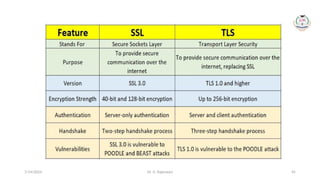
Secure Sockets Layer/Transport Layer Security
(SSL/TLS) (1/5)
• Secure Sockets Layer (SSL) is a standard technique for transmitting documents
securely across a network. SSL technology, created by Netscape, establishes a secure
connection between a Web server and a browser, ensuring private and secure data
transmission
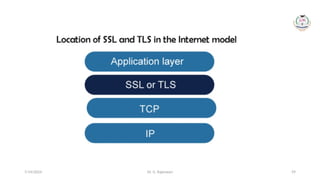
• SSL communicates using the Transport Control Protocol (TCP). The term "socket" in
SSL refers to the method of sending data via a network between a client and a server
• A Web server requires an SSL certificate to establish a secure SSL connection while
using SSL for safe Internet transactions. SSL encrypts network connection segments
atop the transport layer, a network connection component above the program layer
• SSL is based on an asymmetric cryptographic process in which a Web browser
generates both a public and a private (secret) key
• A certificate signing request is a data file that contains the public key (CSR). Only the
recipient receives the private key
7/14/2024
Dr. G. Rajeswari 43
SSL/TLS (2/5)
• Secure Sockets Layer (SSL) was originally designed to solve the security
problems with web browsers
• Back at the beginning of the Internet boom, the great commercial
opportunity that the Internet offered was realized, but the security
concerns of sending personal and credit card information in clear text
needed to be addressed because attackers could easily intercept this
information and use it for evil purposes
• Netscape was the first browser to offer SSL and made the Web safe for
commercial transactions; thus, a secure channel could be provided for
transmission of data
• SSL is transparent, which means that the data arrives at the destination
unchanged by the encryption/decryption process. Therefore, SSL can be
used for many applications
7/14/2024
Dr. G. Rajeswari 44
SSL/TLS (3/5)
• SSL and its successor, Transport Layer Security (TLS), are the most
widely implemented security protocols on the Internet
• Originally implemented by Netscape in 1994, SSL/TLS is implemented
in nearly every browser and most e-mail clients
• Due to the nature of the applications that necessitated SSL/TLS, it
uses TCP as the reliable transport protocol and does not have any
reliability mechanism built into it
• SSL/TLS has been the basis for other security protocols including
• Microsoft’s Private Communications Technology (PCT),
• Secure Transport Layer Protocol (STLP),
• Wireless Transport Layer Security (WTLS)
7/14/2024
Dr. G. Rajeswari 45
7/14/2024
Dr. G. Rajeswari 46
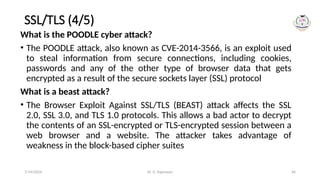
SSL/TLS (4/5)
What is the POODLE cyber attack?
• The POODLE attack, also known as CVE-2014-3566, is an exploit used
to steal information from secure connections, including cookies,
passwords and any of the other type of browser data that gets
encrypted as a result of the secure sockets layer (SSL) protocol
What is a beast attack?
• The Browser Exploit Against SSL/TLS (BEAST) attack affects the SSL
2.0, SSL 3.0, and TLS 1.0 protocols. This allows a bad actor to decrypt
the contents of an SSL-encrypted or TLS-encrypted session between a
web browser and a website. The attacker takes advantage of
weakness in the block-based cipher suites
7/14/2024
Dr. G. Rajeswari 47
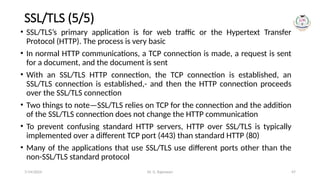
SSL/TLS (5/5)
• SSL/TLS’s primary application is for web traffic or the Hypertext Transfer
Protocol (HTTP). The process is very basic
• In normal HTTP communications, a TCP connection is made, a request is sent
for a document, and the document is sent
• With an SSL/TLS HTTP connection, the TCP connection is established, an
SSL/TLS connection is established,- and then the HTTP connection proceeds
over the SSL/TLS connection
• Two things to note—SSL/TLS relies on TCP for the connection and the addition
of the SSL/TLS connection does not change the HTTP communication
• To prevent confusing standard HTTP servers, HTTP over SSL/TLS is typically
implemented over a different TCP port (443) than standard HTTP (80)
• Many of the applications that use SSL/TLS use different ports other than the
non-SSL/TLS standard protocol
7/14/2024
Dr. G. Rajeswari 48
7/14/2024
Dr. G. Rajeswari 49
7/14/2024
Dr. G. Rajeswari 50
7/14/2024
Dr. G. Rajeswari 51
7/14/2024
Dr. G. Rajeswari 52
7/14/2024
Dr. G. Rajeswari 53
7/14/2024
Dr. G. Rajeswari 54
7/14/2024
Dr. G. Rajeswari 55
7/14/2024
Dr. G. Rajeswari 56
7/14/2024
Dr. G. Rajeswari 57
7/14/2024
Dr. G. Rajeswari 58
7/14/2024
Dr. G. Rajeswari 59
7/14/2024
Dr. G. Rajeswari 60
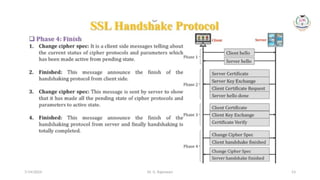
How Does SSL Work?
• SSL encrypts data communicated across the web to guarantee a high level
of privacy. Anyone attempting to intercept this data will meet a jumbled
mess of characters nearly hard to decrypt
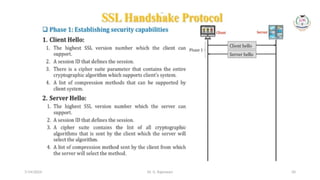
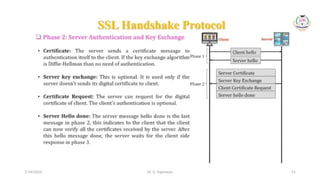
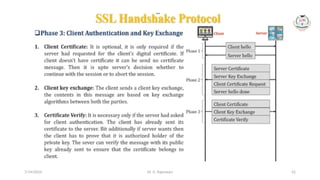
• SSL begins an authentication process known as a handshake between two
communicating devices to confirm that both devices are who they say they
are
• SSL also digitally certificates data to ensure data integrity, ensuring that it
has not been tampered with before reaching its intended receiver
• SSL has gone through multiple versions, each one more secure than the
last. TLS (Transport Layer Security) was introduced in 1999, replacing SSL
7/14/2024
Dr. G. Rajeswari 61
Objectives of SSL
The goals of SSL are as follows –
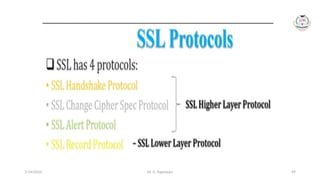
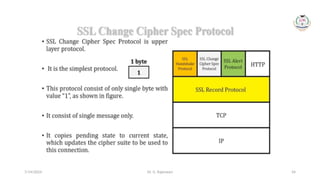
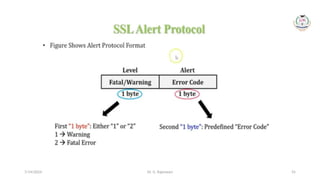
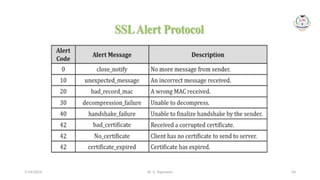
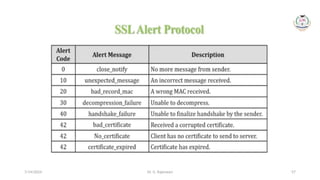
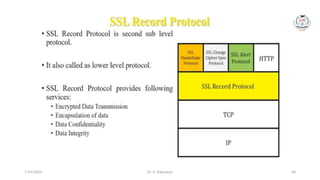
• Data integrity − Information is safe from tampering. The SSL Record Protocol, SSL
Handshake Protocol, SSL Change CipherSpec Protocol, and SSL Alert Protocol
maintain data privacy
• Client-server authentication − The SSL protocol authenticates the client and server
using standard cryptographic procedures
• SSL is the forerunner of Transport Layer Security (TLS), a cryptographic technology
for secure data transfer over the Internet
• SSL/TLS can be used to secure many varieties of network communications
• The most common implementations are based on known TCP communication,
such as e-mail, news, telnet, and the File Transfer Protocol (FTP)
• In many cases, different TCP ports are used for the SSL/TLS secured
communications
7/14/2024
Dr. G. Rajeswari 62
How to Obtain an SSL/TLS Certificate?
Are you ready to protect your website? The following is the fundamental
approach for requesting a publicly trusted SSL/TLS website certificate –
• The individual or organization requesting the certificate generates a pair of
public and private keys, which should be stored on the server being protected
• A certificate signing request is generated using the public key, the domain
name(s) to be protected, and (for OV and EV certificates) organizational
information about the company requesting the certificate (CSR)
• A publicly trusted CA receives the CSR (such as SSL.com). The CA verifies the
information in the CSR and generates a signed certificate that the requester
can install on their web server
7/14/2024
Dr. G. Rajeswari 63
Secure Shell (SSH)- Protocol or Program (1/3)
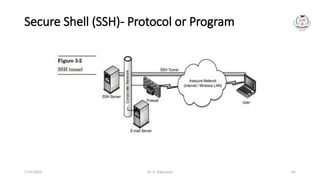
• SSH, also known as Secure Shell or Secure Socket Shell, is a network protocol that
gives users, particularly system administrators, a secure way to access a computer
over an unsecured network
• SSH also refers to the suite of utilities that implement the SSH protocol
• Secure Shell provides strong password authentication and public key
authentication, as well as encrypted data communications between two
computers connecting over an open network, such as the internet
• SSH is much like SSL/TLS in operation from a high level
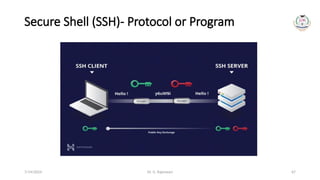
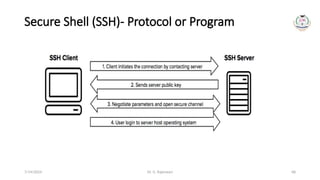
• SSH uses a public-key exchange to secure the initial connection and negotiates a
symmetric key for the data transfer during the session
• SSH can also easily be configured to authenticate both the server as well as the
client
• The most common implementation of the SSH protocol is the Unix ssh program
7/14/2024
Dr. G. Rajeswari 64
Secure Shell (SSH)- Protocol or Program (2/3)
• Secure Shell (SSH), much like SSL/TLS, was created out of a necessity for
secure communication when the only protocols being used were
unsecured protocols
• SSH was developed in 1995 by Tatu Ylönen after his university network
fell victim to a password-sniffing attack earlier that year
• SSH was originally designed to replace some Unix programs such as
telnet, FTP, remote login (rlogin), rshell remote shell (rshell), and remote
copy (rcp)
• Besides replacing these programs, SSH can be used to secure otherwise
insecure programs over a network
• Due to its flexibility and ease of use, SSH is a highly used security protocol
and comes with the standard installation of many operating systems
7/14/2024
Dr. G. Rajeswari 65
Secure Shell (SSH)- Protocol or Program (3/3)
• In addition to providing strong encryption, SSH is widely used by
network administrators to manage systems and applications remotely,
enabling them to log in to another computer over a network, execute
commands and move files from one computer to another
• SSH refers both to the cryptographic network protocol and to the
suite of utilities that implement that protocol
• SSH uses the client-server model, connecting a Secure Shell client
application, which is the end where the session is displayed, with an
SSH server, which is the end where the session runs
• SSH implementations often include support for application protocols
used for terminal emulation or file transfers
7/14/2024
Dr. G. Rajeswari 66
Usages of SSH protocol
• It provides secure access to users and automated processes
• It is an easy and secure way to transfer files from one system to another over an
insecure network. It also issues remote commands to the users
• It helps the users to manage the network infrastructure and other critical system
components
• It is used to log in to shell on a remote system (Host), which replaces Telnet and
rlogin and is used to execute a single command on the host, which replaces rsh
• It combines with sync utility to backup, copy, and mirror files with complete
security and efficiency
• It can be used for forwarding a port. By using SSH, we can set up the automatic
login to a remote server such as OpenSSH
• We can securely browse the web through the encrypted proxy connection with
the SSH client, supporting the SOCKS protocol
7/14/2024
Dr. G. Rajeswari 67
Secure Shell (SSH)- Protocol or Program
7/14/2024
Dr. G. Rajeswari 68
Secure Shell (SSH)- Protocol or Program
7/14/2024
Dr. G. Rajeswari 69
Secure Shell (SSH)- Protocol or Program
7/14/2024
Dr. G. Rajeswari 70
Terminal Access
1. SSH (Secure Shell):
Description: SSH is a cryptographic network protocol that provides secure terminal access
to remote systems over an unsecured network
Usage: It is widely used for command-line-based access to servers and network devices,
allowing administrators to execute commands on remote systems securely
Features: SSH encrypts the communication between the client and server, preventing
eavesdropping and tampering
2. Telnet (Telecommunication Network):
Description: Telnet is a network protocol used for terminal emulation on a remote host.
Usage: Telnet allows a user to establish a connection to a remote host and interact with its
command-line interface as if they were physically present
Security Concerns: Telnet transmits data, including login credentials, in plain text, making
it insecure. SSH is recommended as a more secure alternative
7/14/2024
Dr. G. Rajeswari 71
Telnet
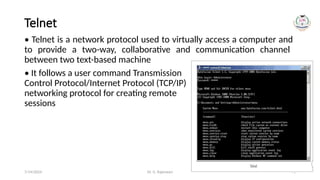
• Telnet is a network protocol used to virtually access a computer and
to provide a two-way, collaborative and communication channel
between two text-based machine
• It follows a user command Transmission
Control Protocol/Internet Protocol (TCP/IP)
networking protocol for creating remote
sessions
7/14/2024
Dr. G. Rajeswari 72
File Transfer (1/4)
1. FTP (File Transfer Protocol):
Description: FTP is a standard network protocol used to transfer files from one
host to another over a TCP-based network
Usage: It allows users to upload and download files between their local systems
and remote servers
Security Concerns: FTP transmits data in plain text, including usernames and
passwords. FTPS (FTP Secure) and SFTP (SSH File Transfer Protocol) are more
secure alternatives
2. FTPS (FTP Secure):
Description: FTPS is an extension of FTP that adds support for Transport Layer
Security (TLS) or Secure Sockets Layer (SSL) encryption
Usage: It provides a secure method for file transfer by encrypting the data during
transmission, addressing the security concerns of traditional FTP
7/14/2024
Dr. G. Rajeswari 73
File Transfer (2/4)
3. SFTP (SSH File Transfer Protocol):
Description: SFTP is a secure file transfer protocol that operates over an encrypted SSH
connection
Usage: SFTP allows users to transfer files securely and also includes file management
capabilities
Features: Like SSH, SFTP encrypts data during transmission, providing a secure alternative
to traditional FTP
4. SCP (Secure Copy Protocol):
Description: SCP is a protocol that uses SSH for secure file transfers and remote file
management
Usage: It enables secure copying of files between local and remote hosts using the
command line
Features: SCP encrypts both the file content and the authentication information during
the transfer
7/14/2024
Dr. G. Rajeswari 74
File Transfer (3/4)
5. HTTP/HTTPS (Hypertext Transfer Protocol/Secure):
Description: While primarily used for web communication, HTTP/HTTPS can be
employed for file downloads or uploads using web browsers
Usage: Web-based file transfers are common for sharing files or downloading resources
Security Considerations: HTTPS (HTTP over TLS) ensures secure and encrypted
communication
6. Rsync (Remote Sync):
Description: Rsync is a utility for efficiently transferring and synchronizing files between
systems
Usage: Rsync is commonly used for backup and mirroring purposes, and it can work
over SSH for added security
Features: Rsync minimizes data transfer by only copying the differences between
source and destination files
7/14/2024
Dr. G. Rajeswari 75
File Transfer (4/4)
• These protocols play a crucial role in network administration, system
management, and data exchange between local and remote systems
• The choice of protocol depends on factors such as security requirements,
ease of use, and specific use cases
• For secure and efficient operations, it's recommended to use protocols that
incorporate encryption, such as SSH-based protocols for terminal access
and FTPS or SFTP for file transfers
7/14/2024
Dr. G. Rajeswari 76
Port forwarding (1/6)
• Port forwarding is a network configuration technique that allows traffic to
pass through a router or firewall to reach a specific device or service on a
private network. While port forwarding can be a useful tool for enabling
remote access to specific services, it comes with security risks
• Here's a word of caution and some considerations when implementing port
forwarding:
1. Security Implications:
• Risk of Unauthorized Access: Port forwarding can expose services to the
internet, potentially allowing unauthorized users to access them if proper
security measures are not in place
• Increased Attack Surface: Opening ports creates additional entry points for
potential attackers, increasing the overall attack surface of your network
7/14/2024
Dr. G. Rajeswari 77
Port forwarding (2/6)
2. Default Credentials and Vulnerabilities:
• Device Security: Many devices and services come with default credentials or may
have known
• vulnerabilities. Exposing such services through port forwarding without securing
them can lead to unauthorized access
• Regular Updates: Ensure that the devices and services behind the forwarded
ports are kept up to date with the latest security patches
3. Choose Strong Authentication:
• Strong Passwords: If port forwarding is necessary for remote access to a service,
ensure that strong, unique passwords are set for any accounts associated with
that service
• Multi-Factor Authentication (MFA): Whenever possible, enable multi-factor
authentication to add an extra layer of security
7/14/2024
Dr. G. Rajeswari 78
Port forwarding (3/6)
4. Use Non-Standard Ports:
• Port Number Selection: Instead of using default port numbers (e.g., 22 for
SSH, 80 for HTTP), consider using non-standard port numbers for added
security. This can help reduce the visibility of services to automated
scanning tools
• Avoid Common Ports: Avoid using commonly targeted ports for well-known
services, as they are more likely to attract malicious activity
5. Regularly Audit and Monitor:
• Regular Audits: Periodically review and audit the list of forwarded ports to
ensure that only necessary services are exposed
• Traffic Monitoring: Implement traffic monitoring and intrusion detection
systems to detect and respond to any unusual or suspicious activity
7/14/2024
Dr. G. Rajeswari 79
Port forwarding (4/6)
6. Limit the Scope of Port Forwarding:
• Specific IP Addresses: If possible, restrict port forwarding to specific
external IP addresses that need access to the service. Avoid opening ports
to the entire internet
• Time Restrictions: Some routers and firewalls allow you to set time-based
rules for port forwarding, limiting exposure during specific periods
7. Consider VPNs for Remote Access:
• Virtual Private Networks (VPNs): Instead of exposing services directly to
the internet, consider using a VPN for remote access. This adds an extra
layer of encryption and authentication before accessing internal services
7/14/2024
Dr. G. Rajeswari 80
Port forwarding (5/6)
8. Regularly Update Router Firmware:
• Router Security: Keep the firmware of your router or firewall up to date
with the latest security patches. Router vulnerabilities can be exploited to
compromise port forwarding configurations
9. Documentation and Accountability:
• Documentation: Keep detailed documentation of the ports that are
forwarded, the services they correspond to, and any associated security
measures
• Accountability: Clearly define roles and responsibilities for managing and
monitoring port forwarding configurations
7/14/2024
Dr. G. Rajeswari 81
Port forwarding (6/6)
• Always weigh the necessity of port forwarding against the potential
security risks
• If possible, consider alternative methods such as VPNs or secure remote
access solutions that can provide the needed connectivity without
exposing services directly to the internet
• Security should always be a top priority when configuring network devices
and services
7/14/2024
Dr. G. Rajeswari 82
Man-in- the-Middle of SSL/TLS (1/3)
• A Man-in-the-Middle (MitM) attack on SSL/TLS involves an attacker intercepting
and potentially altering the communication between two parties who believe they
are communicating directly and securely. SSL (Secure Sockets Layer) and its
successor TLS (Transport Layer Security) are cryptographic protocols used to
secure communication over a computer network. A successful MitM attack can
compromise the confidentiality and integrity of the communication. Here's how a
MitM attack on SSL/TLS might occur:
1. Interception of Traffic:
• The attacker positions themselves between the client and the server, intercepting
the communication passing between them
2. SSL/TLS Handshake Manipulation:
• During the SSL/TLS handshake, the client and server exchange information to
establish a secure connection. The attacker may manipulate this process to insert
themselves into the communication
7/14/2024
Dr. G. Rajeswari 83
Man-in- the-Middle of SSL/TLS (2/3)
3. Creation of Fake Certificates:
• The attacker may create fraudulent SSL/TLS certificates that appear valid to
the client. This involves either using a self-signed certificate or obtaining a
certificate from a compromised or rogue certificate authority
4. DNS Spoofing:
• The attacker might perform DNS spoofing to redirect the client to a malicious
server under their control. The client, thinking it's connecting to the
legitimate server, unwittingly communicates with the attacker's server
5. SSL Stripping:
• The attacker may force the communication to use unencrypted HTTP instead
of HTTPS. While the client and server believe they are using a secure
connection, the attacker can intercept and manipulate the unencrypted traffic
7/14/2024
Dr. G. Rajeswari 84
Man-in- the-Middle of SSL/TLS (3/3)
6. Session Hijacking:
• The attacker may hijack an established SSL/TLS session by stealing the
session cookies or session IDs, gaining unauthorized access to the user's
account
7. SSL/TLS Version Downgrade:
• The attacker could force the client and server to use an older, potentially
less secure version of SSL/TLS, making it easier to exploit known
vulnerabilities
7/14/2024
Dr. G. Rajeswari 85
Mitigating Man-in- the-Middle of SSL/TLS (1/2)
1. Strong Certificate Practices:
Ensure that SSL/TLS certificates are obtained from trusted certificate authorities (CAs) and
regularly audit the certificate chain
2. Certificate Pinning:
Implement certificate pinning to bind a service to a specific certificate, making it more
difficult for attackers to use fraudulent certificates
3. HTTP Strict Transport Security (HSTS):
Implement HSTS to enforce the use of secure connections, preventing SSL stripping attacks
4. Encrypting Entire Session:
Use end-to-end encryption to encrypt the entire communication session, protecting
against eavesdropping even if a MitM attacker intercepts the traffic
5. Perfect Forward Secrecy (PFS):
Enable Perfect Forward Secrecy to ensure that even if a long-term secret key is
compromised, past communications remain secure
7/14/2024
Dr. G. Rajeswari 86
Mitigating Man-in- the-Middle of SSL/TLS (2/2)
6. Strict Certificate Validation:
Configure clients to strictly validate SSL/TLS certificates, avoiding connections to
servers with untrusted or self-signed certificates
7. Network Segmentation:
• An effective technique to strengthen security, network segmentation is a physical or
virtual architectural approach dividing a network into multiple segments, each acting
as its own subnetwork providing additional security and control
• Implement network segmentation to minimize the impact of a successful MitM
attack by restricting the attacker's access
8. Educate Users:
Train users to be cautious about accessing sensitive information on unsecured
networks and to verify the legitimacy of SSL/TLS connections
By implementing these measures, organizations can significantly reduce the risk
of MitM attacks on SSL/TLS and enhance the overall security of their communications
7/14/2024
Dr. G. Rajeswari 87
WTLS-Wireless Transport Layer Security
• Wireless Transport Layer Security (WTLS) is a security level for the Wireless
Application Protocol (WAP), specifically for the applications that use WAP. It is
based on Transport Layer Security (TLS) v1
• WTLS was developed to address issues surrounding mobile network devices
including limited memory capacity, lower processing power and low bandwidth
• It also provides authentication, data integrity and privacy protection
mechanisms
• Designed to support datagrams in a high-latency, low-bandwidth
environment, WTLS provides an optimized handshake through dynamic key
refreshing, which allows encryption keys to be regularly updated during a
secure session
• The method helps clients and servers communicate over a secure and
authenticated connection
7/14/2024
Dr. G. Rajeswari 88
WTLS- Features
• Data integrity
WTLS achieves data integrity by using message authentication to ensure that
the data sent between a client and gateway is not modified
• Privacy
WTLS uses encryption to ensure that the data cannot be read by an
unauthorized middleman or third party
• Authentication
WTLS uses digital certificates to authenticate the parties involved in a
transaction or communication
• Denial-of-service (DoS) protection
WTLS detects and rejects replayed messages and messages that are not
successfully verified to prevent DoS attacks
7/14/2024
Dr. G. Rajeswari 89
Man-in- the-Middle of WTLS (1/2)
A Man-in-the-Middle (MitM) attack on WTLS involves an unauthorized entity
intercepting and potentially altering the communication between two
parties that believe they are communicating securely. Here's an overview of
how a MitM attack on WTLS might occur:
1. Interception of WTLS Handshake:
The attacker positions themselves between the client and the server,
intercepting the WTLS handshake process.
2. Impersonation of the Server:
The attacker may impersonate the server by presenting a fraudulent WTLS
server certificate to the client. This can be achieved by using a self-signed
certificate or obtaining a certificate from a compromised or rogue certificate
authority
7/14/2024
Dr. G. Rajeswari 90
Man-in- the-Middle of WTLS (2/2)
3. Creation of Fake Certificates:
Similar to SSL/TLS, the attacker might create fake WTLS certificates to deceive the
client into thinking it is communicating with a legitimate server
4. Session Hijacking:
The attacker could hijack an established WTLS session by stealing session information,
such as session keys or tokens, and gain unauthorized access to the user's sensitive
information
5. DNS Spoofing:
The attacker may perform DNS spoofing to redirect the client to a malicious server
under their control. This can lead to the client unknowingly communicating with the
attacker's server
6. Encryption Weaknesses:
Exploiting weaknesses in the encryption algorithms used by WTLS to decrypt and
manipulate the traffic passing through the MitM attacker
7/14/2024
Dr. G. Rajeswari 91
Mitigating Man-in- the-Middle of WTLS (1/2)
1. Strong Certificate Practices:
Ensure that WTLS certificates are obtained from trusted certificate
authorities (CAs) and regularly audit the certificate chain
2. Certificate Pinning:
Implement certificate pinning to bind a service to a specific certificate,
making it more difficult for attackers to use fraudulent certificates
3. Secure Key Exchange:
Implement secure key exchange mechanisms to protect against
unauthorized interception and tampering during the WTLS handshake
4. Session Management:
Implement secure session management practices to protect against session
hijacking attempts
7/14/2024
Dr. G. Rajeswari 92
Mitigating Man-in- the-Middle of WTLS (2/2)
5. Secure Random Number Generation:
Ensure that random numbers used in cryptographic operations, such as key
generation, are generated securely to prevent predictable patterns that
attackers could exploit
6. Strict Certificate Validation:
Configure clients to strictly validate WTLS certificates, avoiding connections to
servers with untrusted or self-signed certificates
7. Network Segmentation:
Implement network segmentation to minimize the impact of a successful MitM
attack by restricting the attacker's access
8.Educate Users:
Train users to be cautious about accessing sensitive information on unsecured
networks and to verify the legitimacy of WTLS connections
7/14/2024
Dr. G. Rajeswari 93
Wired Equivalent Privacy (or WEP) encryption (1/2)
• The wireless network can transmit the data (or information) all over an
area. Therefore it can be easily intercepted through wireless data
transmissions
• In today's world, one of the essential resources of an organization is
information (or data)
• This can be one reason why cybercriminals get increased daily because
hackers always try to find new methods and tools to infiltrate your system
to get that information
• So it is essential to make sure that the devices, networks, and servers used
by the organization must be well protected
• In the following, will discuss how can we keep our organization's wireless
networks safe with the help of Wired Equivalent Privacy encryption
7/14/2024
Dr. G. Rajeswari 94
WEP (2/2)
• The term "WEP" stands for Wired Equivalent Privacy. It can be referred to as a security
algorithm introduced to provide data privacy (or confidently) for wireless networks
• WEP was introduced as part of the 802.11 standards. One of the most essential
features of WEP is its 10 or 26 hexadecimal digits key, or we can also say 40 or 104
bits. If we take a look in history, these 40 or 104 bits were very popular among the
users and considered one of the best choices for configuration the routers
• However, the WEP was initially designed to provide a level of security for wireless
networks, or we can more specifically say WLANs
• Although, the level of security provided by WEP is similar to the level of security
expected from a wired local area network, as specified in its name, it transmits data
through radio waves to a specific area that falls within its range
• Therefore the primary goal of WEP is to add a layer of security to the wireless
networks by providing strong encryption for the data. This way, the data will be
unrecognizable to any unwanted or unauthorized users, except the intended receiver
7/14/2024
Dr. G. Rajeswari 95
What are the keys of WEP?
Typically, the primary purpose of WEP is to protect and maintain the integrity of
the data. To do so, it uses two shared keys:
• Unicast session key and Multicast key (also known as the global key)
1. Unicast session key:
It can be referred to as a type of encryption key commonly used to protect
unicast traffic between a wireless AP (Access Point) and the client(or user). It is
known as the unicast because it can only transmit the information or data between
two points. ( A single sender and a single receiver)
2. Multicast Key:
The multicast key is also considered as the global key. As its name suggests,
it is used to protect the multicast traffic between a single wireless AP and all of its
other wireless clients. The term multicast is used because it can be used to transmit
the data between a single sender and multiple receivers or between the multiple
senders and the single receiver
7/14/2024
Dr. G. Rajeswari 96
802.1x
• Devices attempting to connect to a LAN or WLAN require an authentication
mechanism. IEEE 802.1X, an IEEE Standard for Port-Based Network Access Control
(PNAC), provides protected authentication for secure network access
• An 802.1X network is different from home networks in one major way; it has an
authentication server called a RADIUS Server. It checks a user's credentials to see
if they are an active member of the organization and, depending on the network
policies, grants users varying levels of access to the network. This allows unique
credentials or certificates to be used per user, eliminating the reliance on a single
network password that can be easily stolen
• RADIUS (Remote Authentication Dial-In User Service) is a client-server protocol
and software that enables remote access servers to communicate with a central
server to authenticate dial-in users and authorize their access to the requested
system or service
7/14/2024
Dr. G. Rajeswari 97
How Does 802.1X Work?
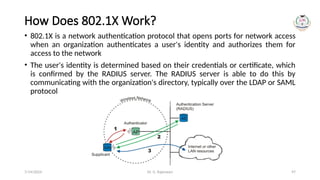
• 802.1X is a network authentication protocol that opens ports for network access
when an organization authenticates a user's identity and authorizes them for
access to the network
• The user's identity is determined based on their credentials or certificate, which
is confirmed by the RADIUS server. The RADIUS server is able to do this by
communicating with the organization's directory, typically over the LDAP or SAML
protocol
7/14/2024
Dr. G. Rajeswari 98
What is 802.1X EAP Security?
• The standard authentication protocol used on encrypted networks is
Extensible Authentication Protocol (EAP), which provides a secure method
to send identifying information over-the-air for network authentication
• 802.1X is the standard that is used for passing EAP over wired and wireless
Local Area Networks (LAN). It provides an encrypted EAP tunnel that
prevents outside users from intercepting information
• The EAP protocol can be configured for credential (EAP-TLS and PEAP) and
digital certificate (EAP-TLS) authentication and is a highly secure method
for protecting the authentication process
7/14/2024
Dr. G. Rajeswari 99
What is 802.1X Used For?
• 802.1X is used for secure network authentication. If you are an
organization dealing with valuable and sensitive information, you need a
secure method of transporting data
• 802.1X is used so devices can communicate securely with access points
(enterprise-grade routers). It was historically only used by large
organizations like enterprises, universities, and hospitals, but is rapidly
becoming adopted by smaller businesses because of the growing threats in
cyber security
• 802.1X is often referred to as WPA2-Enterprise. In contrast, the Pre-Shared
Key network security most often used at home is referred to as WPA2-
Personal. WPA2-Personal is not sufficient for any organization dealing with
sensitive information and can put organizations at serious risk for cyber
crimes
7/14/2024
Dr. G. Rajeswari 100
Are IEEE 802.1X and Wi-Fi the Same?
• Almost. The IEEE 802.1X standard was first designed for use in wired
Ethernet networks. Wi-Fi is a trademarked phrase that refers to the IEEE
802.11x standard specifically – a modified version of the original standard
• That being said, most security and networking professionals use the term
802.1X for both wired and wireless networks if they are using
WPA2-Enterprise security
7/14/2024
Dr. G. Rajeswari 101
How Secure is 802.1X? (1/2)
• When used correctly, it is the golden standard of network authentication
security. It can prevent over-the-air credential theft attacks like Man-in-the-
Middle attacks and Evil Twin proxies
• It is much more secure than Pre-Shared Key networks, which are typically
used in personal networks. However, 802.1X security can vary greatly
depending on two factors
• The first variable occurs if end users are left to manually configure their
devices
• The configuration process requires high-level IT knowledge to understand
and if one step is incorrect, they are left vulnerable to credential theft
• Instead, it is highly recommend using dedicated 802.1X onboarding
software
7/14/2024
Dr. G. Rajeswari 102
How Secure is 802.1X? (2/2)
• The second variable depends on whether an organization is using
credential-based authentication or certificate-based authentication
• Certificate-based EAP-TLS significantly reduces an organization's risk for
credential theft and is the most secure way to use 802.1X
• Not only does it stop credentials from being sent over the air where they
can be easily stolen, but it forces users to go through an
enrollment/onboarding process that ensures their devices are configured
correctly
7/14/2024
Dr. G. Rajeswari 103
IP Security
• IP Sec (Internet Protocol Security) is an Internet Engineering Task Force
(IETF) standard suite of protocols between two communication points
across the IP network that provide data authentication, integrity, and
confidentiality
• It also defines the encrypted, decrypted, and authenticated packets. The
protocols needed for secure key exchange and key management are
defined in it
7/14/2024
Dr. G. Rajeswari 104
Uses of IP Security
IPsec can be used to do the following things:
• To encrypt application layer data
• To provide security for routers sending routing data across the public
internet
• To provide authentication without encryption, like to authenticate that the
data originates from a known sender
• To protect network data by setting up circuits using IPsec tunneling in
which all data being sent between the two endpoints is encrypted, as with
a Virtual Private Network(VPN) connection
7/14/2024
Dr. G. Rajeswari 105
Components of IP Security (1/3)
It has the following components:
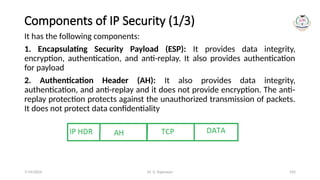
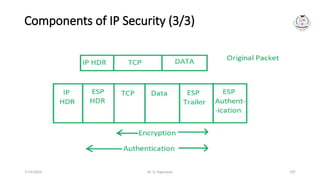
1. Encapsulating Security Payload (ESP): It provides data integrity,
encryption, authentication, and anti-replay. It also provides authentication
for payload
2. Authentication Header (AH): It also provides data integrity,
authentication, and anti-replay and it does not provide encryption. The anti-
replay protection protects against the unauthorized transmission of packets.
It does not protect data confidentiality
7/14/2024
Dr. G. Rajeswari 106
Components of IP Security (2/3)
3.
• Internet Key Exchange (IKE): It is a network security protocol designed to
dynamically exchange encryption keys and find a way over Security Association
(SA) between two devices
• IKE provides message content protection and also an open frame for
implementing standard algorithms such as SHA and MD5. The algorithm’s IP sec
users produce a unique identifier for each packet. This identifier then allows a
device to determine whether a packet has been correct or not. Packets that are
not authorized are discarded and not given to the receiver
• The Security Association (SA) establishes shared security attributes between two
network entities to support secure communication. The Key Management
Protocol (ISAKMP) and Internet Security Association provides a framework for
authentication and key exchange. ISAKMP describes the setup of SAs and how
direct connections between two hosts are established using IPsec
7/14/2024
Dr. G. Rajeswari 107
Components of IP Security (3/3)
7/14/2024
Dr. G. Rajeswari 108
IP Security Architecture (1/2)
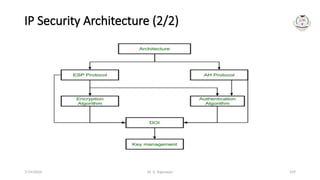
• IPSec architecture uses two protocols to secure the traffic or data flow. These
protocols are ESP (Encapsulation Security Payload) and AH (Authentication
Header)
• IPSec Architecture includes protocols, algorithms, DOI (Domain of Interpretation),
and Key Management
• DOI refers to a set of rules and conventions that define the parameters and
formats used by the IPSec protocols, ensuring interoperability between different
implementations
• All these components are very important in order to provide the three main
services:
• Confidentiality
• Authenticity
• Integrity
7/14/2024
Dr. G. Rajeswari 109
IP Security Architecture (2/2)
7/14/2024
Dr. G. Rajeswari 110
Features of IPSec (1/2)
• Authentication: IPSec provides authentication of IP packets using digital
signatures or shared secrets. This helps ensure that the packets are not tampered
with or forged
• Confidentiality: IPSec provides confidentiality by encrypting IP packets,
preventing eavesdropping on the network traffic
• Integrity: IPSec provides integrity by ensuring that IP packets have not been
modified or corrupted during transmission
• Key management: IPSec provides key management services, including key
exchange and key revocation, to ensure that cryptographic keys are securely
managed
• Tunneling: IPSec supports tunneling, allowing IP packets to be encapsulated
within another protocol, such as GRE (Generic Routing Encapsulation) or L2TP
(Layer 2 Tunneling Protocol)
7/14/2024
Dr. G. Rajeswari 111
Features of IPSec (2/2)
• Flexibility: IPSec can be configured to provide security for a wide range of
network topologies, including point-to-point, site-to-site, and remote access
connections
• Interoperability: IPSec is an open standard protocol, which means that it is
supported by a wide range of vendors and can be used in heterogeneous
environments
7/14/2024
Dr. G. Rajeswari 112
Advantages of IPSec
• Strong security: IPSec provides strong cryptographic security services that help
protect sensitive data and ensure network privacy and integrity
• Wide compatibility: IPSec is an open standard protocol that is widely supported
by vendors and can be used in heterogeneous environments
• Flexibility: IPSec can be configured to provide security for a wide range of
network topologies, including point-to-point, site-to-site, and remote access
connections
• Scalability: IPSec can be used to secure large-scale networks and can be scaled up
or down as needed
• Improved network performance: IPSec can help improve network performance
by reducing network congestion and improving network efficiency
7/14/2024
Dr. G. Rajeswari 113
Disadvantages of IPSec
• Configuration complexity: IPSec can be complex to con 昀椀 gure and requires
specialized knowledge and skills
• Compatibility issues: IPSec can have compatibility issues with some network
devices and applications, which can lead to interoperability problems
• Performance impact: IPSec can impact network performance due to the
overhead of encryption and decryption of IP packets
• Key management: IPSec requires effective key management to ensure the
security of the cryptographic keys used for encryption and authentication
• Limited protection: IPSec only provides protection for IP traffic, and other
protocols such as ICMP, DNS, and routing protocols may still be vulnerable to
attacks
7/14/2024
Dr. G. Rajeswari 114
Steps to improve wireless network security
• Change default passwords: Ensure that all default passwords for wireless access
points, routers, and other network devices are changed to strong, unique passwords
• Use strong encryption: Use WPA2 encryption or other strong encryption methods for
securing wireless networks
• Disable SSID broadcasting: Disabling the broadcast of the wireless network's Service
Set Identifier (SSID) can prevent unauthorized users from discovering your wireless
network
• Enable MAC address filtering: Enable MAC address filtering on your wireless network
to allow only specific devices to connect to the network
• Use a firewall: Install and configure a firewall to block unauthorized access to your
wireless network and to monitor network traffic
• Keep software updated: Keep all wireless network devices and software up-to-date
with the latest security patches and firmware updates to fix known security
vulnerabilities
7/14/2024
Dr. G. Rajeswari 115
7/14/2024

Unit 2 - INTRODUCTION TO WIRELESS SECURITY PROTOCOLS AND CRYPTOGRAPHY.pptx

  • 1.
    UNIT – 2 SCSA3079 MOBILEAND WIRELESS SECURITY
  • 2.
    Dr. G. Rajeswari2 INTRODUCTION TO WIRELESS SECURITY PROTOCOLS AND CRYPTOGRAPHY 1. OSI Model 2. Internet Model 3. Wireless Local Area Network (LAN) Security Protocols 4. Cryptography 5. Secure Sockets Layer/Transport Layer Security (SSL/TLS) 6. Secure Shell (SSH) - Protocol or Program 7. Terminal Access and File Transfer 8. Port Forwarding, Man-in-the-Middle (MITM) of SSL/TLS and SSH, WTLS 9. WEP, 802.1x, IP Security (IP Sec) 7/14/2024
  • 3.
    Dr. G. Rajeswari3 OSI Model • OSI stands for Open System Interconnection is a reference model that describes how information from a software application in one computer moves through a physical medium to the software application in another computer • OSI consists of seven layers, and each layer performs a particular network function • OSI model was developed by the International Organization for Standardization (ISO) in 1984, and it is now considered as an architectural model for the inter-computer communications • OSI model divides the whole task into seven smaller and manageable tasks. Each layer is assigned a particular task • Each layer is self-contained, so that task assigned to each layer can be performed independently 7/14/2024
  • 4.
    Dr. G. Rajeswari4 Characteristics of OSI Model • The OSI model is divided into two layers: upper layers and lower layers • The upper layer of the OSI model mainly deals with the application related issues, and they are implemented only in the software. The application layer is closest to the end user. Both the end user and the application layer interact with the software applications. An upper layer refers to the layer just above another layer • The lower layer of the OSI model deals with the data transport issues. The data link layer and the physical layer are implemented in hardware and software. The physical layer is the lowest layer of the OSI model and is closest to the physical medium. The physical layer is mainly responsible for placing the information on the physical medium 7/14/2024
  • 5.
    Dr. G. Rajeswari5 7/14/2024
  • 6.
    Dr. G. Rajeswari6 7 Layers of OSI Model There are the seven OSI layers. Each layer has different functions. A list of seven layers are given below: 1. Physical Layer 2. Data-Link Layer 3. Network Layer 4. Transport Layer 5. Session Layer 6. Presentation Layer 7. Application Layer 7/14/2024
  • 7.
    Dr. G. Rajeswari7 7/14/2024
  • 8.
    Dr. G. Rajeswari8 1. Physical layer • The main functionality of the physical layer is to transmit the individual bits from one node to another node • It is the lowest layer of the OSI model • It establishes, maintains and deactivates the physical connection • It specifies the mechanical, electrical and procedural network interface specifications 7/14/2024
  • 9.
    Dr. G. Rajeswari9 Functions of a Physical layer • Line Configuration: It defines the way how two or more devices can be connected physically • Data Transmission: It defines the transmission mode whether it is simplex, half-duplex or full-duplex mode between the two devices on the network • Topology: It defines the way how network devices are arranged • Signals: It determines the type of the signal used for transmitting the information 7/14/2024
  • 10.
    Dr. G. Rajeswari10 2. Data Link Layer • This layer is responsible for the error-free transfer of data frames • It defines the format of the data on the network • It provides a reliable and efficient communication between two or more devices • It is mainly responsible for the unique identification of each device that resides on a local network 7/14/2024
  • 11.
    Dr. G. Rajeswari11 Functions of the Data-link layer (1/2) • Framing: The data link layer translates the physical's raw bit stream into packets known as Frames. The Data link layer adds the header and trailer to the frame. The header which is added to the frame contains the hardware destination and source address • Physical Addressing: The Data link layer adds a header to the frame that contains a destination address. The frame is transmitted to the destination address mentioned in the header • Flow Control: Flow control is the main functionality of the Data-link layer. It is the technique through which the constant data rate is maintained on both the sides so that no data get corrupted. It ensures that the transmitting station such as a server with higher processing speed does not exceed the receiving station, with lower processing speed 7/14/2024
  • 12.
    Dr. G. Rajeswari12 Functions of the Data-link layer (2/2) • Error Control: Error control is achieved by adding a calculated value CRC (Cyclic Redundancy Check) that is placed to the Data link layer's trailer which is added to the message frame before it is sent to the physical layer. If any error seems to occur, then the receiver sends the acknowledgment for the retransmission of the corrupted frames • Access Control: When two or more devices are connected to the same communication channel, then the data link layer protocols are used to determine which device has control over the link at a given time 7/14/2024
  • 13.
    Dr. G. Rajeswari13 3. Network Layer • It is a layer 3 that manages device addressing, tracks the location of devices on the network • It determines the best path to move data from source to the destination based on the network conditions, the priority of service, and other factors • The Data link layer is responsible for routing and forwarding the packets • Routers are the layer 3 devices, they are specified in this layer and used to provide the routing services within an internetwork • The protocols used to route the network traffic are known as Network layer protocols. Examples of protocols are IP and Ipv6 7/14/2024
  • 14.
    Dr. G. Rajeswari14 Functions of Network Layer • Internetworking: An internetworking is the main responsibility of the network layer. It provides a logical connection between different devices • Addressing: A Network layer adds the source and destination address to the header of the frame. Addressing is used to identify the device on the internet • Routing: Routing is the major component of the network layer, and it determines the best optimal path out of the multiple paths from source to the destination • Packetizing: A Network Layer receives the packets from the upper layer and converts them into packets. This process is known as Packetizing. It is achieved by internet protocol (IP) 7/14/2024
  • 15.
    Dr. G. Rajeswari15 4. Transport Layer • The Transport layer is a Layer 4 ensures that messages are transmitted in the order in which they are sent and there is no duplication of data • The main responsibility of the transport layer is to transfer the data completely • It receives the data from the upper layer and converts them into smaller units known as segments • This layer can be termed as an end-to-end layer as it provides a point-to- point connection between source and destination to deliver the data reliably 7/14/2024
  • 16.
    Dr. G. Rajeswari16 Functions of Transport Layer (1/2) • Service-point addressing: Computers run several programs simultaneously due to this reason, the transmission of data from source to the destination not only from one computer to another computer but also from one process to another process. The transport layer adds the header that contains the address known as a service-point address or port address. The responsibility of the network layer is to transmit the data from one computer to another computer and the responsibility of the transport layer is to transmit the message to the correct process • Segmentation and reassembly: When the transport layer receives the message from the upper layer, it divides the message into multiple segments, and each segment is assigned with a sequence number that uniquely identifies each segment. When the message has arrived at the destination, then the transport layer reassembles the message based on their sequence numbers 7/14/2024
  • 17.
    Dr. G. Rajeswari17 Functions of Transport Layer (2/2) • Connection control: Transport layer provides two services Connection-oriented service and connectionless service. A connectionless service treats each segment as an individual packet, and they all travel in different routes to reach the destination. A connection-oriented service makes a connection with the transport layer at the destination machine before delivering the packets. In connection- oriented service, all the packets travel in the single route • Flow control: The transport layer also responsible for flow control but it is performed end-to-end rather than across a single link • Error control: The transport layer is also responsible for Error control. Error control is performed end-to-end rather than across the single link. The sender transport layer ensures that message reach at the destination without any error 7/14/2024
  • 18.
    Dr. G. Rajeswari18 5. Session Layer • It is a layer 3 in the OSI model • The Session layer is used to establish, maintain and synchronizes the interaction between communicating devices Functions of Session layer: • Dialog control: Session layer acts as a dialog controller that creates a dialog between two processes or we can say that it allows the communication between two processes which can be either half-duplex or full-duplex • Synchronization: Session layer adds some checkpoints when transmitting the data in a sequence. If some error occurs in the middle of the transmission of data, then the transmission will take place again from the checkpoint. This process is known as Synchronization and recovery 7/14/2024
  • 19.
    Dr. G. Rajeswari19 6. Presentation Layer • A Presentation layer is mainly concerned with the syntax and semantics of the information exchanged between the two systems • It acts as a data translator for a network • This layer is a part of the operating system that converts the data from one presentation format to another format • The Presentation layer is also known as the syntax layer 7/14/2024
  • 20.
    Dr. G. Rajeswari20 Functions of Presentation layer • Translation: The processes in two systems exchange the information in the form of character strings, numbers and so on. Different computers use different encoding methods, the presentation layer handles the interoperability between the different encoding methods. It converts the data from sender-dependent format into a common format and changes the common format into receiver- dependent format at the receiving end • Encryption: Encryption is needed to maintain privacy. Encryption is a process of converting the sender-transmitted information into another form and sends the resulting message over the network • Compression: Data compression is a process of compressing the data, i.e., it reduces the number of bits to be transmitted. Data compression is very important in multimedia such as text, audio, video 7/14/2024
  • 21.
    Dr. G. Rajeswari21 7. Application Layer • An application layer serves as a window for users and application processes to access network service • It handles issues such as network transparency, resource allocation, etc. • An application layer is not an application, but it performs the application layer functions. • This layer provides the network services to the end-users 7/14/2024
  • 22.
    Dr. G. Rajeswari22 Functions of Application layer • File transfer, access, and management (FTAM): An application layer allows a user to access the files in a remote computer, to retrieve the files from a computer and to manage the files in a remote computer • Mail services: An application layer provides the facility for email forwarding and storage • Directory services: An application provides the distributed database sources and is used to provide that global information about various objects 7/14/2024
  • 23.
    Dr. G. Rajeswari23 Internet Model (1/2) • Internet uses TCP/IP protocol suite, also known as Internet suite. This defines Internet Model which contains four layered architecture • OSI Model is general communication model but Internet Model is what the internet uses for all its communication • The internet is independent of its underlying network architecture so is its Model • This model has the following layers: 7/14/2024
  • 24.
    Dr. G. Rajeswari24 Internet Model (2/2) • Application Layer: This layer defines the protocol which enables user to interact with the network. For example, FTP, HTTP etc. • Transport Layer: This layer defines how data should flow between hosts. Major protocol at this layer is Transmission Control Protocol (TCP). This layer ensures data delivered between hosts is in-order and is responsible for end-to-end delivery • Internet Layer: Internet Protocol (IP) works on this layer. This layer facilitates host addressing and recognition. This layer defines routing • Network access Layer or Link Layer: This layer provides mechanism of sending and receiving actual data. Unlike its OSI Model counterpart, this layer is independent of underlying network architecture and hardware 7/14/2024
  • 25.
    Dr. G. Rajeswari25 7/14/2024
  • 26.
    Dr. G. Rajeswari26 Wireless LAN Security Protocols • Wireless Local Area Network (WLAN) security protocols are essential for protecting the confidentiality, integrity, and availability of data transmitted over wireless networks • Several security protocols have been developed over the years to address different aspects of wireless security • Here are some key WLAN security protocols: 7/14/2024
  • 27.
    Dr. G. Rajeswari27 1. WEP (Wired Equivalent Privacy) • Description: WEP was one of the earliest security protocols for wireless networks, introduced as part of the original IEEE 802.11 standard • Security Weaknesses: However, WEP has significant security vulnerabilities, and it is now considered highly insecure • It is susceptible to key-cracking attacks and provides weak protection for wireless communications 7/14/2024
  • 28.
    Dr. G. Rajeswari28 2. WPA (Wi-Fi Protected Access) • Description: WPA was introduced as a replacement for WEP to address its security weaknesses • Improvements: WPA improved the security of wireless networks by introducing Temporal Key Integrity Protocol (TKIP) for encryption and enforcing stronger key management practices • Vulnerabilities: While WPA was more secure than WEP, it is still vulnerable to certain attacks, and its use is generally discouraged in favor of more advanced protocols 7/14/2024
  • 29.
    Dr. G. Rajeswari29 3. WPA2 (Wi-Fi Protected Access 2) • Description: WPA2 represents a further improvement in wireless security and is currently one of the most widely used protocols • Encryption: It introduced the use of the Advanced Encryption Standard (AES) for more robust encryption, replacing TKIP used in WPA • Security Features: WPA2 incorporates stronger security mechanisms and has been the standard for securing Wi-Fi networks for many years 7/14/2024
  • 30.
    Dr. G. Rajeswari30 4. WPA3 (Wi-Fi Protected Access 3) • Description: WPA3 is the latest iteration in the evolution of Wi-Fi security, designed to address vulnerabilities identified in WPA2 • Enhancements: WPA3 introduces stronger encryption, individualized data encryption for open networks, protection against brute-force attacks on weak passwords, and improved security for IoT devices 7/14/2024
  • 31.
    Dr. G. Rajeswari31 5. 802.1X (EAP/TLS or PEAP) • Description: 802.1X is an IEEE standard that provides port-based network access control. It is commonly used with Extensible Authentication Protocol (EAP) methods for authentication • Security Features: EAP/TLS (EAP with Transport Layer Security) and PEAP (Protected Extensible Authentication Protocol) are commonly used within the 802.1X framework to provide more secure authentication 7/14/2024
  • 32.
    Dr. G. Rajeswari32 6. EAP-TLS (Extensible Authentication Protocol- Transport Layer Security) • Description: EAP-TLS is an authentication protocol that uses digital certificates to establish a secure communication channel between the client and the authentication server • Security Benefits: EAP-TLS provides a high level of security by ensuring that both the client and the server authenticate each other using digital certificates 7/14/2024
  • 33.
    Dr. G. Rajeswari33 7. WPA3-Personal and WPA3-Enterprise • Description: WPA3 introduces separate modes for personal (home) and enterprise (business) environments • Features: WPA3-Personal includes Simultaneous Authentication of Equals (SAE), a stronger key exchange protocol, while WPA3-Enterprise builds on the existing 802.1X framework for enhanced security in enterprise settings 7/14/2024
  • 34.
    Dr. G. Rajeswari34 8. Wireless Intrusion Detection Systems (WIDS) and Wireless Intrusion Prevention Systems (WIPS) • Description: While not encryption protocols, WIDS and WIPS are crucial components of WLAN security. They are designed to detect and, in the case of WIPS, prevent unauthorized access and potential threats on wireless networks • When securing a wireless network, it is recommended to use the latest and most secure protocols available • For optimal security, WPA3 is preferred over WPA2 or earlier protocols • Additionally, implementing other security measures such as strong and unique passwords, network segmentation, and regular security audits contributes to a more robust WLAN security posture 7/14/2024
  • 35.
    Dr. G. Rajeswari35 Cryptography • Cryptography is the art and science of making a cryptosystem that is capable of providing information security • Cryptography deals with the actual securing of digital data. It refers to the design of mechanisms based on mathematical algorithms that provide fundamental information security services • Thus, cryptography is the establishment of a large toolkit containing different techniques in security applications 7/14/2024
  • 36.
    Dr. G. Rajeswari36 What is Cryptanalysis? • The art and science of breaking the cipher text is known as cryptanalysis • Cryptanalysis is the sister branch of cryptography and they both co- exist. The cryptographic process results in the cipher text for transmission or storage • It involves the study of cryptographic mechanism with the intention to break them • Cryptanalysis is also used during the design of the new cryptographic techniques to test their security strengths • Note − Cryptography concerns with the design of cryptosystems, while cryptanalysis studies the breaking of cryptosystems 7/14/2024
  • 37.
    Dr. G. Rajeswari37 Security Services of Cryptography The primary objective of using cryptography is to provide the following four fundamental information security services • Confidentiality • Data Integrity • Authentication • Non-repudiation 7/14/2024
  • 38.
    Dr. G. Rajeswari38 Confidentiality • Confidentiality is the fundamental security service provided by cryptography • It is a security service that keeps the information from an unauthorized person. It is sometimes referred to as privacy or secrecy • Confidentiality can be achieved through numerous means starting from physical securing to the use of mathematical algorithms for data encryption 7/14/2024
  • 39.
    Dr. G. Rajeswari39 Data Integrity • It is security service that deals with identifying any alteration to the data • The data may get modified by an unauthorized entity intentionally or accidently • Integrity service confirms that whether data is intact or not since it was last created, transmitted, or stored by an authorized user • Data integrity cannot prevent the alteration of data, but provides a means for detecting whether data has been manipulated in an unauthorized manner 7/14/2024
  • 40.
    Dr. G. Rajeswari40 Authentication • Authentication provides the identification of the originator. It confirms to the receiver that the data received has been sent only by an identified and verified sender. Authentication service has two variants − 1. Message authentication identifies the originator of the message without any regard router or system that has sent the message 2. Entity authentication is assurance that data has been received from a specific entity, say a particular website • Apart from the originator, authentication may also provide assurance about other parameters related to data such as the date and time of creation/transmission 7/14/2024
  • 41.
    Dr. G. Rajeswari41 Non-repudiation • It is a security service that ensures that an entity cannot refuse the ownership of a previous commitment or an action • It is an assurance that the original creator of the data cannot deny the creation or transmission of the said data to a recipient or third party • Non-repudiation is a property that is most desirable in situations where there are chances of a dispute over the exchange of data • For example, once an order is placed electronically, a purchaser cannot deny the purchase order, if non-repudiation service was enabled in this transaction 7/14/2024
  • 42.
    Dr. G. Rajeswari42 Secure Sockets Layer/Transport Layer Security (SSL/TLS) (1/5) • Secure Sockets Layer (SSL) is a standard technique for transmitting documents securely across a network. SSL technology, created by Netscape, establishes a secure connection between a Web server and a browser, ensuring private and secure data transmission • SSL communicates using the Transport Control Protocol (TCP). The term "socket" in SSL refers to the method of sending data via a network between a client and a server • A Web server requires an SSL certificate to establish a secure SSL connection while using SSL for safe Internet transactions. SSL encrypts network connection segments atop the transport layer, a network connection component above the program layer • SSL is based on an asymmetric cryptographic process in which a Web browser generates both a public and a private (secret) key • A certificate signing request is a data file that contains the public key (CSR). Only the recipient receives the private key 7/14/2024
  • 43.
    Dr. G. Rajeswari43 SSL/TLS (2/5) • Secure Sockets Layer (SSL) was originally designed to solve the security problems with web browsers • Back at the beginning of the Internet boom, the great commercial opportunity that the Internet offered was realized, but the security concerns of sending personal and credit card information in clear text needed to be addressed because attackers could easily intercept this information and use it for evil purposes • Netscape was the first browser to offer SSL and made the Web safe for commercial transactions; thus, a secure channel could be provided for transmission of data • SSL is transparent, which means that the data arrives at the destination unchanged by the encryption/decryption process. Therefore, SSL can be used for many applications 7/14/2024
  • 44.
    Dr. G. Rajeswari44 SSL/TLS (3/5) • SSL and its successor, Transport Layer Security (TLS), are the most widely implemented security protocols on the Internet • Originally implemented by Netscape in 1994, SSL/TLS is implemented in nearly every browser and most e-mail clients • Due to the nature of the applications that necessitated SSL/TLS, it uses TCP as the reliable transport protocol and does not have any reliability mechanism built into it • SSL/TLS has been the basis for other security protocols including • Microsoft’s Private Communications Technology (PCT), • Secure Transport Layer Protocol (STLP), • Wireless Transport Layer Security (WTLS) 7/14/2024
  • 45.
    Dr. G. Rajeswari45 7/14/2024
  • 46.
    Dr. G. Rajeswari46 SSL/TLS (4/5) What is the POODLE cyber attack? • The POODLE attack, also known as CVE-2014-3566, is an exploit used to steal information from secure connections, including cookies, passwords and any of the other type of browser data that gets encrypted as a result of the secure sockets layer (SSL) protocol What is a beast attack? • The Browser Exploit Against SSL/TLS (BEAST) attack affects the SSL 2.0, SSL 3.0, and TLS 1.0 protocols. This allows a bad actor to decrypt the contents of an SSL-encrypted or TLS-encrypted session between a web browser and a website. The attacker takes advantage of weakness in the block-based cipher suites 7/14/2024
  • 47.
    Dr. G. Rajeswari47 SSL/TLS (5/5) • SSL/TLS’s primary application is for web traffic or the Hypertext Transfer Protocol (HTTP). The process is very basic • In normal HTTP communications, a TCP connection is made, a request is sent for a document, and the document is sent • With an SSL/TLS HTTP connection, the TCP connection is established, an SSL/TLS connection is established,- and then the HTTP connection proceeds over the SSL/TLS connection • Two things to note—SSL/TLS relies on TCP for the connection and the addition of the SSL/TLS connection does not change the HTTP communication • To prevent confusing standard HTTP servers, HTTP over SSL/TLS is typically implemented over a different TCP port (443) than standard HTTP (80) • Many of the applications that use SSL/TLS use different ports other than the non-SSL/TLS standard protocol 7/14/2024
  • 48.
    Dr. G. Rajeswari48 7/14/2024
  • 49.
    Dr. G. Rajeswari49 7/14/2024
  • 50.
    Dr. G. Rajeswari50 7/14/2024
  • 51.
    Dr. G. Rajeswari51 7/14/2024
  • 52.
    Dr. G. Rajeswari52 7/14/2024
  • 53.
    Dr. G. Rajeswari53 7/14/2024
  • 54.
    Dr. G. Rajeswari54 7/14/2024
  • 55.
    Dr. G. Rajeswari55 7/14/2024
  • 56.
    Dr. G. Rajeswari56 7/14/2024
  • 57.
    Dr. G. Rajeswari57 7/14/2024
  • 58.
    Dr. G. Rajeswari58 7/14/2024
  • 59.
    Dr. G. Rajeswari59 7/14/2024
  • 60.
    Dr. G. Rajeswari60 How Does SSL Work? • SSL encrypts data communicated across the web to guarantee a high level of privacy. Anyone attempting to intercept this data will meet a jumbled mess of characters nearly hard to decrypt • SSL begins an authentication process known as a handshake between two communicating devices to confirm that both devices are who they say they are • SSL also digitally certificates data to ensure data integrity, ensuring that it has not been tampered with before reaching its intended receiver • SSL has gone through multiple versions, each one more secure than the last. TLS (Transport Layer Security) was introduced in 1999, replacing SSL 7/14/2024
  • 61.
    Dr. G. Rajeswari61 Objectives of SSL The goals of SSL are as follows – • Data integrity − Information is safe from tampering. The SSL Record Protocol, SSL Handshake Protocol, SSL Change CipherSpec Protocol, and SSL Alert Protocol maintain data privacy • Client-server authentication − The SSL protocol authenticates the client and server using standard cryptographic procedures • SSL is the forerunner of Transport Layer Security (TLS), a cryptographic technology for secure data transfer over the Internet • SSL/TLS can be used to secure many varieties of network communications • The most common implementations are based on known TCP communication, such as e-mail, news, telnet, and the File Transfer Protocol (FTP) • In many cases, different TCP ports are used for the SSL/TLS secured communications 7/14/2024
  • 62.
    Dr. G. Rajeswari62 How to Obtain an SSL/TLS Certificate? Are you ready to protect your website? The following is the fundamental approach for requesting a publicly trusted SSL/TLS website certificate – • The individual or organization requesting the certificate generates a pair of public and private keys, which should be stored on the server being protected • A certificate signing request is generated using the public key, the domain name(s) to be protected, and (for OV and EV certificates) organizational information about the company requesting the certificate (CSR) • A publicly trusted CA receives the CSR (such as SSL.com). The CA verifies the information in the CSR and generates a signed certificate that the requester can install on their web server 7/14/2024
  • 63.
    Dr. G. Rajeswari63 Secure Shell (SSH)- Protocol or Program (1/3) • SSH, also known as Secure Shell or Secure Socket Shell, is a network protocol that gives users, particularly system administrators, a secure way to access a computer over an unsecured network • SSH also refers to the suite of utilities that implement the SSH protocol • Secure Shell provides strong password authentication and public key authentication, as well as encrypted data communications between two computers connecting over an open network, such as the internet • SSH is much like SSL/TLS in operation from a high level • SSH uses a public-key exchange to secure the initial connection and negotiates a symmetric key for the data transfer during the session • SSH can also easily be configured to authenticate both the server as well as the client • The most common implementation of the SSH protocol is the Unix ssh program 7/14/2024
  • 64.
    Dr. G. Rajeswari64 Secure Shell (SSH)- Protocol or Program (2/3) • Secure Shell (SSH), much like SSL/TLS, was created out of a necessity for secure communication when the only protocols being used were unsecured protocols • SSH was developed in 1995 by Tatu Ylönen after his university network fell victim to a password-sniffing attack earlier that year • SSH was originally designed to replace some Unix programs such as telnet, FTP, remote login (rlogin), rshell remote shell (rshell), and remote copy (rcp) • Besides replacing these programs, SSH can be used to secure otherwise insecure programs over a network • Due to its flexibility and ease of use, SSH is a highly used security protocol and comes with the standard installation of many operating systems 7/14/2024
  • 65.
    Dr. G. Rajeswari65 Secure Shell (SSH)- Protocol or Program (3/3) • In addition to providing strong encryption, SSH is widely used by network administrators to manage systems and applications remotely, enabling them to log in to another computer over a network, execute commands and move files from one computer to another • SSH refers both to the cryptographic network protocol and to the suite of utilities that implement that protocol • SSH uses the client-server model, connecting a Secure Shell client application, which is the end where the session is displayed, with an SSH server, which is the end where the session runs • SSH implementations often include support for application protocols used for terminal emulation or file transfers 7/14/2024
  • 66.
    Dr. G. Rajeswari66 Usages of SSH protocol • It provides secure access to users and automated processes • It is an easy and secure way to transfer files from one system to another over an insecure network. It also issues remote commands to the users • It helps the users to manage the network infrastructure and other critical system components • It is used to log in to shell on a remote system (Host), which replaces Telnet and rlogin and is used to execute a single command on the host, which replaces rsh • It combines with sync utility to backup, copy, and mirror files with complete security and efficiency • It can be used for forwarding a port. By using SSH, we can set up the automatic login to a remote server such as OpenSSH • We can securely browse the web through the encrypted proxy connection with the SSH client, supporting the SOCKS protocol 7/14/2024
  • 67.
    Dr. G. Rajeswari67 Secure Shell (SSH)- Protocol or Program 7/14/2024
  • 68.
    Dr. G. Rajeswari68 Secure Shell (SSH)- Protocol or Program 7/14/2024
  • 69.
    Dr. G. Rajeswari69 Secure Shell (SSH)- Protocol or Program 7/14/2024
  • 70.
    Dr. G. Rajeswari70 Terminal Access 1. SSH (Secure Shell): Description: SSH is a cryptographic network protocol that provides secure terminal access to remote systems over an unsecured network Usage: It is widely used for command-line-based access to servers and network devices, allowing administrators to execute commands on remote systems securely Features: SSH encrypts the communication between the client and server, preventing eavesdropping and tampering 2. Telnet (Telecommunication Network): Description: Telnet is a network protocol used for terminal emulation on a remote host. Usage: Telnet allows a user to establish a connection to a remote host and interact with its command-line interface as if they were physically present Security Concerns: Telnet transmits data, including login credentials, in plain text, making it insecure. SSH is recommended as a more secure alternative 7/14/2024
  • 71.
    Dr. G. Rajeswari71 Telnet • Telnet is a network protocol used to virtually access a computer and to provide a two-way, collaborative and communication channel between two text-based machine • It follows a user command Transmission Control Protocol/Internet Protocol (TCP/IP) networking protocol for creating remote sessions 7/14/2024
  • 72.
    Dr. G. Rajeswari72 File Transfer (1/4) 1. FTP (File Transfer Protocol): Description: FTP is a standard network protocol used to transfer files from one host to another over a TCP-based network Usage: It allows users to upload and download files between their local systems and remote servers Security Concerns: FTP transmits data in plain text, including usernames and passwords. FTPS (FTP Secure) and SFTP (SSH File Transfer Protocol) are more secure alternatives 2. FTPS (FTP Secure): Description: FTPS is an extension of FTP that adds support for Transport Layer Security (TLS) or Secure Sockets Layer (SSL) encryption Usage: It provides a secure method for file transfer by encrypting the data during transmission, addressing the security concerns of traditional FTP 7/14/2024
  • 73.
    Dr. G. Rajeswari73 File Transfer (2/4) 3. SFTP (SSH File Transfer Protocol): Description: SFTP is a secure file transfer protocol that operates over an encrypted SSH connection Usage: SFTP allows users to transfer files securely and also includes file management capabilities Features: Like SSH, SFTP encrypts data during transmission, providing a secure alternative to traditional FTP 4. SCP (Secure Copy Protocol): Description: SCP is a protocol that uses SSH for secure file transfers and remote file management Usage: It enables secure copying of files between local and remote hosts using the command line Features: SCP encrypts both the file content and the authentication information during the transfer 7/14/2024
  • 74.
    Dr. G. Rajeswari74 File Transfer (3/4) 5. HTTP/HTTPS (Hypertext Transfer Protocol/Secure): Description: While primarily used for web communication, HTTP/HTTPS can be employed for file downloads or uploads using web browsers Usage: Web-based file transfers are common for sharing files or downloading resources Security Considerations: HTTPS (HTTP over TLS) ensures secure and encrypted communication 6. Rsync (Remote Sync): Description: Rsync is a utility for efficiently transferring and synchronizing files between systems Usage: Rsync is commonly used for backup and mirroring purposes, and it can work over SSH for added security Features: Rsync minimizes data transfer by only copying the differences between source and destination files 7/14/2024
  • 75.
    Dr. G. Rajeswari75 File Transfer (4/4) • These protocols play a crucial role in network administration, system management, and data exchange between local and remote systems • The choice of protocol depends on factors such as security requirements, ease of use, and specific use cases • For secure and efficient operations, it's recommended to use protocols that incorporate encryption, such as SSH-based protocols for terminal access and FTPS or SFTP for file transfers 7/14/2024
  • 76.
    Dr. G. Rajeswari76 Port forwarding (1/6) • Port forwarding is a network configuration technique that allows traffic to pass through a router or firewall to reach a specific device or service on a private network. While port forwarding can be a useful tool for enabling remote access to specific services, it comes with security risks • Here's a word of caution and some considerations when implementing port forwarding: 1. Security Implications: • Risk of Unauthorized Access: Port forwarding can expose services to the internet, potentially allowing unauthorized users to access them if proper security measures are not in place • Increased Attack Surface: Opening ports creates additional entry points for potential attackers, increasing the overall attack surface of your network 7/14/2024
  • 77.
    Dr. G. Rajeswari77 Port forwarding (2/6) 2. Default Credentials and Vulnerabilities: • Device Security: Many devices and services come with default credentials or may have known • vulnerabilities. Exposing such services through port forwarding without securing them can lead to unauthorized access • Regular Updates: Ensure that the devices and services behind the forwarded ports are kept up to date with the latest security patches 3. Choose Strong Authentication: • Strong Passwords: If port forwarding is necessary for remote access to a service, ensure that strong, unique passwords are set for any accounts associated with that service • Multi-Factor Authentication (MFA): Whenever possible, enable multi-factor authentication to add an extra layer of security 7/14/2024
  • 78.
    Dr. G. Rajeswari78 Port forwarding (3/6) 4. Use Non-Standard Ports: • Port Number Selection: Instead of using default port numbers (e.g., 22 for SSH, 80 for HTTP), consider using non-standard port numbers for added security. This can help reduce the visibility of services to automated scanning tools • Avoid Common Ports: Avoid using commonly targeted ports for well-known services, as they are more likely to attract malicious activity 5. Regularly Audit and Monitor: • Regular Audits: Periodically review and audit the list of forwarded ports to ensure that only necessary services are exposed • Traffic Monitoring: Implement traffic monitoring and intrusion detection systems to detect and respond to any unusual or suspicious activity 7/14/2024
  • 79.
    Dr. G. Rajeswari79 Port forwarding (4/6) 6. Limit the Scope of Port Forwarding: • Specific IP Addresses: If possible, restrict port forwarding to specific external IP addresses that need access to the service. Avoid opening ports to the entire internet • Time Restrictions: Some routers and firewalls allow you to set time-based rules for port forwarding, limiting exposure during specific periods 7. Consider VPNs for Remote Access: • Virtual Private Networks (VPNs): Instead of exposing services directly to the internet, consider using a VPN for remote access. This adds an extra layer of encryption and authentication before accessing internal services 7/14/2024
  • 80.
    Dr. G. Rajeswari80 Port forwarding (5/6) 8. Regularly Update Router Firmware: • Router Security: Keep the firmware of your router or firewall up to date with the latest security patches. Router vulnerabilities can be exploited to compromise port forwarding configurations 9. Documentation and Accountability: • Documentation: Keep detailed documentation of the ports that are forwarded, the services they correspond to, and any associated security measures • Accountability: Clearly define roles and responsibilities for managing and monitoring port forwarding configurations 7/14/2024
  • 81.
    Dr. G. Rajeswari81 Port forwarding (6/6) • Always weigh the necessity of port forwarding against the potential security risks • If possible, consider alternative methods such as VPNs or secure remote access solutions that can provide the needed connectivity without exposing services directly to the internet • Security should always be a top priority when configuring network devices and services 7/14/2024
  • 82.
    Dr. G. Rajeswari82 Man-in- the-Middle of SSL/TLS (1/3) • A Man-in-the-Middle (MitM) attack on SSL/TLS involves an attacker intercepting and potentially altering the communication between two parties who believe they are communicating directly and securely. SSL (Secure Sockets Layer) and its successor TLS (Transport Layer Security) are cryptographic protocols used to secure communication over a computer network. A successful MitM attack can compromise the confidentiality and integrity of the communication. Here's how a MitM attack on SSL/TLS might occur: 1. Interception of Traffic: • The attacker positions themselves between the client and the server, intercepting the communication passing between them 2. SSL/TLS Handshake Manipulation: • During the SSL/TLS handshake, the client and server exchange information to establish a secure connection. The attacker may manipulate this process to insert themselves into the communication 7/14/2024
  • 83.
    Dr. G. Rajeswari83 Man-in- the-Middle of SSL/TLS (2/3) 3. Creation of Fake Certificates: • The attacker may create fraudulent SSL/TLS certificates that appear valid to the client. This involves either using a self-signed certificate or obtaining a certificate from a compromised or rogue certificate authority 4. DNS Spoofing: • The attacker might perform DNS spoofing to redirect the client to a malicious server under their control. The client, thinking it's connecting to the legitimate server, unwittingly communicates with the attacker's server 5. SSL Stripping: • The attacker may force the communication to use unencrypted HTTP instead of HTTPS. While the client and server believe they are using a secure connection, the attacker can intercept and manipulate the unencrypted traffic 7/14/2024
  • 84.
    Dr. G. Rajeswari84 Man-in- the-Middle of SSL/TLS (3/3) 6. Session Hijacking: • The attacker may hijack an established SSL/TLS session by stealing the session cookies or session IDs, gaining unauthorized access to the user's account 7. SSL/TLS Version Downgrade: • The attacker could force the client and server to use an older, potentially less secure version of SSL/TLS, making it easier to exploit known vulnerabilities 7/14/2024
  • 85.
    Dr. G. Rajeswari85 Mitigating Man-in- the-Middle of SSL/TLS (1/2) 1. Strong Certificate Practices: Ensure that SSL/TLS certificates are obtained from trusted certificate authorities (CAs) and regularly audit the certificate chain 2. Certificate Pinning: Implement certificate pinning to bind a service to a specific certificate, making it more difficult for attackers to use fraudulent certificates 3. HTTP Strict Transport Security (HSTS): Implement HSTS to enforce the use of secure connections, preventing SSL stripping attacks 4. Encrypting Entire Session: Use end-to-end encryption to encrypt the entire communication session, protecting against eavesdropping even if a MitM attacker intercepts the traffic 5. Perfect Forward Secrecy (PFS): Enable Perfect Forward Secrecy to ensure that even if a long-term secret key is compromised, past communications remain secure 7/14/2024
  • 86.
    Dr. G. Rajeswari86 Mitigating Man-in- the-Middle of SSL/TLS (2/2) 6. Strict Certificate Validation: Configure clients to strictly validate SSL/TLS certificates, avoiding connections to servers with untrusted or self-signed certificates 7. Network Segmentation: • An effective technique to strengthen security, network segmentation is a physical or virtual architectural approach dividing a network into multiple segments, each acting as its own subnetwork providing additional security and control • Implement network segmentation to minimize the impact of a successful MitM attack by restricting the attacker's access 8. Educate Users: Train users to be cautious about accessing sensitive information on unsecured networks and to verify the legitimacy of SSL/TLS connections By implementing these measures, organizations can significantly reduce the risk of MitM attacks on SSL/TLS and enhance the overall security of their communications 7/14/2024
  • 87.
    Dr. G. Rajeswari87 WTLS-Wireless Transport Layer Security • Wireless Transport Layer Security (WTLS) is a security level for the Wireless Application Protocol (WAP), specifically for the applications that use WAP. It is based on Transport Layer Security (TLS) v1 • WTLS was developed to address issues surrounding mobile network devices including limited memory capacity, lower processing power and low bandwidth • It also provides authentication, data integrity and privacy protection mechanisms • Designed to support datagrams in a high-latency, low-bandwidth environment, WTLS provides an optimized handshake through dynamic key refreshing, which allows encryption keys to be regularly updated during a secure session • The method helps clients and servers communicate over a secure and authenticated connection 7/14/2024
  • 88.
    Dr. G. Rajeswari88 WTLS- Features • Data integrity WTLS achieves data integrity by using message authentication to ensure that the data sent between a client and gateway is not modified • Privacy WTLS uses encryption to ensure that the data cannot be read by an unauthorized middleman or third party • Authentication WTLS uses digital certificates to authenticate the parties involved in a transaction or communication • Denial-of-service (DoS) protection WTLS detects and rejects replayed messages and messages that are not successfully verified to prevent DoS attacks 7/14/2024
  • 89.
    Dr. G. Rajeswari89 Man-in- the-Middle of WTLS (1/2) A Man-in-the-Middle (MitM) attack on WTLS involves an unauthorized entity intercepting and potentially altering the communication between two parties that believe they are communicating securely. Here's an overview of how a MitM attack on WTLS might occur: 1. Interception of WTLS Handshake: The attacker positions themselves between the client and the server, intercepting the WTLS handshake process. 2. Impersonation of the Server: The attacker may impersonate the server by presenting a fraudulent WTLS server certificate to the client. This can be achieved by using a self-signed certificate or obtaining a certificate from a compromised or rogue certificate authority 7/14/2024
  • 90.
    Dr. G. Rajeswari90 Man-in- the-Middle of WTLS (2/2) 3. Creation of Fake Certificates: Similar to SSL/TLS, the attacker might create fake WTLS certificates to deceive the client into thinking it is communicating with a legitimate server 4. Session Hijacking: The attacker could hijack an established WTLS session by stealing session information, such as session keys or tokens, and gain unauthorized access to the user's sensitive information 5. DNS Spoofing: The attacker may perform DNS spoofing to redirect the client to a malicious server under their control. This can lead to the client unknowingly communicating with the attacker's server 6. Encryption Weaknesses: Exploiting weaknesses in the encryption algorithms used by WTLS to decrypt and manipulate the traffic passing through the MitM attacker 7/14/2024
  • 91.
    Dr. G. Rajeswari91 Mitigating Man-in- the-Middle of WTLS (1/2) 1. Strong Certificate Practices: Ensure that WTLS certificates are obtained from trusted certificate authorities (CAs) and regularly audit the certificate chain 2. Certificate Pinning: Implement certificate pinning to bind a service to a specific certificate, making it more difficult for attackers to use fraudulent certificates 3. Secure Key Exchange: Implement secure key exchange mechanisms to protect against unauthorized interception and tampering during the WTLS handshake 4. Session Management: Implement secure session management practices to protect against session hijacking attempts 7/14/2024
  • 92.
    Dr. G. Rajeswari92 Mitigating Man-in- the-Middle of WTLS (2/2) 5. Secure Random Number Generation: Ensure that random numbers used in cryptographic operations, such as key generation, are generated securely to prevent predictable patterns that attackers could exploit 6. Strict Certificate Validation: Configure clients to strictly validate WTLS certificates, avoiding connections to servers with untrusted or self-signed certificates 7. Network Segmentation: Implement network segmentation to minimize the impact of a successful MitM attack by restricting the attacker's access 8.Educate Users: Train users to be cautious about accessing sensitive information on unsecured networks and to verify the legitimacy of WTLS connections 7/14/2024
  • 93.
    Dr. G. Rajeswari93 Wired Equivalent Privacy (or WEP) encryption (1/2) • The wireless network can transmit the data (or information) all over an area. Therefore it can be easily intercepted through wireless data transmissions • In today's world, one of the essential resources of an organization is information (or data) • This can be one reason why cybercriminals get increased daily because hackers always try to find new methods and tools to infiltrate your system to get that information • So it is essential to make sure that the devices, networks, and servers used by the organization must be well protected • In the following, will discuss how can we keep our organization's wireless networks safe with the help of Wired Equivalent Privacy encryption 7/14/2024
  • 94.
    Dr. G. Rajeswari94 WEP (2/2) • The term "WEP" stands for Wired Equivalent Privacy. It can be referred to as a security algorithm introduced to provide data privacy (or confidently) for wireless networks • WEP was introduced as part of the 802.11 standards. One of the most essential features of WEP is its 10 or 26 hexadecimal digits key, or we can also say 40 or 104 bits. If we take a look in history, these 40 or 104 bits were very popular among the users and considered one of the best choices for configuration the routers • However, the WEP was initially designed to provide a level of security for wireless networks, or we can more specifically say WLANs • Although, the level of security provided by WEP is similar to the level of security expected from a wired local area network, as specified in its name, it transmits data through radio waves to a specific area that falls within its range • Therefore the primary goal of WEP is to add a layer of security to the wireless networks by providing strong encryption for the data. This way, the data will be unrecognizable to any unwanted or unauthorized users, except the intended receiver 7/14/2024
  • 95.
    Dr. G. Rajeswari95 What are the keys of WEP? Typically, the primary purpose of WEP is to protect and maintain the integrity of the data. To do so, it uses two shared keys: • Unicast session key and Multicast key (also known as the global key) 1. Unicast session key: It can be referred to as a type of encryption key commonly used to protect unicast traffic between a wireless AP (Access Point) and the client(or user). It is known as the unicast because it can only transmit the information or data between two points. ( A single sender and a single receiver) 2. Multicast Key: The multicast key is also considered as the global key. As its name suggests, it is used to protect the multicast traffic between a single wireless AP and all of its other wireless clients. The term multicast is used because it can be used to transmit the data between a single sender and multiple receivers or between the multiple senders and the single receiver 7/14/2024
  • 96.
    Dr. G. Rajeswari96 802.1x • Devices attempting to connect to a LAN or WLAN require an authentication mechanism. IEEE 802.1X, an IEEE Standard for Port-Based Network Access Control (PNAC), provides protected authentication for secure network access • An 802.1X network is different from home networks in one major way; it has an authentication server called a RADIUS Server. It checks a user's credentials to see if they are an active member of the organization and, depending on the network policies, grants users varying levels of access to the network. This allows unique credentials or certificates to be used per user, eliminating the reliance on a single network password that can be easily stolen • RADIUS (Remote Authentication Dial-In User Service) is a client-server protocol and software that enables remote access servers to communicate with a central server to authenticate dial-in users and authorize their access to the requested system or service 7/14/2024
  • 97.
    Dr. G. Rajeswari97 How Does 802.1X Work? • 802.1X is a network authentication protocol that opens ports for network access when an organization authenticates a user's identity and authorizes them for access to the network • The user's identity is determined based on their credentials or certificate, which is confirmed by the RADIUS server. The RADIUS server is able to do this by communicating with the organization's directory, typically over the LDAP or SAML protocol 7/14/2024
  • 98.
    Dr. G. Rajeswari98 What is 802.1X EAP Security? • The standard authentication protocol used on encrypted networks is Extensible Authentication Protocol (EAP), which provides a secure method to send identifying information over-the-air for network authentication • 802.1X is the standard that is used for passing EAP over wired and wireless Local Area Networks (LAN). It provides an encrypted EAP tunnel that prevents outside users from intercepting information • The EAP protocol can be configured for credential (EAP-TLS and PEAP) and digital certificate (EAP-TLS) authentication and is a highly secure method for protecting the authentication process 7/14/2024
  • 99.
    Dr. G. Rajeswari99 What is 802.1X Used For? • 802.1X is used for secure network authentication. If you are an organization dealing with valuable and sensitive information, you need a secure method of transporting data • 802.1X is used so devices can communicate securely with access points (enterprise-grade routers). It was historically only used by large organizations like enterprises, universities, and hospitals, but is rapidly becoming adopted by smaller businesses because of the growing threats in cyber security • 802.1X is often referred to as WPA2-Enterprise. In contrast, the Pre-Shared Key network security most often used at home is referred to as WPA2- Personal. WPA2-Personal is not sufficient for any organization dealing with sensitive information and can put organizations at serious risk for cyber crimes 7/14/2024
  • 100.
    Dr. G. Rajeswari100 Are IEEE 802.1X and Wi-Fi the Same? • Almost. The IEEE 802.1X standard was first designed for use in wired Ethernet networks. Wi-Fi is a trademarked phrase that refers to the IEEE 802.11x standard specifically – a modified version of the original standard • That being said, most security and networking professionals use the term 802.1X for both wired and wireless networks if they are using WPA2-Enterprise security 7/14/2024
  • 101.
    Dr. G. Rajeswari101 How Secure is 802.1X? (1/2) • When used correctly, it is the golden standard of network authentication security. It can prevent over-the-air credential theft attacks like Man-in-the- Middle attacks and Evil Twin proxies • It is much more secure than Pre-Shared Key networks, which are typically used in personal networks. However, 802.1X security can vary greatly depending on two factors • The first variable occurs if end users are left to manually configure their devices • The configuration process requires high-level IT knowledge to understand and if one step is incorrect, they are left vulnerable to credential theft • Instead, it is highly recommend using dedicated 802.1X onboarding software 7/14/2024
  • 102.
    Dr. G. Rajeswari102 How Secure is 802.1X? (2/2) • The second variable depends on whether an organization is using credential-based authentication or certificate-based authentication • Certificate-based EAP-TLS significantly reduces an organization's risk for credential theft and is the most secure way to use 802.1X • Not only does it stop credentials from being sent over the air where they can be easily stolen, but it forces users to go through an enrollment/onboarding process that ensures their devices are configured correctly 7/14/2024
  • 103.
    Dr. G. Rajeswari103 IP Security • IP Sec (Internet Protocol Security) is an Internet Engineering Task Force (IETF) standard suite of protocols between two communication points across the IP network that provide data authentication, integrity, and confidentiality • It also defines the encrypted, decrypted, and authenticated packets. The protocols needed for secure key exchange and key management are defined in it 7/14/2024
  • 104.
    Dr. G. Rajeswari104 Uses of IP Security IPsec can be used to do the following things: • To encrypt application layer data • To provide security for routers sending routing data across the public internet • To provide authentication without encryption, like to authenticate that the data originates from a known sender • To protect network data by setting up circuits using IPsec tunneling in which all data being sent between the two endpoints is encrypted, as with a Virtual Private Network(VPN) connection 7/14/2024
  • 105.
    Dr. G. Rajeswari105 Components of IP Security (1/3) It has the following components: 1. Encapsulating Security Payload (ESP): It provides data integrity, encryption, authentication, and anti-replay. It also provides authentication for payload 2. Authentication Header (AH): It also provides data integrity, authentication, and anti-replay and it does not provide encryption. The anti- replay protection protects against the unauthorized transmission of packets. It does not protect data confidentiality 7/14/2024
  • 106.
    Dr. G. Rajeswari106 Components of IP Security (2/3) 3. • Internet Key Exchange (IKE): It is a network security protocol designed to dynamically exchange encryption keys and find a way over Security Association (SA) between two devices • IKE provides message content protection and also an open frame for implementing standard algorithms such as SHA and MD5. The algorithm’s IP sec users produce a unique identifier for each packet. This identifier then allows a device to determine whether a packet has been correct or not. Packets that are not authorized are discarded and not given to the receiver • The Security Association (SA) establishes shared security attributes between two network entities to support secure communication. The Key Management Protocol (ISAKMP) and Internet Security Association provides a framework for authentication and key exchange. ISAKMP describes the setup of SAs and how direct connections between two hosts are established using IPsec 7/14/2024
  • 107.
    Dr. G. Rajeswari107 Components of IP Security (3/3) 7/14/2024
  • 108.
    Dr. G. Rajeswari108 IP Security Architecture (1/2) • IPSec architecture uses two protocols to secure the traffic or data flow. These protocols are ESP (Encapsulation Security Payload) and AH (Authentication Header) • IPSec Architecture includes protocols, algorithms, DOI (Domain of Interpretation), and Key Management • DOI refers to a set of rules and conventions that define the parameters and formats used by the IPSec protocols, ensuring interoperability between different implementations • All these components are very important in order to provide the three main services: • Confidentiality • Authenticity • Integrity 7/14/2024
  • 109.
    Dr. G. Rajeswari109 IP Security Architecture (2/2) 7/14/2024
  • 110.
    Dr. G. Rajeswari110 Features of IPSec (1/2) • Authentication: IPSec provides authentication of IP packets using digital signatures or shared secrets. This helps ensure that the packets are not tampered with or forged • Confidentiality: IPSec provides confidentiality by encrypting IP packets, preventing eavesdropping on the network traffic • Integrity: IPSec provides integrity by ensuring that IP packets have not been modified or corrupted during transmission • Key management: IPSec provides key management services, including key exchange and key revocation, to ensure that cryptographic keys are securely managed • Tunneling: IPSec supports tunneling, allowing IP packets to be encapsulated within another protocol, such as GRE (Generic Routing Encapsulation) or L2TP (Layer 2 Tunneling Protocol) 7/14/2024
  • 111.
    Dr. G. Rajeswari111 Features of IPSec (2/2) • Flexibility: IPSec can be configured to provide security for a wide range of network topologies, including point-to-point, site-to-site, and remote access connections • Interoperability: IPSec is an open standard protocol, which means that it is supported by a wide range of vendors and can be used in heterogeneous environments 7/14/2024
  • 112.
    Dr. G. Rajeswari112 Advantages of IPSec • Strong security: IPSec provides strong cryptographic security services that help protect sensitive data and ensure network privacy and integrity • Wide compatibility: IPSec is an open standard protocol that is widely supported by vendors and can be used in heterogeneous environments • Flexibility: IPSec can be configured to provide security for a wide range of network topologies, including point-to-point, site-to-site, and remote access connections • Scalability: IPSec can be used to secure large-scale networks and can be scaled up or down as needed • Improved network performance: IPSec can help improve network performance by reducing network congestion and improving network efficiency 7/14/2024
  • 113.
    Dr. G. Rajeswari113 Disadvantages of IPSec • Configuration complexity: IPSec can be complex to con 昀椀 gure and requires specialized knowledge and skills • Compatibility issues: IPSec can have compatibility issues with some network devices and applications, which can lead to interoperability problems • Performance impact: IPSec can impact network performance due to the overhead of encryption and decryption of IP packets • Key management: IPSec requires effective key management to ensure the security of the cryptographic keys used for encryption and authentication • Limited protection: IPSec only provides protection for IP traffic, and other protocols such as ICMP, DNS, and routing protocols may still be vulnerable to attacks 7/14/2024
  • 114.
    Dr. G. Rajeswari114 Steps to improve wireless network security • Change default passwords: Ensure that all default passwords for wireless access points, routers, and other network devices are changed to strong, unique passwords • Use strong encryption: Use WPA2 encryption or other strong encryption methods for securing wireless networks • Disable SSID broadcasting: Disabling the broadcast of the wireless network's Service Set Identifier (SSID) can prevent unauthorized users from discovering your wireless network • Enable MAC address filtering: Enable MAC address filtering on your wireless network to allow only specific devices to connect to the network • Use a firewall: Install and configure a firewall to block unauthorized access to your wireless network and to monitor network traffic • Keep software updated: Keep all wireless network devices and software up-to-date with the latest security patches and firmware updates to fix known security vulnerabilities 7/14/2024
  • 115.
    Dr. G. Rajeswari115 7/14/2024

Editor's Notes

  • #97 LDAP is an open, vendor-neutral application protocol for accessing and maintaining that data. 
  • #109 DOI refers to a set of rules and conventions that define the parameters and formats used by the IPsec protocols, ensuring interoperability between different implementations