®
Understanding Domino Memory
Internal review of memory structures
Agenda
 Overview of Memory
 Introduction to Memory pools
 NSF,NIF, Event and other pool structures
 OS memory
 Shared memory, Semaphores
 Tools to understand/trap leaks
 Sh Mem Dump , memstats
 QP0ZIPCS, QP0ZIPCR
 Debug , trapleaks, showleaks.
Domino Memory
 Domino can address up to 4 GB or more of Memory per process
 2 GB on 32 bit platforms (windows etc)
 Process is a SERVER, HTTP, ROUTER etc,
 Combination of allocated shared memory and private memory.
 Domino shared memory address space is shared by all Domino
tasks
 A single Domino server – 1 Shared memory address space
 Tasks allocate shared memory from this pool
 OS memory allocations may occur outside the Domino address
space
 To support OS operations
 Domino’s address space can be limited by OS constraint
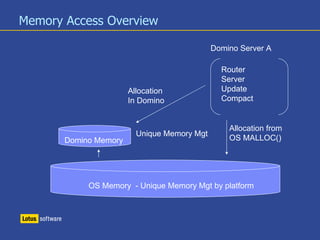
Memory Access Overview
OS Memory - Unique Memory Mgt by platform
Domino Memory
Router
Server
Update
Compact
Allocation from
OS MALLOC()
Allocation
In Domino
Unique Memory Mgt
Domino Server A
Domino Memory – What’s in there?
 Domino has 2 Major types of memory
 Shared – Available to any Domino task
 Private – Allocated to a single Domino task
 Domino Shared Memory
 Has many subtypes which service specific Domino operations
 NSF buffer pool
 NIF pool
 Event Monitor Pool
 Each pool has unique size / usage limits.
Domino Memory
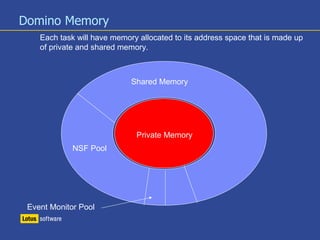
Each task will have memory allocated to its address space that is made up
of private and shared memory.
Shared Memory
Private Memory
NSF Pool
Event Monitor Pool
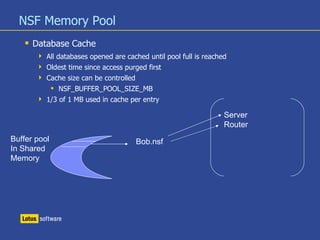
NSF Memory Pool
 Database Cache
 All databases opened are cached until pool full is reached
 Oldest time since access purged first
 Cache size can be controlled
 NSF_BUFFER_POOL_SIZE_MB
 1/3 of 1 MB used in cache per entry
Buffer pool
In Shared
Memory
Server
Router
Bob.nsf
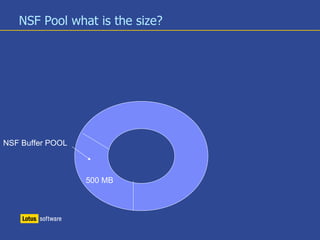
NSF Pool what is the size?
NSF Buffer POOL
500 MB
NSF Pool What is the right size?
 Compare peak and max if peak is max or max -2 review
 Sh ST Database.Database.BufferPool.PerCentReadsInBuffer
 Since average customer has 50% concurrency and each entry uses 1/3 MB,
take total mail files and divide by 6 for starting buffer pool.
NIF Pool
 View/Index Pool
 Caches frequently used views such as $Users
 Special caches for NameLookup and Group membership
 Increasing Any memory pool size is a trade off for performance
DPool
 Defines the size of each shared memory pool in Domino
 ADDENVVAR Notes_shared_dpoolsize
 PRIVATE_DPOOLSIZE_THRESHOLD=
 Notes.ini determines the size of each request
 When the request is larger than the defined max, the request is
allocated via OSLOCAL
Domino Memory - Private
Private Memory
Server
Update
Router
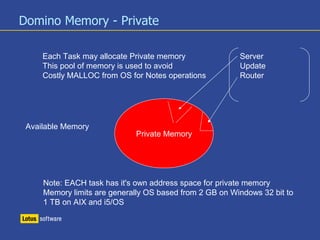
Each Task may allocate Private memory
This pool of memory is used to avoid
Costly MALLOC from OS for Notes operations
Available Memory
Note: EACH task has it's own address space for private memory
Memory limits are generally OS based from 2 GB on Windows 32 bit to
1 TB on AIX and i5/OS
Real versus Virtual Memory
OS Real Memory
Virtual Memory address space
Disk
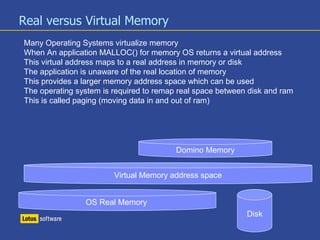
Many Operating Systems virtualize memory
When An application MALLOC() for memory OS returns a virtual address
This virtual address maps to a real address in memory or disk
The application is unaware of the real location of memory
This provides a larger memory address space which can be used
The operating system is required to remap real space between disk and ram
This is called paging (moving data in and out of ram)
Domino Memory
Tuning /sizing/ Hang debug
 More to come…..
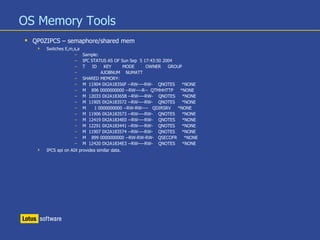
OS Memory Tools
 QP0ZIPCS – semaphore/shared mem
 Switches E,m,s,a
– Sample:
– IPC STATUS AS OF Sun Sep 5 17:43:50 2004
– T ID KEY MODE OWNER GROUP
– AJOBNUM NUMATT
– SHARED MEMORY:
– M 11904 0X2A18356F --RW----RW- QNOTES *NONE
– M 896 0000000000 --RW----R-- QTMHHTTP *NONE
– M 12033 0X2A18365B --RW----RW- QNOTES *NONE
– M 11905 0X2A183572 --RW----RW- QNOTES *NONE
– M 1 0000000000 --RW-RW---- QDIRSRV *NONE
– M 11906 0X2A183573 --RW----RW- QNOTES *NONE
– M 12419 0X2A1834E0 --RW----RW- QNOTES *NONE
– M 12291 0X2A183441 --RW----RW- QNOTES *NONE
– M 11907 0X2A183574 --RW----RW- QNOTES *NONE
– M 899 0000000000 --RW-RW-RW- QSECOFR *NONE
– M 12420 0X2A1834E3 --RW----RW- QNOTES *NONE
 IPCS api on AIX provides similar data.
SH MEM DUMP
 Raw report of memory and handles for a given Domino server
 Report by Domino Task
 Refer to handouts for overview of dump
Domino Memory Pool Performance
 Why do I need to restart a Domino server?
 Domino DPOOLs are memory structures from which tasks allocate shared
memory. As threads allocate and free memory the dpools become fragmented.
 Think of a parking lot....
 If the lot fills up always parking in the first available space, the lot fills from
front to back quickly, no need to “find” a parking space.
 Now think of your last trip to a busy mall, finding that “free space” can take
a LONG time.
 Domino memory does the same thing, as memory is freed it is not
“reorganized” so empty “slots” are left as is, the next request for memory must
search the memory for those open slots.
Domino Shared Pool- parking lots
 The longer the 'search' for the required available memory the
longer the response time to the user requests.
 Memory reports (Dumps) from Domino indirectly show the
fragmentation of the server's pools
 All allocations must be CONTIGUOS space, If you need two
“parking spaces” they must be adjacent.
Reviewing Dump -Raw
 Raw dump (not annotated)
 Defines total memory allocated
 Shared first, followed by private memory per task
 Searched/Skipped rates
 Define Memory “performance”
 Domino must find contiguous memory
– Searched pool count should be 1.8 or less
– Skipped count should be less than 5 (ideally)
Memory Dump - Laza
 Annotated dump
 Defines usage by “package”
 Should be used when a function reports out of memory.
 For detailed package information see attached PDF.
MEMSTATS
 Tool to build summary report of MEM DUMP.
 Summarizes dump by function
– Server
– Client
– Network
– Full Text Index
 Refer to handouts for full review of report.
Using Memory Dumps
 Dumps can be used to better understand memory leaks
 Collect a series of dumps.
 Use memstats to summarize each reports
 Review reports for continually increasing addresses
 Refer to handouts for additional information
Trapping a Memory leak
 DEBUG_TRAPLEAKS
 Set for the value of the memory address which is of concern from the memstats
report
 Must be used with DEBUG_SHOWLEAKS
 Trapleaks must be set to the full offset address.
 The offsets are in binary in memstats report but must be converted to HEX.
 Refer to handle outs
Trapleaks cont. Sample console entry
– [01434:00002-01024] Leaked block: PID=0x129 Handle=0x0044 Type=0x0910(PKG_0x1+41) Length=24 Addr=43B395C0
 This sample is from OSLOCAL as defined in memstats
– OS (0x0100)
– +25 1 58 SHRHDL BLK_OUTPUT - OSConsoleWrite output buffer
– +34 1 486 SHRHDL BLK_ZONETABLE - Time zone table
– +38 1 14018 SHRHDL BLK_FDMAP_ARRAY - FDMAP descriptor array
– +39 1 162530 SHRMEM BLK_OS - OS static data
– +40 15 187710 PRCMEM BLK_PCB - OS per-process data
– +41 55 14418910 PRCMEM BLK_LOCAL - local heap pool set
– +43 1 4114 SHRHDL BLK_POKEBUFFER - OSConsoleRead poke buffer
– +47 2 524324 SHRHDL BLK_FILE_FILL - OSFileFill fill buffer
– +48 312 789360 PRCMEM BLK_TLA - OS per-thread OSLocalAlloc data
– +49 1 65424 SHRHDL BLK_FILENAMES - Pool full of file names used by fdmap
– +50 14 1148 PRCMEM BLK_SDK - SDK process data
– +65 6 392544 SHRHDL BLK_STATICPOOL - Static Table VPool
– +70 15 230670 PRCHDL BLK_INICACHE - Cache to store NOTES.INI
– +80 2 130848 SHRHDL BLK_SEMWAITERPOOL - SemWaiterPool
– +95 355 64244 SHRMEM BLK_FILE_DESCRIPTOR_GROUP - File descriptor group structure
– +97 1 66 SHRHDL BLK_MONTHTABLE - Abbreviated Month table
– +101 1 1184 SHRHDL BLK_ZONE_NAME_TABLE - Time zone name table
– +102 16 7968 SHRHDL BLK_CACHED_NLS_INFOS - Array of NLS_INFOS dynamically loaded
– +110 1 65424 SHRHDL BLK_MIME_TYPES - cached MIME type information
– +110 1 178 PRCMEM BLK_MIME_TYPES - cached MIME type information
Overview of memory
 While most memory is managed within Domino larger requests are
shelled out to OSLOCAL,
 OSLOCAL is unique for each platform,
 Leaks in OSLOCAL may be OS or Domino related
Common Error
 Local Heap is full
 Out of Private Handles:
 Insufficient memory - NSF directory manager pool is full
 Error 402: Error synchronizing [LocalDomainServers]. System is
out of memory or internal index is corrupt.
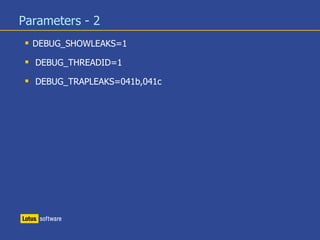
Parameters - 2
 DEBUG_SHOWLEAKS=1
 DEBUG_THREADID=1
 DEBUG_TRAPLEAKS=041b,041c
General continued
 Total memory allocated
 Should not exceed installed memory
 Domino can allocate Massive memory totals based on application
 Example – 1 Domino server had 131GB of ram allocated.
– The OS was caching the servers application database structures open in
memory.
 OS tuning should be evaluated when considering if memory limits have been
exceeded.
 Since all platforms can virtualize memory all can allocate beyond physical
installed RAM.
 Avoid memory allocations beyond installed memory as performance will be
impacted.

Understanding domino memory 2017

  • 1.
    ® Understanding Domino Memory Internalreview of memory structures
  • 2.
    Agenda  Overview ofMemory  Introduction to Memory pools  NSF,NIF, Event and other pool structures  OS memory  Shared memory, Semaphores  Tools to understand/trap leaks  Sh Mem Dump , memstats  QP0ZIPCS, QP0ZIPCR  Debug , trapleaks, showleaks.
  • 3.
    Domino Memory  Dominocan address up to 4 GB or more of Memory per process  2 GB on 32 bit platforms (windows etc)  Process is a SERVER, HTTP, ROUTER etc,  Combination of allocated shared memory and private memory.  Domino shared memory address space is shared by all Domino tasks  A single Domino server – 1 Shared memory address space  Tasks allocate shared memory from this pool  OS memory allocations may occur outside the Domino address space  To support OS operations  Domino’s address space can be limited by OS constraint
  • 4.
    Memory Access Overview OSMemory - Unique Memory Mgt by platform Domino Memory Router Server Update Compact Allocation from OS MALLOC() Allocation In Domino Unique Memory Mgt Domino Server A
  • 5.
    Domino Memory –What’s in there?  Domino has 2 Major types of memory  Shared – Available to any Domino task  Private – Allocated to a single Domino task  Domino Shared Memory  Has many subtypes which service specific Domino operations  NSF buffer pool  NIF pool  Event Monitor Pool  Each pool has unique size / usage limits.
  • 6.
    Domino Memory Each taskwill have memory allocated to its address space that is made up of private and shared memory. Shared Memory Private Memory NSF Pool Event Monitor Pool
  • 7.
    NSF Memory Pool Database Cache  All databases opened are cached until pool full is reached  Oldest time since access purged first  Cache size can be controlled  NSF_BUFFER_POOL_SIZE_MB  1/3 of 1 MB used in cache per entry Buffer pool In Shared Memory Server Router Bob.nsf
  • 8.
    NSF Pool whatis the size? NSF Buffer POOL 500 MB
  • 9.
    NSF Pool Whatis the right size?  Compare peak and max if peak is max or max -2 review  Sh ST Database.Database.BufferPool.PerCentReadsInBuffer  Since average customer has 50% concurrency and each entry uses 1/3 MB, take total mail files and divide by 6 for starting buffer pool.
  • 10.
    NIF Pool  View/IndexPool  Caches frequently used views such as $Users  Special caches for NameLookup and Group membership  Increasing Any memory pool size is a trade off for performance
  • 11.
    DPool  Defines thesize of each shared memory pool in Domino  ADDENVVAR Notes_shared_dpoolsize  PRIVATE_DPOOLSIZE_THRESHOLD=  Notes.ini determines the size of each request  When the request is larger than the defined max, the request is allocated via OSLOCAL
  • 12.
    Domino Memory -Private Private Memory Server Update Router Each Task may allocate Private memory This pool of memory is used to avoid Costly MALLOC from OS for Notes operations Available Memory Note: EACH task has it's own address space for private memory Memory limits are generally OS based from 2 GB on Windows 32 bit to 1 TB on AIX and i5/OS
  • 13.
    Real versus VirtualMemory OS Real Memory Virtual Memory address space Disk Many Operating Systems virtualize memory When An application MALLOC() for memory OS returns a virtual address This virtual address maps to a real address in memory or disk The application is unaware of the real location of memory This provides a larger memory address space which can be used The operating system is required to remap real space between disk and ram This is called paging (moving data in and out of ram) Domino Memory
  • 14.
    Tuning /sizing/ Hangdebug  More to come…..
  • 15.
    OS Memory Tools QP0ZIPCS – semaphore/shared mem  Switches E,m,s,a – Sample: – IPC STATUS AS OF Sun Sep 5 17:43:50 2004 – T ID KEY MODE OWNER GROUP – AJOBNUM NUMATT – SHARED MEMORY: – M 11904 0X2A18356F --RW----RW- QNOTES *NONE – M 896 0000000000 --RW----R-- QTMHHTTP *NONE – M 12033 0X2A18365B --RW----RW- QNOTES *NONE – M 11905 0X2A183572 --RW----RW- QNOTES *NONE – M 1 0000000000 --RW-RW---- QDIRSRV *NONE – M 11906 0X2A183573 --RW----RW- QNOTES *NONE – M 12419 0X2A1834E0 --RW----RW- QNOTES *NONE – M 12291 0X2A183441 --RW----RW- QNOTES *NONE – M 11907 0X2A183574 --RW----RW- QNOTES *NONE – M 899 0000000000 --RW-RW-RW- QSECOFR *NONE – M 12420 0X2A1834E3 --RW----RW- QNOTES *NONE  IPCS api on AIX provides similar data.
  • 16.
    SH MEM DUMP Raw report of memory and handles for a given Domino server  Report by Domino Task  Refer to handouts for overview of dump
  • 17.
    Domino Memory PoolPerformance  Why do I need to restart a Domino server?  Domino DPOOLs are memory structures from which tasks allocate shared memory. As threads allocate and free memory the dpools become fragmented.  Think of a parking lot....  If the lot fills up always parking in the first available space, the lot fills from front to back quickly, no need to “find” a parking space.  Now think of your last trip to a busy mall, finding that “free space” can take a LONG time.  Domino memory does the same thing, as memory is freed it is not “reorganized” so empty “slots” are left as is, the next request for memory must search the memory for those open slots.
  • 18.
    Domino Shared Pool-parking lots  The longer the 'search' for the required available memory the longer the response time to the user requests.  Memory reports (Dumps) from Domino indirectly show the fragmentation of the server's pools  All allocations must be CONTIGUOS space, If you need two “parking spaces” they must be adjacent.
  • 19.
    Reviewing Dump -Raw Raw dump (not annotated)  Defines total memory allocated  Shared first, followed by private memory per task  Searched/Skipped rates  Define Memory “performance”  Domino must find contiguous memory – Searched pool count should be 1.8 or less – Skipped count should be less than 5 (ideally)
  • 20.
    Memory Dump -Laza  Annotated dump  Defines usage by “package”  Should be used when a function reports out of memory.  For detailed package information see attached PDF.
  • 21.
    MEMSTATS  Tool tobuild summary report of MEM DUMP.  Summarizes dump by function – Server – Client – Network – Full Text Index  Refer to handouts for full review of report.
  • 22.
    Using Memory Dumps Dumps can be used to better understand memory leaks  Collect a series of dumps.  Use memstats to summarize each reports  Review reports for continually increasing addresses  Refer to handouts for additional information
  • 23.
    Trapping a Memoryleak  DEBUG_TRAPLEAKS  Set for the value of the memory address which is of concern from the memstats report  Must be used with DEBUG_SHOWLEAKS  Trapleaks must be set to the full offset address.  The offsets are in binary in memstats report but must be converted to HEX.  Refer to handle outs
  • 24.
    Trapleaks cont. Sampleconsole entry – [01434:00002-01024] Leaked block: PID=0x129 Handle=0x0044 Type=0x0910(PKG_0x1+41) Length=24 Addr=43B395C0  This sample is from OSLOCAL as defined in memstats – OS (0x0100) – +25 1 58 SHRHDL BLK_OUTPUT - OSConsoleWrite output buffer – +34 1 486 SHRHDL BLK_ZONETABLE - Time zone table – +38 1 14018 SHRHDL BLK_FDMAP_ARRAY - FDMAP descriptor array – +39 1 162530 SHRMEM BLK_OS - OS static data – +40 15 187710 PRCMEM BLK_PCB - OS per-process data – +41 55 14418910 PRCMEM BLK_LOCAL - local heap pool set – +43 1 4114 SHRHDL BLK_POKEBUFFER - OSConsoleRead poke buffer – +47 2 524324 SHRHDL BLK_FILE_FILL - OSFileFill fill buffer – +48 312 789360 PRCMEM BLK_TLA - OS per-thread OSLocalAlloc data – +49 1 65424 SHRHDL BLK_FILENAMES - Pool full of file names used by fdmap – +50 14 1148 PRCMEM BLK_SDK - SDK process data – +65 6 392544 SHRHDL BLK_STATICPOOL - Static Table VPool – +70 15 230670 PRCHDL BLK_INICACHE - Cache to store NOTES.INI – +80 2 130848 SHRHDL BLK_SEMWAITERPOOL - SemWaiterPool – +95 355 64244 SHRMEM BLK_FILE_DESCRIPTOR_GROUP - File descriptor group structure – +97 1 66 SHRHDL BLK_MONTHTABLE - Abbreviated Month table – +101 1 1184 SHRHDL BLK_ZONE_NAME_TABLE - Time zone name table – +102 16 7968 SHRHDL BLK_CACHED_NLS_INFOS - Array of NLS_INFOS dynamically loaded – +110 1 65424 SHRHDL BLK_MIME_TYPES - cached MIME type information – +110 1 178 PRCMEM BLK_MIME_TYPES - cached MIME type information
  • 25.
    Overview of memory While most memory is managed within Domino larger requests are shelled out to OSLOCAL,  OSLOCAL is unique for each platform,  Leaks in OSLOCAL may be OS or Domino related
  • 26.
    Common Error  LocalHeap is full  Out of Private Handles:  Insufficient memory - NSF directory manager pool is full  Error 402: Error synchronizing [LocalDomainServers]. System is out of memory or internal index is corrupt.
  • 27.
    Parameters - 2 DEBUG_SHOWLEAKS=1  DEBUG_THREADID=1  DEBUG_TRAPLEAKS=041b,041c
  • 28.
    General continued  Totalmemory allocated  Should not exceed installed memory  Domino can allocate Massive memory totals based on application  Example – 1 Domino server had 131GB of ram allocated. – The OS was caching the servers application database structures open in memory.  OS tuning should be evaluated when considering if memory limits have been exceeded.  Since all platforms can virtualize memory all can allocate beyond physical installed RAM.  Avoid memory allocations beyond installed memory as performance will be impacted.