Compact, Compress, De-Duplicate Ulrich Krause  DanNotes, 23. – 24. November 2011,  Comwell Klarskovgaard, Korsør  Denmark
About: Ulrich Krause Administrator & Developer since 1993 Business Application Developer [email_address] , Ratingen, Germany OpenNTF http://openntf.org !!HELP!!, Cebulon, Trigger Happy Various XPages Custom Controls  IBM Champion 2011 https://www-304.ibm.com/connections/blogs/socialbusiness/entry/announcing_the_2011_ibm_champions_for_collaboration_solutions4?lang=de Blog http://www.eknori.de Notes Forum (http://www.atnotes.de)
How did I get here?
How did I get here?
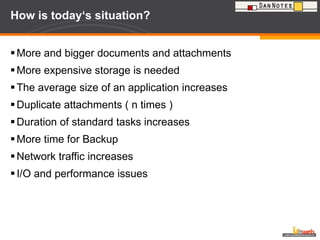
How did I get here? Overall Distance 839 km Flight SK 626  Düsseldorf    Kopenhagen Train Kopenhagen    Korsor  Car Korsor    Venue Thanks to Tobias !!
How is today‘s situation? More and bigger documents and attachments More expensive storage is needed The average size of an application increases Duplicate attachments ( n times ) Duration of standard tasks increases More time for Backup  Network traffic increases I/O and performance issues
What do we want to achieve? Leverage existing storage Reduce size of applications Avoid attachment redundancies Speed-up standard tasks Reduce backup time Reduce network traffic Reduce disc I / O
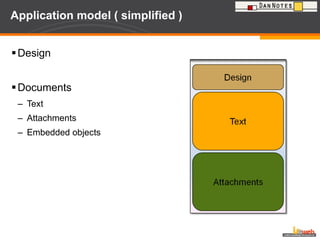
Application model ( simplified ) Design Documents Text Attachments Embedded objects
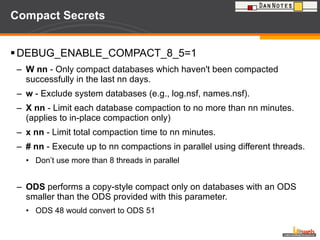
Compact Secrets DEBUG_ENABLE_COMPACT_8_5=1 W nn  - Only compact databases which haven't been compacted successfully in the last nn days. w  - Exclude system databases (e.g., log.nsf, names.nsf). X nn  - Limit each database compaction to no more than nn minutes. (applies to in-place compaction only) x nn  - Limit total compaction time to nn minutes. # nn  - Execute up to nn compactions in parallel using different threads. Don’t use more than 8 threads in parallel ODS  performs a copy-style compact only on databases with an ODS smaller than the ODS provided with this parameter. ODS 48 would convert to ODS 51
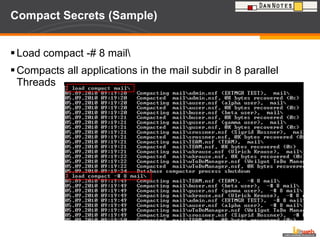
Compact Secrets (Sample) Load compact -# 8 mail\ Compacts all applications in the mail subdir in 8 parallel Threads
Compact via application properties Compacting a database does not necessarily reduce its size If the application requires  structural changes (typically a change of  ODS [on-disk structure]). then a  copy-style compaction will be performed (equivalent to  -L). If the application is logged (Transactional Logging enabled), then a simple in-place compaction will be performed (equivalent to -b). If the application is not logged (Transactional Logging disabled), an in-place with file size reduction compaction will be performed (equivalent to -B).
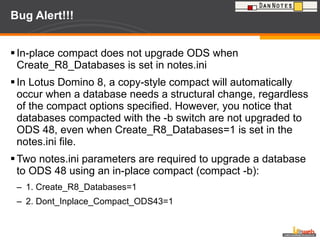
Bug Alert!!! In-place compact does not upgrade ODS when Create_R8_Databases is set in notes.ini  In Lotus Domino 8, a copy-style compact will automatically occur when a database needs a structural change, regardless of the compact options specified. However, you notice that databases compacted with the -b switch are not upgraded to ODS 48, even when Create_R8_Databases=1 is set in the notes.ini file.  Two notes.ini parameters are required to upgrade a database to ODS 48 using an in-place compact (compact -b): 1. Create_R8_Databases=1 2. Dont_Inplace_Compact_ODS43=1
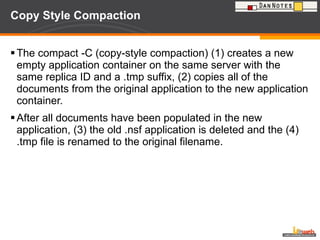
Copy Style Compaction The compact -C (copy-style compaction) (1) creates a new empty application container on the same server with the same replica ID and a .tmp suffix, (2) copies all of the documents from the original application to the new application container.  After all documents have been populated in the new application, (3) the old .nsf application is deleted and the (4) .tmp file is renamed to the original filename.
Defrag File fragmentation saps Domino server I/O performance Even a slightly fragmented file can cause a 50% decrease in non-cached read performance Load compact –C does not allocate space needed before compacting the application Applications are fragmented during copy-style compaction Full Text Indexes are fragmented too Even NLO files in DAOS repository are fragmented over the time Use a tool to defrag your files speed up your Domino server !
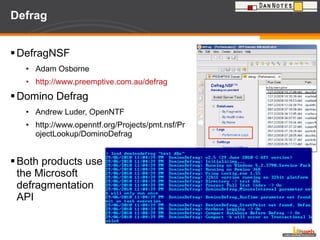
Defrag DefragNSF Adam Osborne http://www.preemptive.com.au/defrag Domino Defrag Andrew Luder, OpenNTF http://www.openntf.org/Projects/pmt.nsf/ProjectLookup/DominoDefrag Both products use the Microsoft  defragmentation  API
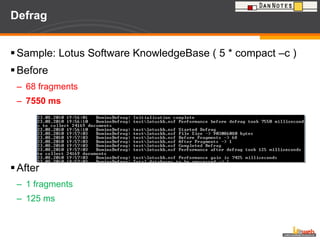
Defrag Sample: Lotus Software KnowledgeBase ( 5 * compact –c ) Before 68 fragments 7550 ms  After 1 fragments 125 ms
Defrag Domino Defrag uses IBM Lotus Notes C API Open Source FREE There is also a professional support plan available Well documented 32/64 Bit support New in Version 3: Free Space Defragmentation Uses jkdefragcmd.exe (http://kessels.com/jkdefrag/)
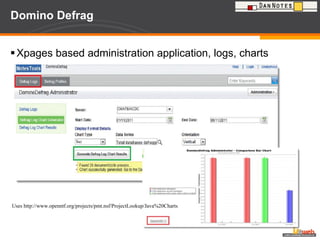
Domino Defrag Xpages based administration application, logs, charts Uses http://www.openntf.org/projects/pmt.nsf/ProjectLookup/Java%20Charts
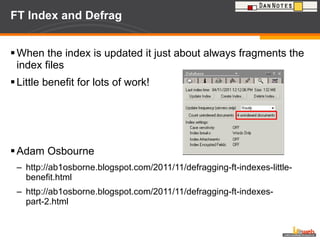
FT Index and Defrag When the index is updated it just about always fragments the index files Little benefit for lots of work! Adam Osbourne http://ab1osborne.blogspot.com/2011/11/defragging-ft-indexes-little-benefit.html http://ab1osborne.blogspot.com/2011/11/defragging-ft-indexes-part-2.html
Design Note Compression
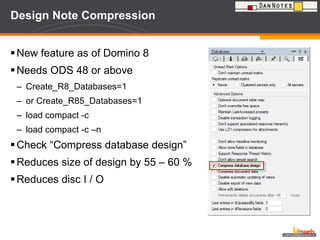
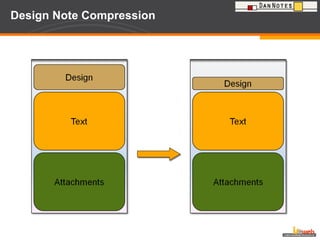
Design Note Compression  New feature as of Domino 8 Needs ODS 48 or above Create_R8_Databases=1 or Create_R85_Databases=1  load compact -c  load compact -c –n Check “Compress database design” Reduces size of design by 55 – 60 % Reduces disc I / O
Design Note Compression
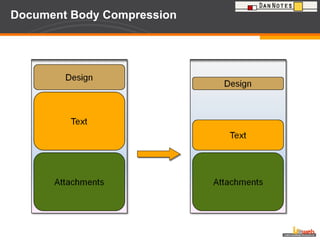
Document Body Compression
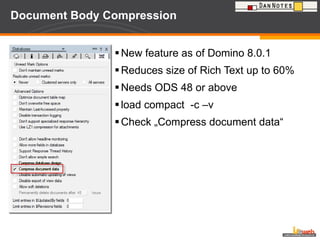
Document Body Compression  New feature as of Domino 8.0.1 Reduces size of Rich Text up to 60% Needs ODS 48 or above load compact  -c –v Check „Compress document data“
Document Body Compression
LZ1 Attachment Compression
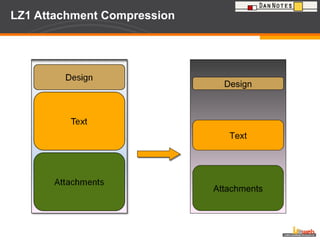
LZ1 Attachment Compression As of release 6 Replaces Huffmann algorithm NOT active when creating a new applications. Recompress using load compact  -c –ZU In 6.5.6 also set  DEBUG_ENABLE_LZ1_REPAIR=1 To avoid problems with JAVA applets in <= 8.5 set DEBUG_ENABLE_LZ1_HOST_TYPES=0 fixed in 8.5.1
LZ1 Attachment Compression There have been problems reported that the fulltext search does not work as expected using LZ1 compression. To revert back to Huffmann use Load compact –c –ZD  In 6.5.6 also set DEBUG_ENABLE_LZ1_REPAIR=1
Avoiding compression conversions There are circumstances that compression conversion is explicitly avoid.  Overall, it is to avoid the performance penalty of attempting a compression and failing back to uncompressed for file types that are already compressed.  The common trick is applied to observe the file extensions and avoid these. NONCOMPRESSABLE_FILES =<comma delimited replacement list> Default list: zip,rar,jpg,gz,z,zz,lzo,zoo,rz,lzma,bz2
LZ1 Attachment Compression Design Text Attachments
DAOS Estimator
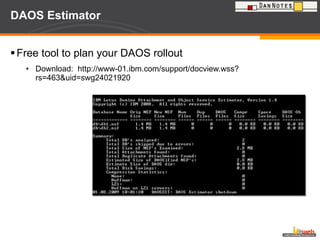
DAOS Estimator Free tool to plan your DAOS rollout Download:  http://www-01.ibm.com/support/docview.wss?rs=463&uid=swg24021920
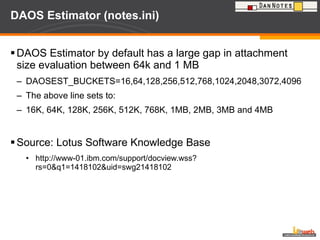
DAOS Estimator (notes.ini) DAOS Estimator by default has a large gap in attachment size evaluation between 64k and 1 MB  DAOSEST_BUCKETS=16,64,128,256,512,768,1024,2048,3072,4096 The above line sets to: 16K, 64K, 128K, 256K, 512K, 768K, 1MB, 2MB, 3MB and 4MB Source: Lotus Software Knowledge Base http://www-01.ibm.com/support/docview.wss?rs=0&q1=1418102&uid=swg21418102
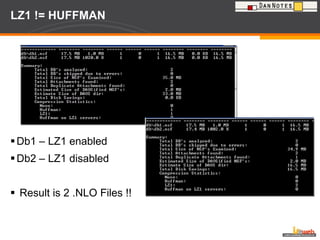
LZ1 != HUFFMAN Db1 – LZ1 enabled Db2 – LZ1 disabled Result is 2 .NLO Files !!
D A O S
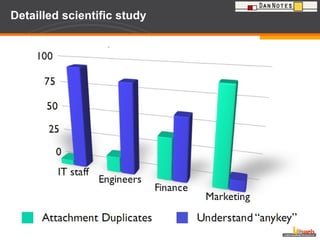
Detailled scientific study
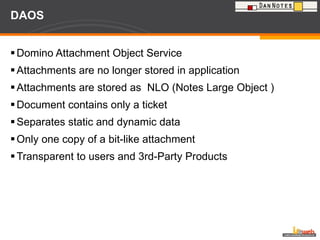
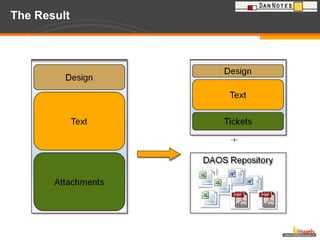
DAOS Domino Attachment Object Service Attachments are no longer stored in application Attachments are stored as  NLO (Notes Large Object ) Document contains only a ticket  Separates static and dynamic data Only one copy of a bit-like attachment  Transparent to users and 3rd-Party Products
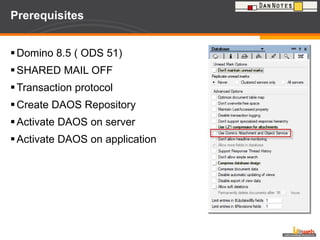
Prerequisites Domino 8.5 ( ODS 51) SHARED MAIL OFF Transaction protocol Create DAOS Repository Activate DAOS on server Activate DAOS on application
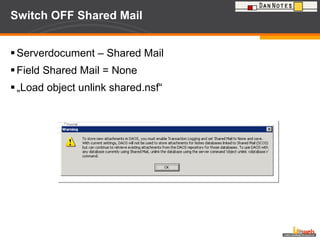
Switch OFF Shared Mail Serverdocument – Shared Mail Field Shared Mail = None „ Load object unlink shared.nsf“
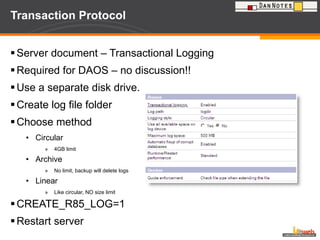
Transaction Protocol Server document – Transactional Logging Required for DAOS – no discussion!! Use a separate disk drive. Create log file folder  Choose method Circular 4GB limit Archive No limit, backup will delete logs Linear Like circular, NO size limit CREATE_R85_LOG=1  Restart server
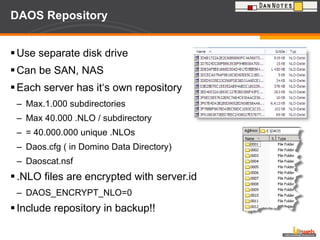
DAOS Repository Use separate disk drive Can be SAN, NAS Each server has it‘s own repository Max.1.000 subdirectories Max 40.000 .NLO / subdirectory = 40.000.000 unique .NLOs Daos.cfg ( in Domino Data Directory) Daoscat.nsf .NLO files are encrypted with server.id DAOS_ENCRYPT_NLO=0 Include repository in backup!!
DAOS Repository How do you change the number of DAOS NLO's per directory? DAOS_MAX_FILES_PER_SUBCONTAINER=40000 Requires a server restart  Will only affect the current DAOS subdirectory (older subdirectories are not changed).  This will also affect the maximum number of files in the DAOS store which is currently this values multiplied by 1000 (this value is not configurable currently). 1.000 * DAOS_MAX_FILES_PER_SUBCONTAINER = MAX_NLO
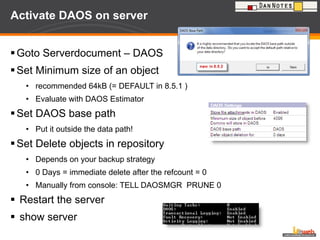
Activate DAOS on server Goto Serverdocument – DAOS Set Minimum size of an object recommended 64kB (= DEFAULT in 8.5.1 ) Evaluate with DAOS Estimator Set DAOS base path Put it outside the data path! Set Delete objects in repository Depends on your backup strategy 0 Days = immediate delete after the refcount = 0 Manually from console: TELL DAOSMGR  PRUNE 0 Restart the server show server
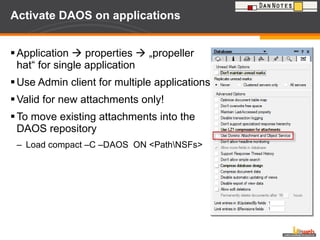
Activate DAOS on applications Application    properties    „propeller hat“ for single application Use Admin client for multiple applications Valid for new attachments only! To move existing attachments into the DAOS repository Load compact –C –DAOS  ON <Path\NSFs>
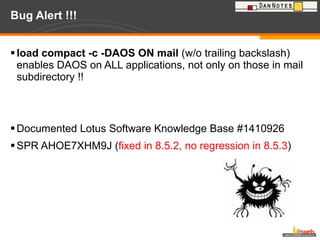
Bug Alert !!! load compact -c -DAOS ON mail  (w/o trailing backslash) enables DAOS on ALL applications, not only on those in mail subdirectory !! Documented Lotus Software Knowledge Base #1410926 SPR AHOE7XHM9J ( fixed in 8.5.2, no regression in 8.5.3 )
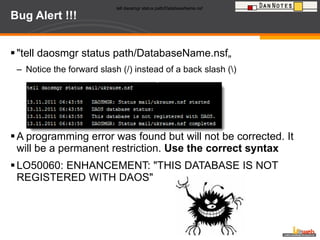
Bug Alert !!! &quot;tell daosmgr status path/DatabaseName.nsf„ Notice the forward slash (/) instead of a back slash (\)   A programming error was found but will not be corrected. It will be a permanent restriction.  Use the correct syntax LO50060: ENHANCEMENT: &quot;THIS DATABASE IS NOT REGISTERED WITH DAOS&quot; tell daosmgr status path/DatabaseName.nsf   tell daosmgr status path/DatabaseName.nsf
The Result
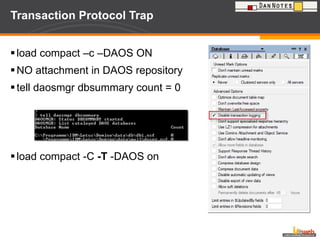
Transaction Protocol Trap load compact –c –DAOS ON  NO attachment in DAOS repository tell daosmgr dbsummary count = 0 load compact -C  -T  -DAOS on
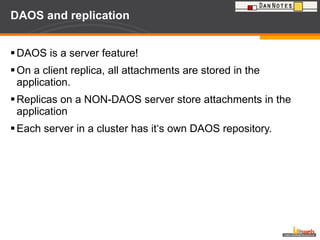
DAOS and replication DAOS is a server feature! On a client replica, all attachments are stored in the application. Replicas on a NON-DAOS server store attachments in the application  Each server in a cluster has it‘s own DAOS repository.
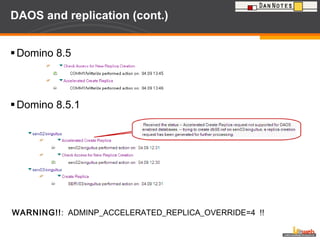
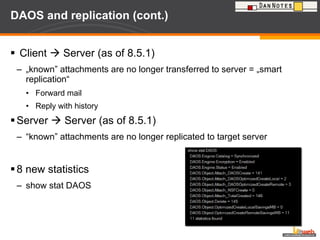
DAOS and replication (cont.) Client    Server (as of 8.5.1) „ known” attachments are no longer transferred to server = „smart replication“ Forward mail Reply with history Server    Server (as of 8.5.1) “ known” attachments are no longer replicated to target server 8 new statistics  show stat DAOS
DAOS and replication (cont.) Domino 8.5 Domino 8.5.1 WARNING!! :  ADMINP_ACCELERATED_REPLICA_OVERRIDE=4  !!
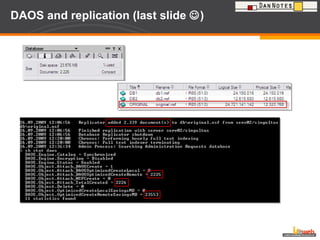
DAOS and replication (last slide   )
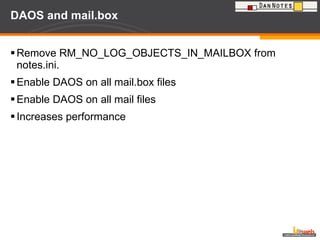
DAOS and mail.box Remove RM_NO_LOG_OBJECTS_IN_MAILBOX from notes.ini. Enable DAOS on all mail.box files Enable DAOS on all mail files Increases performance
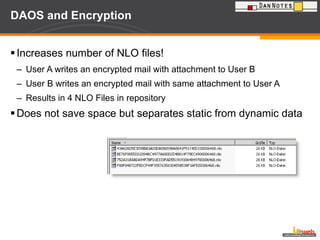
DAOS and Encryption Increases number of NLO files! User A writes an encrypted mail with attachment to User B User B writes an encrypted mail with same attachment to User A Results in 4 NLO Files in repository Does not save space but separates static from dynamic data
DAOS and Quotas Technote: 1405456 Depends on the quota enforcement setting that is in place Check space used in file when adding a note Acts on the physical size of the application (without attachments) Possibly a problem when switching DAOS off!!  64GB limit Check file size when extending the file Check file size when adding a note Both acts on the logical size of the application (with attachments)
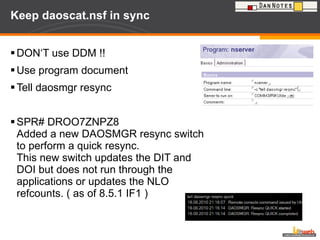
Keep daoscat.nsf in sync DON‘T use DDM !! Use program document Tell daosmgr resync SPR# DROO7ZNPZ8 Added a new DAOSMGR resync switch to perform a quick resync.  This new switch updates the DIT and DOI but does not run through the applications or updates the NLO refcounts. ( as of 8.5.1 IF1 )
„ Needs Resync“  DDM points to the first application that causes the DAOS catalog to go into „Needs Resync“ state. If you cannot find a cause for the issue set debug_threadid=1 console_log_enabled=1 daos_logging=<path/daos.txt>STATE_CHANGE Many improvements in 8.5.2 that reduces the number of  state changes (SPR# RCOR83NLQK)
DAOS resync time window feature The following two notes.ini parameters control when resync will be allowed to run  DAOS_RESYNC_START_TIME=12:00:00 AM DAOS_RESYNC_STOP_TIME=04:00:00 AM Note that these parameters do not launch resync automatically; they just control whether or not resync may run at a given time, and also tell resync when to stop. A program document could be created to launch resync just after midnight. If the catalog is SYNCHRONIZED, then the resync will not take place. However, if a resync is needed, then the resync process will begin. When the end time is reached, the resync threads will finish up the databases they are processing and exit.
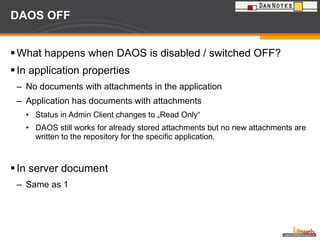
DAOS OFF What happens when DAOS is disabled / switched OFF? In application properties No documents with attachments in the application Application has documents with attachments Status in Admin Client changes to „Read Only“ DAOS still works for already stored attachments but no new attachments are written to the repository for the specific application. In server document Same as 1
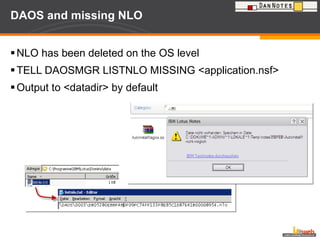
DAOS and missing NLO NLO has been deleted on the OS level TELL DAOSMGR LISTNLO MISSING <application.nsf> Output to <datadir> by default
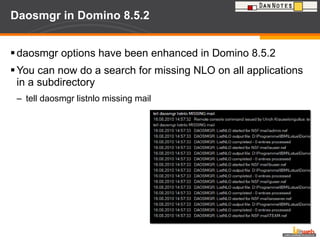
Daosmgr in Domino 8.5.2 daosmgr options have been enhanced in Domino 8.5.2 You can now do a search for missing NLO on all applications in a subdirectory tell daosmgr listnlo missing mail
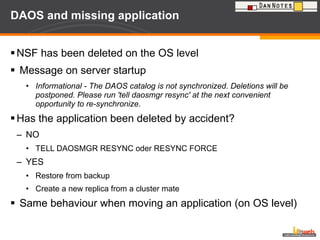
DAOS and missing application NSF has been deleted on the OS level Message on server startup Informational - The DAOS catalog is not synchronized. Deletions will be postponed. Please run 'tell daosmgr resync' at the next convenient opportunity to re-synchronize . Has the application been deleted by accident? NO TELL DAOSMGR RESYNC oder RESYNC FORCE YES Restore from backup Create a new replica from a cluster mate Same behaviour when moving an application (on OS level)
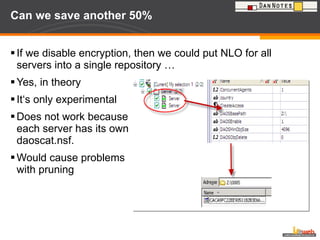
Can we save another 50% If we disable encryption, then we could put NLO for all servers into a single repository … Yes, in theory It‘s only experimental Does not work because  each server has its own daoscat.nsf. Would cause problems  with pruning
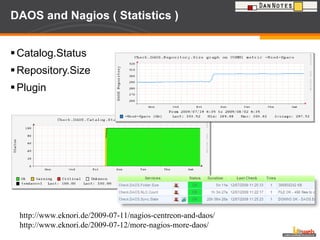
DAOS and Nagios ( Statistics ) Catalog.Status Repository.Size Plugin http://www.eknori.de/2009-07-11/nagios-centreon-and-daos/ http://www.eknori.de/2009-07-12/more-nagios-more-daos/
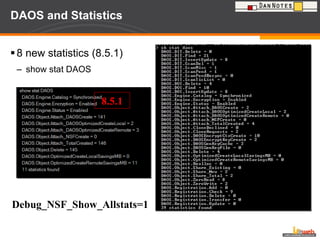
DAOS and Statistics 8 new statistics (8.5.1) show stat DAOS 8.5.1 Debug_NSF_Show_Allstats=1
DAOS and Statistics Windows: @echo off  setlocal for /f &quot;tokens=*&quot; %%a in ('dir/w/s %1 ^|findstr &quot;Datei(en)&quot;') do ( set info=%%a ) echo %info% Linux: #!/bin/sh REPOSITORY=/local/daos OUTFILE=/local/daos.txt fCount=`find $REPOSITORY -type f | wc –l` fSize=`du -ksb $REPOSITORY` IFS=”/” array=($fSize) fDate=$(date +”%d-%m-%Y”) echo $fDate / $fCount / ${array[0]}>> $OUTFILE
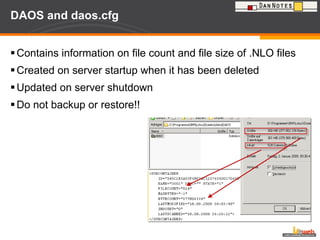
Use XML
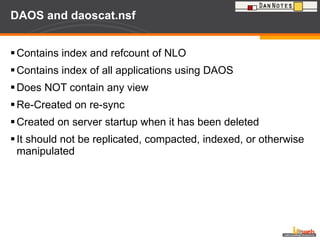
DAOS and daos.cfg Contains information on file count and file size of .NLO files Created on server startup when it has been deleted Updated on server shutdown Do not backup or restore!!
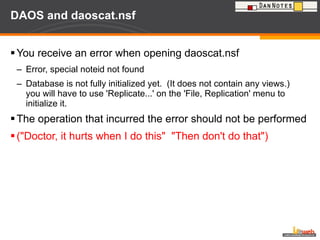
DAOS and daoscat.nsf Contains index and refcount of NLO Contains index of all applications using DAOS Does NOT contain any view  Re-Created on re-sync  Created on server startup when it has been deleted It should not be replicated, compacted, indexed, or otherwise manipulated
DAOS and daoscat.nsf You receive an error when opening daoscat.nsf Error, special noteid not found Database is not fully initialized yet.  (It does not contain any views.)  you will have to use 'Replicate...' on the 'File, Replication' menu to initialize it. The operation that incurred the error should not be performed (&quot;Doctor, it hurts when I do this&quot;  &quot;Then don't do that&quot;)
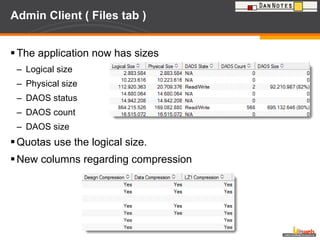
Admin Client ( Files tab ) The application now has sizes Logical size Physical size DAOS status DAOS count DAOS size Quotas use the logical size. New columns regarding compression
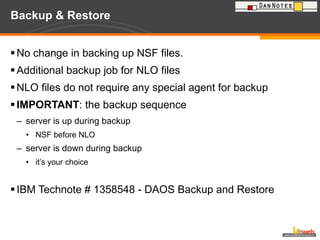
Backup & Restore No change in backing up NSF files. Additional backup job for NLO files NLO files do not require any special agent for backup IMPORTANT : the backup sequence server is up during backup NSF before NLO server is down during backup it’s your choice  IBM Technote # 1358548 - DAOS Backup and Restore
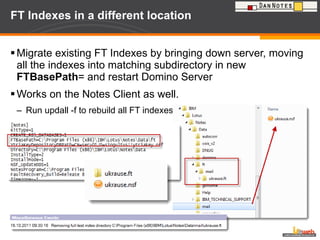
FT Indexes in a different location  Migrate existing FT Indexes by bringing down server, moving all the indexes into matching subdirectory in new  FTBasePath = and restart Domino Server Works on the Notes Client as well.  Run updall -f to rebuild all FT indexes
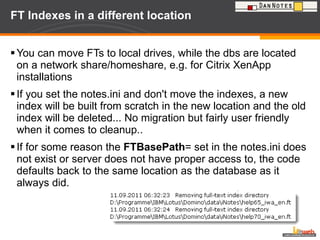
FT Indexes in a different location  You can move FTs to local drives, while the dbs are located on a network share/homeshare, e.g. for Citrix XenApp installations If you set the notes.ini and don't move the indexes, a new index will be built from scratch in the new location and the old index will be deleted... No migration but fairly user friendly when it comes to cleanup..  If for some reason the  FTBasePath = set in the notes.ini does not exist or server does not have proper access to, the code defaults back to the same location as the database as it always did.
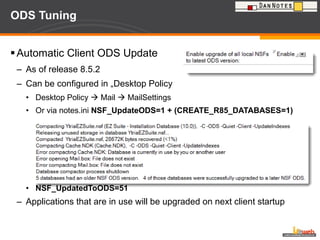
ODS Tuning  Automatic Client ODS Update  As of release 8.5.2 Can be configured in „Desktop Policy Desktop Policy    Mail    MailSettings Or via notes.ini  NSF_UpdateODS=1 + (CREATE_R85_DATABASES=1) NSF_UpdatedToODS=51 Applications that are in use will be upgraded on next client startup
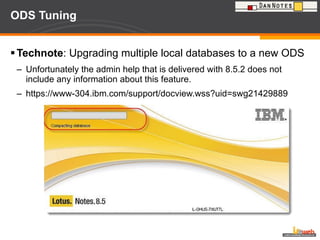
ODS Tuning Technote : Upgrading multiple local databases to a new ODS Unfortunately the admin help that is delivered with 8.5.2 does not include any information about this feature. https://www-304.ibm.com/support/docview.wss?uid=swg21429889
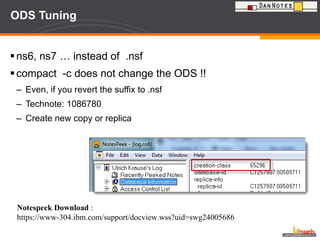
ODS Tuning ns6, ns7 … instead of  .nsf compact  -c does not change the ODS !! Even, if you revert the suffix to .nsf Technote: 1086780 Create new copy or replica Notespeek Download  : https://www-304.ibm.com/support/docview.wss?uid=swg24005686
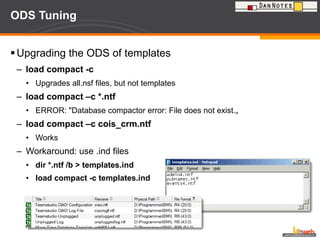
ODS Tuning Upgrading the ODS of templates load compact -c Upgrades all.nsf files, but not templates load compact –c *.ntf ERROR: &quot;Database compactor error: File does not exist.„ load compact –c cois_crm.ntf Works  Workaround: use .ind files  dir *.ntf /b > templates.ind load compact -c templates.ind
Agent Manager Retry on Compact  There is a new setting starting with 8.5.3 and 8.5.2 FP3 to retry to run an agent after the agent has been blocked out thru a compact previously. SPR# KMUR63DF3V - Fix introduces an ini DEBUG_AMGR_ENABLE_RETRY_ON_COMPACT to allow an agent to run on a time interval once database compact is complete. Previously when a database was being compacted and an attempt was made to load a scheduled agent it would fail and the agent would be marked to not run again unless the user restarted the agent manager or the agent cache refreshed. This fix introduces a notes.ini variable to allow the agent in question to be retried on it's subsequent time interval.
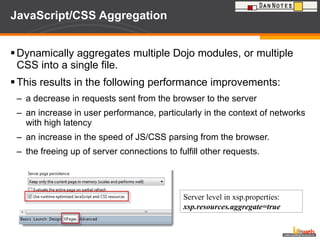
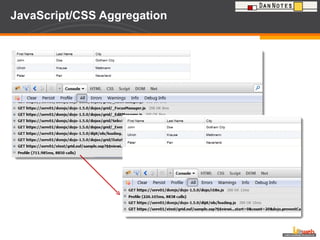
JavaScript/CSS Aggregation Dynamically aggregates multiple Dojo modules, or multiple CSS into a single file.  This results in the following performance improvements: a decrease in requests sent from the browser to the server  an increase in user performance, particularly in the context of networks with high latency  an increase in the speed of JS/CSS parsing from the browser.  the freeing up of server connections to fulfill other requests.  Server level in xsp.properties: xsp.resources.aggregate=true
JavaScript/CSS Aggregation
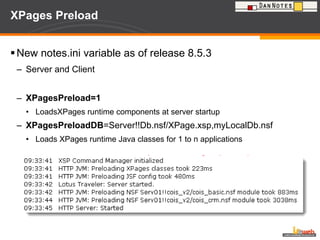
XPages Preload New notes.ini variable as of release 8.5.3  Server and Client XPagesPreload=1 LoadsXPages runtime components at server startup XPagesPreloadDB =Server!!Db.nsf/XPage.xsp,myLocalDb.nsf Loads XPages runtime Java classes for 1 to n applications
Resources DAOS Wiki http://www-10.lotus.com/ldd/dominowiki.nsf/archive?openview&title=DAOS&type=cat&cat=null&tag=DAOS DAOS Backup and Restore http://www-10.lotus.com/ldd/dominowiki.nsf/dx/daosbackup-and-restore DAOS Estimator http://www.ibm.com/support/docview.wss?rs=463&uid=swg24021920 DAOS Technical Overview http://www.nelotus.org/A55CBA/nelotus.nsf/87fde291d7608ada852564c9006eeba5/b6523e7f4b15585b862575b5004d3488/$FILE/DAOSTechnicalOverview_NELotus.pdf
Har du nogen spørgsmål Mail:  [email_address] Blog: http://www.eknori.de Sametime: bleedyellow.com Twitter: eknori Tak for  jeres opmærksomhed

Compact, Compress, De-Duplicate (DAOS)

  • 1.
    Compact, Compress, De-DuplicateUlrich Krause DanNotes, 23. – 24. November 2011, Comwell Klarskovgaard, Korsør Denmark
  • 2.
    About: Ulrich KrauseAdministrator & Developer since 1993 Business Application Developer [email_address] , Ratingen, Germany OpenNTF http://openntf.org !!HELP!!, Cebulon, Trigger Happy Various XPages Custom Controls IBM Champion 2011 https://www-304.ibm.com/connections/blogs/socialbusiness/entry/announcing_the_2011_ibm_champions_for_collaboration_solutions4?lang=de Blog http://www.eknori.de Notes Forum (http://www.atnotes.de)
  • 3.
    How did Iget here?
  • 4.
    How did Iget here?
  • 5.
    How did Iget here? Overall Distance 839 km Flight SK 626 Düsseldorf  Kopenhagen Train Kopenhagen  Korsor Car Korsor  Venue Thanks to Tobias !!
  • 6.
    How is today‘ssituation? More and bigger documents and attachments More expensive storage is needed The average size of an application increases Duplicate attachments ( n times ) Duration of standard tasks increases More time for Backup Network traffic increases I/O and performance issues
  • 7.
    What do wewant to achieve? Leverage existing storage Reduce size of applications Avoid attachment redundancies Speed-up standard tasks Reduce backup time Reduce network traffic Reduce disc I / O
  • 8.
    Application model (simplified ) Design Documents Text Attachments Embedded objects
  • 9.
    Compact Secrets DEBUG_ENABLE_COMPACT_8_5=1W nn - Only compact databases which haven't been compacted successfully in the last nn days. w - Exclude system databases (e.g., log.nsf, names.nsf). X nn - Limit each database compaction to no more than nn minutes. (applies to in-place compaction only) x nn - Limit total compaction time to nn minutes. # nn - Execute up to nn compactions in parallel using different threads. Don’t use more than 8 threads in parallel ODS performs a copy-style compact only on databases with an ODS smaller than the ODS provided with this parameter. ODS 48 would convert to ODS 51
  • 10.
    Compact Secrets (Sample)Load compact -# 8 mail\ Compacts all applications in the mail subdir in 8 parallel Threads
  • 11.
    Compact via applicationproperties Compacting a database does not necessarily reduce its size If the application requires structural changes (typically a change of ODS [on-disk structure]). then a copy-style compaction will be performed (equivalent to -L). If the application is logged (Transactional Logging enabled), then a simple in-place compaction will be performed (equivalent to -b). If the application is not logged (Transactional Logging disabled), an in-place with file size reduction compaction will be performed (equivalent to -B).
  • 12.
    Bug Alert!!! In-placecompact does not upgrade ODS when Create_R8_Databases is set in notes.ini In Lotus Domino 8, a copy-style compact will automatically occur when a database needs a structural change, regardless of the compact options specified. However, you notice that databases compacted with the -b switch are not upgraded to ODS 48, even when Create_R8_Databases=1 is set in the notes.ini file. Two notes.ini parameters are required to upgrade a database to ODS 48 using an in-place compact (compact -b): 1. Create_R8_Databases=1 2. Dont_Inplace_Compact_ODS43=1
  • 13.
    Copy Style CompactionThe compact -C (copy-style compaction) (1) creates a new empty application container on the same server with the same replica ID and a .tmp suffix, (2) copies all of the documents from the original application to the new application container. After all documents have been populated in the new application, (3) the old .nsf application is deleted and the (4) .tmp file is renamed to the original filename.
  • 14.
    Defrag File fragmentationsaps Domino server I/O performance Even a slightly fragmented file can cause a 50% decrease in non-cached read performance Load compact –C does not allocate space needed before compacting the application Applications are fragmented during copy-style compaction Full Text Indexes are fragmented too Even NLO files in DAOS repository are fragmented over the time Use a tool to defrag your files speed up your Domino server !
  • 15.
    Defrag DefragNSF AdamOsborne http://www.preemptive.com.au/defrag Domino Defrag Andrew Luder, OpenNTF http://www.openntf.org/Projects/pmt.nsf/ProjectLookup/DominoDefrag Both products use the Microsoft defragmentation API
  • 16.
    Defrag Sample: LotusSoftware KnowledgeBase ( 5 * compact –c ) Before 68 fragments 7550 ms After 1 fragments 125 ms
  • 17.
    Defrag Domino Defraguses IBM Lotus Notes C API Open Source FREE There is also a professional support plan available Well documented 32/64 Bit support New in Version 3: Free Space Defragmentation Uses jkdefragcmd.exe (http://kessels.com/jkdefrag/)
  • 18.
    Domino Defrag Xpagesbased administration application, logs, charts Uses http://www.openntf.org/projects/pmt.nsf/ProjectLookup/Java%20Charts
  • 19.
    FT Index andDefrag When the index is updated it just about always fragments the index files Little benefit for lots of work! Adam Osbourne http://ab1osborne.blogspot.com/2011/11/defragging-ft-indexes-little-benefit.html http://ab1osborne.blogspot.com/2011/11/defragging-ft-indexes-part-2.html
  • 20.
  • 21.
    Design Note Compression New feature as of Domino 8 Needs ODS 48 or above Create_R8_Databases=1 or Create_R85_Databases=1 load compact -c load compact -c –n Check “Compress database design” Reduces size of design by 55 – 60 % Reduces disc I / O
  • 22.
  • 23.
  • 24.
    Document Body Compression New feature as of Domino 8.0.1 Reduces size of Rich Text up to 60% Needs ODS 48 or above load compact -c –v Check „Compress document data“
  • 25.
  • 26.
  • 27.
    LZ1 Attachment CompressionAs of release 6 Replaces Huffmann algorithm NOT active when creating a new applications. Recompress using load compact -c –ZU In 6.5.6 also set DEBUG_ENABLE_LZ1_REPAIR=1 To avoid problems with JAVA applets in <= 8.5 set DEBUG_ENABLE_LZ1_HOST_TYPES=0 fixed in 8.5.1
  • 28.
    LZ1 Attachment CompressionThere have been problems reported that the fulltext search does not work as expected using LZ1 compression. To revert back to Huffmann use Load compact –c –ZD In 6.5.6 also set DEBUG_ENABLE_LZ1_REPAIR=1
  • 29.
    Avoiding compression conversionsThere are circumstances that compression conversion is explicitly avoid. Overall, it is to avoid the performance penalty of attempting a compression and failing back to uncompressed for file types that are already compressed. The common trick is applied to observe the file extensions and avoid these. NONCOMPRESSABLE_FILES =<comma delimited replacement list> Default list: zip,rar,jpg,gz,z,zz,lzo,zoo,rz,lzma,bz2
  • 30.
    LZ1 Attachment CompressionDesign Text Attachments
  • 31.
  • 32.
    DAOS Estimator Freetool to plan your DAOS rollout Download: http://www-01.ibm.com/support/docview.wss?rs=463&uid=swg24021920
  • 33.
    DAOS Estimator (notes.ini)DAOS Estimator by default has a large gap in attachment size evaluation between 64k and 1 MB DAOSEST_BUCKETS=16,64,128,256,512,768,1024,2048,3072,4096 The above line sets to: 16K, 64K, 128K, 256K, 512K, 768K, 1MB, 2MB, 3MB and 4MB Source: Lotus Software Knowledge Base http://www-01.ibm.com/support/docview.wss?rs=0&q1=1418102&uid=swg21418102
  • 34.
    LZ1 != HUFFMANDb1 – LZ1 enabled Db2 – LZ1 disabled Result is 2 .NLO Files !!
  • 35.
  • 36.
  • 37.
    DAOS Domino AttachmentObject Service Attachments are no longer stored in application Attachments are stored as NLO (Notes Large Object ) Document contains only a ticket Separates static and dynamic data Only one copy of a bit-like attachment Transparent to users and 3rd-Party Products
  • 38.
    Prerequisites Domino 8.5( ODS 51) SHARED MAIL OFF Transaction protocol Create DAOS Repository Activate DAOS on server Activate DAOS on application
  • 39.
    Switch OFF SharedMail Serverdocument – Shared Mail Field Shared Mail = None „ Load object unlink shared.nsf“
  • 40.
    Transaction Protocol Serverdocument – Transactional Logging Required for DAOS – no discussion!! Use a separate disk drive. Create log file folder Choose method Circular 4GB limit Archive No limit, backup will delete logs Linear Like circular, NO size limit CREATE_R85_LOG=1 Restart server
  • 41.
    DAOS Repository Useseparate disk drive Can be SAN, NAS Each server has it‘s own repository Max.1.000 subdirectories Max 40.000 .NLO / subdirectory = 40.000.000 unique .NLOs Daos.cfg ( in Domino Data Directory) Daoscat.nsf .NLO files are encrypted with server.id DAOS_ENCRYPT_NLO=0 Include repository in backup!!
  • 42.
    DAOS Repository Howdo you change the number of DAOS NLO's per directory? DAOS_MAX_FILES_PER_SUBCONTAINER=40000 Requires a server restart Will only affect the current DAOS subdirectory (older subdirectories are not changed). This will also affect the maximum number of files in the DAOS store which is currently this values multiplied by 1000 (this value is not configurable currently). 1.000 * DAOS_MAX_FILES_PER_SUBCONTAINER = MAX_NLO
  • 43.
    Activate DAOS onserver Goto Serverdocument – DAOS Set Minimum size of an object recommended 64kB (= DEFAULT in 8.5.1 ) Evaluate with DAOS Estimator Set DAOS base path Put it outside the data path! Set Delete objects in repository Depends on your backup strategy 0 Days = immediate delete after the refcount = 0 Manually from console: TELL DAOSMGR PRUNE 0 Restart the server show server
  • 44.
    Activate DAOS onapplications Application  properties  „propeller hat“ for single application Use Admin client for multiple applications Valid for new attachments only! To move existing attachments into the DAOS repository Load compact –C –DAOS ON <Path\NSFs>
  • 45.
    Bug Alert !!!load compact -c -DAOS ON mail (w/o trailing backslash) enables DAOS on ALL applications, not only on those in mail subdirectory !! Documented Lotus Software Knowledge Base #1410926 SPR AHOE7XHM9J ( fixed in 8.5.2, no regression in 8.5.3 )
  • 46.
    Bug Alert !!!&quot;tell daosmgr status path/DatabaseName.nsf„ Notice the forward slash (/) instead of a back slash (\) A programming error was found but will not be corrected. It will be a permanent restriction. Use the correct syntax LO50060: ENHANCEMENT: &quot;THIS DATABASE IS NOT REGISTERED WITH DAOS&quot; tell daosmgr status path/DatabaseName.nsf tell daosmgr status path/DatabaseName.nsf
  • 47.
  • 48.
    Transaction Protocol Trapload compact –c –DAOS ON NO attachment in DAOS repository tell daosmgr dbsummary count = 0 load compact -C -T -DAOS on
  • 49.
    DAOS and replicationDAOS is a server feature! On a client replica, all attachments are stored in the application. Replicas on a NON-DAOS server store attachments in the application Each server in a cluster has it‘s own DAOS repository.
  • 50.
    DAOS and replication(cont.) Client  Server (as of 8.5.1) „ known” attachments are no longer transferred to server = „smart replication“ Forward mail Reply with history Server  Server (as of 8.5.1) “ known” attachments are no longer replicated to target server 8 new statistics show stat DAOS
  • 51.
    DAOS and replication(cont.) Domino 8.5 Domino 8.5.1 WARNING!! : ADMINP_ACCELERATED_REPLICA_OVERRIDE=4 !!
  • 52.
    DAOS and replication(last slide  )
  • 53.
    DAOS and mail.boxRemove RM_NO_LOG_OBJECTS_IN_MAILBOX from notes.ini. Enable DAOS on all mail.box files Enable DAOS on all mail files Increases performance
  • 54.
    DAOS and EncryptionIncreases number of NLO files! User A writes an encrypted mail with attachment to User B User B writes an encrypted mail with same attachment to User A Results in 4 NLO Files in repository Does not save space but separates static from dynamic data
  • 55.
    DAOS and QuotasTechnote: 1405456 Depends on the quota enforcement setting that is in place Check space used in file when adding a note Acts on the physical size of the application (without attachments) Possibly a problem when switching DAOS off!! 64GB limit Check file size when extending the file Check file size when adding a note Both acts on the logical size of the application (with attachments)
  • 56.
    Keep daoscat.nsf insync DON‘T use DDM !! Use program document Tell daosmgr resync SPR# DROO7ZNPZ8 Added a new DAOSMGR resync switch to perform a quick resync. This new switch updates the DIT and DOI but does not run through the applications or updates the NLO refcounts. ( as of 8.5.1 IF1 )
  • 57.
    „ Needs Resync“ DDM points to the first application that causes the DAOS catalog to go into „Needs Resync“ state. If you cannot find a cause for the issue set debug_threadid=1 console_log_enabled=1 daos_logging=<path/daos.txt>STATE_CHANGE Many improvements in 8.5.2 that reduces the number of state changes (SPR# RCOR83NLQK)
  • 58.
    DAOS resync timewindow feature The following two notes.ini parameters control when resync will be allowed to run DAOS_RESYNC_START_TIME=12:00:00 AM DAOS_RESYNC_STOP_TIME=04:00:00 AM Note that these parameters do not launch resync automatically; they just control whether or not resync may run at a given time, and also tell resync when to stop. A program document could be created to launch resync just after midnight. If the catalog is SYNCHRONIZED, then the resync will not take place. However, if a resync is needed, then the resync process will begin. When the end time is reached, the resync threads will finish up the databases they are processing and exit.
  • 59.
    DAOS OFF Whathappens when DAOS is disabled / switched OFF? In application properties No documents with attachments in the application Application has documents with attachments Status in Admin Client changes to „Read Only“ DAOS still works for already stored attachments but no new attachments are written to the repository for the specific application. In server document Same as 1
  • 60.
    DAOS and missingNLO NLO has been deleted on the OS level TELL DAOSMGR LISTNLO MISSING <application.nsf> Output to <datadir> by default
  • 61.
    Daosmgr in Domino8.5.2 daosmgr options have been enhanced in Domino 8.5.2 You can now do a search for missing NLO on all applications in a subdirectory tell daosmgr listnlo missing mail
  • 62.
    DAOS and missingapplication NSF has been deleted on the OS level Message on server startup Informational - The DAOS catalog is not synchronized. Deletions will be postponed. Please run 'tell daosmgr resync' at the next convenient opportunity to re-synchronize . Has the application been deleted by accident? NO TELL DAOSMGR RESYNC oder RESYNC FORCE YES Restore from backup Create a new replica from a cluster mate Same behaviour when moving an application (on OS level)
  • 63.
    Can we saveanother 50% If we disable encryption, then we could put NLO for all servers into a single repository … Yes, in theory It‘s only experimental Does not work because each server has its own daoscat.nsf. Would cause problems with pruning
  • 64.
    DAOS and Nagios( Statistics ) Catalog.Status Repository.Size Plugin http://www.eknori.de/2009-07-11/nagios-centreon-and-daos/ http://www.eknori.de/2009-07-12/more-nagios-more-daos/
  • 65.
    DAOS and Statistics8 new statistics (8.5.1) show stat DAOS 8.5.1 Debug_NSF_Show_Allstats=1
  • 66.
    DAOS and StatisticsWindows: @echo off setlocal for /f &quot;tokens=*&quot; %%a in ('dir/w/s %1 ^|findstr &quot;Datei(en)&quot;') do ( set info=%%a ) echo %info% Linux: #!/bin/sh REPOSITORY=/local/daos OUTFILE=/local/daos.txt fCount=`find $REPOSITORY -type f | wc –l` fSize=`du -ksb $REPOSITORY` IFS=”/” array=($fSize) fDate=$(date +”%d-%m-%Y”) echo $fDate / $fCount / ${array[0]}>> $OUTFILE
  • 67.
  • 68.
    DAOS and daos.cfgContains information on file count and file size of .NLO files Created on server startup when it has been deleted Updated on server shutdown Do not backup or restore!!
  • 69.
    DAOS and daoscat.nsfContains index and refcount of NLO Contains index of all applications using DAOS Does NOT contain any view Re-Created on re-sync Created on server startup when it has been deleted It should not be replicated, compacted, indexed, or otherwise manipulated
  • 70.
    DAOS and daoscat.nsfYou receive an error when opening daoscat.nsf Error, special noteid not found Database is not fully initialized yet. (It does not contain any views.) you will have to use 'Replicate...' on the 'File, Replication' menu to initialize it. The operation that incurred the error should not be performed (&quot;Doctor, it hurts when I do this&quot; &quot;Then don't do that&quot;)
  • 71.
    Admin Client (Files tab ) The application now has sizes Logical size Physical size DAOS status DAOS count DAOS size Quotas use the logical size. New columns regarding compression
  • 72.
    Backup & RestoreNo change in backing up NSF files. Additional backup job for NLO files NLO files do not require any special agent for backup IMPORTANT : the backup sequence server is up during backup NSF before NLO server is down during backup it’s your choice IBM Technote # 1358548 - DAOS Backup and Restore
  • 73.
    FT Indexes ina different location Migrate existing FT Indexes by bringing down server, moving all the indexes into matching subdirectory in new FTBasePath = and restart Domino Server Works on the Notes Client as well. Run updall -f to rebuild all FT indexes
  • 74.
    FT Indexes ina different location You can move FTs to local drives, while the dbs are located on a network share/homeshare, e.g. for Citrix XenApp installations If you set the notes.ini and don't move the indexes, a new index will be built from scratch in the new location and the old index will be deleted... No migration but fairly user friendly when it comes to cleanup.. If for some reason the FTBasePath = set in the notes.ini does not exist or server does not have proper access to, the code defaults back to the same location as the database as it always did.
  • 75.
    ODS Tuning Automatic Client ODS Update As of release 8.5.2 Can be configured in „Desktop Policy Desktop Policy  Mail  MailSettings Or via notes.ini NSF_UpdateODS=1 + (CREATE_R85_DATABASES=1) NSF_UpdatedToODS=51 Applications that are in use will be upgraded on next client startup
  • 76.
    ODS Tuning Technote: Upgrading multiple local databases to a new ODS Unfortunately the admin help that is delivered with 8.5.2 does not include any information about this feature. https://www-304.ibm.com/support/docview.wss?uid=swg21429889
  • 77.
    ODS Tuning ns6,ns7 … instead of .nsf compact -c does not change the ODS !! Even, if you revert the suffix to .nsf Technote: 1086780 Create new copy or replica Notespeek Download : https://www-304.ibm.com/support/docview.wss?uid=swg24005686
  • 78.
    ODS Tuning Upgradingthe ODS of templates load compact -c Upgrades all.nsf files, but not templates load compact –c *.ntf ERROR: &quot;Database compactor error: File does not exist.„ load compact –c cois_crm.ntf Works Workaround: use .ind files dir *.ntf /b > templates.ind load compact -c templates.ind
  • 79.
    Agent Manager Retryon Compact There is a new setting starting with 8.5.3 and 8.5.2 FP3 to retry to run an agent after the agent has been blocked out thru a compact previously. SPR# KMUR63DF3V - Fix introduces an ini DEBUG_AMGR_ENABLE_RETRY_ON_COMPACT to allow an agent to run on a time interval once database compact is complete. Previously when a database was being compacted and an attempt was made to load a scheduled agent it would fail and the agent would be marked to not run again unless the user restarted the agent manager or the agent cache refreshed. This fix introduces a notes.ini variable to allow the agent in question to be retried on it's subsequent time interval.
  • 80.
    JavaScript/CSS Aggregation Dynamicallyaggregates multiple Dojo modules, or multiple CSS into a single file. This results in the following performance improvements: a decrease in requests sent from the browser to the server an increase in user performance, particularly in the context of networks with high latency an increase in the speed of JS/CSS parsing from the browser. the freeing up of server connections to fulfill other requests. Server level in xsp.properties: xsp.resources.aggregate=true
  • 81.
  • 82.
    XPages Preload Newnotes.ini variable as of release 8.5.3 Server and Client XPagesPreload=1 LoadsXPages runtime components at server startup XPagesPreloadDB =Server!!Db.nsf/XPage.xsp,myLocalDb.nsf Loads XPages runtime Java classes for 1 to n applications
  • 83.
    Resources DAOS Wikihttp://www-10.lotus.com/ldd/dominowiki.nsf/archive?openview&title=DAOS&type=cat&cat=null&tag=DAOS DAOS Backup and Restore http://www-10.lotus.com/ldd/dominowiki.nsf/dx/daosbackup-and-restore DAOS Estimator http://www.ibm.com/support/docview.wss?rs=463&uid=swg24021920 DAOS Technical Overview http://www.nelotus.org/A55CBA/nelotus.nsf/87fde291d7608ada852564c9006eeba5/b6523e7f4b15585b862575b5004d3488/$FILE/DAOSTechnicalOverview_NELotus.pdf
  • 84.
    Har du nogenspørgsmål Mail: [email_address] Blog: http://www.eknori.de Sametime: bleedyellow.com Twitter: eknori Tak for jeres opmærksomhed

Editor's Notes

  • #7 In Deutschland wurde am 3. August 1984 um 10:14 Uhr MEZ die erste Internet-E-Mail empfangen: Michael Rotert von der Universität Karlsruhe (TH) empfing unter seiner Adresse „rotert@germany“ eine Grußbotschaft von Laura Breeden („breeden@scnet-sh.arpa“) an der US-amerikanischen Plattform CSNET aus Cambridge (Massachusetts) zur elektronischen Kommunikation von Wissenschaftlern, die einen Tag zuvor (am 2. August 1984, 12:21 Uhr)[8] abgeschickt worden war. Eine Kopie dieser E-Mail wurde erst später an den Leiter des Projekts, Werner Zorn („zorn@germany“), geschickt.[9]
  • #30 There are circumstances that compression conversion is explicitly avoid. Overall, it is to avoid the performance penalty of attempting a compression and failing back to uncompressed for file types that are already compressed. The common trick is applied to observe the file extensions and avoid these. Default list: zip,rar,jpg,gz,z,zz,lzo,zoo,rz,lzma,bz2 Ini to control: NONCOMPRESSABLE_FILES=&lt;comma delimited replacement list&gt; There is also a mechanism to avoid for specific item names. Default List: $JavaFile Init to control: NONCOMPRESSABLE_NOTE_ITEMS=&lt;comma delimited replacement list - and do not remove $JavaFile - see below&gt; For $JavaFile problem see technote: https://www-304.ibm.com/support/docview.wss?uid=swg21370344
  • #43 The reason for my concern? We have been told that the DAOS store has lesser disk performance demands than say the Transaction Logs or the data directory, yet it appears that when a DAOS MGR RESYNC or similar operation is initiated, actually a very intensive audit of the DAOS area takes place. This is where the 40,000 file per directory comes in... Just doing an &apos;ls&apos; or &apos;dir&apos; of a very large directory like that takes a significant time, particularly when this area is stored on NFS or iSCSI disk. In the case of a NFS mounted DAOS directory (say on an enterprise-class NetApps file), that 40000 files per subcontainer is too much. When the DAOS MGR RESYNC starts, it enumerates the contents of all the subcontainers. Due to the nature of NFS this is an extremely intensive operation. For 1.2 million attachments in 30 subcontainers this takes quite some time on NFS (3 hours or so) and is a heavy hit on the NFS filer performance. During this time, the daos catalogue daos cat.nsf is &amp;quot;unavailable&amp;quot;, and so mail routing cannot occur until directory enumeration is complete. This is only going to get worse as more attachments are added to the DAOS store. Whenever the DAOS is resync&apos;d, mail cannot be routed until this initial phase is completed and it starts on the databases themselves. In my opinion, we would see much better performance on initial resync if file count per subcontainer can be restricted to 5000 files or less for situations such as NFS. So if there isn&apos;t a means of decreasing the files/directory ratio now, can one be created? Feedback number SMIE82TFFY created by Stuart McIntyre on 19.02.2010
  • #59 http://www-01.ibm.com/support/docview.wss?uid=swg21449104 Question How does the DAOS resync time window feature work.   Answer Brief explanation of how the Resync Time Window feature works The following two notes.ini parameters control when resync will be allowed to run. Note that these parameters do not launch resync automatically; they just control whether or not resync may run at a given time, and also tell resync when to stop. DAOS_RESYNC_START_TIME=12:00:00 AM DAOS_RESYNC_STOP_TIME=04:00:00 AM The format of the time is as follows: HH:MM:SS AM/PM The above example will allow resync to run between midnight and 4:00 AM. A program document could be created to launch resync just after midnight. If the catalog is SYNCHRONIZED, then the resync will not take place. However, if a resync is needed, then the resync process will begin. When the end time is reached, the resync threads will finish up the databases they are processing and exit. If resync finished processing all databases during the time window, then the catalog will go to the SYNCHRONIZED state. At this point there is still a little more work to be done to the catalog. Even though the time window is closed, this processing will be finished up. Therefore, there is a potential for resync to run past the end time, but the remaining work is low-impact and will not effect server response time. Note that until resync scans all databases on the system and puts them into the SYNCHRONIZED state, the DAOS catalog will remain in the RESYNCING state. This indicates that resync still has work to be done. It does not, however, indicate that resync is currently running. Resync Time Window FAQ: 1. Why does processing continues after set stop time, DAOS_RESYNC_STOP_TIME? One reason for the resync to continue is that each thread will finish the NSF it is processing, and this work may run past the specified stop time. The next night, when resync is run again, it will continue with the next databases to be processed. Another reason might be that after the nlo file reference counts for all the databases are completed, the remaining processing will be low-cost in terms of time, and will be allowed to complete. 2. What happens if DAOS_RESYNC_START_TIME and DAOS_RESYNC_STOP_TIME are set using the 24 hour clock? 24 hour clock times are not currently supported for this feature. The issue can be tracked under the SPR SRIO84NQTY. The following example shows the behavior of the time window with the 24-hour clock set. If you see this behavior, set the DAOS_RESYNC_START_TIME/DAOS_RESYNC_STOP_TIME to supply values based on the 12-hour clock. A. set config DAOS_RESYNC_START_TIME=15:00:00 B. set config DAOS_RESYNC_STOP_TIME=16:00:00 C. tell daosmgr resync results in an abort. sh config DAOS_RESYNC_START_TIME [602228:00009-01286] DAOS_RESYNC_START_TIME=15:00:00 sh config DAOS_RESYNC_STOP_TIME [602228:00009-01286] DAOS_RESYNC_STOP_TIME=16:00:00 tell daosmgr resync [376974:00002-00001] Current Time is not within resync time slot, aborting... tell daosmgr status [376974:00002-00001] 04/19/2010 15:36:42    DAOSMGR: Status started [376974:00002-00001] 04/19/2010 15:36:42   threadsShouldQuit = FALSE [376974:00002-00001] 04/19/2010 15:36:42   refcount = 1 [376974:00002-00001] 04/19/2010 15:36:42   threadsCreated = 3 [376974:00002-00001] 04/19/2010 15:36:42   [376974:00002-00001] 04/19/2010 15:36:42   basePath = /local1/notesdata/ [376974:00002-00001] 04/19/2010 15:36:42   baseStoragePath = /local1/notesdata/DAOSREP1/ [376974:00002-00001] 04/19/2010 15:36:42   storagePath = /local1/notesdata/DAOSREP1/ [376974:00002-00001] 04/19/2010 15:36:42   pruneInterval = 0 [376974:00002-00001] 04/19/2010 15:36:42   maxFilesPerSubcontainer = 40000 [376974:00002-00001] 04/19/2010 15:36:42   maxSubcontainers = 1000 [376974:00002-00001] 04/19/2010 15:36:42   minObjectSize = 4096 [376974:00002-00001] 04/19/2010 15:36:42   catalogState = NEEDS RESYNC [376974:00002-00001] 04/19/2010 15:36:42   catalogVersion = 3 [376974:00002-00001] 04/19/2010 15:36:42   catalogMinVersion = 5 3. Why does DAOSMGR report that a resync has completed during shutdown? A series of messages similar to those following indicates that the resync thread has completed processing and has terminated. It is not an indication that the resync process has completed its task of synchronizing the DAOS catalog. &gt; quit 05/24/2010 08:53:17 AM  Cluster Database Directory Terminating 05/24/2010 08:53:17 AM  Cluster Database Directory shutdown ... 05/24/2010 08:53:18 AM PID=3888 TID=5 RESYNC Object rebuild finished: 0x0000 05/24/2010 08:53:18 AM PID=3888 TID=5 Unknown Failed rebuilding the object entries/index in the DAOS catalog: 0000 05/24/2010 08:53:18 AM  DAOS was unable to rebuild the list of external files while trying to resynchronize. 05/24/2010 08:53:18 AM  There was an error rebuilding the catalog. 05/24/2010 08:53:18 AM PID=3888 TID=5 RESYNC Catalog rebuild finished: 0x0AC5 05/24/2010 08:53:18 AM PID=3888 TID=5 RESYNC DAOS Resync &apos;QUICK&apos; mode, exiting without updating the ref counts 05/24/2010 08:53:18 AM  The DAOS catalog cannot be resynchronized. DAOS deletions will be postponed. 05/24/2010 08:53:18 AM PID=3888 TID=5 RESYNC Resync catalog done. 05/24/2010 08:53:18 AM  DAOSMGR: Resync completed 05/24/2010 08:53:20 AM  DAOSMGR: DAOS Manager terminating 4. Why doesn&apos;t the console message for DAOS resync aborting include the window of time? If the time window is set and the current time is not within the window, a warning will report that the current time is not within the resync time window, but there will be no information on when the time window is. The same behavior will occur for the &amp;quot;tell daosmgr resync quick&amp;quot; command. The issue with the time window not being reported in this warning can be tracked under the SPR SRIO84NKUU. sh config DAOS_RESYNC_START_TIME [069C:0018-0C10] DAOS_RESYNC_START_TIME=08:00:00am sh config DAOS_RESYNC_STOP_TIME [069C:0018-0C10] DAOS_RESYNC_STOP_TIME=09:00:00am tell daosmgr resync [0E10:0002-0DE0] Current Time is not within resync time slot, aborting... [009C:0002-0098] 04/19/2010 11:14:13 AM  Admin Process: Searching Administration Requests database 04/19/2010 11:14:14 AM  Agent Manager: Error validating execution rights for agent &apos;AAA Test Validate&apos; in database &apos;dct\\lsbeexpresults.nsf&apos;. Agent signer &apos;Agent Signer/Agents&apos;, effective user &apos;Agent Signer/Agents&apos;. Examine &apos;Programmability Restrictions&apos; However, you can use &amp;quot;tell daosmgr status&amp;quot; to report the time. 05/24/2010 08:53:09 AM  resyncWindowStartTime = 08:00:00 PM 05/24/2010 08:53:09 AM  resyncWindowEndTime = 10:00:00 PM 5. How does an administrator start the resync outside the currently set window? You can accomplish this in two ways: 1. Reset the time window using &amp;quot;set config DAOS_RESYNC_START_TIME=&lt;current time&gt;&amp;quot; and &amp;quot;set config DAOS_RESYNC_STOP_TIME=&lt;time to stop&gt;&amp;quot; and restart the resync by issuing the &amp;quot;tell daosmgr resync&amp;quot; command. If necessary, reset the time window back to what it its original setting. 2. You can considering using the FORCE option, &amp;quot;tell daosmgr resync quick force&amp;quot; or &amp;quot;tell daosmgr resync force&amp;quot;. It will force a resync outside of resync time window. However, this method is less desirable because there is a time cost associated with the FORCE commands. The resync FORCE will result in aborting all the work done to synchronize the catalog up until that point and will start all over. 6. Why is Resync aborted immediately when a Resync Time Window is set? This could happen if the stop and start time were mistakenly swapped. Consider the following time window: DAOS_RESYNC_START_TIME=10:00AM DAOS_RESYNC_STOP_TIME=8:00AM If resync is started at all after 10AM, it stops immediately because the time check shows that the current time is after the stop time of 8AM.
  • #83 XPages Preload options New options designed to improve the startup performance of XPages applications have been added to this release. A preference can be set that preloads the XPages runtime on the Domino server and Notes client. Additionally, specific XPages applications may also be preloaded. The preferences are set as entries in the NOTES.INI file and have the following form: XPagesPreload=1 XPagesPreloadDB=myServer!!myDb.nsf/myXPage.xsp,myLocalDb.nsf/foo.xsp The first entry (XPagesPreload) causes an extensive list of XPages runtime Java classes to be preloaded, so they are available in memory when an application is opened by a user. The second preference (XPagesPreloadDB) allows a comma separated list of applications to be specified, with or without a specific XPage extension. Again, any required classes are loaded when the server or client starts up and are thus available as soon as any declared application is accessed by a user. The benefit of this may be more evident when running in remote mode on the Notes client, i.e. the XPages is running on the client but the application itself resides on a remote server. In this instance, the Java classes in the application (XPages, custom controls) need to be loaded across the network in order to be executed in the local XPD web container. Preloading such applications produces more responsive initial user experience.