How do I?
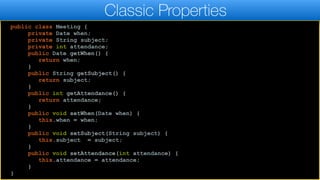
public class Meeting {
private Date when;
private String subject;
private int attendance;
public Date getWhen() {
return when;
}
public String getSubject() {
return subject;
}
public int getAttendance() {
return attendance;
}
public void setWhen(Date when) {
this.when = when;
}
public void setSubject(String subject) {
this.subject = subject;
}
public void setAttendance(int attendance) {
this.attendance = attendance;
}
}
Classic Properties
Understanding Properties
public class Meeting {
private Date when;
private String subject;
private int attendance;
public Date getWhen() {
return when;
}
public String getSubject() {
return subject;
}
public int getAttendance() {
return attendance;
}
public void setWhen(Date when) {
this.when = when;
}
public void setSubject(String subject) {
this.subject = subject;
}
public void setAttendance(int attendance) {
this.attendance = attendance;
}
}
Classic Properties
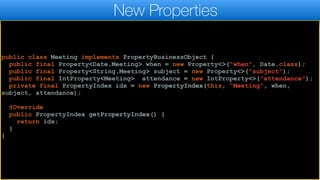
public class Meeting implements PropertyBusinessObject {
public final Property<Date,Meeting> when = new Property<>("when", Date.class);
public final Property<String,Meeting> subject = new Property<>("subject");
public final IntProperty<Meeting> attendance = new IntProperty<>("attendance");
private final PropertyIndex idx = new PropertyIndex(this, "Meeting", when,
subject, attendance);
@Override
public PropertyIndex getPropertyIndex() {
return idx;
}
}
New Properties
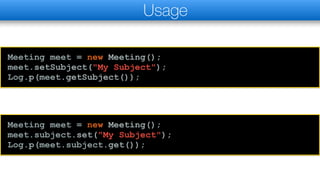
Meeting meet = new Meeting();
meet.setSubject("My Subject");
Log.p(meet.getSubject());
Usage
Meeting meet = new Meeting();
meet.subject.set("My Subject");
Log.p(meet.subject.get());
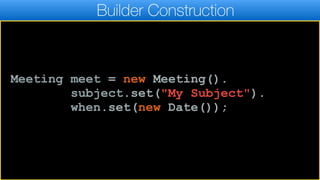
Builder Construction
Meeting meet = new Meeting().
subject.set("My Subject").
when.set(new Date());
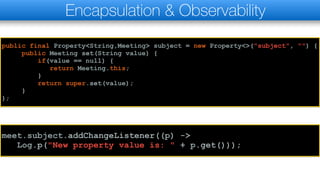
Encapsulation & Observability
public final Property<String,Meeting> subject = new Property<>("subject", "") {
public Meeting set(String value) {
if(value == null) {
return Meeting.this;
}
return super.set(value);
}
};
meet.subject.addChangeListener((p) ->
Log.p("New property value is: " + p.get()));
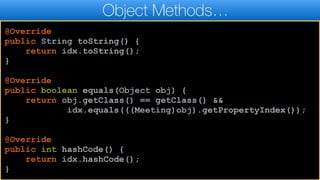
Object Methods…
@Override
public String toString() {
return idx.toString();
}
@Override
public boolean equals(Object obj) {
return obj.getClass() == getClass() &&
idx.equals(((Meeting)obj).getPropertyIndex());
}
@Override
public int hashCode() {
return idx.hashCode();
}
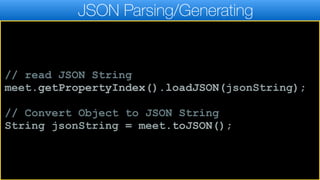
JSON Parsing/Generating
// read JSON String
meet.getPropertyIndex().loadJSON(jsonString);
// Convert Object to JSON String
String jsonString = meet.toJSON();
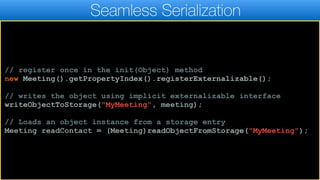
Seamless Serialization
// register once in the init(Object) method
new Meeting().getPropertyIndex().registerExternalizable();
// writes the object using implicit externalizable interface
writeObjectToStorage("MyMeeting", meeting);
// Loads an object instance from a storage entry
Meeting readContact = (Meeting)readObjectFromStorage("MyMeeting");
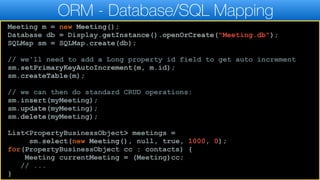
ORM - Database/SQL Mapping
Meeting m = new Meeting();
Database db = Display.getInstance().openOrCreate("Meeting.db");
SQLMap sm = SQLMap.create(db);
// we'll need to add a Long property id field to get auto increment
sm.setPrimaryKeyAutoIncrement(m, m.id);
sm.createTable(m);
// we can then do standard CRUD operations:
sm.insert(myMeeting);
sm.update(myMeeting);
sm.delete(myMeeting);
List<PropertyBusinessObject> meetings =
sm.select(new Meeting(), null, true, 1000, 0);
for(PropertyBusinessObject cc : contacts) {
Meeting currentMeeting = (Meeting)cc;
// ...
}
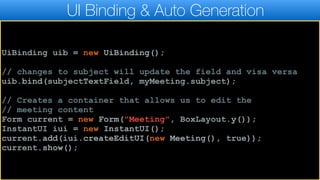
UI Binding & Auto Generation
UiBinding uib = new UiBinding();
// changes to subject will update the field and visa versa
uib.bind(subjectTextField, myMeeting.subject);
// Creates a container that allows us to edit the
// meeting content
Form current = new Form("Meeting", BoxLayout.y());
InstantUI iui = new InstantUI();
current.add(iui.createEditUI(new Meeting(), true));
current.show();
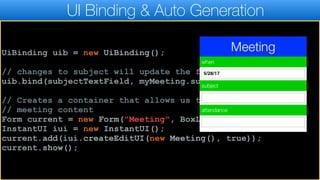
UI Binding & Auto Generation
UiBinding uib = new UiBinding();
// changes to subject will update the field and visa versa
uib.bind(subjectTextField, myMeeting.subject);
// Creates a container that allows us to edit the
// meeting content
Form current = new Form("Meeting", BoxLayout.y());
InstantUI iui = new InstantUI();
current.add(iui.createEditUI(new Meeting(), true));
current.show();
UI Binding & Auto Generation
UiBinding uib = new UiBinding();
// changes to subject will update the field and visa versa
uib.bind(subjectTextField, myMeeting.subject);
// Creates a container that allows us to edit the
// meeting content
Form current = new Form("Meeting", BoxLayout.y());
InstantUI iui = new InstantUI();
current.add(iui.createEditUI(new Meeting(), true));
current.show();
Thank You!

Understand Properties in Codename One

  • 1.
  • 2.
    public class Meeting{ private Date when; private String subject; private int attendance; public Date getWhen() { return when; } public String getSubject() { return subject; } public int getAttendance() { return attendance; } public void setWhen(Date when) { this.when = when; } public void setSubject(String subject) { this.subject = subject; } public void setAttendance(int attendance) { this.attendance = attendance; } } Classic Properties Understanding Properties
  • 3.
    public class Meeting{ private Date when; private String subject; private int attendance; public Date getWhen() { return when; } public String getSubject() { return subject; } public int getAttendance() { return attendance; } public void setWhen(Date when) { this.when = when; } public void setSubject(String subject) { this.subject = subject; } public void setAttendance(int attendance) { this.attendance = attendance; } } Classic Properties
  • 4.
    public class Meetingimplements PropertyBusinessObject { public final Property<Date,Meeting> when = new Property<>("when", Date.class); public final Property<String,Meeting> subject = new Property<>("subject"); public final IntProperty<Meeting> attendance = new IntProperty<>("attendance"); private final PropertyIndex idx = new PropertyIndex(this, "Meeting", when, subject, attendance); @Override public PropertyIndex getPropertyIndex() { return idx; } } New Properties
  • 5.
    Meeting meet =new Meeting(); meet.setSubject("My Subject"); Log.p(meet.getSubject()); Usage Meeting meet = new Meeting(); meet.subject.set("My Subject"); Log.p(meet.subject.get());
  • 6.
    Builder Construction Meeting meet= new Meeting(). subject.set("My Subject"). when.set(new Date());
  • 7.
    Encapsulation & Observability publicfinal Property<String,Meeting> subject = new Property<>("subject", "") { public Meeting set(String value) { if(value == null) { return Meeting.this; } return super.set(value); } }; meet.subject.addChangeListener((p) -> Log.p("New property value is: " + p.get()));
  • 8.
    Object Methods… @Override public StringtoString() { return idx.toString(); } @Override public boolean equals(Object obj) { return obj.getClass() == getClass() && idx.equals(((Meeting)obj).getPropertyIndex()); } @Override public int hashCode() { return idx.hashCode(); }
  • 9.
    JSON Parsing/Generating // readJSON String meet.getPropertyIndex().loadJSON(jsonString); // Convert Object to JSON String String jsonString = meet.toJSON();
  • 10.
    Seamless Serialization // registeronce in the init(Object) method new Meeting().getPropertyIndex().registerExternalizable(); // writes the object using implicit externalizable interface writeObjectToStorage("MyMeeting", meeting); // Loads an object instance from a storage entry Meeting readContact = (Meeting)readObjectFromStorage("MyMeeting");
  • 11.
    ORM - Database/SQLMapping Meeting m = new Meeting(); Database db = Display.getInstance().openOrCreate("Meeting.db"); SQLMap sm = SQLMap.create(db); // we'll need to add a Long property id field to get auto increment sm.setPrimaryKeyAutoIncrement(m, m.id); sm.createTable(m); // we can then do standard CRUD operations: sm.insert(myMeeting); sm.update(myMeeting); sm.delete(myMeeting); List<PropertyBusinessObject> meetings = sm.select(new Meeting(), null, true, 1000, 0); for(PropertyBusinessObject cc : contacts) { Meeting currentMeeting = (Meeting)cc; // ... }
  • 12.
    UI Binding &Auto Generation UiBinding uib = new UiBinding(); // changes to subject will update the field and visa versa uib.bind(subjectTextField, myMeeting.subject); // Creates a container that allows us to edit the // meeting content Form current = new Form("Meeting", BoxLayout.y()); InstantUI iui = new InstantUI(); current.add(iui.createEditUI(new Meeting(), true)); current.show();
  • 13.
    UI Binding &Auto Generation UiBinding uib = new UiBinding(); // changes to subject will update the field and visa versa uib.bind(subjectTextField, myMeeting.subject); // Creates a container that allows us to edit the // meeting content Form current = new Form("Meeting", BoxLayout.y()); InstantUI iui = new InstantUI(); current.add(iui.createEditUI(new Meeting(), true)); current.show();
  • 14.
    UI Binding &Auto Generation UiBinding uib = new UiBinding(); // changes to subject will update the field and visa versa uib.bind(subjectTextField, myMeeting.subject); // Creates a container that allows us to edit the // meeting content Form current = new Form("Meeting", BoxLayout.y()); InstantUI iui = new InstantUI(); current.add(iui.createEditUI(new Meeting(), true)); current.show(); Thank You!