WRITING CLEAN CODE
IN SWIFT
TOKYO IOS MEETUP
JANUARY, 2017 DEREK LEE
ANY FOOL CAN
WRITE CODE THAT A
COMPUTER CAN
UNDERSTAND. GOOD
PROGRAMMERS
WRITE CODE
THAT HUMANS CAN
UNDERSTAND.
Martin Fowler
… a blog post?
… a research paper?
… a presentation?
SO HOW WOULD YOU WRITE …
DRAFT→REVISE
REFACTORING
REVISE
TDD:
RED
GREEN
REFACTOR
How much time do you think you spend
reading code versus writing code?
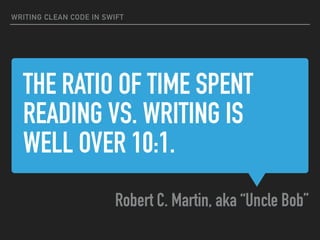
THE RATIO OF TIME SPENT
READING VS. WRITING IS
WELL OVER 10:1.
Robert C. Martin, aka “Uncle Bob”
WRITING CLEAN CODE IN SWIFT
7 12HOURS MINUTES
Here are three ways in which you can
immediately improve the readability
of your Swift code
#1
USE DESCRIPTIVE
NAMES
#1 USE DESCRIPTIVE NAMES
NAMES SHOULD BE…
▸ Intention-revealing: Why it exists, what it does, how it is
used
▸ Pronounceable: Easy to read, not cryptic, using standard
acronyms
▸ Consistent: Choose a single word for a domain concept
and stick with it
#1 USE DESCRIPTIVE NAMES
RENAMING IS CONSIDERED REFACTORING
▸ Finding the right name the first time is rare.
▸ Names can and should be revised as needed.
▸ Xcode and AppCode have some automated tools to help
with this process.
#1 USE DESCRIPTIVE NAMES
REFACTORING NAMES: XCODE
▸ ⌃ + ⌘ + E → Rename Variable
#1 USE DESCRIPTIVE NAMES
REFACTORING NAMES: APP CODE
▸ Shift + F6 → Rename (on pretty much anything)
#1 USE DESCRIPTIVE NAMES
func calculate(date1: Date, date2: Date) -> String {
var diff: TimeInterval = 0
if (date2 > date1) {
diff = date2.timeIntervalSince(date1)
} else {
return "No time remaining"
}
let s = Int(diff) % 60
let m = Int(diff / 60) % 60
let h = Int(diff / 3600) % 24
let d = Int(diff / 86400)
return "(d) days, (h) hours, (m) minutes, and (s) seconds remaining"
}
#1 USE DESCRIPTIVE NAMES
func calculate(date1: Date, date2: Date) -> String {
var diff: TimeInterval = 0
if (date2 > date1) {
diff = date2.timeIntervalSince(date1)
} else {
return "No time remaining"
}
let s = Int(diff) % 60
let m = Int(diff / 60) % 60
let h = Int(diff / 3600) % 24
let d = Int(diff / 86400)
return "(d) days, (h) hours, (m) minutes, and (s) seconds remaining"
}
let date1 = Date(timeIntervalSince1970: 1484360070) // Jan 14 2017 11:14:30 AM
let date2 = Date(timeIntervalSince1970: 1484557200) // Jan 16 2017 18:00:00 PM
calculate(date1: date1, date2: date2) // 2 days, 6 hours, 45 minutes, 30 seconds
calculate(date1: date2, date2: date1) // No time remaining
#1 USE DESCRIPTIVE NAMES
func formatRemainingTime(pastDate: Date, futureDate: Date) -> String {
var secondsDifference: TimeInterval = 0
if (pastDate < futureDate) {
secondsDifference = date2.timeIntervalSince(date1)
} else {
return "No time remaining"
}
let secondsRemaining = Int(secondsDifference) % 60
let minutesRemaining = Int(secondsDifference / 60) % 60
let hoursRemaining = Int(secondsDifference / 3600) % 24
let daysRemaining = Int(secondsDifference / 86400)
let formattedRemainingTime =
String(daysRemaining) + " days, " +
String(hoursRemaining) + " hours, " +
String(minutesRemaining) + " minutes, and " +
String(secondsRemaining) + " seconds remaining"
return formattedRemainingTime
}
#1 USE DESCRIPTIVE NAMES
func formatRemainingTime(pastDate: Date, futureDate: Date) -> String {
guard (futureDate > pastDate) else {
return "No time remaining"
}
let secondsDifference = futureDate.timeIntervalSince(pastDate)
let secondsRemaining = Int(secondsDifference) % 60
let minutesRemaining = Int(secondsDifference / 60) % 60
let hoursRemaining = Int(secondsDifference / 3600) % 24
let daysRemaining = Int(secondsDifference / 86400)
let formattedRemainingTime =
String(daysRemaining) + " days, " +
String(hoursRemaining) + " hours, " +
String(minutesRemaining) + " minutes, and " +
String(secondsRemaining) + " seconds remaining"
return formattedRemainingTime
}
#2
ORGANIZE YOUR
OBJECTS
#2 ORGANIZE YOUR OBJECTS
USE ‘MARK’ ANNOTATIONS FOR CODE ORGANIZATION
▸ // MARK: -
▸ Can be used for:
▸ Defining common parts of objects
▸ Protocol Conformance
▸ Private Methods
DEFINE PROPERTIES SEPARATE FROM PROTOCOL CONFORMANCE
#2 ORGANIZE YOUR OBJECTS
DEFINE PROPERTIES SEPARATE FROM PROTOCOL CONFORMANCE
{
Properties

+

Initialization
#2 ORGANIZE YOUR OBJECTS
DEFINE PROPERTIES SEPARATE FROM PROTOCOL CONFORMANCE
{
Properties

+

Initialization
{Protocol

Conformance
#2 ORGANIZE YOUR OBJECTS
DEFINE PROPERTIES SEPARATE FROM PROTOCOL CONFORMANCE
{
Properties

+

Initialization
{Protocol

Conformance
{Private 

Methods
#2 ORGANIZE YOUR OBJECTS
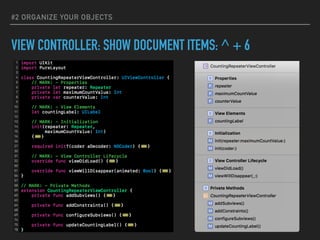
VIEW CONTROLLER: SHOW DOCUMENT ITEMS: ^ + 6
#2 ORGANIZE YOUR OBJECTS
VIEW CONTROLLER: SHOW DOCUMENT ITEMS: ^ + 6
#2 ORGANIZE YOUR OBJECTS
VIEW CONTROLLER: SHOW DOCUMENT ITEMS: ^ + 6
#2 ORGANIZE YOUR OBJECTS
XCODE SNIPPETS
#2 ORGANIZE YOUR OBJECTS
#3
AVOID
COMMENTS
EVERY TIME YOU
WRITE A COMMENT,
YOU SHOULD
GRIMACE AND FEEL
THE FAILURE OF
YOUR ABILITY OF
EXPRESSION.
Uncle Bob
CREATE A NEW
METHOD INSTEAD
When you feel the need to write a comment…
#3 AVOID COMMENTS
A SIMPLE COMPARISON
OR
// Check to see if the employee is eligible for full benefits
if (employee.isHourly && employee.age > 65) {
}
if (employee.isEligibleForFullBenefits()) {
}
#3 AVOID COMMENTS
HOW ABOUT DATES?
// Jan 14 2017 11:14:30 AM
let date1 = Date(timeIntervalSince1970: 1484360070)
let Jan_14_2017_11_14_30_AM = Date(timeIntervalSince1970: 1484360070)
OR
#3 AVOID COMMENTS
IS THERE SUCH THING AS A GOOD REASON FOR COMMENTS?
▸ Documentation for frameworks or libraries.
▸ Clarification outside of your control (e.g. library usage).
▸ Warning of consequences.
▸ See ‘Clean Code’ for a few more examples.
#3 AVOID COMMENTS
WRITING CLEAN CODE IN SWIFT
SUMMARY
1. Use Descriptive Names
2. Organize Your Objects
3. Avoid Comments
@DEREKLEEROCK
Thank you!
Tokyo iOS Meetup January 2017

Writing Clean Code in Swift

  • 1.
    WRITING CLEAN CODE INSWIFT TOKYO IOS MEETUP JANUARY, 2017 DEREK LEE
  • 2.
    ANY FOOL CAN WRITECODE THAT A COMPUTER CAN UNDERSTAND. GOOD PROGRAMMERS WRITE CODE THAT HUMANS CAN UNDERSTAND. Martin Fowler
  • 3.
    … a blogpost? … a research paper? … a presentation? SO HOW WOULD YOU WRITE …
  • 4.
  • 6.
  • 7.
  • 8.
    How much timedo you think you spend reading code versus writing code?
  • 9.
    THE RATIO OFTIME SPENT READING VS. WRITING IS WELL OVER 10:1. Robert C. Martin, aka “Uncle Bob” WRITING CLEAN CODE IN SWIFT
  • 10.
  • 11.
    Here are threeways in which you can immediately improve the readability of your Swift code
  • 12.
  • 13.
    #1 USE DESCRIPTIVENAMES NAMES SHOULD BE… ▸ Intention-revealing: Why it exists, what it does, how it is used ▸ Pronounceable: Easy to read, not cryptic, using standard acronyms ▸ Consistent: Choose a single word for a domain concept and stick with it
  • 14.
    #1 USE DESCRIPTIVENAMES RENAMING IS CONSIDERED REFACTORING ▸ Finding the right name the first time is rare. ▸ Names can and should be revised as needed. ▸ Xcode and AppCode have some automated tools to help with this process.
  • 15.
    #1 USE DESCRIPTIVENAMES REFACTORING NAMES: XCODE ▸ ⌃ + ⌘ + E → Rename Variable
  • 16.
    #1 USE DESCRIPTIVENAMES REFACTORING NAMES: APP CODE ▸ Shift + F6 → Rename (on pretty much anything)
  • 17.
    #1 USE DESCRIPTIVENAMES func calculate(date1: Date, date2: Date) -> String { var diff: TimeInterval = 0 if (date2 > date1) { diff = date2.timeIntervalSince(date1) } else { return "No time remaining" } let s = Int(diff) % 60 let m = Int(diff / 60) % 60 let h = Int(diff / 3600) % 24 let d = Int(diff / 86400) return "(d) days, (h) hours, (m) minutes, and (s) seconds remaining" }
  • 18.
    #1 USE DESCRIPTIVENAMES func calculate(date1: Date, date2: Date) -> String { var diff: TimeInterval = 0 if (date2 > date1) { diff = date2.timeIntervalSince(date1) } else { return "No time remaining" } let s = Int(diff) % 60 let m = Int(diff / 60) % 60 let h = Int(diff / 3600) % 24 let d = Int(diff / 86400) return "(d) days, (h) hours, (m) minutes, and (s) seconds remaining" } let date1 = Date(timeIntervalSince1970: 1484360070) // Jan 14 2017 11:14:30 AM let date2 = Date(timeIntervalSince1970: 1484557200) // Jan 16 2017 18:00:00 PM calculate(date1: date1, date2: date2) // 2 days, 6 hours, 45 minutes, 30 seconds calculate(date1: date2, date2: date1) // No time remaining
  • 19.
    #1 USE DESCRIPTIVENAMES func formatRemainingTime(pastDate: Date, futureDate: Date) -> String { var secondsDifference: TimeInterval = 0 if (pastDate < futureDate) { secondsDifference = date2.timeIntervalSince(date1) } else { return "No time remaining" } let secondsRemaining = Int(secondsDifference) % 60 let minutesRemaining = Int(secondsDifference / 60) % 60 let hoursRemaining = Int(secondsDifference / 3600) % 24 let daysRemaining = Int(secondsDifference / 86400) let formattedRemainingTime = String(daysRemaining) + " days, " + String(hoursRemaining) + " hours, " + String(minutesRemaining) + " minutes, and " + String(secondsRemaining) + " seconds remaining" return formattedRemainingTime }
  • 20.
    #1 USE DESCRIPTIVENAMES func formatRemainingTime(pastDate: Date, futureDate: Date) -> String { guard (futureDate > pastDate) else { return "No time remaining" } let secondsDifference = futureDate.timeIntervalSince(pastDate) let secondsRemaining = Int(secondsDifference) % 60 let minutesRemaining = Int(secondsDifference / 60) % 60 let hoursRemaining = Int(secondsDifference / 3600) % 24 let daysRemaining = Int(secondsDifference / 86400) let formattedRemainingTime = String(daysRemaining) + " days, " + String(hoursRemaining) + " hours, " + String(minutesRemaining) + " minutes, and " + String(secondsRemaining) + " seconds remaining" return formattedRemainingTime }
  • 21.
  • 22.
    #2 ORGANIZE YOUROBJECTS USE ‘MARK’ ANNOTATIONS FOR CODE ORGANIZATION ▸ // MARK: - ▸ Can be used for: ▸ Defining common parts of objects ▸ Protocol Conformance ▸ Private Methods
  • 23.
    DEFINE PROPERTIES SEPARATEFROM PROTOCOL CONFORMANCE #2 ORGANIZE YOUR OBJECTS
  • 24.
    DEFINE PROPERTIES SEPARATEFROM PROTOCOL CONFORMANCE { Properties
 +
 Initialization #2 ORGANIZE YOUR OBJECTS
  • 25.
    DEFINE PROPERTIES SEPARATEFROM PROTOCOL CONFORMANCE { Properties
 +
 Initialization {Protocol
 Conformance #2 ORGANIZE YOUR OBJECTS
  • 26.
    DEFINE PROPERTIES SEPARATEFROM PROTOCOL CONFORMANCE { Properties
 +
 Initialization {Protocol
 Conformance {Private 
 Methods #2 ORGANIZE YOUR OBJECTS
  • 27.
    VIEW CONTROLLER: SHOWDOCUMENT ITEMS: ^ + 6 #2 ORGANIZE YOUR OBJECTS
  • 28.
    VIEW CONTROLLER: SHOWDOCUMENT ITEMS: ^ + 6 #2 ORGANIZE YOUR OBJECTS
  • 29.
    VIEW CONTROLLER: SHOWDOCUMENT ITEMS: ^ + 6 #2 ORGANIZE YOUR OBJECTS
  • 30.
  • 31.
  • 32.
    EVERY TIME YOU WRITEA COMMENT, YOU SHOULD GRIMACE AND FEEL THE FAILURE OF YOUR ABILITY OF EXPRESSION. Uncle Bob
  • 33.
    CREATE A NEW METHODINSTEAD When you feel the need to write a comment… #3 AVOID COMMENTS
  • 34.
    A SIMPLE COMPARISON OR //Check to see if the employee is eligible for full benefits if (employee.isHourly && employee.age > 65) { } if (employee.isEligibleForFullBenefits()) { } #3 AVOID COMMENTS
  • 35.
    HOW ABOUT DATES? //Jan 14 2017 11:14:30 AM let date1 = Date(timeIntervalSince1970: 1484360070) let Jan_14_2017_11_14_30_AM = Date(timeIntervalSince1970: 1484360070) OR #3 AVOID COMMENTS
  • 36.
    IS THERE SUCHTHING AS A GOOD REASON FOR COMMENTS? ▸ Documentation for frameworks or libraries. ▸ Clarification outside of your control (e.g. library usage). ▸ Warning of consequences. ▸ See ‘Clean Code’ for a few more examples. #3 AVOID COMMENTS
  • 37.
    WRITING CLEAN CODEIN SWIFT SUMMARY 1. Use Descriptive Names 2. Organize Your Objects 3. Avoid Comments
  • 39.