UDL in Practice: Universal Design  For Learning Joshua Zola, Ed.S., CBIS
Acknowledgments This presentation was created for EDET 735 Summer 2008. Most of the information in this presentation was taken directly from CAST. For further information about their copyright terms, contact CAST at  [email_address]  or via fax (781) 245-5212.  Please also notice that all headings on the top of the page are hyperlinks.
What is UDL? Universal Design for Learning (UDL) is a research-based framework for designing curricula—that is, educational goals, methods, materials, and assessments—that enable all individuals to gain knowledge, skills, and enthusiasm for learning. This is accomplished by simultaneously providing rich supports for learning and reducing barriers to the curriculum, while maintaining high achievement standards for all students.  © CAST, 2008 .
What is UDL? Drawing from brain research and using new media, the UDL framework guides educators to provide three kinds of flexibility: To represent information in multiple formats and media;  To provide multiple pathways for students' strategies and expression;  To provide multiple ways to engage students' interest and motivation  The goal of UDL is to enable all individuals to gain knowledge, skills and enthusiasm for learning.  © CAST, 2008 .
What is CAST? Founded in 1984 as the Center for Applied Special Technology, CAST has earned international recognition for its development of innovative, technology-based educational resources and strategies based on the principles of Universal Design for Learning (UDL). CAST staff includes specialists in education research and policy, neuropsychology, clinical/school psychology, technology, engineering, curriculum development, K-12 professional development, and more. By defining UDL and exploring its practical applications, CAST is pushing the boundaries of education research, practice, and policymaking. Achievements include: Creation or codevelopment of innovative software such as Thinking Reader, WiggleWorks, and Bobby   Leadership of federally funded initiatives to develop and promote a National Instructional Materials Accessibility Standard (NIMAS). NIMAS will guide the production and electronic distribution of curricular materials in accessible, student-ready versions, including Braille and Digital Talking Books   Provision of support for school teachers and administrators through professional development, consultation, publications, and online resources  Link to CAST:  http:// www.cast.org/index.html © CAST, 2008 .
Where can I get the UDL guidelines? There is a lot of information on UDL guidelines.  You can get to them at: http://www.cast.org/publications/UDLguidelines/version1.html © CAST, 2008 .
Where can I get information on Systemic Change Things that should be taken into consideration: Technology infrastructure; obtaining and managing digital content resources; administrative support; teacher training and support; redefined roles for special and regular education teachers; a new curriculum planning model; parent and community involvement; and creative funding.  http://www.cast.org/teachingeverystudent/tools/systemicchange.cfm Where to start?: The  UDL Systemic Change Tutorial  helps you become familiar with components that may be key in making UDL a reality.  The  UDL Systemic Change Tool  structures you in establishing goals and monitoring progress in your own school or district.  The  Creating Systemic Change Template  is a downloadable template you can use on screen or in print to develop UDL solutions for your classroom.  © CAST, 2008 .
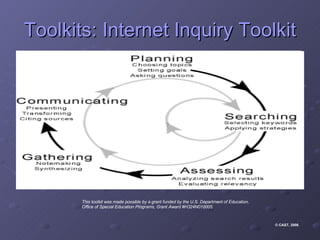
Toolkits: Internet Inquiry Toolkit This toolkit was made possible by a grant funded by the U.S. Department of Education,  Office of Special Education Programs, Grant Award #H324N010005.   © CAST, 2008 .
What equipment do I need in order to teach Internet inquiry? One multimedia computer with fast, reliable Internet access for every student or pair of students  LCD projector and screen or TV monitor for teacher demonstrations and student presentations  At least one reliable printer (color is optimal) for producing student work  Internet browser software, e.g.,  Internet Explorer   Netscape   Text-to-speech tool for students with decoding difficulties, e.g.,  CAST  eReader  (PC & Mac)  Natural Voice Reader  (PC freeware)  HearIt  (Mac freeware)  Software for creating inquiry projects, e.g., Microsoft Word  (word processing)  Microsoft Publisher  (desktop publishing)  Microsoft PowerPoint  (slide shows)  Inspiration  (concept maps & timelines)  Dreamweaver  (Web pages)  © CAST, 2008 .
How do I create my own lessons? The CAST Universal Design for Learning (UDL) Lesson Builder  provides educators with models and tools to create and adapt lessons that increase access and participation in the general education curriculum for all students.  http://lessonbuilder.cast.org/ © CAST, 2008 .
How do I create goals? The key is to design a goal that represents the true purpose of the learning activity. This sounds obvious but actually many goals are stated in a way that confuses means and ends. Only when the essential learning purpose is clear can we determine the educational focus for all learners. At the same time, a clear goal enables us to determine which alternative pathways and scaffolds can be used to meet diverse learning needs while keeping the learning challenge where it belongs.  http://www.cast.org/teachingeverystudent/tools/udlgoalsetter.cfm © CAST, 2008 .
How do we find Curriculum Barriers? We know that each learner brings unique strengths, challenges, and interests to learning tasks, and that the idea of a homogeneous group of "typical" learners is really a myth. Yet most curriculum is designed as if learners were all the same.  The predominance of printed textbooks, oral presentation by teachers, and paper and pencil post-hoc testing have led to curricula that work for some students, but not for all. Of course those with disabilities who can't use these media are excluded. But many students who seem "typical" also miss out. Albert Einstein's spatial genius, George Lucas's skill in creating narratives, and Mel Torme's musical talent were all completely missed by their teachers, primarily because materials, media and methods in the classroom did not support the use of graphics, video, and music. Without knowing it, we often throw roadblocks in the way of student learning, simply by using traditional, one-size-fits-all media and methods in our teaching.  http://www.cast.org/teachingeverystudent/tools/curriculumbarriers.cfm © CAST, 2008 .
How do I find UDL Solutions? The key to helping all students achieve is identifying and removing barriers from our teaching methods and curriculum materials. One effective way to do this is to expand your teaching toolbox with digital media and software. To accommodate a broad spectrum of learners, universally designed curricula require a range of options for accessing, using, and engaging with learning materials. The materials themselves, as well as the teaching approaches, need to be sufficiently flexible to support varied pathways towards common learning goals.  http://www.cast.org/teachingeverystudent/tools/udlsolutionsfinder.cfm © CAST, 2008 .
Where do I get more information on Professional Development? To help educators at all grade levels meet the challenge of teaching diverse learners with Universal Design for Learning (UDL), CAST offers high-quality professional development and other resources to individuals, school districts, and postsecondary institutions.  http:// www.cast.org/pd/index.html
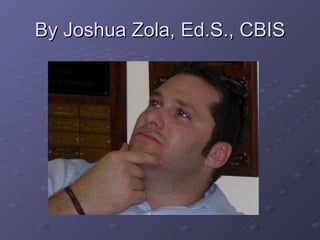
By Joshua Zola, Ed.S., CBIS

UDL In Practice

  • 1.
    UDL in Practice:Universal Design For Learning Joshua Zola, Ed.S., CBIS
  • 2.
    Acknowledgments This presentationwas created for EDET 735 Summer 2008. Most of the information in this presentation was taken directly from CAST. For further information about their copyright terms, contact CAST at [email_address] or via fax (781) 245-5212. Please also notice that all headings on the top of the page are hyperlinks.
  • 3.
    What is UDL?Universal Design for Learning (UDL) is a research-based framework for designing curricula—that is, educational goals, methods, materials, and assessments—that enable all individuals to gain knowledge, skills, and enthusiasm for learning. This is accomplished by simultaneously providing rich supports for learning and reducing barriers to the curriculum, while maintaining high achievement standards for all students. © CAST, 2008 .
  • 4.
    What is UDL?Drawing from brain research and using new media, the UDL framework guides educators to provide three kinds of flexibility: To represent information in multiple formats and media; To provide multiple pathways for students' strategies and expression; To provide multiple ways to engage students' interest and motivation The goal of UDL is to enable all individuals to gain knowledge, skills and enthusiasm for learning. © CAST, 2008 .
  • 5.
    What is CAST?Founded in 1984 as the Center for Applied Special Technology, CAST has earned international recognition for its development of innovative, technology-based educational resources and strategies based on the principles of Universal Design for Learning (UDL). CAST staff includes specialists in education research and policy, neuropsychology, clinical/school psychology, technology, engineering, curriculum development, K-12 professional development, and more. By defining UDL and exploring its practical applications, CAST is pushing the boundaries of education research, practice, and policymaking. Achievements include: Creation or codevelopment of innovative software such as Thinking Reader, WiggleWorks, and Bobby Leadership of federally funded initiatives to develop and promote a National Instructional Materials Accessibility Standard (NIMAS). NIMAS will guide the production and electronic distribution of curricular materials in accessible, student-ready versions, including Braille and Digital Talking Books Provision of support for school teachers and administrators through professional development, consultation, publications, and online resources Link to CAST: http:// www.cast.org/index.html © CAST, 2008 .
  • 6.
    Where can Iget the UDL guidelines? There is a lot of information on UDL guidelines. You can get to them at: http://www.cast.org/publications/UDLguidelines/version1.html © CAST, 2008 .
  • 7.
    Where can Iget information on Systemic Change Things that should be taken into consideration: Technology infrastructure; obtaining and managing digital content resources; administrative support; teacher training and support; redefined roles for special and regular education teachers; a new curriculum planning model; parent and community involvement; and creative funding. http://www.cast.org/teachingeverystudent/tools/systemicchange.cfm Where to start?: The UDL Systemic Change Tutorial helps you become familiar with components that may be key in making UDL a reality. The UDL Systemic Change Tool structures you in establishing goals and monitoring progress in your own school or district. The Creating Systemic Change Template is a downloadable template you can use on screen or in print to develop UDL solutions for your classroom. © CAST, 2008 .
  • 8.
    Toolkits: Internet InquiryToolkit This toolkit was made possible by a grant funded by the U.S. Department of Education, Office of Special Education Programs, Grant Award #H324N010005. © CAST, 2008 .
  • 9.
    What equipment doI need in order to teach Internet inquiry? One multimedia computer with fast, reliable Internet access for every student or pair of students LCD projector and screen or TV monitor for teacher demonstrations and student presentations At least one reliable printer (color is optimal) for producing student work Internet browser software, e.g., Internet Explorer Netscape Text-to-speech tool for students with decoding difficulties, e.g., CAST eReader (PC & Mac) Natural Voice Reader (PC freeware) HearIt (Mac freeware) Software for creating inquiry projects, e.g., Microsoft Word (word processing) Microsoft Publisher (desktop publishing) Microsoft PowerPoint (slide shows) Inspiration (concept maps & timelines) Dreamweaver (Web pages) © CAST, 2008 .
  • 10.
    How do Icreate my own lessons? The CAST Universal Design for Learning (UDL) Lesson Builder provides educators with models and tools to create and adapt lessons that increase access and participation in the general education curriculum for all students. http://lessonbuilder.cast.org/ © CAST, 2008 .
  • 11.
    How do Icreate goals? The key is to design a goal that represents the true purpose of the learning activity. This sounds obvious but actually many goals are stated in a way that confuses means and ends. Only when the essential learning purpose is clear can we determine the educational focus for all learners. At the same time, a clear goal enables us to determine which alternative pathways and scaffolds can be used to meet diverse learning needs while keeping the learning challenge where it belongs. http://www.cast.org/teachingeverystudent/tools/udlgoalsetter.cfm © CAST, 2008 .
  • 12.
    How do wefind Curriculum Barriers? We know that each learner brings unique strengths, challenges, and interests to learning tasks, and that the idea of a homogeneous group of "typical" learners is really a myth. Yet most curriculum is designed as if learners were all the same. The predominance of printed textbooks, oral presentation by teachers, and paper and pencil post-hoc testing have led to curricula that work for some students, but not for all. Of course those with disabilities who can't use these media are excluded. But many students who seem "typical" also miss out. Albert Einstein's spatial genius, George Lucas's skill in creating narratives, and Mel Torme's musical talent were all completely missed by their teachers, primarily because materials, media and methods in the classroom did not support the use of graphics, video, and music. Without knowing it, we often throw roadblocks in the way of student learning, simply by using traditional, one-size-fits-all media and methods in our teaching. http://www.cast.org/teachingeverystudent/tools/curriculumbarriers.cfm © CAST, 2008 .
  • 13.
    How do Ifind UDL Solutions? The key to helping all students achieve is identifying and removing barriers from our teaching methods and curriculum materials. One effective way to do this is to expand your teaching toolbox with digital media and software. To accommodate a broad spectrum of learners, universally designed curricula require a range of options for accessing, using, and engaging with learning materials. The materials themselves, as well as the teaching approaches, need to be sufficiently flexible to support varied pathways towards common learning goals. http://www.cast.org/teachingeverystudent/tools/udlsolutionsfinder.cfm © CAST, 2008 .
  • 14.
    Where do Iget more information on Professional Development? To help educators at all grade levels meet the challenge of teaching diverse learners with Universal Design for Learning (UDL), CAST offers high-quality professional development and other resources to individuals, school districts, and postsecondary institutions. http:// www.cast.org/pd/index.html
  • 15.
    By Joshua Zola,Ed.S., CBIS