Recommended
PPTX
PDF
はじめよう TypeScript - 入門から実践まで - 素の JavaScript とはさようなら!
PDF
PDF
3日時間をもらったのでTypeScriptを触ってみた
PPTX
PDF
TypeScript 型定義ファイルのある開発 TypeScript勉強会 VSハッカソン倶楽部
PDF
PDF
jQuery 対応ライブラリと TypeScript
PDF
Visual Studioで始めるTypeScript開発入門
PDF
PDF
PPTX
jQueryの先に行こう!最先端のWeb開発トレンドを学ぶ
PDF
TypeScript による今風の web アプリ開発
PDF
PDF
PDF
PDF
PDF
PDF
PhpStormを使おう --高槻からは快速急行が早くなります #jbugj
PPTX
PDF
PDF
PDF
PDF
PDF
PDF
PDF
PDF
PDF
PPTX
More Related Content
PPTX
PDF
はじめよう TypeScript - 入門から実践まで - 素の JavaScript とはさようなら!
PDF
PDF
3日時間をもらったのでTypeScriptを触ってみた
PPTX
PDF
TypeScript 型定義ファイルのある開発 TypeScript勉強会 VSハッカソン倶楽部
PDF
PDF
jQuery 対応ライブラリと TypeScript
What's hot
PDF
Visual Studioで始めるTypeScript開発入門
PDF
PDF
PPTX
jQueryの先に行こう!最先端のWeb開発トレンドを学ぶ
PDF
TypeScript による今風の web アプリ開発
PDF
PDF
PDF
PDF
PDF
PDF
PhpStormを使おう --高槻からは快速急行が早くなります #jbugj
PPTX
PDF
PDF
PDF
PDF
PDF
PDF
PDF
Viewers also liked
PDF
PDF
PPTX
PPTX
PDF
PPTX
PPTX
PDF
TypeScript ファースト ステップ (v.0.9 対応版) ~ Any browser. Any host. Any OS. Open Sourc...
PPTX
PDF
CLR/H#74 LT IT勉強会発表用イチオシツール
PDF
Introduction of "MarkdownPresenter"
PPTX
PDF
More Azure Websites! - JAZUGさっぽろ "きたあず" 第5回勉強会ライトニングトーク
PPT
PPTX
イラスト日用服飾辞典/三面記事の歴史/健康男 を読んで
PDF
20140823 LL diver Angular.js で構築した note に関して
PDF
PDF
[予告篇] みんなで同時プレイするクイズWebアプリでCodeQuizに挑戦!
PDF
PPTX
Similar to Typescriptの中のこと(浅め)
PDF
PDF
PDF
TypeScript と Visual Studio Code
PPTX
PDF
DEV-011_TypeScript ~Any browser. Any host. Any OS. Open Source~
PDF
ng-japan 2015 TypeScript+AngularJS 1.3
PDF
Buildinsider OFFLINE TypeScriptの基礎から実践・利用事例まで
PDF
Angular ユーザーなら押さえておきたい! TypeScript と Visual Studio Code の基礎と活用
PDF
PDF
PDF
TypeScript ファーストステップ (Rev.2) ~ Any browser. Any host. Any OS. Open Source. ~
PDF
PDF
PDF
PPTX
PDF
Visual Studio 2012 Web 開発 ~ One ASP.NET から TypeScript まで ~
PDF
PDF
PDF
"今" 押さえておきたい! Web アプリ開発の技術トレンドとツールの進化
PDF
More from Kazuhide Maruyama
PDF
PPTX
Way Of Multi Platform Desktop App Development By DotNet
PPTX
夏時間対応始めました。 - .NET Conf関西 2018 LT
PPTX
Microsoft bot frameworkを触ってみた
PDF
PPTX
PDF
PPTX
PPTX
PDF
Grid application テンプレートを紐解く
PDF
Developerのdeveloperによるdeveloperのためのmetro designの話
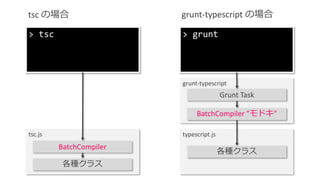
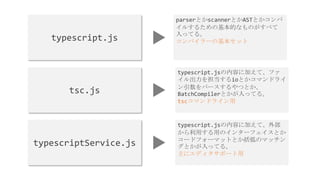
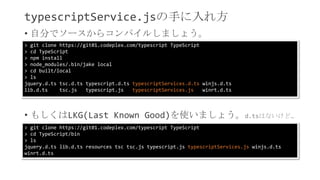
Typescriptの中のこと(浅め) 1. 2. 5. 6. 7. typescriptService.jsの手に入れ方
• 自分でソースからコンパイルしましょう。
> git clone https://git01.codeplex.com/typescript TypeScript
> cd TypeScript
> npm install
> node_modules/.bin/jake local
> cd built/local
> ls
jquery.d.ts tsc.d.ts typescript.d.ts typescriptServices.d.ts winjs.d.ts
lib.d.ts tsc.js typescript.js typescriptServices.js winrt.d.ts
• もしくはLKG(Last Known Good)を使いましょう。d.tsはないけど…
> git clone https://git01.codeplex.com/typescript TypeScript
> cd TypeScript/bin
> ls
jquery.d.ts lib.d.ts resources tsc tsc.js typescript.js typescriptServices.js winjs.d.ts
winrt.d.ts
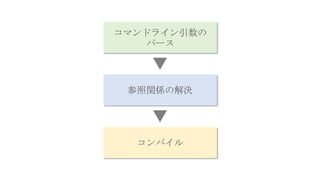
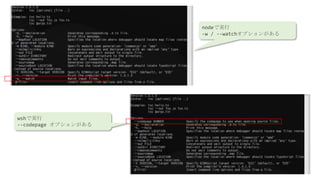
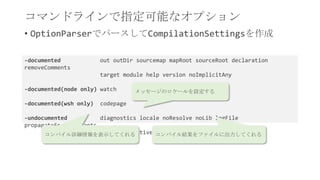
8. 9. 10. 11. 12. コマンドラインで指定可能なオプション
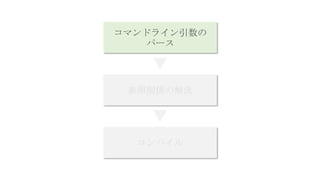
• OptionParserでパースしてCompilationSettingsを作成
-documented out outDir sourcemap mapRoot sourceRoot declaration
removeComments
target module help version noImplicitAny
-documented(node only) watch
-documented(wsh only) codepage
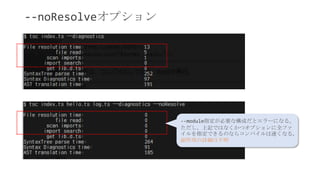
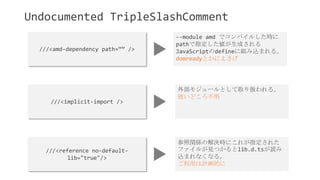
-undocumented diagnostics locale noResolve noLib logFile
propagateEnumConstants
useCaseSensitiveFileResoltionコンパイル詳細情報を表示してくれる
メッセージのロケールを設定する
コンパイル結果をファイルに出力してくれる
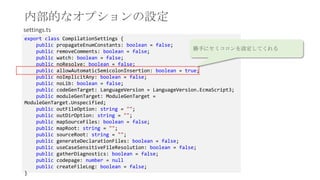
13. 内部的なオプションの設定
export class CompilationSettings {
public propagateEnumConstants: boolean = false;
public removeComments: boolean = false;
public watch: boolean = false;
public noResolve: boolean = false;
public allowAutomaticSemicolonInsertion: boolean = true;
public noImplicitAny: boolean = false;
public noLib: boolean = false;
public codeGenTarget: LanguageVersion = LanguageVersion.EcmaScript3;
public moduleGenTarget: ModuleGenTarget =
ModuleGenTarget.Unspecified;
public outFileOption: string = "";
public outDirOption: string = "";
public mapSourceFiles: boolean = false;
public mapRoot: string = "";
public sourceRoot: string = "";
public generateDeclarationFiles: boolean = false;
public useCaseSensitiveFileResolution: boolean = false;
public gatherDiagnostics: boolean = false;
public codepage: number = null
public createFileLog: boolean = false;
}
settings.ts
勝手にセミコロンを設定してくれる
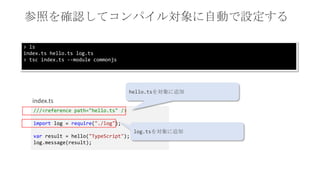
14. 15. ///<reference path="hello.ts" />
import log = require("./log");
var result = hello("TypeScript");
log.message(result);
index.ts
hello.tsを対象に追加
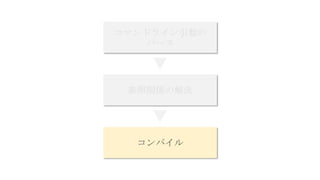
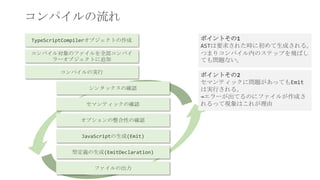
参照を確認してコンパイル対象に自動で設定する
log.tsを対象に追加
> ls
index.ts hello.ts log.ts
> tsc index.ts --module commonjs
16. 17. 18. 19. 20. 21. 22.






![[予告篇] みんなで同時プレイするクイズWebアプリでCodeQuizに挑戦!](https://cdn.slidesharecdn.com/ss_thumbnails/osc13do-jsakamoto-trailer-130905063238--thumbnail.jpg?width=640&height=640&fit=bounds)


