Data Model
• Adata model defines how data is organized, stored, and
manipulated in a database.
• It provides a conceptual framework for representing and
structuring data in a way that aligns with the database's
requirements and the application's goals.
3.
Types of DataModels
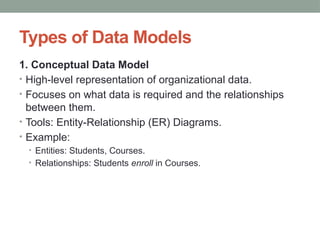
1. Conceptual Data Model
• High-level representation of organizational data.
• Focuses on what data is required and the relationships
between them.
• Tools: Entity-Relationship (ER) Diagrams.
• Example:
• Entities: Students, Courses.
• Relationships: Students enroll in Courses.
4.
Types of DataModels
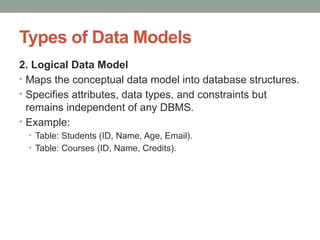
2. Logical Data Model
• Maps the conceptual data model into database structures.
• Specifies attributes, data types, and constraints but
remains independent of any DBMS.
• Example:
• Table: Students (ID, Name, Age, Email).
• Table: Courses (ID, Name, Credits).
5.
Types of DataModels
3. Physical Data Model
• Represents how the data is stored physically in the
database.
• Includes file structures, indexes, and storage
considerations.
• DBMS-specific.
• Example:
• Define tables in SQL, indexes on "Student ID," and storage
locations.
6.
Data Modeling Components
1.Entities
• Objects or concepts that have data stored about them.
• Example: "Student," "Course."
2. Attributes
• Properties or characteristics of an entity.
• Example: For "Student," attributes might be "ID," "Name," "Age."
3. Relationships
• Defines how entities are related to one another.
• Example: A "Student" enrolls in a "Course."
4. Constraints
• Rules that govern the data.
• Example: Primary keys, foreign keys, unique constraints.
7.
Types of DatabaseData Models
• There are several different Database model types, some
of them are old, while some of them are new, to cater to
the new age requirements. Here is a list of the 7 popular
Database models:
• Hierarchical Model
• Network Model
• Entity-relationship Model
• Relational Model
• Object-oriented Model
8.
1. Hierarchical Model
•The hierarchical database model organizes data into a tree-like structure, with
a single root, to which all the other data is linked.
• The hierarchy starts from the Root data, and expands like a tree, adding child nodes
to the parent nodes.
• In this model, a child node will only have a single parent node.
• This model efficiently describes many real-world relationships like the index of a book,
etc.
• IBM's Information Management System (IMS) is based on this model.
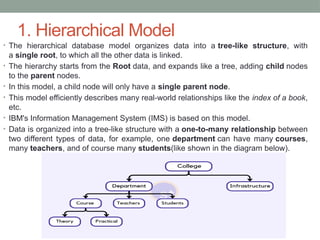
• Data is organized into a tree-like structure with a one-to-many relationship between
two different types of data, for example, one department can have many courses,
many teachers, and of course many students(like shown in the diagram below).
9.
Advantages/Disadvantages of theHierarchical
Model
• Because it has one-to-many relationships between
different types of data so it is easier and fast to fetch the
data.
• But the Hierarchical model is less flexible.
• And it doesn't support many-to-many relationships.
10.
2. Network Model
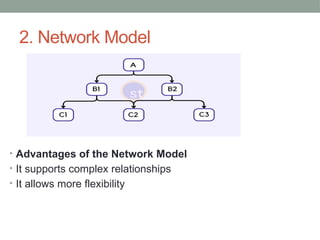
•The Network Model is an extension of the Hierarchical model.
• In this model, data is organized more like a graph, and allowed to have more than
one parent node.
• In the network database model, data is more related as more relationships are
established in this database model.
• Also, as the data is more related, hence accessing the data is also
easier and fast.
• This database model uses many-to-many data relationships.
• Integrated Data Store (IDS) is based on this database model.
• This was the most widely used database model before Relational Model was
introduced.
• The implementation of the Network model is complex, and it's very difficult to
maintain it.
• The Network model is difficult to modify also.
• You may want to explore this if you are developing some social networking
applications, although the Graph Database model is new and is far better than the
Network Database model.
11.
2. Network Model
•Advantages of the Network Model
• It supports complex relationships
• It allows more flexibility
12.
3. Entity-relationship Model
•In this database model, relationships are created by
dividing objects of interest into entities and their
characteristics into attributes.
• Different entities are related using relationships.
• ER Models are defined to represent the relationships in
pictorial form to make it easier for different stakeholders
to understand.
• This model is good to design a database, which can then
be turned into tables in a relational model (explained
below).
13.
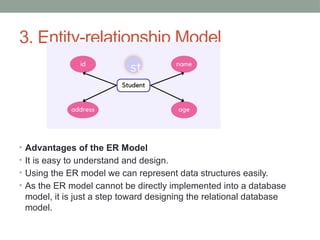
3. Entity-relationship Model
•Let's take an example, If we have to design a School
Database, then the Student will be
an entity with attributes name, age, address, etc. As
an Address is generally complex, it can be
another entity with attributes street, pincode, city, etc,
and there will be a relationship between them.
• Relationships can also be of different types. You can learn
about ER Diagrams in detail if you want to learn about
entities and relationships.
14.
3. Entity-relationship Model
•Advantages of the ER Model
• It is easy to understand and design.
• Using the ER model we can represent data structures easily.
• As the ER model cannot be directly implemented into a database
model, it is just a step toward designing the relational database
model.
15.
4. Relational Model
•In this model, data is organized in two-
dimensional tables and the relationship is maintained by
storing a common field.
• This model was introduced by E.F Codd in 1970, and since
then it has been the most widely used database model.
• The basic structure of data in the relational model
is tables. All the information related to a particular type is
stored in rows of that table.
• Hence, tables are also known as relations in the relational
model.
16.
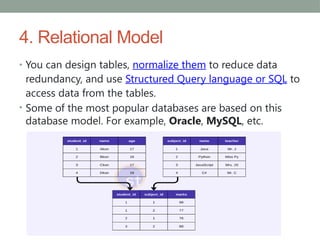
4. Relational Model
•You can design tables, normalize them to reduce data
redundancy, and use Structured Query language or SQL to
access data from the tables.
• Some of the most popular databases are based on this
database model. For example, Oracle, MySQL, etc.
17.
4. Relational Model
•Advantages of the Relational Model
• It's simple and easy to implement.
• Poplar database software is available for this database
model.
• It supports SQL using which you can easily query the
data.
18.
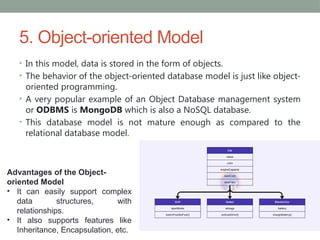
5. Object-oriented Model
•In this model, data is stored in the form of objects.
• The behavior of the object-oriented database model is just like object-
oriented programming.
• A very popular example of an Object Database management system
or ODBMS is MongoDB which is also a NoSQL database.
• This database model is not mature enough as compared to the
relational database model.
Advantages of the Object-
oriented Model
• It can easily support complex
data structures, with
relationships.
• It also supports features like
Inheritance, Encapsulation, etc.



![Database System Concepts AND architecture [Autosaved].pptx](https://cdn.slidesharecdn.com/ss_thumbnails/databasesystemconceptsandarchitectureautosaved-230817173311-be7f8590-thumbnail.jpg?width=640&height=640&fit=bounds)


