Train the Trainer 2012
Welcome to AfG
Debbie Forster
COO
Introducing the team
AfG and being agile
Introducing our growing network
TTT is a meta course:
A short programme
about a larger
programme
Introduction to AfG
Richard Smartt
Agenda
A Student’s Perspective
http://vimeo.com/29314692
Benefits & Challenges
Benefits Challenges
Vibrant, engaged cohort Teams working at different paces
Student growth Student resilience
Student-led progress Avoid over-direction
Huge potential for effective
Solutions
Over-complication if SOW not
followed
AfG Lifecycle Overview
Richard Smartt
1: Problem definition
2: Market Research
3: Solution Design
4: Product Design
5:Firstbuild&test
The 5-Step approach
refine
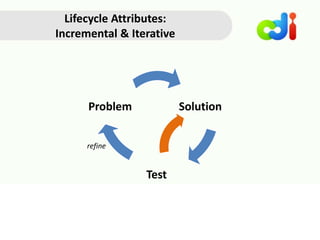
Lifecycle Attributes:
Incremental & Iterative
refine
Experts App
Inventor
SCQA
framing
Problem
video
Scenario
map
Business
model
canvas
Wireframe
Pitch
Student experience of Apps for Good
AppResearch
outputs
User
personas
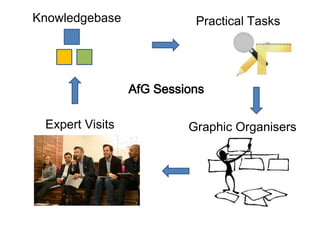
AfG Session
~50 Minutes
Graphic OrganisersExpert Visits
Practical TasksKnowledgebase
AfG Sessions
AfG Schedule / SOW
No. of weeks (excluding holidays) 26
Session Duration (mins) 50
Guided Learning Hours
In classroom [21] +
Curriculum Enrichment or other
supplementary time [4]
25
Non - Guided Learning Hours
inc AFGA Support (6) +
App Inventor home study (10) +
AFGA Finalist Prep (9) [If Applicable]
25
Total 50
Facilitation
Non-directive, adult-to-adult
style. Maximised peer learning
AfG Experts –An Overview
1. Market research
2. Business models
3. User Experience Design
4. Development/ Programming
5. Marketing/ customer acquisition
6. Public speaking
7. Intellectual Property Law
1. Problem Selection
2. Advice on
Implementing and
Pivoting Solutions
Ad hoc support
Introducing Smart Phone Apps
to students
There’s a recipe for responding
CATCH THE BALL!
TAG OUT A BASE RUNNER
THROW THE BALL
COVER A BASE
THROW BACK TO PITCHER
Functions an app can use
Location
services
Purchase
channel
Touch screen
and internal
sensors
(shake, draw,
layout)
Multimedia
(audio, video,
stream live)
Notifications Connect
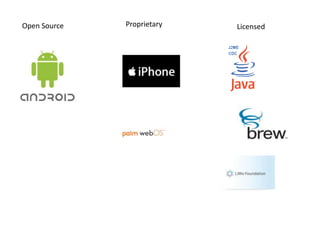
Open Source Proprietary Licensed
Unpacking the 5 steps
1: Problem
definition
2: Market
Research
3: Solution
Design
4: Product
Design
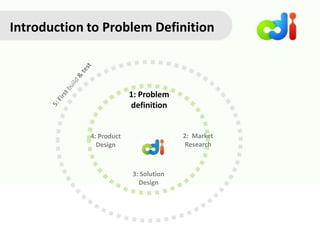
Introduction to Problem Definition
1: Problem
definition
2: Market
Research
3: Solution
Design
4: Product
Design
So what kind of
problems are we
looking for exactly?
Problem Statement
A concise
description of the
problem to be
addressed
THE ‘VEX’ FACTOR
Familiar Frequent Specific
Irritant Expensive Moves
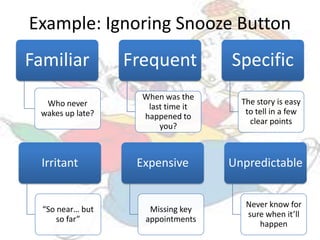
Familiar
Who never
wakes up late?
Frequent
When was the
last time it
happened to
you?
Specific
The story is easy
to tell in a few
clear points
Example: Ignoring Snooze Button
Irritant
“So near… but
so far”
Expensive
Missing key
appointments
Unpredictable
Never know for
sure when it’ll
happen
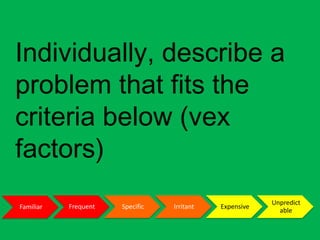
Individually, describe a
problem that fits the
criteria below (vex factors)
Familiar Frequent Specific Irritant Expensive
Unpredict
able
Pass your description to
the team member on your
right; try to improve on the
description you’ve received,
OR describe a new problem
below it.
Framing
Problems
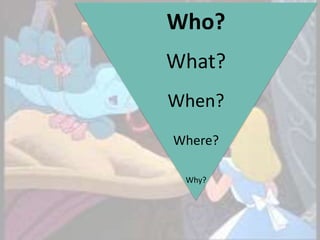
Who?
What?
When?
Where?
Why?
Who? What? Where? When? Why?
Pick 3 problems that
resonate most with the
team; briefly describe the
‘5 ws’ for each
Discuss the problems
your team identified and
take a vote on two
problems to explore (one
is a back-up)
Familiar Frequent Specific Irritant Expensive
Unpredict
able
What are the specific
steps someone
experiencing each
problem goes through?
Tell us the story...
Situation Complication Question Answer
The
background
to the
specific issue
Explains
what the
specific issue
is
A specific
inquiry into
how the
complication
can be
addressed,
given the
situation
A possible
answer to
the
question
SCQA Mapping
Situation Complication Question Answer
There are 100 million
12-18 year olds in the
developed world
A recent poll from
the Chartered
Management
Institute (CMI) found
that 61% of
employers had
encountered
problems with young
people’s discipline
and punctuality.
Everyday young
people frequently
oversleep despite
setting alarm clocks.
Ignoring the snooze
button leads to
oversleeping, and
costly opportunities
are lost such as sitting
exams, maintaining a
good punctuality
record at school,
missing out on job
interviews and key
opportunities in the
morning
How can we help
students to wake up
on time and get out
of bed promptly?
A gamified
commuting
experience where
the user is
rewarded for
punctual arrival at
various checkpoints
mapped with
Google pins.
Create your team’s SCQA
problem framing
Draft a concise
description of the exact
problem.
Step 1 Review
Practicalities
Adaptation
Key Assignments
Overview of the Build Path
“Where is Step 5?”
1: Problem definition
2: Market Research
3: Solution Design
4: Product Design
5:Firstbuild&test
refine
Experts App
Inventor
SCQA
framing
Problem
video
Scenario
map
Business
model
canvas
Wireframe
Pitch
Student experience of Apps for Good
AppResearch
outputs
User
personas
Introduction to AfG Research
1: Problem
definition
2: Market
Research
3: Solution
Design
4: Product
Design
Introduction to AfG Research
Central Questions
What are users
thoughts about
the problem?
Can users validate
team’s assumptions
from Step 1?
Feed me,
already.
What to look for...
Profile
Story
Obstacles
REAL USER
REAL USER
REAL USER
Research Design: Prospective Questions
How old are you?
How often do you get out of bed late?
How often do you wake up late?
What responsibilities do you have in the mornings?
Do you use the snooze button? How many times in succession?
Have you ever had a wake up call (by telephone)?
What is the biggest opportunity you’ve missed through lateness?
Using the web
Write a list of the people
you would speak to, and
sources you would
explore to research the
problem
The Problem Video
http://youtu.be/PJUP_OLFDgU
Student Example - Good
http://www.youtube.com/watch?v=7u_2IX_tzx4
Student Example - Poor
STEP 2 REVIEW
Practicalities
Adaptation
Key Assignments
1: Problem
definition
2: Market
Research
3: Solution
Design
4: Product
Design
Introduction to Solution Design - Pt 1
Discovering Value
Introduction to Solution Design Pt 1
Discovering Value
Central Questions
What are the
possible solutions?
How do we
create value for
the users?
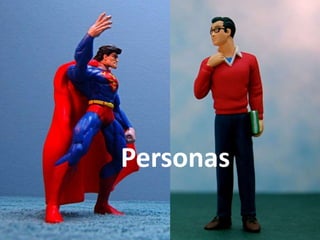
Personas
Source: Uxforthemasses.com
Example persona
Create a persona
representing the likely
users of your solution
“Describes how
an organization
captures,
creates and
delivers value”
Business Model
Put together the business
model canvas for the
Buzzer Buddies app
Discuss and complete a
business model canvas that
shows how your app could
be structured to create &
deliver value
...describe
what should
happen
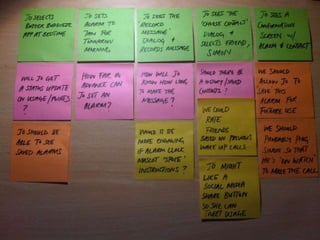
Scenario Maps...
From the diary page the user
can input daily feelings and
notes that they can look back
on. They can also rate each day
out of 10.
The user will select the
app form the screen.
Here the user can
select a page from 3
options. These are:
Diary, Goals, and Tips.
From the Goals page users can
input a goal and when this is
achieved it can be turned into
some visual prompt – graph.
Also they can view finished
goals
From the Tips page the
user can receive a tip
daily.
Will our product name
be memorable enough
for people to find the
app and download it?
This will then be turned
into a line graph that
would give you tips on
how to improve if you
get a low score
Within each of these pages there
may be other pages. For example
on the goals page we will have an
achievement log with achieved
goal and on-going goals
This will most likely be
a picture of our logo.
It would make you
enter something you
have done to make you
feel proud.
We can have another
aspect of this page that
makes people want to
come back.
When you have
reached a certain
amount you could get
a reward of some sort
These could be picture
buttons or buttons
with text
It could play a clip of a
song every time you
enter something.
If you get a high score
it will congratulate you.
Maybe we could work
with companies to get
discounts or special
offers for users.
StepIdeaComment Question
Key
Create a scenario map
showing what should
happen in the solution
you have decided upon
STEP 3 REVIEW
Practicalities
Adaptation
Key Assignments
AfG Educator Community
Robert Rankin
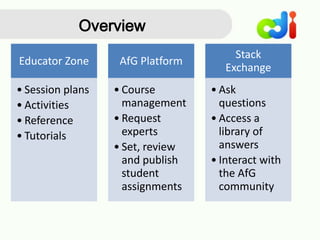
Overview
Educator Zone
• Session plans
• Activities
• Reference
• Tutorials
AfG Platform
• Course
management
• Request
experts
• Set, review
and publish
student
assignments
Stack
Exchange
• Ask
questions
• Access a
library of
answers
• Interact with
the AfG
community
Educator Zone
An open source ‘Wiki’ style site that
houses all our educational content
and support materials.
• No login required
• Integrated with our platform
• Access our session plans,
reference materials and
student activities for each step
of the course
• Find guidance notes, tutorials
and information on course
delivery and the AfG toolset.
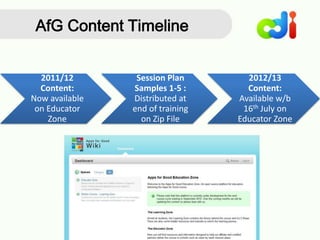
2011/12
Content:
Now available
on Educator
Zone
Session Plan
Samples 1-5 :
Distributed at
end of training
on Zip File
2012/13
Content:
Available w/b
16th July on
Educator Zone
AfG Content Timeline
The AfG Online Platform
Will enable you to:
Run and manage Apps for Good courses.
Access resources for delivering Apps for Good sessions
Set, review and publish student assignments
Connect with experts
Stack Exchange
We have set one up for the Apps for Good community that will
enable you to:
• Post questions and get answers about all things Apps for Good
• Access a library of questions and answers focused on the
most important topics
• Interact with other AfG educators (old and new), our expert
community, our content only partners around the world and
the AfG team.
Stack Exchange
But there is a twist……before our Q&A site can go live, we have
to prove ourselves as a community!
There are three stages to this process:
• Definition - defining the range of topics the site will cover
• Commitment - building up members of the community
• Beta - site goes live but will be withdrawn if not used
frequently
Stack Exchange-Getting Started
“Homework” via email:
1. Follow Apps for Good’s proposal link
2. Submit up to 5 questions you think would be useful
3. Pick your top 3 questions and vote them up
4. Pick your bottom 3 and vote them down
End of Day 1
Agenda
Safeguarding/Child Protection
Using the Platform
 Public website
 Students as teams not individuals
 Teachers/CDI can edit submissions
 No direct contact with teams by public
Joint child-protection responsibilities
 School & CDI monitor platform jointly
 Schools to brief students about online
safety and appropriate behavior
 Schools to align with their own
Acceptable Use & Safeguarding
Policies
 If school develops ongoing relationship
with expert, it can liaise with him/her
re: CRB/List 99 if it so desires
 If concerns are reported, schools to
escalate to their child protection
officer and alert Debbie at CDI & joint
investigation will be carried out
Expert Sessions
 Experts NOT required to be CRB’ed
 Generally by Skype
 Initiated only by teacher
 Uses school, not student, Skype
accounts
 Member of staff must be present
Re-capping on Day 1
Sharing your ideas
1: Problem
definition
2: Market
Research
3: Solution
Design
4: Product
Design
Introduction to Product Design
Step 4: Product Design
Precisely how should the interaction
be laid out? What should the user
experience be?
Step 4 Core Question
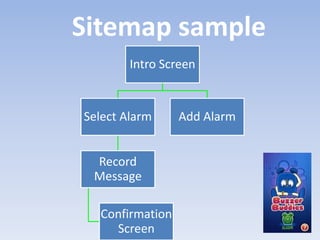
Intro Screen
Select Alarm
Record
Message
Confirmation
Screen
Add Alarm
Sitemap sample
Recipe Browser
Recipe Step Through
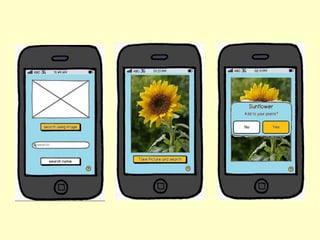
Rapid Prototyping (RP)
Prototypes are simulations of the product.
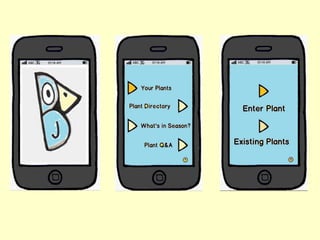
KoubachiWeather Birds App
Weather watch: Alerts on weather
forecast and effect for
gardens/plants
Information:
Nutrients and how to care for
garden and plant
Visual diary: Plant/garden
development
Diary:
Note progress/concerns:
Tags,
Student Example - Fair
Have a go creating some
of the initial screens for
your idea on Balsamiq
Mockups
Step 4 Review
Practicalities
Adaptation
Key Assignments
1: Problem
definition
2: Market
Research
3: Solution
Design
4: Product
Design
Build Path & Tools
AfG Tool Recap
Using App Inventor
Download Assets for Basic Drum Tutorial
www.bit.ly/lSGTA6
AfG Educator Zone App Inventor tutorials
www.bit.ly/appinventortutorials
Download Dell Streak Driver
www.bit.ly/dellstreakdriver
1. Scroll down to the ‘Éclair v2.1’ download and download zip folder
2. Run installation file extracted folder
3. Ensure driver is installed, then reboot laptop
4. Connect Dell Streak to laptop and run App Inventor Blocks Editor (‘Connect
to Device’)
APP INVENTOR
UI
Programming
Concepts
A I
HTML5
HTML5 +
programming
Javascript +
jquery
CSS
HTML
MOBILE APPS
HTML5 PhoneGap
Mobile
App
(STEP 5)
HTML5 • JSON
Facebook
API • Timeline
Hosting
• Heroku
/Github
Server
Side
• PHP/ Ruby/
Node.js
Database • PostgresSQL
Facebook App
FACEBOOK APPS
Ending the course & AFGA
Coming to the end of the course
AFGA Sponsors
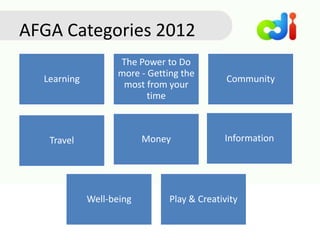
Learning
The Power to Do
more - Getting the
most from your
time
Community
Travel Money Information
Well-being Play & Creativity
AFGA Categories 2012
•Categories finalised
•Competition opens
•Entries submitted online
•Semi-finalists named
•Judging panel chooses finalists
•Mentors work with Finalists
•Finalists come to London
•Presentation to Dragon’s Den panels with Q&A
•Elevator Pitch to live audience and streamed on internet
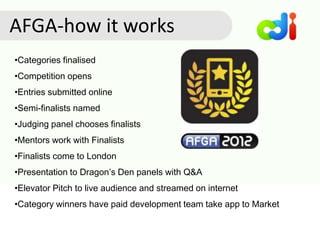
•Category winners have paid development team take app to Market
AFGA-how it works
In teams prepare a Dragon’s Den
pitch--
30 minutes prep
2 minute pitch
Good luck!
Your Turn at AFGA
How AfG Maps to Curricula
Mapping AfG to the KS3 ICT National Curriculum
OFSTED
What makes a good
AfG lesson?
What makes a good Ofsted lesson?
- new January criteria
Mapping AfG to other curricula
Assessment
• Educators
• Experts
• Users
• Compare with curricula
• Good, average, poor
• User feedback
• Expert feedback
• APP Assessment criteria
• Educator community
• CDI Europe
Who? How?
Other support
Making AfG Work in Your School
Next Steps
How we will work
We are here to support you in delivering the apps
for good course. We will:
• Provide you with the resources to deliver the course through
the AFG Online Platform & Educator Zone
• Help you connect with experts through our booking
system on the platform
• ‘Top-up’ training sessions via periodic webinars
• Support you through regular visits or virtual catch-ups on
Skype to see how you are doing and where we can help
(certified only)
• Help you find answers to queries and address problems
through guidance on the Educator Zone and our Q&A site –
Stack Exchange
What we require
In order for us to best support you in delivering
the course, we need you to:
 Have a dedicated point of contact to receive and act
upon all AfG communications in a timely fashion
 Proactively communicate any difficulties you maybe
experiencing
 Troubleshoot before you seek help on technical
problems
 We are a community and as such help each other – we
encourage you to connect with and support other
partners
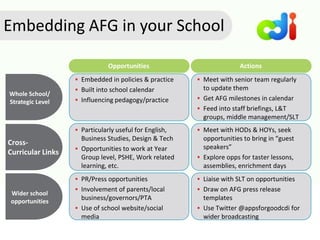
Embedding AFG in your School
Whole School/
Strategic Level
Opportunities
 Embedded in policies & practice
 Built into school calendar
 Influencing pedagogy/practice
Cross-
Curricular Links
Actions
 Meet with senior team regularly
to update them
 Get AFG milestones in calendar
 Feed into staff briefings, L&T
groups, middle management/SLT
 Particularly useful for English,
Business Studies, Design & Tech
 Opportunities to work at Year
Group level, PSHE, Work related
learning, etc.
 Meet with HODs & HOYs, seek
opportunities to bring in “guest
speakers”
 Explore opps for taster lessons,
assemblies, enrichment days
Wider school
opportunities
 PR/Press opportunities
 Involvement of parents/local
business/governors/PTA
 Use of school website/social
media
 Liaise with SLT on opportunities
 Draw on AFG press release
templates
 Use Twitter @appsforgoodcdi for
wider broadcasting
Book planning time with Senior Team
member and appropriate staff
Open zip files and go onto Educator Zone
Do Stack Exchange homework
If you are willing to help test AFG platform let
Rob know
Next steps - within the week
137
Next steps - within the month
Agree with Senior team and staff how you will
implement the course, incl recruitment & parents
Consider how you can inform/involve other staff and
departments
Use Educator Zone to access new materials
Align AFG planning with school planning to get delivery
plan for the year
Ensure equipment, software ordered, installed, etc.
Begin interacting with network of schools locally and
beyond
138
Next steps - by August
Course planning in place for year, 1st half term
detailed planning in place
Equipment/software in place- Test App Inventor!!
Familiar with content & tools-learning content and
App Inventor and Stack Exchange
Plans for student recruitment in place ready for
September launch, including informing parents
Plans for promotion in place-incl local press, school
newsletter/website, using Twitter, LinkedIn, etc
139
Next steps - September and beyond
School Launch of AFG
AFG platform formally launched & teams onboarded
Baseline data return completed by educator &
students
Use Stack Exchange to interact with wider network
Onboarding discussions and meetings with Rob &
Debbie
Download Session Plan Samples
bit.ly/MubxAS
These session plans are provided for your reference for the purposes of training.
Term 1 session plans and corresponding materials for 2012/13 will be published
on the AfG Educator Zone w/b 16/07/12
Evaluation
www.bit.ly/AfGtraining
(capital A, capital G)
Education – Community
Robert.Rankin@cdieurope.eu
Partnerships / Senior Team Liaison:
Debbie.Forster@cdieurope.eu
Evaluation/data
Paul.Edkins@cdieurope.eu
Thank you and good luck!
www.appsforgood.org
Special Thanks to
JD Hancock for images CC

TTT 2012 slide deck

  • 1.
  • 2.
  • 3.
  • 4.
  • 5.
  • 6.
    TTT is ameta course: A short programme about a larger programme
  • 7.
  • 8.
  • 9.
  • 12.
    Benefits & Challenges BenefitsChallenges Vibrant, engaged cohort Teams working at different paces Student growth Student resilience Student-led progress Avoid over-direction Huge potential for effective Solutions Over-complication if SOW not followed
  • 13.
  • 14.
    1: Problem definition 2:Market Research 3: Solution Design 4: Product Design 5:Firstbuild&test The 5-Step approach
  • 15.
  • 16.
  • 17.
  • 18.
    Graphic OrganisersExpert Visits PracticalTasksKnowledgebase AfG Sessions
  • 19.
    AfG Schedule /SOW No. of weeks (excluding holidays) 26 Session Duration (mins) 50 Guided Learning Hours In classroom [21] + Curriculum Enrichment or other supplementary time [4] 25 Non - Guided Learning Hours inc AFGA Support (6) + App Inventor home study (10) + AFGA Finalist Prep (9) [If Applicable] 25 Total 50
  • 20.
  • 21.
    AfG Experts –AnOverview 1. Market research 2. Business models 3. User Experience Design 4. Development/ Programming 5. Marketing/ customer acquisition 6. Public speaking 7. Intellectual Property Law 1. Problem Selection 2. Advice on Implementing and Pivoting Solutions Ad hoc support
  • 22.
    Introducing Smart PhoneApps to students
  • 24.
    There’s a recipefor responding CATCH THE BALL! TAG OUT A BASE RUNNER THROW THE BALL COVER A BASE THROW BACK TO PITCHER
  • 25.
    Functions an appcan use Location services Purchase channel Touch screen and internal sensors (shake, draw, layout) Multimedia (audio, video, stream live) Notifications Connect
  • 26.
  • 28.
    Unpacking the 5steps 1: Problem definition 2: Market Research 3: Solution Design 4: Product Design
  • 29.
    Introduction to ProblemDefinition 1: Problem definition 2: Market Research 3: Solution Design 4: Product Design
  • 30.
    So what kindof problems are we looking for exactly?
  • 31.
    Problem Statement A concise descriptionof the problem to be addressed
  • 32.
    THE ‘VEX’ FACTOR FamiliarFrequent Specific Irritant Expensive Moves
  • 33.
    Familiar Who never wakes uplate? Frequent When was the last time it happened to you? Specific The story is easy to tell in a few clear points Example: Ignoring Snooze Button Irritant “So near… but so far” Expensive Missing key appointments Unpredictable Never know for sure when it’ll happen
  • 34.
    Individually, describe a problemthat fits the criteria below (vex factors) Familiar Frequent Specific Irritant Expensive Unpredict able
  • 35.
    Pass your descriptionto the team member on your right; try to improve on the description you’ve received, OR describe a new problem below it.
  • 36.
  • 37.
  • 38.
  • 39.
    Pick 3 problemsthat resonate most with the team; briefly describe the ‘5 ws’ for each
  • 40.
    Discuss the problems yourteam identified and take a vote on two problems to explore (one is a back-up) Familiar Frequent Specific Irritant Expensive Unpredict able
  • 41.
    What are thespecific steps someone experiencing each problem goes through? Tell us the story...
  • 42.
    Situation Complication QuestionAnswer The background to the specific issue Explains what the specific issue is A specific inquiry into how the complication can be addressed, given the situation A possible answer to the question SCQA Mapping
  • 43.
    Situation Complication QuestionAnswer There are 100 million 12-18 year olds in the developed world A recent poll from the Chartered Management Institute (CMI) found that 61% of employers had encountered problems with young people’s discipline and punctuality. Everyday young people frequently oversleep despite setting alarm clocks. Ignoring the snooze button leads to oversleeping, and costly opportunities are lost such as sitting exams, maintaining a good punctuality record at school, missing out on job interviews and key opportunities in the morning How can we help students to wake up on time and get out of bed promptly? A gamified commuting experience where the user is rewarded for punctual arrival at various checkpoints mapped with Google pins.
  • 44.
    Create your team’sSCQA problem framing
  • 45.
    Draft a concise descriptionof the exact problem.
  • 46.
  • 47.
    Overview of theBuild Path “Where is Step 5?”
  • 48.
    1: Problem definition 2:Market Research 3: Solution Design 4: Product Design 5:Firstbuild&test
  • 49.
  • 50.
    Introduction to AfGResearch 1: Problem definition 2: Market Research 3: Solution Design 4: Product Design
  • 51.
  • 52.
    Central Questions What areusers thoughts about the problem? Can users validate team’s assumptions from Step 1? Feed me, already.
  • 53.
    What to lookfor... Profile Story Obstacles REAL USER REAL USER REAL USER
  • 54.
    Research Design: ProspectiveQuestions How old are you? How often do you get out of bed late? How often do you wake up late? What responsibilities do you have in the mornings? Do you use the snooze button? How many times in succession? Have you ever had a wake up call (by telephone)? What is the biggest opportunity you’ve missed through lateness?
  • 56.
  • 57.
    Write a listof the people you would speak to, and sources you would explore to research the problem
  • 58.
  • 59.
  • 60.
  • 61.
  • 62.
    1: Problem definition 2: Market Research 3:Solution Design 4: Product Design Introduction to Solution Design - Pt 1 Discovering Value
  • 63.
    Introduction to SolutionDesign Pt 1 Discovering Value
  • 64.
    Central Questions What arethe possible solutions? How do we create value for the users?
  • 65.
  • 66.
  • 67.
    Create a persona representingthe likely users of your solution
  • 68.
    “Describes how an organization captures, createsand delivers value” Business Model
  • 70.
    Put together thebusiness model canvas for the Buzzer Buddies app
  • 72.
    Discuss and completea business model canvas that shows how your app could be structured to create & deliver value
  • 73.
  • 75.
    From the diarypage the user can input daily feelings and notes that they can look back on. They can also rate each day out of 10. The user will select the app form the screen. Here the user can select a page from 3 options. These are: Diary, Goals, and Tips. From the Goals page users can input a goal and when this is achieved it can be turned into some visual prompt – graph. Also they can view finished goals From the Tips page the user can receive a tip daily. Will our product name be memorable enough for people to find the app and download it? This will then be turned into a line graph that would give you tips on how to improve if you get a low score Within each of these pages there may be other pages. For example on the goals page we will have an achievement log with achieved goal and on-going goals This will most likely be a picture of our logo. It would make you enter something you have done to make you feel proud. We can have another aspect of this page that makes people want to come back. When you have reached a certain amount you could get a reward of some sort These could be picture buttons or buttons with text It could play a clip of a song every time you enter something. If you get a high score it will congratulate you. Maybe we could work with companies to get discounts or special offers for users. StepIdeaComment Question Key
  • 76.
    Create a scenariomap showing what should happen in the solution you have decided upon
  • 77.
  • 78.
  • 79.
    Overview Educator Zone • Sessionplans • Activities • Reference • Tutorials AfG Platform • Course management • Request experts • Set, review and publish student assignments Stack Exchange • Ask questions • Access a library of answers • Interact with the AfG community
  • 80.
    Educator Zone An opensource ‘Wiki’ style site that houses all our educational content and support materials. • No login required • Integrated with our platform • Access our session plans, reference materials and student activities for each step of the course • Find guidance notes, tutorials and information on course delivery and the AfG toolset.
  • 81.
    2011/12 Content: Now available on Educator Zone SessionPlan Samples 1-5 : Distributed at end of training on Zip File 2012/13 Content: Available w/b 16th July on Educator Zone AfG Content Timeline
  • 82.
    The AfG OnlinePlatform Will enable you to: Run and manage Apps for Good courses. Access resources for delivering Apps for Good sessions Set, review and publish student assignments Connect with experts
  • 83.
    Stack Exchange We haveset one up for the Apps for Good community that will enable you to: • Post questions and get answers about all things Apps for Good • Access a library of questions and answers focused on the most important topics • Interact with other AfG educators (old and new), our expert community, our content only partners around the world and the AfG team.
  • 84.
    Stack Exchange But thereis a twist……before our Q&A site can go live, we have to prove ourselves as a community! There are three stages to this process: • Definition - defining the range of topics the site will cover • Commitment - building up members of the community • Beta - site goes live but will be withdrawn if not used frequently
  • 85.
    Stack Exchange-Getting Started “Homework”via email: 1. Follow Apps for Good’s proposal link 2. Submit up to 5 questions you think would be useful 3. Pick your top 3 questions and vote them up 4. Pick your bottom 3 and vote them down
  • 86.
  • 87.
  • 88.
    Safeguarding/Child Protection Using thePlatform  Public website  Students as teams not individuals  Teachers/CDI can edit submissions  No direct contact with teams by public Joint child-protection responsibilities  School & CDI monitor platform jointly  Schools to brief students about online safety and appropriate behavior  Schools to align with their own Acceptable Use & Safeguarding Policies  If school develops ongoing relationship with expert, it can liaise with him/her re: CRB/List 99 if it so desires  If concerns are reported, schools to escalate to their child protection officer and alert Debbie at CDI & joint investigation will be carried out Expert Sessions  Experts NOT required to be CRB’ed  Generally by Skype  Initiated only by teacher  Uses school, not student, Skype accounts  Member of staff must be present
  • 89.
    Re-capping on Day1 Sharing your ideas
  • 90.
    1: Problem definition 2: Market Research 3:Solution Design 4: Product Design Introduction to Product Design
  • 91.
  • 92.
    Precisely how shouldthe interaction be laid out? What should the user experience be? Step 4 Core Question
  • 93.
  • 95.
  • 96.
  • 98.
    Rapid Prototyping (RP) Prototypesare simulations of the product.
  • 99.
    KoubachiWeather Birds App Weatherwatch: Alerts on weather forecast and effect for gardens/plants Information: Nutrients and how to care for garden and plant Visual diary: Plant/garden development Diary: Note progress/concerns: Tags, Student Example - Fair
  • 103.
    Have a gocreating some of the initial screens for your idea on Balsamiq Mockups
  • 104.
  • 105.
    1: Problem definition 2: Market Research 3:Solution Design 4: Product Design Build Path & Tools
  • 106.
  • 108.
  • 111.
    Download Assets forBasic Drum Tutorial www.bit.ly/lSGTA6 AfG Educator Zone App Inventor tutorials www.bit.ly/appinventortutorials Download Dell Streak Driver www.bit.ly/dellstreakdriver 1. Scroll down to the ‘Éclair v2.1’ download and download zip folder 2. Run installation file extracted folder 3. Ensure driver is installed, then reboot laptop 4. Connect Dell Streak to laptop and run App Inventor Blocks Editor (‘Connect to Device’)
  • 112.
  • 113.
  • 114.
  • 115.
    HTML5 • JSON Facebook API• Timeline Hosting • Heroku /Github Server Side • PHP/ Ruby/ Node.js Database • PostgresSQL Facebook App FACEBOOK APPS
  • 116.
    Ending the course& AFGA Coming to the end of the course
  • 117.
  • 118.
    Learning The Power toDo more - Getting the most from your time Community Travel Money Information Well-being Play & Creativity AFGA Categories 2012
  • 119.
    •Categories finalised •Competition opens •Entriessubmitted online •Semi-finalists named •Judging panel chooses finalists •Mentors work with Finalists •Finalists come to London •Presentation to Dragon’s Den panels with Q&A •Elevator Pitch to live audience and streamed on internet •Category winners have paid development team take app to Market AFGA-how it works
  • 120.
    In teams preparea Dragon’s Den pitch-- 30 minutes prep 2 minute pitch Good luck! Your Turn at AFGA
  • 121.
    How AfG Mapsto Curricula
  • 122.
    Mapping AfG tothe KS3 ICT National Curriculum
  • 123.
    OFSTED What makes agood AfG lesson? What makes a good Ofsted lesson? - new January criteria
  • 124.
    Mapping AfG toother curricula
  • 125.
    Mapping AfG toother curricula
  • 126.
    Assessment • Educators • Experts •Users • Compare with curricula • Good, average, poor • User feedback • Expert feedback • APP Assessment criteria • Educator community • CDI Europe Who? How? Other support
  • 127.
    Making AfG Workin Your School Next Steps
  • 128.
    How we willwork We are here to support you in delivering the apps for good course. We will: • Provide you with the resources to deliver the course through the AFG Online Platform & Educator Zone • Help you connect with experts through our booking system on the platform • ‘Top-up’ training sessions via periodic webinars • Support you through regular visits or virtual catch-ups on Skype to see how you are doing and where we can help (certified only) • Help you find answers to queries and address problems through guidance on the Educator Zone and our Q&A site – Stack Exchange
  • 129.
    What we require Inorder for us to best support you in delivering the course, we need you to:  Have a dedicated point of contact to receive and act upon all AfG communications in a timely fashion  Proactively communicate any difficulties you maybe experiencing  Troubleshoot before you seek help on technical problems  We are a community and as such help each other – we encourage you to connect with and support other partners
  • 130.
    Embedding AFG inyour School Whole School/ Strategic Level Opportunities  Embedded in policies & practice  Built into school calendar  Influencing pedagogy/practice Cross- Curricular Links Actions  Meet with senior team regularly to update them  Get AFG milestones in calendar  Feed into staff briefings, L&T groups, middle management/SLT  Particularly useful for English, Business Studies, Design & Tech  Opportunities to work at Year Group level, PSHE, Work related learning, etc.  Meet with HODs & HOYs, seek opportunities to bring in “guest speakers”  Explore opps for taster lessons, assemblies, enrichment days Wider school opportunities  PR/Press opportunities  Involvement of parents/local business/governors/PTA  Use of school website/social media  Liaise with SLT on opportunities  Draw on AFG press release templates  Use Twitter @appsforgoodcdi for wider broadcasting
  • 131.
    Book planning timewith Senior Team member and appropriate staff Open zip files and go onto Educator Zone Do Stack Exchange homework If you are willing to help test AFG platform let Rob know Next steps - within the week
  • 132.
    137 Next steps -within the month Agree with Senior team and staff how you will implement the course, incl recruitment & parents Consider how you can inform/involve other staff and departments Use Educator Zone to access new materials Align AFG planning with school planning to get delivery plan for the year Ensure equipment, software ordered, installed, etc. Begin interacting with network of schools locally and beyond
  • 133.
    138 Next steps -by August Course planning in place for year, 1st half term detailed planning in place Equipment/software in place- Test App Inventor!! Familiar with content & tools-learning content and App Inventor and Stack Exchange Plans for student recruitment in place ready for September launch, including informing parents Plans for promotion in place-incl local press, school newsletter/website, using Twitter, LinkedIn, etc
  • 134.
    139 Next steps -September and beyond School Launch of AFG AFG platform formally launched & teams onboarded Baseline data return completed by educator & students Use Stack Exchange to interact with wider network Onboarding discussions and meetings with Rob & Debbie
  • 135.
    Download Session PlanSamples bit.ly/MubxAS These session plans are provided for your reference for the purposes of training. Term 1 session plans and corresponding materials for 2012/13 will be published on the AfG Educator Zone w/b 16/07/12
  • 136.
  • 137.
    Education – Community Robert.Rankin@cdieurope.eu Partnerships/ Senior Team Liaison: Debbie.Forster@cdieurope.eu Evaluation/data Paul.Edkins@cdieurope.eu
  • 138.
    Thank you andgood luck! www.appsforgood.org Special Thanks to JD Hancock for images CC

Editor's Notes

  • #4 A Summary of PE – Data RR – Community SK – Tech, Education, FB Course PM DF - Operations RS – Coaching & Education AP – Logistics AT – Communications & PR IL – CEO JP – Platform Developer LK - Fundraising
  • #5 A Summary of PE – Data RR – Community SK – Tech, Education, FB Course PM DF - Operations RS – Coaching & Education AP – Logistics AT – Communications & PR IL – CEO JP – Platform Developer LK - Fundraising
  • #7  the central questions for each step, how the educators role fits into getting answers for those questions, what artefacts, results, milestones educators should expect to see emerging Delivering over the next two days will be RR, DF, PE , and myself who taught one of our first school courses. You have quite detailed notes already. So much of what I will share is the why behind the what of AfG principles Debbie will also chime in toward the end of our look at each step and offer you tips for making AFG work in your school context. Between the 4 of us we hope to cover a lot of ground, we can field short questions as we go along, but they’ll also be Q&A time towards the end of the session to explore issues
  • #10 Mohima Video – Note the passion for the problem and the solution Opportunities for networking; Support; career springboard Clarity of problem description; Elegance of Solution – all products of following the class
  • #11 AFG, WHAT IT IS an award-winning problem-solving course is licensed under a Creative Commons Attribution-Noncommercial-Share Alike 2.0 UK License (Please share and share alike) Work flow: Rapidly Incremental & Iterative: Fail fast, fail often. Guided by questioning from educator and student peers a cross-curricular and multi-disciplinary programme; designed to develop students across a wide spectrum of skills, including problem solving, research and analysis, innovation and value creation, and to some degree technical skills student-led; an opportunity for young people to create imaginative mobile apps that solve problems they care about; aims for a personal a personalised learning experience that students own Real world problems, owned by active learners
  • #12 NOT Not impersonal, batch process approach. Where problem domains are prescribed WITI? Prescriptions would kill the course; remove the onus from students to explore an individual undertaking--it has a crucial teamwork and networking aspect WITI? ICT not famed for teamworking, for many its the first time to see the sum of the parts being greater than the whole on a student own tech project an app implementation or programming course, but is focused on problem solving and developing entrepreneurial skills. WITI? Common misconception that some find it hard to let go of, even after being trained. If you try to stretch beyond the boundaries of what this design programme is intended to do, you may come unstuck based on traditional standardised assessment and a simple right or wrong answer; the focus is on failing fast and often and emerging with a validated solution. We will provide a spectrum of varying degrees of quality though WITI? Two common myths that pervade one is that there is one way of doing things - a very definite approach to innovation. The other is that real world users are an afterthought, irrelevancy or impracticality. AfG challenges all of that. a traditional “waterfall” or linear model of software development; it uses agile models and is more like an iterative quest for the right problems, the right data, and of course, apt solutions WITI? As you’ll see the steps convey a general iterative and incremental movement through the course, and not a rigid sequence of things to do more like an iterative quest for the right problems, the right data, and of course, apt solutions
  • #13 The map is not the territory; how you conceive of the programme in theory, will always vary from how it works in practice. Pacing: Different teams of differing competence moving at different pacing at the same time Resilience: Teams of students who don’t know what they don’t know. More resilient students find it easier to flourish, less resilient struggle with the fail fast fail often mantra Avoiding Suggestions: We’re use to dispensing advice and it can he hard initially to break the habit and turn our sagely advice into questions, can’t it? Aside from logistical challenges, most of the challenges are to do with perception. Chief among these is over complication, especially of a technical kind that imagines the course to be more technically demanding than it actually is. Most of the best design is simple, elegant and unobtrusive.
  • #15 Problem Definition: Moving from big, vague out-of-scope ideas to precise problems that can be solved What is the problem? WITI?: Apps are about helping users solve problems. So beginning there is a good idea. Helping young people to understand that problems are the lifeblood of innovation. And the only reason we bother finding solutions. That is to say, we are not making software for it’s own sake but because it adds value, and makes the work meaningful Research: Validating hypotheses with customers and users Is the problem a real one? WITI? Everything conceived during step 1 is an assumption. Those assumptions need to be tested, research provides that opportunity to verify the story students have with the users reality Solution design: Exploring and describing and selecting from possible value-creating solutions What are the possible solutions? WITI? It’s the part students jump to, and it’s at the heart of the course. This is a conceptual course, and this step is where the solutions concepts are fleshed out Product design: Describing how users will navigate in, and experience value, through the solution What will the user experience be? WITI? AfG is a highly visual course, this is where the visual assets are created (sitemaps, wireframes, information architecture) First build pathway (in parallel with above steps): Moving toward a technical implementation (using App Inventor) that solves some aspect of, or the crux of the defined problem in the form of a prototype What aspects of the solution, if any, can we build with App Inventor WITI? Finally we have the 5th phase, which happens in parallel with the other 4 steps. We’ve built App Inventor activity into the other 4 steps. The diagram also shows step 5 circumscribing the other 4 steps to covey their parallel nature.
  • #16 Incremental and iterative – students build up there projects incrementally through this process But the general flow of idea is iterative in practise, meaning students rapidly cycle through initial versions of problems and ideas, testing them on users and getting expert feedback for the next iteration. So lets say a team comes up with a bunch of ideas during step 1, from which they choose 1 idea to explore. They may attempt to cycle through the validation of that idea, but find that the idea fails or is somehow flawed. They may then revisit the idea, perhaps redefining the problem they are trying to solve, or the solution they are proposing. We call this deviation from the existing plan a ‘pivot’. All this means there should be less anxiety about an idea ‘failing’. There is a sense in which the more fast failures the better/
  • #18 Each AfG session plan is based on a 50-minute session Each session is a unit of progress; oversight of all sessions is possible via the online platform
  • #19 We’ve talked about the lifecycle of the course, lets zoom in and take a closer look at the flow of a session Educator Talks These talks provide the core base of knowledge students need as stimuli for their ideas. Educator talk templates will be available on the confluence site WITI? Students probably won’t read up on this stuff; so it needs to be communicated in a punchy, economic way   Student Tasks Practical, constructivist activities that help develop and improve a student's understanding of ideas they are working through. Some activities will lead to required outcomes (assignments) others will provide intermediate steps of progress. WITI? “Get on with you work” doesn’t produce the right results. Early on it’s especially important to help students manage the critical path by working through activities systematically   Graphic Organisers Students tend to record their work with various lo-fi visual artefacts (e.g. mind maps and wireframes) which can be uploaded to the online platform. ~The graphic organisers make sure the artefacts that emerge are clear and can be easily interpreted by experts & third parties WITI? Course is not prosaic. Mobile is primarily a visual medium   Expert Visits Talks enable and support the tasks, drawing on the information they gather from the students’ graphic organisers . Together they set up a critical path for productive work. WITI? Student Motivation; Breakthrough Insight, Knowledge gaps filled, role model to emulate
  • #20 We use the terms schedule and scheme of work interchangeably The sequence of session plans over the course duration
  • #21 We’ll talk continually about the role of the educator, but one of key feature of our pedagogy, is the aim of moving move beyond compliant and co-operative student reactions to responses of ownership; for us we’ve found that means Ask a lot of probing questions and LISTEN Getting clarity on what students are finding difficult For the first few session you will be having a more hands on role in keeping students on task; however as the course progresses you should start to see the teams become more cohesive and independent allowing you to take on a more non-directive, adult-to-adult style. What teams say and do will start to become more instructive to one another as the course progresses; allowing you to step back. Outline aims Signpost the online platform as repository of artefacts Stimulate the session with an Educator Talk Explain and illustrate required assignment or intermediate task Circulate--Avoid just giving instructions/giving answers to students; instead take on a question-asking and sound boarding role in trying to assist/encourage teams as you go around the class Avoid prescribing solutions or quick fixes; don’t allow students to complete tasks perfunctorily Identify any common problems / patterns of difficulty - address in plenary Focus on future possibilities instead of past mistakes Field student questions - if you don’t know the answer - say so. Encourage students to join you in finding the answer then seek guidance from AfG Education Team after the session or with an expert if you have one booked
  • #22 Problem Selection ( ~ week 6) Advice on Implementing and Pivoting Solutions ( ~ week 14) To make the most of experts in a session Ensure students are really ready to share and interact with an expert RR will run through the practicalities of how you actually get experts on board for your course Give students the date of the visit well in advance Ensure all students understand the protocol for interacting with experts Keep interactions on track by moderating/chairing discussions to ensure equal access to expertise
  • #23 Lets start with What apps are The main technology they make use of
  • #24 For sports fans out there, It may help you to think about event handling in terms of a baseball play. The hitter hits the ball (which is our user event)…
  • #25 And sure enough, the event handler has a recipe for responding: First he’s got to catch the ball, then decide which recipe to do next… So in summary, Apps help users to get jobs done An app is a set of event handlers which handle many events Event handlers have ‘recipes‘ they only perform in response to particular events
  • #27 Mobile Platforms [“a mobile plaforms primary duty is provide access to the devices”. Which devices need to run software and services across a platform, or core programming language] Licensed: sold to device manufacturers for non exclusive distro on devices Java Micro edition (J2ME), Binary Run time Environment for Wireless (BREW), Windows Mobile, LiMo Proprietary: Platforms developed for manufacturers by manufacturers, exclusively Palm, Blackberry, iPhone Open Source: Freely available for users to download, alter and edit Android
  • #31 Ontology: The class of relevant problems So we’ve talked about what apps are and their superpowers, but about the vulnerabilities and inconveniences in our everyday routines that mobile apps address. Just what kind of problem should we be on the lookout for.?
  • #32 It’s very important throughout the course that students can state what the problem is quickly and concisely. Ambiguity or waffling is a sure sign that story is either not well understood, or is merely a symptom of deeper, underlying and specific issue
  • #33 The good problems, the best ones, are BAD for the prospective user of your solution. They are Familiar: They effect either real people you know (and can name), or yourself Frequent: They happen often enough to justify a solution Specific: They have a clearly defined story you can tell Irritant: They often get on somebody’s nerves Expensive: What you forfeit if you don’t have a solution is pretty high Moves: You physical position is not static when you encounter this issue
  • #34 How familiar is this issue? how many of people in the team agree? How often do you encounter the problem? Is this problem encountered during a set of specific tasks? Are people irriated by it? How much? Is the opportunity cost expensive? How big is the gap between the current situation and the best available solution? Do people encounter this problem on the move?
  • #35 Describe 5 Problems Keep in mind the criteria for good problems that we’ve just outlined need of those affected by the problem Routines and ways of doing things you go through in work, rest or play Unwritten rule: Keep it simple! & Tell a story
  • #36 Describe 5 Problems Keep in mind the criteria for good problems that we’ve just outlined need of those affected by the problem Routines and ways of doing things you go through in work, rest or play Unwritten rule: Keep it simple! & Tell a story
  • #37 Include the key parts of the 5w’s
  • #38 The techniques Image JD Hancock
  • #39 Once you’ve considered the vex factor, another time honoured way of capturing the story behind the problem is the 5 w’s: News Story Pyramid
  • #40 Who: Lets say it’s students (16-25) What: The circumstances are that the student is studying for exams Where: Student dorm When: 7am Why: Late night cramming, leaves the student jaded! Alll of which precipitate in the student ignoring snooze, running late and potentially missing the exam!
  • #41 Describe 5 Problems Keep in mind the criteria for good problems that we’ve just outlined need of those affected by the problem Routines and ways of doing things you go through in work, rest or play Unwritten rule: Keep it simple! & Tell a story
  • #42 Compare the merits of each problem; are they familiar, frequent, specific, irritant, expensive, unpredictable, simple?
  • #43 Remember to really empathise with those affected; Break down the stories you’ve been telling into discrete steps. Consider the mental model of those effected
  • #45 Include the key parts of the 5w’s
  • #47 Include the key parts of the 5w’s
  • #48 Key Learning Outcomes for Problem Definition Student Identifying multiple, divergent interests / problem Students exploring business problems Negotiation and cooperation with team members Assignments required for Problem Definition Prioritised list of 5 'Big' Ideas Selected Idea (with clear problem) presented as '5 ws'; (Who, What, Why, When, Where attributes of problem) SCQA Mapping (Situation, Complication, Question attributes of problem) Adapting Problem Definition for your students   Deductive or Inductive Approach We recommend moving from the general to the specific by starting with where students are, (which is typically very excited about large, impractical app ideas that are unlikely to work) and breaking these down to zero-in on plausible scenarios Alternatively you can insist students focus on coming up with problems first. However, be advised this is challenging for even gifted students.
  • #50 Problem Definition: Moving from big, vague out-of-scope ideas to precise problems that can be solved What is the problem? WITI?: Apps are about helping users solve problems. So beginning there is a good idea. Helping young people to understand that problems are the lifeblood of innovation. And the only reason we bother finding solutions. That is to say, we are not making software for it’s own sake but because it adds value, and makes the work meaningful Research: Validating hypotheses with customers and users Is the problem a real one? WITI? Everything conceived during step 1 is an assumption. Those assumptions need to be tested, research provides that opportunity to verify the story students have with the users reality Solution design: Exploring and describing and selecting from possible value-creating solutions What are the possible solutions? WITI? It’s the part students jump to, and it’s at the heart of the course. This is a conceptual course, and this step is where the solutions concepts are fleshed out Product design: Describing how users will navigate in, and experience value, through the solution What will the user experience be? WITI? AfG is a highly visual course, this is where the visual assets are created (sitemaps, wireframes, information architecture) First build pathway (in parallel with above steps): Moving toward a technical implementation (using App Inventor) that solves some aspect of, or the crux of the defined problem in the form of a prototype What aspects of the solution, if any, can we build with App Inventor WITI? Finally we have the 5th phase, which happens in parallel with the other 4 steps. We’ve built App Inventor activity into the other 4 steps. The diagram also shows step 5 circumscribing the other 4 steps to covey their parallel nature.
  • #54 Users are often selfish... Like Garfield
  • #55 It’s a search not just data but genuine insight. It should culminate in story board of the problem and a video
  • #56 Include the key parts of the 5w’s
  • #58 Operators Alerts Keywords
  • #61 Here is the link in case the video is not working. https://skydrive.live.com/redir.aspx?cid=1024bf4073c21bb5&resid=1024BF4073C21BB5!312&parid=root
  • #63 Assignments Required for AfG Research   Research Findings Results gathered from surveys; represented graphically AND what conclusions might reasonably follow from the findings   Completed Problem Video An illustration of the problem; by role play or other means Key learning outcomes AfG Research Students are able to answer a range of questions about existing solutions (if they exist) Students obtain validation of the idea they’ve selected OR manage to pivot to an idea that better meets users needs Students attempt some information design to display their research findings in a compelling way Adapting AfG Research for your students   If you find students are distracted with going through the motions with data collection and creating pie charts, then limit the time they can spend on these in the class. Perhaps you might challenge them to summarize the findings without aid from these traditional means.   Roleplay is not a requirement for the problem video. If Students can describe/illustrate the problem some other, more effective way then so much the better.  
  • #66 R
  • #70  Direct Fee The person or business pays for receiving a direct service/product, without other parties involved Charity The donor pays money so that the recipient gets a service or product Advertising Advertisers pay publishers to show viewers their ads Transactions The marketplace owner takes a cut from a transaction between buyer and seller
  • #71 The solution is not the just set of event handlers that make up the app, is envisioning how this business model canvas will look. This canvas of 9 building blocks allows you to describe, analyze and create business models RHS 1.Every business model has a customer, first you find your customer; What problems are we gonna solve? 2. Next how are you gonna reach them: online? Mobile? Mass marketing? 3. What kind of relationship, mass customisation? Personalised relationships? Revenue models, what are people willing to pay for? LHS: What are the key resources we need? 5. What are the key resources we need? Developers? A great brand? Servers? Great people? 6. What are the activities we need to perform? What is it that we really do? Marketing, maintaining servers? 7. Who are the key partners/collaborators? 8. Now you know what the cost structure is
  • #72 End of Day 1
  • #74 End of Day 1
  • #75 Tends to not be done well – will be the subject of further webinars
  • #78 118 Skinburness Road Silloth Wigton Cumbria CA7 4QH   Dove Consumer Care UK Unilever UK Freepost Admail 1000 London SW1A 2XX 24/04/2012 Dear Sir/Madam We are writing to you to concerning your recent advertisements surrounding self esteem. We are a currently involved in a group called Apps for Good which is a competition to make an app for an android phone. After researching different ideas we settled on an app for self esteem and this would help boost children’s confidence in secondary school. Now that you are also looking towards preventing this problem, we were wondering if you would be interested in supporting us in our app building project. Your advice would help us greatly with what we might put into our app and original ways that we can overcome this problem. Your support would be very much appreciated and we would be grateful if you could get back to us on this inquiry. Yours faithfully, Alison Storey, Sophie Thompson, Gemma Redmond and Katrina Weightman Year 11 pupils at The Nelson Thomlinson School, Cumbria.  
  • #80 Assignments Required for AfG Solution Design   User Personas Photo / Scan of Completed Scenario Map Photo / Scan of Business Model Canvas Blurb for App stores Key Learning Outcomes AfG Solution Design   Identifying multiple, divergent solutions to the user’s problem, and select one to focus on User focused - design, testing and refining of possible solutions to maximise value add Describe how a proposed solution creates, captures and delivers value Create a high-level design architecture: Organise a user’s journey according to their needs, and as required by the brand experience Design a feature set with economy; eliminate features that do not support user needs Adapting AfG Solution Design for your students   This step culminates in the creation of an initial pitch presentation. The prescribed activities help to arrive at this presentation, as such there is less room for deviating from the course map. However, it is worth noting that students will frequently need to return to elements of step 1 and 2 as they pivot through various alternatives.
  • #83 Followed by confluence demo
  • #85 Followed by platform demo
  • #86 We experimented with google groups last year and for a number of reasons it didn’t work as an online community. We think we have found the best solution in Stack Exchange
  • #87 Demo Stack Overflow as an example
  • #88 We need to audition, we will drive this forward but will need your participation Firstly, as a community, we need to define the range of topics and questions the AfG site will cover. To do this we need a minimum of 60 people to ‘follow’ our proposal A minimum of 40 questions that have been submitted and voted up by members of the AfG community Once we have that we need everybody to digitally ‘commit’ to actively particpating in the community The site will then go live on a probationary period but will be taken down if it isn’t used frequently (no activity within one month)
  • #91 Agenda
  • #95 OVERVIEW We’ll look at some of the artefacts, processes and challenges of this step that get produced along this stage Central Question: Precisely how should the interaction be laid out (app)? What should the user experience be?
  • #96 : Precisely how should the interaction be laid out (app)? What should the user experience be?
  • #97 Purpose of sitemap
  • #102 Uxforthemasess, Neil Turner Prototypes are a much better at communicating a design. It’s much easier to sit down with designers, developers, product owners and of course users to get feedback and to run through design ideas if everyone can see how things might work with their own eyes. Prototypes are more user friendly. Where as people are often scared off by wireframes everyone understands what a prototype is (just make it clear that prototypes are very different from the finished article). Prototypes require less documentation as they are less open to interpretation and on-page interactions can be mocked up. If you do need to document your prototypes (hopefully with an emphasis on ‘just enough’ documentation) then you’ll find yourself having to write many fewer comments for a prototype than a set of wireframes. Prototypes better support user-centred design. It’s much easier to carry out usability testing with a prototype than a set of wireframes and to get lots of juicy feedback from users in general. Prototypes require less work. If you are careful to prototype ‘just enough’ to get the feedback that you need then prototypes typically require less work than wireframes because you’ll need to write (and maintain) less documentation. –
  • #103 Koubachi is another app on the app market which has similar features. They alert you when you next need to water or feed your plants. Unlike our app they do not integrate other phone features into their app like Weather Birds does and does not tell you how much to water your plant each day according to the weather. www.koubachi.com
  • #104 Mock ups Front page when app is launched Selection process
  • #105 Use of camera to take picture of plant Use of recognition software like those of fingerprint recognition. Notifications/alerts on how much to water each day.
  • #109 End of Day 1
  • #110 Assignments required for AfG Product Design Sitemaps Wireframes / Balsamiq Mockups How to Facilitate AfG Product Design Allow students to quickly ‘sketch’ prototypes by hand or with Balsamiq Encourage systematic feedback with real users Ensure the feedback loop is closed (i.e. students action the user feedback) with an amended iteration Adapting AfG Product Design for your students   Technically artistic students may be keen to go straight to Product Design and skip Solution Design. Provided students are using wireframes in step 3 to help get real world feedback, and there is someone else on the team working through conceptual details, this need not be prohibited. In fact, in some cases this more closely mirrors what happens in industry: the intertwining of conceptual and visual thinking, along with testing.   Balsamiq is a rapid prototyping tool that allows designers to quickly mock up and test design online using an interface that supplies lots of ready made widgets; many students prefer this to drawing out neat sketches of phones.
  • #113 Summarized from App Inventor: Create your own Android Apps Wolber Abelson,
  • #114 What is MIT App Inventor?
  • #124 Learning – Helping others learn - NESTA The Power to do More - Getting the most from your time – Dell Community – Bring people together - Omyidar Network Travel – Helping people get from A to B - Blackberry RIM Money – Making the most of your money - Barclaycard Information – Using information for good - Thomson Reuters Well-being – Encouraging healthy safe and sustainable lifestyles – Nominet Play & Creativity - Games and positive play for social good - CDI Apps for Good
  • #134 Resources – I will be running through these in more detail shortly Course management via the platform Session plans, reference materials, student activities, troubleshooting guides, tutorials via Educator Zone Submit requests and fill expert sessions via the platform Regular training opportunities via webinars Tune in online to short presentations from the education team followed a Q&A session Our certified partners will receive termly in person or Skype visits, a chance for us to see how your course is working on the ground, provide feedback and tailor support. Visits are a chance for us to observe NOT inspect, we are here to help not assess. As well as troubleshooting guides on the Educator Zone, you can find an
  • #135 Throughout the course we will send a range of comms from scheduling visits to requests to fill out evaluation surveys. We require one member of staff (preferably the lead educator) to oversee all comms from us and ensure they are responded to appropriately If there are any changes in staff or prolonged absence – let us know as soon as you can. If you are experiencing difficulties with the course– tell us. If you are doing well – tell us, we want to know. If you are experiencing technical difficulties (software or hardware) please check for guidance online before you seek help. We provide guides via the Educator Zone, most software will have their own FAQs and troubleshooting guides online as well. If you cannot find a solution to a problem yourself, please in the first instance, reach out to the wider Apps for Good community, the chances is are someone would have experienced a similar problem and will already have a solution. I mentioned stack exchange earlier, our Q&A site will connect you with the wider community – more on that later Also Please do share best practice and any resources you have developed yourselves with our partners and collaborate with local AfG schools Go to Pauls Map