0
Jeremy Twaits, NI Robin Getz, MathWorks
Transforming Wireless System
Design with MATLAB and NI
1
Share the EXPO experience
#MATLABEXPO
rgetz robinlgetz rgetz
Jeremy Twaits
2
2
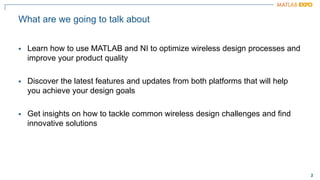
What are we going to talk about
▪ Learn how to use MATLAB and NI to optimize wireless design processes and
improve your product quality
▪ Discover the latest features and updates from both platforms that will help
you achieve your design goals
▪ Get insights on how to tackle common wireless design challenges and find
innovative solutions
3
3
Wireless Standards AI for Wireless
Digital, RF, and Antenna Design Hardware Design, Prototyping, and Testing
Radar Applications Hands-On Learning
Transforming Wireless System Design with MATLAB and NI
Design, analyze, and test standards-
based 5G, Wi-Fi, LTE, satellite
communications, and Bluetooth systems.
Apply deep learning, machine learning,
and reinforcement learning techniques to
wireless communications applications.
Jointly optimize digital, RF, and antenna
components of an end-to-end wireless
communications system.
Implement and verify your designs on
hardware. Test your algorithms and
designs over-the-air with RF instruments
and SDRs.
Simulate multifunction radars for
automotive, surveillance, and SAR
applications. Synthesize radar signals to
train machine and deep learning models
for target and signal classification.
Jump-start learning online or in the
classroom. Download interactive teaching
content developed by MathWorks and
educators from leading universities.
4
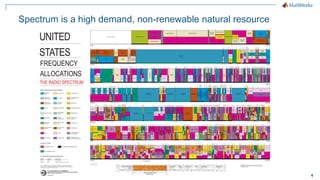
Spectrum is a high demand, non-renewable natural resource
5
5
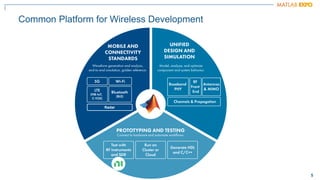
Common Platform for Wireless Development
Radar
6
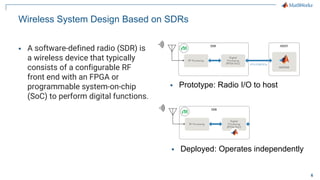
Wireless System Design Based on SDRs
▪ A software-defined radio (SDR) is
a wireless device that typically
consists of a configurable RF
front end with an FPGA or
programmable system-on-chip
(SoC) to perform digital functions.
▪ Prototype: Radio I/O to host
▪ Deployed: Operates independently
7
7
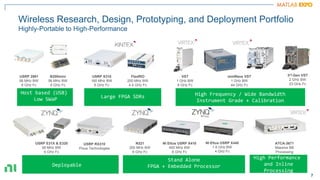
High Performance
and Inline
Processing
ATCA-3671
Massive BB
Processing
USRP E31X & E320
56 MHz BW
6 GHz Fc
B200mini
56 MHz BW
6 GHz Fc
VST
1 GHz BW
6 GHz Fc
High Frequency / Wide Bandwidth
Instrument Grade + Calibration
mmWave VST
1 GHz BW
44 GHz Fc
Deployable
USRP 2901
56 MHz BW
6 GHz Fc
Host based (USB)
Low SWaP
USRP X310
160 MHz BW
6 GHz Fc
FlexRIO
200 MHz BW
4.4 GHz Fc
Large FPGA SDRs
N321
200 MHz BW
6 GHz Fc
NI Ettus USRP X410
400 MHz BW
8 GHz Fc
Stand Alone
FPGA + Embedded Processor
USRP RX310
Pixus Technologies
3rd-Gen VST
2 GHz BW
23 GHz Fc
Wireless Research, Design, Prototyping, and Deployment Portfolio
Highly-Portable to High-Performance
NI Ettus USRP X440
1.6 GHz BW
4 GHz Fc
8
8
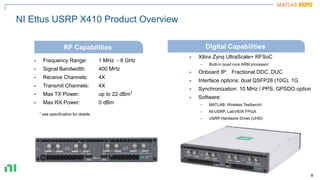
NI Ettus USRP X410 Product Overview
▪ Frequency Range: 1 MHz - 8 GHz
▪ Signal Bandwidth: 400 MHz
▪ Receive Channels: 4X
▪ Transmit Channels: 4X
▪ Max TX Power: up to 22 dBm1
▪ Max RX Power: 0 dBm
▪ Xilinx Zynq UltraScale+ RFSoC
– Built-in quad core ARM processor
▪ Onboard IP: Fractional DDC, DUC
▪ Interface options: dual QSFP28 (10G), 1G
▪ Synchronization: 10 MHz / PPS, GPSDO option
▪ Software:
– MATLAB, Wireless Testbench
– NI-USRP, LabVIEW FPGA
– USRP Hardware Driver (UHD)
RF Capabilities Digital Capabilities
1 see specification for details
9
9
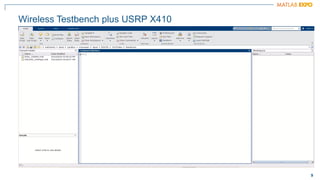
Wireless Testbench plus USRP X410
10
10
PA
DPD
Pin [dBm]
Pout
[dBm]
PA characteristic
(actual)
Compression
Memory
RF
Baseband
Up-conversion
Down-conversion
Adaptive coefficients
Timing
Antenna loading
DPD characteristic
PA Linearization: Digital Predistortion (DPD) in Practice
11
11
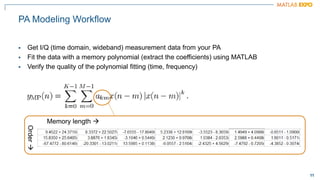
PA Modeling Workflow
▪ Get I/Q (time domain, wideband) measurement data from your PA
▪ Fit the data with a memory polynomial (extract the coefficients) using MATLAB
▪ Verify the quality of the polynomial fitting (time, frequency)
Memory length →
Order
→
12
12
What resources are available to characterize a PA Model?
PA Data
MATLAB fitting procedure
(White box)
PA model coefficients
PA model for circuit
envelope simulation
13
13
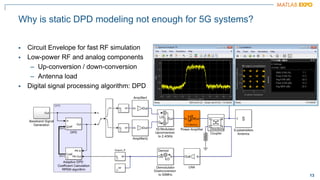
Why is static DPD modeling not enough for 5G systems?
▪ Circuit Envelope for fast RF simulation
▪ Low-power RF and analog components
– Up-conversion / down-conversion
– Antenna load
▪ Digital signal processing algorithm: DPD
14
14
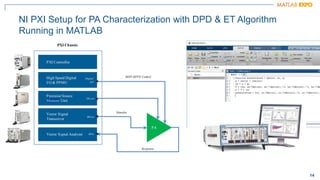
NI PXI Setup for PA Characterization with DPD & ET Algorithm
Running in MATLAB
15
Qualcomm UK Uses MATLAB to Develop 5G RF
Front-End Components and Algorithms
Challenge
10x more waveform combinations in 5G than in LTE,
making device validation much more complex and time-
consuming
Solution
Use MATLAB to simulate hardware-accurate Tx and Rx
paths to predict system performance and optimize
design parameters.
Results
▪ Fully model RF transceiver and components
▪ Securely release sensitive IP
▪ Eliminate the cost of developing separate test suites
“We use MATLAB models to
optimize and verify the 5G RF
front end through all phases
of development.”
Sean Lynch
Qualcomm UK, Ltd.
Qualcomm 5G RF front end prototype
NanoSemi Improves System Efficiency
for 5G and Other RF Products
Challenge
Accelerate design and verification of RF power amplifier
linearization algorithms used in 5G and Wi-Fi 6 devices
Solution
Use MATLAB to characterize amplifier performance,
develop predistortion and machine learning algorithms,
and automate standard-compliant test procedures
Results
▪ Development time reduced by 50%
▪ Iterative verification process accelerated
▪ Early customer validation enabled
NanoSemi linearization IP development
and verification using MATLAB.
“With MATLAB, our team can deliver
leading-edge IP faster, enabling our
customers to increase bandwidth,
push modulation rates higher, and
reduce power consumption.”
Nick Karter
NanoSemi
16
16
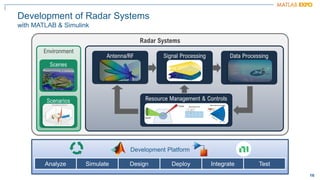
Development of Radar Systems
with MATLAB & Simulink
Radar Systems
Antenna/RF Signal Processing Data Processing
Environment
Scenes
Scenarios
Development Platform
Analyze Simulate Design Deploy Integrate Test
Resource Management & Controls
17
17
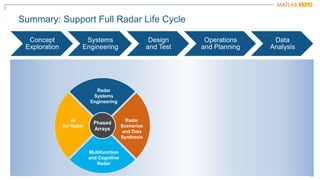
Summary: Support Full Radar Life Cycle
Concept
Exploration
Systems
Engineering
Design
and Test
Operations
and Planning
Data
Analysis
AI
for Radar
Radar
Systems
Engineering
Radar
Scenarios
and Data
Synthesis
Multifunction
and Cognitive
Radar
Phased
Arrays
18
18
Radar Budget Analysis
Stoplight visualizations and metrics
SNR available at the input
of the radar receiver
Detectability threshold
for a given Pd, Pfa
Metrics
minimum detectable signal (MDS)
EIRP
range and Doppler ambiguity
resolution, accuracy
track probabilities
Warn: violates objective but
meets threshold
Stoplight chart
Pass: measurement meets
objective
19
19
Land and
Sea Surface
Models
Radar
Reflectivity
Models
Radar
Surface
Return
Power Level
Measurement
Level
Waveform Level
Simulating Clutter Returns
Test signal and data processing algorithms
20
20
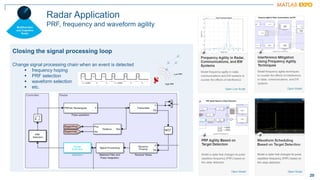
Radar Application
PRF, frequency and waveform agility
Closing the signal processing loop
Change signal processing chain when an event is detected
▪ frequency hoping
▪ PRF selection
▪ waveform selection
▪ etc.
21
21
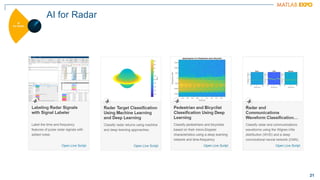
AI for Radar
22
22
RFSG.dll
RFSA.dll
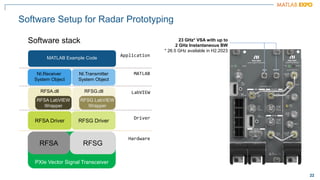
Software Setup for Radar Prototyping
Software stack
PXIe Vector Signal Transceiver
RFSG
RFSA
RFSA Driver RFSG Driver
RFSA LabVIEW
Wrapper
RFSG LabVIEW
Wrapper
NI.Receiver
System Object
NI.Transmitter
System Object
MATLAB Example Code
Hardware
Driver
LabVIEW
MATLAB
Application
23 GHz* VSA with up to
2 GHz Instantaneous BW
* 26.5 GHz available in H2.2023
23
23
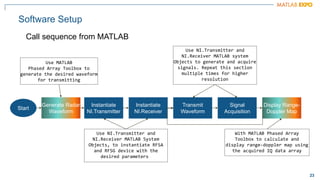
Software Setup
Call sequence from MATLAB
Start
Instantiate
NI.Transmitter
Instantiate
NI.Receiver
Transmit
Waveform
Signal
Acquisition
Generate Radar
Waveform
Display Range-
Doppler Map
Use MATLAB
Phased Array Toolbox to
generate the desired waveform
for transmitting
Use NI.Transmitter and
NI.Receiver MATLAB System
Objects, to instantiate RFSA
and RFSG device with the
desired parameters
Use NI.Transmitter and
NI.Receiver MATLAB system
Objects to generate and acquire
signals. Repeat this section
multiple times for higher
resolution
With MATLAB Phased Array
Toolbox to calculate and
display range-doppler map using
the acquired IQ data array
24
ni.com
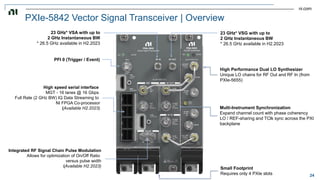
PXIe-5842 Vector Signal Transceiver | Overview
23 GHz* VSG with up to
2 GHz Instantaneous BW
* 26.5 GHz available in H2.2023
23 GHz* VSA with up to
2 GHz Instantaneous BW
* 26.5 GHz available in H2.2023
High Performance Dual LO Synthesizer
Unique LO chains for RF Out and RF In (from
PXIe-5655)
Multi-Instrument Synchronization
Expand channel count with phase coherency
LO / REF-sharing and TClk sync across the PXI
backplane
High speed serial interface
MGT - 16 lanes @ 16 Gbps
Full Rate (2 GHz BW) IQ Data Streaming to
NI FPGA Co-processor
(Available H2.2023)
Integrated RF Signal Chain Pulse Modulation
Allows for optimization of On/Off Ratio
versus pulse width
(Available H2.2023) Small Footprint
Requires only 4 PXIe slots
PFI 0 (Trigger / Event)
25
25
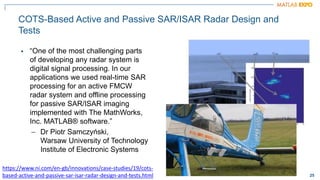
COTS-Based Active and Passive SAR/ISAR Radar Design and
Tests
▪ “One of the most challenging parts
of developing any radar system is
digital signal processing. In our
applications we used real-time SAR
processing for an active FMCW
radar system and offline processing
for passive SAR/ISAR imaging
implemented with The MathWorks,
Inc. MATLAB® software.”
– Dr Piotr Samczyński,
Warsaw University of Technology
Institute of Electronic Systems
https://www.ni.com/en-gb/innovations/case-studies/19/cots-
based-active-and-passive-sar-isar-radar-design-and-tests.html
26
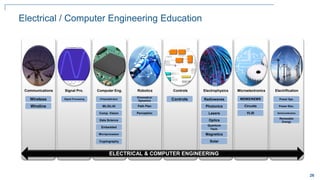
Electrical / Computer Engineering Education
Communications Signal Pro. Computer Eng. Robotics Controls Electrophysics Microelectronics Electrification
Wireless
Wireline
Signal Processing
Kinematics/
Dynamics
Path Plan
Perception
Controls Radiowaves
Photonics
Lasers
Optics
Quantum
Tech.
Magnetics
MEMS/NEMS
Circuits
VLSI
Power Sys.
Power Elec.
Semiconductors
FPGA/ASIC/SoC
ML/DL/AI
Comp. Vision
Data Science
Embedded
Microprocessor
Cryptography Solar
ELECTRICAL & COMPUTER ENGINEERING
Renewable
Energy
ELECTRICAL & COMPUTER ENGINEERING
27
27
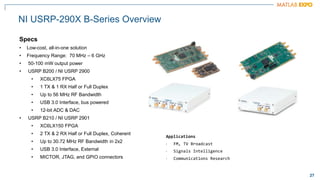
Specs
• Low-cost, all-in-one solution
• Frequency Range: 70 MHz – 6 GHz
• 50-100 mW output power
• USRP B200 / NI USRP 2900
• XC6LX75 FPGA
• 1 TX & 1 RX Half or Full Duplex
• Up to 56 MHz RF Bandwidth
• USB 3.0 Interface, bus powered
• 12-bit ADC & DAC
• USRP B210 / NI USRP 2901
• XC6LX150 FPGA
• 2 TX & 2 RX Half or Full Duplex, Coherent
• Up to 30.72 MHz RF Bandwidth in 2x2
• USB 3.0 Interface, External
• MICTOR, JTAG, and GPIO connectors
Applications
• FM, TV Broadcast
• Signals Intelligence
• Communications Research
NI USRP-290X B-Series Overview
28
28
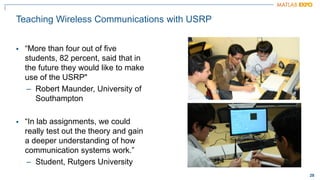
Teaching Wireless Communications with USRP
▪ “More than four out of five
students, 82 percent, said that in
the future they would like to make
use of the USRP"
– Robert Maunder, University of
Southampton
▪ “In lab assignments, we could
really test out the theory and gain
a deeper understanding of how
communication systems work.”
– Student, Rutgers University
29
29
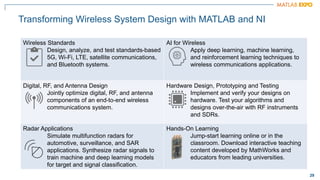
Transforming Wireless System Design with MATLAB and NI
Wireless Standards
Design, analyze, and test standards-based
5G, Wi-Fi, LTE, satellite communications,
and Bluetooth systems.
AI for Wireless
Apply deep learning, machine learning,
and reinforcement learning techniques to
wireless communications applications.
Digital, RF, and Antenna Design
Jointly optimize digital, RF, and antenna
components of an end-to-end wireless
communications system.
Hardware Design, Prototyping and Testing
Implement and verify your designs on
hardware. Test your algorithms and
designs over-the-air with RF instruments
and SDRs.
Radar Applications
Simulate multifunction radars for
automotive, surveillance, and SAR
applications. Synthesize radar signals to
train machine and deep learning models
for target and signal classification.
Hands-On Learning
Jump-start learning online or in the
classroom. Download interactive teaching
content developed by MathWorks and
educators from leading universities.
30
© 2023 The MathWorks, Inc. MATLAB and Simulink are registered trademarks of The MathWorks, Inc.
See mathworks.com/trademarks for a list of additional trademarks. Other product or brand names may be
trademarks or registered trademarks of their respective holders.
Thank you

transforming-wireless-system-design-with-matlab-and-ni.pdf

  • 1.
    0 Jeremy Twaits, NIRobin Getz, MathWorks Transforming Wireless System Design with MATLAB and NI
  • 2.
    1 Share the EXPOexperience #MATLABEXPO rgetz robinlgetz rgetz Jeremy Twaits
  • 3.
    2 2 What are wegoing to talk about ▪ Learn how to use MATLAB and NI to optimize wireless design processes and improve your product quality ▪ Discover the latest features and updates from both platforms that will help you achieve your design goals ▪ Get insights on how to tackle common wireless design challenges and find innovative solutions
  • 4.
    3 3 Wireless Standards AIfor Wireless Digital, RF, and Antenna Design Hardware Design, Prototyping, and Testing Radar Applications Hands-On Learning Transforming Wireless System Design with MATLAB and NI Design, analyze, and test standards- based 5G, Wi-Fi, LTE, satellite communications, and Bluetooth systems. Apply deep learning, machine learning, and reinforcement learning techniques to wireless communications applications. Jointly optimize digital, RF, and antenna components of an end-to-end wireless communications system. Implement and verify your designs on hardware. Test your algorithms and designs over-the-air with RF instruments and SDRs. Simulate multifunction radars for automotive, surveillance, and SAR applications. Synthesize radar signals to train machine and deep learning models for target and signal classification. Jump-start learning online or in the classroom. Download interactive teaching content developed by MathWorks and educators from leading universities.
  • 5.
    4 Spectrum is ahigh demand, non-renewable natural resource
  • 6.
    5 5 Common Platform forWireless Development Radar
  • 7.
    6 Wireless System DesignBased on SDRs ▪ A software-defined radio (SDR) is a wireless device that typically consists of a configurable RF front end with an FPGA or programmable system-on-chip (SoC) to perform digital functions. ▪ Prototype: Radio I/O to host ▪ Deployed: Operates independently
  • 8.
    7 7 High Performance and Inline Processing ATCA-3671 MassiveBB Processing USRP E31X & E320 56 MHz BW 6 GHz Fc B200mini 56 MHz BW 6 GHz Fc VST 1 GHz BW 6 GHz Fc High Frequency / Wide Bandwidth Instrument Grade + Calibration mmWave VST 1 GHz BW 44 GHz Fc Deployable USRP 2901 56 MHz BW 6 GHz Fc Host based (USB) Low SWaP USRP X310 160 MHz BW 6 GHz Fc FlexRIO 200 MHz BW 4.4 GHz Fc Large FPGA SDRs N321 200 MHz BW 6 GHz Fc NI Ettus USRP X410 400 MHz BW 8 GHz Fc Stand Alone FPGA + Embedded Processor USRP RX310 Pixus Technologies 3rd-Gen VST 2 GHz BW 23 GHz Fc Wireless Research, Design, Prototyping, and Deployment Portfolio Highly-Portable to High-Performance NI Ettus USRP X440 1.6 GHz BW 4 GHz Fc
  • 9.
    8 8 NI Ettus USRPX410 Product Overview ▪ Frequency Range: 1 MHz - 8 GHz ▪ Signal Bandwidth: 400 MHz ▪ Receive Channels: 4X ▪ Transmit Channels: 4X ▪ Max TX Power: up to 22 dBm1 ▪ Max RX Power: 0 dBm ▪ Xilinx Zynq UltraScale+ RFSoC – Built-in quad core ARM processor ▪ Onboard IP: Fractional DDC, DUC ▪ Interface options: dual QSFP28 (10G), 1G ▪ Synchronization: 10 MHz / PPS, GPSDO option ▪ Software: – MATLAB, Wireless Testbench – NI-USRP, LabVIEW FPGA – USRP Hardware Driver (UHD) RF Capabilities Digital Capabilities 1 see specification for details
  • 10.
  • 11.
    10 10 PA DPD Pin [dBm] Pout [dBm] PA characteristic (actual) Compression Memory RF Baseband Up-conversion Down-conversion Adaptivecoefficients Timing Antenna loading DPD characteristic PA Linearization: Digital Predistortion (DPD) in Practice
  • 12.
    11 11 PA Modeling Workflow ▪Get I/Q (time domain, wideband) measurement data from your PA ▪ Fit the data with a memory polynomial (extract the coefficients) using MATLAB ▪ Verify the quality of the polynomial fitting (time, frequency) Memory length → Order →
  • 13.
    12 12 What resources areavailable to characterize a PA Model? PA Data MATLAB fitting procedure (White box) PA model coefficients PA model for circuit envelope simulation
  • 14.
    13 13 Why is staticDPD modeling not enough for 5G systems? ▪ Circuit Envelope for fast RF simulation ▪ Low-power RF and analog components – Up-conversion / down-conversion – Antenna load ▪ Digital signal processing algorithm: DPD
  • 15.
    14 14 NI PXI Setupfor PA Characterization with DPD & ET Algorithm Running in MATLAB
  • 16.
    15 Qualcomm UK UsesMATLAB to Develop 5G RF Front-End Components and Algorithms Challenge 10x more waveform combinations in 5G than in LTE, making device validation much more complex and time- consuming Solution Use MATLAB to simulate hardware-accurate Tx and Rx paths to predict system performance and optimize design parameters. Results ▪ Fully model RF transceiver and components ▪ Securely release sensitive IP ▪ Eliminate the cost of developing separate test suites “We use MATLAB models to optimize and verify the 5G RF front end through all phases of development.” Sean Lynch Qualcomm UK, Ltd. Qualcomm 5G RF front end prototype NanoSemi Improves System Efficiency for 5G and Other RF Products Challenge Accelerate design and verification of RF power amplifier linearization algorithms used in 5G and Wi-Fi 6 devices Solution Use MATLAB to characterize amplifier performance, develop predistortion and machine learning algorithms, and automate standard-compliant test procedures Results ▪ Development time reduced by 50% ▪ Iterative verification process accelerated ▪ Early customer validation enabled NanoSemi linearization IP development and verification using MATLAB. “With MATLAB, our team can deliver leading-edge IP faster, enabling our customers to increase bandwidth, push modulation rates higher, and reduce power consumption.” Nick Karter NanoSemi
  • 17.
    16 16 Development of RadarSystems with MATLAB & Simulink Radar Systems Antenna/RF Signal Processing Data Processing Environment Scenes Scenarios Development Platform Analyze Simulate Design Deploy Integrate Test Resource Management & Controls
  • 18.
    17 17 Summary: Support FullRadar Life Cycle Concept Exploration Systems Engineering Design and Test Operations and Planning Data Analysis AI for Radar Radar Systems Engineering Radar Scenarios and Data Synthesis Multifunction and Cognitive Radar Phased Arrays
  • 19.
    18 18 Radar Budget Analysis Stoplightvisualizations and metrics SNR available at the input of the radar receiver Detectability threshold for a given Pd, Pfa Metrics minimum detectable signal (MDS) EIRP range and Doppler ambiguity resolution, accuracy track probabilities Warn: violates objective but meets threshold Stoplight chart Pass: measurement meets objective
  • 20.
    19 19 Land and Sea Surface Models Radar Reflectivity Models Radar Surface Return PowerLevel Measurement Level Waveform Level Simulating Clutter Returns Test signal and data processing algorithms
  • 21.
    20 20 Radar Application PRF, frequencyand waveform agility Closing the signal processing loop Change signal processing chain when an event is detected ▪ frequency hoping ▪ PRF selection ▪ waveform selection ▪ etc.
  • 22.
  • 23.
    22 22 RFSG.dll RFSA.dll Software Setup forRadar Prototyping Software stack PXIe Vector Signal Transceiver RFSG RFSA RFSA Driver RFSG Driver RFSA LabVIEW Wrapper RFSG LabVIEW Wrapper NI.Receiver System Object NI.Transmitter System Object MATLAB Example Code Hardware Driver LabVIEW MATLAB Application 23 GHz* VSA with up to 2 GHz Instantaneous BW * 26.5 GHz available in H2.2023
  • 24.
    23 23 Software Setup Call sequencefrom MATLAB Start Instantiate NI.Transmitter Instantiate NI.Receiver Transmit Waveform Signal Acquisition Generate Radar Waveform Display Range- Doppler Map Use MATLAB Phased Array Toolbox to generate the desired waveform for transmitting Use NI.Transmitter and NI.Receiver MATLAB System Objects, to instantiate RFSA and RFSG device with the desired parameters Use NI.Transmitter and NI.Receiver MATLAB system Objects to generate and acquire signals. Repeat this section multiple times for higher resolution With MATLAB Phased Array Toolbox to calculate and display range-doppler map using the acquired IQ data array
  • 25.
    24 ni.com PXIe-5842 Vector SignalTransceiver | Overview 23 GHz* VSG with up to 2 GHz Instantaneous BW * 26.5 GHz available in H2.2023 23 GHz* VSA with up to 2 GHz Instantaneous BW * 26.5 GHz available in H2.2023 High Performance Dual LO Synthesizer Unique LO chains for RF Out and RF In (from PXIe-5655) Multi-Instrument Synchronization Expand channel count with phase coherency LO / REF-sharing and TClk sync across the PXI backplane High speed serial interface MGT - 16 lanes @ 16 Gbps Full Rate (2 GHz BW) IQ Data Streaming to NI FPGA Co-processor (Available H2.2023) Integrated RF Signal Chain Pulse Modulation Allows for optimization of On/Off Ratio versus pulse width (Available H2.2023) Small Footprint Requires only 4 PXIe slots PFI 0 (Trigger / Event)
  • 26.
    25 25 COTS-Based Active andPassive SAR/ISAR Radar Design and Tests ▪ “One of the most challenging parts of developing any radar system is digital signal processing. In our applications we used real-time SAR processing for an active FMCW radar system and offline processing for passive SAR/ISAR imaging implemented with The MathWorks, Inc. MATLAB® software.” – Dr Piotr Samczyński, Warsaw University of Technology Institute of Electronic Systems https://www.ni.com/en-gb/innovations/case-studies/19/cots- based-active-and-passive-sar-isar-radar-design-and-tests.html
  • 27.
    26 Electrical / ComputerEngineering Education Communications Signal Pro. Computer Eng. Robotics Controls Electrophysics Microelectronics Electrification Wireless Wireline Signal Processing Kinematics/ Dynamics Path Plan Perception Controls Radiowaves Photonics Lasers Optics Quantum Tech. Magnetics MEMS/NEMS Circuits VLSI Power Sys. Power Elec. Semiconductors FPGA/ASIC/SoC ML/DL/AI Comp. Vision Data Science Embedded Microprocessor Cryptography Solar ELECTRICAL & COMPUTER ENGINEERING Renewable Energy ELECTRICAL & COMPUTER ENGINEERING
  • 28.
    27 27 Specs • Low-cost, all-in-onesolution • Frequency Range: 70 MHz – 6 GHz • 50-100 mW output power • USRP B200 / NI USRP 2900 • XC6LX75 FPGA • 1 TX & 1 RX Half or Full Duplex • Up to 56 MHz RF Bandwidth • USB 3.0 Interface, bus powered • 12-bit ADC & DAC • USRP B210 / NI USRP 2901 • XC6LX150 FPGA • 2 TX & 2 RX Half or Full Duplex, Coherent • Up to 30.72 MHz RF Bandwidth in 2x2 • USB 3.0 Interface, External • MICTOR, JTAG, and GPIO connectors Applications • FM, TV Broadcast • Signals Intelligence • Communications Research NI USRP-290X B-Series Overview
  • 29.
    28 28 Teaching Wireless Communicationswith USRP ▪ “More than four out of five students, 82 percent, said that in the future they would like to make use of the USRP" – Robert Maunder, University of Southampton ▪ “In lab assignments, we could really test out the theory and gain a deeper understanding of how communication systems work.” – Student, Rutgers University
  • 30.
    29 29 Transforming Wireless SystemDesign with MATLAB and NI Wireless Standards Design, analyze, and test standards-based 5G, Wi-Fi, LTE, satellite communications, and Bluetooth systems. AI for Wireless Apply deep learning, machine learning, and reinforcement learning techniques to wireless communications applications. Digital, RF, and Antenna Design Jointly optimize digital, RF, and antenna components of an end-to-end wireless communications system. Hardware Design, Prototyping and Testing Implement and verify your designs on hardware. Test your algorithms and designs over-the-air with RF instruments and SDRs. Radar Applications Simulate multifunction radars for automotive, surveillance, and SAR applications. Synthesize radar signals to train machine and deep learning models for target and signal classification. Hands-On Learning Jump-start learning online or in the classroom. Download interactive teaching content developed by MathWorks and educators from leading universities.
  • 31.
    30 © 2023 TheMathWorks, Inc. MATLAB and Simulink are registered trademarks of The MathWorks, Inc. See mathworks.com/trademarks for a list of additional trademarks. Other product or brand names may be trademarks or registered trademarks of their respective holders. Thank you