TRANSACTIONS and
CONCURRENCY in JAVA
Ersen Öztoprak
Software Engineer at Iyzico, iyzicoder
hersenoztoprak@yahoo.com
https://www.linkedin.com/in/ersenoztoprak/
Agenda
 Examine transaction with ACID properties
 Transaction Management Models
 Local
 Programmatic
 Declerative
 Concurrency Management Essentials
 Drawbacks in concurrent transactions
 Isolation Levels in RDBMS
 Advices
Transaction?
 A transaction is a collection of read/write operations succeeding only if all
contained operations succeed.
 Executed Set of SQL commands as if it were all a single SQL statement
 In order to complete the transaction and commit all the changes, all the SQL
commands in the transaction must be succeeded
 Otherwise, all changes must be rollbacked and the database is returned to its
original state before the transaction started.
Why do we need it?
While sending money, what if
operation interrupt because
of corruption?
Money discounted from your
account, but not given
outside
Use of transaction
 The transaction block works with either all or no logic
 either all transactions are performed properly and accepted as valid
 Or at least one operation is failed before block ends, then no operation is
accepted
How to create and end a Transaction?
 To start a transaction:
 START TRANSACTION;
 BEGIN
 BEGIN WORK
 To end transaction:
 Commit(başarılı)
 Rollback(başarısız)
START TRANSACTION;
UPDATE account SET balance=balance+50 WHERE id = 1;
UPDATE account SET balance=balance-50 WHERE id = 2;
COMMIT;
transaction takes place
START TRANSACTION;
UPDATE account SET balance=balance+50 WHERE id = 1;
UPDATE account SET balance=balance-50 WHERE id = 2;
ROOLBACK;
nothing is done
Commands unable to rollback
 some sql commands(DDL) cannot be undone with rollback:
 CREATE DATABASE
 CREATE TABLE
 DROP DATABASE
 DROP TABLE
 ALTER TABLE
autocommit
 When activated(autocommit = 1), every single operation becomes a single
transaction
 unless a new transaction starts, all of the previous commands are traeated as a
transaction
 Set 0 to cancel
 When used, no need to specify start or begin tansaction explicitly:
SET AUTOCOMMIT=0;
UPDATE trans_test SET name=’a’ WHERE id=’1’;
COMMIT;
ACID
 All transactions share these properties: (represented by the acronym ACID)
 Atomicity : all-or-nothing
 Consistency : leave data in a consistent state(items cannot exist without an order)
 Isolation : must remain isolated from any other transaction
 Durability : committed state changes despite any failures afterwards
TRANSACTION MODELS
Threre are 3 types of transaction management model supported by Java:
 Local
 Programmatic
 Declarative
Local Transaction Model
 transactions are managed by the underlying database resource manager
 connections are managed rather than transactions.
 can't be used the when making database updates using an ORM framework
such as Hibernate, TopLink, or the JavaPersistence API
 but can be still applied when using DAO or JDBC-based frameworks and
database stored procedures
 The Local Transaction model is used in one of two ways:
 let the database manage the connection,
 manage the connection programmatically.
Let database manage
 set the autoCommit property on the JDBC Connection object to true (the
default value)
 which tells the underlying DBMS to commit the transaction after the insert,
update, or delete has completed, or roll back the work if it fails
manage the connection
programmatically
 set the autoCommit property on the Connection object to false which starts
the transaction
 manually commit or roll back the connection
 makes transaction active, JDBC waits to reflect changes until the end of the
transaction
 connection.commit() method reflects the changes
 connection.rollback() method
Transaction Management with JDBC
try{
DriverManager.registerDriver(newDriver());
connection= DriverManager.getConnection("jdbc:h2:tcp://localhost/~/test", "sa","");
connection.setAutoCommit(false);
Statementstatement= connection.createStatement();
statement.executeUpdate("updateaccountsetbalance= balance- "+ amount+ "whereid = "+ sourceAccountId);
statement.executeUpdate("updateaccountsetbalance= balance+ "+ amount+ "whereid ="+ targetAccountId);
connection.commit();
} catch(SQLExceptione) {
connection.rollback();
}
Programmatic Transaction Model
 developer is responsible for managing the transaction
 unlike the Local Transaction model, you manage transactions and are
isolated from the underlying database connections
 the developer is responsible for
 obtaining a transaction from the transaction manager,
 starting the transaction,
 committing the transaction,
 ( if an exception occurs) rolling back the transaction.
Programmatic Transaction Management
In Spring
 Following are two approaches to programmatic transaction management:
 TransactionTemplate (recommended by Spring)
 PlatformTransactionManager (low level, similar to JDBC API)
TransactionTemplate
Based on Template Method Pattern such as:
try {
begin transaction
execute transactional code block
commit transaction
}
catch(Exception ex) {
rollback transaction
}
finally {
do resource clean up
}
Developer only need to provide the highlighted part
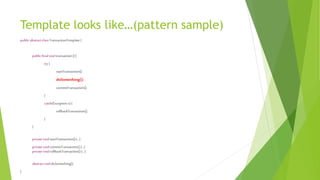
Template looks like…(pattern sample)
public abstractclassTransactionTemplate{
public finalvoidtransaction(){
try{
startTransaction();
doSomething();
commitTransaction();
}
catch(Exception e){
rollbackTransaction();
}
}
privatevoidstartTransaction(){…}
privatevoidcommitTransaction(){…}
privatevoidrollbackTransaction(){…}
abstractvoiddoSomething();
}
TransactionTemplate Sample
transactionTemplate.execute(newTransactionCallbackWithoutResult(){
@Override
protectedvoid doInTransactionWithoutResult(TransactionStatusstatus) {
AccountsourceAccount= accountDao.find(sourceAccountId);
AccounttargetAccount=accountDao.find(targetAccountId);
sourceAccount.setBalance(sourceAccount.getBalance()- amount);
targetAccount.setBalance(targetAccount.getBalance()+ amount);
accountDao.update(sourceAccount);
accountDao.update(targetAccount);
}
});
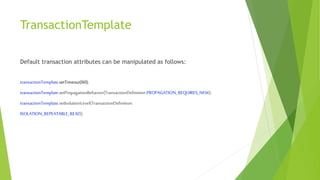
TransactionTemplate
Default transaction attributes can be manipulated as follows:
transactionTemplate.setTimeout(60);
transactionTemplate.setPropagationBehavior(TransactionDefinition.PROPAGATION_REQUIRES_NEW);
transactionTemplate.setIsolationLevel(TransactionDefinition.
ISOLATION_REPEATABLE_READ);
TransactionTemplate rollback behaviour
 Performs rollback both on unchecked and checked exceptions
 Does not provide a mechanism for this purpose
PlatformTransactionManager
 Low – level approach
 Transaction begins and ends via calls to the PlatformTransactionManager API
 TransactionDefinition instance represents current transaction definition and
configurable as @Transaction annotation.Default values are same
 Commits and rollbacks are achieved by PlatformTransactionManager
PlatformTransactionManager sample
TransactionDefinitiondefinition=newDefaultTransactionDefinition();
TransactionStatusstatus= transactionManager.getTransaction(definition);
try{
Account sourceAccount=accountDao.find(sourceAccountId);
AccounttargetAccount= accountDao.find(targetAccountId);
sourceAccount.setBalance(sourceAccount.getBalance()- amount);
targetAccount.setBalance(targetAccount.getBalance()+amount);
accountDao.update(sourceAccount);
accountDao.update(targetAccount);
transactionManager.commit(status);
}catch (Exception e){
transactionManager.rollback(status);
}
PlatformTransactionManager types
TRANSACTION MANAGER CLASS DATA ACCESS TECHNOLOGY
DataSourceTransactionManager JDBC
JpaTransactionManager JPA - JDBC
HibernateTransactionManager Hibernate without JPA*, JDBC
JdoTransactionManager JDO(Java Data Objects**), JDBC
JtaTransactionManager Suitable for global transactions
(distributed transaction management)
* coding directly with Hibernate, use only its specific classes
(i.e. org.hibernate.*) and ways, and have no reference
to javax.persistence anywhere
** Java Data Objects is an API designed for persisting object-oriented data into
any database and provide a user-friendly query language using the Java syntax
Spring supports several implementations for different data accesss technologies:
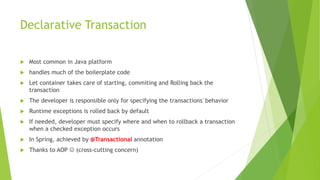
Declarative Transaction
 Most common in Java platform
 handles much of the boilerplate code
 Let container takes care of starting, commiting and Rolling back the
transaction
 The developer is responsible only for specifying the transactions' behavior
 Runtime exceptions is rolled back by default
 If needed, developer must specify where and when to rollback a transaction
when a checked exception occurs
 In Spring, achieved by @Transactional annotation
 Thanks to AOP  (cross-cutting concern)
How Transactional Works?
 To understand backstage, we need to know proxy types:
 Dynamic proxy can only proxy by interface (so your target class needs to
implement an interface, which is then also implemented by the proxy class)
and compose target class
 CGLIB (and javassist) can create a proxy by subclassing. In this scenario the
proxy becomes a subclass of the target class. No need for interfaces.
Dynamic Proxy
Declerative Transaction By Dynamic
Proxy
CGLIB Proxy
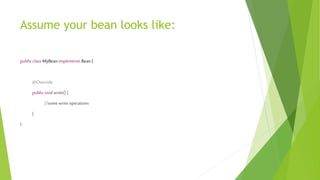
Assume your bean looks like:
public class MyBean implements Bean {
@Override
public void write() {
//some write operations
}
}
Then the Dynamic Proxy looks like…
classMyProxyimplementsBean{
privateMyBeanbean;
@Override
public voidwrite(){
try{
startTransaction();
bean.write();
commitTransaction();
}
catch(Exception e) {
rollback();
}
}
}
@Transactional usage
@Transactional
public void transferMoney(long sourceAccountId,long targetAccountId,double amount) {
AccountsAccount = accountDao.find(sourceAccountId);
AccounttAccount = accountDao.find(targetAccountId);
sAccount.setBalance(sourceAccount.getBalance() -amount);
tAccount.setBalance(targetAccount.getBalance() + amount);
accountDao.update(sAccount);
accountDao.update(tAccount);
}
Properties of @Transactional
 propogation
 isolation(4.1 or above)
 readonly
 Time-out
 rollbackFor
 noRollbackFor
Propogation property
Isolation Property
 Defines the isolation level for current transaction at application level
 sets the current isolation level of the database by default
 Before using, be sure that, underlying database supports the specified
isolation level
 Values:
 DEFAULT
 READ_UNCOMMITTED
 READ_COMMITTED
 REPEATABLE_READ
 SERIALIZABLE
Read-only property
 false by default
 When set as true, Spring sets the JDBC transaction into a read-only mode
 By read-only transactions, an exception may be thrown while trying to
insert/update.(vendor dependent)
 make sense only on methods that start new transaction (with
propagation REQUIRED, REQUIRES_NEW).
 Read-only transactions can be a useful optimization in some cases, such as
when you are using Hibernate
Time-out Property
 in seconds
 How long this transaction runs before timing out and being rolled back
 defaults to the default timeout of the underlying transaction system
 Exclusively designed for use with REQUIRED or REQUIRES_NEW propogation
levels since they only applies to newly started transactions
RollbackFor – NoRollbackFor
 By default, the only way for rolling back of a transaction is throwing a
runtime exception
 If thrown exception is catched by the transaction owner, transaction is not
rolled back
 When throwing a checked exception, transaction is not rolled back by default
 rollbackFor property indicates which exception(subclass of throwable) types
must cause a transaction rollback.(even if exception is a checked exception)
 noRollbackFor property indicates which exception(subclass of throwable)
types must not cause a transaction rollback. (even if exception is a runtime
exception)
 If we don’t want to throw exception to rollback the exception below
command can be used:
 TransactionAspectSupport.currentTransactionStatus().setRollbackOnly();
Concurrency
 A RDBM must provide a runtime environment for multiple users working on
common data at the same time
 Access to the same resource at common times, may cause various drawbacks.
 These drawbacks are standardized as 4 main problems:
 Lost Update
 Dirty Read
 Non-repeatable read
 Phantom read
Lost Update
If the two transactions want to change the same columns, the second
transaction will overwrite the first one, therefore losing the first
transaction update.
Dirty Read
Dirty Read
 when a transaction is allowed to read the uncommitted changes of some
other concurrent transaction.
 When rolling back of uncommitted data, second transaction reads an invalid
value which is dangerous for applications
 most database systems offer a higher default isolation level
 Rarely needed.But may be useful in same cases:
 non-strict reporting queries
 batch processing task and you want to know its progress
Non-repeatable read
Non-repeatable read
 one transaction reads a database row without applying a shared(read) lock on
the newly fetched record, then a concurrent transaction might change this
row before the first transaction has ended.
 So during the course of a transaction, a row is retrieved twice and the values
within the row differ between reads.
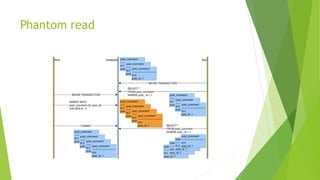
Phantom read
Phantom read
 new rows are added by another transaction to the records being read
 is problematic when the current transaction makes a business decision based
on the first version of the given result set.
Non-repeatable read vs Phantom Read
 A non-repeatable read occurs, when during the course of a transaction, a row
is retrieved twice and the values within the row differ between reads.
 A phantom read occurs when, in the course of a transaction, two identical
queries are executed, and the collection of rows returned by the second
query is different from the first.
ISOLATION LEVELS
 Isolation Level determines how other transactions will behave in a transaction
against a transaction.
 weaker isolation level, more available operations but also more anomalies can
ocur
 higher isolation level, more consistent data, but also more deadlock and
lower scalalibity
 Mainly 4 types, from weaker to higher:
 READ_UNCOMMITTED
 READ_COMMITTED
 REPEATABLE_READ
 SERIALIZABLE
READ_UNCOMMITTED
 No isolation!
 A transaction can read uncommitted changes of other transactions
 Allows dirty reads
 The weakest blocking
 Dirty Read, Phantom read, non-repetable read may occour
 When uncomitted changes rollbacked, it may causes some consistency issues
 dirty read queries may be useful as long as you treat them as estimates and
don't make any critical decisions based upon them
READ_COMMITTED
 Transactions that are modified by other transactions but not committed
cannot be read.
 Guarantees that any data read was committed at the moment is read.
 Restricts the reader from seeing any intermediate, uncommitted, 'dirty' read.
 Makes no promise whatsoever that if the transaction re-issues the read, will
find the same data, data is free to change after it was read.
 Most of the database use this level as default
REPEATABLE_READ
 in addition to the guarantees of the read committed level, it also guarantees
that any data read cannot change
 if the transaction reads the same data again, it will find the previously read
data in place, unchanged, and available to read
SERIALIZABLE
 Highest isolation level
 Without a transaction ended, other transactions cannot Access the shared
resources.
 Naturally, in this case, concurrency problems are eliminated
ISOLATION LEVEL Capabilities
Isolation Level Dirty Read Non-repeatable Read Phantom Read
READ_UNCOMMITTED allowed allowed allowed
READ_COMMITTED prevented allowed allowed
REPEATABLE_READ prevented prevented allowed
SERIALIZABLE prevented prevented prevented
An example
• READ COMITTED, the second SELECT may return any data. A concurrent
transaction may update the record, delete it, insert new records. The second
select will always see the newdata.
• REPEATABLE READ the second SELECT is guaranteed to see the rows that has
seen at first select unchanged. New rows may be added by a concurrent
transaction in that one minute, but the existing rows cannot be deleted nor
changed
• SERIALIZABLE reads the second select is guaranteed to see exactly the same
rows as the first. No row can change, nor deleted, nor new rows could be
inserted by a concurrent transaction
To enable isolation
 We have two types of methods:
 Locking(Pessimistic)
 Row versioning (Optimistic)
Locking
 Resources are locked until end of the transaction
 Resources may be as:
 Row
 Rows
 table
 Most database systems locks 2 types of lock:
 shared (read)
 exclusive (write)
Isolation Levels and Locking
Level Lock Procedure
READ_UNCOMMITTED No lock
READ_COMMITTED Lock on committed data(read lock)
REPEATABLE_READ lock on block of sql(which is selected
by using select query – write lock)
SERIALIZABLE lock on full table
Optimistic Locking
 Done by addding a new column which holds version detail about row:
 write count of the row
 Write date of the row(last updated date)
 Before update the record, transaction can check value of the version column
 Then let the transaction commit if version is same, otherwise don’t
 But don’t forget setting the version column while updating
 Use @Version annotation for JPA
 No need to lock which seems as an advantage!
 Generated SQL command like below:
UPDATE TABLE SET ..., version = version + 1 WHERE id = ? AND version =
readVersion
General Advices
 Business needs should be well analyzed
 If the problem can be solved without writing code, may be with a unique-
index on the persistence layer, then it can be resolved
 The default isolation level of the database being studied should be known
 If the default isolation level does not meet the business need, the isolation
level can be manipulated on application level.Buth in this case don’t forget to
check if your database supports the manipulated isolation level
 Avoid to write to transactional and non-transactional environments in the
same operation as much as possible
 Limit the transaction block as much as you can, don’t include inquiry
operations and validations(availability)
Advices for @Transactional annotation
 should not be used on inquiry methods or single-write methods
 Meaningless on private methods(no proxy for private methods!)
 Meaningless for non-transactional environments(such as NOSQL databases)
 class based usage should be avoided
 Service layer is the best choice to use
 Don’t forget : Checked exceptions are not rolled back by default
 If spring bean is implemented from an interface, transactional method should
be overridden from interface(because of dynamic proxy)
Be careful while working with MYSQL!!!
 Mysql supports various storage engines.
 Storage engines are server elements which used to create and support
database tables
 With SHOW ENGINES; command, suportted list can be seen:
 MyISAM- DO NOT SUPPORTS TRANSACTIONS
 InnoDB and Falcon- SUPPORTS TRANSACTIONS
 While creating table, can be specified explicitly:
 CREATE TABLE t1 (i INT) ENGINE = INNODB;
Detailed at : https://www.w3resource.com/mysql/mysql-storage-engines.php
Transaction and concurrency pitfalls in Java

Transaction and concurrency pitfalls in Java

  • 1.
    TRANSACTIONS and CONCURRENCY inJAVA Ersen Öztoprak Software Engineer at Iyzico, iyzicoder hersenoztoprak@yahoo.com https://www.linkedin.com/in/ersenoztoprak/
  • 2.
    Agenda  Examine transactionwith ACID properties  Transaction Management Models  Local  Programmatic  Declerative  Concurrency Management Essentials  Drawbacks in concurrent transactions  Isolation Levels in RDBMS  Advices
  • 3.
    Transaction?  A transactionis a collection of read/write operations succeeding only if all contained operations succeed.  Executed Set of SQL commands as if it were all a single SQL statement  In order to complete the transaction and commit all the changes, all the SQL commands in the transaction must be succeeded  Otherwise, all changes must be rollbacked and the database is returned to its original state before the transaction started.
  • 4.
    Why do weneed it? While sending money, what if operation interrupt because of corruption? Money discounted from your account, but not given outside
  • 5.
    Use of transaction The transaction block works with either all or no logic  either all transactions are performed properly and accepted as valid  Or at least one operation is failed before block ends, then no operation is accepted
  • 6.
    How to createand end a Transaction?  To start a transaction:  START TRANSACTION;  BEGIN  BEGIN WORK  To end transaction:  Commit(başarılı)  Rollback(başarısız)
  • 7.
    START TRANSACTION; UPDATE accountSET balance=balance+50 WHERE id = 1; UPDATE account SET balance=balance-50 WHERE id = 2; COMMIT; transaction takes place START TRANSACTION; UPDATE account SET balance=balance+50 WHERE id = 1; UPDATE account SET balance=balance-50 WHERE id = 2; ROOLBACK; nothing is done
  • 8.
    Commands unable torollback  some sql commands(DDL) cannot be undone with rollback:  CREATE DATABASE  CREATE TABLE  DROP DATABASE  DROP TABLE  ALTER TABLE
  • 9.
    autocommit  When activated(autocommit= 1), every single operation becomes a single transaction  unless a new transaction starts, all of the previous commands are traeated as a transaction  Set 0 to cancel  When used, no need to specify start or begin tansaction explicitly: SET AUTOCOMMIT=0; UPDATE trans_test SET name=’a’ WHERE id=’1’; COMMIT;
  • 10.
    ACID  All transactionsshare these properties: (represented by the acronym ACID)  Atomicity : all-or-nothing  Consistency : leave data in a consistent state(items cannot exist without an order)  Isolation : must remain isolated from any other transaction  Durability : committed state changes despite any failures afterwards
  • 11.
    TRANSACTION MODELS Threre are3 types of transaction management model supported by Java:  Local  Programmatic  Declarative
  • 12.
    Local Transaction Model transactions are managed by the underlying database resource manager  connections are managed rather than transactions.  can't be used the when making database updates using an ORM framework such as Hibernate, TopLink, or the JavaPersistence API  but can be still applied when using DAO or JDBC-based frameworks and database stored procedures  The Local Transaction model is used in one of two ways:  let the database manage the connection,  manage the connection programmatically.
  • 13.
    Let database manage set the autoCommit property on the JDBC Connection object to true (the default value)  which tells the underlying DBMS to commit the transaction after the insert, update, or delete has completed, or roll back the work if it fails
  • 14.
    manage the connection programmatically set the autoCommit property on the Connection object to false which starts the transaction  manually commit or roll back the connection  makes transaction active, JDBC waits to reflect changes until the end of the transaction  connection.commit() method reflects the changes  connection.rollback() method
  • 15.
    Transaction Management withJDBC try{ DriverManager.registerDriver(newDriver()); connection= DriverManager.getConnection("jdbc:h2:tcp://localhost/~/test", "sa",""); connection.setAutoCommit(false); Statementstatement= connection.createStatement(); statement.executeUpdate("updateaccountsetbalance= balance- "+ amount+ "whereid = "+ sourceAccountId); statement.executeUpdate("updateaccountsetbalance= balance+ "+ amount+ "whereid ="+ targetAccountId); connection.commit(); } catch(SQLExceptione) { connection.rollback(); }
  • 16.
    Programmatic Transaction Model developer is responsible for managing the transaction  unlike the Local Transaction model, you manage transactions and are isolated from the underlying database connections  the developer is responsible for  obtaining a transaction from the transaction manager,  starting the transaction,  committing the transaction,  ( if an exception occurs) rolling back the transaction.
  • 17.
    Programmatic Transaction Management InSpring  Following are two approaches to programmatic transaction management:  TransactionTemplate (recommended by Spring)  PlatformTransactionManager (low level, similar to JDBC API)
  • 18.
    TransactionTemplate Based on TemplateMethod Pattern such as: try { begin transaction execute transactional code block commit transaction } catch(Exception ex) { rollback transaction } finally { do resource clean up } Developer only need to provide the highlighted part
  • 19.
    Template looks like…(patternsample) public abstractclassTransactionTemplate{ public finalvoidtransaction(){ try{ startTransaction(); doSomething(); commitTransaction(); } catch(Exception e){ rollbackTransaction(); } } privatevoidstartTransaction(){…} privatevoidcommitTransaction(){…} privatevoidrollbackTransaction(){…} abstractvoiddoSomething(); }
  • 20.
    TransactionTemplate Sample transactionTemplate.execute(newTransactionCallbackWithoutResult(){ @Override protectedvoid doInTransactionWithoutResult(TransactionStatusstatus){ AccountsourceAccount= accountDao.find(sourceAccountId); AccounttargetAccount=accountDao.find(targetAccountId); sourceAccount.setBalance(sourceAccount.getBalance()- amount); targetAccount.setBalance(targetAccount.getBalance()+ amount); accountDao.update(sourceAccount); accountDao.update(targetAccount); } });
  • 21.
    TransactionTemplate Default transaction attributescan be manipulated as follows: transactionTemplate.setTimeout(60); transactionTemplate.setPropagationBehavior(TransactionDefinition.PROPAGATION_REQUIRES_NEW); transactionTemplate.setIsolationLevel(TransactionDefinition. ISOLATION_REPEATABLE_READ);
  • 22.
    TransactionTemplate rollback behaviour Performs rollback both on unchecked and checked exceptions  Does not provide a mechanism for this purpose
  • 23.
    PlatformTransactionManager  Low –level approach  Transaction begins and ends via calls to the PlatformTransactionManager API  TransactionDefinition instance represents current transaction definition and configurable as @Transaction annotation.Default values are same  Commits and rollbacks are achieved by PlatformTransactionManager
  • 24.
    PlatformTransactionManager sample TransactionDefinitiondefinition=newDefaultTransactionDefinition(); TransactionStatusstatus= transactionManager.getTransaction(definition); try{ AccountsourceAccount=accountDao.find(sourceAccountId); AccounttargetAccount= accountDao.find(targetAccountId); sourceAccount.setBalance(sourceAccount.getBalance()- amount); targetAccount.setBalance(targetAccount.getBalance()+amount); accountDao.update(sourceAccount); accountDao.update(targetAccount); transactionManager.commit(status); }catch (Exception e){ transactionManager.rollback(status); }
  • 25.
    PlatformTransactionManager types TRANSACTION MANAGERCLASS DATA ACCESS TECHNOLOGY DataSourceTransactionManager JDBC JpaTransactionManager JPA - JDBC HibernateTransactionManager Hibernate without JPA*, JDBC JdoTransactionManager JDO(Java Data Objects**), JDBC JtaTransactionManager Suitable for global transactions (distributed transaction management) * coding directly with Hibernate, use only its specific classes (i.e. org.hibernate.*) and ways, and have no reference to javax.persistence anywhere ** Java Data Objects is an API designed for persisting object-oriented data into any database and provide a user-friendly query language using the Java syntax Spring supports several implementations for different data accesss technologies:
  • 26.
    Declarative Transaction  Mostcommon in Java platform  handles much of the boilerplate code  Let container takes care of starting, commiting and Rolling back the transaction  The developer is responsible only for specifying the transactions' behavior  Runtime exceptions is rolled back by default  If needed, developer must specify where and when to rollback a transaction when a checked exception occurs  In Spring, achieved by @Transactional annotation  Thanks to AOP  (cross-cutting concern)
  • 27.
    How Transactional Works? To understand backstage, we need to know proxy types:  Dynamic proxy can only proxy by interface (so your target class needs to implement an interface, which is then also implemented by the proxy class) and compose target class  CGLIB (and javassist) can create a proxy by subclassing. In this scenario the proxy becomes a subclass of the target class. No need for interfaces.
  • 28.
  • 29.
  • 30.
  • 31.
    Assume your beanlooks like: public class MyBean implements Bean { @Override public void write() { //some write operations } }
  • 32.
    Then the DynamicProxy looks like… classMyProxyimplementsBean{ privateMyBeanbean; @Override public voidwrite(){ try{ startTransaction(); bean.write(); commitTransaction(); } catch(Exception e) { rollback(); } } }
  • 33.
    @Transactional usage @Transactional public voidtransferMoney(long sourceAccountId,long targetAccountId,double amount) { AccountsAccount = accountDao.find(sourceAccountId); AccounttAccount = accountDao.find(targetAccountId); sAccount.setBalance(sourceAccount.getBalance() -amount); tAccount.setBalance(targetAccount.getBalance() + amount); accountDao.update(sAccount); accountDao.update(tAccount); }
  • 34.
    Properties of @Transactional propogation  isolation(4.1 or above)  readonly  Time-out  rollbackFor  noRollbackFor
  • 35.
  • 36.
    Isolation Property  Definesthe isolation level for current transaction at application level  sets the current isolation level of the database by default  Before using, be sure that, underlying database supports the specified isolation level  Values:  DEFAULT  READ_UNCOMMITTED  READ_COMMITTED  REPEATABLE_READ  SERIALIZABLE
  • 37.
    Read-only property  falseby default  When set as true, Spring sets the JDBC transaction into a read-only mode  By read-only transactions, an exception may be thrown while trying to insert/update.(vendor dependent)  make sense only on methods that start new transaction (with propagation REQUIRED, REQUIRES_NEW).  Read-only transactions can be a useful optimization in some cases, such as when you are using Hibernate
  • 38.
    Time-out Property  inseconds  How long this transaction runs before timing out and being rolled back  defaults to the default timeout of the underlying transaction system  Exclusively designed for use with REQUIRED or REQUIRES_NEW propogation levels since they only applies to newly started transactions
  • 39.
    RollbackFor – NoRollbackFor By default, the only way for rolling back of a transaction is throwing a runtime exception  If thrown exception is catched by the transaction owner, transaction is not rolled back  When throwing a checked exception, transaction is not rolled back by default  rollbackFor property indicates which exception(subclass of throwable) types must cause a transaction rollback.(even if exception is a checked exception)  noRollbackFor property indicates which exception(subclass of throwable) types must not cause a transaction rollback. (even if exception is a runtime exception)  If we don’t want to throw exception to rollback the exception below command can be used:  TransactionAspectSupport.currentTransactionStatus().setRollbackOnly();
  • 40.
    Concurrency  A RDBMmust provide a runtime environment for multiple users working on common data at the same time  Access to the same resource at common times, may cause various drawbacks.  These drawbacks are standardized as 4 main problems:  Lost Update  Dirty Read  Non-repeatable read  Phantom read
  • 41.
    Lost Update If thetwo transactions want to change the same columns, the second transaction will overwrite the first one, therefore losing the first transaction update.
  • 42.
  • 43.
    Dirty Read  whena transaction is allowed to read the uncommitted changes of some other concurrent transaction.  When rolling back of uncommitted data, second transaction reads an invalid value which is dangerous for applications  most database systems offer a higher default isolation level  Rarely needed.But may be useful in same cases:  non-strict reporting queries  batch processing task and you want to know its progress
  • 44.
  • 45.
    Non-repeatable read  onetransaction reads a database row without applying a shared(read) lock on the newly fetched record, then a concurrent transaction might change this row before the first transaction has ended.  So during the course of a transaction, a row is retrieved twice and the values within the row differ between reads.
  • 46.
  • 47.
    Phantom read  newrows are added by another transaction to the records being read  is problematic when the current transaction makes a business decision based on the first version of the given result set.
  • 48.
    Non-repeatable read vsPhantom Read  A non-repeatable read occurs, when during the course of a transaction, a row is retrieved twice and the values within the row differ between reads.  A phantom read occurs when, in the course of a transaction, two identical queries are executed, and the collection of rows returned by the second query is different from the first.
  • 49.
    ISOLATION LEVELS  IsolationLevel determines how other transactions will behave in a transaction against a transaction.  weaker isolation level, more available operations but also more anomalies can ocur  higher isolation level, more consistent data, but also more deadlock and lower scalalibity  Mainly 4 types, from weaker to higher:  READ_UNCOMMITTED  READ_COMMITTED  REPEATABLE_READ  SERIALIZABLE
  • 50.
    READ_UNCOMMITTED  No isolation! A transaction can read uncommitted changes of other transactions  Allows dirty reads  The weakest blocking  Dirty Read, Phantom read, non-repetable read may occour  When uncomitted changes rollbacked, it may causes some consistency issues  dirty read queries may be useful as long as you treat them as estimates and don't make any critical decisions based upon them
  • 51.
    READ_COMMITTED  Transactions thatare modified by other transactions but not committed cannot be read.  Guarantees that any data read was committed at the moment is read.  Restricts the reader from seeing any intermediate, uncommitted, 'dirty' read.  Makes no promise whatsoever that if the transaction re-issues the read, will find the same data, data is free to change after it was read.  Most of the database use this level as default
  • 52.
    REPEATABLE_READ  in additionto the guarantees of the read committed level, it also guarantees that any data read cannot change  if the transaction reads the same data again, it will find the previously read data in place, unchanged, and available to read
  • 53.
    SERIALIZABLE  Highest isolationlevel  Without a transaction ended, other transactions cannot Access the shared resources.  Naturally, in this case, concurrency problems are eliminated
  • 54.
    ISOLATION LEVEL Capabilities IsolationLevel Dirty Read Non-repeatable Read Phantom Read READ_UNCOMMITTED allowed allowed allowed READ_COMMITTED prevented allowed allowed REPEATABLE_READ prevented prevented allowed SERIALIZABLE prevented prevented prevented
  • 55.
    An example • READCOMITTED, the second SELECT may return any data. A concurrent transaction may update the record, delete it, insert new records. The second select will always see the newdata. • REPEATABLE READ the second SELECT is guaranteed to see the rows that has seen at first select unchanged. New rows may be added by a concurrent transaction in that one minute, but the existing rows cannot be deleted nor changed • SERIALIZABLE reads the second select is guaranteed to see exactly the same rows as the first. No row can change, nor deleted, nor new rows could be inserted by a concurrent transaction
  • 56.
    To enable isolation We have two types of methods:  Locking(Pessimistic)  Row versioning (Optimistic)
  • 57.
    Locking  Resources arelocked until end of the transaction  Resources may be as:  Row  Rows  table  Most database systems locks 2 types of lock:  shared (read)  exclusive (write)
  • 58.
    Isolation Levels andLocking Level Lock Procedure READ_UNCOMMITTED No lock READ_COMMITTED Lock on committed data(read lock) REPEATABLE_READ lock on block of sql(which is selected by using select query – write lock) SERIALIZABLE lock on full table
  • 59.
    Optimistic Locking  Doneby addding a new column which holds version detail about row:  write count of the row  Write date of the row(last updated date)  Before update the record, transaction can check value of the version column  Then let the transaction commit if version is same, otherwise don’t  But don’t forget setting the version column while updating  Use @Version annotation for JPA  No need to lock which seems as an advantage!  Generated SQL command like below: UPDATE TABLE SET ..., version = version + 1 WHERE id = ? AND version = readVersion
  • 60.
    General Advices  Businessneeds should be well analyzed  If the problem can be solved without writing code, may be with a unique- index on the persistence layer, then it can be resolved  The default isolation level of the database being studied should be known  If the default isolation level does not meet the business need, the isolation level can be manipulated on application level.Buth in this case don’t forget to check if your database supports the manipulated isolation level  Avoid to write to transactional and non-transactional environments in the same operation as much as possible  Limit the transaction block as much as you can, don’t include inquiry operations and validations(availability)
  • 61.
    Advices for @Transactionalannotation  should not be used on inquiry methods or single-write methods  Meaningless on private methods(no proxy for private methods!)  Meaningless for non-transactional environments(such as NOSQL databases)  class based usage should be avoided  Service layer is the best choice to use  Don’t forget : Checked exceptions are not rolled back by default  If spring bean is implemented from an interface, transactional method should be overridden from interface(because of dynamic proxy)
  • 62.
    Be careful whileworking with MYSQL!!!  Mysql supports various storage engines.  Storage engines are server elements which used to create and support database tables  With SHOW ENGINES; command, suportted list can be seen:  MyISAM- DO NOT SUPPORTS TRANSACTIONS  InnoDB and Falcon- SUPPORTS TRANSACTIONS  While creating table, can be specified explicitly:  CREATE TABLE t1 (i INT) ENGINE = INNODB; Detailed at : https://www.w3resource.com/mysql/mysql-storage-engines.php