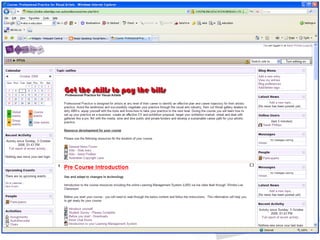
Welcome Explore and Experience Loddon Mallee eMentor Project Trainers Session  7 October 2008
Session overview Using the Virtual Classroom Social Networking Wikis Blogs Learning Management Systems Widget’s - how they work What is available? Questions? Upcoming Dates Explore and Experience Loddon Mallee Region
Social Networking  Overall, an astonishing 96 percent of students with online access report that they ever used any social networking technologies, such as chatting, text messaging, blogging and visiting online communities…  Further, students report that one of the most common topics of conversation on the social networking scene is education. Almost 60 percent of students who use social networking talk about education topics online and, surprisingly, more than 50 percent talk specifically about schoolwork.  Explore and Experience Loddon Mallee Region
Social Networking  You can provide the space and make it interesting for them too.  Discussion forums, chat rooms, blogs, collaborative spaces and widgets are all things that our learners are familiar with, and you can use to make learning more personalised without the huge financial outlay.  Explore and Experience Loddon Mallee Region
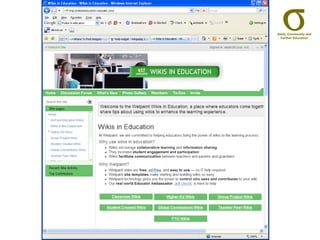
Wiki’s  A  wiki  is a page or collection of Web pages designed to enable anyone (excluding blocked or banned users) who accesses it, to contribute or modify content, using a simplified markup language (wysiwyg).  Wikis are often used to create collaborative websites and to power community websites. The collaborative encyclopedia Wikipedia is one of the best-known wikis.  Explore and Experience Loddon Mallee Region
Wiki’s  Wikis are used in business to provide  intranets  and  Knowledge Management  systems.  Wikis are now used in education providers as an alternative to Learning Management Systems, often set up for each course that is being delivered.  Originally described it as "the simplest online database that could possibly work"  Explore and Experience Loddon Mallee Region
How can wikis be used in the classroom? Group projects:  Students work together in one place to research, outline, draft, and edit projects within the wiki Assignments:  Post homework, course materials, study guides, and more. Resource Collections:  Organize articles, websites, videos, and other resources for students Peer Review:  Post questions for student brainstorming, or have students post papers for peer feedback Group FAQ:  Students and/or teachers post and respond to questions on a given topic Parent Involvement:  Give parents a chance to be a part of the classroom and stay up to date on classroom news and events Online Newspaper:  Create a student-published online newspaper Explore and Experience Loddon Mallee Region
Wiki examples  Wetpaint Wikipedia Wikispaces WikiWikiWeb – First ever wiki Explore and Experience Loddon Mallee Region
 
Blogs   A  blog  is a Web site, usually maintained by an individual , with regular entries of commentary, descriptions of events, or other material such as graphics or video.  Entries are commonly displayed in reverse-chronological order. A blog is commonly used for the purpose of keeping personal diaries, and the opportunity for other people to leave comments on entries is usually available.  Explore and Experience Loddon Mallee Region
Blogs   Blogs come in many different forms, this can be your standard personal blog, vlogs, moblogs, linkblogs etc.  Blogs provide a communication space that teachers can utilise with students whenever there is a curriculum need to develop writing, share ideas and reflect on work being undertaken in the classroom.  Explore and Experience Loddon Mallee Region
Blogs The use of blogs in instructional settings is limited only by your imagination. Options for instructors using blogs: Content-related blog as professional practice  Networking and personal knowledge sharing  Instructional tips for students  Course announcements and readings  Annotated links  Knowledge management  Options for students using blogs in your courses include: Reflective or writing journals  Knowledge management  Assignment submission and review  Dialogue for groupwork  E-portfolios  Share course-related resources  Explore and Experience Loddon Mallee Region
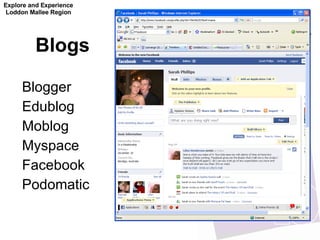
Blogs   Blogger Edublog Moblog Myspace  Facebook  Podomatic Explore and Experience Loddon Mallee Region
Learning Management Systems A  Learning Management System.  (LMS) is software for delivering, tracking and managing training.  LMSs range from simple systems for managing training records to software for distributing courses over the Internet and offering features for online collaboration.  In many instances, corporate training departments purchase LMSs to automate record-keeping as well as the registration of employees for classroom and online courses.  Explore and Experience Loddon Mallee Region
Learning Management Systems Learning Management Systems such as Tafe VC and Moodle are designed to integrate with modules and SCORM compliant objects, which is recognised in Australian accessibility e-standards. Moodle is an LMS that is classified as Open Source, where development of the software is done collaboratively by the public, and the software is made available for education purposes, free of charge. Tafe VC is provided by the State Government for education providers to use with purchase of a license. Explore and Experience Loddon Mallee Region
Learning Management Systems Some of the additional dimensions to Learning Management Systems: Student self-service  Training workflow  The provision of on-line learning  On-line assessment  Management of continuous professional education  Collaborative learning  Training resource management Explore and Experience Loddon Mallee Region
Learning Management Systems Explore and Experience Loddon Mallee Region
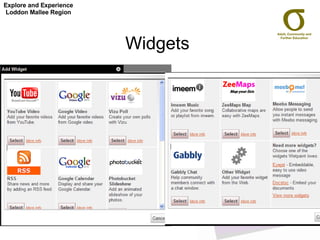
Widgets Embedded chunks of reusable code that allow blog and wiki authors to borrow content from other interactive sites and display it on their personal pages.  Widgets may take the form of video, avatars, music and podcasts, photographs, personal productivity tools, rss feeds, games and much much more, and usually include players. Widgets can also come from other blogs and posted into new blogs.  Explore and Experience Loddon Mallee Region
Widgets Usually uses HTML, Java script or Flash The code in html usually looks something like this: <object> width, height, ppi, skin, then the href:www.</object> This is the most common form of code, although Java script is now becoming more popular.  Also known as a module in a Learning Management System, or a banner in standard webpage. These are usually personal productivity tools eg. Calendars, emails, etc. Explore and Experience Loddon Mallee Region
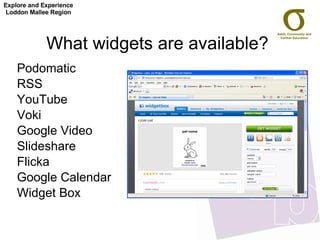
What widgets are available? Podomatic RSS YouTube Voki  Google Video Slideshare  Flicka Google Calendar Widget Box Explore and Experience Loddon Mallee Region
Widgets Explore and Experience Loddon Mallee Region
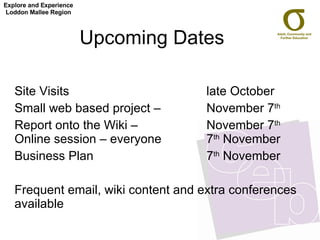
Upcoming Dates  Site Visits  late October Small web based project –  November 7 th   Report onto the Wiki –  November 7 th  Online session – everyone 7 th  November Business Plan 7 th  November Frequent email, wiki content and extra conferences available Explore and Experience Loddon Mallee Region
Thank you for your time  Sarah Phillips eLearning Coordinator  Continuing Education Bendigo  [email_address] (03) 5430 2100  Skype Name: phisar2 Explore and Experience Loddon Mallee Region

Trainers Session2

  • 1.
    Welcome Explore andExperience Loddon Mallee eMentor Project Trainers Session 7 October 2008
  • 2.
    Session overview Usingthe Virtual Classroom Social Networking Wikis Blogs Learning Management Systems Widget’s - how they work What is available? Questions? Upcoming Dates Explore and Experience Loddon Mallee Region
  • 3.
    Social Networking Overall, an astonishing 96 percent of students with online access report that they ever used any social networking technologies, such as chatting, text messaging, blogging and visiting online communities… Further, students report that one of the most common topics of conversation on the social networking scene is education. Almost 60 percent of students who use social networking talk about education topics online and, surprisingly, more than 50 percent talk specifically about schoolwork. Explore and Experience Loddon Mallee Region
  • 4.
    Social Networking You can provide the space and make it interesting for them too. Discussion forums, chat rooms, blogs, collaborative spaces and widgets are all things that our learners are familiar with, and you can use to make learning more personalised without the huge financial outlay. Explore and Experience Loddon Mallee Region
  • 5.
    Wiki’s A wiki is a page or collection of Web pages designed to enable anyone (excluding blocked or banned users) who accesses it, to contribute or modify content, using a simplified markup language (wysiwyg). Wikis are often used to create collaborative websites and to power community websites. The collaborative encyclopedia Wikipedia is one of the best-known wikis. Explore and Experience Loddon Mallee Region
  • 6.
    Wiki’s Wikisare used in business to provide intranets and Knowledge Management systems. Wikis are now used in education providers as an alternative to Learning Management Systems, often set up for each course that is being delivered. Originally described it as &quot;the simplest online database that could possibly work&quot; Explore and Experience Loddon Mallee Region
  • 7.
    How can wikisbe used in the classroom? Group projects: Students work together in one place to research, outline, draft, and edit projects within the wiki Assignments: Post homework, course materials, study guides, and more. Resource Collections: Organize articles, websites, videos, and other resources for students Peer Review: Post questions for student brainstorming, or have students post papers for peer feedback Group FAQ: Students and/or teachers post and respond to questions on a given topic Parent Involvement: Give parents a chance to be a part of the classroom and stay up to date on classroom news and events Online Newspaper: Create a student-published online newspaper Explore and Experience Loddon Mallee Region
  • 8.
    Wiki examples Wetpaint Wikipedia Wikispaces WikiWikiWeb – First ever wiki Explore and Experience Loddon Mallee Region
  • 9.
  • 10.
    Blogs A blog is a Web site, usually maintained by an individual , with regular entries of commentary, descriptions of events, or other material such as graphics or video. Entries are commonly displayed in reverse-chronological order. A blog is commonly used for the purpose of keeping personal diaries, and the opportunity for other people to leave comments on entries is usually available. Explore and Experience Loddon Mallee Region
  • 11.
    Blogs Blogs come in many different forms, this can be your standard personal blog, vlogs, moblogs, linkblogs etc. Blogs provide a communication space that teachers can utilise with students whenever there is a curriculum need to develop writing, share ideas and reflect on work being undertaken in the classroom. Explore and Experience Loddon Mallee Region
  • 12.
    Blogs The useof blogs in instructional settings is limited only by your imagination. Options for instructors using blogs: Content-related blog as professional practice Networking and personal knowledge sharing Instructional tips for students Course announcements and readings Annotated links Knowledge management Options for students using blogs in your courses include: Reflective or writing journals Knowledge management Assignment submission and review Dialogue for groupwork E-portfolios Share course-related resources Explore and Experience Loddon Mallee Region
  • 13.
    Blogs Blogger Edublog Moblog Myspace Facebook Podomatic Explore and Experience Loddon Mallee Region
  • 14.
    Learning Management SystemsA Learning Management System. (LMS) is software for delivering, tracking and managing training. LMSs range from simple systems for managing training records to software for distributing courses over the Internet and offering features for online collaboration. In many instances, corporate training departments purchase LMSs to automate record-keeping as well as the registration of employees for classroom and online courses. Explore and Experience Loddon Mallee Region
  • 15.
    Learning Management SystemsLearning Management Systems such as Tafe VC and Moodle are designed to integrate with modules and SCORM compliant objects, which is recognised in Australian accessibility e-standards. Moodle is an LMS that is classified as Open Source, where development of the software is done collaboratively by the public, and the software is made available for education purposes, free of charge. Tafe VC is provided by the State Government for education providers to use with purchase of a license. Explore and Experience Loddon Mallee Region
  • 16.
    Learning Management SystemsSome of the additional dimensions to Learning Management Systems: Student self-service Training workflow The provision of on-line learning On-line assessment Management of continuous professional education Collaborative learning Training resource management Explore and Experience Loddon Mallee Region
  • 17.
    Learning Management SystemsExplore and Experience Loddon Mallee Region
  • 18.
    Widgets Embedded chunksof reusable code that allow blog and wiki authors to borrow content from other interactive sites and display it on their personal pages. Widgets may take the form of video, avatars, music and podcasts, photographs, personal productivity tools, rss feeds, games and much much more, and usually include players. Widgets can also come from other blogs and posted into new blogs. Explore and Experience Loddon Mallee Region
  • 19.
    Widgets Usually usesHTML, Java script or Flash The code in html usually looks something like this: <object> width, height, ppi, skin, then the href:www.</object> This is the most common form of code, although Java script is now becoming more popular. Also known as a module in a Learning Management System, or a banner in standard webpage. These are usually personal productivity tools eg. Calendars, emails, etc. Explore and Experience Loddon Mallee Region
  • 20.
    What widgets areavailable? Podomatic RSS YouTube Voki Google Video Slideshare Flicka Google Calendar Widget Box Explore and Experience Loddon Mallee Region
  • 21.
    Widgets Explore andExperience Loddon Mallee Region
  • 22.
    Upcoming Dates Site Visits late October Small web based project – November 7 th Report onto the Wiki – November 7 th Online session – everyone 7 th November Business Plan 7 th November Frequent email, wiki content and extra conferences available Explore and Experience Loddon Mallee Region
  • 23.
    Thank you foryour time Sarah Phillips eLearning Coordinator Continuing Education Bendigo [email_address] (03) 5430 2100 Skype Name: phisar2 Explore and Experience Loddon Mallee Region

Editor's Notes

  • #2 Welcome everyone to the session It’s exciting to have everyone together finally Comment that I am aware that time is precious and will try and fit this into an hour if possible.