Social Media 101:
What You Need To Know To Stay
         In The Game
         Michelle Smalls
          Booz Allen Hamilton
               and
          Tanesha Boldin
              PNC Bank
Description & Objectives


     Description. Marketing through social media platforms, such as Facebook and
     blogs, can be quick and powerful. Social media present unique marketing
     opportunities and methods of success.


     Objectives. At the end of this session, participants will be able to:

     1.   Launch a blog
     2.   Set up and manage Facebook, Twitter, and LinkedIn pages
     3.   Build a social media dashboard to spot engagement opportunities
     4.   Leverage analytical tools (Google Analytics)
Agenda

    • The Business Case for Social Media

    • Your Social Media Marketing Strategy

    • Joining the Conversation

    • Blogs, Podcasts and Vlogs: Building Your Blog

    • Popular Social Media Marketing Sites
       • Getting to Know Facebook
       • Getting to Know Twitter
       • Getting Know LinkedIn

    • Managing Your Cybersocial Campaign: Creating a Social Media Dashboard

    • Measuring Your Results & Building on Your Success

    • Personal Stories
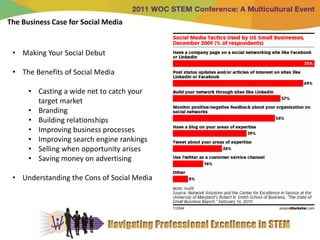
The Business Case for Social Media


 • Making Your Social Debut

 • The Benefits of Social Media

      • Casting a wide net to catch your
        target market
      • Branding
      • Building relationships
      • Improving business processes
      • Improving search engine rankings
      • Selling when opportunity arises
      • Saving money on advertising

 • Understanding the Cons of Social Media
Your Social Media Marketing Strategy

     • Establishing Goals

     • Setting Quantifiable Objectives

     • Identifying Your Target Markets

     • Estimating Costs

     • Valuing Social Media ROI (return on investment)
Joining the Conversation

     • Lurking and Listening
         • Listening actively
         • Hearing an opportunity and taking it

     • Minding Your Social P’s & Q’s
        • Sticking to business
        • Selling them softly with your song

     • Engaging Your Audience
        • Keeping it short and sweet
        • Finding your voice

     • Staying Engaged
         • Asking questions
              • ….and asking questions
         • Being helpful
         • Finding content
         • Handling critics
Building Your Blog
http://blog.k9cuisine.com/
Building Your Blog

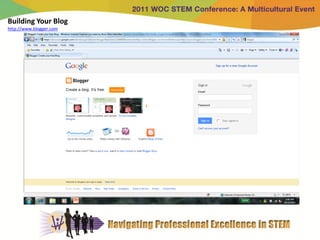
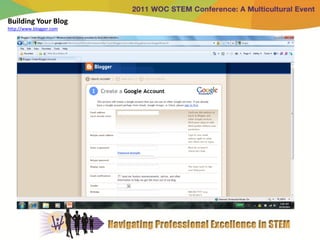
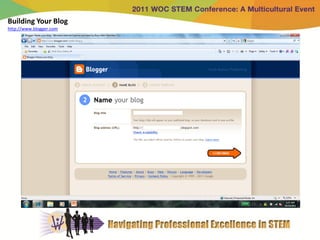
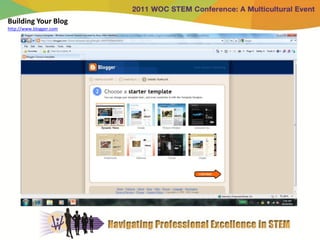
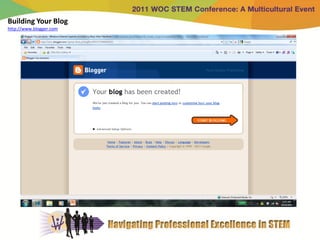
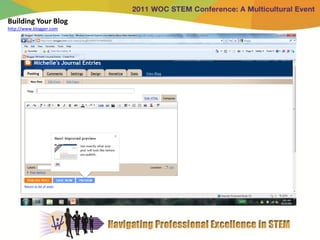
     • Setting Up Your “Blogger” Blog

          •   Create a Google account
          •   Name your blog
          •   Choose a starter template
          •   Customize how your blog looks
          •   Start posting!

     • Discovering the Fine Art of Blogging

          •   Doing your homework
          •   Creating a post
          •   Adding keywords and tags
          •   Making posts public, private, or sticky
          •   Keeping posts timely
          •   Handling comments and spam and other delights
          •   Creating meaningful categories
          •   Using trackbacks
Building Your Blog
http://www.blogger.com
Building Your Blog
http://www.blogger.com
Building Your Blog
http://www.blogger.com
Building Your Blog
http://www.blogger.com
Building Your Blog
http://www.blogger.com
Building Your Blog
http://www.blogger.com
Building Your Blog


                     http://www.blogger.com
                     http://www.youtube.com/watch?v=rA4s3wN_vK8
Popular Social Media Marketing Sites

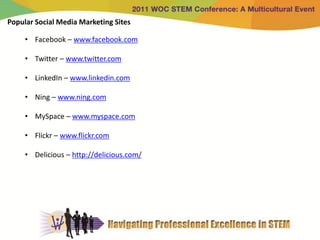
     • Facebook – www.facebook.com

     • Twitter – www.twitter.com

     • LinkedIn – www.linkedin.com

     • Ning – www.ning.com

     • MySpace – www.myspace.com

     • Flickr – www.flickr.com

     • Delicious – http://delicious.com/
Getting to Know Facebook
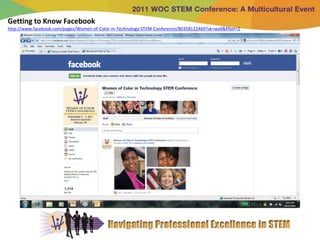
http://www.facebook.com/pages/Women-of-Color-in-Technology-STEM-Conference/80358122469?sk=wall&filter=2
Getting to Know Facebook
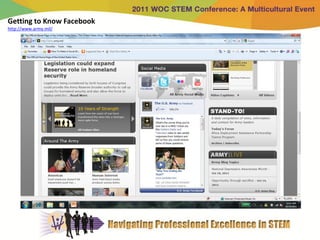
http://www.army.mil/
Getting to Know Facebook
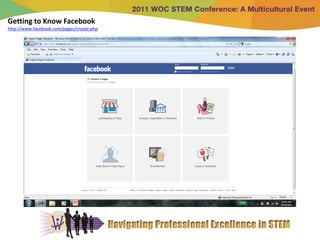
http://www.facebook.com/pages/create.php
Getting To Know Facebook


                           http://www.facebook.com/
                           http://www.facebook.com/pages/create.php
Getting To Know Twitter
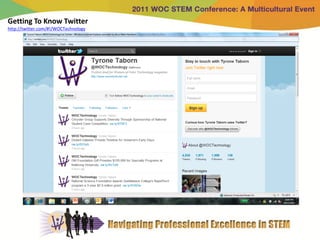
http://twitter.com/#!/WOCTechnology
Getting To Know Twitter
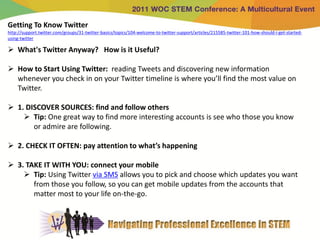
http://support.twitter.com/groups/31-twitter-basics/topics/104-welcome-to-twitter-support/articles/215585-twitter-101-how-should-i-get-started-
using-twitter

 What's Twitter Anyway? How is it Useful?

 How to Start Using Twitter: reading Tweets and discovering new information
  whenever you check in on your Twitter timeline is where you’ll find the most value on
  Twitter.

 1. DISCOVER SOURCES: find and follow others
     Tip: One great way to find more interesting accounts is see who those you know
       or admire are following.

 2. CHECK IT OFTEN: pay attention to what’s happening

 3. TAKE IT WITH YOU: connect your mobile
     Tip: Using Twitter via SMS allows you to pick and choose which updates you want
       from those you follow, so you can get mobile updates from the accounts that
       matter most to your life on-the-go.
Getting To Know Twitter
http://support.twitter.com/groups/31-twitter-basics/topics/104-welcome-to-twitter-support/articles/215585-twitter-101-how-should-i-get-started-
using-twitter

How to Start Tweeting:

 1. BUILD A VOICE: retweet, reply, react
     Tip: If you're a new user, others are more likely to find your messages if they are
       retweets or replies.

 2. MENTION: include others in your content
     Tip: Can’t think of anything to write? Don’t worry! Like I said, the real magic lies
      in locating and reading content on Twitter.

 3. GET FANCY: explore advanced features
     Tip: The best way to gain followers on Twitter is to regularly engage and
       contribute in a meaningful way.
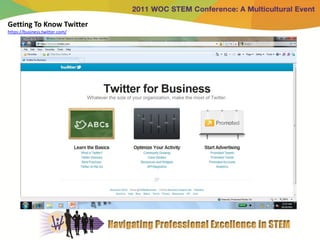
Getting To Know Twitter
https://business.twitter.com/
Getting to Know Twitter


                          http://twitter.com/
                          https://business.twitter.com/
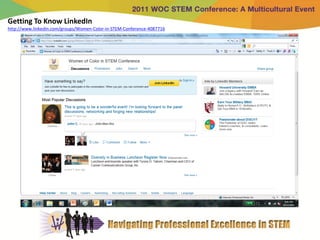
Getting To Know LinkedIn
http://www.linkedin.com/groups/Women-Color-in-STEM-Conference-4087716
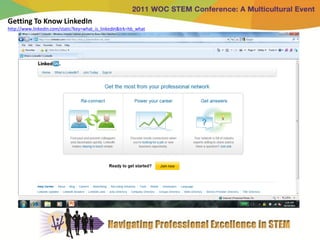
Getting To Know LinkedIn
http://www.linkedin.com/static?key=what_is_linkedin&trk=hb_what
Getting To Know LinkedIn


                           http://www.linkedin.com/
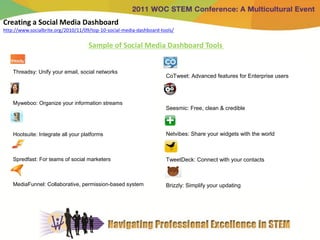
Creating a Social Media Dashboard
http://www.socialbrite.org/2010/11/09/top-10-social-media-dashboard-tools/

                                     Sample of Social Media Dashboard Tools


    Threadsy: Unify your email, social networks
                                                                      CoTweet: Advanced features for Enterprise users


    Myweboo: Organize your information streams
                                                                      Seesmic: Free, clean & credible


    Hootsuite: Integrate all your platforms                           Netvibes: Share your widgets with the world


    Spredfast: For teams of social marketers                          TweetDeck: Connect with your contacts


    MediaFunnel: Collaborative, permission-based system               Brizzly: Simplify your updating
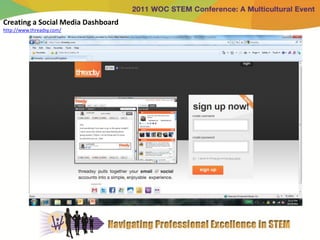
Creating a Social Media Dashboard
http://www.threadsy.com/
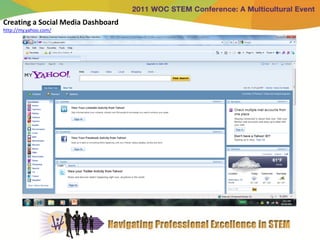
Creating a Social Media Dashboard
http://my.yahoo.com/
Creating a Social Media Dashboard


                               http://my.yahoo.com/
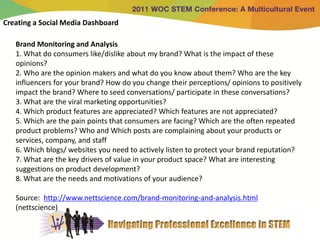
Creating a Social Media Dashboard

   Brand Monitoring and Analysis
   1. What do consumers like/dislike about my brand? What is the impact of these
   opinions?
   2. Who are the opinion makers and what do you know about them? Who are the key
   influencers for your brand? How do you change their perceptions/ opinions to positively
   impact the brand? Where to seed conversations/ participate in these conversations?
   3. What are the viral marketing opportunities?
   4. Which product features are appreciated? Which features are not appreciated?
   5. Which are the pain points that consumers are facing? Which are the often repeated
   product problems? Who and Which posts are complaining about your products or
   services, company, and staff
   6. Which blogs/ websites you need to actively listen to protect your brand reputation?
   7. What are the key drivers of value in your product space? What are interesting
   suggestions on product development?
   8. What are the needs and motivations of your audience?

   Source: http://www.nettscience.com/brand-monitoring-and-analysis.html
   (nettscience)
Creating a Social Media Dashboard

   Competition Monitoring and Analysis
   1. What are the opinions and perceptions of the audience about your brand vis a vis
   your competition? What are they saying about your competitors?
   2. What is the share of conversation for your brand against competition?
   3. Who are the competitors and what story is most talked about? Who are your
   unknown competitors? Who is your biggest competitor in terms of share of voice?
   4. Who are the key influencers for your competitor? How do you influence their
   opinions to positively impact your brand?
   5. Which product features of your competition are appreciated? Which features are not
   appreciated? Can you leverage this to your advantage?

   Source: http://www.nettscience.com/brand-monitoring-and-analysis.html
   (nettscience)
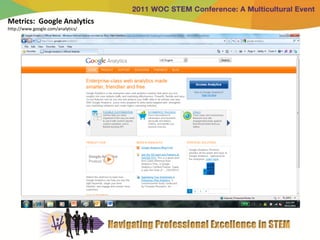
Metrics: Google Analytics
http://www.google.com/analytics/
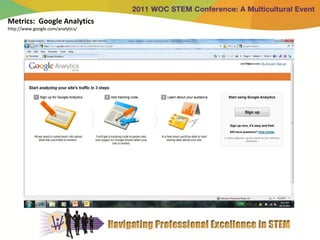
Metrics: Google Analytics
http://www.google.com/analytics/
Metrics: Google Analytics


                            http://www.google.com/analytics/
Measuring Your Results & Building on Your Success

     • Delving into the Data

     • Comparing Metrics from Different Marketing Techniques

     • Tallying the Bottom Line

     • Making Decisions by the Numbers

     • Multiplying Your Impact

     • Staying Ahead of the Curve
Personal Stories & Book Review “Get Bold: Using Social
Media to Create a Type of Social Business” By Sandy Carter

      • The AGENDA for Social Business Success

      • Align Organizational Goals and Culture

      • Gain Social Trust

      • Engage Through Experiences

      • (Social) Network Your Business Processes

      • Design for Reputation and Risk Management

      • Analyze Your Data

      • Technology as a Competitive Ingredient

      • Draw Up Your Agenda
References & Contact Information


     References

     • “Get Bold: Using Social Media to Create a Type of Social Business” By Sandy
       Carter

     • “Social Media Marketing: All-In-One For Dummies” by Jan Zimmerman and
       Doug Sahlin


     Contact Information

     • Michelle Smalls, Associate, Booz Allen Hamilton, smalls_michelle@bah.com

     • Tanesha Boldin, VP and Maryland Market Manager, PNC Bank,
       boldin2k@gmail.com

Social Media 101 - Michelle Smalls

  • 1.
    Social Media 101: WhatYou Need To Know To Stay In The Game Michelle Smalls Booz Allen Hamilton and Tanesha Boldin PNC Bank
  • 2.
    Description & Objectives Description. Marketing through social media platforms, such as Facebook and blogs, can be quick and powerful. Social media present unique marketing opportunities and methods of success. Objectives. At the end of this session, participants will be able to: 1. Launch a blog 2. Set up and manage Facebook, Twitter, and LinkedIn pages 3. Build a social media dashboard to spot engagement opportunities 4. Leverage analytical tools (Google Analytics)
  • 3.
    Agenda • The Business Case for Social Media • Your Social Media Marketing Strategy • Joining the Conversation • Blogs, Podcasts and Vlogs: Building Your Blog • Popular Social Media Marketing Sites • Getting to Know Facebook • Getting to Know Twitter • Getting Know LinkedIn • Managing Your Cybersocial Campaign: Creating a Social Media Dashboard • Measuring Your Results & Building on Your Success • Personal Stories
  • 4.
    The Business Casefor Social Media • Making Your Social Debut • The Benefits of Social Media • Casting a wide net to catch your target market • Branding • Building relationships • Improving business processes • Improving search engine rankings • Selling when opportunity arises • Saving money on advertising • Understanding the Cons of Social Media
  • 5.
    Your Social MediaMarketing Strategy • Establishing Goals • Setting Quantifiable Objectives • Identifying Your Target Markets • Estimating Costs • Valuing Social Media ROI (return on investment)
  • 6.
    Joining the Conversation • Lurking and Listening • Listening actively • Hearing an opportunity and taking it • Minding Your Social P’s & Q’s • Sticking to business • Selling them softly with your song • Engaging Your Audience • Keeping it short and sweet • Finding your voice • Staying Engaged • Asking questions • ….and asking questions • Being helpful • Finding content • Handling critics
  • 7.
  • 8.
    Building Your Blog • Setting Up Your “Blogger” Blog • Create a Google account • Name your blog • Choose a starter template • Customize how your blog looks • Start posting! • Discovering the Fine Art of Blogging • Doing your homework • Creating a post • Adding keywords and tags • Making posts public, private, or sticky • Keeping posts timely • Handling comments and spam and other delights • Creating meaningful categories • Using trackbacks
  • 9.
  • 10.
  • 11.
  • 12.
  • 13.
  • 14.
  • 15.
    Building Your Blog http://www.blogger.com http://www.youtube.com/watch?v=rA4s3wN_vK8
  • 16.
    Popular Social MediaMarketing Sites • Facebook – www.facebook.com • Twitter – www.twitter.com • LinkedIn – www.linkedin.com • Ning – www.ning.com • MySpace – www.myspace.com • Flickr – www.flickr.com • Delicious – http://delicious.com/
  • 17.
    Getting to KnowFacebook http://www.facebook.com/pages/Women-of-Color-in-Technology-STEM-Conference/80358122469?sk=wall&filter=2
  • 18.
    Getting to KnowFacebook http://www.army.mil/
  • 19.
    Getting to KnowFacebook http://www.facebook.com/pages/create.php
  • 20.
    Getting To KnowFacebook http://www.facebook.com/ http://www.facebook.com/pages/create.php
  • 21.
    Getting To KnowTwitter http://twitter.com/#!/WOCTechnology
  • 22.
    Getting To KnowTwitter http://support.twitter.com/groups/31-twitter-basics/topics/104-welcome-to-twitter-support/articles/215585-twitter-101-how-should-i-get-started- using-twitter  What's Twitter Anyway? How is it Useful?  How to Start Using Twitter: reading Tweets and discovering new information whenever you check in on your Twitter timeline is where you’ll find the most value on Twitter.  1. DISCOVER SOURCES: find and follow others  Tip: One great way to find more interesting accounts is see who those you know or admire are following.  2. CHECK IT OFTEN: pay attention to what’s happening  3. TAKE IT WITH YOU: connect your mobile  Tip: Using Twitter via SMS allows you to pick and choose which updates you want from those you follow, so you can get mobile updates from the accounts that matter most to your life on-the-go.
  • 23.
    Getting To KnowTwitter http://support.twitter.com/groups/31-twitter-basics/topics/104-welcome-to-twitter-support/articles/215585-twitter-101-how-should-i-get-started- using-twitter How to Start Tweeting:  1. BUILD A VOICE: retweet, reply, react  Tip: If you're a new user, others are more likely to find your messages if they are retweets or replies.  2. MENTION: include others in your content  Tip: Can’t think of anything to write? Don’t worry! Like I said, the real magic lies in locating and reading content on Twitter.  3. GET FANCY: explore advanced features  Tip: The best way to gain followers on Twitter is to regularly engage and contribute in a meaningful way.
  • 24.
    Getting To KnowTwitter https://business.twitter.com/
  • 25.
    Getting to KnowTwitter http://twitter.com/ https://business.twitter.com/
  • 26.
    Getting To KnowLinkedIn http://www.linkedin.com/groups/Women-Color-in-STEM-Conference-4087716
  • 27.
    Getting To KnowLinkedIn http://www.linkedin.com/static?key=what_is_linkedin&trk=hb_what
  • 28.
    Getting To KnowLinkedIn http://www.linkedin.com/
  • 29.
    Creating a SocialMedia Dashboard http://www.socialbrite.org/2010/11/09/top-10-social-media-dashboard-tools/ Sample of Social Media Dashboard Tools Threadsy: Unify your email, social networks CoTweet: Advanced features for Enterprise users Myweboo: Organize your information streams Seesmic: Free, clean & credible Hootsuite: Integrate all your platforms Netvibes: Share your widgets with the world Spredfast: For teams of social marketers TweetDeck: Connect with your contacts MediaFunnel: Collaborative, permission-based system Brizzly: Simplify your updating
  • 30.
    Creating a SocialMedia Dashboard http://www.threadsy.com/
  • 31.
    Creating a SocialMedia Dashboard http://my.yahoo.com/
  • 32.
    Creating a SocialMedia Dashboard http://my.yahoo.com/
  • 33.
    Creating a SocialMedia Dashboard Brand Monitoring and Analysis 1. What do consumers like/dislike about my brand? What is the impact of these opinions? 2. Who are the opinion makers and what do you know about them? Who are the key influencers for your brand? How do you change their perceptions/ opinions to positively impact the brand? Where to seed conversations/ participate in these conversations? 3. What are the viral marketing opportunities? 4. Which product features are appreciated? Which features are not appreciated? 5. Which are the pain points that consumers are facing? Which are the often repeated product problems? Who and Which posts are complaining about your products or services, company, and staff 6. Which blogs/ websites you need to actively listen to protect your brand reputation? 7. What are the key drivers of value in your product space? What are interesting suggestions on product development? 8. What are the needs and motivations of your audience? Source: http://www.nettscience.com/brand-monitoring-and-analysis.html (nettscience)
  • 34.
    Creating a SocialMedia Dashboard Competition Monitoring and Analysis 1. What are the opinions and perceptions of the audience about your brand vis a vis your competition? What are they saying about your competitors? 2. What is the share of conversation for your brand against competition? 3. Who are the competitors and what story is most talked about? Who are your unknown competitors? Who is your biggest competitor in terms of share of voice? 4. Who are the key influencers for your competitor? How do you influence their opinions to positively impact your brand? 5. Which product features of your competition are appreciated? Which features are not appreciated? Can you leverage this to your advantage? Source: http://www.nettscience.com/brand-monitoring-and-analysis.html (nettscience)
  • 35.
  • 36.
  • 37.
    Metrics: Google Analytics http://www.google.com/analytics/
  • 38.
    Measuring Your Results& Building on Your Success • Delving into the Data • Comparing Metrics from Different Marketing Techniques • Tallying the Bottom Line • Making Decisions by the Numbers • Multiplying Your Impact • Staying Ahead of the Curve
  • 39.
    Personal Stories &Book Review “Get Bold: Using Social Media to Create a Type of Social Business” By Sandy Carter • The AGENDA for Social Business Success • Align Organizational Goals and Culture • Gain Social Trust • Engage Through Experiences • (Social) Network Your Business Processes • Design for Reputation and Risk Management • Analyze Your Data • Technology as a Competitive Ingredient • Draw Up Your Agenda
  • 40.
    References & ContactInformation References • “Get Bold: Using Social Media to Create a Type of Social Business” By Sandy Carter • “Social Media Marketing: All-In-One For Dummies” by Jan Zimmerman and Doug Sahlin Contact Information • Michelle Smalls, Associate, Booz Allen Hamilton, smalls_michelle@bah.com • Tanesha Boldin, VP and Maryland Market Manager, PNC Bank, boldin2k@gmail.com