How to Use Twitter for Professional Success
FOR PROFESSIONALS
Presented by: Melissa McGinnis
Uses for Twitter
• Professional Development
• Share your knowledge and expertise
• Promote your blog
• Build your brand as a professional
• Build Your Business
• Increase business exposure
• Increase traffic to your web site
• Engage your audience/customers
• Build your brand as the best in the business
Facebook VS Twitter
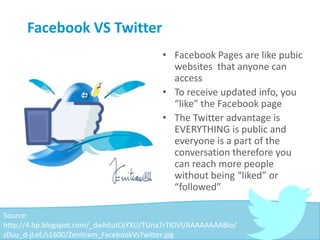
• Facebook Pages are like pubic
websites that anyone can
access
• To receive updated info, you
“like” the Facebook page
• The Twitter advantage is
EVERYTHING is public and
everyone is a part of the
conversation therefore you
can reach more people
without being “liked” or
“followed”
Source:
http://4.bp.blogspot.com/_dwhEutOjYXU/TUna7rTIOVI/AAAAAAAABlo/
z0uu_d-jLeE/s1600/Zenitram_FacebookVsTwitter.jpg
Facebook Post: Scenario One
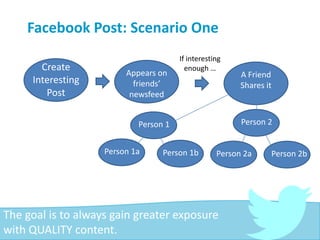
The goal is to always gain greater exposure
with QUALITY content.
Create
Interesting
Post
Appears on
friends’
newsfeed
If interesting
enough …
A Friend
Shares it
Person 1 Person 2
Person 1a Person 1b Person 2a Person 2b
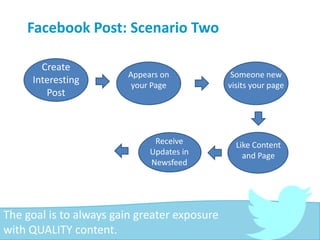
Facebook Post: Scenario Two
The goal is to always gain greater exposure
with QUALITY content.
Create
Interesting
Post
Appears on
friends’
newsfeed
Appears on
your Page
Someone new
visits your page
Like Content
and Page
Receive
Updates in
Newsfeed
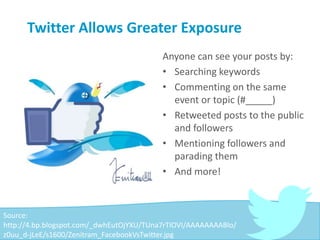
Twitter Allows Greater Exposure
Anyone can see your posts by:
• Searching keywords
• Commenting on the same
event or topic (#_____)
• Retweeted posts to the public
and followers
• Mentioning followers and
parading them
• And more!
Source:
http://4.bp.blogspot.com/_dwhEutOjYXU/TUna7rTIOVI/AAAAAAAABlo/
z0uu_d-jLeE/s1600/Zenitram_FacebookVsTwitter.jpg
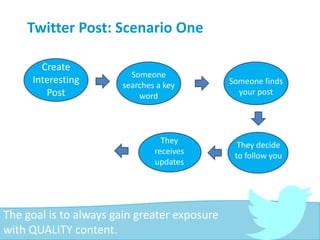
Twitter Post: Scenario One
The goal is to always gain greater exposure
with QUALITY content.
Create
Interesting
Post
Appears on
friends’
newsfeed
Someone
searches a key
word
Someone finds
your post
They decide
to follow you
They
receives
updates
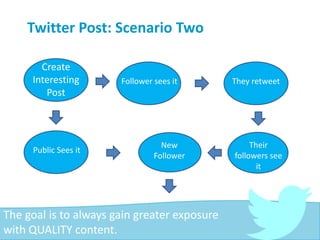
Twitter Post: Scenario Two
The goal is to always gain greater exposure
with QUALITY content.
Create
Interesting
Post
Appears on
friends’
newsfeed
Follower sees it They retweet
Their
followers see
it
New
Follower
Public Sees it
Twitter Allows Greater Exposure
On Twitter,
the general public has a much greater
chance of seeing your post than on
Facebook!
Basic Terminology
Twitter
the social media site
Tweet
a post on Twitter; tweeting, tweeted
ReTweet (RT)
sending someone else’s Tweet
Reply
responding or commenting on someone else’s tweet
Basic Terminology
Follow
People or organizations you receive information
(or Tweets) from
Followers
People or or organizations that receive
information (or Tweets) from you
Remember … For business and professional purposes, it is
not the number but rather the quality of your followers
that is important!
Basic Terminology: Hashtag
#______
• A specific topic of discussion
• Used in a Tweet to categorize the Tweet for the
public
• When everyone uses the same hashtag in a Tweet
they are talking about, or commenting on, the
same topic.
• Hashtags are typically created by advertisers or
marketers, and sometimes created by creative
individuals for fun!
Basic Terminology: Handle
@______
Name of a person or organization on Twitter
When you add a handle to a tweet you are:
1.Addressing an individual or organization
publicly
2.Mentioning them; often giving accolades
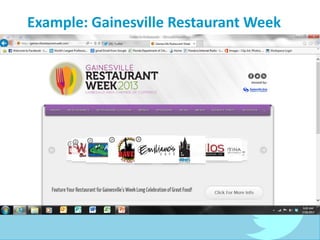
Example: Gainesville Restaurant Week
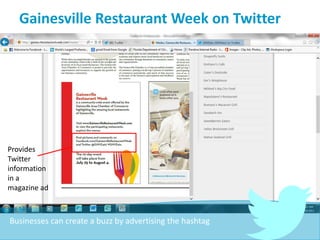
Gainesville Restaurant Week on Twitter
Provides
Twitter
information
in a
magazine ad
Businesses can create a buzz by advertising the hashtag
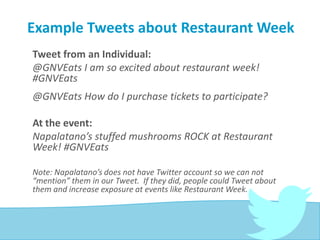
Example Tweets about Restaurant Week
Tweet from an Individual:
@GNVEats I am so excited about restaurant week!
#GNVEats
@GNVEats How do I purchase tickets to participate?
At the event:
Napalatano’s stuffed mushrooms ROCK at Restaurant
Week! #GNVEats
Note: Napalatano’s does not have Twitter account so we can not
“mention” them in our Tweet. If they did, people could Tweet about
them and increase exposure at events like Restaurant Week.
Tweeting as a Business
• Recognize other businesses participating in Restaurant
week
• A consistent in-person presence in the community and
on Twitter increase your exposure
• Your tone, consistency, and presence online will help
build your brand and increase your exposure
• When mentioning others, your Tweets have the
potential to be Retweeted, expanding your audience
Example Tweets about Restaurant Week
Tweeting as a business:
Experience the joy of good food with us at
Restaurant Week in Gainesville this
weekend! #GNVEats
@GNVEats We had a great time at
Restaurant Week! #GNVEats
Great job @GnvChamber on Restaurant
Week! #GNVEats
Restaurant Week on Twitter
Restaurant Week can be used by the Gainesville Area Chamber
of Commerce to help local businesses in the food and beverage
industry
Twitter Can:
• Help to increase exposure of restaurants in Gainesville
• Brand Gainesville as a fun destination to “wine and dine”
• Promote Restaurant Week by providing information about
participating restaurants and encouraging positive hype
• Show how the Chamber can help local businesses
And more!
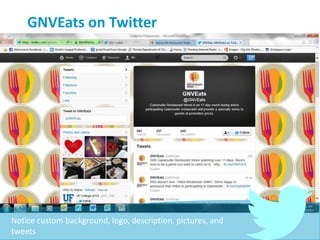
GNVEats on Twitter
Notice custom background, logo, description, pictures, and
tweets
Tweeting as GNVEats
Possible Strategies:
• Tweet about local restaurants – positive experiences,
special events, and deals
• Provide updated information about Restaurant Week,
reminding that it will occur and encourage hype
• Recognize participants positively
• Offer exclusive offers for GNVEats followers
• Encourage # conversations to build hype
• RT (retweet) positive feedback
• Tweet with links to website
• And more ….
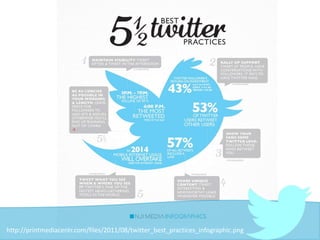
http://printmediacentr.com/files/2011/08/twitter_best_practices_infographic.png
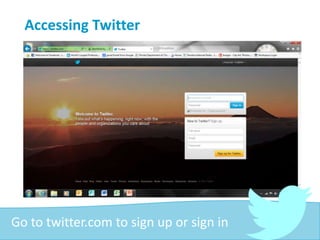
Accessing Twitter
Go to twitter.com to sign up or sign in
Tips for Creating an Account
• Create a “handle” that will be easy to
remember
• If you are using Twitter for:
• Professional Development use a professional
picture of yourself
• Promoting a business use the company logo
Potential People to Follow
• Mentors and Experts in your field
• Competitors
• Non-profit and Foundations with similar interests
• Customers
• Professional Organizations
• Other Local Companies
• Friends and Colleagues
• Former Clients
• Social Media Marketing Experts
• Events
• Conferences of interest
• Government organizations
• News Sources
And more!
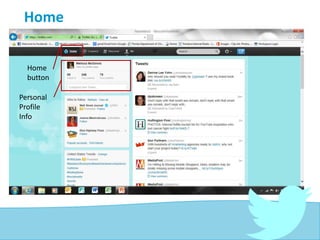
Home
Home
button
Personal
Profile
Info
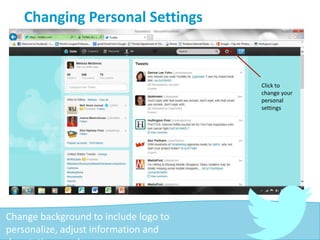
Changing Personal Settings
Click to
change your
personal
settings
Change background to include logo to
personalize, adjust information and
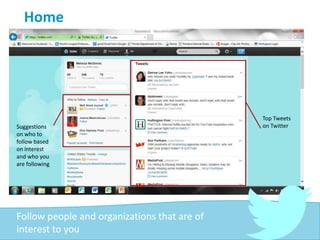
Home
Suggestions
on who to
follow based
on interest
and who you
are following
Top Tweets
on Twitter
Follow people and organizations that are of
interest to you
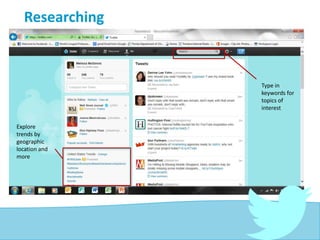
Researching
Explore
trends by
geographic
location and
more
Type in
keywords for
topics of
interest
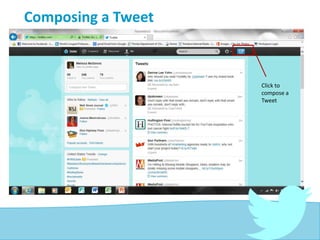
Composing a Tweet
Click to
compose a
Tweet
Source: http://blog.thoughtpick.com/wp-content/uploads/2009/09/twitter-joke.jpg
Sources:
• Twitter Logo
http://blogs.loc.gov/loc/files/2010/04/twitter_logo.jpg
• Bird Cartoon http://blog.thoughtpick.com/wp-
content/uploads/2009/09/twitter-joke.jpg
• Best Practices Infograph
http://printmediacentr.com/files/2011/08/twitter_best_pr
actices_infographic.png
Thank You!
Melissa McGinnis
@MelissaMarleneM
mcginnis.m.melissa@gmail.com

Twitter for Professionals

  • 1.
    How to UseTwitter for Professional Success FOR PROFESSIONALS Presented by: Melissa McGinnis
  • 2.
    Uses for Twitter •Professional Development • Share your knowledge and expertise • Promote your blog • Build your brand as a professional • Build Your Business • Increase business exposure • Increase traffic to your web site • Engage your audience/customers • Build your brand as the best in the business
  • 3.
    Facebook VS Twitter •Facebook Pages are like pubic websites that anyone can access • To receive updated info, you “like” the Facebook page • The Twitter advantage is EVERYTHING is public and everyone is a part of the conversation therefore you can reach more people without being “liked” or “followed” Source: http://4.bp.blogspot.com/_dwhEutOjYXU/TUna7rTIOVI/AAAAAAAABlo/ z0uu_d-jLeE/s1600/Zenitram_FacebookVsTwitter.jpg
  • 4.
    Facebook Post: ScenarioOne The goal is to always gain greater exposure with QUALITY content. Create Interesting Post Appears on friends’ newsfeed If interesting enough … A Friend Shares it Person 1 Person 2 Person 1a Person 1b Person 2a Person 2b
  • 5.
    Facebook Post: ScenarioTwo The goal is to always gain greater exposure with QUALITY content. Create Interesting Post Appears on friends’ newsfeed Appears on your Page Someone new visits your page Like Content and Page Receive Updates in Newsfeed
  • 6.
    Twitter Allows GreaterExposure Anyone can see your posts by: • Searching keywords • Commenting on the same event or topic (#_____) • Retweeted posts to the public and followers • Mentioning followers and parading them • And more! Source: http://4.bp.blogspot.com/_dwhEutOjYXU/TUna7rTIOVI/AAAAAAAABlo/ z0uu_d-jLeE/s1600/Zenitram_FacebookVsTwitter.jpg
  • 7.
    Twitter Post: ScenarioOne The goal is to always gain greater exposure with QUALITY content. Create Interesting Post Appears on friends’ newsfeed Someone searches a key word Someone finds your post They decide to follow you They receives updates
  • 8.
    Twitter Post: ScenarioTwo The goal is to always gain greater exposure with QUALITY content. Create Interesting Post Appears on friends’ newsfeed Follower sees it They retweet Their followers see it New Follower Public Sees it
  • 9.
    Twitter Allows GreaterExposure On Twitter, the general public has a much greater chance of seeing your post than on Facebook!
  • 10.
    Basic Terminology Twitter the socialmedia site Tweet a post on Twitter; tweeting, tweeted ReTweet (RT) sending someone else’s Tweet Reply responding or commenting on someone else’s tweet
  • 11.
    Basic Terminology Follow People ororganizations you receive information (or Tweets) from Followers People or or organizations that receive information (or Tweets) from you Remember … For business and professional purposes, it is not the number but rather the quality of your followers that is important!
  • 12.
    Basic Terminology: Hashtag #______ •A specific topic of discussion • Used in a Tweet to categorize the Tweet for the public • When everyone uses the same hashtag in a Tweet they are talking about, or commenting on, the same topic. • Hashtags are typically created by advertisers or marketers, and sometimes created by creative individuals for fun!
  • 13.
    Basic Terminology: Handle @______ Nameof a person or organization on Twitter When you add a handle to a tweet you are: 1.Addressing an individual or organization publicly 2.Mentioning them; often giving accolades
  • 14.
  • 15.
    Gainesville Restaurant Weekon Twitter Provides Twitter information in a magazine ad Businesses can create a buzz by advertising the hashtag
  • 16.
    Example Tweets aboutRestaurant Week Tweet from an Individual: @GNVEats I am so excited about restaurant week! #GNVEats @GNVEats How do I purchase tickets to participate? At the event: Napalatano’s stuffed mushrooms ROCK at Restaurant Week! #GNVEats Note: Napalatano’s does not have Twitter account so we can not “mention” them in our Tweet. If they did, people could Tweet about them and increase exposure at events like Restaurant Week.
  • 17.
    Tweeting as aBusiness • Recognize other businesses participating in Restaurant week • A consistent in-person presence in the community and on Twitter increase your exposure • Your tone, consistency, and presence online will help build your brand and increase your exposure • When mentioning others, your Tweets have the potential to be Retweeted, expanding your audience
  • 18.
    Example Tweets aboutRestaurant Week Tweeting as a business: Experience the joy of good food with us at Restaurant Week in Gainesville this weekend! #GNVEats @GNVEats We had a great time at Restaurant Week! #GNVEats Great job @GnvChamber on Restaurant Week! #GNVEats
  • 19.
    Restaurant Week onTwitter Restaurant Week can be used by the Gainesville Area Chamber of Commerce to help local businesses in the food and beverage industry Twitter Can: • Help to increase exposure of restaurants in Gainesville • Brand Gainesville as a fun destination to “wine and dine” • Promote Restaurant Week by providing information about participating restaurants and encouraging positive hype • Show how the Chamber can help local businesses And more!
  • 20.
    GNVEats on Twitter Noticecustom background, logo, description, pictures, and tweets
  • 21.
    Tweeting as GNVEats PossibleStrategies: • Tweet about local restaurants – positive experiences, special events, and deals • Provide updated information about Restaurant Week, reminding that it will occur and encourage hype • Recognize participants positively • Offer exclusive offers for GNVEats followers • Encourage # conversations to build hype • RT (retweet) positive feedback • Tweet with links to website • And more ….
  • 22.
  • 23.
    Accessing Twitter Go totwitter.com to sign up or sign in
  • 24.
    Tips for Creatingan Account • Create a “handle” that will be easy to remember • If you are using Twitter for: • Professional Development use a professional picture of yourself • Promoting a business use the company logo
  • 25.
    Potential People toFollow • Mentors and Experts in your field • Competitors • Non-profit and Foundations with similar interests • Customers • Professional Organizations • Other Local Companies • Friends and Colleagues • Former Clients • Social Media Marketing Experts • Events • Conferences of interest • Government organizations • News Sources And more!
  • 26.
  • 27.
    Changing Personal Settings Clickto change your personal settings Change background to include logo to personalize, adjust information and
  • 28.
    Home Suggestions on who to followbased on interest and who you are following Top Tweets on Twitter Follow people and organizations that are of interest to you
  • 29.
  • 30.
    Composing a Tweet Clickto compose a Tweet
  • 31.
  • 32.
    Sources: • Twitter Logo http://blogs.loc.gov/loc/files/2010/04/twitter_logo.jpg •Bird Cartoon http://blog.thoughtpick.com/wp- content/uploads/2009/09/twitter-joke.jpg • Best Practices Infograph http://printmediacentr.com/files/2011/08/twitter_best_pr actices_infographic.png
  • 33.