1
Top 10 Things You Didn’t Know About
Bloomfire
Chad Schexnayder
Director of Client Success
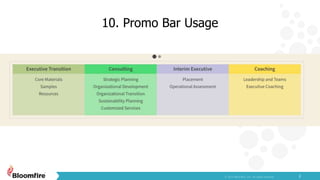
10. Promo Bar Usage
2
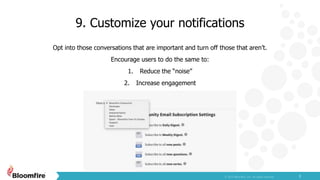
9. Customize your notifications
3
Opt into those conversations that are important and turn off those that aren’t.
Encourage users to do the same to:
1. Reduce the “noise”
2. Increase engagement
8. Crossposting across groups/communities
4
Crossposting contributions allow you to share information across groups and communities and
automatically sync updates.
7. Whitelabel your community
5
Whitelabeling your community allows you to customize your URL and provide your users a seemless
user experience across their tools.
Many clients choose to customize their URL with their corporate domain or use the opportunity to
create an entirely new domain.
Examples: learning.yourcompany.com
OR
www.yourcompany.com
6. Custom reporting available as a professional
service
6
We can build a custom report for your organization’s needs as a professional service. Send an email to
support@bloomfire.com and we can work with you to get the data that is vital to you!
5. Boolean Search
7
Bloomfire global search now allows for boolean search!
+ for an AND operation (example: coffee +tea)
| for an OR operation (example: coffee | tea)
- for removing a term from your search (example: coffee -starbucks)
“ “ to indicate a search phrase (example: "cat coffee mug")
( ) to group terms logically (example: (decaf +coffee) | (green +tea))
4. Additional reporting available through API
8
You can generate more reports through the API, such as:
• All time member reports
• All time content export
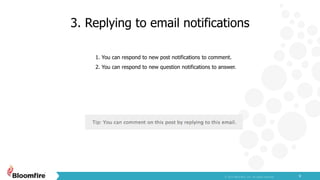
3. Replying to email notifications
9
1. You can respond to new post notifications to comment.
2. You can respond to new question notifications to answer.
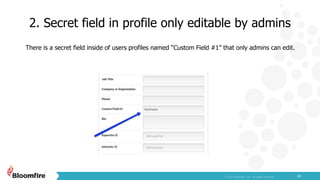
2. Secret field in profile only editable by admins
10
There is a secret field inside of users profiles named “Custom Field #1” that only admins can edit.
1. Secret field appears in Advanced Reporting
export
11
This secret field shows up in the Advanced Reporting Member Export, which allows you to filter or sort
users by the custom field.
***
12
Thank you
Chad Schexnayder

Top 10 Things You Didn’t Know About Bloomfire

  • 1.
    1 Top 10 ThingsYou Didn’t Know About Bloomfire Chad Schexnayder Director of Client Success
  • 2.
  • 3.
    9. Customize yournotifications 3 Opt into those conversations that are important and turn off those that aren’t. Encourage users to do the same to: 1. Reduce the “noise” 2. Increase engagement
  • 4.
    8. Crossposting acrossgroups/communities 4 Crossposting contributions allow you to share information across groups and communities and automatically sync updates.
  • 5.
    7. Whitelabel yourcommunity 5 Whitelabeling your community allows you to customize your URL and provide your users a seemless user experience across their tools. Many clients choose to customize their URL with their corporate domain or use the opportunity to create an entirely new domain. Examples: learning.yourcompany.com OR www.yourcompany.com
  • 6.
    6. Custom reportingavailable as a professional service 6 We can build a custom report for your organization’s needs as a professional service. Send an email to support@bloomfire.com and we can work with you to get the data that is vital to you!
  • 7.
    5. Boolean Search 7 Bloomfireglobal search now allows for boolean search! + for an AND operation (example: coffee +tea) | for an OR operation (example: coffee | tea) - for removing a term from your search (example: coffee -starbucks) “ “ to indicate a search phrase (example: "cat coffee mug") ( ) to group terms logically (example: (decaf +coffee) | (green +tea))
  • 8.
    4. Additional reportingavailable through API 8 You can generate more reports through the API, such as: • All time member reports • All time content export
  • 9.
    3. Replying toemail notifications 9 1. You can respond to new post notifications to comment. 2. You can respond to new question notifications to answer.
  • 10.
    2. Secret fieldin profile only editable by admins 10 There is a secret field inside of users profiles named “Custom Field #1” that only admins can edit.
  • 11.
    1. Secret fieldappears in Advanced Reporting export 11 This secret field shows up in the Advanced Reporting Member Export, which allows you to filter or sort users by the custom field. ***
  • 12.