WEB SECURITY TIPS FOR YOUR
WEBSITE
5703 Red Bug Lake Rd. Winter springs FL 32708
Ph.No- 407-545-7884 ,Email – info@kareoweb.com
 It may seem obvious, but ensuring you keep all software
up to date is vital in keeping your site secure. This
applies to both the server operating system and any
software you may be running on your website such as a
CMS or forum. When website security holes are found in
software, hackers are quick to attempt to abuse them.
 If you are using a managed hosting solution then you
don't need to worry so much about applying security
updates for the operating system as the hosting
company should take care of this.
 If you are using third-party software on your website
such as a CMS or forum, you should ensure you are
quick to apply any security patches. Most vendors have
a mailing list or RSS feed detailing any website security
issues. WordPress, Umbraco and many other CMSes
1-Keep Software up to date
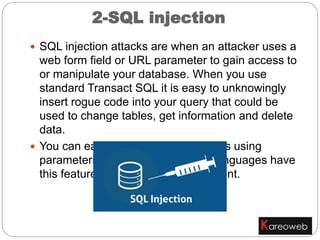
2-SQL injection
 SQL injection attacks are when an attacker uses a
web form field or URL parameter to gain access to
or manipulate your database. When you use
standard Transact SQL it is easy to unknowingly
insert rogue code into your query that could be
used to change tables, get information and delete
data.
 You can easily prevent this by always using
parameterized queries, most web languages have
this feature and it is easy to implement.
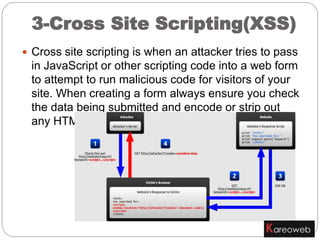
 Cross site scripting is when an attacker tries to pass
in JavaScript or other scripting code into a web form
to attempt to run malicious code for visitors of your
site. When creating a form always ensure you check
the data being submitted and encode or strip out
any HTML.
3-Cross Site Scripting(XSS)
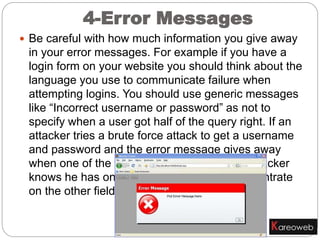
 Be careful with how much information you give away
in your error messages. For example if you have a
login form on your website you should think about the
language you use to communicate failure when
attempting logins. You should use generic messages
like “Incorrect username or password” as not to
specify when a user got half of the query right. If an
attacker tries a brute force attack to get a username
and password and the error message gives away
when one of the fields are correct then the attacker
knows he has one of the fields and can concentrate
on the other field.
4-Error Messages
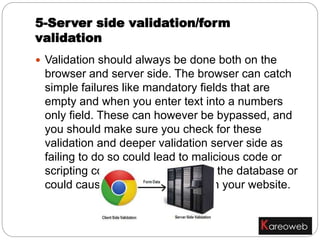
 Validation should always be done both on the
browser and server side. The browser can catch
simple failures like mandatory fields that are
empty and when you enter text into a numbers
only field. These can however be bypassed, and
you should make sure you check for these
validation and deeper validation server side as
failing to do so could lead to malicious code or
scripting code being inserted into the database or
could cause undesirable results in your website.
5-Server side validation/form
validation
 Everyone knows they should use complex passwords,
but that doesn’t mean they always do. It is crucial to
use strong passwords to your server and website
admin area, but equally also important to insist on good
password practices for your users to protect the
security of their accounts.
 As much as users may not like it, enforcing password
requirements such as a minimum of around eight
characters, including an uppercase letter and number
will help to protect their information in the long run.
 Passwords should always be stored as encrypted
values, preferably using a one way hashing algorithm
such as SHA. Using this method means when you are
authenticating users you are only ever comparing
encrypted values. For extra website security it is a good
idea to salt the passwords, using a new salt per
password.
6- Passwords
 Allowing users to upload files to your website can be a big
website security risk, even if it’s simply to change their avatar.
The risk is that any file uploaded however innocent it may look,
could contain a script that when executed on your server
completely opens up your website.
 If you have a file upload form then you need to treat all files with
great suspicion. If you are allowing users to upload images, you
cannot rely on the file extension or the mime type to verify that
the file is an image as these can easily be faked. Even opening
the file and reading the header, or using functions to check the
image size are not full proof. Most images formats allow storing a
comment section which could contain PHP code that could be
executed by the server.
 So what can you do to prevent this? Ultimately you want to stop
users from being able to execute any file they upload. By default
web servers won't attempt to execute files with image extensions,
but it isn't recommended to rely solely on checking the file
extension as a file with the name image.jpg.php has been known
to get through.
 Some options are to rename the file on upload to ensure the
correct file extension, or to change the file permissions, for
example, chmod 0666 so it can't be executed. If using *nix you
7-File uploads
8- HTTPS
 HTTPS is a protocol used to provide security over
the Internet. HTTPS guarantees to users that
they're talking to the server they expect, and that
nobody else can intercept or change the content
they're seeing in transit.

Tips for web security

  • 1.
    WEB SECURITY TIPSFOR YOUR WEBSITE 5703 Red Bug Lake Rd. Winter springs FL 32708 Ph.No- 407-545-7884 ,Email – info@kareoweb.com
  • 2.
     It mayseem obvious, but ensuring you keep all software up to date is vital in keeping your site secure. This applies to both the server operating system and any software you may be running on your website such as a CMS or forum. When website security holes are found in software, hackers are quick to attempt to abuse them.  If you are using a managed hosting solution then you don't need to worry so much about applying security updates for the operating system as the hosting company should take care of this.  If you are using third-party software on your website such as a CMS or forum, you should ensure you are quick to apply any security patches. Most vendors have a mailing list or RSS feed detailing any website security issues. WordPress, Umbraco and many other CMSes 1-Keep Software up to date
  • 3.
    2-SQL injection  SQLinjection attacks are when an attacker uses a web form field or URL parameter to gain access to or manipulate your database. When you use standard Transact SQL it is easy to unknowingly insert rogue code into your query that could be used to change tables, get information and delete data.  You can easily prevent this by always using parameterized queries, most web languages have this feature and it is easy to implement.
  • 4.
     Cross sitescripting is when an attacker tries to pass in JavaScript or other scripting code into a web form to attempt to run malicious code for visitors of your site. When creating a form always ensure you check the data being submitted and encode or strip out any HTML. 3-Cross Site Scripting(XSS)
  • 5.
     Be carefulwith how much information you give away in your error messages. For example if you have a login form on your website you should think about the language you use to communicate failure when attempting logins. You should use generic messages like “Incorrect username or password” as not to specify when a user got half of the query right. If an attacker tries a brute force attack to get a username and password and the error message gives away when one of the fields are correct then the attacker knows he has one of the fields and can concentrate on the other field. 4-Error Messages
  • 6.
     Validation shouldalways be done both on the browser and server side. The browser can catch simple failures like mandatory fields that are empty and when you enter text into a numbers only field. These can however be bypassed, and you should make sure you check for these validation and deeper validation server side as failing to do so could lead to malicious code or scripting code being inserted into the database or could cause undesirable results in your website. 5-Server side validation/form validation
  • 7.
     Everyone knowsthey should use complex passwords, but that doesn’t mean they always do. It is crucial to use strong passwords to your server and website admin area, but equally also important to insist on good password practices for your users to protect the security of their accounts.  As much as users may not like it, enforcing password requirements such as a minimum of around eight characters, including an uppercase letter and number will help to protect their information in the long run.  Passwords should always be stored as encrypted values, preferably using a one way hashing algorithm such as SHA. Using this method means when you are authenticating users you are only ever comparing encrypted values. For extra website security it is a good idea to salt the passwords, using a new salt per password. 6- Passwords
  • 8.
     Allowing usersto upload files to your website can be a big website security risk, even if it’s simply to change their avatar. The risk is that any file uploaded however innocent it may look, could contain a script that when executed on your server completely opens up your website.  If you have a file upload form then you need to treat all files with great suspicion. If you are allowing users to upload images, you cannot rely on the file extension or the mime type to verify that the file is an image as these can easily be faked. Even opening the file and reading the header, or using functions to check the image size are not full proof. Most images formats allow storing a comment section which could contain PHP code that could be executed by the server.  So what can you do to prevent this? Ultimately you want to stop users from being able to execute any file they upload. By default web servers won't attempt to execute files with image extensions, but it isn't recommended to rely solely on checking the file extension as a file with the name image.jpg.php has been known to get through.  Some options are to rename the file on upload to ensure the correct file extension, or to change the file permissions, for example, chmod 0666 so it can't be executed. If using *nix you 7-File uploads
  • 9.
    8- HTTPS  HTTPSis a protocol used to provide security over the Internet. HTTPS guarantees to users that they're talking to the server they expect, and that nobody else can intercept or change the content they're seeing in transit.