Thread Concept in Java
Why Thread?
 We were unable to run more than one task in parallel. So, Thread
Concept was introduced.
Definition:
 A thread is a process that allows a program to operate more efficiently by
running multiple tasks simultaneously.
 In order to perform complicated tasks in the background, we used
the Thread concept in Java.
 A Thread is a very light-weighted process
 All the tasks are executed without affecting the main program.
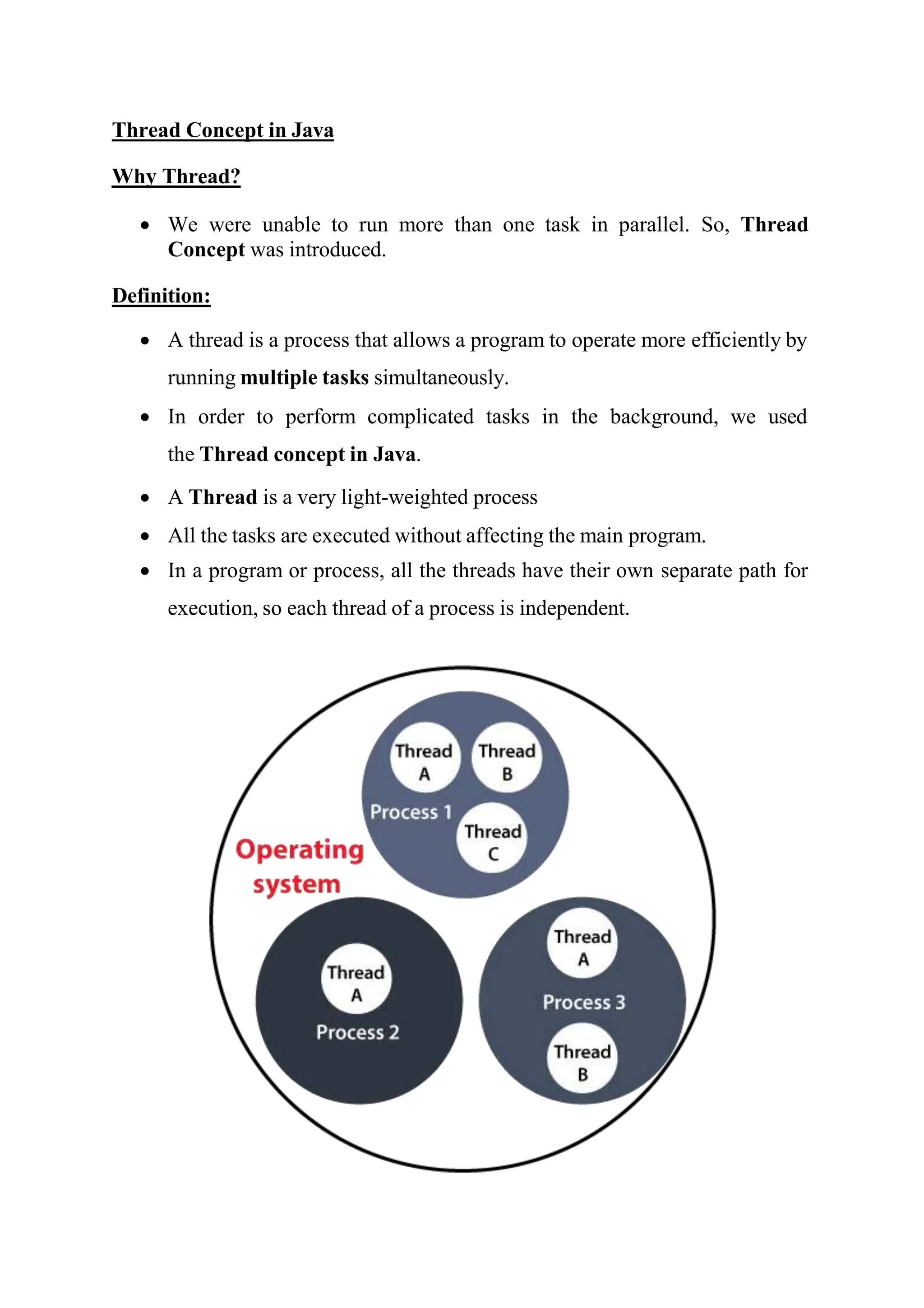
 In a program or process, all the threads have their own separate path for
execution, so each thread of a process is independent.
 Another benefit of using thread is that if a thread gets an exception or an
error at the time of its execution, it doesn't affect the execution of the
other threads.
 All the threads share a common memory and have their own stack, local
variables and program counter.
 When multiple threads are executed in parallel at the same time, this
process is known as Multithreading.
a Thread is a:
o Feature through which we can perform multiple activities within a single
process.
o Lightweight process.
o Series of executed statements.
o Nested sequence of method calls.
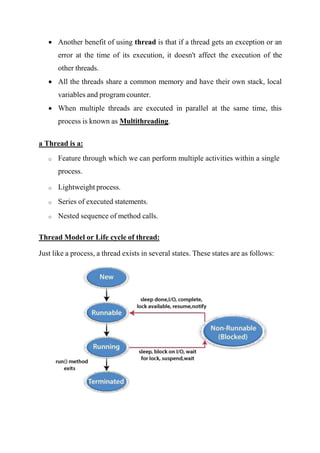
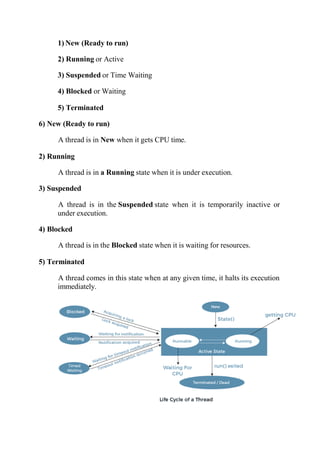
Thread Model or Life cycle of thread:
Just like a process, a thread exists in several states. These states are as follows:
1) New (Ready to run)
2) Running or Active
3) Suspended or Time Waiting
4) Blocked or Waiting
5) Terminated
6) New (Ready to run)
A thread is in New when it gets CPU time.
2) Running
A thread is in a Running state when it is under execution.
3) Suspended
A thread is in the Suspended state when it is temporarily inactive or
under execution.
4) Blocked
A thread is in the Blocked state when it is waiting for resources.
5) Terminated
A thread comes in this state when at any given time, it halts its execution
immediately.
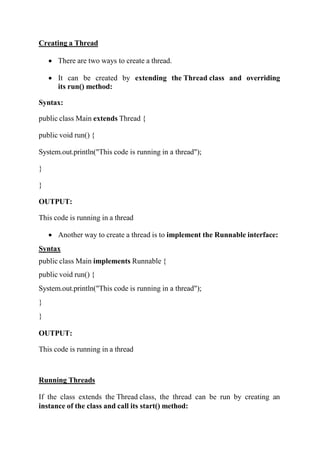
Creating a Thread
 There are two ways to create a thread.
 It can be created by extending the Thread class and overriding
its run() method:
Syntax:
public class Main extends Thread {
public void run() {
System.out.println("This code is running in a thread");
}
}
OUTPUT:
This code is running in a thread
 Another way to create a thread is to implement the Runnable interface:
Syntax
public class Main implements Runnable {
public void run() {
System.out.println("This code is running in a thread");
}
}
OUTPUT:
This code is running in a thread
Running Threads
If the class extends the Thread class, the thread can be run by creating an
instance of the class and call its start() method:
Example
public class Main extends Thread {
public static void main(String[] args) {
Main thread = new Main();
thread.start();
System.out.println("This code is outside of the thread")
}
public void run() {
System.out.println("This code is running in a thread")
}
}
OUTPUT:
This code is outside of the thread
This code is running in a thread
Program 9: Java program to create a class by extending the Thread class
and use the methods of Thread class to change name, priority of the
current Thread and display the same.
class A extends Thread
{
public void run()
{
for(int i=0;i<3;i++)
System.out.println("thread is executing");
}
}
class B extends Thread
{
public void run()
{
for(int j=0;j<3;j++)
System.out.println("thread2 is executing");
}
}
class C extends Thread
{
public void run()
{
for(int k=0;k<3;k++)
System.out.println("thread2 is executing");
}
}
class Mainthread
{
public static void main(String args[])
{
A t1=new A();
System.out.println("t1 priority="+t1.getPriority());
t1.setPriority(Thread.MAX_PRIORITY);
System.out.println("after setting t1 priority"+t1.getPriority());
System.out.println("Name is"+t1.getName());
t1.setName("MyThread1");
System.out.println("t1 after setname "+t1.getName());
B t2=new B();
System.out.println("t2 priority="+t2.getPriority());
t2.setPriority(Thread.MIN_PRIORITY);
System.out.println("after setting t2 priority"+t2.getPriority());
System.out.println("Name is"+t2.getName());
t2.setName("MyThread2");
System.out.println("t2 after setname "+t2.getName());
C t3=new C();
System.out.println("t3 priority="+t3.getPriority());
t3.setPriority(Thread.NORM_PRIORITY);
System.out.println("after setting t3 priority"+t3.getPriority());
System.out.println("Name is"+t3.getName());
t3.setName("MyThread3");
System.out.println("t3 after setname "+t3.getName());
System.out.println("thread1 is executing");
t1.start();
System.out.println("thread2 is executing");
t2.start();
System.out.println("thread3 is executing");
t3.start();
}
}

Thread Concept: Multithreading, Creating thread using thread

  • 1.
    Thread Concept inJava Why Thread?  We were unable to run more than one task in parallel. So, Thread Concept was introduced. Definition:  A thread is a process that allows a program to operate more efficiently by running multiple tasks simultaneously.  In order to perform complicated tasks in the background, we used the Thread concept in Java.  A Thread is a very light-weighted process  All the tasks are executed without affecting the main program.  In a program or process, all the threads have their own separate path for execution, so each thread of a process is independent.
  • 2.
     Another benefitof using thread is that if a thread gets an exception or an error at the time of its execution, it doesn't affect the execution of the other threads.  All the threads share a common memory and have their own stack, local variables and program counter.  When multiple threads are executed in parallel at the same time, this process is known as Multithreading. a Thread is a: o Feature through which we can perform multiple activities within a single process. o Lightweight process. o Series of executed statements. o Nested sequence of method calls. Thread Model or Life cycle of thread: Just like a process, a thread exists in several states. These states are as follows:
  • 3.
    1) New (Readyto run) 2) Running or Active 3) Suspended or Time Waiting 4) Blocked or Waiting 5) Terminated 6) New (Ready to run) A thread is in New when it gets CPU time. 2) Running A thread is in a Running state when it is under execution. 3) Suspended A thread is in the Suspended state when it is temporarily inactive or under execution. 4) Blocked A thread is in the Blocked state when it is waiting for resources. 5) Terminated A thread comes in this state when at any given time, it halts its execution immediately.
  • 4.
    Creating a Thread There are two ways to create a thread.  It can be created by extending the Thread class and overriding its run() method: Syntax: public class Main extends Thread { public void run() { System.out.println("This code is running in a thread"); } } OUTPUT: This code is running in a thread  Another way to create a thread is to implement the Runnable interface: Syntax public class Main implements Runnable { public void run() { System.out.println("This code is running in a thread"); } } OUTPUT: This code is running in a thread Running Threads If the class extends the Thread class, the thread can be run by creating an instance of the class and call its start() method:
  • 5.
    Example public class Mainextends Thread { public static void main(String[] args) { Main thread = new Main(); thread.start(); System.out.println("This code is outside of the thread") } public void run() { System.out.println("This code is running in a thread") } } OUTPUT: This code is outside of the thread This code is running in a thread Program 9: Java program to create a class by extending the Thread class and use the methods of Thread class to change name, priority of the current Thread and display the same. class A extends Thread { public void run() { for(int i=0;i<3;i++) System.out.println("thread is executing"); } } class B extends Thread { public void run() { for(int j=0;j<3;j++) System.out.println("thread2 is executing");
  • 6.
    } } class C extendsThread { public void run() { for(int k=0;k<3;k++) System.out.println("thread2 is executing"); } } class Mainthread { public static void main(String args[]) { A t1=new A(); System.out.println("t1 priority="+t1.getPriority()); t1.setPriority(Thread.MAX_PRIORITY); System.out.println("after setting t1 priority"+t1.getPriority()); System.out.println("Name is"+t1.getName()); t1.setName("MyThread1"); System.out.println("t1 after setname "+t1.getName()); B t2=new B(); System.out.println("t2 priority="+t2.getPriority()); t2.setPriority(Thread.MIN_PRIORITY); System.out.println("after setting t2 priority"+t2.getPriority()); System.out.println("Name is"+t2.getName()); t2.setName("MyThread2"); System.out.println("t2 after setname "+t2.getName()); C t3=new C(); System.out.println("t3 priority="+t3.getPriority()); t3.setPriority(Thread.NORM_PRIORITY); System.out.println("after setting t3 priority"+t3.getPriority()); System.out.println("Name is"+t3.getName()); t3.setName("MyThread3"); System.out.println("t3 after setname "+t3.getName()); System.out.println("thread1 is executing"); t1.start();
  • 7.