Thinking about
Jenkins Security
Concepts and Practices for Security
Thinking about
Jenkins Security
DevSecOps and SecurityJenkins Admin
Wadeck Follonier Mark WaiteMeg McRoberts
© 2019 All Rights Reserved. 3
Security Principles
• Know the system
• Least Privilege
• Grant only required privileges
• Open only required ports
• Defense in Depth
• Update your Software
• Latest LTS
• Latest Weekly
© 2019 All Rights Reserved. 4
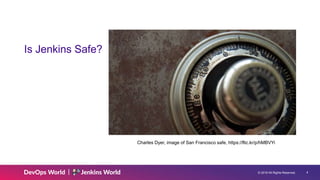
Is Jenkins Safe?
Charles Dyer, image of San Francisco safe, https://flic.kr/p/hMBVYi
© 2019 All Rights Reserved. 5
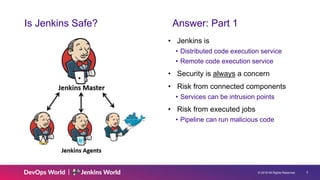
Is Jenkins Safe? Answer: Part 1
• Jenkins is
• Distributed code execution service
• Remote code execution service
• Security is always a concern
• Risk from connected components
• Services can be intrusion points
• Risk from executed jobs
• Pipeline can run malicious code
© 2019 All Rights Reserved. 6
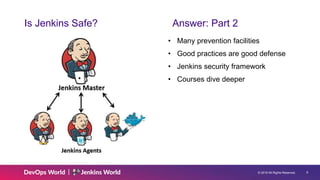
Is Jenkins Safe? Answer: Part 2
• Many prevention facilities
• Good practices are good defense
• Jenkins security framework
• Courses dive deeper
© 2019 All Rights Reserved. 7
What is Security?
Managing threats
• Unwarranted access
• Data theft
• Data damage
• Misuse of resources
© 2019 All Rights Reserved. 8
Secure Your Information
Protecting Your Intellectual Property
• Your organization has information that is used to create value
• Information has value. Assure its
• Confidentiality
• Integrity
• Availability
• Security practices protect your information
© 2019 All Rights Reserved. 9
Don’t Run Malicious Code
• Jenkins is distributed execution
• Network connections as entry points
• Bad actors want your resources
• Cryptocurrency miners
• Distributed denial of service attacks
• Bot networks
• Bad actors want to attack you
• Malware attacks on your builds
• Malware attacks on your products
© 2019 All Rights Reserved. 10
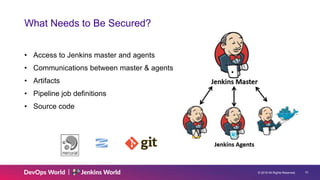
What Needs to Be Secured?
• Access to Jenkins master and agents
• Communications between master & agents
• Artifacts
• Pipeline job definitions
• Source code
© 2019 All Rights Reserved. 11
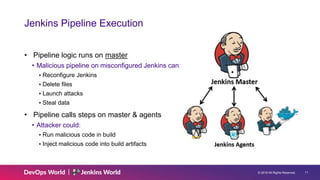
Jenkins Pipeline Execution
• Pipeline logic runs on master
• Malicious pipeline on misconfigured Jenkins can:
▸Reconfigure Jenkins
▸Delete files
▸Launch attacks
▸Steal data
• Pipeline calls steps on master & agents
• Attacker could:
▸Run malicious code in build
▸Inject malicious code into build artifacts
© 2019 All Rights Reserved. 12
Don’t Build on Master!
• Do not build on Jenkins Master
• Zero executors on the master
• When master job is mandatory
• Configure a master executor
• Run the job
• Remove the master executor
• Jobs on master have access to the master file system and configuration
• Run as the ‘Jenkins’ user
• Read and write configuration files
© 2019 All Rights Reserved. 13
Static and Ephemeral Agents
• Advantages
• Easy to provision
• Persist indefinitely
• Easy to configure
• Predictable costs and allocation
• Disadvantages
• Persist “indefinitely”
• Costs when idling
• Harder to scale
• Advantages
• Single-use
• Elastic allocation
• No cost when idle
• Easier to scale
• Disadvantages
• Initial configuration is harder
• Debugging more difficult
Static Agents Ephemeral Agents
© 2019 All Rights Reserved. 14
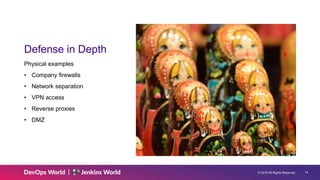
Defense in Depth
Physical examples
• Company firewalls
• Network separation
• VPN access
• Reverse proxies
• DMZ
© 2019 All Rights Reserved. 15
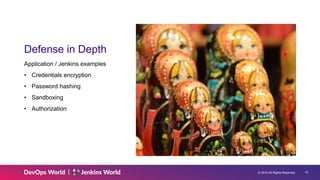
Defense in Depth
Application / Jenkins examples
• Credentials encryption
• Password hashing
• Sandboxing
• Authorization
© 2019 All Rights Reserved. 16
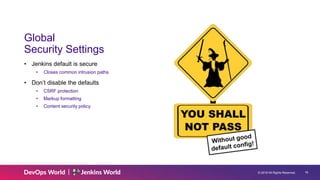
Global
Security Settings
• Jenkins default is secure
• Closes common intrusion paths
• Don’t disable the defaults
• CSRF protection
• Markup formatting
• Content security policy
© 2019 All Rights Reserved. 17
Key Security Concepts
• Authentication
• Who can access the system
• Authorization
• What can the authenticated user do
© 2019 All Rights Reserved. 18
Authentication
• Active Directory
• LDAP
• Jenkins’ own user database
• OAuth
• SAML
• Kerberos
• None
© 2019 All Rights Reserved. 19
Authentication
• Active Directory
• LDAP
• Jenkins’ own user database
• OAuth
• SAML
• Kerberos
• None
© 2019 All Rights Reserved. 20
Authentication
• Active Directory
• LDAP
• Jenkins’ own user database
• OAuth
• SAML
• Kerberos
• None
© 2019 All Rights Reserved. 21
Authorization
• Matrix-based security
• Project-based matrix security
• Role-based strategy
• Logged-in users can do anything
• Anyone can do anything
© 2019 All Rights Reserved. 22
Authorization
• Matrix-based security
• Project-based matrix security
• Role-based strategy
• Logged-in users can do anything
• Anyone can do anything
© 2019 All Rights Reserved. 23
Authorization
• Matrix-based security
• Project-based matrix security
• Role-based strategy
• Logged-in users can do anything
• Anyone can do anything
© 2019 All Rights Reserved. 24
Least Privilege
• Addition beats subtraction
© 2019 All Rights Reserved. 25
Jenkins Credentials Trusted Access to Resources
• Usernames and passwords
• Private keys
• OAuth tokens
• Secret text
• Certificates
© 2019 All Rights Reserved. 26
Use Jenkins Credentials – Don’t Embed Plaintext
• No passwords in source
• No private keys in source
• No authentication tokens in source
© 2019 All Rights Reserved. 27
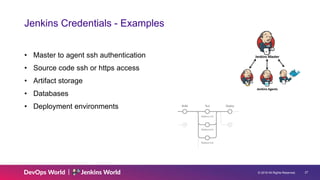
Jenkins Credentials - Examples
• Master to agent ssh authentication
• Source code ssh or https access
• Artifact storage
• Databases
• Deployment environments
© 2019 All Rights Reserved. 28
Why Jenkins Credentials?
Stored securely, available in context
• Credentials as Jenkins resources
• Protected by Jenkins authorization matrix
▸Create, read, update, and delete permissions
• Stored where they are used
▸Store credentials in folder containing jobs that use the credentials
▸Not available to jobs outside the folder
© 2019 All Rights Reserved. 29
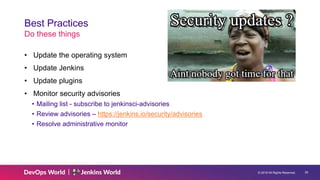
Best Practices
Do these things
• Update the operating system
• Update Jenkins
• Update plugins
• Monitor security advisories
• Mailing list - subscribe to jenkinsci-advisories
• Review advisories – https://jenkins.io/security/advisories
• Resolve administrative monitor
© 2019 All Rights Reserved. 30
Best Practices
Do these things
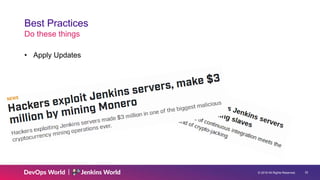
• Apply Updates
© 2019 All Rights Reserved. 31
Best Practices
Do these things
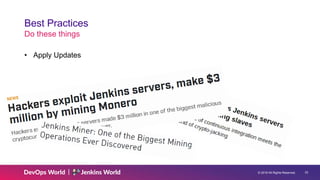
• Apply Updates
© 2019 All Rights Reserved. 32
Best Practices
Do these things
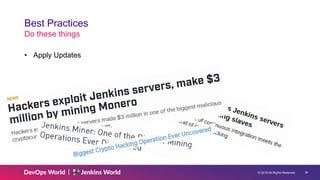
• Apply Updates
© 2019 All Rights Reserved. 33
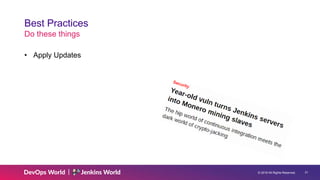
Best Practices
Do these things
• Apply Updates
© 2019 All Rights Reserved. 34
Best Practices
Do these things
• Apply Updates
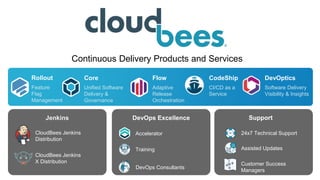
DevOptics
Software Delivery
Visibility & Insights
Core
Unified Software
Delivery &
Governance
CodeShip
CI/CD as a
Service
Flow
Adaptive
Release
Orchestration
DevOps ExcellenceJenkins
CloudBees Jenkins
Distribution
CloudBees Jenkins
X Distribution
24x7 Technical Support
Assisted Updates
Support
Accelerator
Training
Customer Success
Managers
DevOps Consultants
Rollout
Feature
Flag
Management
Continuous Delivery Products and Services
Thinking about Jenkins Security

Thinking about Jenkins Security

  • 1.
    Thinking about Jenkins Security Conceptsand Practices for Security
  • 2.
    Thinking about Jenkins Security DevSecOpsand SecurityJenkins Admin Wadeck Follonier Mark WaiteMeg McRoberts
  • 3.
    © 2019 AllRights Reserved. 3 Security Principles • Know the system • Least Privilege • Grant only required privileges • Open only required ports • Defense in Depth • Update your Software • Latest LTS • Latest Weekly
  • 4.
    © 2019 AllRights Reserved. 4 Is Jenkins Safe? Charles Dyer, image of San Francisco safe, https://flic.kr/p/hMBVYi
  • 5.
    © 2019 AllRights Reserved. 5 Is Jenkins Safe? Answer: Part 1 • Jenkins is • Distributed code execution service • Remote code execution service • Security is always a concern • Risk from connected components • Services can be intrusion points • Risk from executed jobs • Pipeline can run malicious code
  • 6.
    © 2019 AllRights Reserved. 6 Is Jenkins Safe? Answer: Part 2 • Many prevention facilities • Good practices are good defense • Jenkins security framework • Courses dive deeper
  • 7.
    © 2019 AllRights Reserved. 7 What is Security? Managing threats • Unwarranted access • Data theft • Data damage • Misuse of resources
  • 8.
    © 2019 AllRights Reserved. 8 Secure Your Information Protecting Your Intellectual Property • Your organization has information that is used to create value • Information has value. Assure its • Confidentiality • Integrity • Availability • Security practices protect your information
  • 9.
    © 2019 AllRights Reserved. 9 Don’t Run Malicious Code • Jenkins is distributed execution • Network connections as entry points • Bad actors want your resources • Cryptocurrency miners • Distributed denial of service attacks • Bot networks • Bad actors want to attack you • Malware attacks on your builds • Malware attacks on your products
  • 10.
    © 2019 AllRights Reserved. 10 What Needs to Be Secured? • Access to Jenkins master and agents • Communications between master & agents • Artifacts • Pipeline job definitions • Source code
  • 11.
    © 2019 AllRights Reserved. 11 Jenkins Pipeline Execution • Pipeline logic runs on master • Malicious pipeline on misconfigured Jenkins can: ▸Reconfigure Jenkins ▸Delete files ▸Launch attacks ▸Steal data • Pipeline calls steps on master & agents • Attacker could: ▸Run malicious code in build ▸Inject malicious code into build artifacts
  • 12.
    © 2019 AllRights Reserved. 12 Don’t Build on Master! • Do not build on Jenkins Master • Zero executors on the master • When master job is mandatory • Configure a master executor • Run the job • Remove the master executor • Jobs on master have access to the master file system and configuration • Run as the ‘Jenkins’ user • Read and write configuration files
  • 13.
    © 2019 AllRights Reserved. 13 Static and Ephemeral Agents • Advantages • Easy to provision • Persist indefinitely • Easy to configure • Predictable costs and allocation • Disadvantages • Persist “indefinitely” • Costs when idling • Harder to scale • Advantages • Single-use • Elastic allocation • No cost when idle • Easier to scale • Disadvantages • Initial configuration is harder • Debugging more difficult Static Agents Ephemeral Agents
  • 14.
    © 2019 AllRights Reserved. 14 Defense in Depth Physical examples • Company firewalls • Network separation • VPN access • Reverse proxies • DMZ
  • 15.
    © 2019 AllRights Reserved. 15 Defense in Depth Application / Jenkins examples • Credentials encryption • Password hashing • Sandboxing • Authorization
  • 16.
    © 2019 AllRights Reserved. 16 Global Security Settings • Jenkins default is secure • Closes common intrusion paths • Don’t disable the defaults • CSRF protection • Markup formatting • Content security policy
  • 17.
    © 2019 AllRights Reserved. 17 Key Security Concepts • Authentication • Who can access the system • Authorization • What can the authenticated user do
  • 18.
    © 2019 AllRights Reserved. 18 Authentication • Active Directory • LDAP • Jenkins’ own user database • OAuth • SAML • Kerberos • None
  • 19.
    © 2019 AllRights Reserved. 19 Authentication • Active Directory • LDAP • Jenkins’ own user database • OAuth • SAML • Kerberos • None
  • 20.
    © 2019 AllRights Reserved. 20 Authentication • Active Directory • LDAP • Jenkins’ own user database • OAuth • SAML • Kerberos • None
  • 21.
    © 2019 AllRights Reserved. 21 Authorization • Matrix-based security • Project-based matrix security • Role-based strategy • Logged-in users can do anything • Anyone can do anything
  • 22.
    © 2019 AllRights Reserved. 22 Authorization • Matrix-based security • Project-based matrix security • Role-based strategy • Logged-in users can do anything • Anyone can do anything
  • 23.
    © 2019 AllRights Reserved. 23 Authorization • Matrix-based security • Project-based matrix security • Role-based strategy • Logged-in users can do anything • Anyone can do anything
  • 24.
    © 2019 AllRights Reserved. 24 Least Privilege • Addition beats subtraction
  • 25.
    © 2019 AllRights Reserved. 25 Jenkins Credentials Trusted Access to Resources • Usernames and passwords • Private keys • OAuth tokens • Secret text • Certificates
  • 26.
    © 2019 AllRights Reserved. 26 Use Jenkins Credentials – Don’t Embed Plaintext • No passwords in source • No private keys in source • No authentication tokens in source
  • 27.
    © 2019 AllRights Reserved. 27 Jenkins Credentials - Examples • Master to agent ssh authentication • Source code ssh or https access • Artifact storage • Databases • Deployment environments
  • 28.
    © 2019 AllRights Reserved. 28 Why Jenkins Credentials? Stored securely, available in context • Credentials as Jenkins resources • Protected by Jenkins authorization matrix ▸Create, read, update, and delete permissions • Stored where they are used ▸Store credentials in folder containing jobs that use the credentials ▸Not available to jobs outside the folder
  • 29.
    © 2019 AllRights Reserved. 29 Best Practices Do these things • Update the operating system • Update Jenkins • Update plugins • Monitor security advisories • Mailing list - subscribe to jenkinsci-advisories • Review advisories – https://jenkins.io/security/advisories • Resolve administrative monitor
  • 30.
    © 2019 AllRights Reserved. 30 Best Practices Do these things • Apply Updates
  • 31.
    © 2019 AllRights Reserved. 31 Best Practices Do these things • Apply Updates
  • 32.
    © 2019 AllRights Reserved. 32 Best Practices Do these things • Apply Updates
  • 33.
    © 2019 AllRights Reserved. 33 Best Practices Do these things • Apply Updates
  • 34.
    © 2019 AllRights Reserved. 34 Best Practices Do these things • Apply Updates
  • 35.
    DevOptics Software Delivery Visibility &Insights Core Unified Software Delivery & Governance CodeShip CI/CD as a Service Flow Adaptive Release Orchestration DevOps ExcellenceJenkins CloudBees Jenkins Distribution CloudBees Jenkins X Distribution 24x7 Technical Support Assisted Updates Support Accelerator Training Customer Success Managers DevOps Consultants Rollout Feature Flag Management Continuous Delivery Products and Services